Watch our recorded webinar to discover how Striim, a powerful enterprise-grade streaming integration and intelligence platform, revolutionizes the process of data migration and real-time Change Data Capture (CDC) from Oracle to Snowflake.
_______________
As organizations increasingly adopt Snowflake’s cloud data platform for its scalability, flexibility, and performance, the need to seamlessly transition data from legacy systems becomes paramount. Striim offers a comprehensive solution by leveraging its advanced capabilities to ensure a smooth, efficient, and near real-time migration process.
In this webinar, our experts will demonstrate how Striim’s intuitive interface simplifies the complexities of Oracle to Snowflake migration, saving significant time and effort. They will showcase Striim’s powerful CDC functionality, enabling you to capture and replicate changes from Oracle databases in real time to Snowflake, ensuring data integrity and continuous availability.
By attending this session, you will gain insights into:
The challenges of traditional data migration methods and the advantages of using Striim’s streamlined approach.
How Striim’s intelligent integration and transformation capabilities enable seamless data transfer from Oracle to Snowflake.
Real-time Change Data Capture (CDC) and its significance in maintaining data accuracy and consistency during migration.
A live demonstration of Striim’s Oracle to Snowflake migration and CDC functionalities, highlighting key features.
Customer success stories and real-world examples of organizations that have leveraged Striim to achieve efficient Oracle to Snowflake data migration.
Don’t miss this opportunity to explore how Striim empowers your organization to unlock the full potential of Snowflake’s cloud data platform. Watch now and embark on a journey towards seamless data migration and real-time CDC with Striim’s cutting-edge capabilities.
Presented by:
Srdan Dvanajscak Director of Solutions Consulting, Striim
A Comprehensive Guide to Migrating On-Premise Oracle Data to Databricks Unity Catalog with Python and Databricks Notebook
Seamlessly establish connectivity between the Oracle database and Databricks
Benefits
Migrate your database data and schemas to Databricks in minutes.
Stream operational data from Oracle to your data lake in real-time
Automatically keep schemas and models in sync with your operational database.
On this page
In today’s data-driven world, businesses are constantly seeking ways to enhance data accessibility and accelerate analytics workflows. In this comprehensive guide, we will explore how to seamlessly bring data from an on-premise Oracle database to Databricks Unity Catalog using the powerful combination of Databricks Notebook and Python. Databricks Unity Catalog serves as an enterprise data catalog and collaborative platform for data discovery and management, enabling organizations to centralize and leverage their data assets effectively. Additionally, Striim is a robust real-time data integration platform, which complements Databricks Unity Catalog by facilitating continuous data ingestion and synchronization. By following these step-by-step instructions, you’ll be able to harness the benefits of cloud computing, streamline data integration, and enable data agility for your organization with the integration of Databricks Unity Catalog and Striim.
Before diving into the migration process, ensure you have the following prerequisites in place:
Access to a Striim instance: You will need a functional Striim instance configured to communicate with the source Oracle database and the Databricks environment. If you don’t have a Striim instance set up, refer to the Striim Cloud documentation for deployment and configuration instructions.
Access to a Databricks instance with Unity Catalog enabled: To migrate data from the on-premise Oracle database to Databricks Unity Catalog, you’ll need access to a Databricks instance where Unity Catalog is enabled. If you are unsure how to enable Unity Catalog in your Databricks instance, you can follow the instructions provided in the Databricks documentation: Enabling Unity Catalog.
Ensure that you have created the necessary target schema and tables within the Databricks database prior to proceeding.
Once you have ensured that you meet the prerequisites, follow the steps below to setup your Databricks environment:
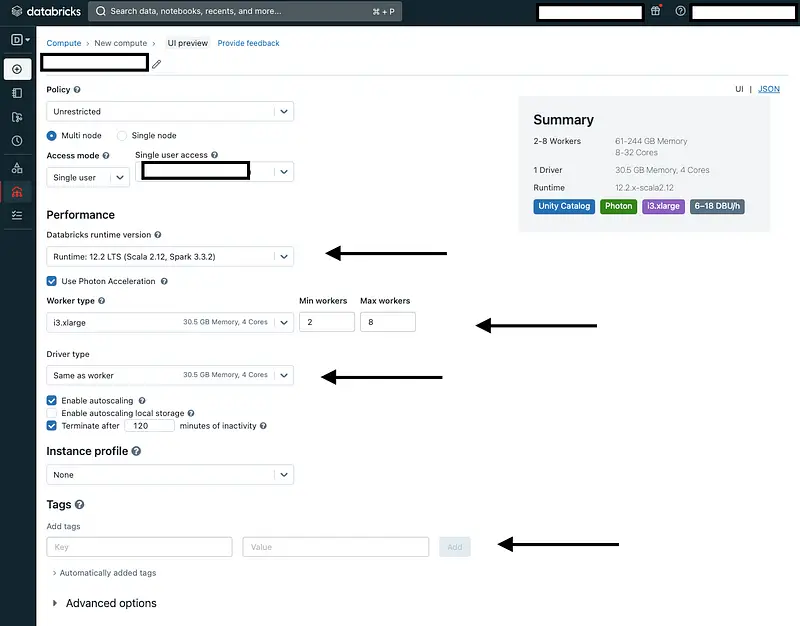
Step 1: Create a Databricks Cluster
In your Databricks instance, navigate to the cluster creation interface. Configure the cluster settings according to your requirements, such as the cluster type, size, and necessary libraries.
Additionally, make sure to set the following environment variables by clicking on “Advanced Options” and selecting “Spark”:
DATABRICKS_ACCESS_TOKEN=<access_token>
PYSPARK_PYTHON=/databricks/python3/bin/python3
ORACLE_JDBC_URL=<jdbc_oracle_conn_url>
DATABRICKS_JDBC_URL=<jdbc_databricks_conn_url>
DATABRICKS_HOSTNAME=<databricks_host>
ORACLE_USERNAME=<oracle_username>
STRIIM_USERNAME=<striim_username> # We will be using the ‘admin’ user
Later in our Databricks notebook, we will extract the values of these environment variables to obtain a Striim authentication token and create our first data pipeline.
Note: To adhere to best practices, it is recommended to use Databricks Secrets Management for storing these credentials securely. By leveraging Databricks Secrets Management, you can ensure that sensitive information, such as database credentials, is securely stored and accessed within your Databricks environment. This approach helps enhance security, compliance, and ease of management.
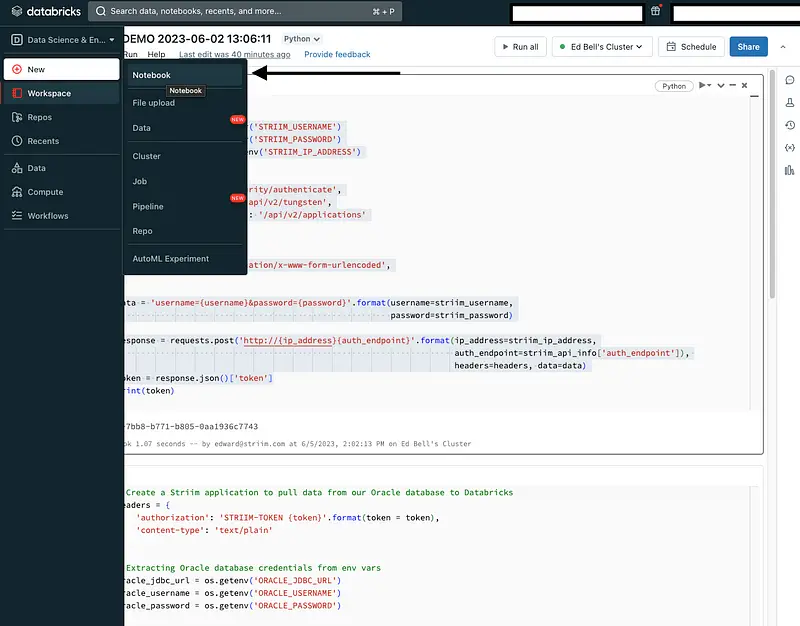
Create a Databricks Notebook: With the cluster up and running, you are ready to create a notebook. To do this, click on “New” in the Databricks workspace interface and select “Notebook.” Provide a name for your notebook and choose the desired programming language (Python) for your notebook.
By creating a notebook, you establish an environment where you can write and execute Python code to perform the necessary data extraction, and loading tasks using Striim.
Once you have created your Databricks Python Notebook, follow the steps below to begin bringing data from an on-prem Oracle database to Databricks Unity Catalog:
Generate an Authentication Token: To interact with the Striim instance programmatically, we will use the Striim REST API. The first step is to generate an authentication token that will allow your Python code to authenticate with the Striim instance:
The code snippet generates an authentication token by making an HTTP POST request to the Striim REST API. It retrieves the Striim username, password, and IP address from environment variables, sets the necessary headers, and sends the request to the authentication endpoint. The authentication token is then extracted from the response for further API interactions.
Step 2: Create a Striim Application
With the authentication token in hand, you will use Python and the Striim REST API to create a Striim application. This application will serve as the bridge between the Oracle database and Databricks.
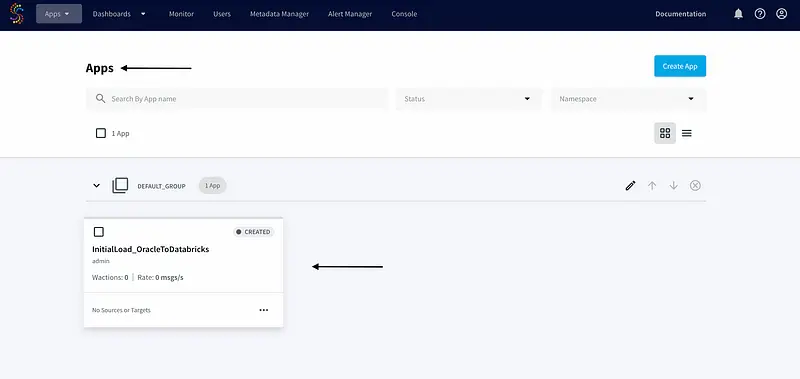
The provided code creates a Striim application named InitialLoad_OracleToDatabricks to migrate the DMS_SAMPLE.NBA_SPORTING_TICKET Oracle table.
The code sets the necessary headers for the HTTP request using the authentication token obtained earlier. It retrieves the Oracle database and Databricks credentials from the environment variables.
Using the retrieved credentials, the code defines the application data, specifying the source as the Oracle database using the Global.DatabaseReader adapter, and the target as Databricks using the Global.DeltaLakeWriter adapter. More information of the Delta Lake Writer adapter can be found here: https://www.striim.com/docs/en/databricks-writer.html
After formatting the application data with the credentials and configuration details, the code sends a POST request to the Striim tungsten endpoint to create the application.
To verify that it was created successfully, we will log in to the Striim console and go to the “Apps” page:
Step 3: Deploy and Start the Striim Application
Once the Striim application is created, we will deploy and start it using the following HTTP POST requests:
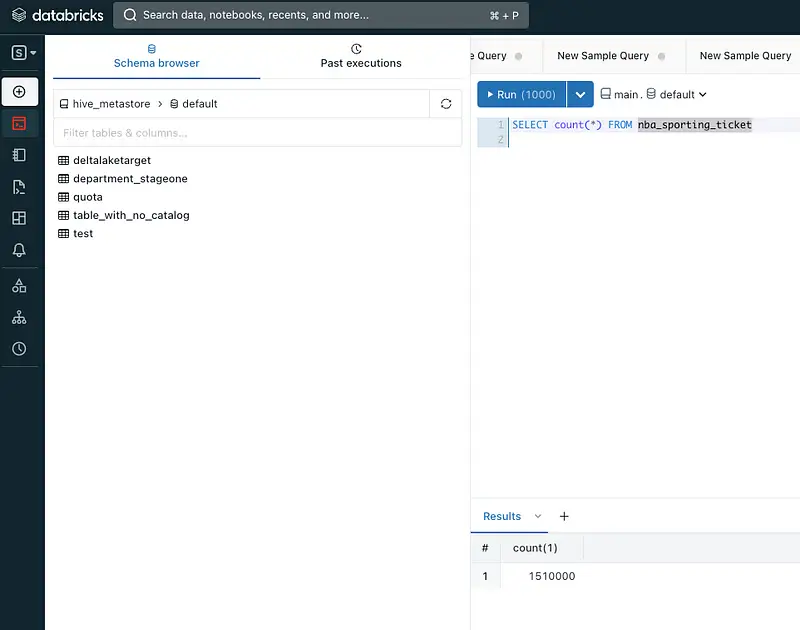
If the Total Output and Input values are equal, it indicates the successful migration of Oracle data to the Databricks catalog. To further validate the completeness of the migration, execute the following query in the Databricks editor to verify the total count of our NBA_SPORTING_TICKET table:
Conclusion
In conclusion, this comprehensive guide has walked you through the process of migrating data from an on-premise Oracle database to the Databricks Unity Catalog using Databricks Notebook and Python. By leveraging the power of Striim and its REST API, we were able to seamlessly establish connectivity between the Oracle database and Databricks. Through the step-by-step instructions and code snippets provided, you have learned how to generate an authentication token, create a Striim application, and deploy it to facilitate the data transfer process. With the integration of Databricks’ data processing capabilities and the centralized data catalog provided by the Unity Catalog, organizations can unlock data agility and enable streamlined data integration.
Wrapping Up: Start your Free Trial Today
In this recipe, we have walked you through steps for migrating on-premise Oracle Data to Databricks Unity Catalog with Python and Databricks Notebook. You can easily set up a streaming app by configuring your Databricks target. As always, feel free to reach out to our integration experts to schedule a demo, or try Striim developer for free here.
Tools you need
Striim
Striim’s unified data integration and streaming platform connects clouds, data and applications.
Databricks
Databricks combines data warehouse and Data lake into a Lakehouse architecture
Python
Python is a high-level, general-purpose programming language. Its design philosophy emphasizes code readability with the use of significant indentation via the off-side rule.
Striim may be pronounced stream, however the way Striim streams data is more than just classic streaming. ‘Striiming’ data ensures that the anytime, ever-changing story from data, is perpetually told. This story, is “Real-Time”.
HOW FAR HAVE WE COME?
In 1689 Newton, in his 3rd law, observed that every action has a reaction. Apple falling on head = Ouch! Genius. Yet over 400 years later time delays are still endured between business related actions, and a business’s reaction.
Jump forward to Henry Ford 1933: he reduced the time to make a car from 12 to 1.5 hours on the production line. “Batch” production was valuable then, however today it is the dated principle of ‘Batch processing of data’ that holds back many businesses from being served with essential real time business critical insights. And this is at the expense of business results, not to mention the increasing cost of trying to make batch processing run quicker. Nobody likes finding out what is going on, by the time that it is too late to do anything about it. Ouch.
WHY REAL-TIME MATTERS
Life happens in real time. Business customers and consumers expect organizations to respond, react and manage business in real-time. Whether this is across OmniChannel consumer environments, supply chain decision making, medical life-critical decisions, responding to changes in the weather, exchange rates, stock prices, whims, needs and wants, power outages etc… All these are examples of where the real-time processing of data can save and enrich lives and be the power-house for the AI automation and LLM that is transforming business operations.
LLM?
By LLM we of course mean Large Language Models, you know, where you get a human like response to a human like question from a machine. A world where the machines learn (ML) and get smarter at making predictions that help us. And this, along with Chat GPT and NLP (Natural Language Processing) all comes under the generic banner of Generative AI. The modern day evolution of good old Artificial Intelligence (AI).
MODERN GENERATIVE EXPECTATIONS
Many of us have experienced the real-time effect like when targeted offers find us immediately on our devices just seconds after we utter a product word. However, not many people are aware of the underlying advances in data-streaming that can power these instant and accurately targeted outcomes. Well, it is something to do with continuous, real-time, simultaneous homogenisation of petabytes of data, from numerous sources that are then modeled to drive automated reactions at the right (Real) time due to clever algorithms. Or it’s pretty much that. Actions happen, and a real-time appropriate reaction can be generated. Real-time intelligent streaming of data is allowing Generative AI to enact Newton’s 3rd law: Action, reaction.
ACTIONS, REACTIONS IN REAL-TIME
The old IT world is still rife with the “Batch” processing of data operations which entails multiple individual data source transfers to usually one cloud or ‘Data-Lake’ where different treatments are then applied, one after the other, to clean, dedupe, curate, govern, merge, wrangle and scrub this data as best as possible to make it passable for AI. Often in a mysterious inexplicable way where dubious data can create “Hallucinated” results or impose a bias. Too many people suffer from the delusion that ‘If a result appears on a pretty dashboard, it must be true’. Rather than the reality of ‘garbage in, garbage out’.
THE RISE OF SMART STREAMING
Streaming is not new, Striiming data is. Streaming is the continuous flow of data from a source to a target. It is fast and can ingest from databases via Change Data Capture (CDC). The difference with “Intelligent Streaming” or “Striiming” data is that multiple sources of data are extracted via CDC, intelligently integrated (ii) and Striimed simultaneously. And… in the same split-second the data is cleaned, cross-connected and correlated with data science models applied to the data in transit. It arrives in the flexible cloud environment Action-Ready. AI-Ready. That can help explain how when things happen in the real world, there can be a real-time response. Action-reaction. Genius!
It is the rocket fuel for agile cloud environments like: Snowflake & Snowpark, Google BigQuery & Vertex AI, Databricks, Microsoft Azure ML, Sagemaker in AWS and DataScience platforms like Dataiku
STRIIMING FOR LARGE LANGUAGE MODELS (LLM)
Large Language Models are like a professional business version of Chat GPT. LLM is not just a trawl and regurgitation of the internet. The difference is that LLM is anchored to vast sets of real organizational data that is defined, structured and can be openly challenged for provenance, legacy and validity. Striiming data can differentiate in these LLM contexts due to the ability to access huge, new, vast volumes of historic or new real-time generated data. And this reveals the new true stories that human brain power could never fathom, and batch processing struggles to cater for. This allows predictions and actions to be output in seconds after events occur.
NEW “ONLINE MACHINE LEARNING”
The word ‘Online’ here is not like ‘Being Online” it refers more to a fresh-feedback fashion of ML. Continuously Striiming data is a continuous real-time enabler of Online Machine Learning which is a superior form of model training that perpetually provides new fresh continuously Striimed data for the training models. As opposed to normal ML which trains from an initial, static data set.
Online ML facilitates significantly higher rates of prediction and accuracy from the machines and can begin to explain the breath-taking speed and accuracy for how answers to questions appear to us in perfectly articulated words and figures as the outputs of LLM.
DATA TELLS A STORY – NOW YOU CAN READ IT
Before Striiming, it was thought too complex to interrogate vast oceans of deeply tangled and submerged data. Not so now. The in-memory compute power of Striim and its Striiming approach can now add the relevance of this historic data and apply its story and meaning concatenated with other relevancy-selected split-second continuously-changing current-day data from live-happening events and actions. Hence Online ML served by Striiming data can yield better forecast and predicted results and reactions.
SO WHAT?
Well, saving lives for one. But let’s take a look at some other real life scenarios. Picture hundreds of cameras at an airport capturing gigabytes of intel on files. How many people, where, how many suitcases, size, drivers, pilots, engines, parts, fuel, brakes, fails, fix, stock, threats, tourists, delays – this Airport Ballet plays out every day. Seemingly unrelated scenarios, actions, reactions, and stories being captured and recorded within yottabytes of file data. The cameras capture patterns and meaning way beyond human comprehension yet the story, in context of other cross-referenced real-time data, is of huge importance to those that can extract the meaning from the data on a real-time basis. So what? Well, It means getting staff, passengers, luggage and parts to the right place at the right time and for at least one airline, it ensures 100s more planes take off, safely and on-time, saving an estimated $1m dollars each time a plane is now not delayed waiting for a part or a person.
HUMANS ARE THINKING MORE LIKE COMPUTERS
Humans are getting smarter, Data Science expertise grows at an impressive rate – but arguably what is fuelling the greatest impact on LLM and Gen AI is the speed and quality of data prepared ready-made for the new clever models and algorithms and ML recipes. Sure, AI teaches itself from legacy and new data oceans. But remember, the humans are the creators of these new data Striiming methods and the models that yield the results. Humans have learnt to think like computers (Actions). So no wonder the computers seem to be thinking more like humans (Reactions). CONCLUSIONS DRAWN
In my humble and bias opinion, this is now finally the best evidence, application and observation of Newton’s 3rd law of Motion within Generative AI. Actions and instant AI reactions for large enterprises. Solving the old problems in a new, real-time way: saving lives and money, making money and mitigating risk. The same problems we ever had. Only now, Striiming solutions by virtue of CDC and “ii” (Intelligent integration) is certainly a next generation powerful way to solve them.
Remember. Don’t stream data when you can Striim data.
Aye Aye… (ii). Roger over and out. Email me Roger.Nash@Striim.com.
Data warehouses emerged after analytics teams slowed down the production database one too many times. Analytical workloads aren’t meant for transactional databases, which are optimized for high latency reads, writes, and data integrity. Similarly, there’s a reason production applications are run on transactional databases.
Definition: Transactional (OLTP) data stores are databases that keep ACID (atomicity, consistency, isolation, and durability) properties in a transaction. Examples include PostgreSQL and MySQL, which scale to 20 thousand transactions per second.
Analytics teams aren’t quite so concerned with inserting 20 thousand rows in the span of a second — instead, they want to join, filter, and transform tables to get insights from data. Data warehouses optimize for precisely this using OLAP.
Definition: OLAP (online analytical processing) databases optimize for multidimensional analyses on large volumes of data. Examples included popular data warehouses like Snowflake, Redshift, and BigQuery.
Different teams, different needs, different databases. The question remains: if analytics teams use OLAP data warehouses, how do they get populated?
Image by authors
Use CDC to improve data SLAs
Let’s back up a step. A few examples of areas analytics teams own:
Customer segmentation data, sent to third party tools to optimize business functions like marketing and customer support
Fraud detection, to alert on suspicious behavior on the product
If these analyses are run on top of a data warehouse, the baseline amount of data required in the warehouse is just from the production database. Supplemental data from third party tools is very helpful but not usually where analytics teams start. The first approach usually considered when moving data from a database to a data warehouse is batch based.
Definition: Batch process data pipelines involve checking the source database on scheduled intervals and running the pipeline to update data in the target (usually a warehouse).
There are technical difficulties with this approach, most notably the logic required to know what has changed in the source and what needs to be updated in the target. Batch ELT tools have really taken this burden off of data professionals. No batch ELT tool, however, has solved for the biggest caveat of them all: data SLAs. Consider a data pipeline that runs every three hours. Any pipelines that run independently on top of that data, even if running every three hours as well, would in the worst case scenario be six hours out of date. For many analyses, the six hour delay doesn’t move the needle. This begs the question: when should teams care about data freshness and SLAs?
Definition: An SLA (service level agreement) is a contract between a vendor and its customers as to what they can expect from the vendor when it comes to application availability and downtime. A data SLA is an agreement between the analytics team and its stakeholders around how fresh the data is expected to be.
When fresh data makes a meaningful impact on the business, that’s when teams should care. Going back to the examples of analytics team projects, if a fraudulent event happens (like hundreds of fraudulent orders) time is of the essence. A data SLA of 3 hours could be what causes the business to lose thousands of dollars instead of less than $100.
When freshness can’t wait — cue CDC, or change data capture. CDC tools read change logs on databases and mimic those changes in the target data. This happens fairly immediately, with easy reruns if a data pipeline encounters errors.
With live change logs, CDC tools keep two data stores (a production database and analytics warehouse) identical in near-realtime. The analytics team is then running analyses on data fresh as a daisy.
Getting started with CDC
Image by authors
The most common production transactional databases are PostgreSQL and MySQL, which have both been around for decades. Being targets more often than sources, warehouses don’t usually support CDC in the same way (although even this is changing).
To set up a source database for CDC, you need to:
Make sure WAL (write-ahead) logs are enabled and the WAL timeout is high enough. This occurs in database settings directly.
Make sure archive logs are stored on the source based on the CDC tool’s current specifications.
Create a replication slot, where a CDC tool can subscribe to change logs.
Monitor source and target database infrastructure to ensure neither is overloaded.
On the source database, if a row of data changes to A, then to value B, then to A, this behavior is replayed on the target warehouse. The replay ensures data integrity and consistency.
While open source CDC solutions like Debezium exist, hosted CDC solutions allow users to worry less about infrastructure and more about the business specifications of the pipeline, unique to their business.
As a consultant in analytics & go-to-market for dev-tools, I was previously leading the data engineering function at Perpay and built out a change data capture stack. From my perspective, change data capture isn’t just about real-time analytics. It’s simply the most reliable and scalable way to copy data from an operational database to analytical systems especially when downstream latency requirements are at play.