Data Warehouse vs. Data Lake vs. Data Lakehouse: An Overview of Three Cloud Data Storage Patterns

data warehouse vs data lake vs data lakehouse

As more companies rely on data to drive critical business decisions, improve product offerings, and serve customers better, the amount of data companies capture is higher than ever. This study by Domo estimates 2.5 quintillion bytes of data were generated every day in 2017, with this figure set to increase to 463 exabytes in 2025. But what good is all that data if companies can’t utilize it quickly? The topic of the most optimal data storage for data analytics needs has been long debated.

Data warehouses and data lakes have been the most widely used storage architectures for big data. But what about using a data lakehouse vs. a data warehouse? A data lakehouse is a new data storage architecture that combines the flexibility of data lakes and the data management of data warehouses.

Depending on your company’s needs, understanding the different big-data storage techniques is instrumental to developing a robust data storage pipeline for business intelligence (BI), data analytics, and machine learning (ML) workloads.

What Is a Data Warehouse?

A data warehouse is a unified data repository for storing large amounts of information from multiple sources within an organization. A data warehouse represents a single source of “data truth” in an organization and serves as a core reporting and business analytics component.

Typically, data warehouses store historical data by combining relational data sets from multiple sources, including application, business, and transactional data. Data warehouses extract data from multiple sources and transform and clean the data before loading it into the warehousing system to serve as a single source of data truth. Organizations invest in data warehouses because of their ability to quickly deliver business insights from across the organization.

Data warehouses enable business analysts, data engineers, and decision-makers to access data via BI tools, SQL clients, and other less advanced (i.e., non-data science) analytics applications.

data warehouse
Data warehousing. Image source: https://corporatefinanceinstitute.com/

The benefits of a data warehouse

Data warehouses, when implemented, offer tremendous advantages to an organization. Some of the benefits include:

  • Improving data standardization, quality, and consistency: Organizations generate data from various sources, including sales, users, and transactional data. Data warehousing consolidates corporate data into a consistent, standardized format that can serve as a single source of data truth, giving the organization the confidence to rely on the data for business needs.
  • Delivering enhanced business intelligence: Data warehousing bridges the gap between voluminous raw data, often collected automatically as a matter of practice, and the curated data that offers insights. They serve as the data storage backbone for organizations, allowing them to answer complex questions about their data and use the answers to make informed business decisions.
  • Increasing the power and speed of data analytics and business intelligence workloads: Data warehouses speed up the time required to prepare and analyze data. Since the data warehouse’s data is consistent and accurate, they can effortlessly connect to data analytics and business intelligence tools. Data warehouses also cut down the time required to gather data and give teams the power to leverage data for reports, dashboards, and other analytics needs.
  • Improving the overall decision-making process: Data warehousing improves decision-making by providing a single repository of current and historical data. Decision-makers can evaluate risks, understand customers’ needs, and improve products and services by transforming data in data warehouses for accurate insights.

For example, Walgreens migrated its inventory management data into Azure Synapse to enable supply chain analysts to query data and create visualizations using tools such as Microsoft Power BI. The move to a cloud data warehouse also decreased time-to-insights: previous-day reports are now available at the start of the business day, instead of hours later.

The disadvantages of a data warehouse

Data warehouses empower businesses with highly performant and scalable analytics. However, they present specific challenges, some of which include:

  • Lack of data flexibility: Although data warehouses perform well with structured data, they can struggle with semi-structured and unstructured data formats such as log analytics, streaming, and social media data. This makes it hard to recommend data warehouses for machine learning and artificial intelligence use cases.
  • High implementation and maintenance costs: Data warehouses can be expensive to implement and maintain. This article by Cooladata estimates the annual cost of an in-house data warehouse with one terabyte of storage and 100,000 queries per month to be $468,000. Additionally, the data warehouse is typically not static; it becomes outdated and requires regular maintenance, which can be costly.

What Is a Data Lake?

A data lake is a centralized, highly flexible storage repository that stores large amounts of structured and unstructured data in its raw, original, and unformatted form. In contrast to data warehouses, which store already “cleaned” relational data, a data lake stores data using a flat architecture and object storage in its raw form. Data lakes are flexible, durable, and cost-effective and enable organizations to gain advanced insight from unstructured data, unlike data warehouses that struggle with data in this format.

In data lakes, the schema or data is not defined when data is captured; instead, data is extracted, loaded, and transformed (ELT) for analysis purposes. Data lakes allow for machine learning and predictive analytics using tools for various data types from IoT devices, social media, and streaming data.

data lake
The data lake pattern. Image source: datakitchen.io

The benefits of a data lake

Because data lakes can store both structured and unstructured data, they offer several benefits, such as:

  • Data consolidation: Data lakes can store both structured and unstructured data to eliminate the need to store both data formats in different environments. They provide a central repository to store all types of organizational data.
  • Data flexibility: A significant benefit of data lakes is their flexibility; you can store data in any format or medium without the need to have a predefined schema. Allowing the data to remain in its native format allows for more data for analysis and caters to future data use cases.
  • Cost savings: Data lakes are less expensive than traditional data warehouses; they are designed to be stored on low-cost commodity hardware, like object storage, usually optimized for a lower cost per GB stored. For example, Amazon S3 standard object storage offers an unbelievable low price of $0.023 per GB for the first 50 TB/month.
  • Support for a wide variety of data science and machine learning use cases: Data in data lakes is stored in an open, raw format, making it easier to apply various machine and deep learning algorithms to process the data to produce meaningful insights.

The disadvantages of a data lake

Although data lakes offer quite a few benefits, they also present challenges:

  • Poor performance for business intelligence and data analytics use cases: If not properly managed, data lakes can become disorganized, making it hard to connect them with business intelligence and analytics tools. Also, a lack of consistent data structure and ACID (atomicity, consistency, isolation, and durability) transactional support can result in sub-optimal query performance when required for reporting and analytics use cases.
  • Lack of data reliability and security: Data lakes’ lack of data consistency makes it difficult to enforce data reliability and security. Because data lakes can accommodate all data formats, it might be challenging to implement proper data security and governance policies to cater to sensitive data types.

What Is a Data Lakehouse? A Combined Approach

A data lakehouse is a new, big-data storage architecture that combines the best features of both data warehouses and data lakes. A data lakehouse enables a single repository for all your data (structured, semi-structured, and unstructured) while enabling best-in-class machine learning, business intelligence, and streaming capabilities.

Data lakehouses usually start as data lakes containing all data types; the data is then converted to Delta Lake format (an open-source storage layer that brings reliability to data lakes). Delta lakes enable ACID transactional processes from traditional data warehouses on data lakes.

The benefits of a data lakehouse

Data lakehouse architecture combines a data warehouse’s data structure and management features with a data lake’s low-cost storage and flexibility. The benefits of this implementation are enormous and include:

  • Reduced data redundancy: Data lakehouses reduce data duplication by providing a single all-purpose data storage platform to cater to all business data demands. Because of the advantages of the data warehouse and the data lake, most companies opt for a hybrid solution. However, this approach could lead to data duplication, which can be costly.
  • Cost-effectiveness: Data lakehouses implement the cost-effective storage features of data lakes by utilizing low-cost object storage options. Additionally, data lakehouses eliminate the costs and time of maintaining multiple data storage systems by providing a single solution.
  • Support for a wider variety of workloads: Data lakehouses provide direct access to some of the most widely used business intelligence tools (Tableau, PowerBI) to enable advanced analytics. Additionally, data lakehouses use open-data formats (such as Parquet) with APIs and machine learning libraries, including Python/R, making it straightforward for data scientists and machine learning engineers to utilize the data.
  • Ease of data versioning, governance, and security: Data lakehouse architecture enforces schema and data integrity making it easier to implement robust data security and governance mechanisms.

The disadvantages of a data lakehouse

The main disadvantage of a data lakehouse is it’s still a relatively new and immature technology. As such, it’s unclear whether it will live up to its promises. It may be years before data lakehouses can compete with mature big-data storage solutions. But with the current speed of modern innovation, it’s difficult to predict whether a new data storage solution could eventually usurp it.

Data Warehouse vs. Data Lake vs. Data Lakehouse: A Quick Overview

The data warehouse is the oldest big-data storage technology with a long history in business intelligence, reporting, and analytics applications. However, data warehouses are expensive and struggle with unstructured data such as streaming and data with variety.

Data lakes emerged to handle raw data in various formats on cheap storage for machine learning and data science workloads. Though data lakes work well with unstructured data, they lack data warehouses’ ACID transactional features, making it difficult to ensure data consistency and reliability.

The data lakehouse is the newest data storage architecture that combines the cost-efficiency and flexibility of data lakes with data warehouses’ reliability and consistency.

This table summarizes the differences between the data warehouse vs. data lake vs. data lakehouse.

Data Warehouse Data Lake Data Lakehouse
Storage Data Type Works well with structured data Works well with semi-structured and unstructured data Can handle structured, semi-structured, and unstructured data
Purpose Optimal for data analytics and business intelligence (BI) use-cases Suitable for machine learning (ML) and artificial intelligence (AI) workloads Suitable for both data analytics and machine learning workloads
Cost Storage is costly and time-consuming Storage is cost-effective, fast, and flexible Storage is cost-effective, fast, and flexible
ACID Compliance Records data in an ACID-compliant manner to ensure the highest levels of integrity Non-ACID compliance: updates and deletes are complex operations ACID-compliant to ensure consistency as multiple parties concurrently read or write data

The “data lakehouse vs. data warehouse vs. data lake” is still an ongoing conversation. The choice of which big-data storage architecture to choose will ultimately depend on the type of data you’re dealing with, the data source, and how the stakeholders will use the data. Although a data lakehouse combines all the benefits of data warehouses and data lakes, we don’t advise you to throw your existing data storage technology out the window for a data lakehouse.

Data lakehouses can be complex to build from scratch. And you’ll most likely use a platform built to support open data lakehouse architecture. So, ensure you research each platform’s different capabilities and implementations before making a purchase.

A data warehouse is a good choice for companies seeking a mature, structured data solution that focuses on business intelligence and data analytics use cases. However, data lakes are suitable for organizations seeking a flexible, low-cost, big-data solution to drive machine learning and data science workloads on unstructured data.

Suppose the data warehouse and data lake approaches aren’t meeting your company’s data demands, or you’re looking for ways to implement both advanced analytics and machine learning workloads on your data. In that case, a data lakehouse is a reasonable choice.

Whichever solution you choose, Striim can help. Striim makes it simple to continuously and non-intrusively ingest all your enterprise data from various sources in real-time for data warehousing. Striim can also be used to preprocess your data in real-time as it is being delivered into the data lake stores to speed up downstream activities.

Schedule a demo and we’ll give you a personalized walkthrough or try Striim at production-scale for free! Small data volumes or hoping to get hands on quickly? At Striim we also offer a free developer version.

Real-Time Point-of-Sale (POS) Analytics with Striim and BigQuery

Tutorial

Real-Time Point-of-Sale (POS) Analytics with Striim and BigQuery

How to use Striim to generate transaction reports and send alerts when transaction counts are higher or lower than average

Benefits

Detect Anomalies in Real Time
Generate reports on transaction activity and get alerts when transaction counts deviate from the meanManage Inventory Levels
Monitor your stock levels in real time and get notified when stock is lowGet a Live View of Your Sales
Use POS Analytics to get real-time insights into customer purchases
On this page

Analyze point-of-sale retail data in real-time with Striim, BigQuery, and the BI tool of your choice.

  1. Streaming Change Data Capture – Striim
  2. Streaming Data Pipelines in SQL – Striim
  3. Streaming Data Visualiztion – Striim
  4. Cloud Data Warehouse with incremental views – BigQuery
  5. Reporting & BI – Metabase

Overview

Before following the instructions below, sign up for Striim Developer to run through this tutorial (no credit card required).

In the web UI, from the top menu, select Apps > View All Apps.

If you don’t see PosApp anywhere on the page (you may need to expand the Samples group) , download the TQL from Striim’s GitHub page. select Create App > Import TQL file, navigate to Striim/Samples/PosApp, double-click PosApp.tql, enter Samples as the namespace, and click Import.

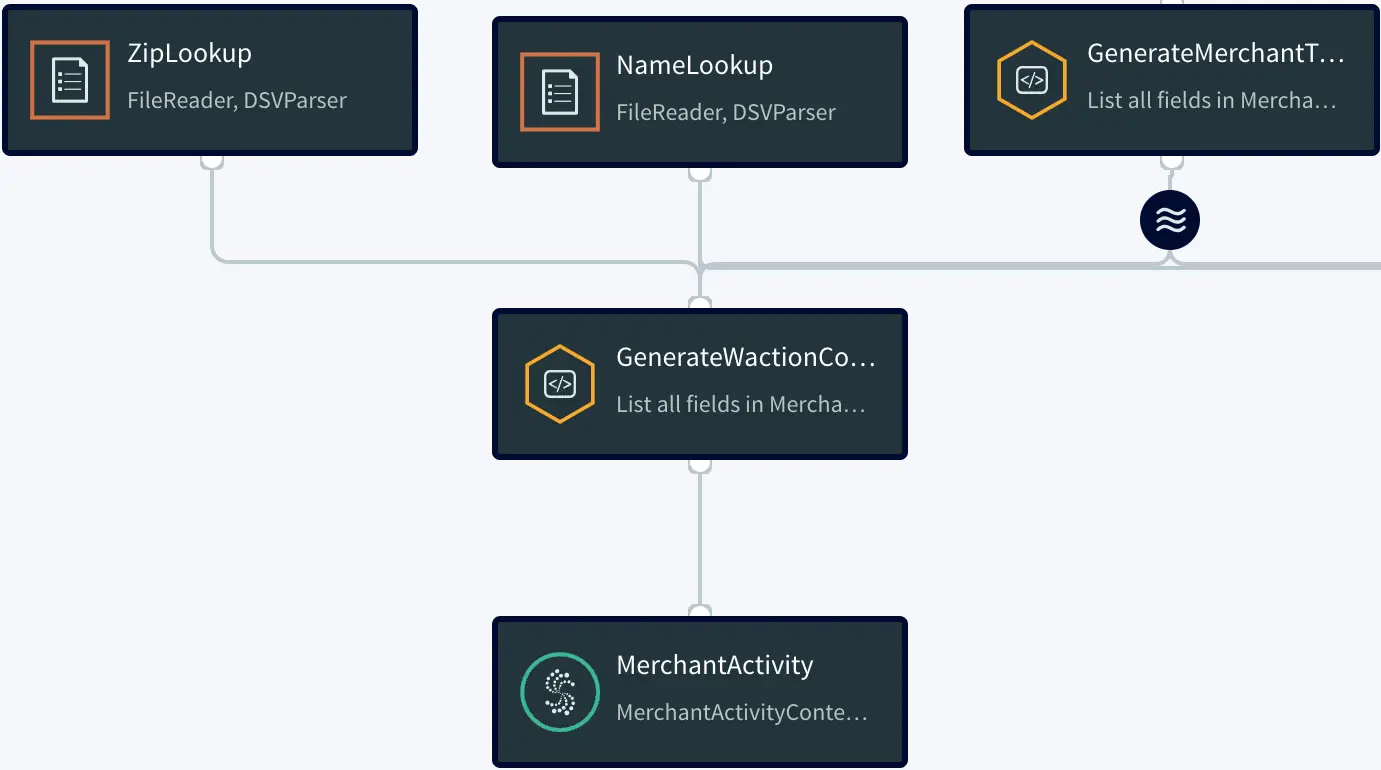
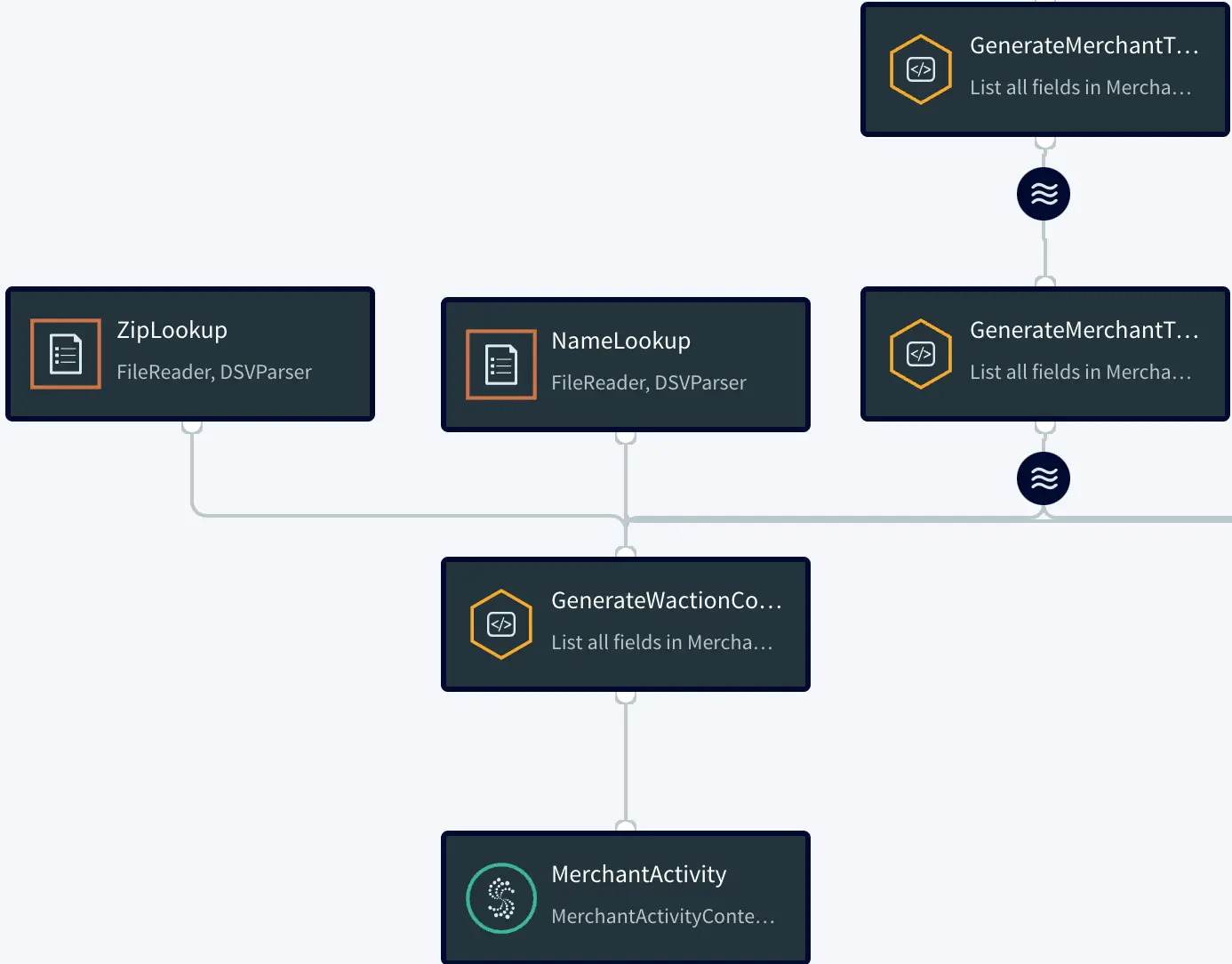
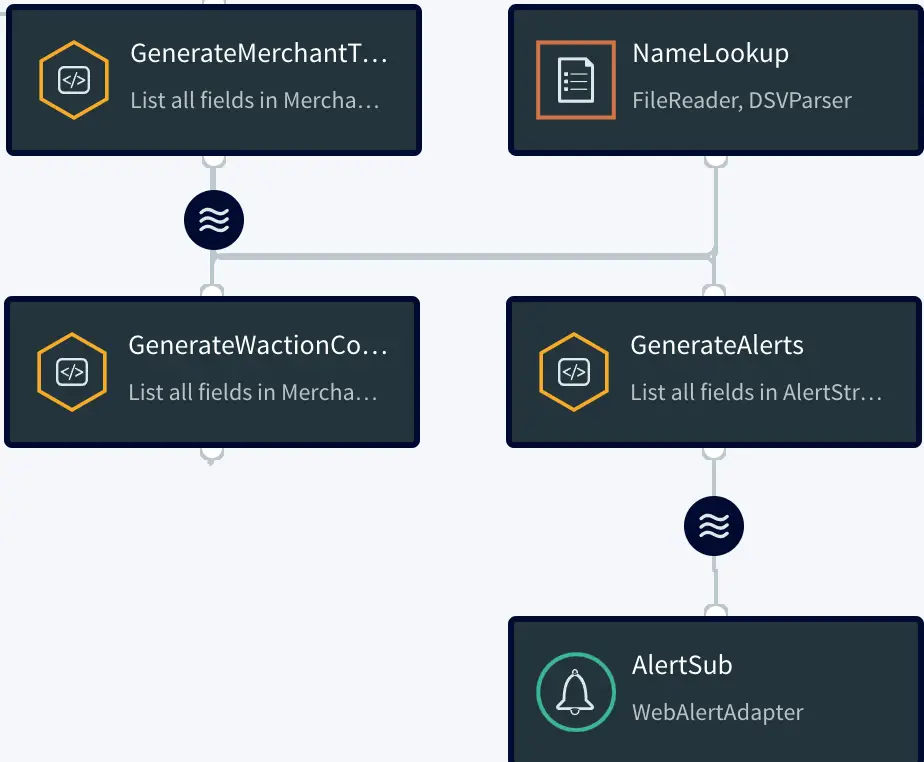
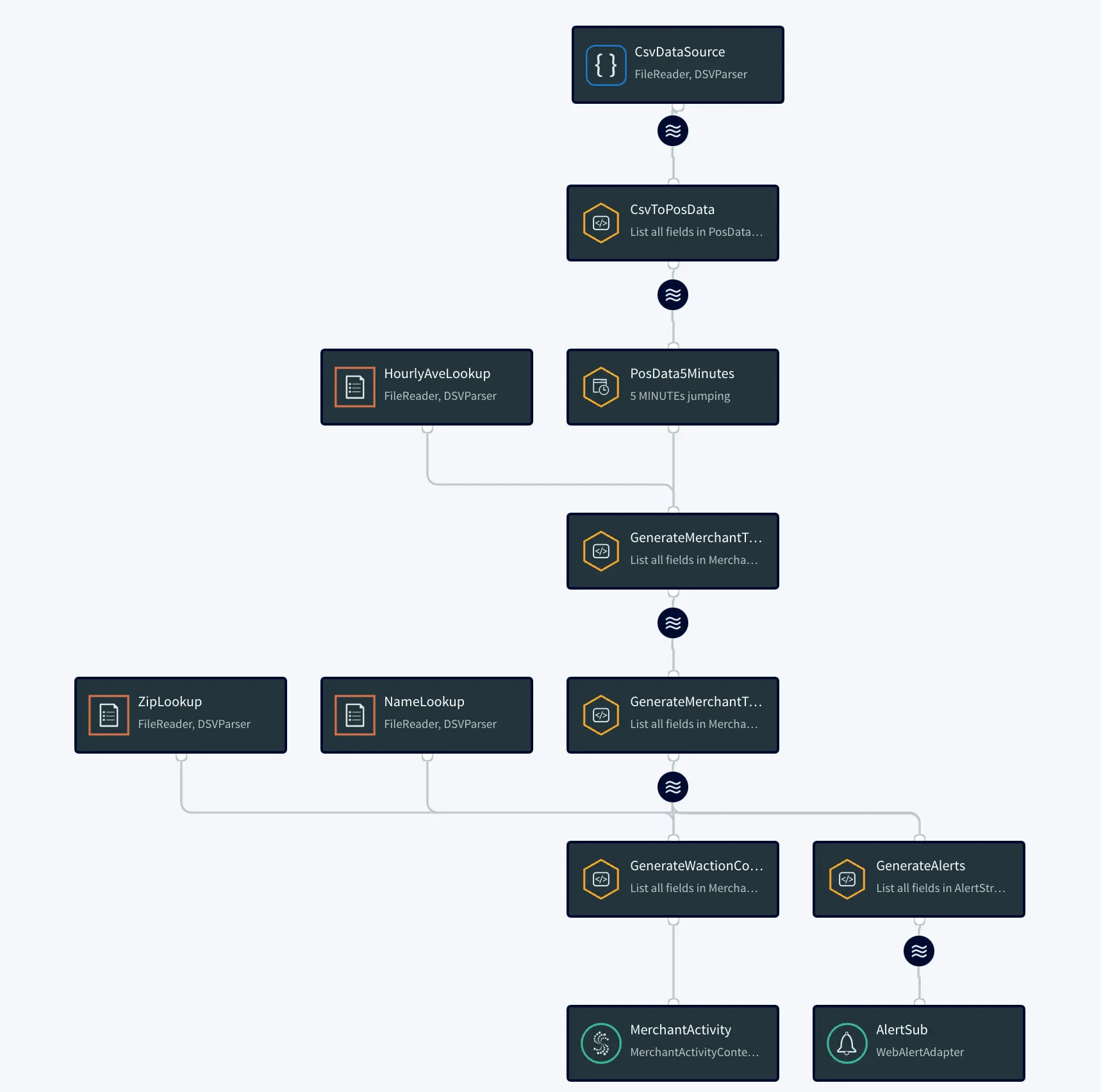
At the bottom right corner of the PosApp tile, select … > Manage Flow. The Flow Designer displays a graphical representation of the application flow:

PosApp Graphical Representation

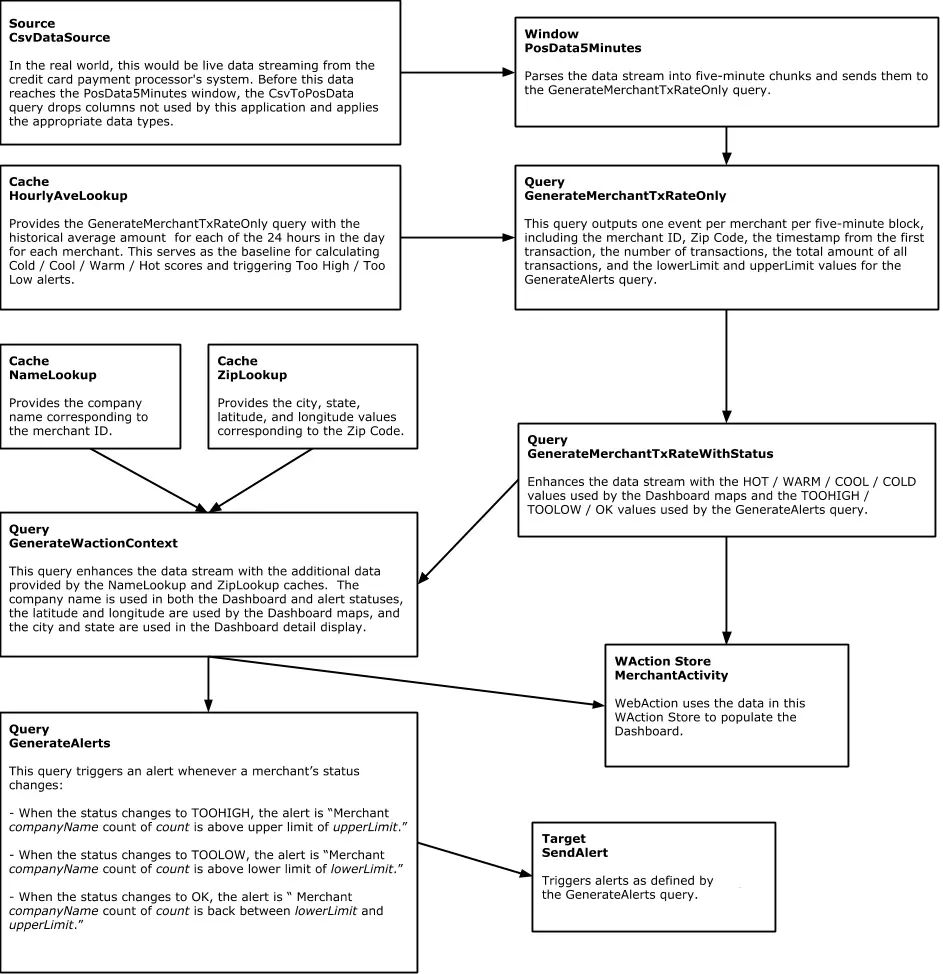
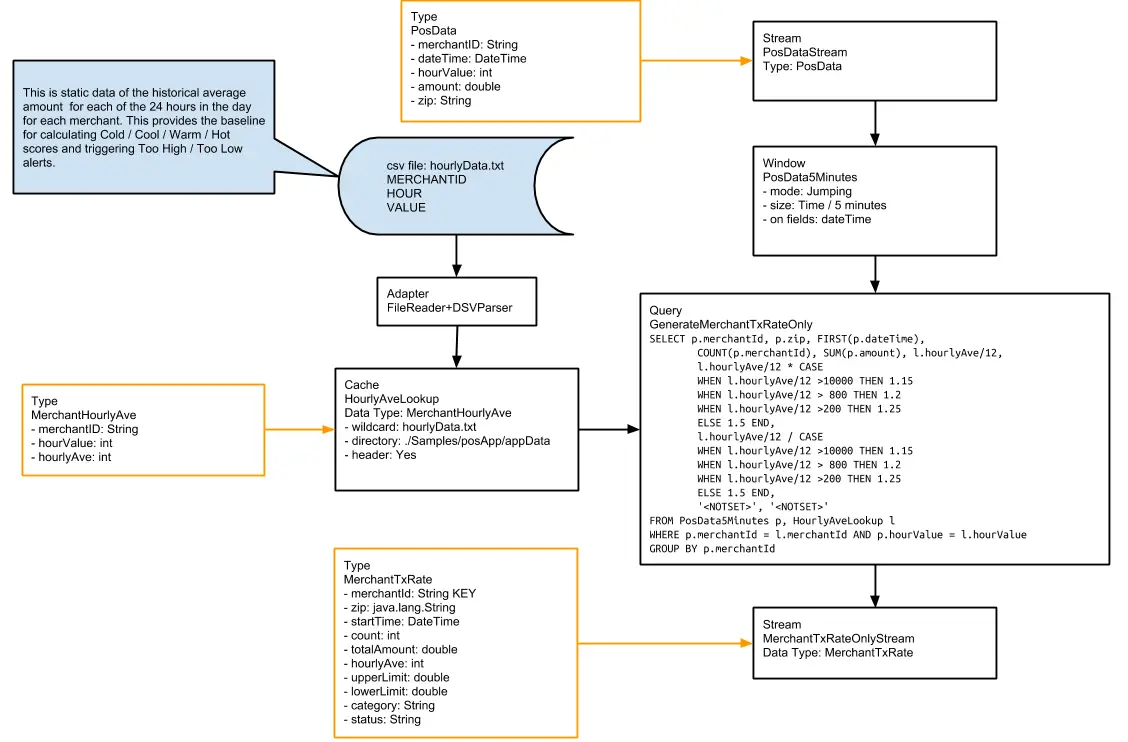
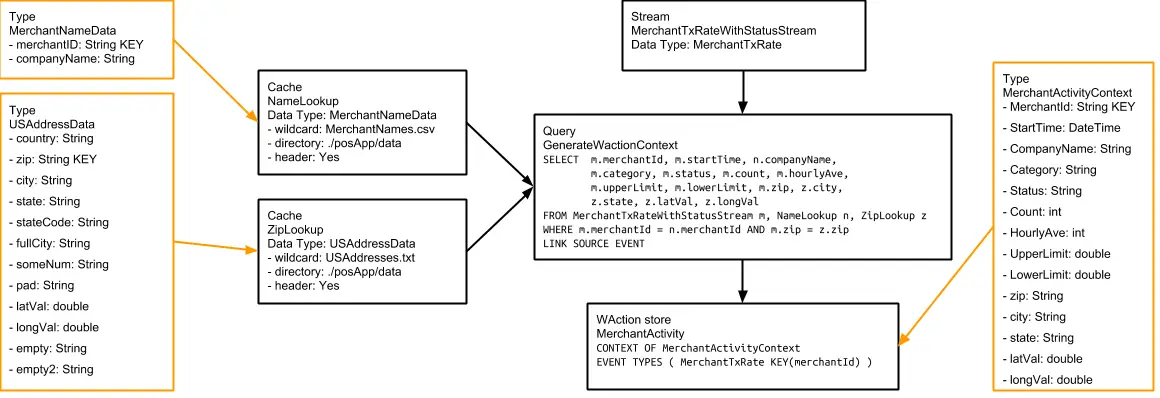
The following is simplified diagram of that flow:

Diagram of PosApp

Step 1: Acquire Data

Striim has hundreds of connectors including change data capture from databases such as Oracle, SQLServer, MySQL, and PostgreSQL.

In this example, we’ll use a simple file source. We call this a ‘Source’ component in Striim.

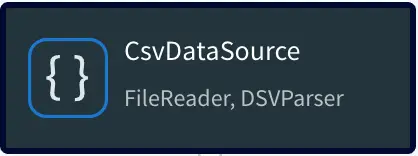
CsvDataSouce

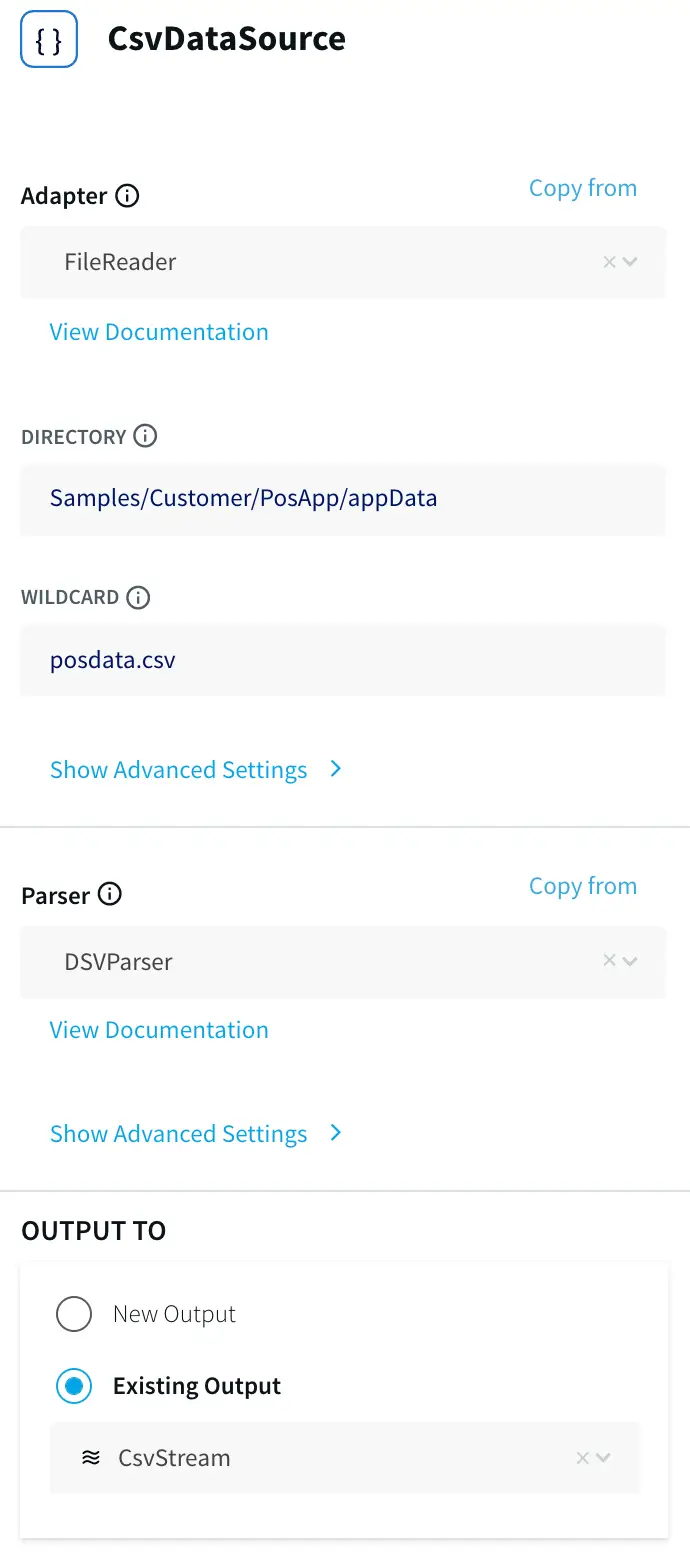
Double-clicking CsvDataSource opens it for editing:

CsvDataSource Editor

This is the primary data source for this application. In a real-world application, it would be real-time data. Here, the data comes from a comma-delimited file, posdata.csv. Here are the first two lines of that file:

BUSINESS NAME,MERCHANT ID,PRIMARY ACCOUNT NUMBER,POS DATA CODE,DATETIME,EXP DATE,CURRENCY CODE,AUTH AMOUNT,TERMINAL ID,ZIP,CITY,COMPANY

1,D6RJPwyuLXoLqQRQcOcouJ26KGxJSf6hgbu,6705362103919221351,0,20130312173210,0916,USD,2.20,5150279519809946,41363,Quicksand


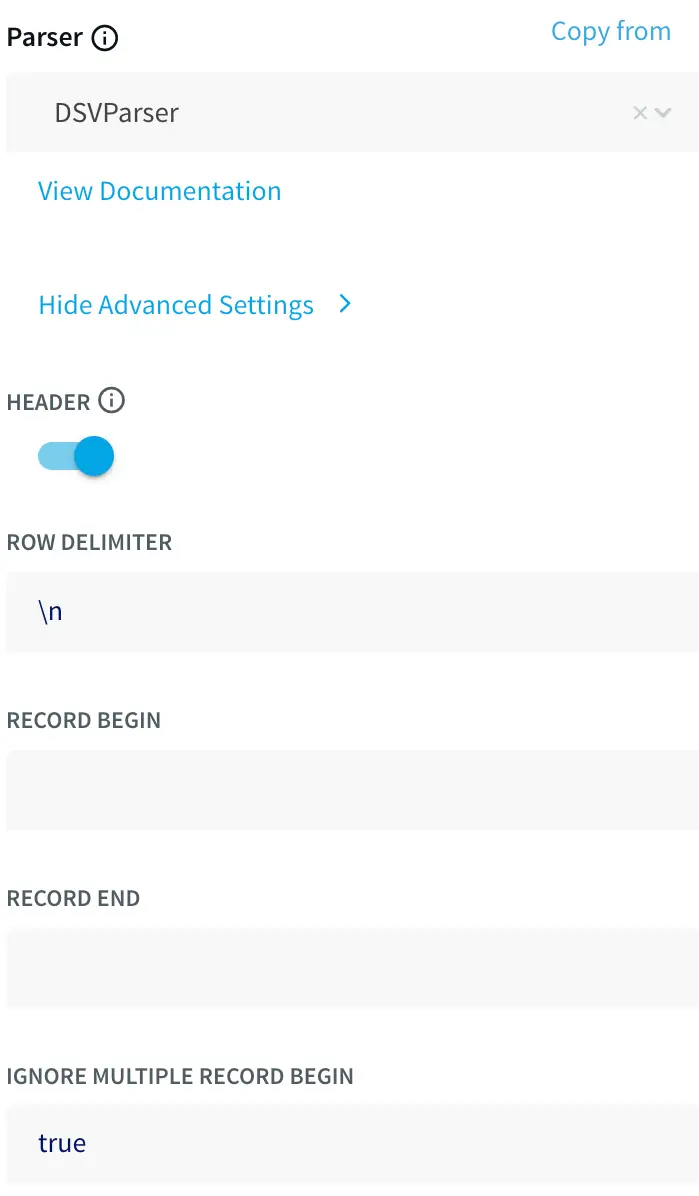
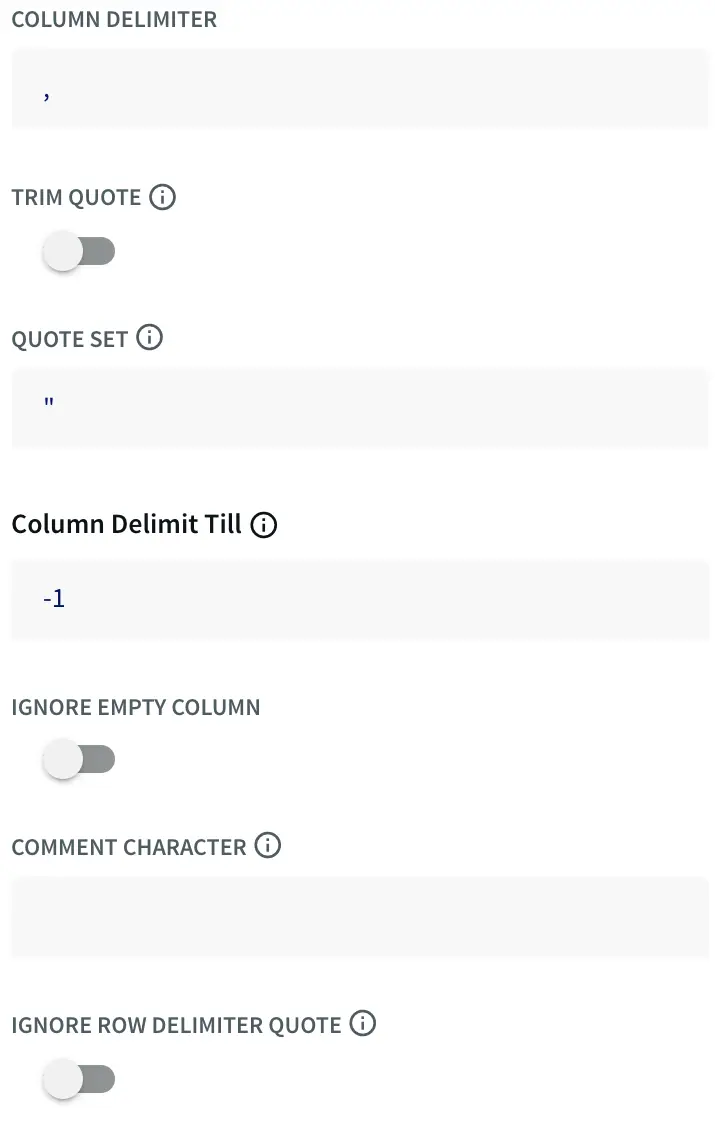
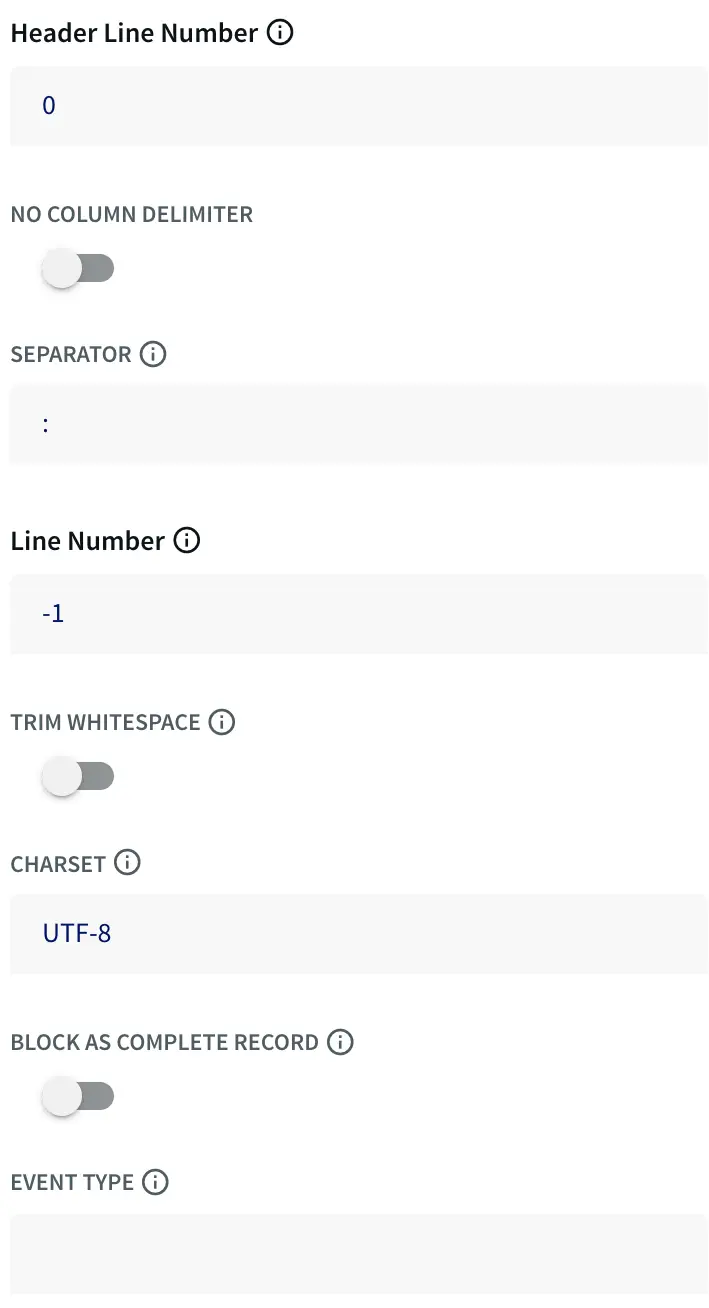
In Striim terms, each line of the file is an event, which in many ways is comparable to a row in a SQL database table, and and can be used in similar ways. Click Show Advanced Settings to see the DSVParser properties:

DSVParser1

DSVParser2

DSVParser3

The True setting for the header property indicates that the first line contains field labels that are not to be treated as data.

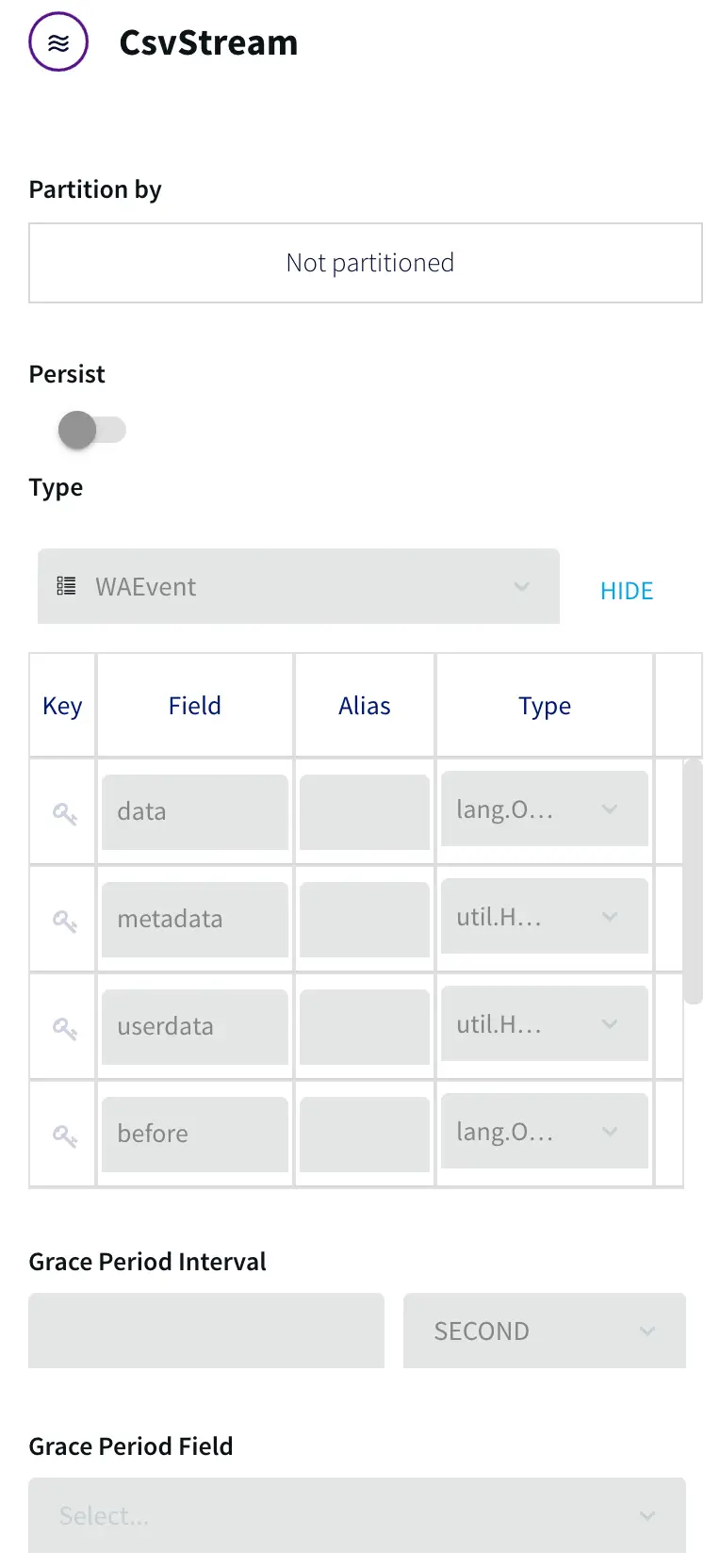
The “Output to” stream CsvStream automatically inherits the WAEvent type associated with the CSVReader:

CsvStream output

The only field used by this application is “data”, an array containing the delimited fields.

Step 2: Filter The Data Stream

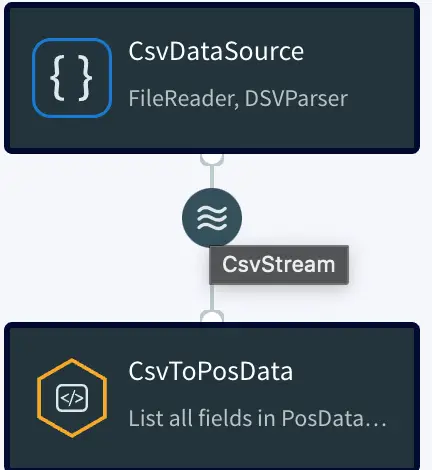
Filter Data Stream

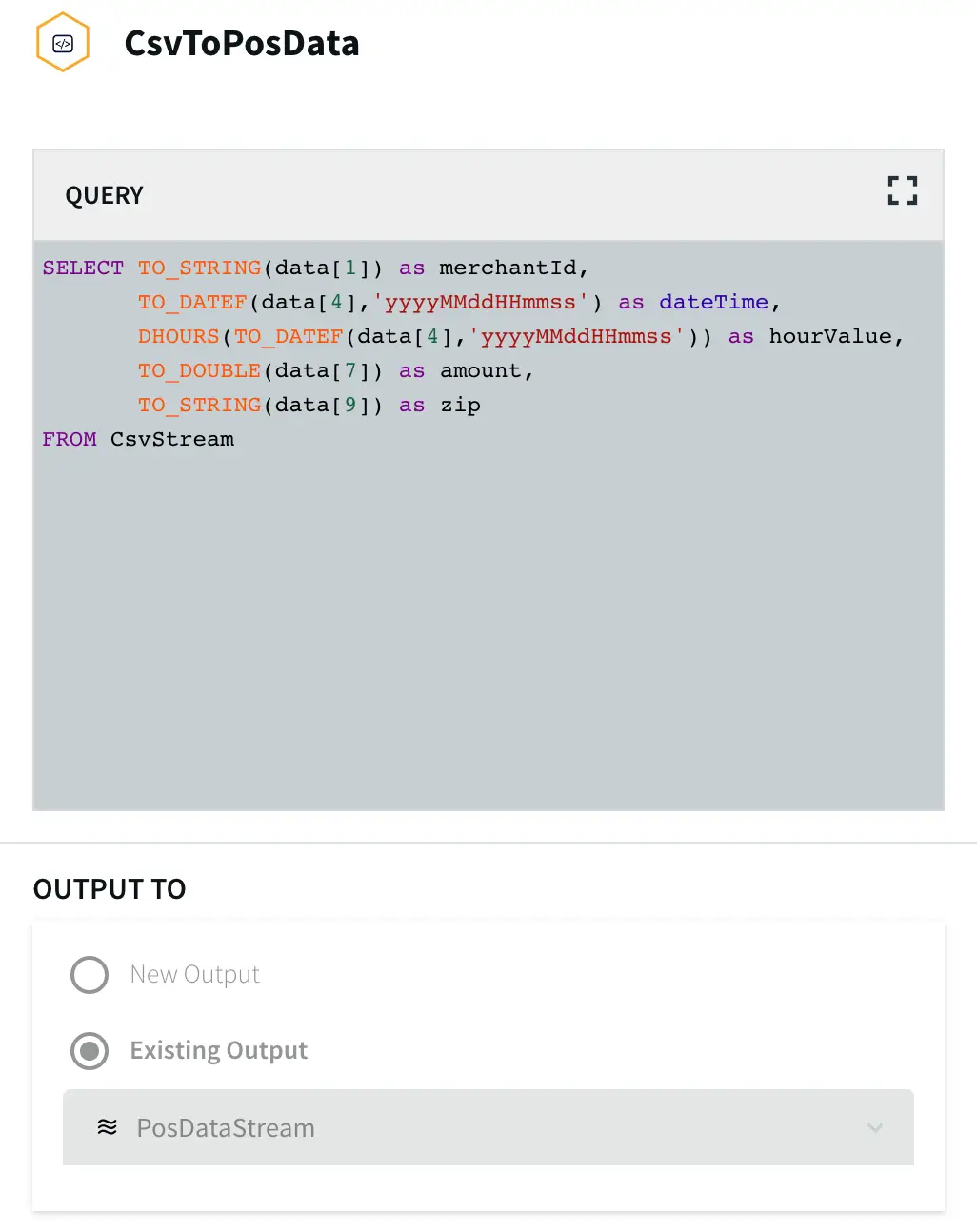
CsvDataSource outputs the data to CsvStream, which is the input for the query CsvToPosData:

Input for the query CsvToPosData

This CQ converts the comma-delimited fields from the source into typed fields in a stream that can be consumed by other Striim components. Here, “data” refers to the array mentioned above, and the number in brackets specifies a field from the array, counting from zero. Thus data[1] is MERCHANT ID,
data[4] is DATETIME, data[7] is AUTH AMOUNT, and data[9] is ZIP.

TO_STRING, TO_DATEF, and TO_DOUBLE functions cast the fields as the types to be used in the Output to stream. The DATETIME field from the source is converted to both a dateTime value, used as the event
timestamp by the application, and (via the DHOURS function) an integer hourValue, which is used to look up historical hourly averages from the HourlyAveLookup cache, discussed below.

The other six fields are discarded. Thus the first line of data from posdata.csv has at this point been code-reduced to five values:

  1. D6RJPwyuLXoLqQRQcOcouJ26KGxJSf6hgbu (merchantId)
  2. 20130312173210 (DateTime)
  3. 17 (hourValue)
  4. 2.20 (amount)
  5. 41363 (zip)

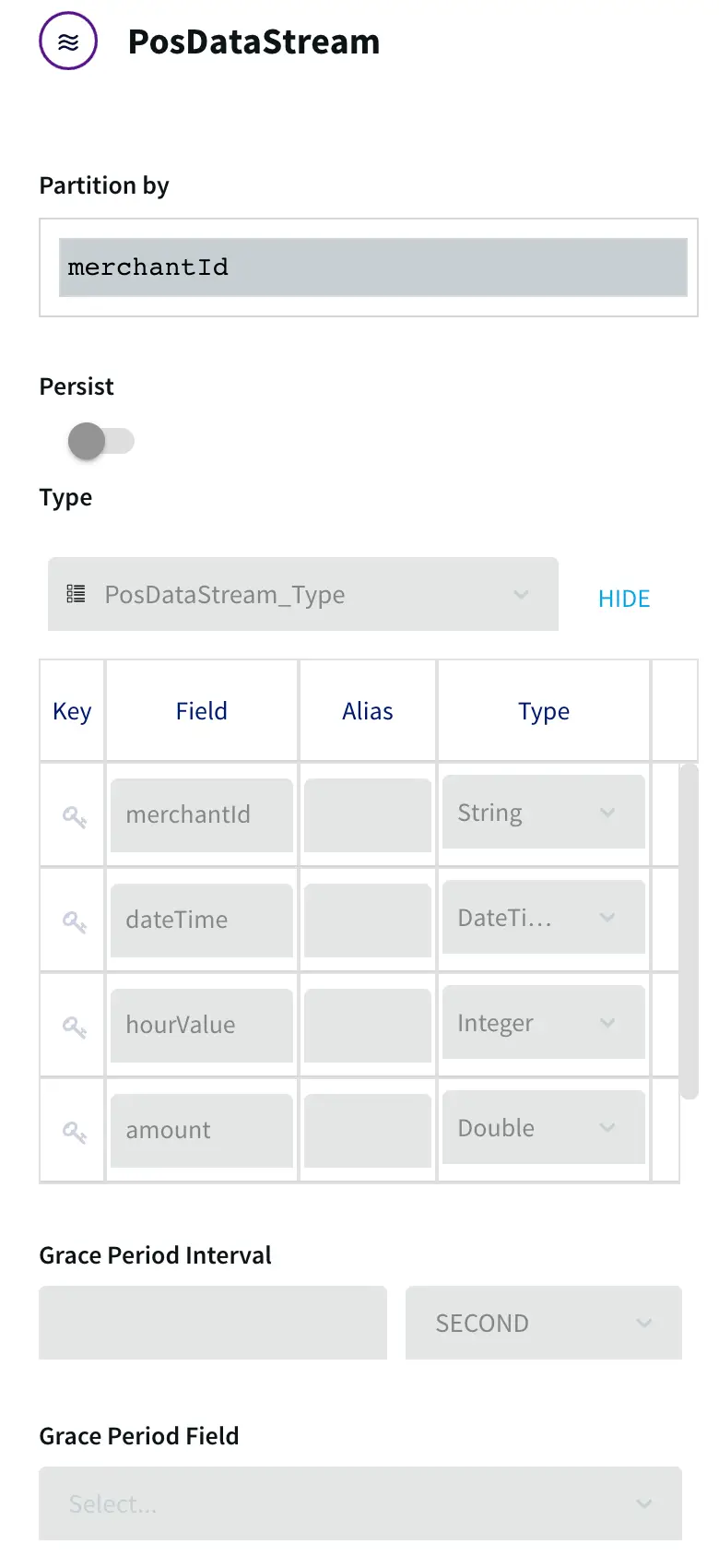
The CsvToPosDemo query outputs the processed data to PosDataStream:

CsvToPosDemo query ouput

PosDataStream assigns the five remaining fields the names and data types in the order listed above:

  1. PRIMARY ACCOUNT NUMBER to merchantID
  2. DATETIME to dateTime
  3. the DATETIME substring to hourValue
  4. AUTH AMOUNT to amount
  5. ZIP to zip

Step 3: Define the Data Set

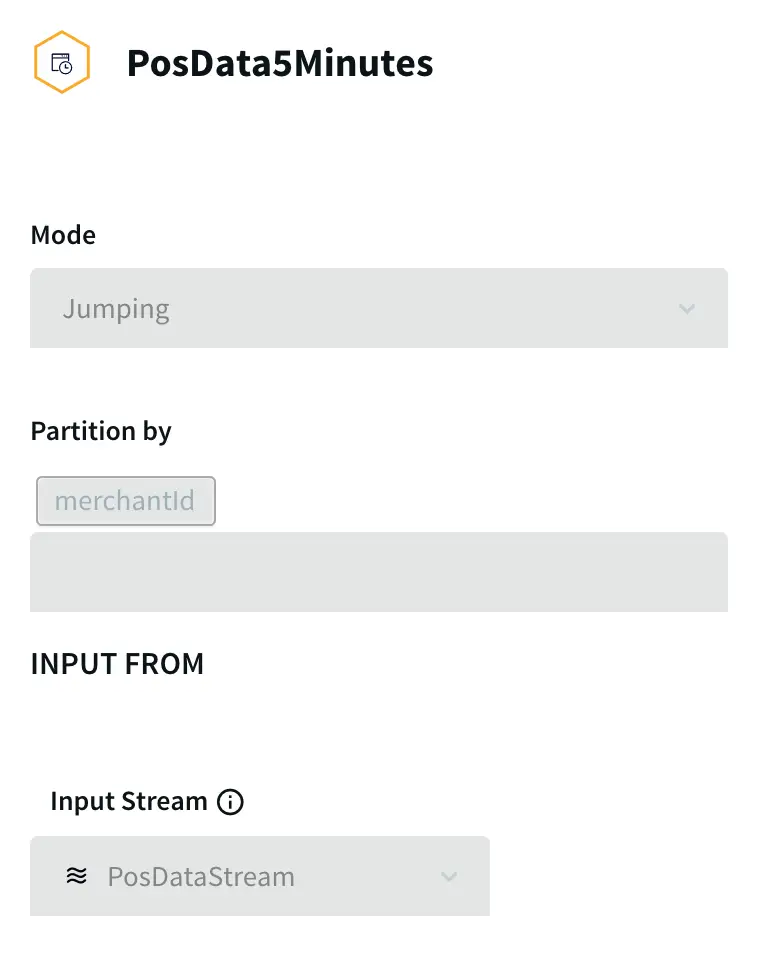
PosDataStream passes the data to the window PosData5Minutes:


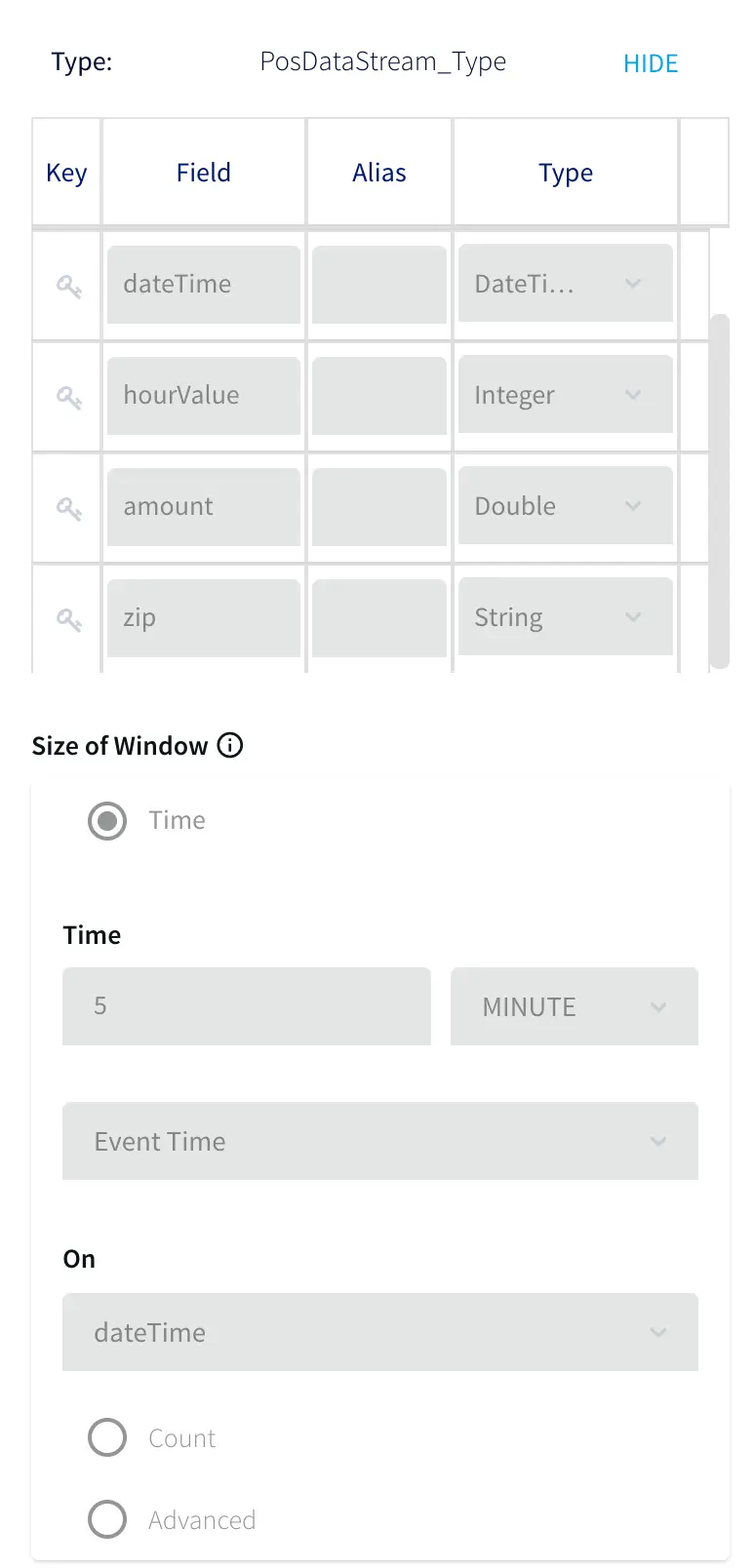
A window is in many ways comparable to a table in a SQL database, just as the events it contains are comparable to rows in a table. The Mode and Size settings determine how many events the window will contain and how it will be refreshed. With the Mode set to Jumping, this window is refreshed with a
completely new set of events every five minutes. For example, if the first five-minute set of events received when the application runs from 1:00 pm through 1:05 pm, then the next set of events will run from 1:06 through 1:10, and so on. (If the Mode were set to Sliding, the window continuously add new
events and drop old ones so at to always contain the events of the most recent five minutes.)

Step 4: Process and Enhance the Data

The PosData5Minutes window sends each five-minute set of data to the GenerateMerchantTxRateOnly query. As you can see from the following schema diagram, this query is fairly complex:

The GenerateMerchantTxRateOnly query combines data from the PosData5Minutes event stream with data from the HourlyAveLookup cache. A cache is similar to a source, except that the data is static rather than real-time. In the real world, this data would come from a periodically updated table in the
payment processor’s system containing historical averages of the number of transactions processed for each merchant for each hour of each day of the week (168 values per merchant). In this sample application, the source is a file, hourlyData.txt, which to simplify the sample data set has only 24 values
per merchant, one for each hour in the day.

For each five-minute set of events received from the PosData5Minutes window, the GenerateMerchantTxRateOnly query ouputs one event for each merchantID found in the set to MerchantTxRateOnlyStream, which applies the MerchantTxRate type. The easiest way to summarize what is happening in the above diagram
is to describe where each of the fields in the MerchantTxRateOnlySteam comes from:

field description TQL
merchantId the merchantID field from PosData5Minutes
SELECT p.merchantID
zip the zip field from PosData5Minutes
    
SELECT … p.zip
startTime the dateTime field for the first event for the merchantID in the five-minute set from PosData5Minutes
SELECT … FIRST(p.dateTime)
count count of events for the merchantID in the five-minute set from PosData5Minutes
SELECT … COUNT(p.merchantID)
totalAmount sum of amount field values for the merchantID in the five-minute set from PosData5Minutes
SELECT … SUM(p.amount)
hourlyAve the hourlyAve value for the current hour from HourlyAveLookup, divided by 12 to give the five-minute average
SELECT … l.hourlyAve/12 …
    WHERE … p.hourValue = l.hourValue
upperLimit the hourlyAve value for the current hour from HourlyAveLookup, divided by 12, then multiplied by 1.15 if the value is 200 or less, 1.2 if the value is between 201 and 800, 1.25 if the value is between 801 and 10,000, or 1.5 if the value is over 10,000
SELECT …l.hourlyAve/12 * CASE 
    WHEN l.hourlyAve/12 >10000 THEN 1.15 
    WHEN l.hourlyAve/12 > 800 THEN 1.2 
    WHEN l.hourlyAve/12 > 200 THEN 1.25 
    ELSE 1.5 END
lowerLimit the hourlyAve value for the current hour from HourlyAveLookup, divided by 12, then divided by 1.15 if the value is 200 or less, 1.2 if the value is between 201 and 800, 1.25 if the value is between 801 and 10,000, or 1.5 if the value is over 10,000
SELECT …l.hourlyAve/12 / CASE 
    WHEN l.hourlyAve/12 >10000 THEN 1.15 
    WHEN l.hourlyAve/12 > 800 THEN 1.2 
    WHEN l.hourlyAve/12 > 200 THEN 1.25 
    ELSE 1.5 END
category, status placeholders for values to be added
SELECT … '<NOTSET>'

The MerchantTxRateOnlyStream passes this output to the GenerateMerchantTxRateWithStatus query, which populates the category and status fields by evaluating the count, upperLimit, and lowerLimit fields:

SELECT merchantId,
  zip,
  startTime,
  count,
  totalAmount,
  hourlyAve,
  upperLimit,
  lowerLimit,
    CASE
      WHEN count > 10000 THEN 'HOT'
      WHEN count > 800 THEN 'WARM'
      WHEN count > 200 THEN 'COOL'
      ELSE 'COLD' END,
    CASE
      WHEN count > upperLimit THEN 'TOOHIGH'
      WHEN count < lowerLimit THEN 'TOOLOW'
      ELSE 'OK' END
FROM MerchantTxRateOnlyStream

The category values are used by the Dashboard to color-code the map points. The status values are used by the GenerateAlerts query.

The output from the GenerateMerchantTxRateWithStatus query goes to MerchantTxRateWithStatusStream.

Step 5: Populate the Dashbhoard

The GenerateWactionContent query enhances the data from MerchantTxRateWithStatusStream with the merchant’s company, city, state, and zip code, and the latitude and longitude to position the merchant on the map, then populates the MerchantActivity WActionstore:

In a real-world application, the data for the NameLookup cache would come from a periodically updated table in the payment processor’s system, but the data for the ZipLookup cache might come from a file such as the one used in this sample application.

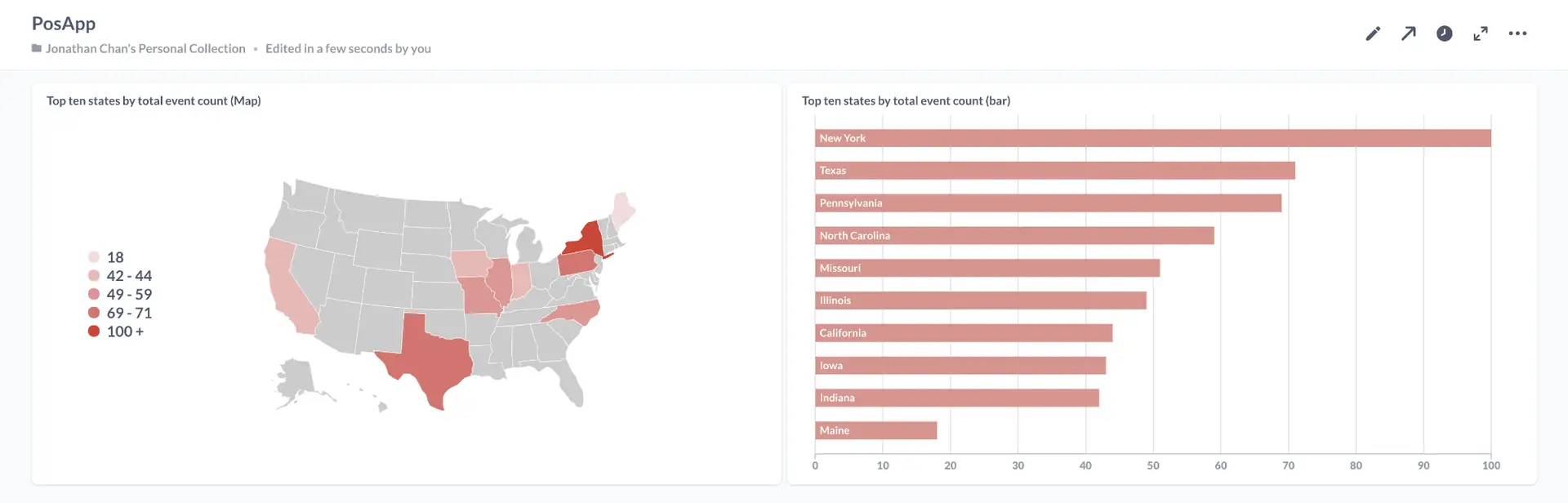
When the application finishes processing all the test data, the WActionStore will contain 423 WActions, one for each merchant. Each WAction includes the merchant’s context information (MerchantId, StartTime, CompanyName, Category, Status, Count, HourlyAve, UpperLimit, LowerLimit, Zip, City, State,
LatVal, and LongVal) and all events for that merchant from the MerchantTxRateWithStatusStream (merchantId, zip, String, startTime, count, totalAmount, hourlyAvet, upperLimit, lowerLimit, category, and status for each of 40 five-minute blocks). This data is used to populate the dashboard, as detailed in
PosAppDash.

Step 6: Trigger Alerts

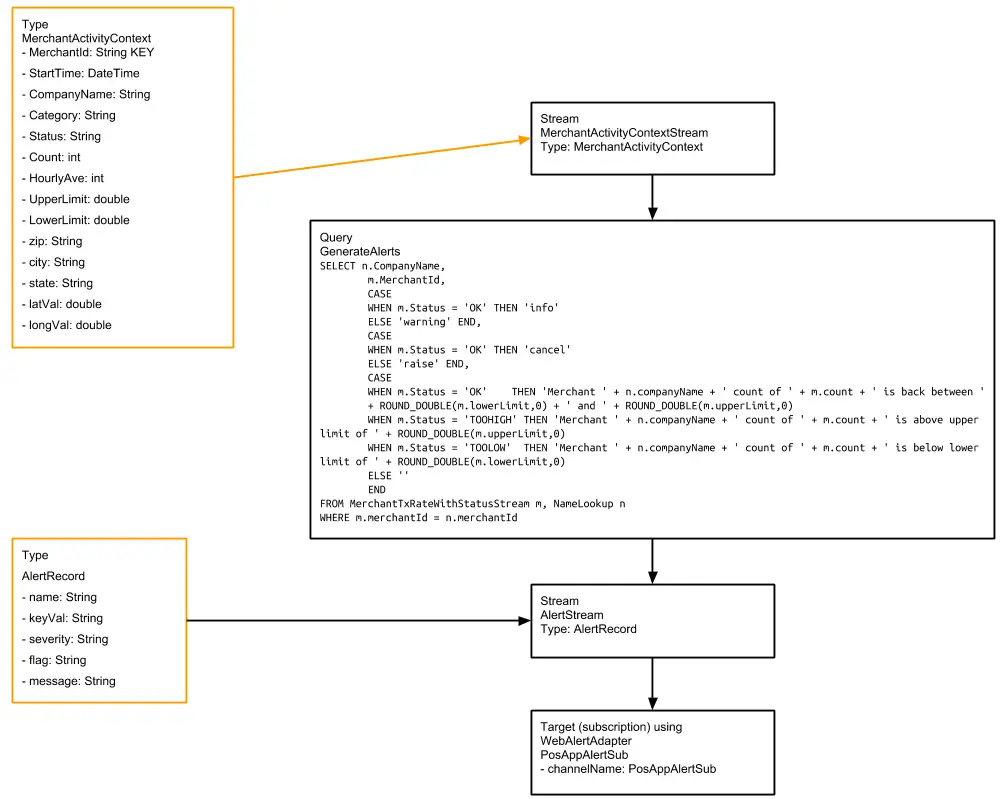
MerchantTxRateWithStatusStream sends the detailed event data to the GenerateAlerts query, which triggers alerts based on the Status value:

When a merchant’s status changes to TOOLOW or TOOHIGH, Striim will send an alert such as, “WARNING – alert from Striim – POSUnusualActivity – 2013-12-20 13:55:14 – Merchant Urban Outfitters Inc. count of 12012 is below lower limit of 13304.347826086958.” The “raise” value for the flag field instructs the subscription not to send another alert until the status returns to OK.

When the status returns to OK, Striim will send an alert such as, “INFO – alert from Striim – POSUnusualActivity – 2013-12-20 14:02:27 – Merchant Urban Outfitters Inc. count of 15853 is back between 13304.347826086958 and 17595.0.” The “cancel” value for the flag field instructs the subscription to send an alert the next time the status changes to TOOLOW or TOOHIGH. See Sending alerts from applications for more information on info, warning, raise, and cancel.

Step 7: Stream data to BigQuery

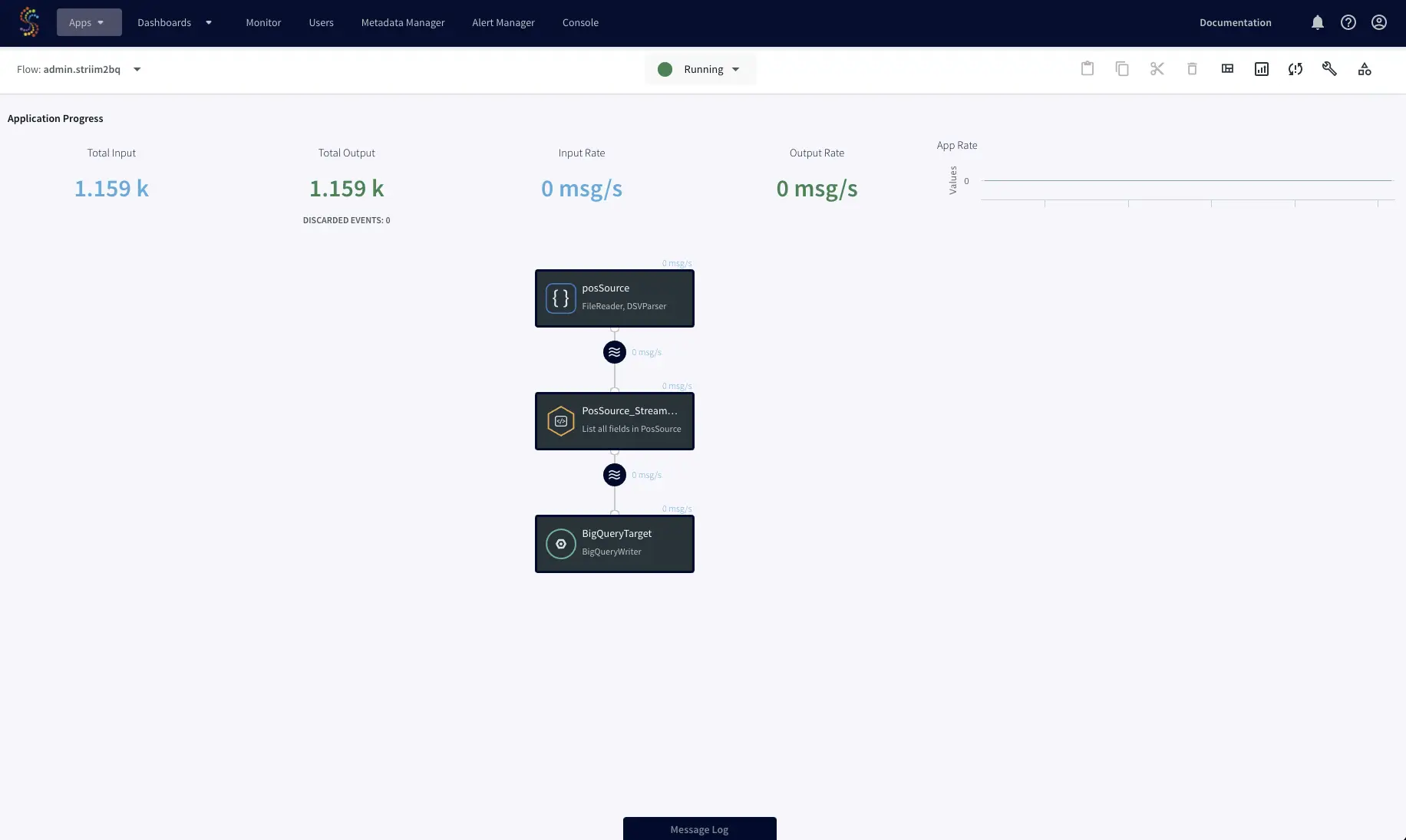
Now you can stream the enriched point-of-sale analytical data to cloud data platforms such as BigQuery, Snowflake, and Redshift. In this example, we’re going to stream the data to BigQuery for storage and analysis.

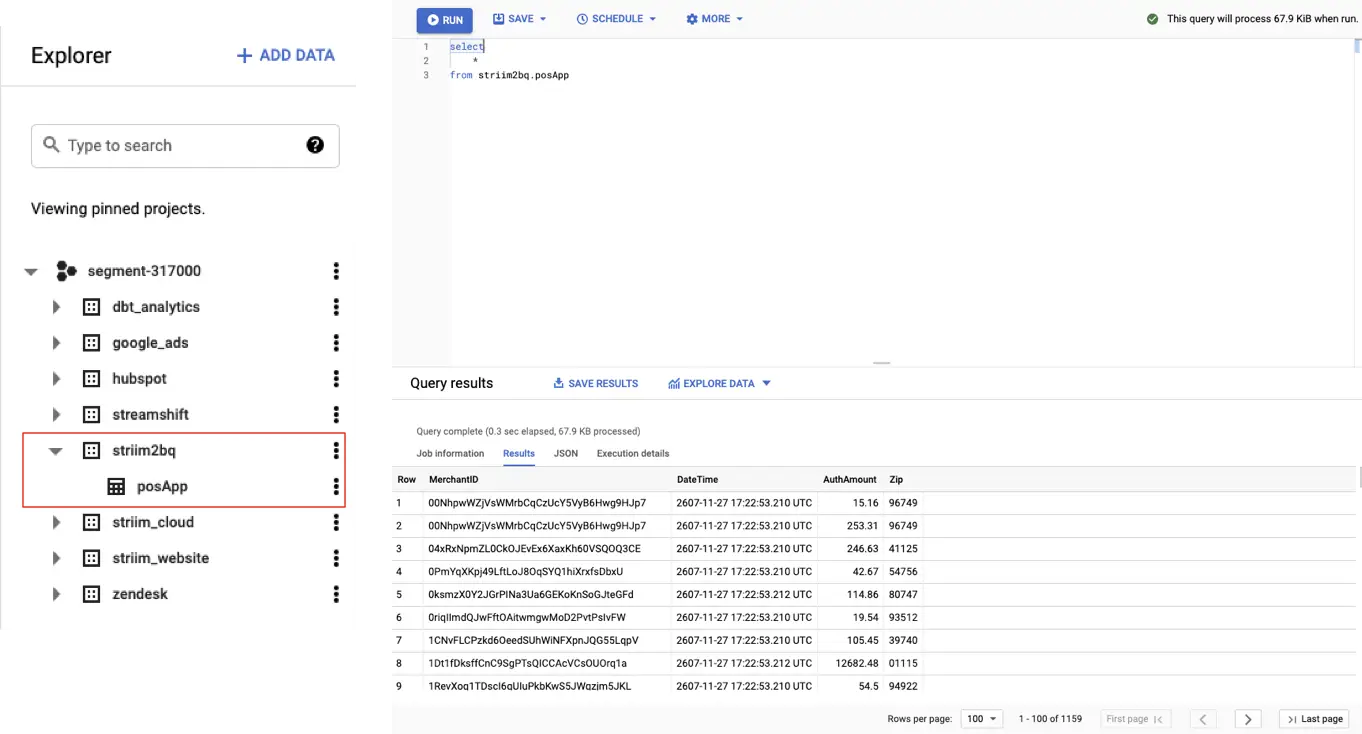
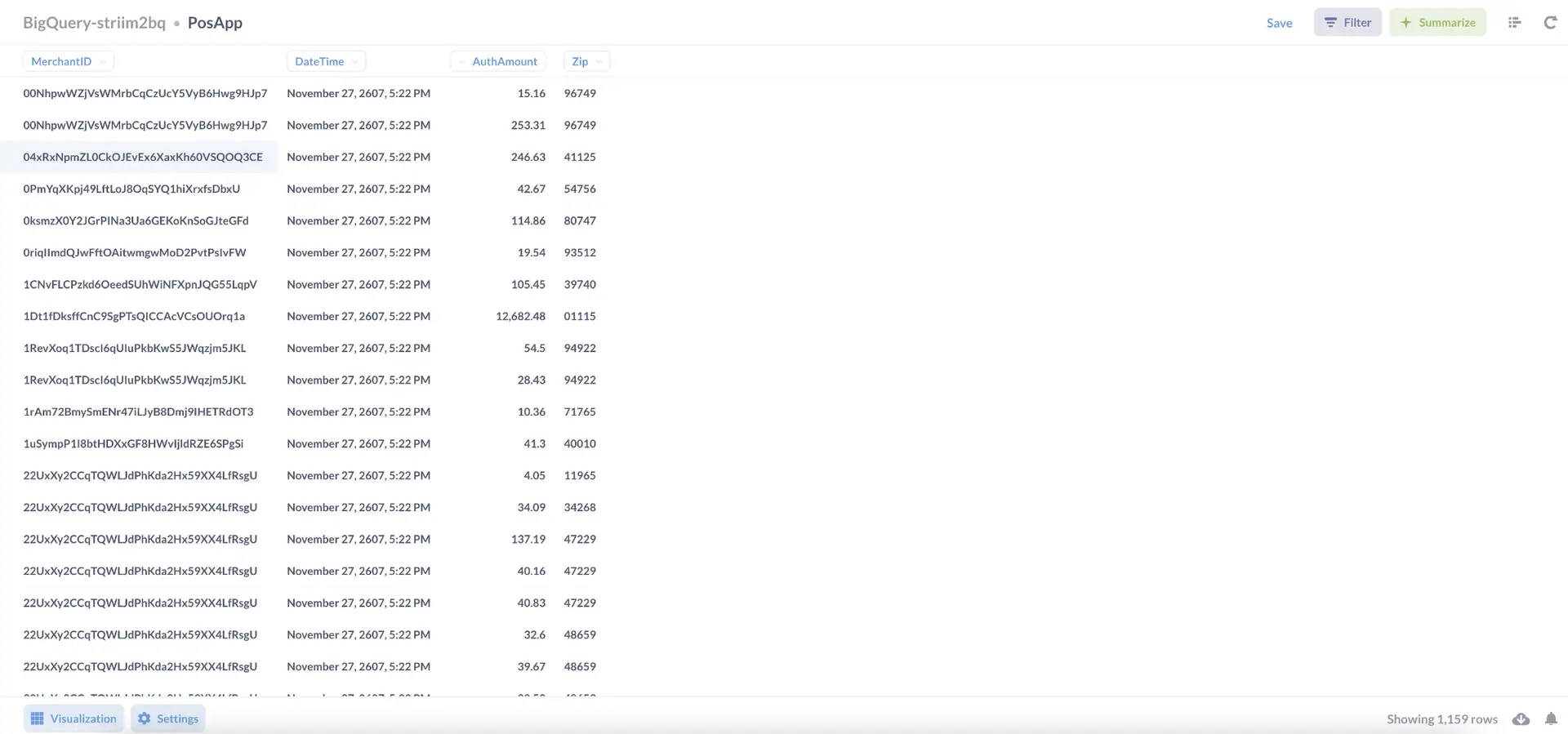
Striim can stream data into BigQuery in real-time while optimizing costs with partition pruning on merge operations. After the data is loaded into BigQuery, your team can analyze it with your business intelligence tool of choice. In this example we’re generating the reports in Metabase.

Get Started

Try this recipe yourself for free by signing up for a trial or talking to sales team for hands-on guidance. Striim can be deployed on your laptop, in a docker container, or directly on your cloud-service provider of
choice.

Tools you need

Striim

Striim’s unified data integration and streaming platform connects clouds, data and applications.

Google BigQuery

BigQuery is a serverless, highly scalable multicloud data warehouse.

BI Tool (Metabase)

Metabase is an open source business intelligence tool.

Data Architect vs. Data Engineer: An Overview of Two In-Demand Roles

The demand for data engineers and data architects is higher than ever. A report by Opinium, in collaboration with the UK’s Department for Digital, Culture, Media and Sport, shows UK companies alone are currently recruiting for 178,000 to 234,000 roles that require hard data skills. And as we continue to generate and use data to enhance critical business decisions, the demand for data professionals will continue to increase.

The data architect and data engineer roles are sometimes used interchangeably. Although there is some overlap, and they share some specific duties, understanding how both roles operate in the organization can benefit engineering managers looking to build an engineering team and students and professionals looking to develop a career in either field.

What Is a Data Architect? The Role and Its Responsibilities

what is a data architect

A data architect is responsible for formulating the organizational data strategy and defining the data management standards and principles on which the organization operates. Data architects design the “data blueprint” that other data consumers follow and implement.

They create the organization’s logical and physical data assets and set data policies based on company requirements. Data architects are often veterans in the industry who have had experience in many data roles and have gained experience navigating complex business scenarios and designing solutions that data teams can implement.

Data architect responsibilities

The data architect’s primary responsibility revolves around providing deep technical expertise for designing, creating, managing, and deploying large-scale data systems in the organization.

A data architect’s responsibilities include:

  • Designing, developing, implementing, and translating business requirements and the overall organizational data strategy, including standards, principles, data sources, storage, pipelines, data flow, and data security policies
  • Collaborating with data engineers, data scientists, and other stakeholders to execute the data strategy
  • Communicating and defining data architecture patterns in the organization that guide the data framework
  • Leading data teams to develop secure, scalable, high-performance, and reliable big data and analytics software and services

What skills do data architects have?

Data architects need a combination of technical and soft skills to thrive. Typically, data architects start in other data roles, such as data scientist, data analyst, or data engineer, and work their way up to becoming data architects after years of experience with data modeling, data design, and data management. Some of the skills data architects have include:

  • Data modeling, integration, design, and data management: Data architects understand the concepts, principles, and implementation of data modeling, design, and data management. They can produce relevant data models and design the organization’s data flow.
  • Databases and operating systems: Data architects are experienced in the various SQL and NoSQL databases. They understand the advantages and drawbacks of each and how they can be set up effectively and securely across different operating systems (Linux, Windows) and environments (development and production).
  • Data architecture: Data architects know the best practices on data architecture for enterprise data warehouse development. They have a solid understanding of the organization’s data infrastructure and how different systems interact.
  • Data security and governance: Data architects understand the processes, roles, policies, standards, and metrics that ensure the effective and efficient use of data/information. Data architects are skilled in data governance strategies with a good understanding of the risks and mitigations of each. They ensure data governance is in line with the overall organizational strategy.
  • Communication and leadership: Data architects are usually leaders of the data management team; as such, they must communicate clear technical solutions to complex data problems to both technical and non-technical audiences.

Although every organization has slightly different requirements, you’ll notice similar skills and common themes (like the ones outlined above) throughout job descriptions for this role. For example, this data solutions architect role with Lightspeed asks that candidates have experience with data management for software as a service (SaaS) tools and build data solutions and models for this team.

What Is a Data Engineer? The Role and Its Responsibilities

what is a data engineer

A data engineer is responsible for designing, maintaining, and optimizing data infrastructure for data collection, management, transformation, and access. Data engineers create pipelines that convert raw data into usable formats for data scientists and other data consumers to utilize.

The data engineer role evolved to handle the core data aspects of software engineering and data science; they use software engineering principles to develop algorithms that automate the data flow process. They also collaborate with data scientists to build machine learning and analytics infrastructure, from testing to deployment.

Data engineer responsibilities

The primary responsibility of a data engineer is ensuring that data is readily available, secure, and accessible to stakeholders when they need it.

A data engineer’s responsibilities typically include:

  • Building and maintaining data infrastructure for the optimal extraction, transformation, and loading of data from a wide variety of sources such as Amazon Web Services (AWS) and Google Cloud big data platforms
  • Ensuring data accessibility at all times and implementing company data policies with respect to data privacy and confidentiality
  • Cleaning and wrangling data from primary and secondary sources into formats that can be efficiently utilized by data scientists and other data consumers
  • Collaborating with engineering teams, data scientists, and other stakeholders to understand how data can be leveraged to meet business needs

What skills do data engineers have?

Data engineering is a synthesis of software engineering and data science, so knowledge of both fields is advantageous. Because data engineering is heavily reliant on programming, most data engineers begin their careers as software engineers and then pivot to data engineering.

Some of the skills required of data engineers include:

  • Database systems (SQL and NoSQL): Data engineers have a good knowledge of SQL and NoSQL databases and are skilled in writing queries to manipulate and retrieve data.
  • Data migration and integration: Data engineers are often tasked with aggregating data from multiple sources and migrating data from one platform to another based on business needs. Data engineers understand data migration and integration techniques (Big-Bang, trickle, lift and shift )and the tools required to perform them. Striim is a popular tool used by data engineers for data integration and migration; it provides modern, reliable data integration and migration across the public and private cloud.
  • Data wrangling: Data wrangling is the process of gathering, cleaning, enriching, and transforming data into the desired format to incorporate better decision-making in less time. A data engineer is skilled in various data wrangling techniques and tools, such as extraction, transformation, and loading (ETL).
  • Data processing techniques and tools: Data engineers are experienced in various data processing techniques, such as real-time processing and batch processing; they are comfortable working with data processing tools such as Apache Kafka and Apache Spark.
  • Programming languages (Python): Data engineering relies heavily on programming; data engineers are typically fluent in at least one programming language, with Python being regarded as the most popular and widely used programming language in the data engineering community.
  • Cloud computing and distributed systems: With more companies relying on cloud providers for data infrastructure needs, companies rely on data engineers to create data solutions using popular cloud providers, such as Amazon Web Services, Google Cloud, and Azure. Data engineers have experience working with tools such as Hadoop for the distributed processing of large datasets.

Although each organization’s requirements are slightly different, you’ll notice similar skills and common themes (such as the ones outlined above) throughout the job descriptions for data engineer roles. For example, the candidate for this data engineer, infrastructure engineering role at TikTok will be responsible for collaborating with software engineers and data scientists to build big data solutions.

Data Architect vs. Data Engineer: What Are the Differences?

The data architect and data engineer titles are closely related and, as such, frequently confused. The difference in both roles lies in their primary responsibilities.

  • Data architects design the vision and blueprint of the organization’s data framework, while the data engineer is responsible for creating that vision.
  • Data architects provide technical expertise and guide data teams on bringing business requirements to life; data engineers ensure data is readily available, secure, and accessible to stakeholders (data scientists, data analysts) when they need it.
  • Data architects have substantial experience in data modeling, data integration, and data design and are often experienced in other data roles; data engineers have a strong foundation in programming with software engineering experience.
  • The data architect and the data engineer work together to build the organization’s data system.

Here’s a table to briefly summarize the key differences and help you visualize the contrast in responsibilities:

Data Architect Data Engineer
Visualizes the blueprint for the organizational data framework, defining how the data will be stored, consumed, integrated, and managed by different data entities and IT systems Builds and maintains the data systems and information specified by data architects in the data framework
Deep expertise in databases, data modeling, data architecture, and operating systems Strong background in software engineering, algorithms, and application development
Focused on leadership and high-level data strategy Focused on the day-to-day tasks of cleaning, wrangling, and preparing data for other data consumers, such as data scientists

When choosing a career or hiring, note that the data architecture role requires years of experience in a previous data-related role; both roles require a deep understanding of database systems, data processing tools, and experience working with big data. To put together an effective data management team, you must first understand the differences between the roles.

When interviewing for data engineers, consider whether the candidate has experience building software and APIs, as well as a solid understanding of various databases, data wrangling, and data processing techniques.

For data architects, on the other hand, be sure to ask what data projects they’ve led in the past and get a sense of their “data philosophy.” Remember that a data architect will be the leader of your data management team to whom you should feel confident delegating authority.

Schedule a demo and we’ll give you a personalized walkthrough or try Striim at production-scale for free! Small data volumes or hoping to get hands on quickly? At Striim we also offer a free developer version.
Back to top