In today’s fast-paced digital landscape, businesses increasingly rely on real-time data integration solutions to gain actionable insights and make data-driven decisions. Striim, a leading real-time data integration platform, offers seamless connectivity to Google Cloud Platform (GCP) services, enabling organizations to harness the power of real-time data streaming.
Join us for an informative webinar as we showcase Striim’s cutting-edge capabilities in real-time data integration with GCP. During this live session, we will demonstrate how Striim efficiently loads data from Oracle, a popular database management system, and seamlessly replicates it to multiple GCP targets, including BigQuery, Spanner, Google Cloud Storage (GCS), and Pub/Sub.
Key highlights of the webinar include:
An overview of Striim’s real-time data integration capabilities and how it facilitates continuous, low-latency data movement.
Live demonstrations showcasing the integration with BigQuery, Spanner, GCS, and Pub/Sub, illustrating real-time data streaming in action.
A special focus on Striim’s industry-leading BigQuery Storage Write API, enabling high-performance and cost-effective data ingestion into BigQuery.
Success stories of organizations leveraging Striim for real-time data integration needs.
Best practices for implementing Striim’s industry-leading Google to BigQuery data loading.
Don’t miss this opportunity to explore the seamless integration between Striim and Google Cloud Platform, and discover how you can harness the power of real-time data streaming for your organization’s data-driven success. Join us to gain valuable insights from our team and get ready to unleash the true potential of your data in the cloud.
Presented by:
Srdan Dvanajscak Director of Solutions Consulting, Striim
Detect Anomalies and Process Data Streams with Pattern Matching: A Financial Services Example
How you can use rule-based, Complex Event Processing (CEP) to detect real world patterns in data
Benefits
Operational Analytics Use non-intrusive CDC to Kafka to create persistent streams that can be accessed by multiple consumers and automatically reflect upstream schema changes
Empower Your TeamsGive teams across your organization a real-time view of your Oracle database transactions.Get Analytics-Ready DataGet your data ready for analytics before it lands in the cloud. Process and analyze in-flight data with scalable streaming SQL.
On this page
Introduction
Striim is a unified real-time data streaming and integration product that enables continuous replication from various data sources, including databases, data warehouses, object stores, messaging systems, files, and network protocols. The Continuous Query (CQ) component of Striim uses SQL-like operations to query streaming data with almost no latency.
Pattern matching in data pipelines is often used to run transformations on specific parts of a data stream. In particular, this is a common approach in the finance industry to anonymize data in streams (like credit card numbers) or act quickly on it.
Striim works with a financial institution that has a need to correlate authorization transactions and final capture transactions which typically are brought into their databases as events. Their current process is overly complicated where a sequence of hard queries are made on the databases to see if a set of rows are matching a specific pattern by a specific key. The alternative is to have Databases or Data Warehouses like Oracle/Snowflake use MATCH_RECOGNIZE to do this as a single query; however, for a data stream this has to be done for all the events and the queries hit on the database will be even worse and may need to be done in batches.
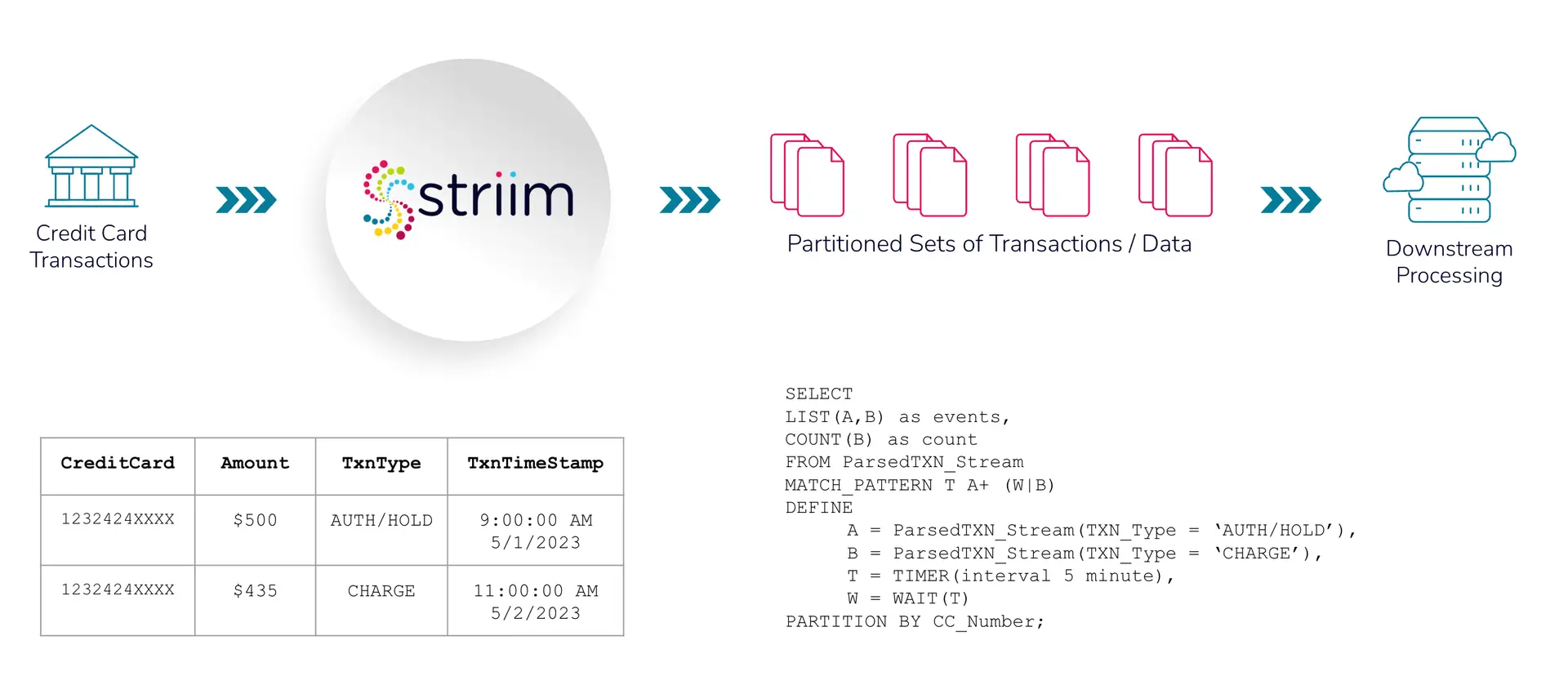
We can use the MATCH_PATTERN and PARTITION BY statements in Striim’s Continuous Query component to process the data in real-time. Striim’s CQ can also mask the credit card numbers to anonymize personally identifiable information. The entire workflow can be achieved with Striim’s easy-to-understand architecture This tutorial walks through an example we completed with a fictitious financial institution, First Wealth Bank, on using pattern matching and Continuous Query to partition masked credit cards and process them, which is possible only with Striim’s ability to transform, enrich, and join data in realtime.
Use Case
Imagine you are staying at a hotel, “Hotel California”, and from the moment you check-in until you check-out, they charge your credit card with a series of “auth/hold” transactions. At check-out the hotel creates a “Charge” transaction against the prior authorizations for the total bill, which is essentially a total sum of all charges incurred by you during your stay.
Your financial institution, “First Wealth Bank”, has a streaming transaction pattern where one or more Credit Card Authorization Hold (A) events are followed by a Credit Card Charge (B) event or a Timeout (T) event which is intended to process your charges accurately.
With Pattern Matching & Partitioning, Striim can match these sequences of credit card transactions in real-time, and output these transactions partitioned by their identifiers (i.e Credit Card/Account/Session ID numbers) which would ultimately simplify the customer experience.
Data Field (with assumptions)
BusinessID = HotelCalifornia CustomerName = John Doe CC_Number = Credit-Card/Account number used by customer. ChargeSessionID (assumption) = CSNID123 – we are assuming this is an id that First Wealth Bank provides as part of authorization transaction response. This id repeats for all subsequent incremental authorizations. If not, we will have to use CreditCard number. Amount = hold authorization amount in dollars or final payment charge. TXN_Type = AUTH/HOLD or CHARGE TXN_Timestamp = datetime when transaction was entered.
As shown in the above schematic, credit card transactions are recorded in financial institutions (in this case, First Wealth Bank) which is streamed in real-time. Data enrichment and processing takes place using Striim’s Continuous Query. Credit card numbers are masked for anonymization, followed by partitioning based on identifiers (credit card numbers). The partitioned data is then queried to check the pattern in downstream processing, ‘Auth/Hold’ followed by ‘Charge’ or ‘Auth/Hold’ followed by ‘Timeout’ for each credit.
Core Striim Components
MS SQL Reader: Reads from SQL Server and writes to various targets.
Filereader: Reads files from disk using a compatible parser.
Continuous Query: Striim’s continuous queries are continually running SQL queries that act on real-time data and may be used to filter, aggregate, join, enrich, and transform events.
Window: A window bounds real-time data by time, event count or both. A window is required for an application to aggregate or perform calculations on data, populate the dashboard, or send alerts when conditions deviate from normal parameters.
Stream: A stream passes one component’s output to one or more components. For example, a simple flow that only writes to a file might have this sequence.
FileWriter: Writes to a file in various format (csv, json etc)
Step 1: Configure your source
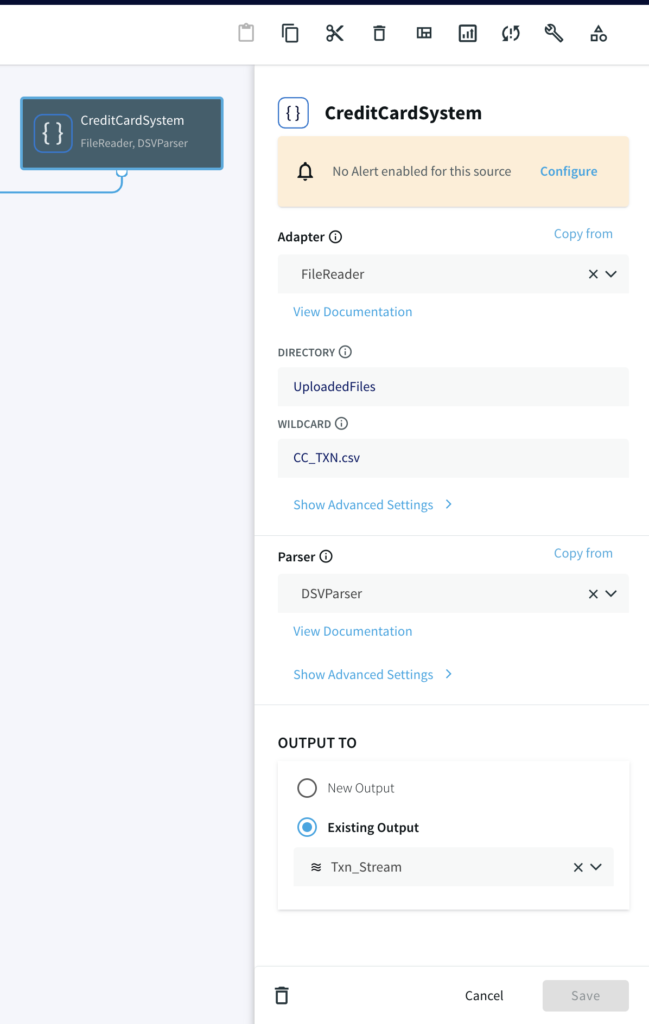
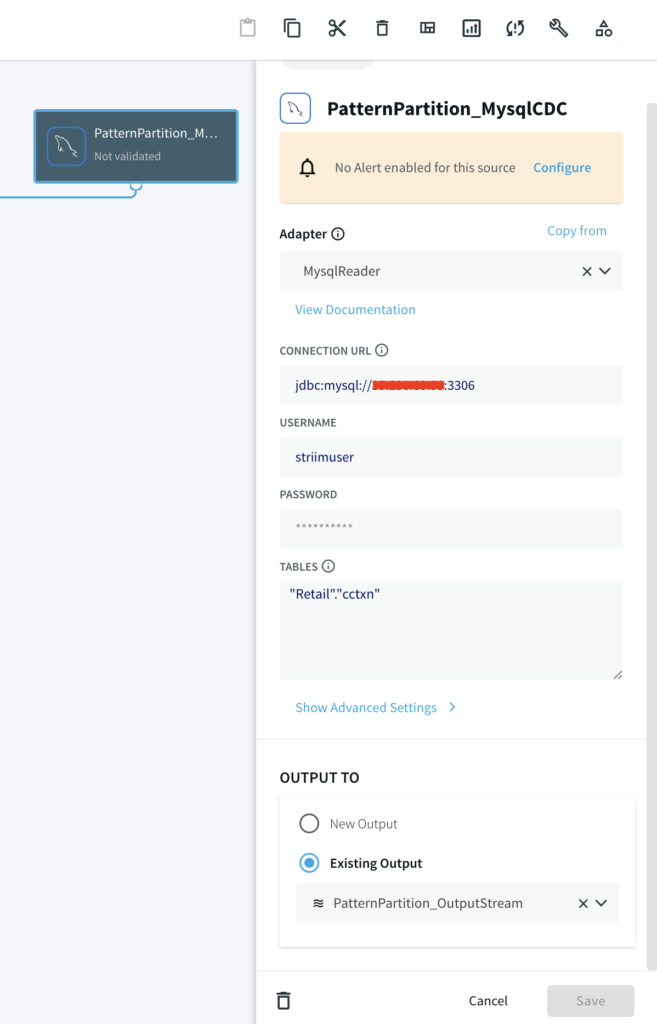
For this tutorial, you can either use MySQL CDC to replicate a real-life business scenario or a csv file if you do not have access to MySQL database.
Striim Demo w/ MySQL CDC
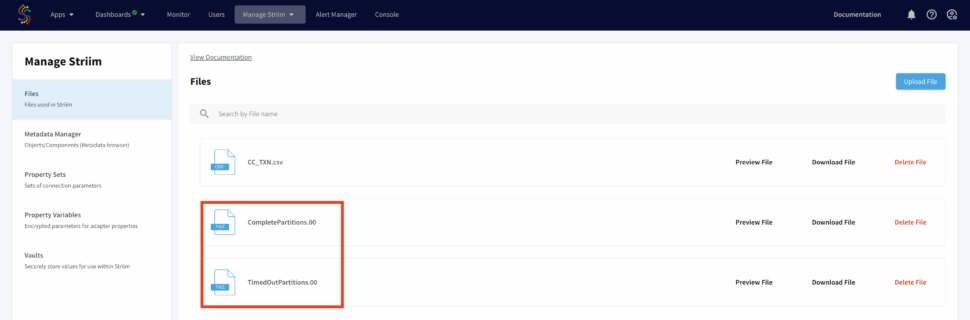
A CDC pipeline that has MySQL/Oracle as source with above data added as sequence of events. The output are two files, CompletePartitions (Pattern Matched) and TimedOutPartitions (Timer ran down with incomplete CHARGE) for each identifier (Credit Card Number/ Session id).
Demo Data Size
1 million events (transactions) over 250,000 partitions
50,000 partitions for success/complete partitions
200,000 partitions for incomplete/timed-out partitions
The Python script that writes data to your SQL database can be found here.
Striim Demo w/ FileReader CDC-like Behavior
A File Reader-Writer pipeline that can be run locally without relying on a external working database. This utilizes a python script to write data into a csv file.
Step 2: Mask the Credit Card Numbers
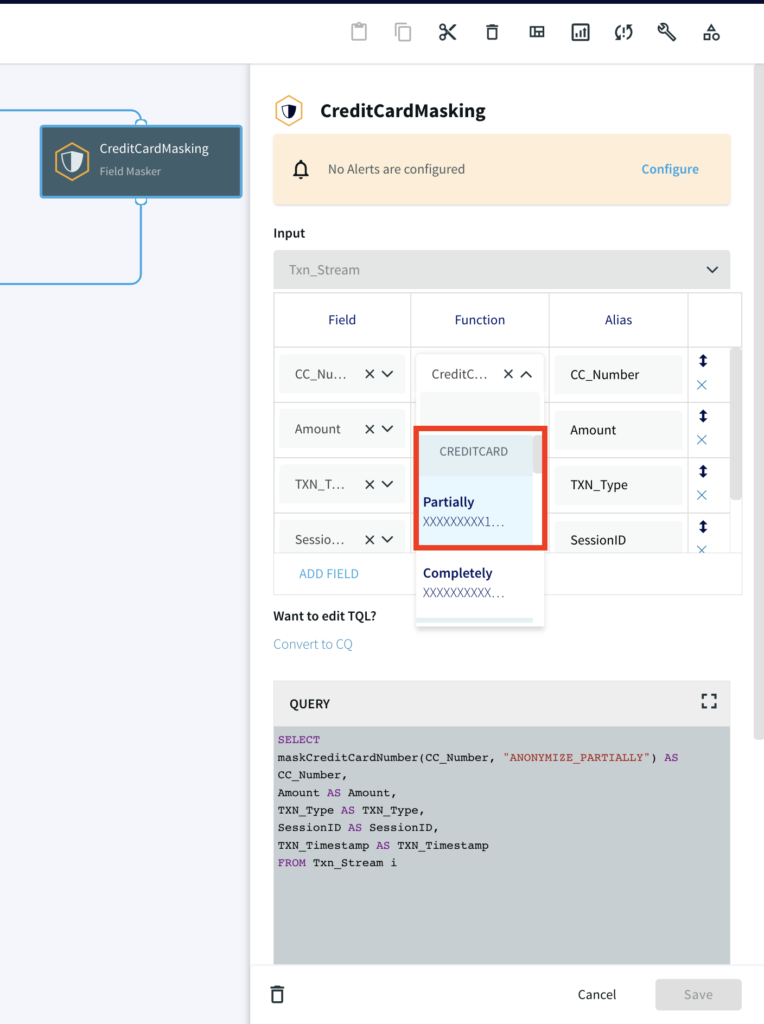
Striim utilizes inbuilt masking function to anonymize personally identifiable information like credit card numbers. The function maskCreditCardNumber(String value, String functionType) masks the credit card number partially or fully as specified by the user. We use a Continuous Query to read masked data from the source.
					SELECT
maskCreditCardNumber(CC_Number, "ANONYMIZE_PARTIALLY") AS CC_Number,
Amount AS Amount,
TXN_Type AS TXN_Type,
SessionID AS SessionID,
TXN_Timestamp AS TXN_Timestamp
FROM Txn_Stream i;
Step 3: Continuous Query (w/ Pattern Match & Partitions)
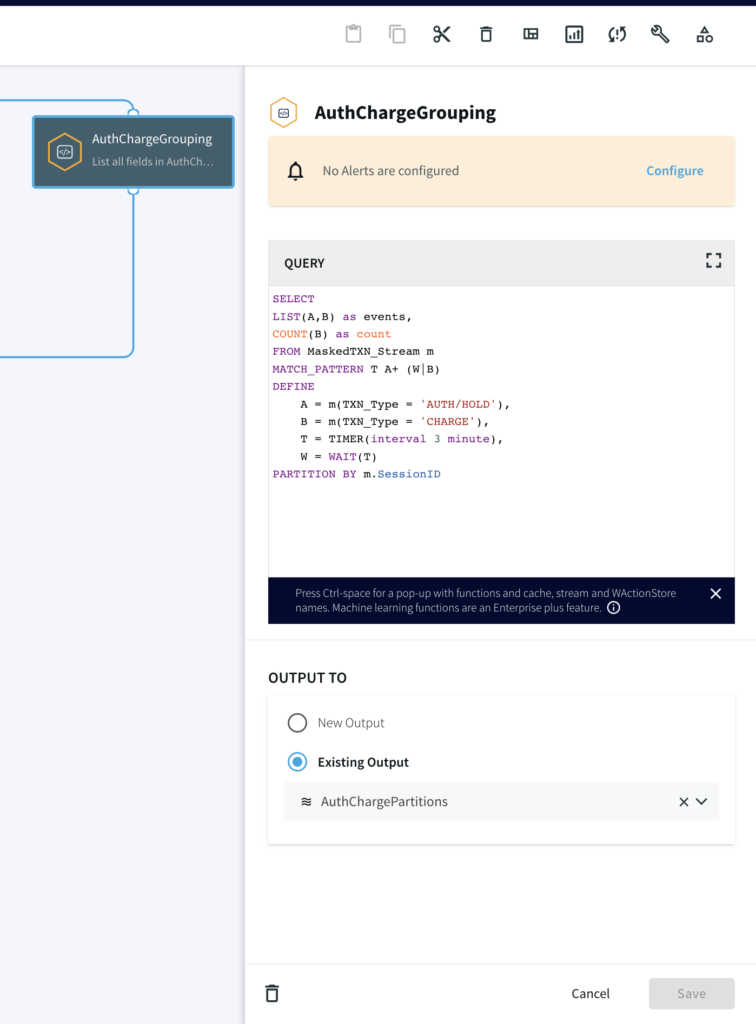
Next, we write a continuous query on the data with masked credit card numbers to partition the events by their distinct CC_NUMBER. The pattern logic for the CQ is:
Start the pattern on the first event of ‘A’ (an event where the TXN_Type is AUTH/HOLD) for a particular CC_NUMBER
With ‘A’ event to start the pattern, start the timer (mimicking the hold time) for 3 minutes
Accumulate any incoming ‘A’ events until either the following happens:
‘W’ occurs where the Timer runs down OR
event ‘B’ occurs where the TXN_Type is CHARGE
					SELECT
LIST(A,B) as events,
COUNT(B) as count
FROM MaskedTXN_Stream m
MATCH_PATTERN T A+ (W|B)
DEFINE
A = m(TXN_Type = 'AUTH/HOLD'),
B = m(TXN_Type = 'CHARGE'),
T = TIMER(interval 3 minute),
W = WAIT(T)
PARTITION BY m.SessionID
Step 4: Split the data into Complete and TimedOut Criteria
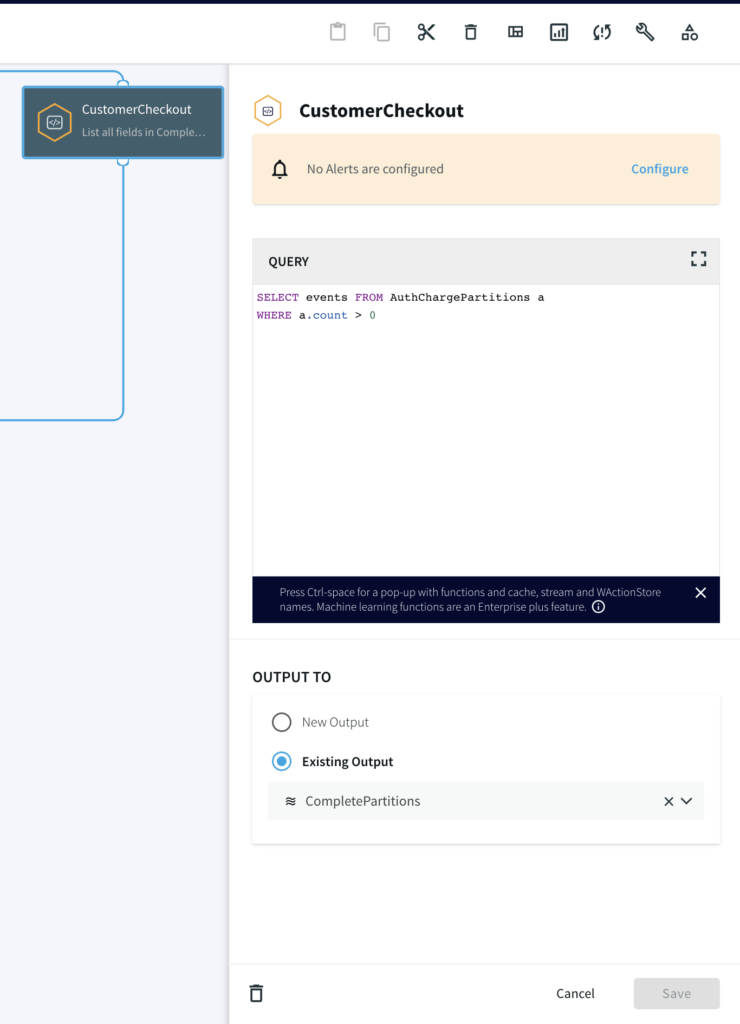
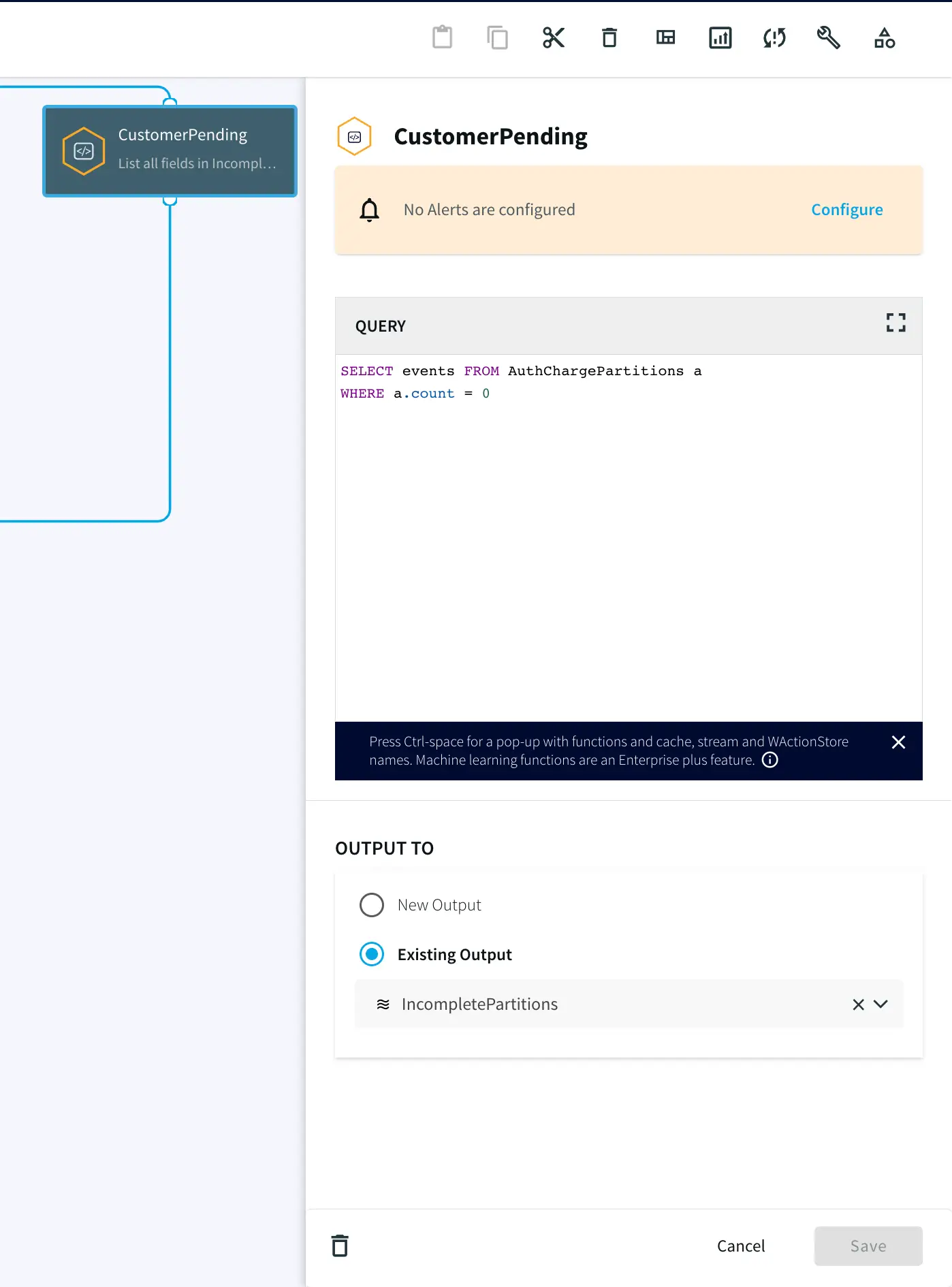
In this step, two Continuous Queries are written to split the data into two categories. One where the credit cards has been Charged and other where there was no charge until timeout.
Step 5: Write the Output using FileWriter
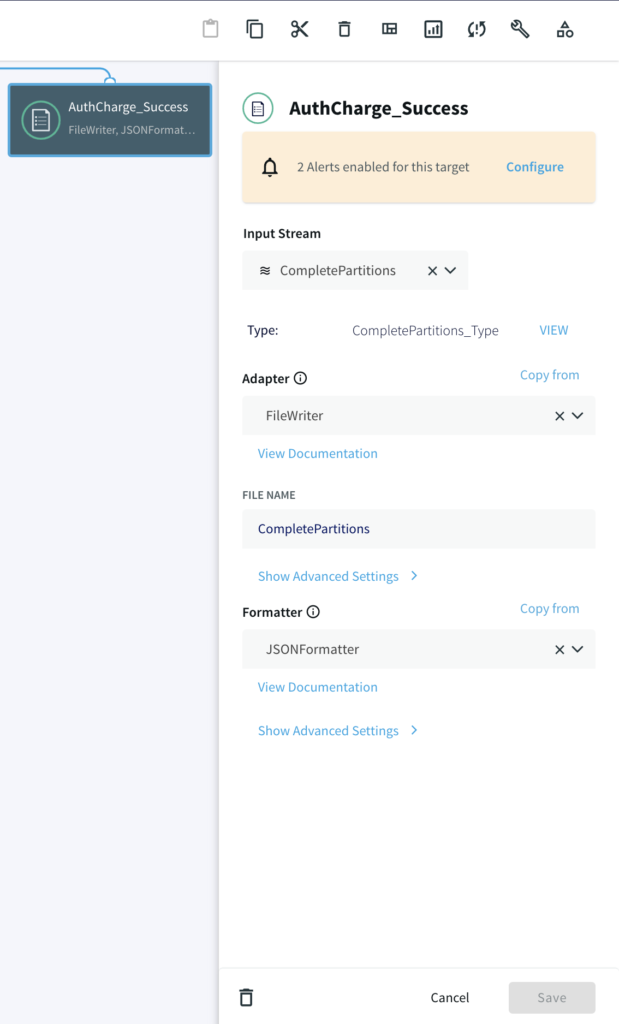
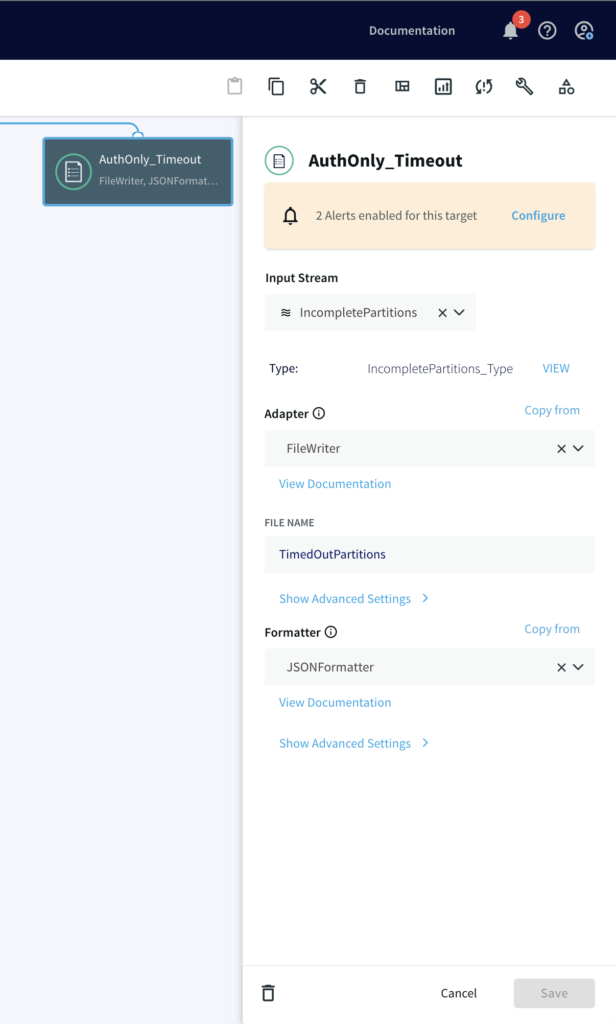
Once all events (‘A’ and ‘B’) are accumulated in the partition, two different files are written, one where timers ran down with incomplete charge and other where the credit card was actually charged after auth/hold.
Run the Striim App
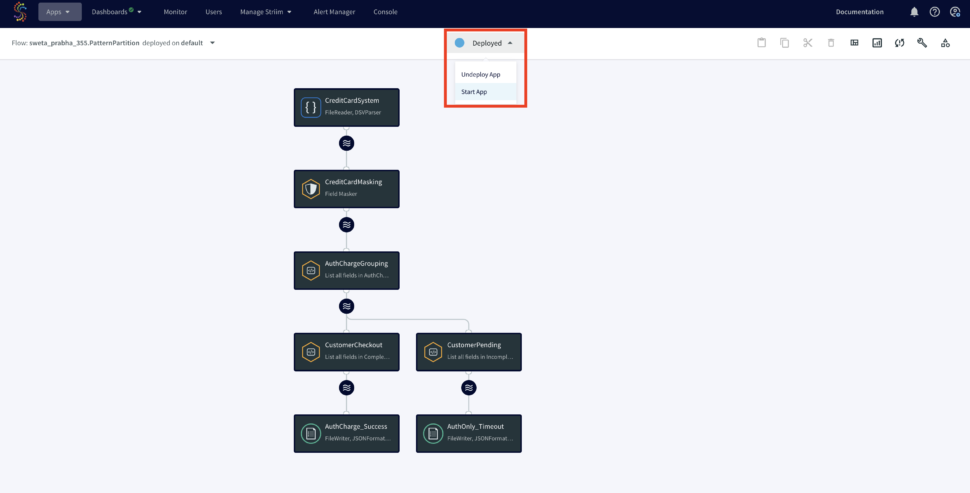
You can import the TQL file from here and run the app by selecting ‘Deploy’ followed by ‘Start App’ from the dropdown as shown below:
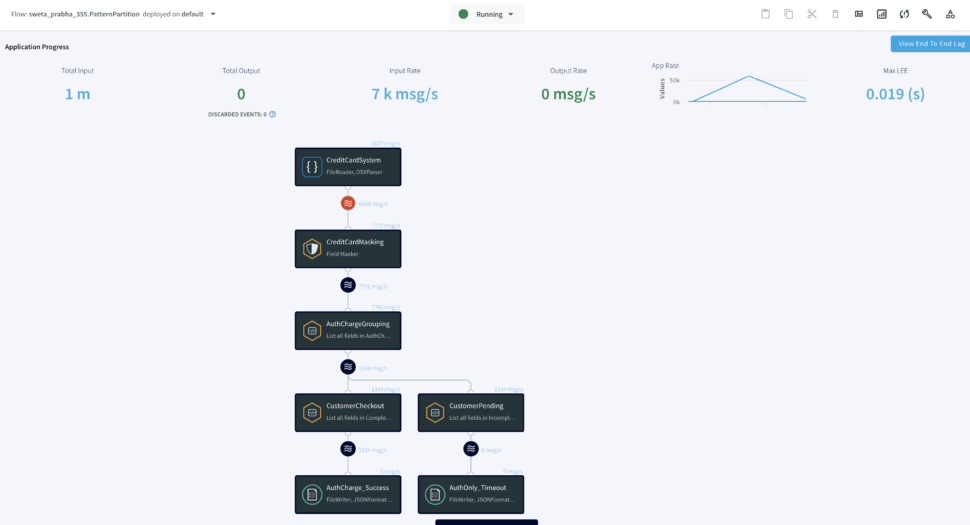
Once the Striim app starts running you can monitor the input and output data from the UI. To learn more about app monitoring, please refer to the documentation here.
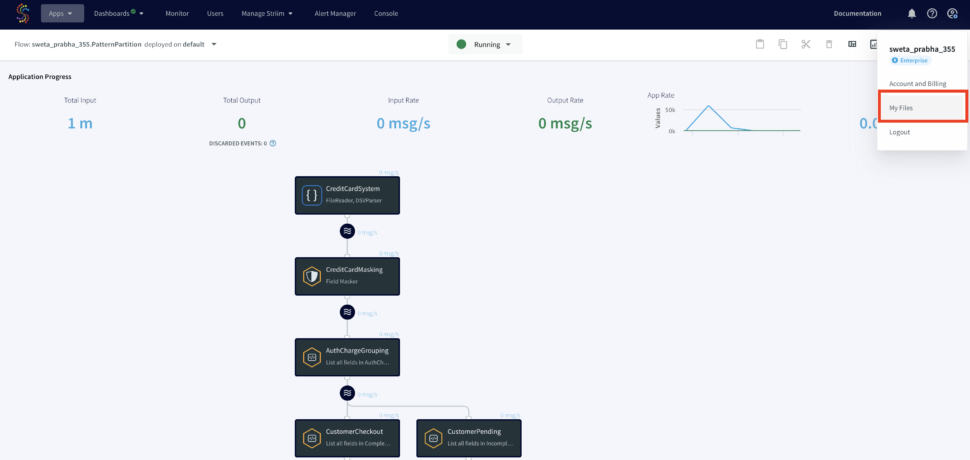
The output files will be stores under ‘My Files’ in the web UI as shown below:
Wrapping Up
As you can see in this use case, Striim can help organizations simplify their real-time workflow by processing and enriching data in real-time using Continuous Query.
This concept can be applicable to many financial use-cases, such as Brokerage Industries where streaming trade order fulfillment patterns are analyzed, for example, a Market Order Submitted (A) event is followed by a Market Order Fulfilled (B) event OR a Canceled (C) event. This has to be done in real-time as stock market brokerage does not have time to wait around for batch processing and has a very high SLA for data.
Unlock the true potential of your data with Striim. Don’t miss out—start your 14-day free trial today and experience the future of data integration firsthand. To give what you saw in this recipe a try, get started on your journey with Striim by signing up for free Striim Developer or Striim Cloud.
What’s New in Data – a popular podcast and thought leadership series hosted by John Kutay – did a special live episode at the top of Salesforce Tower in San Francisco. Bruno Aziza from CapitalG, Ridhima Kahn from Dapper Labs, and Sanjeev Mohan of SanjMo (former VP of Data at Gartner) did a recap of 2023 Google Cloud Next’s biggest announcements, how (and why) data teams are adopting GenerativeAI, and gave examples of futuristic consumer experiences such as interacting with AI-generated social media influencers. John Kutay moderated the panel in front of a live audience.