Striim Cloud on Google Cloud

Introducing Striim Cloud on Google Cloud: a fully managed and unified cloud solution offering real time data streaming and integration

Insights-driven organizations grow an average of 30% per year, but with ever-increasing data sources, formats, and volumes, it’s a huge undertaking to integrate and unify it all. While homegrown tools, scripts, and third party utilities may offer temporary relief, it can become unwieldy to manage them across multiple teams and environments. And then you add in the need for low latency — because who wants stale data? — and the struggles with scalability to keep up with company growth.

With the release of Striim Cloud on Google. Remove data silos: Connect your sources and targets and manage your data pipelines within one console. Cloud, we’re excited to offer a solution for data scientists, database admins, and businesses that rely on data.

Starting today, Striim Cloud can be purchased on the Google Cloud marketplace. Striim Cloud on Google Cloud delivers five key benefits:

  1. Get started quickly: Launch smart data pipelines within ten minutes of sign up.
  2. Remove data silos: Connect your sources and targets and manage your data pipelines within one console.
  3. Reduce total cost of ownership: Replace multiple tools with a single platform. Pay as you go based on consumption and quickly scale as needed.
  4. Ensure business continuity: Protect your business with daily backups, disaster recovery, uptime SLA of 99.5% and high availability.
  5. Rest easy with enterprise-grade features: Proven at enterprise scale with petabytes of data securely and reliably moved every day to the cloud.

Striim Cloud is built on our popular Striim Enterprise platform – proven at enterprise scale. Even though Striim Cloud is designed with simplicity in mind, it is also secure, reliable, and comprehensive.

Striim Cloud gives you extensive options to control and customize your data pipelines. Services come with daily backups, built-in disaster recovery and an uptime SLA of 99.5%. This blog will take you through a sample use case, but Striim Cloud is capable of much more than this specific use case.

Striim Cloud offers great return-on-investment and delivers immediate value to cloud customers as shown below:

value_proposition_Striim_Cloud

Striim Cloud Example Use Case: Build a Ticketing Application on Google BigQuery

To give you a quick tour of Striim Cloud, we’re going to walk through a use case for a ticketing application used to sell tickets for football and baseball games. The app is running an on-premise Oracle database. Our objective is to move data to BigQuery with millisecond latency so we can analyze the data and glean insights — like the number of tickets sold by game, by state, or by stadium — to facilitate real-time business decisions. The same flow is shown in the architecture diagram below, along with other capabilities of Striim Cloud on Google Cloud.

Striim Cloud on Google Cloud

Start by going to the Striim Cloud Enterprise solution on the Google Cloud Marketplace. Go through the standard marketplace SaaS solution purchase flow and sign up with Striim Cloud as shown in the image below. Alternatively, you can also sign up for the trial from Striim.com.


Striim Cloud


Once you sign up for Striim Cloud, it takes less than ten minutes to get your first data pipeline up and running through a simple and intuitive user flow. It’s a three step process:

  1. Create a cloud service
  2. Create a Striim app for your data pipeline
  3. Set up content and speed

Create a cloud service: 

In this step you only need to provide the cluster name — Striim Cloud applies smart defaults for everything else. However, if desired you can change the default cluster size, modify security options, sign-in options, user roles, and more.

Cloud service

Create an app for your smart data pipeline:

Next, you create a Striim app — essentially a data pipeline — using drag-and-drop elements or a wizard-based flow. Once again, Striim Cloud automatically applies smart defaults in the app. In our example, we’re creating an Oracle to BigQuery pipeline with source and target credentials for Striim Cloud to connect securely. Striim Cloud connects and validates the connection in this step for a better user experience.

smart data pipeline app

Validating connection

Set up content and speed: 

In the third and final configuration steps, select content like schemas, collections, and tables on the source and map to the corresponding schemas, collections, and tables on the target. Striim Cloud automatically does most of the heavy lifting including auto-schema conversions and data-type conversions.

Striim Cloud offers many advanced features such as data transform, enrich, mask, encrypt, and correlate in the pipeline.

As your data is ingested and delivered, you can monitor its progress and watch real-time ticket data landing in BigQuery. With Striim Cloud, you can easily create actionable data insights and a dashboard for a real-time view of ticket sales data.

Striim Cloud monitoring

Striim Cloud offers many more features and capabilities for real-time data streaming and analytics. Learn more about Striim Cloud here and contact us for a trial or demo.

 

How to Stream Data to Kafka and Snowflake with Striim

Technical_Demo_April_27_Recorded-v2

 Adopting a data warehouse in the cloud with Snowflake requires a modern approach to the movement of enterprise data. This data is often generated by diverse data sources deployed in various locations – including on-premise data centers, major public clouds, and devices.
In this technical demo, Fahad Ansari and Srdan Dvanajscak show you two ways to stream data from an Oracle database to Snowflake:
  • Directly, with Striim’s native integration with Snowflake that gives users granular control over how their data is uploaded to Snowflake
  • Via Kafka, using Striim to stream data to a Kafka topic and load it to Snowflake

Three Benefits of Azure Cosmos DB

More than a decade ago, Microsoft launched Project Florence. This was a research wing created to resolve issues developers faced while building large-scale applications within Microsoft. After some time, Microsoft realized developers around the world also faced these challenges while creating globally distributed applications. This led to the release of Azure DocumentDB in 2015. Over the years, it received more features and updates and evolved into Azure Cosmos DB. Thanks to the countless benefits of Cosmos DB, it’s one of the most popular NoSQL databases today.

Cosmos DB is a NoSQL database designed to handle large workloads on a global level. It offers a plethora of features that can make database creation and management easier, and it also ensures that your database is scalable, reliable, and available.

1. You can use APIs to store data in different models

A relational database is only required when you need a normalized data structure — comprised of rows and columns. Otherwise, you can take advantage of Cosmos DB’s multi-model capabilities. A multi-model database enables you to store data in multiple ways — relational, document, key-value, and column-family — in a single and integrated environment. When it comes to Cosmos DB, you can use APIs of different databases natively and use them to store data.

  • SQL API: SQL API is the default Cosmos DB API. You can use it to write SQL to search within JSON documents. Unlike other Cosmos DB APIs, it also supports server-side programming, allowing you to write triggers, stored procedures, and user-defined functions via JavaScript.
  • MongoDB API: MongoDB is one of the most popular NoSQL databases, and you can integrate with Cosmos DB by using MongoDB’s wire protocol via MongoDB API. This way, you can use MongoDB’s existing client drivers. Moreover, you can use this API to migrate your current MongoDB applications to Cosmos DB with some basic and quick changes.
  • Cassandra API: Apache Cassandra is an open-source NoSQL wide column store database, which can be queried with a SQL-like language — Cassandra Query Language (CQL). Cosmos DB’s Cassandra API allows you to use CQL and Cassandra’s drivers and tools, such as cqlsh.
  • Gremlin API: Cosmos DB Gremlin API uses Gremlin — a functional query language — to offer a graph database service. You can also use Gremlin to implement graph algorithms.
  • Table API: Azure Table Storage is a NoSQL datastore used for storing a large amount of non-relational and structured data. You can use Table API to store and query data from Azure Table Storage.

2. You can replicate data globally for multiple regions

Typically, when you’re looking to create a large-scale globally distributed application, it’s accompanied by considerable work. Building such applications requires you to spend plenty of time planning a multi-center data environment configuration that can smoothly support your application.

Cosmos DB has been built as a globally distributed database, which means you don’t have to waste time planning your multi-center environment. You can configure Cosmos DB to replicate your data to all of your targeted regions. To minimize latency, look into where your users live and place the data closer to them. Cosmos DB will then deliver a single system image of your global database and containers, which are read and written locally by your application.

All global applications aim for high availability, so users of that data can access it without interruption. With Cosmos DB, you can run a database in several regions at once, which can improve your database’s availability. Even if a region is unavailable, Cosmos DB automates the handling of application requests by assigning them to other regions. This global distribution of data is turnkey — you can add or remove one or more geographical regions with a brief API call or a few clicks.

For instance, if you manage a SaaS application, it’s likely to get customer requests from around the world. Formats that store and track user experiences, such as session states, product catalogs, and JSON require accessibility with low latency. Cosmos DB’s globally distributed storage can help you store this data.

3. You can create social media applications

Social media is one of the niches where developers use Cosmos DB to store and query user generated content (UGC) — content users generate in the form of text, reviews, images, and videos. For instance, you can store the data of your social media network’s user ratings and comments in Cosmos DB. Blog posts, tweets, and chat sessions are also part of UGC.

UGC is a combination of free-form text, relationships, tags, and properties that are not governed by an inflexible structure. That’s why UGC is categorized as unstructured data. A relational database can’t store UGC due to its strict schema limitations. A NoSQL database like Cosmos DB can store UGC data more easily because it’s schema-free. Developers have more control to adapt their database to different types of data. In addition, this form of database also requires fewer transformations for data storage and retrieval than a relational database.

Since Cosmos DB is schema-free, you can use it to store documents with different and dynamic structures. For instance, what if you want your social media posts to contain a list of hashtags and categories? Cosmos DB can manage this by adding them as attributes without requiring any additional work. Unlike relational databases, you can make object mapping simple by setting comments under a social media post with a parent property in JSON. Here’s what it would look like:

{
“id”:”4322-bte4-65ut-200b”,
“title”:”My first post!”,
“date”:”2022-05-08″,
“createdBy”:User5,
“parent”:”dv13-sft3-353d-655g”
}

You have to enable your users to search and find content easily. For that, you can use Azure Cognitive Search to implement a search engine. This process doesn’t require you to write any code and is completed within a few minutes.

For storing social media followers, you can use the Gremlin API to use vertexes for each store. Similarly, you can set edges to create the relation of user A following user B. You can also make suggestions to users with common interests by adding a graph.

Use Striim’s native integration to unlock all the benefits of Cosmos DB

For all the benefits of Cosmos DB, there are some minor issues that plague its users. These users struggle to find native integration that supports document, relational, and non-relational databases as sources, hampering data movement into Cosmos DB. Another issue that plagues Cosmos DB users is the use of Batch ETL methods, which are unsuitable for a few use cases. Batch ETL methods read periodically from source data and write to target data repositories after a fixed time. That means all the data-driven decisions that are made after performing analytics on the target data repository are based on relatively old data.

real-time data integration and data replication platform

As a unified data integration and streaming platform, Striim connects data, clouds, and applications with real-time streaming data pipelines.

Striim has come up with a solution for both problems. It offers native integration with Cosmos DB, which means you can use Striim to move data from a wide range of data sources, including Salesforce, PostgreSQL, and Oracle to Cosmos DB. Striim also supports real-time data movement, allowing you to replace your batch ETL methods in applications that need real-time analytics.


Deliver Real-Time Insights and Fresh Data with dbt and Striim on Snowflake Partner Connect

Tutorial

Deliver Real-Time Insights and Fresh Data with dbt and Striim on Snowflake Partner Connect

Use Striim to stream data from PostgreSQL to Snowflake and coordinate transform jobs in dbt

Benefits

Manage Scalable Applications
Integrate Striim with dbt to transform and monitor real time data SLAs

Capture Data Updates in real time
Use Striim’s postgrescdc reader for real time data updates

Build Real-Time Analytical ModelsUse dbt to build Real-Time analytical and ML models 
On this page

Overview

Striim is a unified data streaming and integration product that offers change capture (CDC) enabling continuous replication from popular databases such as Oracle, SQLServer, PostgreSQL and many others to target data warehouses like BigQuery and Snowflake.

dbt Cloud is a hosted service that helps data analysts and engineers productionize dbt deployments. It is a popular technique among analysts and engineers to transform data into usable formats and also ensuring if source data freshness is meeting the SLAs defined for the project. Striim collaborates with dbt for effective monitoring and transformation of the in-flight data. For example, if the expectation is that data should be flowing every minute based on timestamps, then dbt will check that property and make sure the time between last check and latest check is only 1 minute apart.

In this recipe, we have shown how Striim and dbt cloud can be launched from Snowflake’s Partner Connect to perform transformation jobs and ensure data freshness with Snowflake data warehouse as the target.

Core Striim Components

PostgreSQL CDC: PostgreSQL Reader uses the wal2json plugin to read PostgreSQL change data. 1.x releases of wal2jon can not read transactions larger than 1 GB.

Stream: A stream passes one component’s output to one or more other components. For example, a simple flow that only writes to a file might have this sequence

Snowflake Writer: Striim’s Snowflake Writer writes to one or more existing tables in Snowflake. Events are staged to local storage, Azure Storage, or AWS S3, then written to Snowflake as per the Upload Policy setting.

Benefits of DBT Integration with Striim for Snowflake

Striim and dbt work like magic with Snowflake to provide a simple, near real-time cloud data integration and modeling service for Snowflake. Using Striim, dbt, and Snowflake a powerful integrated data streaming system for real-time analytics that ensures fresh data
SLAs across your company.

Striim is unified data streaming and integration product that can ingest data from various sources including change data from databases (Oracle, PostgreSQL, SQLServer, MySQL and others), and rapidly deliver it to your cloud systems such as Snowflake. Data loses it’s much of its value over time and to make the most out of it, real-time analytics is the modern solution. With dbt, datasets can be transformed and monitored within the data warehouse. Striim streams real-time data into the target warehouse where analysts can leverage dbt to build models and transformations. Coordinating data freshness validation between Striim and dbt is a resilient method to ensure service level agreements. Companies can leverage Striim integration with dbt in production to make real-time data transformation fast and reliable.

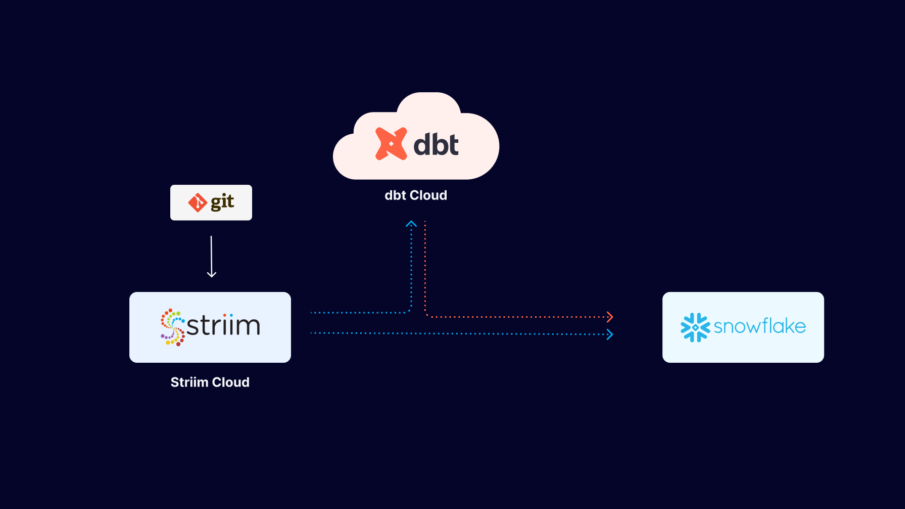
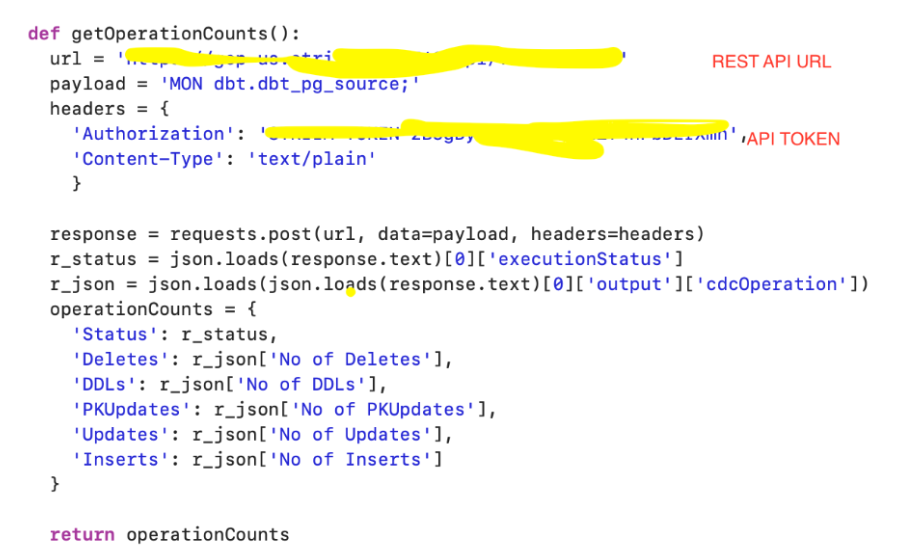
We have demonstrated how to build a simple python script that pings the Striim API to fetch metadata from the Striim source (getOperationCounts()) that records the number of DDLs, deletes, inserts and updates. This data can be used by dbt to monitor freshness, schedule or pause dbt jobs. For example, run dbt when n inserts occur on the source table or Striim CDC is in-sync. The schematic below shows the workflow of dbt cloud integration with striim server. Users can configure DBT scheduling within Striim via dbt cloud API calls. dbt integration with Striim enhances the user’s analytics pipeline after Striim has moved data in real-time.
 

Step 1: Launch Striim Cloud from Snowflake Partner Connect

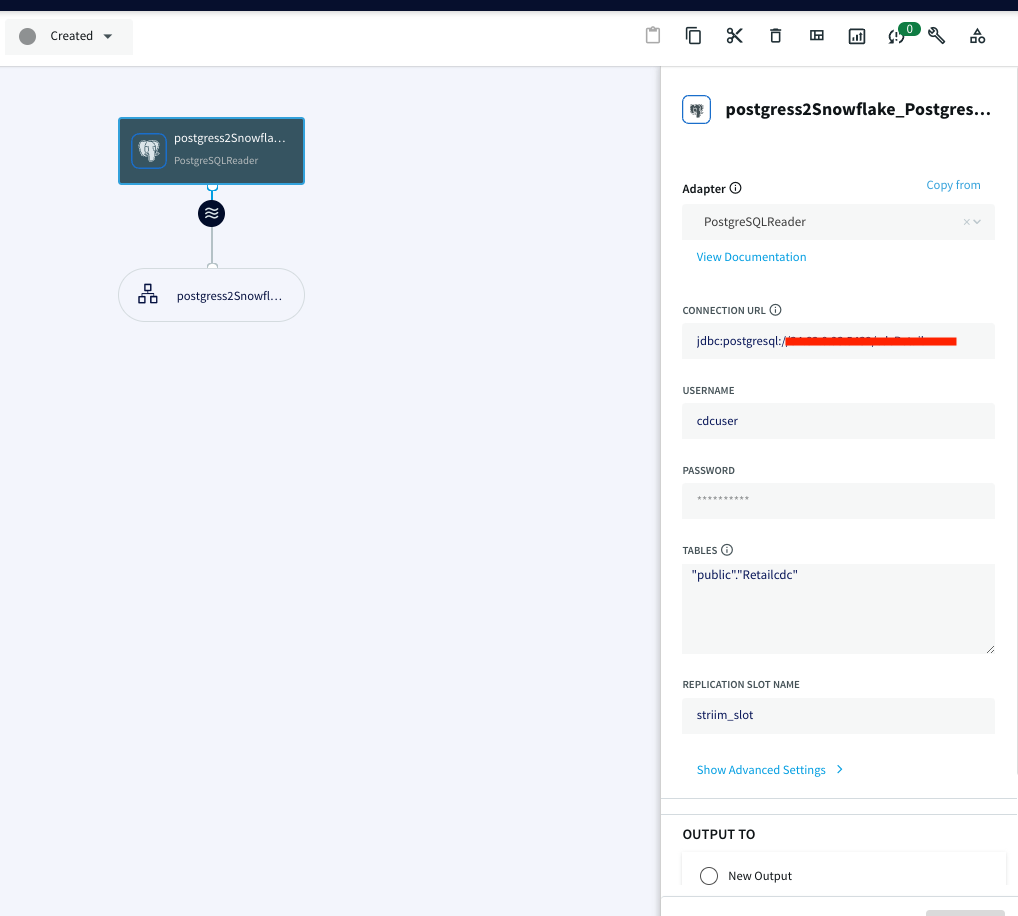
Follow the steps below to connect Striim server to postgres instance containing the source database:

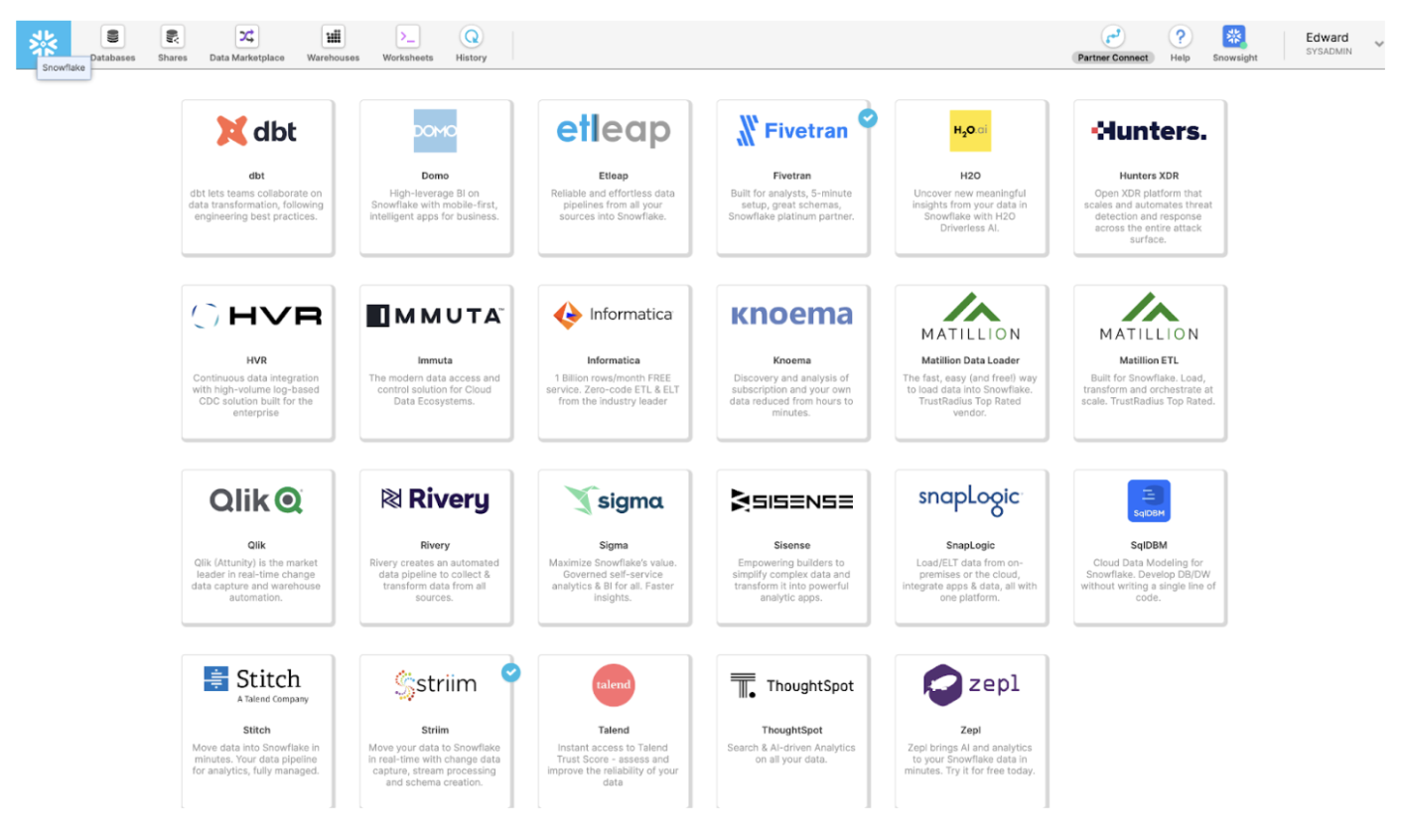
Launch Striim in Snowflake Partner Connect by clicking on “Partner Connect” in the top right corner of the navigation bar.

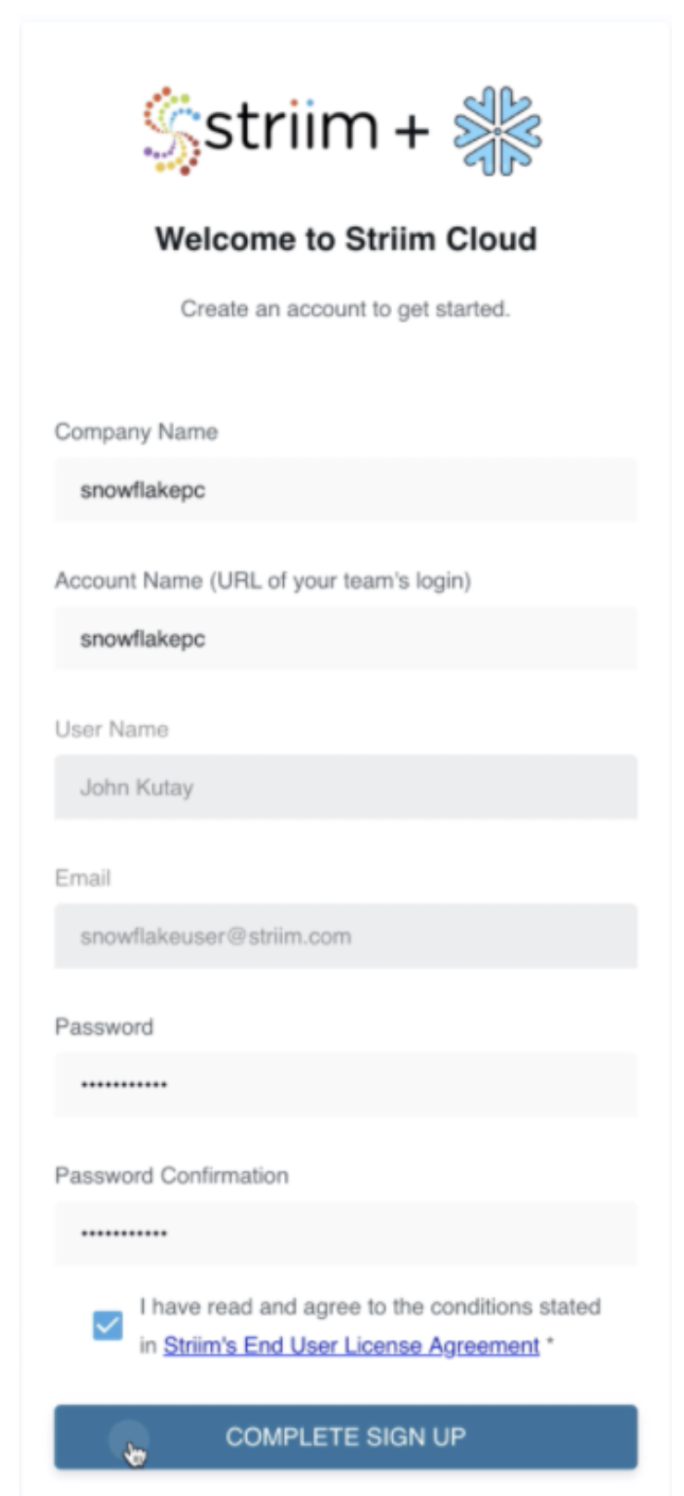
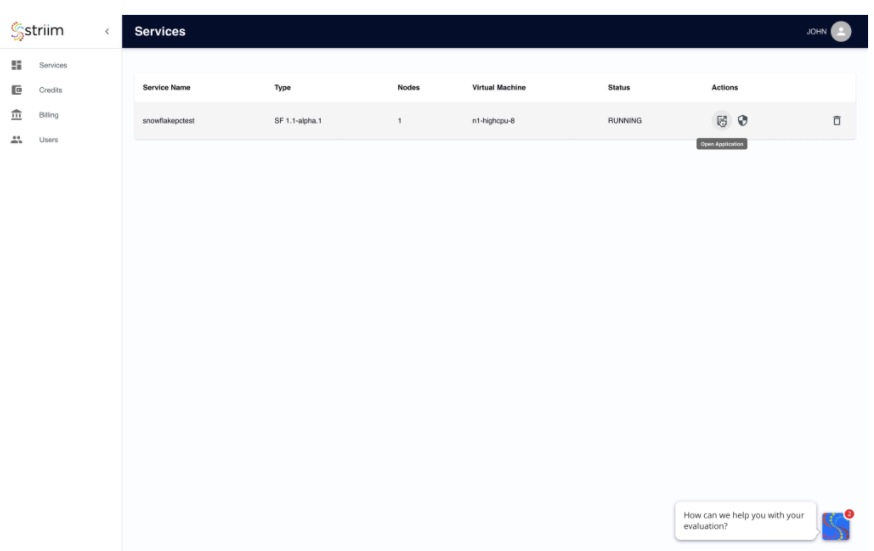
In the next window, you can launch Striim and sign up for a free trial.

Create your first Striim Service to move data to Snowflake.

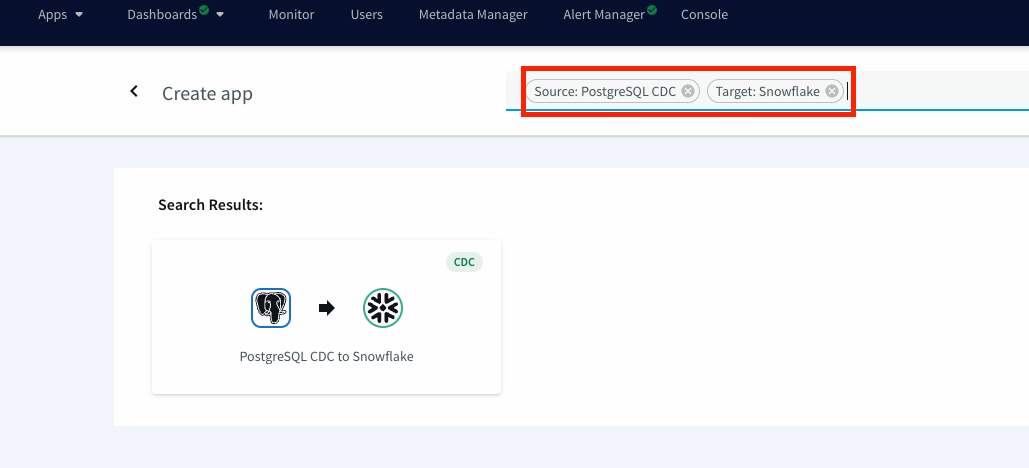
Launch the new service and use app wizard to stream data from PostgresCDC to Snowflake and Select Source and Target under create app from wizard:

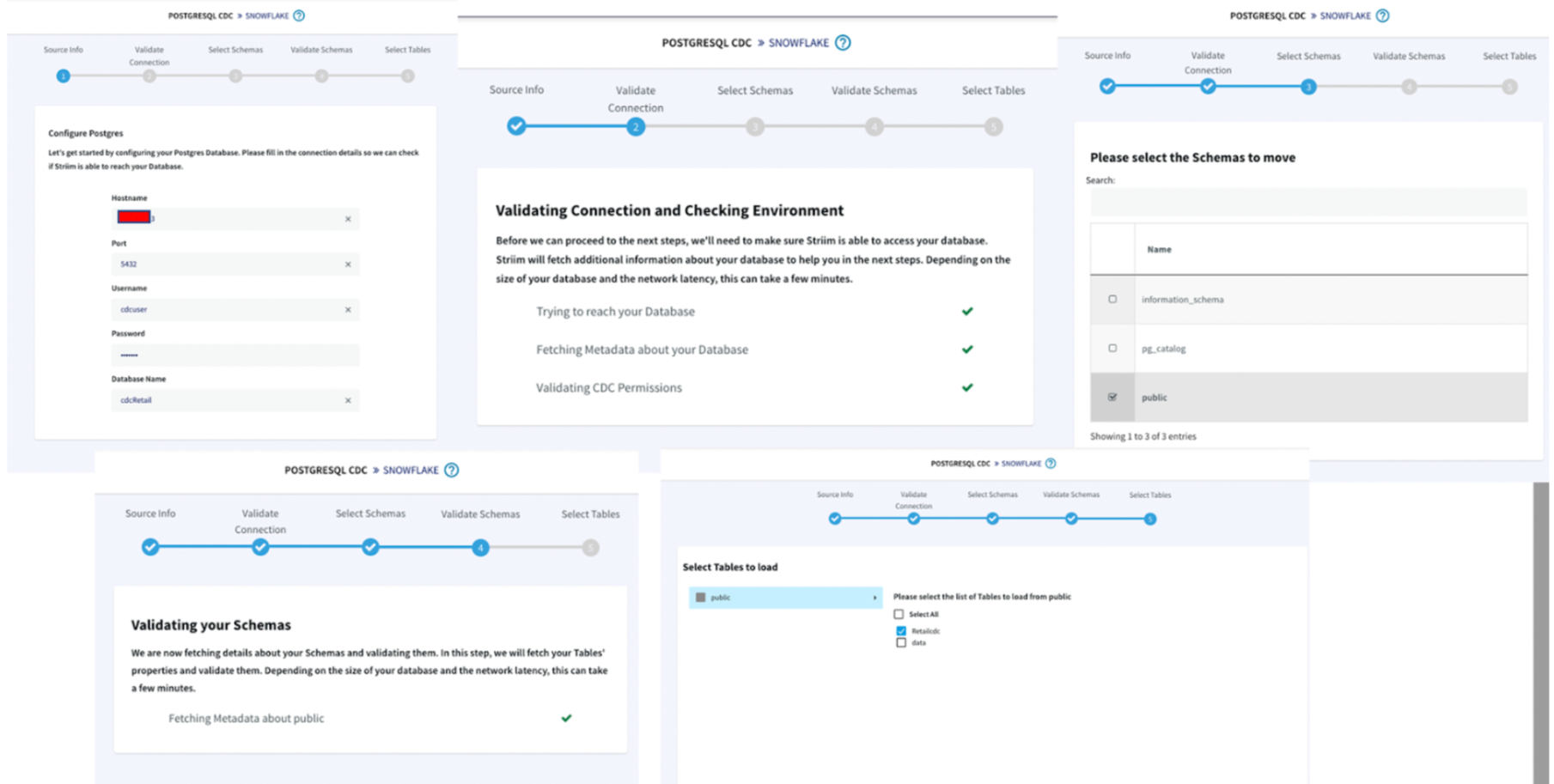
Give a name to your app and establish the connection between striim server and postgres instance.

Step 1 :

  • Hostname: IP address of postgres instance
  • Port : For postgres, port is 5432
  • Username & Password: User with replication attribute that has access to source database
  • Database Name: Source Database

Step 2 :The wizard will check and validate the connection between source to striim server

Step 3 :Select the schema that will be replicated

Step 4 :The selected schema is validated

Step 5 :Select the tables to be streamed

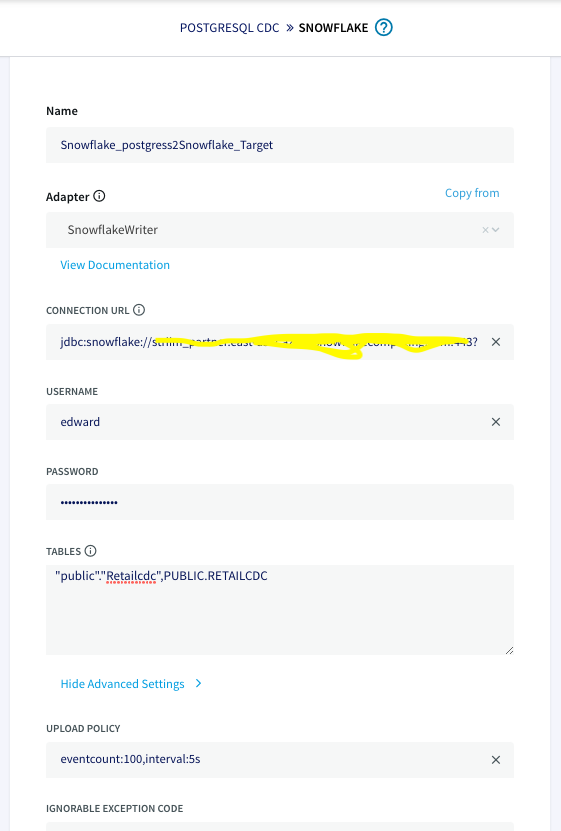
Once the connection with the source database and tables is established, we will configure the target where the data is replicated to.

The connection url has the following format:
jdbc:snowflake://YOUR_HOST-2.azure.snowflakecomputing.com:***?warehouse=warehouse_name &db=RETAILCDC&schema=public

After the source and targets are configured and connection is established successfully, the app is ready to stream change data capture on the source table and replicate it onto the target snowflake table. When there is an update on the source table, the updated data is streamed
through striim app to the target table on snowflake.

Step 2: Launch dbt cloud from Snowflake Partner Connect

Snowflake also provides dbt launches through Partner Connect. You can set up your dbt cloud account and project using this method. For more information on how to set up a fully fledged dbt account with your snowflake connection, managed repository and environments
please follow the steps in Snowflake’s dbt configuration page.

Step 3: Configure your project on cloud managed repository in dbt cloud

For information on how to set up the cloud managed repository, please refer to this documentation.

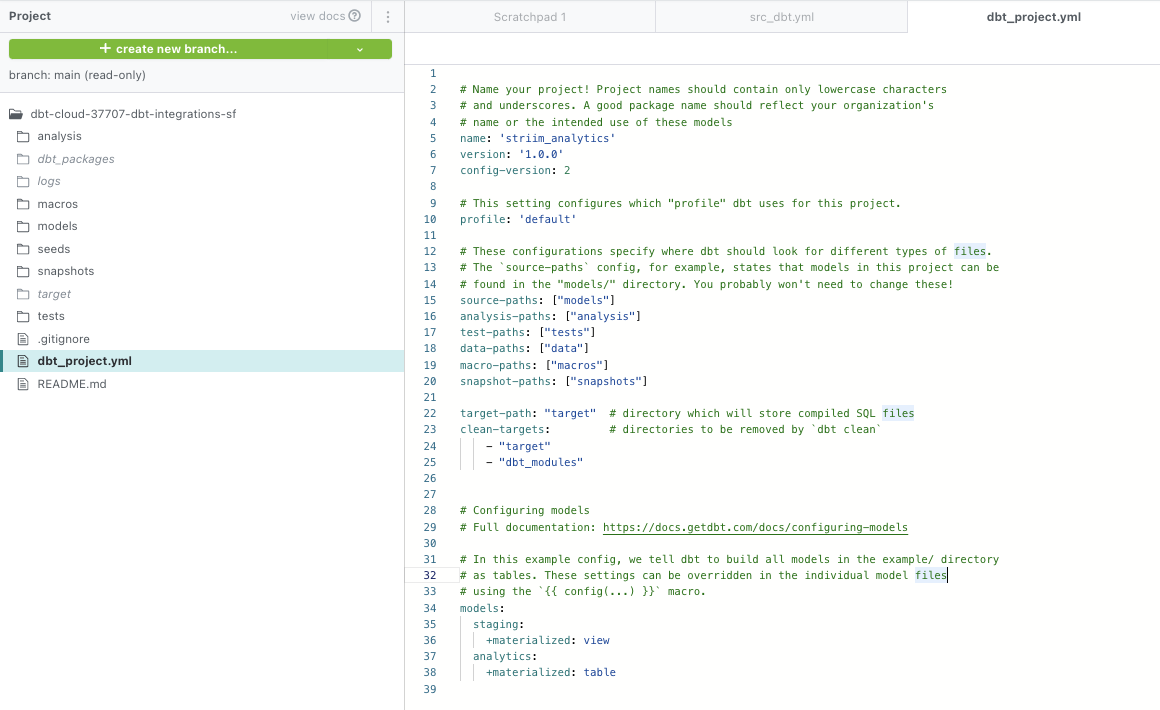
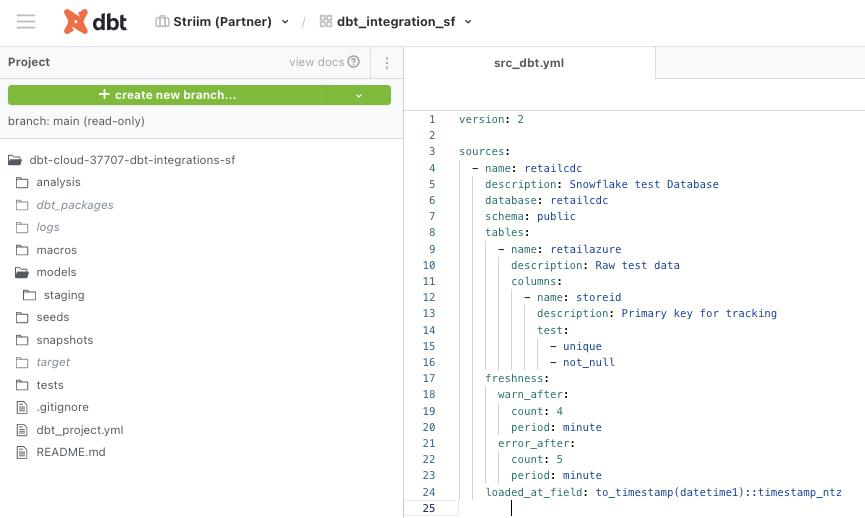
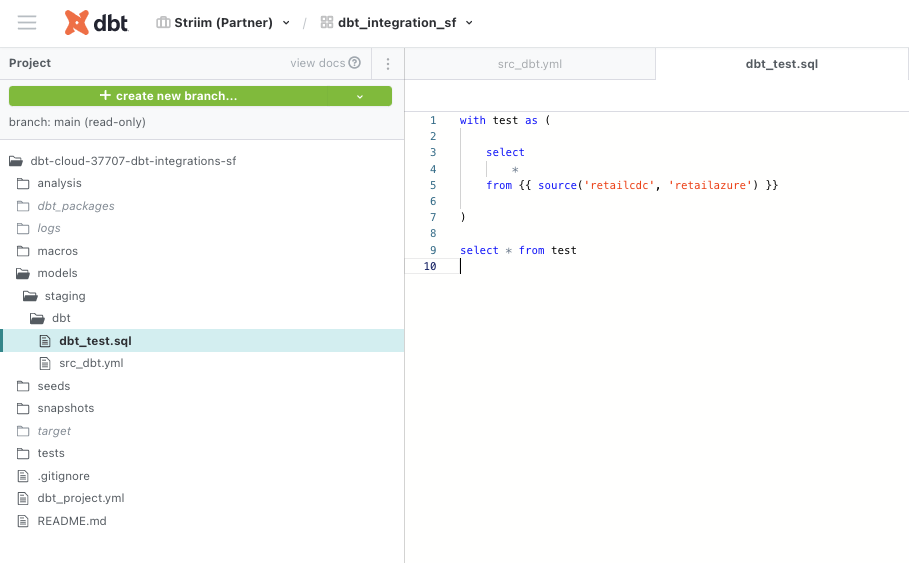
The dbt_project.yml, model yaml files and sql staging files for this project were configured as follows. Please follow this github repo  to download the code.

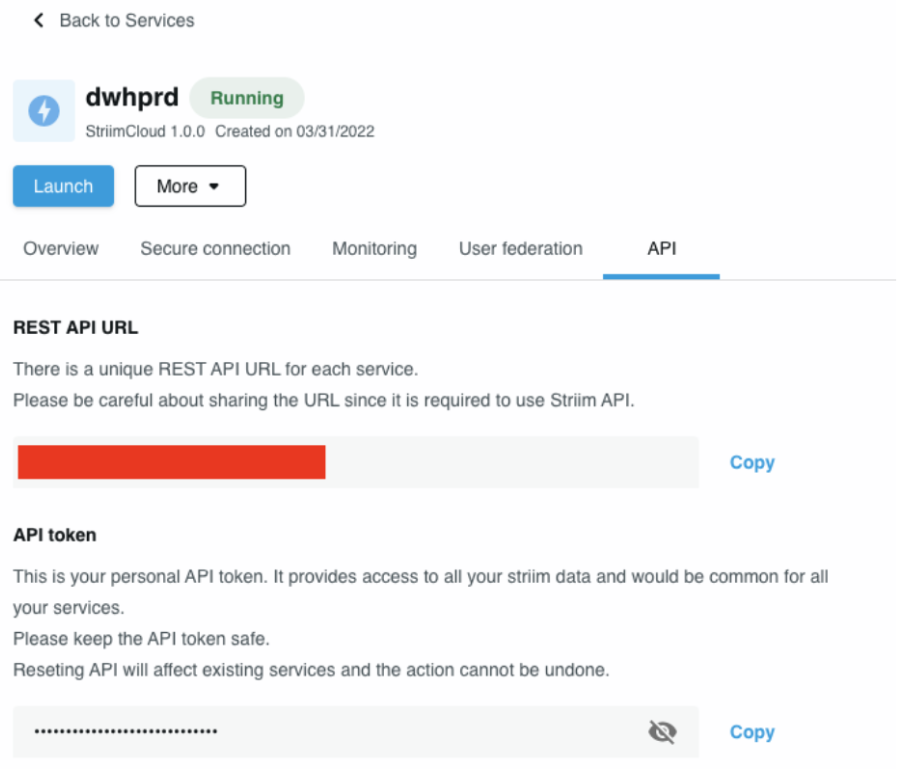
Step 4: Add Striim’s service API in the Python Script to fetch Striim app’s metadata

We will use python script to ping Striim’s service API to gather metadata from the Striim app. The metadata is compared against benchmarks to determine the SLAs defined for the project. The python script for this project can be downloaded from here.

In the python script, enter the REST API URL as connection url and source name in payload.

Step 5: Run the Python Script

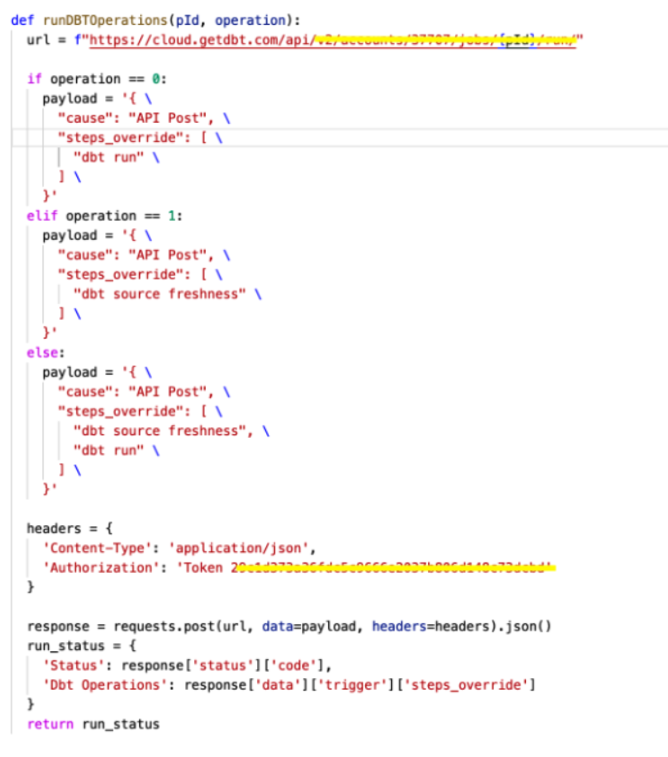
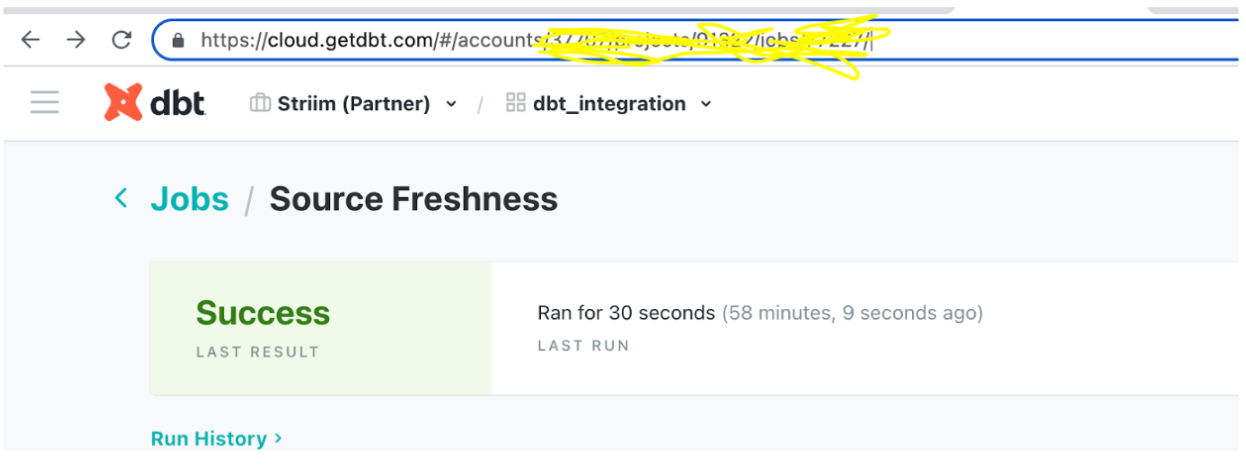
Once the dbt project is set up, the python script that hits the Striim Cloud Service url to get the metadata from striim server acts as a trigger to run dbt transformation and monitoring. To hit the dbt cloud API, the following commands are used. The account id and
job id can be retrieved from dbt cloud url. The authorization token can be found under API access on the left navigation bar.

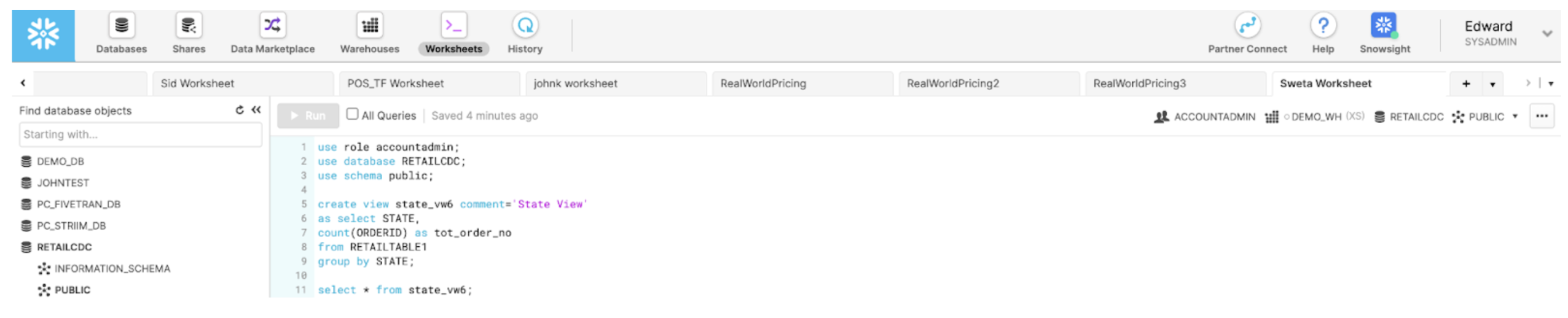
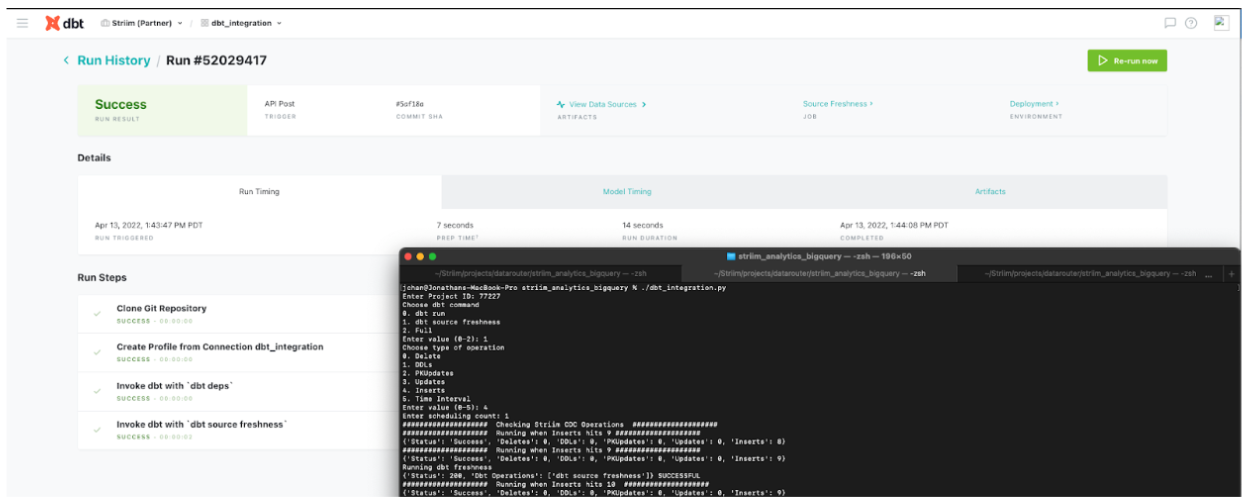
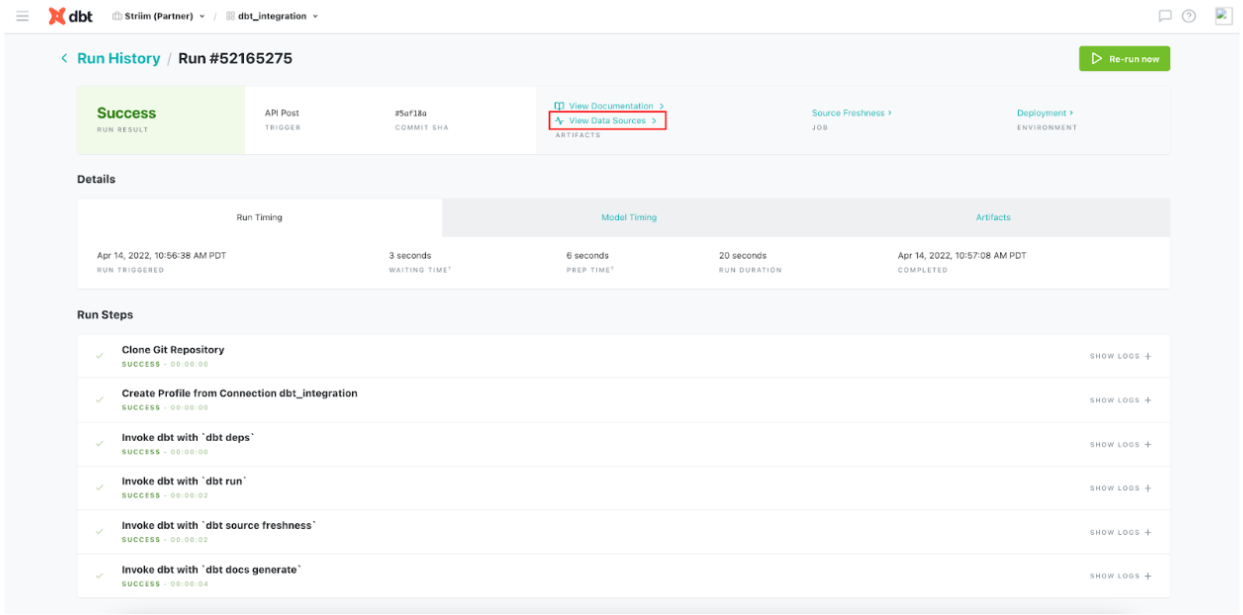
The following snapshots are from the dbt run that shows the inserts and source data freshness.

Enabling Source Freshness

To ensure you’re meeting data freshness SLAs for all your business stakeholders, you can monitor Source Freshness in dbt cloud.

Follow this document to enable source freshness of the real time data flowing from PostgreSQL through Striim to BigQuery. The source freshness snapshots can be checked under view data
source.

Video Walkthrough

Here is the video showing all the dbt run for the above tutorial.

https://www.youtube.com/watch?v=udzlepBexTM

Setting Up dbt and Striim

Step 1: Configure your dbt project

Configure your project on cloud managed repository in dbt cloud as shown in the recipe

Step 2: Edit the Python Script

Download the Python Script from our github repository and configure the endpoints

Step 3: Download TQL file

Download the TQL file and dataset from github repo and configure your source and target

Step 4: Run the Striim app

Deploy and run the Striim app for data replication

Step 5: Run the Python script

Run the Python Script and enable source freshness on dbt to monitor data SLAs

Wrapping Up: Start Your Free Trial

Our tutorial showed you how a striim app can run with dbt, an open source data transformation and monitoring tool. With this feature you can monitor your data without interrupting the real-time streaming through Striim. dbt can be used with popular adapter
plugins like PostgreSQL, Redshift, Snowflake and BigQuery, all of which are supported by Striim. With Striim’s integration with major databases and data warehouses and powerful CDC capabilities, data streaming and analytics becomes very fast and efficient.

As always, feel free to reach out to our integration experts to schedule a demo, or try Striim for free here.

Tools you need

Striim

Striim’s unified data integration and streaming platform connects clouds, data and applications.

Snowflake

Snowflake is a cloud-native relational data warehouse that offers flexible and scalable architecture for storage, compute and cloud services.

PostgreSQL

PostgreSQL is an open-source relational database management system.

dbt cloud

dbt™ is a transformation workflow that lets teams quickly and collaboratively deploy analytics code following software engineering best practices like modularity, portability, CI/CD, and documentation.

Back to top