6 Key Considerations for Selecting a Real-Time Analytics Tool 

In today’s world, analyzing data as it’s generated is a key commercial requirement. A survey by Oxford Economics found that only 42% of executives can use data for decision-making. The lack of data availability impedes an organization’s ability to use data to improve customer experiences and internal operations. 

A modern real-time analytics tool can empower businesses to make faster, well-informed, and more accurate decisions. By acting immediately on the information your data sources generate, these tools can improve the efficiency of your business operations. According to McKinsey, organizations adopting data analytics can improve their operating margins by 60%. However, choosing a real-time analytics tool can be tricky because one might not know what type of criteria to use while looking for a tool.

Your decision-making has a major impact on your organization’s operations for a long time, so you need a reliable real-time analytics tool to support it. Here are some considerations that can help in that regard. 

Non-intrusive collection of data from operational sources

Modern businesses often deal with data streams — the continuous flow of data generated by a wide range of operational data systems. For example, a retailer can analyze transactions in real time to see if there’s any insight that indicates credit card fraud.

An operational data system generates data related to a business’ day-to-day operations. This can simply be inventory data for a manufacturing plant or customer purchase data for a retailer. A real-time analytics solution needs to support the collection of these streams from their sources. 

For most businesses, data isn’t collected from a single source. Data are split into different sources based on different departments and their teams. Before performing real-time analytics on these data, you have to consolidate them into a single source of data. 

It’s also important to look into the change data capture (CDC) approach your tool uses to collect and update data. If it uses triggers, then it can affect the performance of the source system by requiring multiple write operations to the source system. This interference to the system’s performance can be removed by using a tool that supports log-based CDC

Unlike other CDC approaches, log-based CDC doesn’t affect the source system’s performance as it doesn’t scan operational tables. For this reason, you need a real-time analytics solution that provides non-intrusive data collection from multiple operational sources. 

Pre-built data connectors to get real-time data from multiple sources

A data connector is a software or process that can transfer data from a data source to a destination. For example, if you are looking to collect real-time data about customer metrics (e.g., customer effort score) and analyze them to improve your customer experiences, then you need a data connector to collect that data from your CRM and send them to a data warehouse. Over time, your data engineers can spend a lot of their time working on custom data connectors. 

As an organization scales up, there comes a time when it becomes hard to manage data extraction from sources to the data warehouse. That’s because it also exponentially increases the number of required custom connectors, which increases the burden on the data engineering team. A real-time analytics solution that comes with pre-built data connectors can solve this problem. 

Building connectors by yourself can take considerable time. Things don’t end with the development of connectors; you also have to maintain them. A tool with pre-built connectors can eliminate this burden. Pre-built connectors are designed to ensure that end-users can add or remove data sources with a few clicks without requiring help from specialists. Your development team can then focus their time on other critical tasks, such as creating dashboards or building machine learning algorithms.

Data freshness SLAs to build trust among business users

A service level agreement (SLA) is a contract between two parties that defines the standard of service that a vendor will deliver. SLAs are used to set realistic and measurable expectations for customers.

Similarly, you need an SLA that can set clear expectations regarding your tool’s data freshness. Data freshness is necessary because business users need to know that the data they are using to make reports or decisions aren’t outdated. A data freshness SLA is a guarantee that can help to build that trust. 

Data freshness means how up-to-date or recent the data are. Data can be updated every day, every hour, or every few seconds. A data freshness SLA is a contract that an organization signs with the vendor. It describes how recent data are being delivered by the tool to the target users.

In-flight data transformations to organize information

Around 90% of the data produced every day are unstructured. To make this data organized and meaningful, organizations need to apply data transformations. For this purpose, you need to look for a tool that can transform data in motion. 

Data transformation converts data from one format to another format that is compatible with the target application or system. Companies perform data transformation for different reasons, such as changing the formatting. The basic data transformations include: 

  • Joining: Combining data from two or more tables. 
  • Cleaning: Removing duplicate or incomplete values. 
  • Correlating: Showing a meaningful relationship between metrics. 
  • Filtering: Only selecting specific columns to load. 
  • Enriching: Enhancing information by adding context. 

Often businesses fail to derive value from raw data. Data transformation can help you to extract this value by doing the following:

  • Adding contextual information to your data, such as timestamps. 
  • Performing aggregations, such as comparing sales from two branches. 
  • Making your data usable while sending it to a data warehouse by changing its data types, so the latter’s users can view it in a usable format. 

Streaming analytics and delivery to get real-time insights

Streaming analytics refers to analyzing data in motion in real time, which can be used to derive business insights. It relies on continuous queries for analyzing data from different sources. Examples of this streaming data include web activity logs, financial transactions, and health monitoring systems. 

Streaming analytics are important because they help you to predict and identify key business events as soon as they happen, enabling you to maximize gain and minimize risk. For example, streaming analytics can be used in advertising campaigns where it can analyze user interest and clicks in real time and show sponsored ads accordingly. 

Once your tool is done performing analytics, it needs to send fresh data to your target systems, which can be a CRM, ERP, or any other operational system. 

Choose a real-time analytics tool that delivers all of these features

It’s no longer good enough to have a real-time analytics tool that performs some of these operations. As data increases in volume and speed across different industries, you need all the features above to get maximum value out of analytics. One of the tools that is equipped with all these features is Striim.   

Build smart data pipelines with Striim
Striim is a unified real-time data streaming and integration platform that makes it easy to build Smart Data Pipelines connecting clouds, data, and applications.

Striim supports real-time data enrichment, which other tools like Fivetran and Hevo Data don’t offer. Similarly, tools like Qlik Replicate only support a few predefined data transformations, whereas Striim allows you to not only build complex in-flight data transformations but also filter logic with SQL. Sign up for a demo right now to learn more about how Striim can help you generate valuable business insights. 


The Modern Data Divide with Arpit Choudhury

We host Arpit Choudhury – well known for his work in building data communities such as Astorik.com – to talk about the ‘modern data divide’ and how to overcome friction between data people and non-data people. Arpit also talks about the value of ‘all in one’ tools versus having a multivariate modern data stack. Follow Arpit Choudhury on Linkedin and check out his community of data practitioners at Astorik.com

Oracle Change Data Capture to Databricks

Tutorial

Oracle Change Data Capture to Databricks

Benefits

Migrate your database data and schemas to Databricks in minutes.

Stream operational data from Oracle to your data lake in real-time

Automatically keep schemas and models in sync with your operational database.

On this page

We will go over two ways on how to create smart pipelines to stream data from Oracle to Databricks. Striim also offers streaming integration from popular databases such as PostgreSQL, SQLServer, MongoDB, MySQL, and applications such as Salesforce to Databricks Delta Lake.

In the first half of the demo, we will be focusing on how to move historical data for migration use cases, which are becoming more  and more common as many users start moving from traditional on-prem to cloud hosted services.

Striim is also proud to offer the industry’s fastest and most scalable Oracle change data capture to address the most critical use cases.

Striim makes initial load, schema conversion, and change data capture a seamless experience for data engineers.

In a traditional pipeline approach, there are times we would have to manually create the schema either through code or infer the schema from the csv file etc.

And next, configure the connectivity parameters for the source and target.

Striim offers the ability to reduce the amount of time and manual effort  when it comes to setting up these connections and also creates the schema at the target with the help of a simple wizard.

Here we have a view of the databricks homepage with no schema or table created in the DBFS.

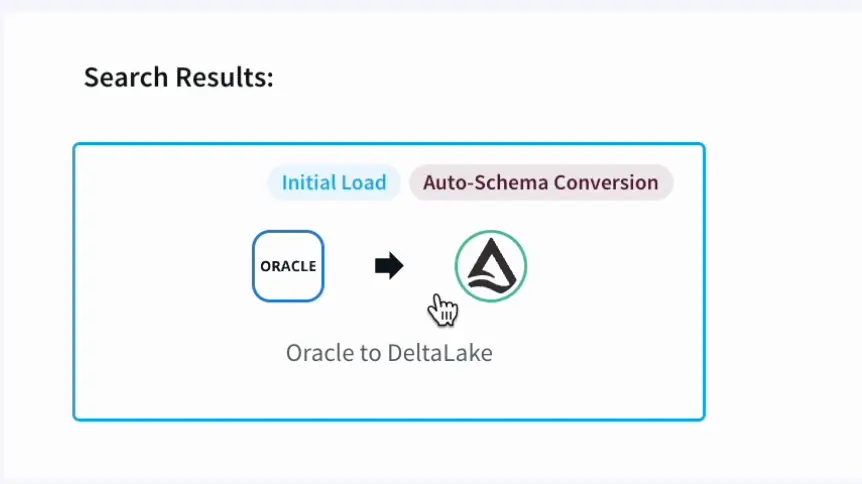
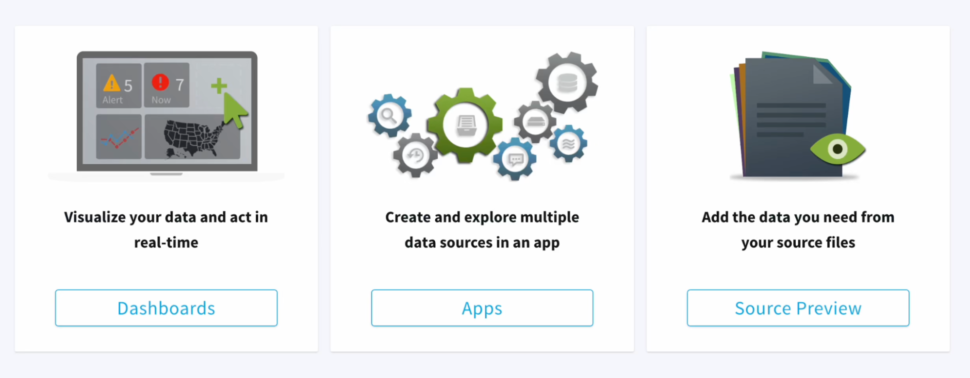
In the Striim UI, under the ‘Create app’ option, we can choose from templates offered for a wide array of data sources and targets.

With our most recent 4.1 release, we have also support the Delta Lake adapter as a Target datasink.

Part 1: Initial Load and Schema Creation

In this demo, we will be going over on how to move historical data from Oracle to Databrick’s Delta lake.

  1. With the help of Striim’s Intuitive Wizard we name the application,
    With the added option to create multiple namespaces depending on our  pipelines needs and requirements
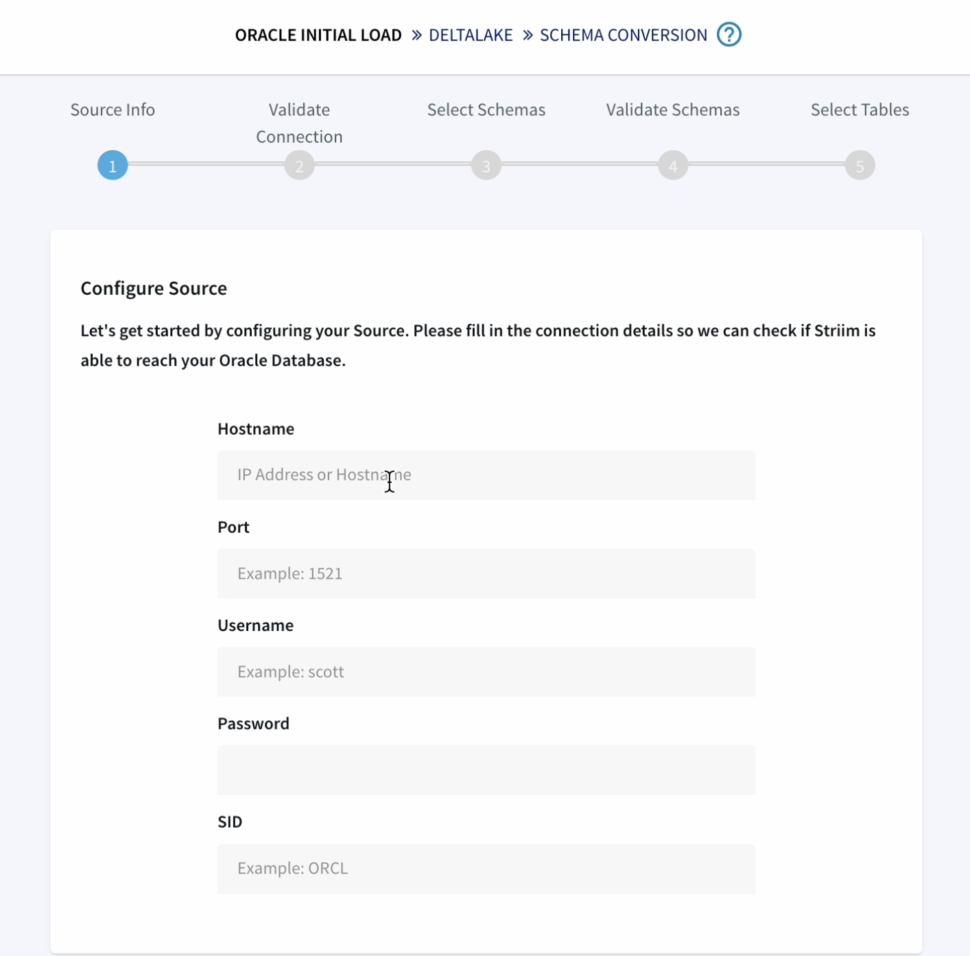
  2. First we configure the source details for the Oracle Database.
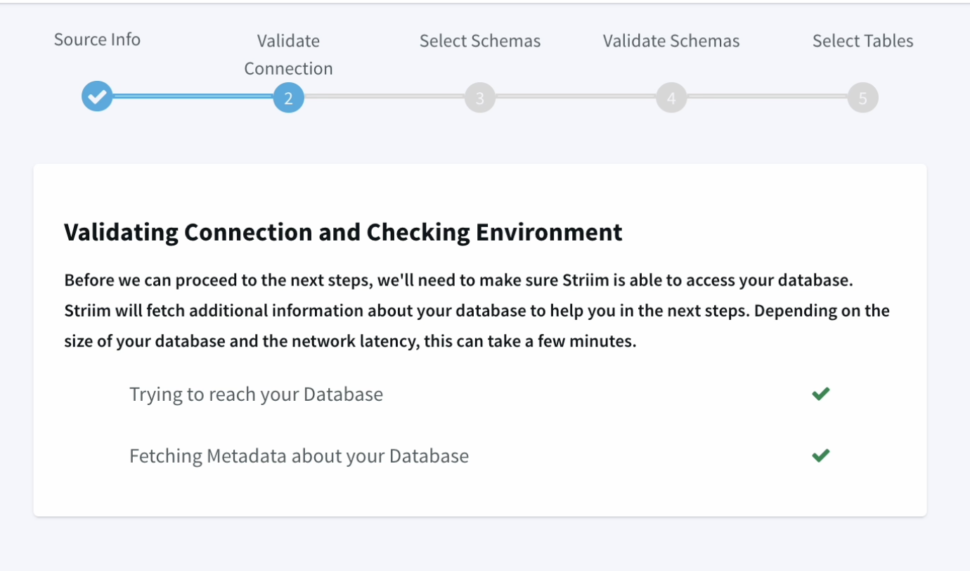
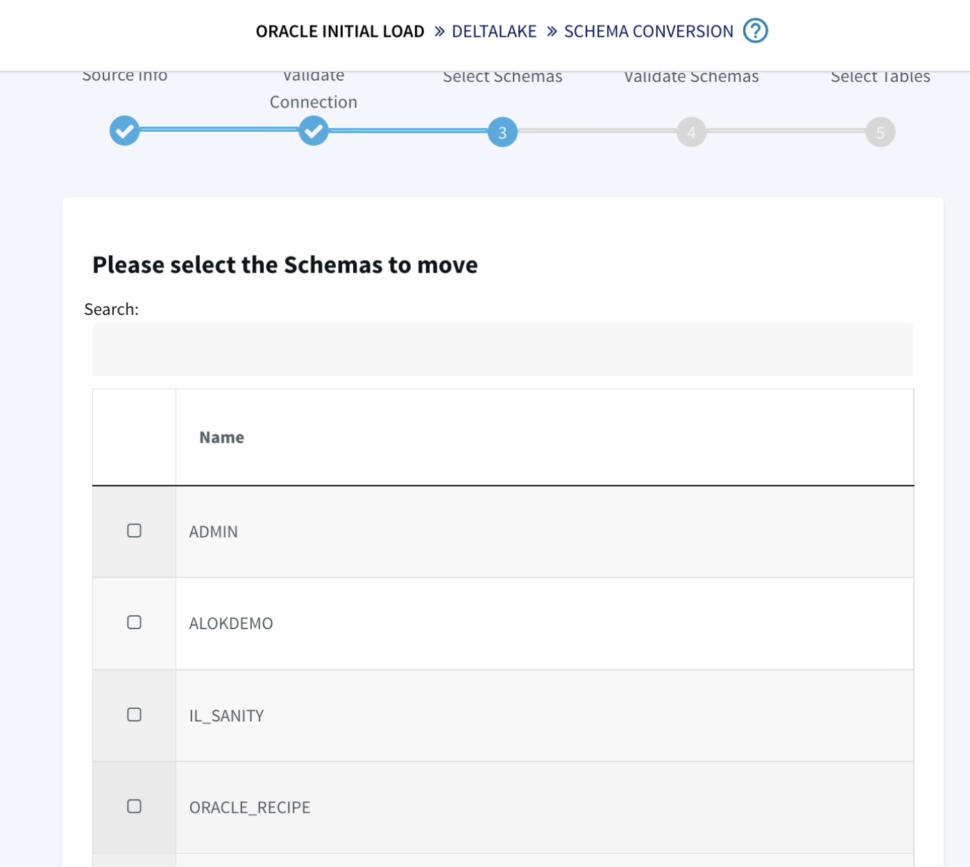
  3. We can validate our connection details
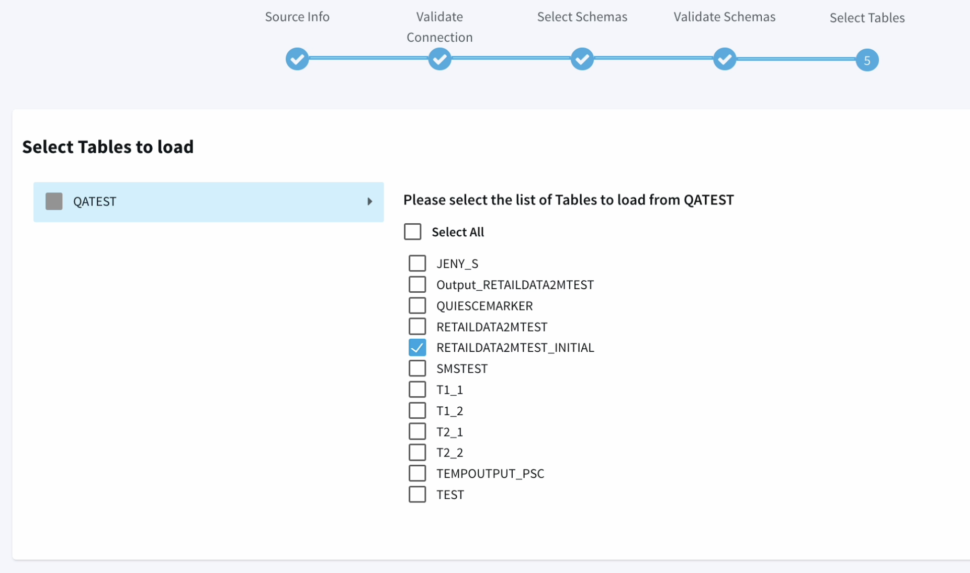
  4. Next we have to option to choose the schemas and tables that we specifically want to move, providing us with more flexibility instead of replicating the entire database or schema.
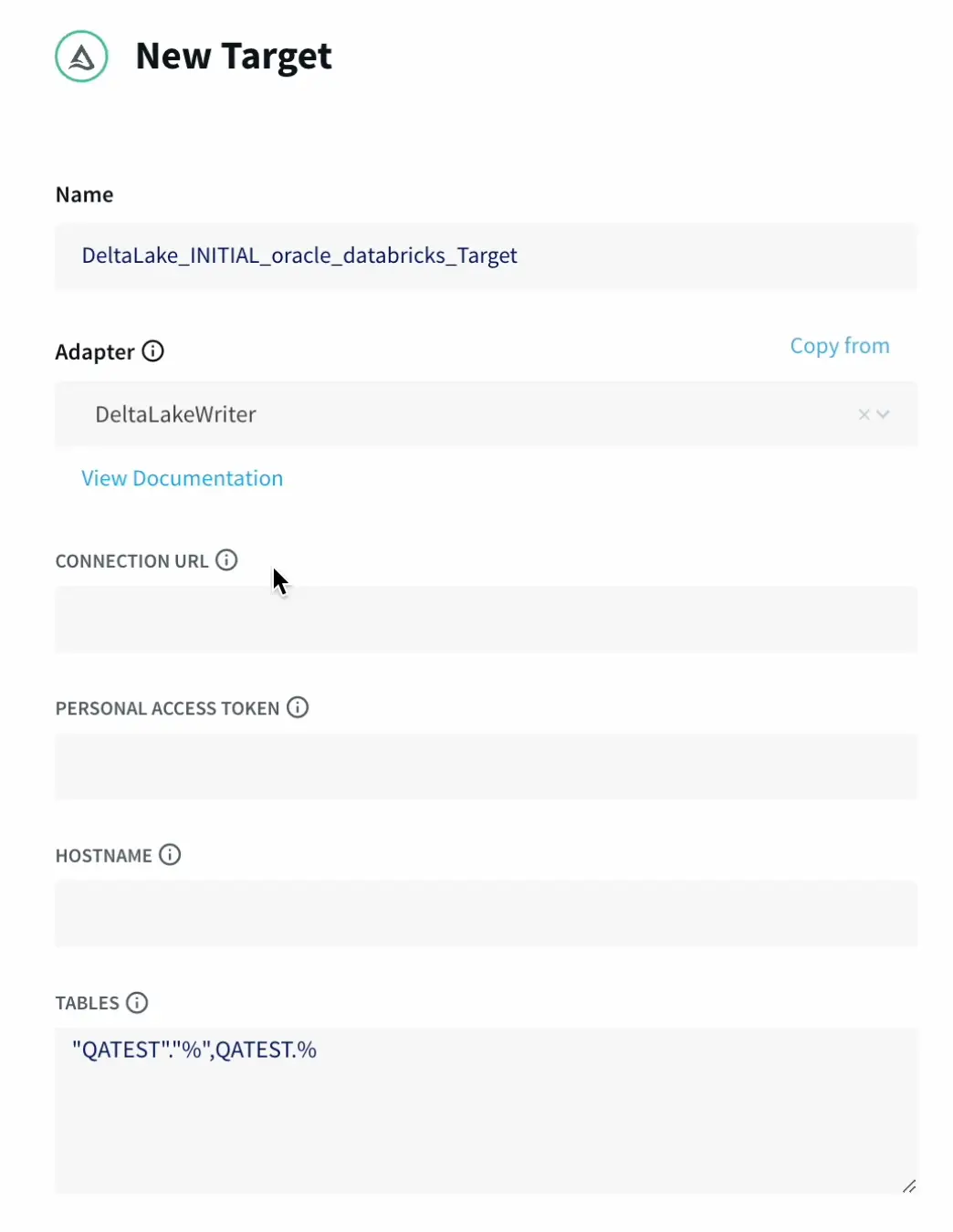
  5. Now we can start to configure our target Delta Lake.
    Which supports ACID transactions, scalable metadata handling, and unifies streaming and batch data processing.
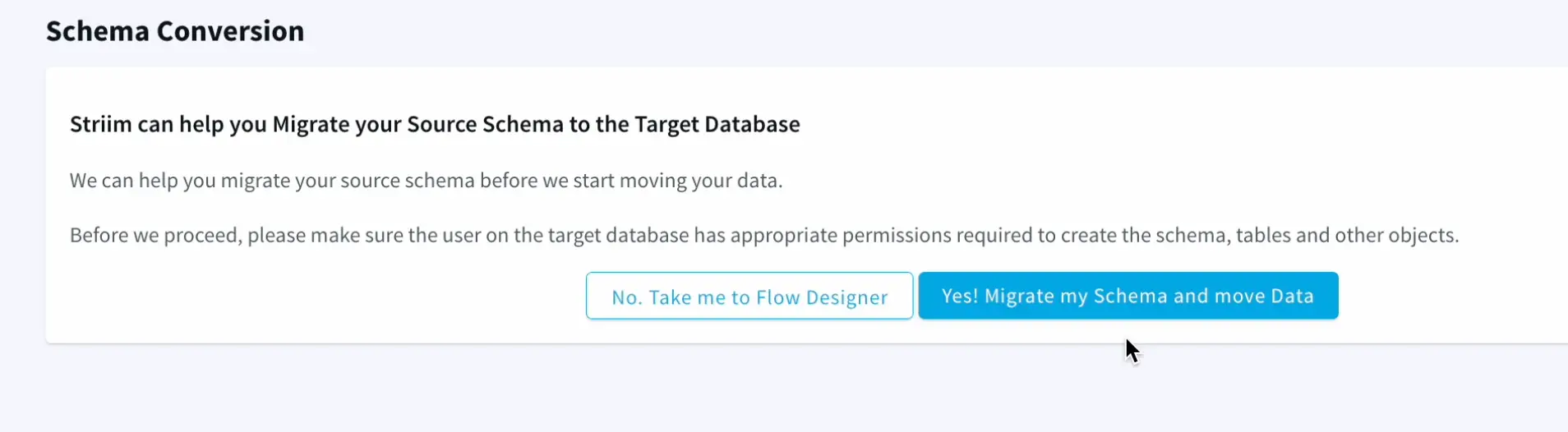
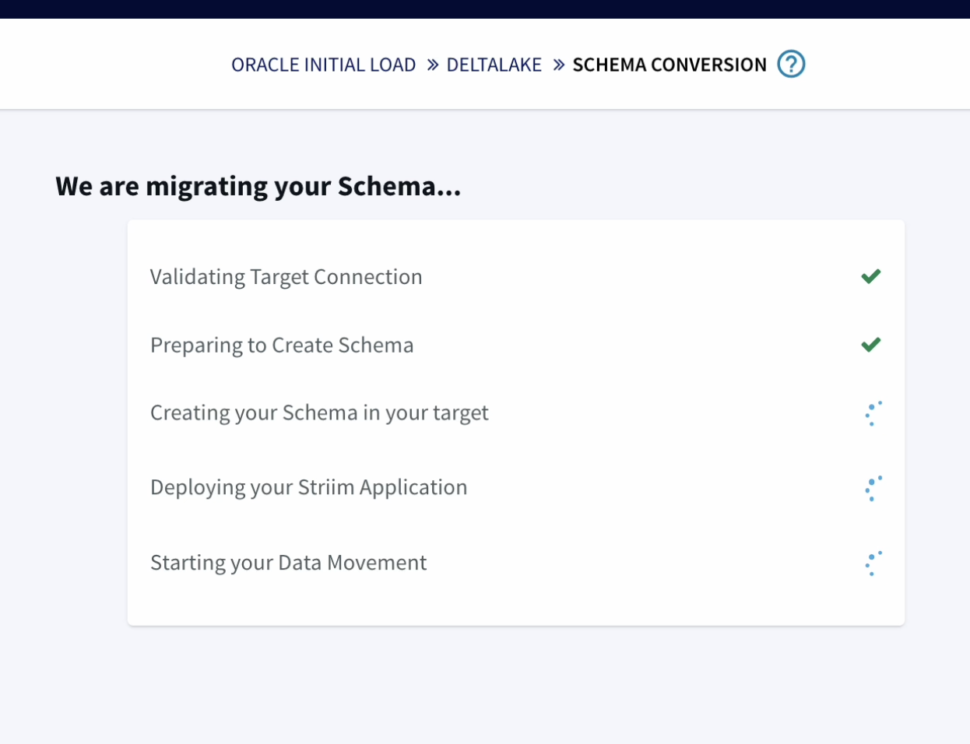
  6. Striim has the capability to migrate schemas too as part of the wizard which makes it very seamless and easy.
  7. The wizard takes care of validating the target connections, using the oracle metadata to create schema in the target and initiate the historical data push to delta lake as well.

    Making the whole end to end operation finish in less then a fraction of the time it would take with traditional pipelines.

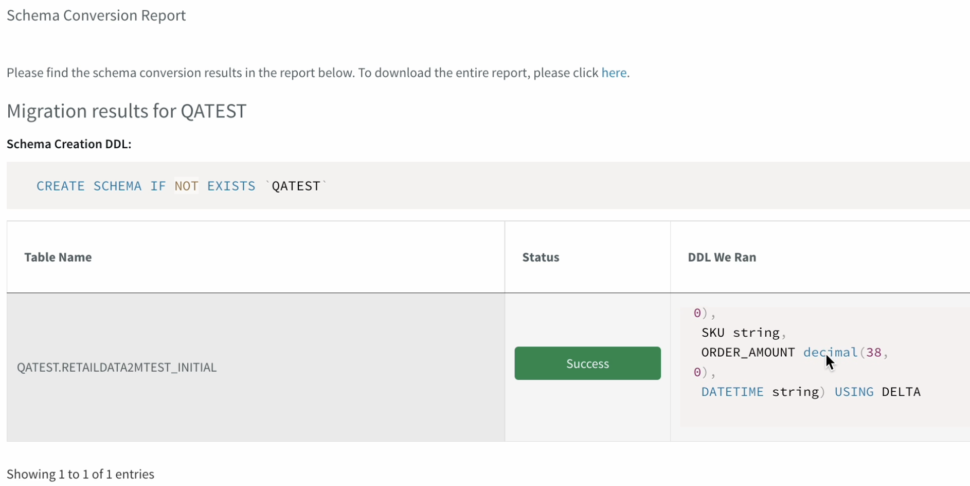
    Once the schema is created,  we can also verify  it before we go ahead with the migration to Delta lake

  8. Striim’s unified data integration provides unprecedented speed and simplicity which we have just observed on how simple it was to connect a source and target.
    In case, we want to make additional changes to the Fetch size, provide a custom Query. The second half of the demo highlights , how we can apply those changes without the wizard.
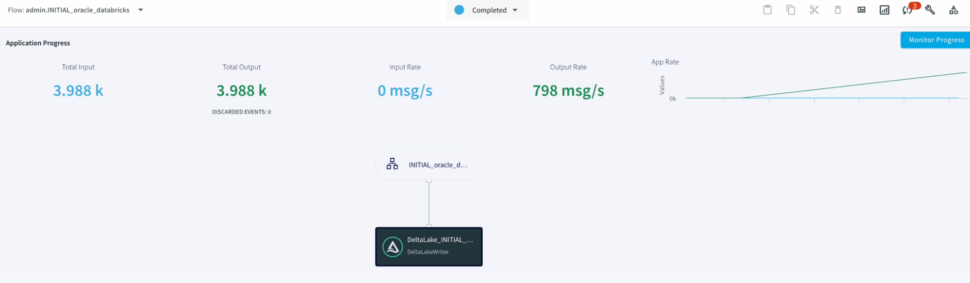
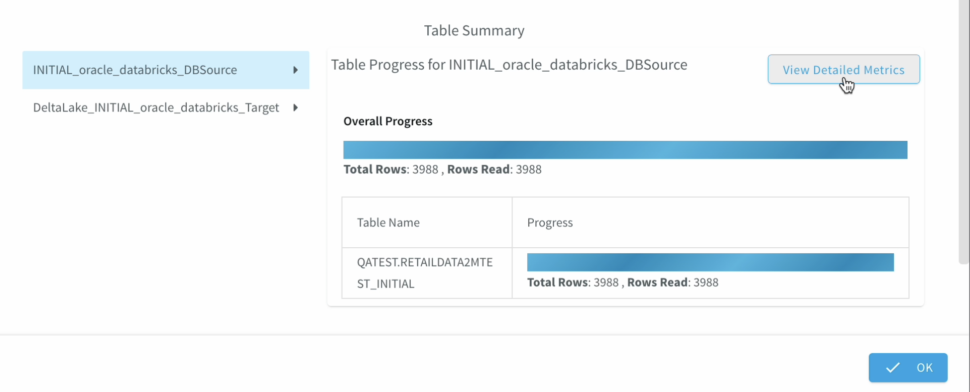
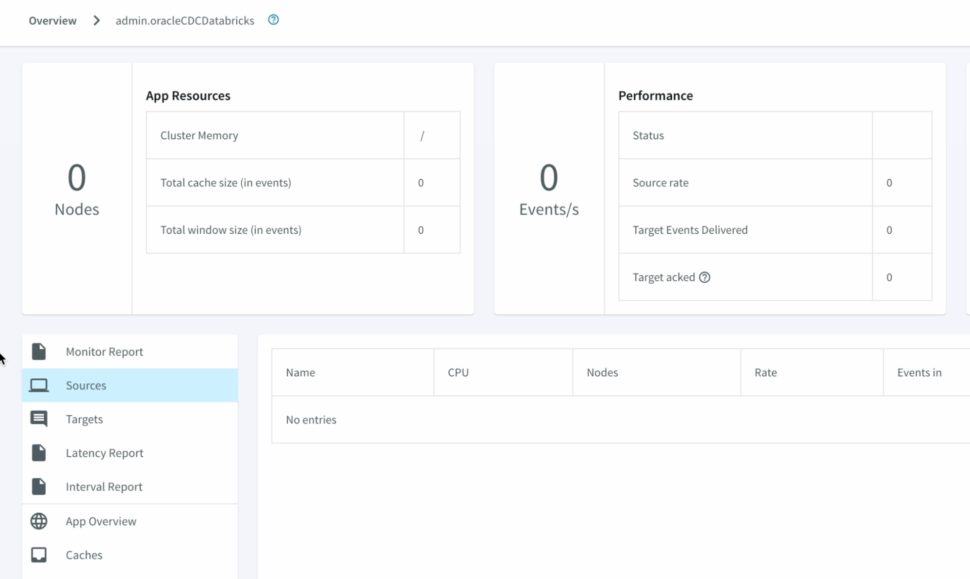
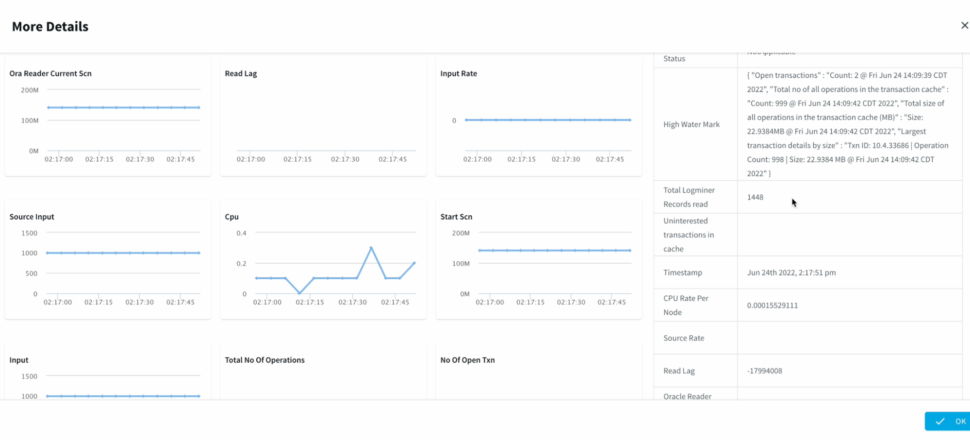
  9. We can Monitor the progress of the job with detailed metrics which would help with the data governance to ensure data has been replicated appropriately.

Part 2: Change Data Capture

As part of our second demo, we will be highlighting Striim’s Change data Capture that helps drive Digital transformation and leverage true real time analytics.

  1. Earlier we have gone through how to create a pipeline through the wizard, and Now we will have a look at how we can tune our pipeline without the wizard and use the intuitive drag and drop flow design

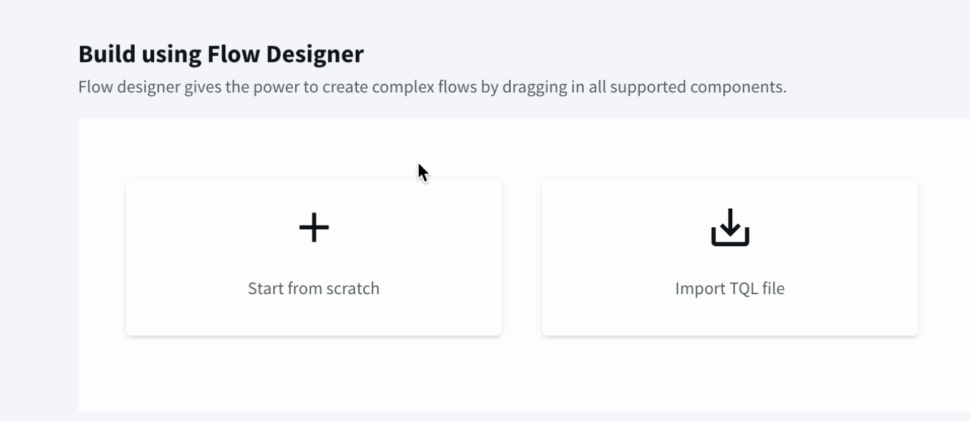
    From the Striim dashboard , we can navigate the same way as earlier to create An Application from scratch or also import a TQL file if we already have a pipeline created.
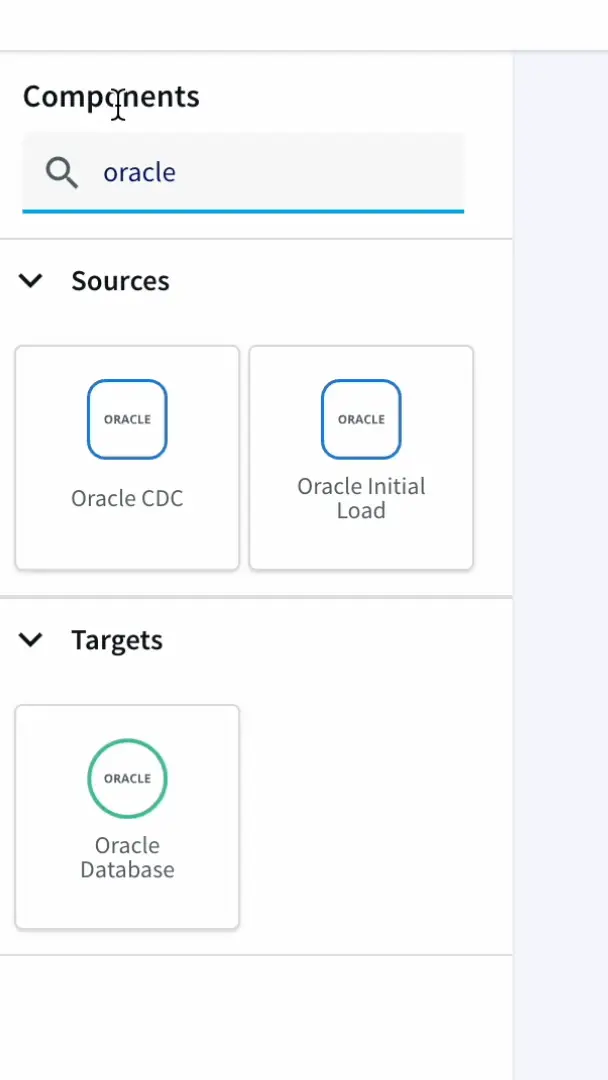
  2. From the search bar, we can search for the oracle CDC adapter. The UI is super friendly with an easy drag and drop approach.
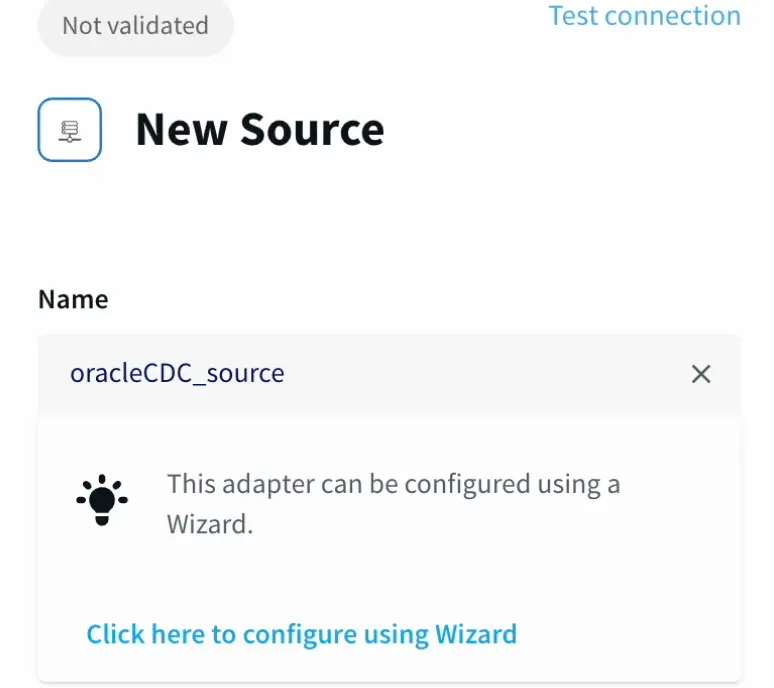
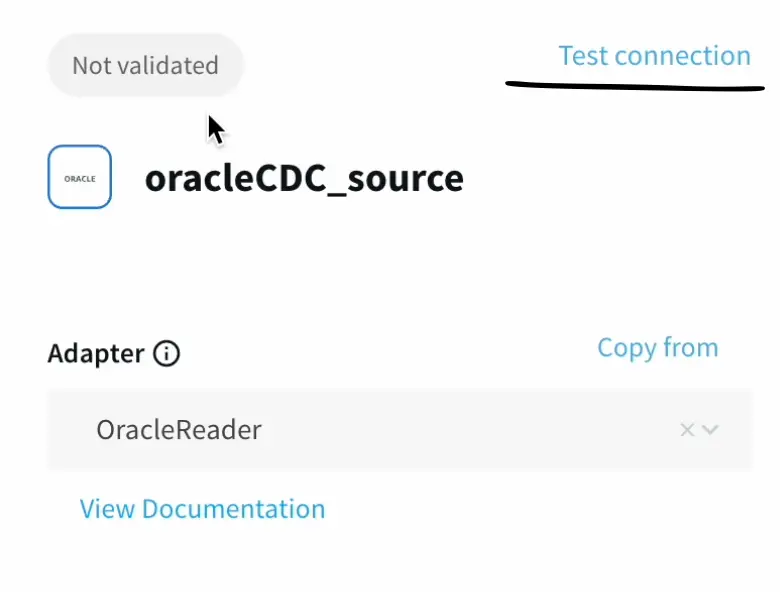
  3. We can skip the wizard if we want and go ahead and enter the connection parameters like earlier.
  4. In the additional parameters, we have the flexibility to make any changes to the data we pull from the source.

    Lastly, we can create an output stream that will connect to the data sink

    We can test connections and validate our connections even without deploying the app or pipeline.

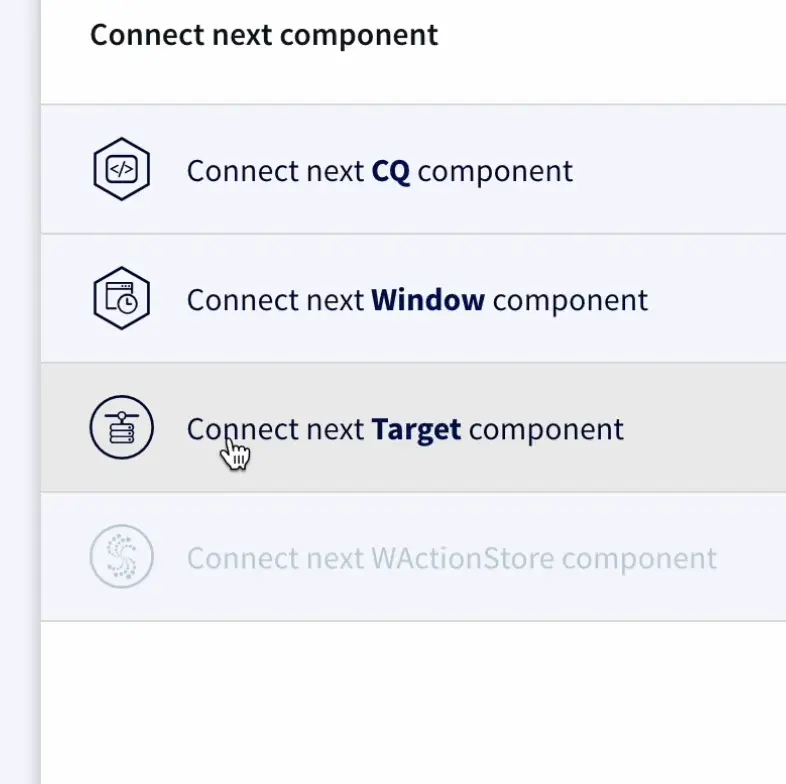
  5. Once the source connection is established , we can connect to a target component, and select the delta Lake adapter from the drop down.
  6. Databricks has a unified approach to its design that allows us to bridge the gap between different types of users ranging from Analysts, Data Scientists, and Machine Learning Engineers.

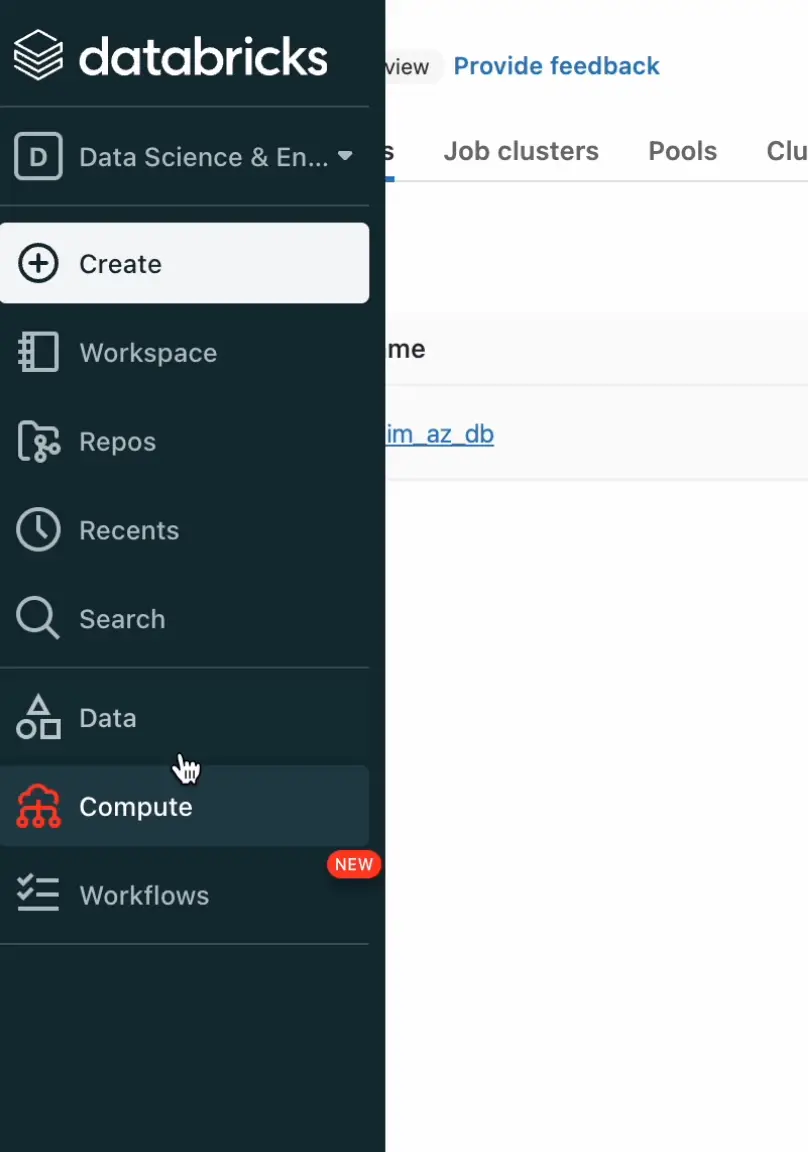
    From the Databricks dashboard, we can navigate to the Compute section to access the cluster’s connection parameters.

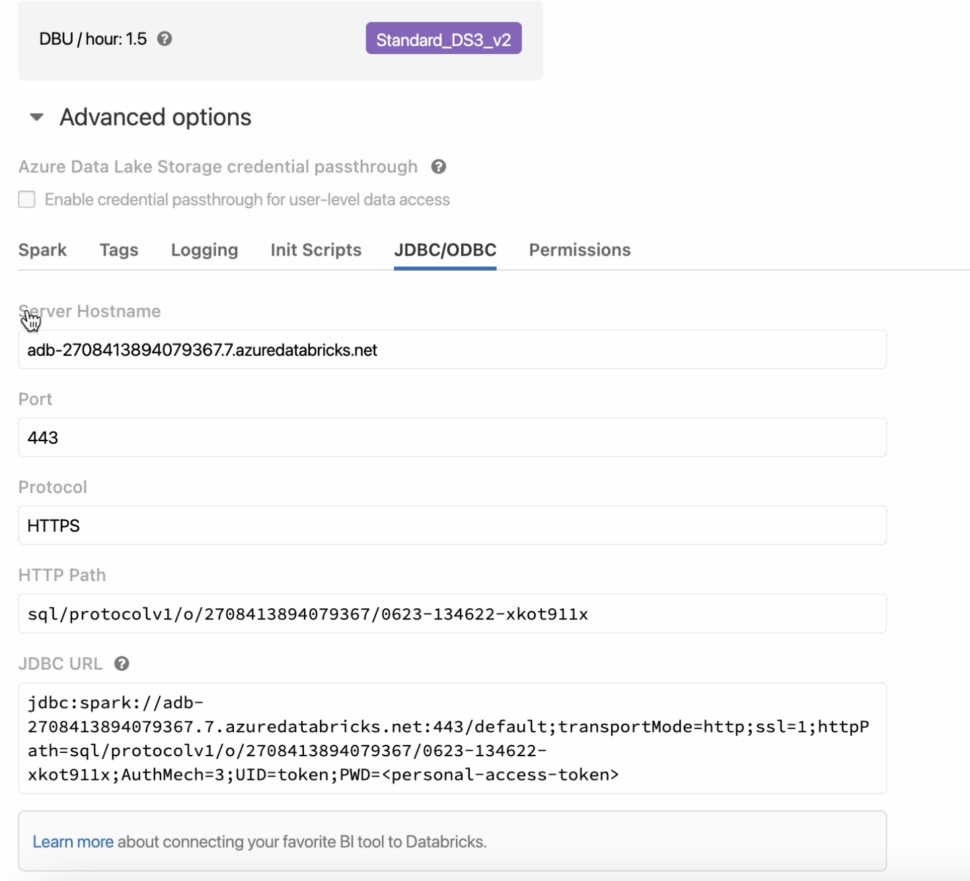
  7. Under the advanced settings, select the JDBC/ODBC settings to view the cluster’s Hostname and JDBC URL.
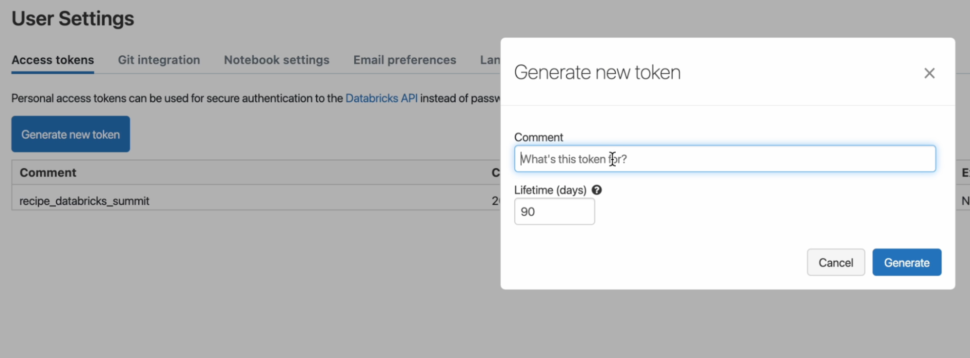
  8. Next, we can go ahead and generate a Personal access token that will be used to authenticate the user’s access to DatabricksFrom the settings, we can navigate to the user’s settings and click on Generate a new token.
  9. After adding the required parameters, we can go ahead and create the directory in DBFS through the following commands in a notebook
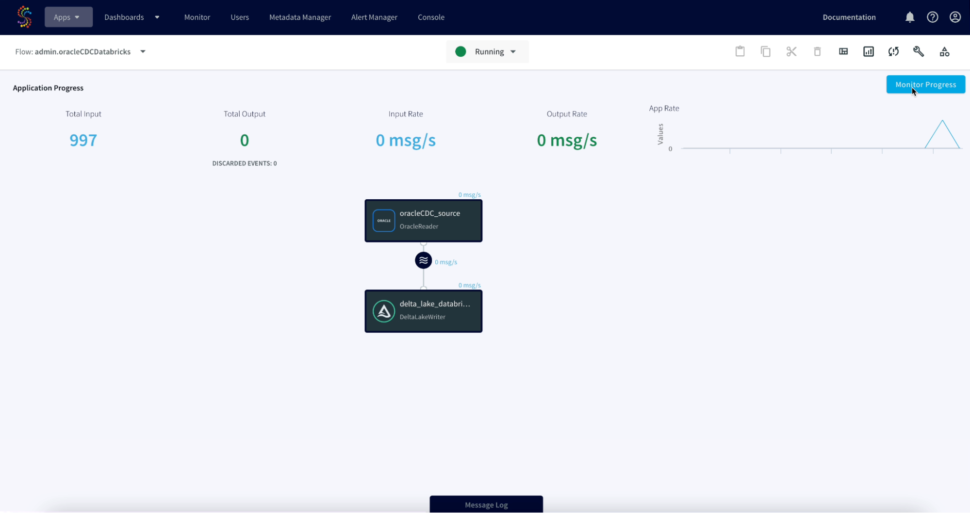
  10. Next, we can go ahead and deploy the app and start the flow to initiate the CDC.
  11. We can refresh Databricks to view the CDC data, Striim allows us to view the detailed metrics of a pipeline in real-time.

Tools you need

Striim

Striim’s unified data integration and streaming platform connects clouds, data and applications.

Striim_Partner_Databricks_color

Databricks

Databricks combines data warehouse and Data lake into a Lakehouse architecture

Oracle

Oracle is a multi-model relational database management system.

Delta Lake

Delta Lake is an open-source storage framework that supports building a lakehouse architecture

Conclusion

Managing large-scale data is a challenge for every enterprise. Real-time, integrated data is a requirement to stay competitive, but modernizing your data architecture can be an overwhelming task.

Striim can handle the volume, complexity, and velocity of enterprise data by connecting legacy systems to modern cloud applications on a scalable platform. Our customers don’t have to pause operations to migrate data or juggle different tools for every data source—they simply connect legacy systems to newer cloud applications and get data streaming in a few clicks.

Seamless integrations. Near-perfect performance. Data up to the moment. That’s what embracing complexity without sacrificing performance looks like to an enterprise with a modern data stack.

Use cases

Integrating Striim’s CDC capabilities with Databricks makes it very easy to rapidly expand the capabilities of a Lakehouse with just a few clicks.

Striim’s additional components allow not only to capture real-time data, but also apply transformations on the fly before it even lands in the staging zone, thereby reducing the amount of data cleansing that is required.

The wide array of Striim’s event transformers makes it as seamless as possible with handling any type of sensitive data allowing users to maintain compliance norms on various levels.

Allow high-quality data into Databricks which can then be transformed via Spark code and loaded into Databrick’s new services such as Delta Live tables.

How to Stream Data to Google Cloud with Striim


06_16_Tech Webinar_Dark_Blue

The move to Google Cloud is an attractive path for data modernization and for achieving a solid foundation for digital transformation. Real-time data integration allows you to run high-value workloads in the cloud and reap the full benefits of your cloud environment to improve your business operations and embrace innovation. As with adopting any new technology, there is complexity in the move and a number of things to consider, especially when dealing with mission-critical systems.

In this on-demand technical demo, Fahad Ansari and Srdan Dvanajscak show you how to stream data from an Oracle database to Google BigQuery and other Google Cloud targets with Striim. They demonstrate how Striim enables you to:

  • Ingest data from in-production sources with negligible impact
  • Make your operational data available immediately for applications and services on the Google Cloud
  • Process and analyze in-flight data using SQL queries and UI-based operators

Striim Platform 4.1: Another big step forward

We are pleased to announce the release of Striim Platform 4.1, the latest version of Striim’s flagship real-time streaming and data integration platform.  Our releases incorporate feedback from our customers in terms of new features, enhancements to existing features, and bug fixes.  We have centered Striim 4.1. around the themes of scalability, performance, and automation.  

3 new data adapters

We have introduced 3 new data adapters and 1 new parser in Striim 4.1 to support customers’ high-performance applications and workflows that process large volumes of data. With these new adapters and parsers, Striim now supports over 125 types of readers and writers.

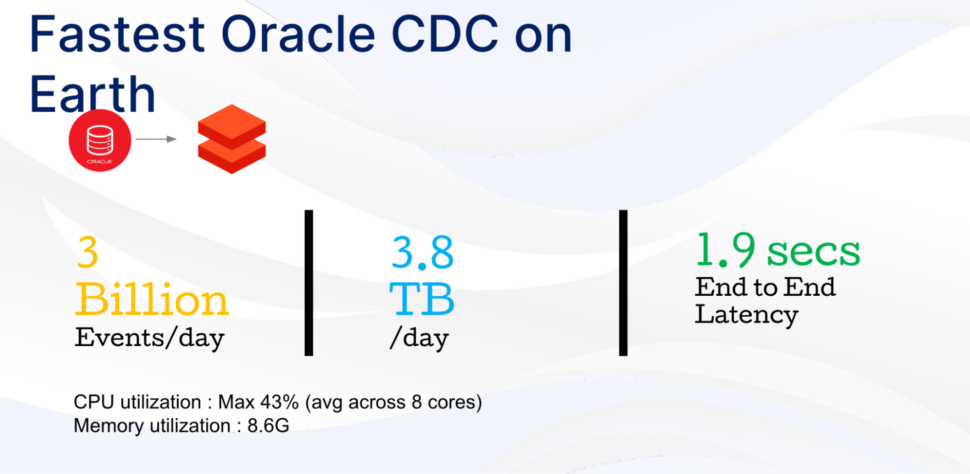
  1. OJet reader for Oracle:  Ojet is Striim’s next-generation high-performance Oracle adapter that can read up to 150+ gigabytes of data per hour from Oracle databases (up to version-21c).  OJet is the highest-performing Oracle CDC reader today. We tested OJet to be able to read 3 billion events per day from Oracle and write to Google BigQuery with an average end-to-end latency of 1.9 seconds. With an average event size of 1.3 KB, this means that OJet read 3.8 TB of data per day. We have designed OJet for efficiency: in our tests, OJet resulted in a mere 43% CPU utilization across 8 cores.    
  2. Azure Cosmos DB reader:  Microsoft Azure Cosmos DB is a fully-managed NoSQL database service for modern application development. Striim introduces a new adapter to ingest data using change streams from Azure Cosmos DB with the SQL API or the MongoDB API. You can now use Striim to read real-time data from operational applications running on Cosmos DB, and write to their preferred datawarehouse, such as Azure Synapse, Snowflake, or Google BigQuery to gain visibility into their operational data. 
  3. Databricks Delta Lake writer:   Stiim now supports real-time integration to Databricks Delta Lake, a long-requested feature by our customers. Delta Lake can improve the reliability of data lakes by providing additional capabilities such as ACID transactions, scalable metadata handling, and unified stream and batch data processing. You can now use the Databricks Delta Lake writer to build your real-time SQL analytics, real-time monitoring, and real-time machine-learning workflows.   
  4. Parquet parser:  Apache Parquet is a column storage file format that is popular in the data engineering and AI/ML ecosystems. You can now read data in Parquet format from supported sources such as Amazon S3 or distributed file systems such as the Hadoop Distributed File System, thus enabling real-time integration and analytics with your big data applications. 

Enhancements

In addition, we have also enhanced our existing readers and writers.  We have updated our Salesforce reader to support the latest Salesforce API (v51), and to read custom and multi-objects. We now support Kerberos-based authentication when reading from Oracle and PostgreSQL databases, and merge operations with Microsoft Azure Synapse

Striim 4.1 offers enhanced operational and management enhancements for our customers that have deployed Striim on a single or multiple nodes. We support smart application rebalance by monitoring the compute resources consumed by Striim applications, and, in the event of a node going down, distributing Striim applications among the existing nodes. Striim can detect when the node rejoins the cluster, and it can redistribute Striim applications to balance the load among all online nodes. This maximizes operational uptime, reduces manual intervention, and provides improved scalability and cluster performance for our customers. 

Data observability and data traceability are emerging patterns among enterprise customers.  When dealing with data integration at scale across multiple teams, and hundreds to thousands of users, enterprise customers often ask where a data entry or data field originated.  We are the first data streaming platform to natively support data streaming lineage functions.  Striim can send your application metadata to your chosen data warehouse or analytical system. You can then use a data governance tool to know about all Striim components that process your data as the data moves from source to target. 

With Striim 4.1, we support emerging workload patterns and collaboration among developers and database administrators by sending real-time alerts to Slack channels, thus enabling them to monitor and react to their data pipelines in real-time. Additionally, customers can build on Slack’s integrations with enterprise tools such as ServiceNow or PagerDuty to automatically create IT tickets based on the incoming alert message.

These are just a few of the major new features that are part of Striim 4.1. To hear more about Striim 4.1, you can watch a LinkedIn Live recording from the recent launch.  You can also visit the Striim User Guide for a full list of new features included in the release, as well as the list of customer-reported issues that are fixed with this release.  

To get started with Striim 4.1, visit https://www.striim.com/.  

Migrating from MySQL to BigQuery for Real-Time Data Analytics

Tutorial

Migrating from MySQL to BigQuery for Real-Time Data Analytics

How to replicate and synchronize your data from on-premises MySQL to BigQuery using change data capture CDC)

Benefits

Operational AnalyticsAnalyze your data in real-time without impacting the performance of your operational database.Act in Real TimePredict, automate, and react to business events as they happen, not minutes or hours later.Empower Your TeamsGive teams across your organization a real-time view into operational data
On this page

Overview

In this post, we will walk through an example of how to replicate and synchronize your data from on-premises MySQL to BigQuery using change data capture (CDC).

Data warehouses have traditionally been on-premises services that required data to be transferred using batch load methods. Ingesting, storing, and manipulating data with cloud data services like Google BigQuery makes the whole process easier and more cost effective, provided that you can get your data in efficiently.

Striim real-time data integration platform allows you to move data in real-time as changes are being recorded using a technology called change data capture. This allows you to build real-time analytics and machine learning capabilities from your on-premises datasets with minimal impact.

Step 1: Source MySQL Database

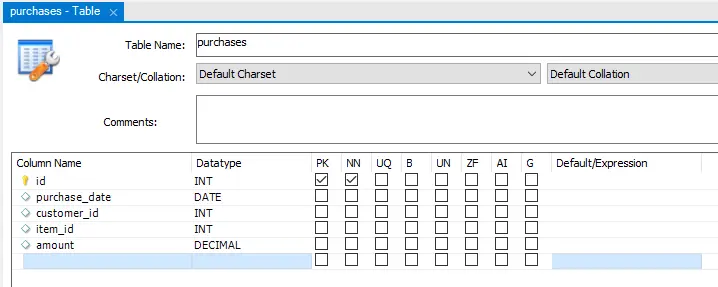
Before you set up the Striim platform to synchronize your data from MySQL to BigQuery, let’s take a look at the source database and prepare the corresponding database structure in BigQuery. For this example, I am using a local MySQL database with a simple purchases table to simulate a financial datastore that we want to ingest from MySQL to BigQuery for analytics and reporting.

I’ve loaded a number of initial records into this table and have a script to apply additional records once Striim has been configured to show how it picks up the changes automatically in real time.

Step 2: Targeting Google BigQuery

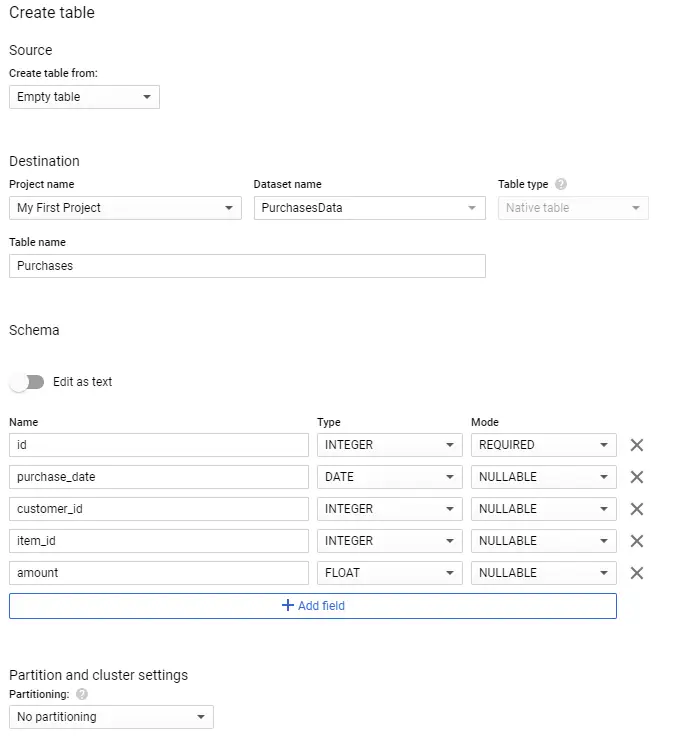
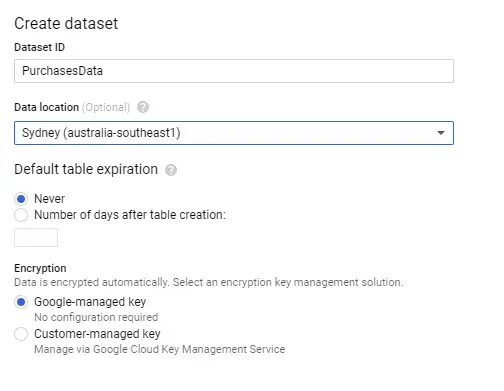
You also need to make sure your instance of BigQuery has been set up to mirror the source or the on-premises data structure. There are a few ways to do this, but because you are using a small table structure, you are going to set this up using the Google Cloud Console interface. Open the Google Cloud Console, and select a project, or create a new one. You can now select BigQuery from the available cloud services. Create a new dataset to hold the incoming data from the MySQL database.

MySQL to Google BigQuery

Once the dataset has been created, you also need to create a table structure. Striim can perform the transformations while the data flies through the synchronization process. However, to make things a little easier here, I have replicated the same structure as the on-premises data source.

MySQL to Google BigQuery

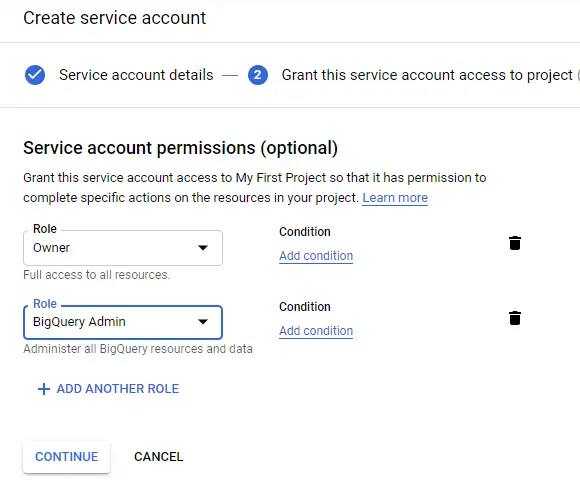
You will also need a service account to allow your Striim application to access BigQuery. Open the service account option through the IAM window in the Google Cloud Console and create a new service account. Give the necessary permissions for the service account by assigning BigQuery Owner and Admin roles and download the service account key to a JSON file.

MySQL to Google BigQuery

Step 3: Set Up the Striim Application

Now you have your data in a table in the on-premises MySQL database and have a corresponding empty table with the same fields in BigQuery. Let’s now set up a Striim application on Google Cloud Platform for the migration service.

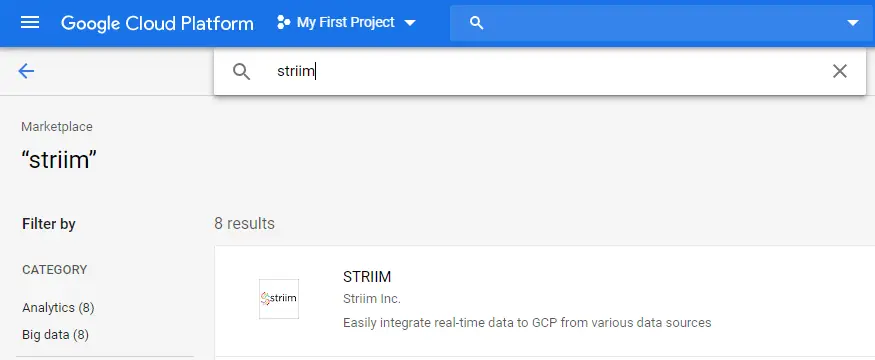
Open your Google Cloud Console and open or start a new project. Go to the marketplace and search for Striim. A number of options should return, but the option you are after is the first item that allows integration of real-time data to Google Cloud services.

MySQL to Google BigQuery

Select this option and start the deployment process. For this tutorial, you are just using the defaults for the Striim server. In production, you would need to size appropriately depending on your load.

Click the deploy button at the bottom of this screen and start the deployment process.

MySQL to Google BigQuery

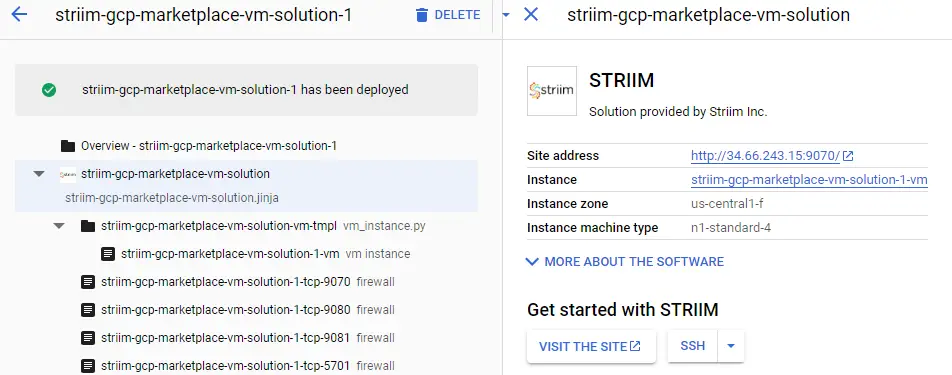
Once this deployment has finished, the details of the server and the Striim application will be generated.

Before you open the admin site, you will need to add a few files to the Striim Virtual Machine. Open the SSH console to the machine and copy the JSON file with the service account key to a location Striim can access. I used /opt/striim/conf/servicekey.json.

You also need to restart the Striim services for these setting and changes to take effect. The easiest way to do this is to restart the VM.

Give these files the right permissions by running the following commands:

chown striim:striim


chmod 770

You also need to restart the Striim services for this to take effect. The easiest way to do this is to restart the VM.

MySQL to Google BigQuery

Once this is done, close the shell and click on the Visit The Site button to open the Striim admin portal.

Before you can use Striim, you will need to configure some basic details. Register your details and enter in the Cluster name (I used “DemoCluster”) and password, as well as an admin password. Leave the license field blank to get a trial license if you don’t have a license, then wait for the installation to finish.

When you get to the home screen for Striim, you will see three options. Let’s start by creating an app to connect your on-premises database with BigQuery to perform the initial load of data. To create this application, you will need to start from scratch from the applications area. Give your application a name and you will be presented with a blank canvas.

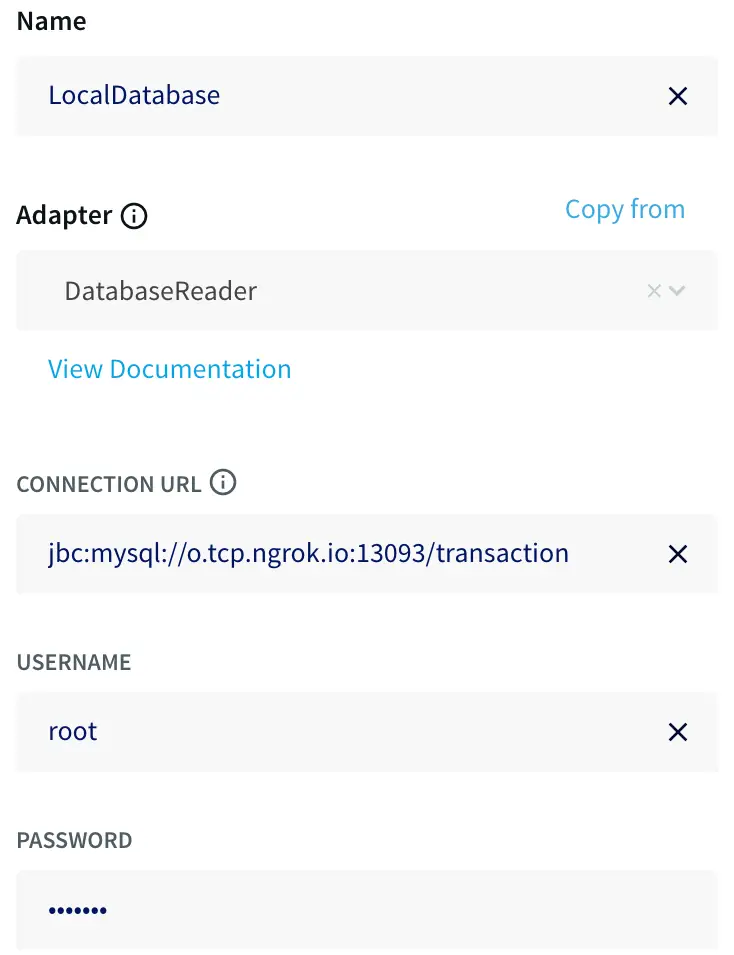
The first step is to read data from MySQL, so drag a database reader from the sources tab on the left. Double-click on the database reader to set the connection string with a JDBC-style URL using the template:


jdbc:mysql://:/

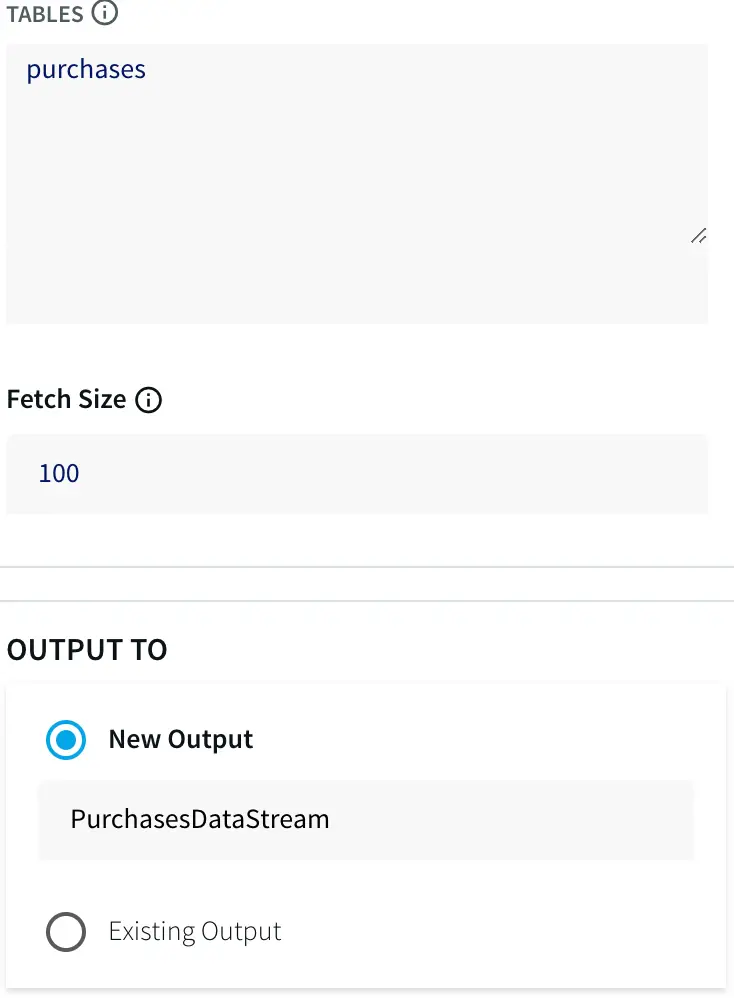
You must also specify the tables to synchronize — for this example, purchases — as this allows you to restrict what is synchronized.

Finally, create a new output. I called mine PurchasesDataStream.


MySQL to Google BigQuery


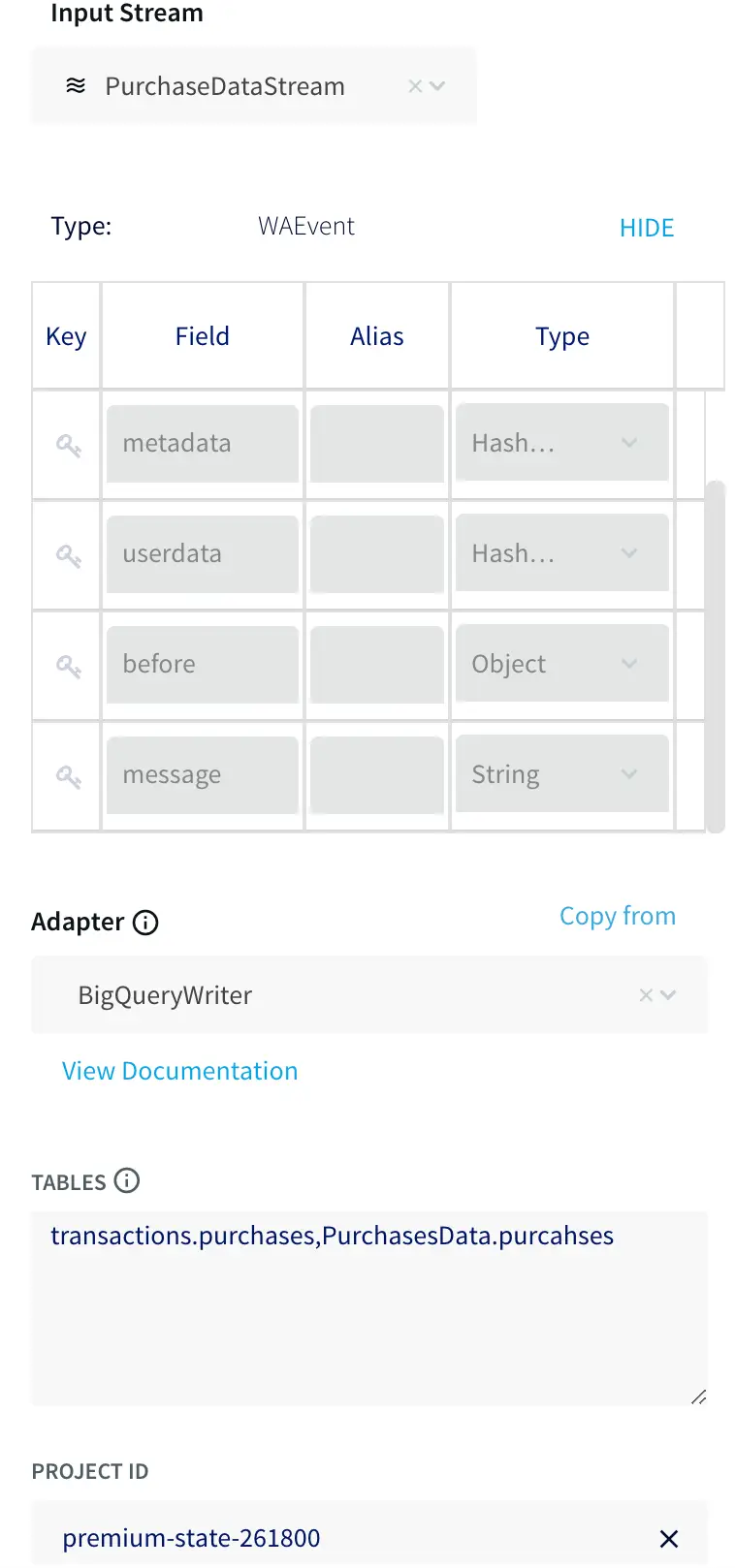
You also need to connect your BigQuery instance to your source. Drag a BigQuery writer from the targets tab on the left. Double-click on the writer and select the input stream from the previous step and specify the location of the service account key. Finally, map the source and target tables together using the form:


.,.

For this use case this is just a single table on each side.

MySQL to Google BigQuery

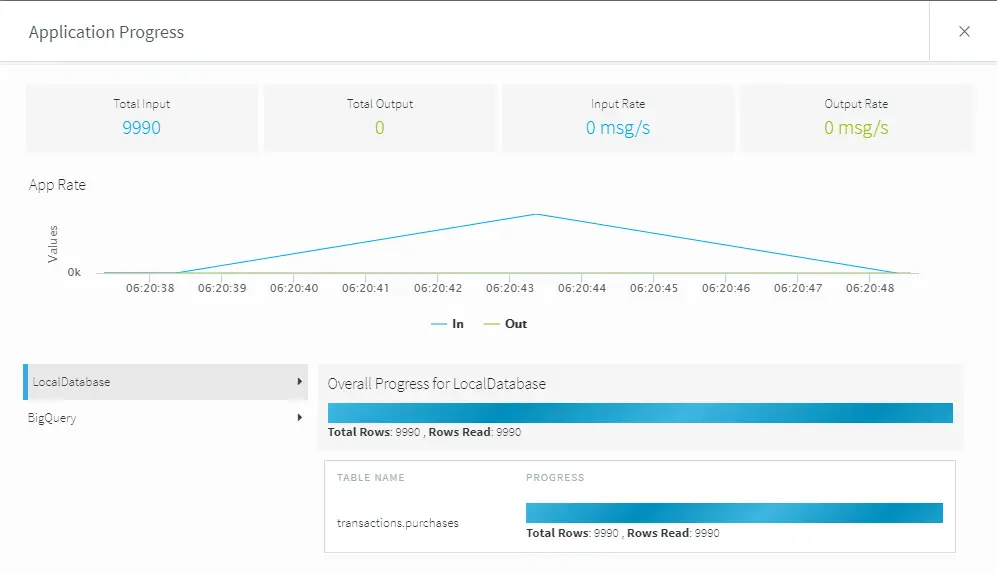
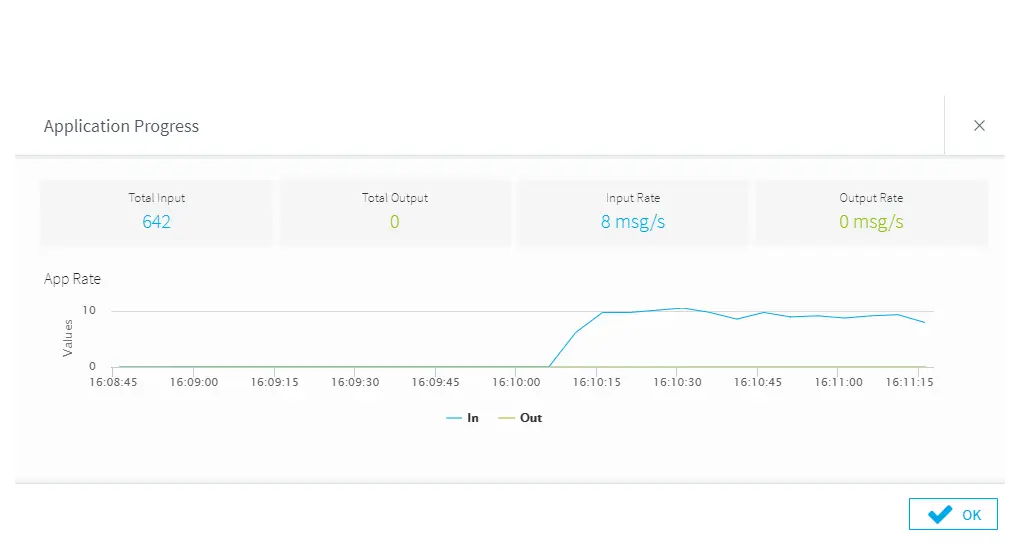
Once both the source and target connectors have been configured, deploy and start the application to begin the initial load process. Once the application is deployed and running, you can use the monitor menu option on the top left of the screen to watch the progress.


MySQL to Google BigQuery

Because this example contains a small data load, the initial load application finishes pretty quickly. You can now stop this initial load application and move on to the synchronization.

Step 4: Updating BigQuery with Change Data Capture

Striim has pushed your current database up into BigQuery, but ideally you want to update this every time the on-premises database changes. This is where the change data capture application comes into play.

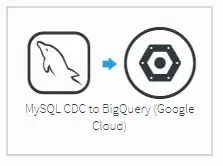
Go back to the applications screen in Striim and create a new application from a template. Find and select the MySQL CDC to BigQuery option.

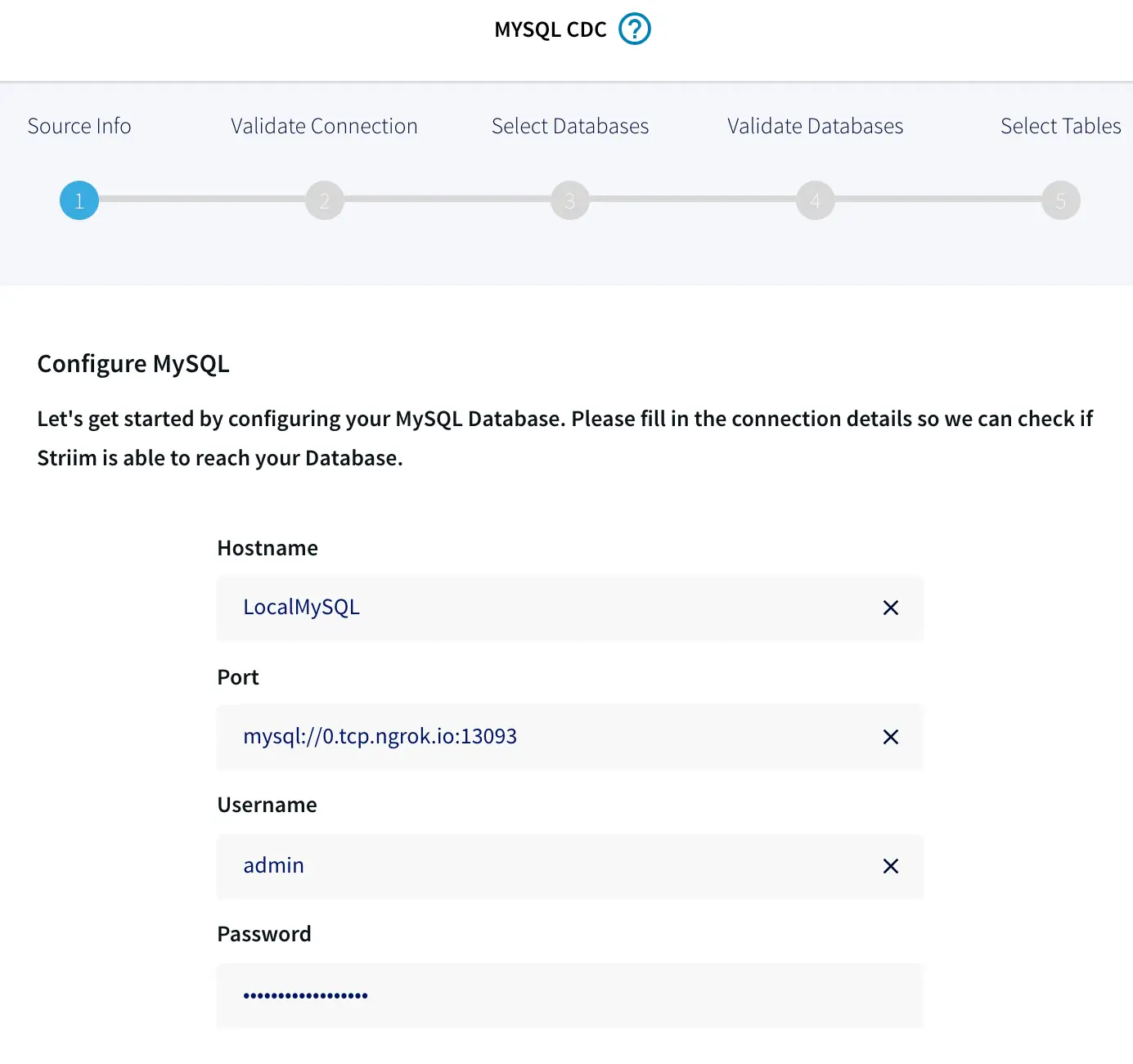
Like the first application, you need to configure the details for your on-premises MySQL source. Use the same basic settings as before. However, this time the wizard adds the JDBC component to the connection URL.

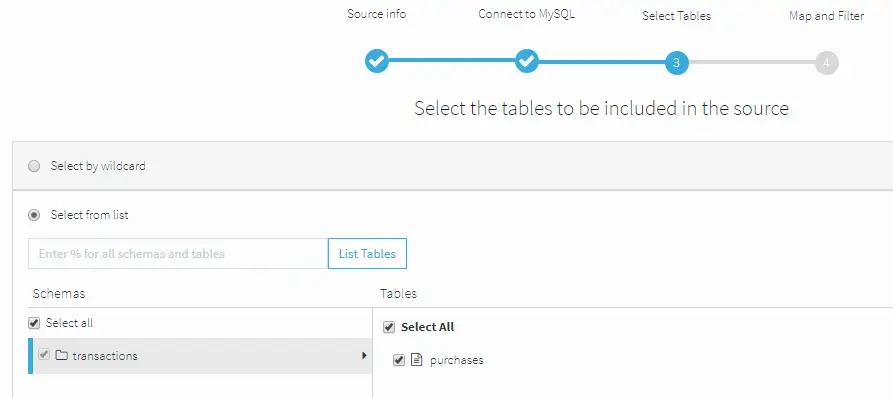
When you click Next, Striim will ensure that it can connect to the local source. Striim will retrieve all the tables from the source. Select the tables you want to sync. For this example, it’s just the purchases table.


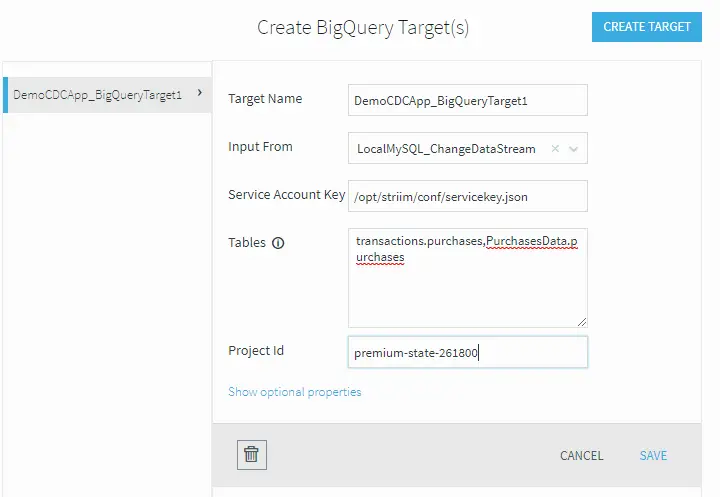
Once the local tables are mapped, you need to connect to the BigQuery target. Again, you can use the same settings as before by specifying the same service key JSON file, table mapping, and GCP Project ID.


Once the setup of the application is complete, you can deploy and turn on the synchronization application. This will monitor the on-premises database for any changes, then synchronize them into BigQuery.

Let’s see this in action by clicking on the monitor button again and loading some data into your on-premises database. As the data loads, you will see the transactions being processed by Striim.

Next Step

As you can see, Striim makes it easy for you to synchronize your on-premises data from existing databases, such as MySQL, to BigQuery. By constantly moving your data into BigQuery, you could now start building analytics or machine learning models on top, all with minimal impact to your current systems. You could also start ingesting and normalizing more datasets with Striim to fully take advantage of your data when combined with the power of BigQuery.

To learn more about Striim for Google BigQuery, check out the related product page. Striim is not limited to MySQL to BigQuery integration, and supports many different sources and targets. To see how Striim can help with your move to cloud-based services, schedule a demo with a Striim technologist or download a free trial of the platform.

Tools you need

Striim

Striim’s unified data integration and streaming platform connects clouds, data and applications.

MySQL

MySQL is an open-source relational database management system.

Snowflake

Snowflake is a cloud-native relational data warehouse that offers flexible and scalable architecture for storage, compute and cloud services.

Back to top