To address the demand for a simple way to build, manage, and monitor streaming data pipelines, Striim is introducing a series of purpose-built data pipeline solutions for popular data warehouses. We’re very pleased to introduce our first solution, Striim for BigQuery, for Google BigQuery users. Striim for BigQuery enables users to load data to BigQuery with maximum performance, simplicity, and operational ease.
We’d like to invite you to join us for a live webinar showcasing Striim for BigQuery and its capabilities including:
How Striim for BigQuery enables you to extract and load data from various sources at high scale and low latency, while ensuring security and maintaining compliance
A simple, no-code UX that requires minimal user intervention and eliminates complexities associated with setting up streaming data pipelines
Intuitive monitoring and dashboards that provide transparency into the health and status of your pipelines, so you can understand what’s happening and fine-tune your data pipelines
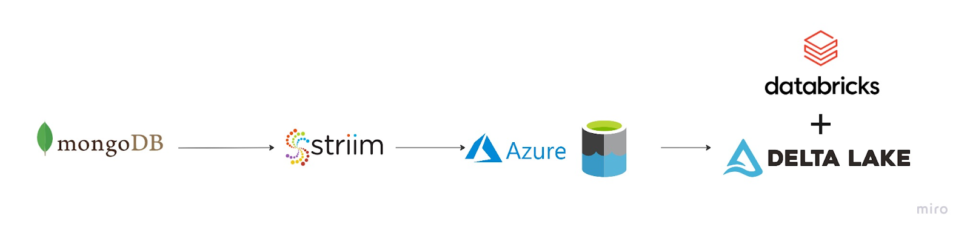
Streaming Change Data Capture from MongoDB to ADLS Gen2 in Parquet Format
Benefits
Leverage Striim for real-time CDC and convert data into Parquet format on the fly.
Use Striim with Databricks for instant scalability and accelerate Analytics and reporting.
Use the power of Delta Lake that extends Parquet data files with a file-based transaction log for ACID transactions and scalable metadata handling.
On this page
Real-time data analytics is proving to be the next big wave in Big data and Cloud computing and in a computing context, there’s an increasing demand to derive insights from data just milliseconds after it is available or captured from various sources.
NoSQL databases have become widely adopted by companies over the years due to their versatility in handling vast amounts of structured and unstructured streaming data with the added benefit to scale quickly with large amounts of data at high user loads.
Why MongoDB?
MongoDB has become a prominent powerhouse among NoSQL databases and is widely embraced among many modern data architectures. With its ability to handle evolving data schemas and store data in JSON-like format which allows us to map to native objects supported by most modern programming languages.
MongoDB has the ability to scale both vertically and horizontally which makes it a prime choice when it comes to integrating large amounts of data from diverse sources, delivering data in high-performance applications, and interpreting complex data structures that evolve with the user’s needs ranging from hybrid to multi-cloud applications.
Why Parquet?
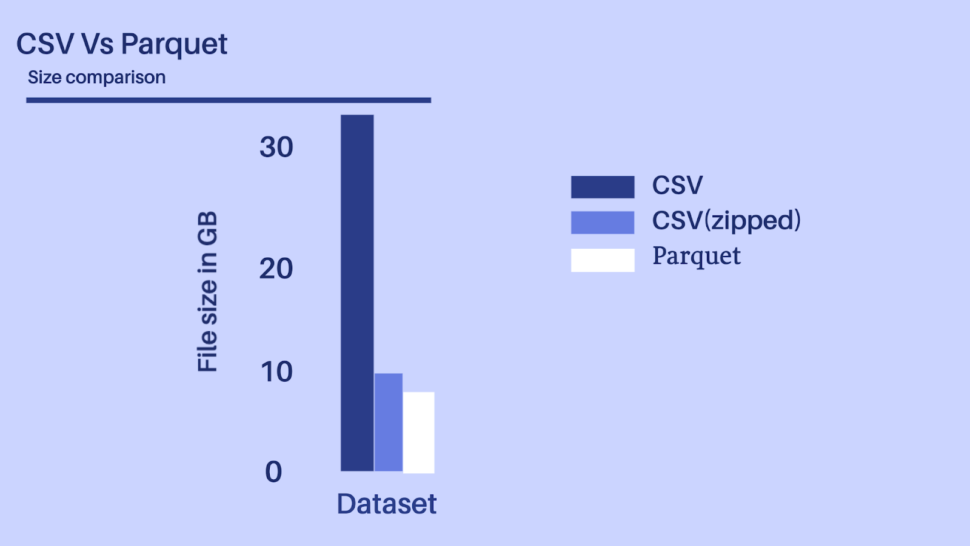
Storage matters! I/O costs really hurt and with more multi-cloud distributed compute clusters being adopted, we would need to consider both the disk I/O along with the network I/O. In a Big data use case, these little costs accrue both in terms of compute and storage costs.
Considering the above-depicted scenario, let’s presume we have a dataset with 100+ fields of different datatypes, it would be unwise to ingest a 30+ GB file even by using a distributed processing system like Spark or Flink.
Parquet data format is more efficient when dealing with large data files and goes hand in hand with Spark which allows it to read directly from a Spark data frame while preserving the schema. At the same time, Parquet can handle complex nested data structures and also supports limited Schema evolution to accommodate changes in data like adding new columns or merging schemas that aren’t compatible.
Is Delta Lake the new Data Lake?
Databricks leverage Delta lake which helps accelerates the velocity at which high-quality data can be stored in the data lake and in parallel, provide teams with leverage to insights from data in a secure and scalable cloud service.
Key highlights among its features include
Leveraging spark distributed processing power to handle metadata for Petabyte scale tables.
Act interchangeably as a batch table, streaming source, and data sink.
Schema change handling that prevents insertion of bad records during ingestion.
Data versioning allows rollbacks, builds historical audit trails, and facilitates rebuildable machine-learning experiments.
Optimize upserts and delete operations that allow for complex use cases like change-data-capture (CDC), slowly changing dimension (SCD), streaming upserts, and so on.
Core Striim Components
MongoDB reader: MongoDBReader reads data from the Replica Set Oplog, so to use it you must be running a replica set. In InitialLoad mode, the user specified in MongoDBReader’s Username property must have read access to all databases containing the specified collections. In Incremental mode, the user must have read access to the local database and the oplog.rs collection.
Continuous Query: Striim Continuous Queries are continually running SQL queries that act on real-time data and may be used to filter, aggregate, join, enrich, and transform events.
ADLS Gen2 Writer: Writes to files in an Azure Data Lake Storage Gen2 file system. When setting up the Gen2 storage account, set the Storage account kind to StorageV2 and enable the Hierarchical namespace.
Stream: A stream passes one component’s output to one or more other components. For example, a simple flow that only writes to a file might have this sequence.
Dashboard: A Striim dashboard gives you a visual representation of data read and written by a Striim application.
WAEvent: The output data type for sources that use change data capture readers is WAEvent.
Simplified diagram of the Striim App
The Striim app in this recipe showcases how we can stream the CDC data from MongoDB as Json events and convert them into Parquet files before placing them into Azure’s ADLS Gen2 storage account. The same Striim app can be used to perform historical or initial loads and seamlessly convert into an incremental application once the historical data is captured.
We use the Continous Query to extract the fields from the JSON events and convert them into Parquet files using the Parquet formatter built into ADLS Gen2 writer. Once the data lands, Databricks provides us the option to convert these parquet files into a Delta table in-place.
In a production setting, Striim’s Change Data Capture allows for real-time insights from MongoDB into Databricks Delta tables.
Feel free to sign up for a Free trial of Striim here
Step 1: Setting up MongoDB Atlas as a source
MongoDB Atlas is a Database as a service (DBaaS) and a fully managed cloud database that handles the complexity of configuring and deploying in the cloud provider of our choice(AWS, Azure, and GCP). Feel free to sign up for an account here.
If you are a new user, Complete the prompts to create an organization and a project which are needed in order to create a database cluster.
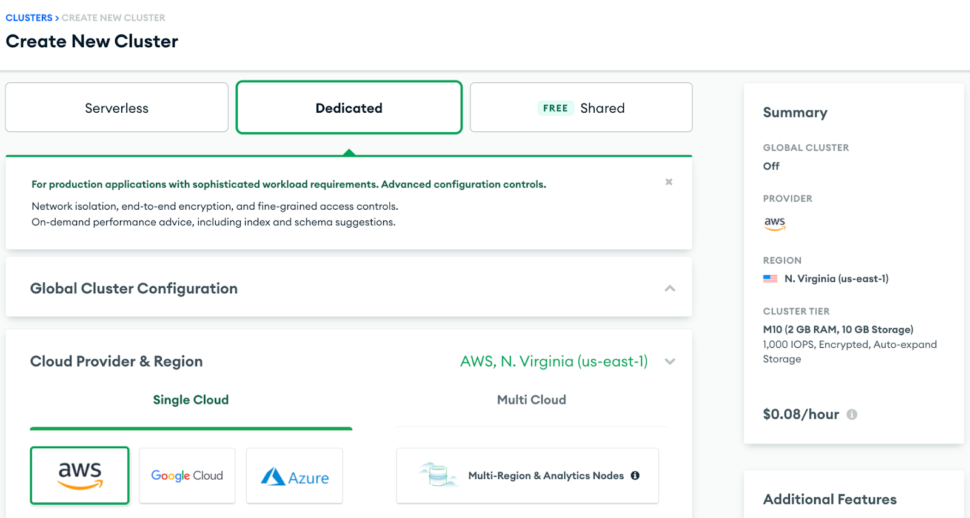
Note: There are multiple cluster offerings to choose from MongoDB which are as follows: Shared cluster, Dedicated Cluster, and Multi-Cloud & Multi-region cluster. We will be using a Dedicated cluster in this recipe since the shared free tier cluster uses a shared opLog, and for security concerns, external services or applications aren’t given access to it.
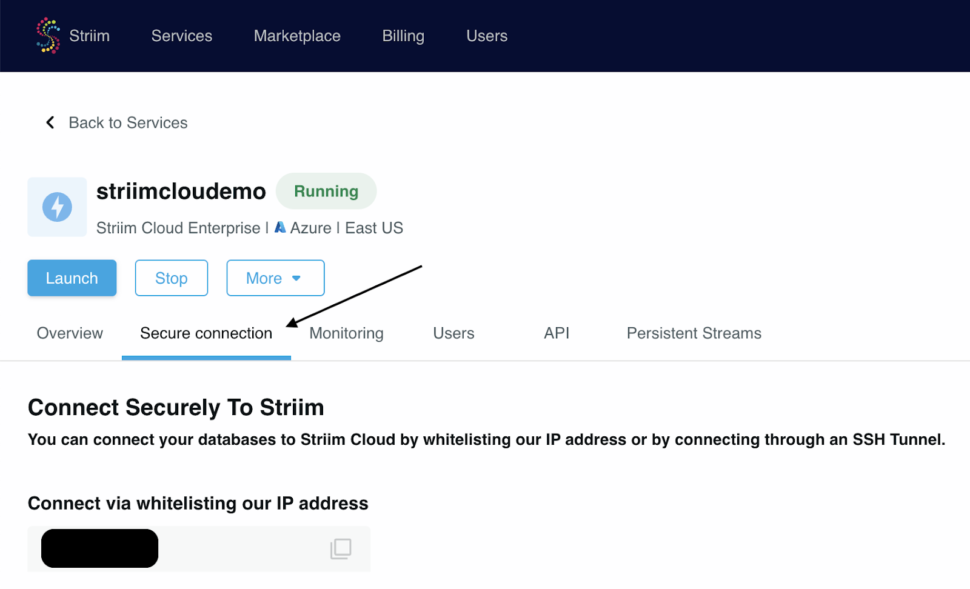
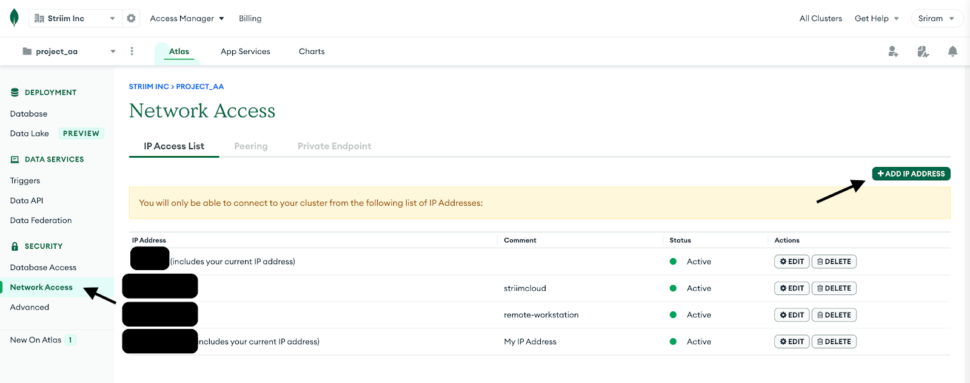
1. Once the Dedicated cluster is up and running, we would need to whitelist the IP for Striim Cloud which can be found under the Secure connection tab within the Striim cloud account.
2. Navigate to Network Access under Security in the MongoDB account and whitelist the IP for any workstation that will be used along with the Striim App’s IP.
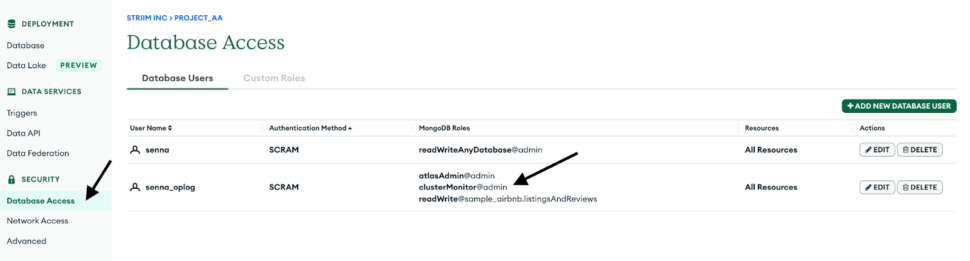
3. Create a database user for the cluster by navigating into the Database Access tab and make sure to add clusterMonitor role under the MongoDB roles. This is necessary for the Striim App to gain access to the OpLog and read the CDC data.
We can connect to the cluster using the mongosh or Mongo’s GUI tool called Compass.
MongoDB provides us the option to import test data via CSV or JSON document. For this recipe, we will use the sample airbnb dataset which is offered by MongoDB when a new database cluster is created.
Step 2: Configure the MongoDB Reader in Striim
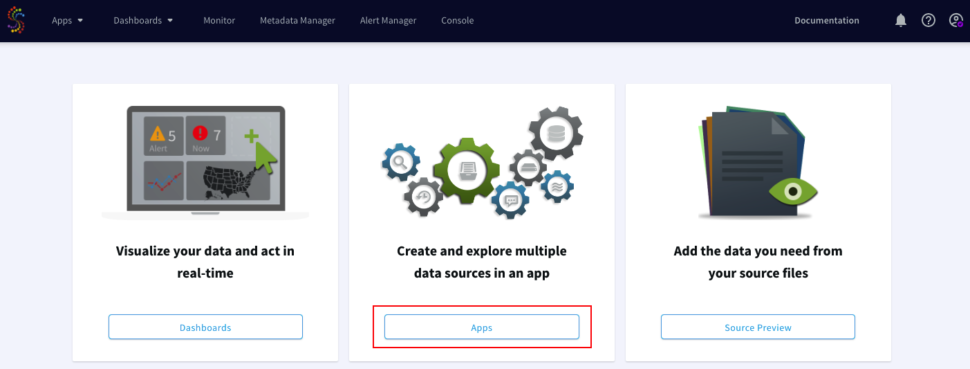
Login to your Striiim cloud instance and select Create App from the Apps dashboard.
Click on Start from scratch or use the built-in wizard by using keywords to the data source and sink in the search bar. Drag and drop the MongoDB CDC reader from Sources and enter the connection parameters for the MongoDB database cluster.
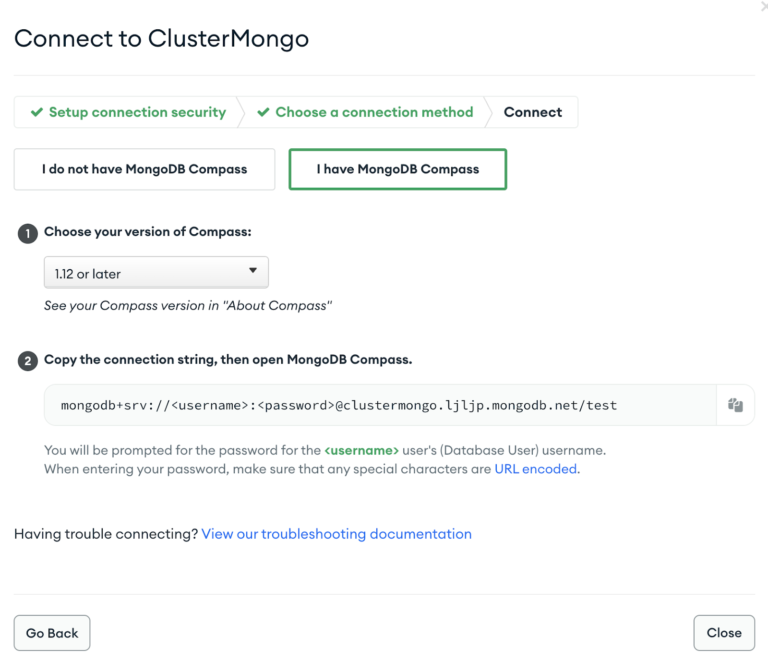
Obtain the Connection URL by navigating to the MongoDB account and click on Connect under the Database tab, and Select Connect using MongoDB Compass. We can use the same connection string to connect the Striim app as well.
Enter the other connection URL from above along with the username, and password of the database user which has ClusterMonitor role which was created as part of Step 1. Select the type of ingestion as Initial or Incremental and Auth type as default or SCRAMSHA1.
Note: If the Striim app is configured to run Initial mode as ingestion first, do turn on the option for Quiesce on IL Completion. Set to True to automatically quiesce the application after all data has been read.
Step 3: Configure a Continous SQL Query to parse JSON events from MongoDB
A new stream is created after the MongoDB reader is configured which loads the Type in the stream as JsonNodeEvents. JSON’s widespread use has made it the obvious choice for representing data structures in MongoDB’s document data model.
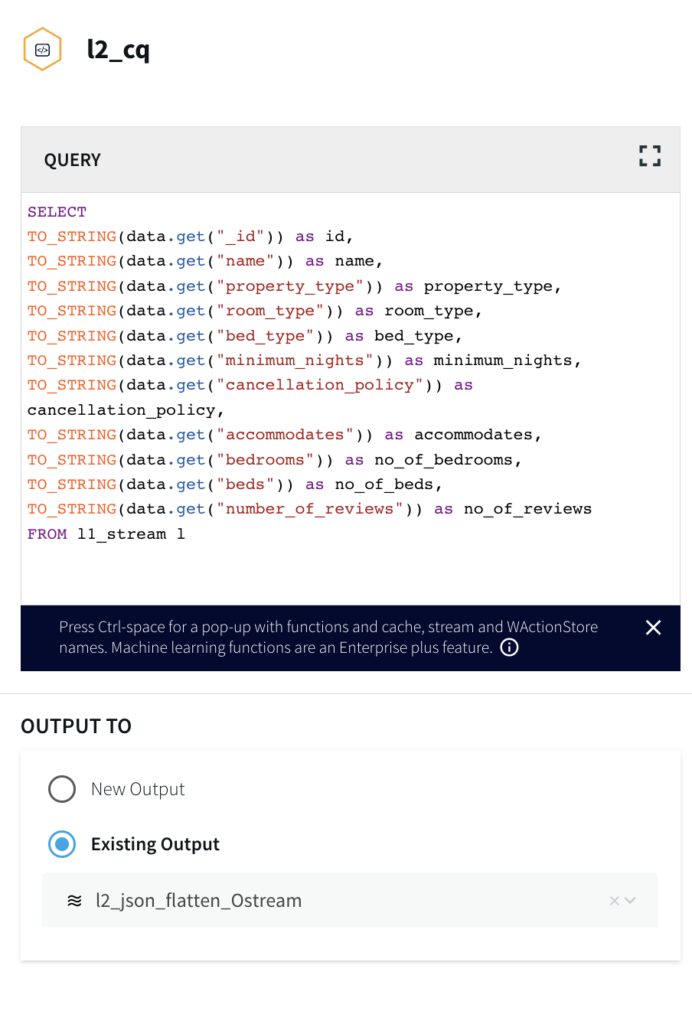
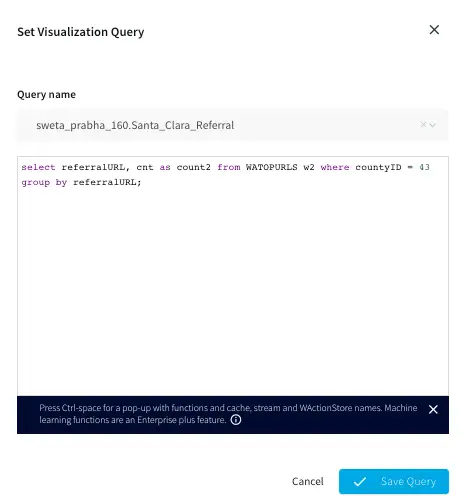
Select the Continuous Query (CQ) processor from the drop-down menu and pass the following query to pull MongoDB data from the dataset that has been created. The query can be found in the following GitHub repository.
2. Make sure the values under the Type have been picked up by the Striim app.
Note:
This allows the JSON events from MongoDB to be converted into WAEvent within Striim. This is necessary as part of the Parquet conversion process since the reader-parser combinations are not supported directly from JSON to Parquet.
Step 4: Configure the ADLS Gen2 as a Data Sink
Navigate to the Azure portal and create a new ADLS Gen2 and make sure to set the Storage account kind to StorageV2 and enable the Hierarchical namespace.
Inside the Striim App, Search for the Azure Data Lake Store Gen2 under Targets and select the input stream from above.
Enter the Storage account name and Generate the SAS token by Navigating to the Shared Access Signature tab under the Security + Networking tab and Enable all three options (Service, Container, Object) as shown below.
Note:
Once the SAS key is generated, Remove the ? from the beginning of the SAS token before adding it into the Striim App. Refer to the ADLS Gen2 Writer documentation here.
For example,
?sv=2021-06-08&ss=bfqt&srt=o&sp=upyx&se=2022-10-16T07:40:04Z&st=2022-10-13T23:40:04Z&spr=https&sig=LTcawqa0yU2NF8gZJBuog%3D
Add the mandatory fields like Filesystem name, File name, and directory (if any), and also enable Roll Over on DDL which has a default value of True. This allows the events to roll over to a new file when a DDL event is received. Set to False to keep writing to the same file.
Under the Formatter, Select ParquetFormatter option and provide a Schema file name and make sure to append _.Note:
In the Downstream application of Databricks, we will be generating a Delta table in-place which will generate a _delta_log folder. All other files/folders will be treated as Parquet files along with the Schema file name folder that will be created by the Striim application during run-time.
By not appending the underscore value to the Schema file name in this use case will lead to a run time error during the creation of the delta table.
Once the app is configured, Click on the Deploy App from the top menu and Select Start App.
Once the app is deployed and Started, we can view the status of the data streaming via the dashboard. The parquet files can be viewed inside the ADLS Gen2 container.
Step 5: Convert Parquet to Delta
Navigate to your Databricks Homepage and import the notebook from this Github repo.
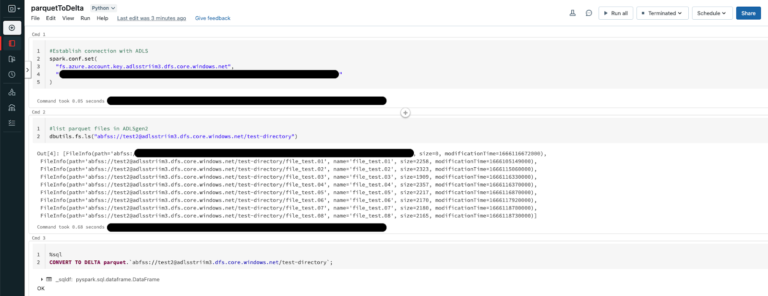
Databricks allows us to convert an existing parquet table to a Delta table in place and in this recipe, we will be pointing the Delta table to the ADLS storage container from above which receives the Parquet file dump.
CONVERT TO DELTA parquet.`abfss://@.dfs.core.windows.net/`;
Executing the above operation will create a Delta Lake Transaction log that tracks the files in the ADLS storage container. It can also automatically infer the data schema from the footers of all Parquet files. This allows for more flexibility when the schema is modified at the source allowing the Delta table to handle it seamlessly.
Next, we can go ahead and create a table in Databricks as shown below. An added advantage of using the Parquet file format is, it contains the metadata of the schema for the data stored. This reduces a lot of manual effort in production environments where schema has to be defined. It is much easier to automate the whole pipeline via Delta tables by pointing to the ADLS storage container.
Once the _delta_log is created, any new Parquet file landing in the storage container will be picked up by the Delta table allowing for near real-time analytics.
For instance, when the values for certain fields have been updated as shown below, Striim CDC application is able to pick up the CDC data and convert them into Parquet files on the fly before landing in ADLS.
Note:
For CDC testing purposes, avoid using the updateMany({….})with MongoDB since that would lead to error with Null IDs being generated.
Optimize Delta tables
The Parquet data files can be enhanced further by running the Optimize functionality in Databricks which optimizes a subset of data or colocates data by Column. If you do not specify colocation, bin-packing optimization is performed.
Any file not tracked by Delta lake is considered invisible and will be deleted if the VACUUM operation is performed on the Delta Table. If the DELETE or OPTIMIZE operations are performed which can change the Data files, Run the following command to enforce Garbage collection.
> VACUUM delta.`<path-to-table>` RETAIN 0 HOURS
Limitations
While the above architecture is cost-efficient, supports open formats, and compatible with future analytics workloads, it has limitations around read isolation and data management at scale.
It can be further simplified by using Striim’s DeltaLakeWriter to handle copying data directly into Delta Tables with optimized merges and partition pruning for fast performance streaming into Delta Lake.
Step 6: Create Delta Live Tables (Optional)
Delta Live tables (DLT) is a Databricks offering that allows for building reliable and maintainable pipelines with testable data processing. DLT can govern task orchestration, cluster management, monitoring, data quality, and error handling.
Striim’s Delta Lake Writer writes to tables in Databricks for both Azure and Amazon Web Services. Additional documentation on Delta Lake writer properties can be accessed here.
The recipe can be further augmented using Delta Live tables which simplifies ETL/ELT development and management with declarative pipeline development.
The main unit of execution in Delta Live tables is a pipeline which is a Directed Acycle Graph (DAG) linking multiple data sources. In this case, each table in a production environment can be pointed to an ADLS container.
Leverage Expectations which allows us to specify data quality controls on the contents of a dataset. Unlike the CHECK constraint, Expectations provide added flexibility to handle incorrect data based on the constraints that are set instead of killing the whole pipeline due to bad data.
Use Striim and Delta lake to create Streaming tables and views that reduce the cost of ingesting new data and the latency at which new data is made available leading to near real-time analytics.
Leverage streaming data from Striim and Spark jobs in Databricks by using the ADLS storage container from the above recipe as the Raw/Ingestion tables(Bronze layer), create Refined tables (Silver layer) which apply any Transformations and then create Feature/Aggregate Data Store (Gold layer) for advanced reporting and real-time analytics.
To know more about Databricks Delta live tables feel free to explore here.
How to deploy and run this Striim Application?
Step 1: Download the TQL files
The Striim application’s TQL file is available from our Github repository which can import and Deploy the app on your Striim server.
Step 2: Set up MongoDB Atlas account and cluster
The sample dataset is readily available with the cluster once it is active. Configure the access roles/permissions for the MongoDB cluster and configure the connection parameters in the Striim Application.
Step 3: Setup ADLS and Databricks cluster
Set up ADLS gen2 storage container through the Azure portal and use the Databricks notebook from the Github repository.
Step 4: Deploy the App and Run the Databricks notebook
Wrapping up: Start your free trial
The recipe highlighted how Streaming Data from High-performance databases like MongoDB can be handled seamlessly and leverage Striim’s CDC capability and Parquet formatter to help enable the creation of Delta tables in-place.
Leveraging MongoDB’s ability to handle different types of data and scale horizontally or vertically to meet users’ needs.
Striim’s ability to capture CDC data using MongoDB’s OpLog minimizes CPU overhead on sources with no application changes.
Use Striim’s Parquet formatter to convert Json events on the fly and leverage the Parquet file format that helps optimize the data. This helps in significantly reduce the Compute cost of using Databricks or any other application to convert the JSON data after it lands into Parquet.
Leverage the same ADLS container where the data lands instead of mounting the data into DBFS or any other Datawarehouse thereby reducing the amount of I/O costs which are crucial in any cloud-based environment.
Striim’s pipelines are portable between multiple clouds across hundreds of endpoint connectors including MongoDB, and Azure Cosmos, and also support other data warehouses including Google BigQuery, Snowflake, and Amazon Redshift.
Questions on how to use this recipe? Join the discussion on The Striim Community and also check out our other recipes here!”
As always, feel free to reach out to our integration experts to schedule a demo, or try Striim for free here.
Tools you need
Striim
Striim’s unified data integration and streaming platform connects clouds, data and applications.
Databricks
Databricks combines data warehouse and Data lake into a Lakehouse architecture
Azure ADLS Gen2
Azure ADLS Gen2 storage is built on top of Blob Storage and provides low-cost, file system semantics and security at scale.
MongoDB
NoSQL database that provides support for JSON-like storage with full indexing support.
Use cases
Integrating Striim’s CDC capabilities with MongoDB makes it very easy to rapidly expand the capabilities of real-time data with just a few clicks.
Striim’s additional components allow not only to capture real-time data, but also apply Parquet or Avro conversions on the fly before it even lands in the staging zone, thereby reducing the amount of data storage that is required.
The wide array of Striim’s event transformers makes it as seamless as possible with handling any type of sensitive data allowing users to maintain compliance norms on various levels.
Allow high-quality data into Databricks in Parquet format in real-time which can then be transformed via Spark code and integrate with Power BI or Tablueau for Visualizations.
Replicating changes and maintaining history in your warehouse with streaming change data capture
You don’t have to copy data or run expensive batch jobs to audit your data
Benefits
Reduce Costs
Run updates only when the data changes and not on fixed schedule
Avoid Maintainability Problems
Simplified Architecture that gives you correctness and avoids maintainability problems with batch/scheduled snapshots
Extend with Additional FunctionalityEasy to extend with additional functionality, e.g. Slack Notification when a customer changes their address and has an open order
On this page
Overview
Many companies need to maintain a history of changes on the lifecycle of their customers while keeping the latest ‘source of truth’. When this data is processed in an operational database (PostgreSQL, MySQL, MongoDB), the common method of doing the above is change data capture to a cloud data warehouse (Snowflake, BigQuery, Redshift). However there are challenges here: how do I use the same CDC stream to A) apply the changes as DML to a table in my warehouse and B) maintain a separate table to track the history WITHOUT copying data inefficiently or creating multiple CDC clients on the database (each client adding some processing overhead).
Striim is a unified data streaming and integration product that offers change data capture (CDC) enabling continuous replication from popular databases such as Oracle, SQLServer, PostgreSQL and many others to target data warehouses like BigQuery and Snowflake. The CDC capabilities of Striim makes it a powerful tool to track changes in real time whenever a table is altered.
In this recipe we have shown how we can use Striim to maintain historical records while streaming data that gets frequently updated. For example, when engineering teams have a production table that overwrites data, such as users in a CUSTOMERS table change their addresses and the table is updated with the new data. However, for tax and reporting purposes, a record of the customer’s previous addresses is required. We can use CDC to solve this without requiring engineering effort from the backend teams.
One possible solution is a Batch ETL process directly into Snowflake with dbt Snapshots running regularly to mimic a CDC-like process. The problem with this approach is that it only detects changes when it’s running. If a record changed twice between dbt Snapshots, then the first change is lost forever. To support the CDC-like behavior, you have to run your batch ETL more frequently in order to reduce (but not eliminate) the likelihood of missing a change between runs.
We can leverage Striim to generate a CDC feed from source database (eg. PostgreSQL) that captures all changes as they happen. All new and updated records are appended to an audit/history table and at the same time, we use Snowflake’s merge function to maintain an up-to-date list of current customer information.
The latter architecture gives correctness and avoids maintainability problems that occur in batch/scheduled snapshots. There is a reduction in cost as updates are run only when the data changes and not on a fixed schedule. The data pipeline is simpler with only one connector/CDC stream for incoming data. Last but not least, this architecture can be easily extended with additional functionality, e.g. Slack Notification when a change occurs.
Please follow the steps below to set up your CDC source and configure the target table for both historical records table and most up-to-date table.
Core Striim Components
PostgreSQL Reader: PostgreSQL Reader uses the wal2json plugin to read PostgreSQL change data.
Stream: A stream passes one component’s output to one or more other components. For example, a simple flow that only writes to a file might have this sequence.
Snowflake Writer: Striim’s Snowflake Writer writes to one or more existing tables in Snowflake. Events are staged to local storage, Azure Storage, or AWS S3, then written to Snowflake as per the Upload Policy setting.
Step 1: Set up your Source Database
For this recipe, our source database is PostgreSQL. A table containing customer names and addresses is updated when a customer changes their address. It is very important to have a Primary Key column to capture DMLs like Update and Delete operations.
Step 2: Set up your Snowflake Targets
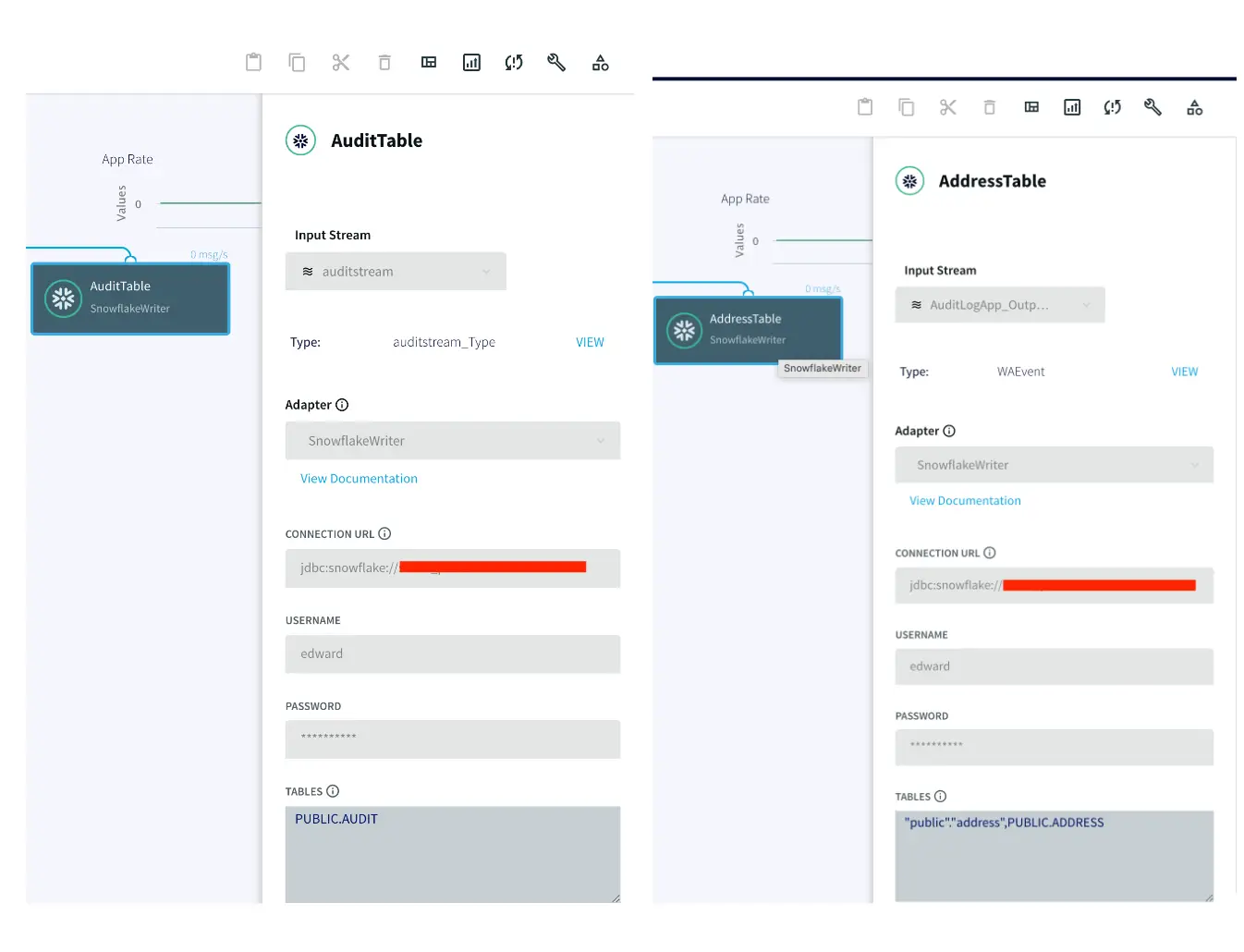
The target tables for this streaming application are hosted in snowflake data warehouse. There is an AUDIT table that stores all new as well as historical records for each customer and a second table called ADDRESS stores the most recent records for each customer.
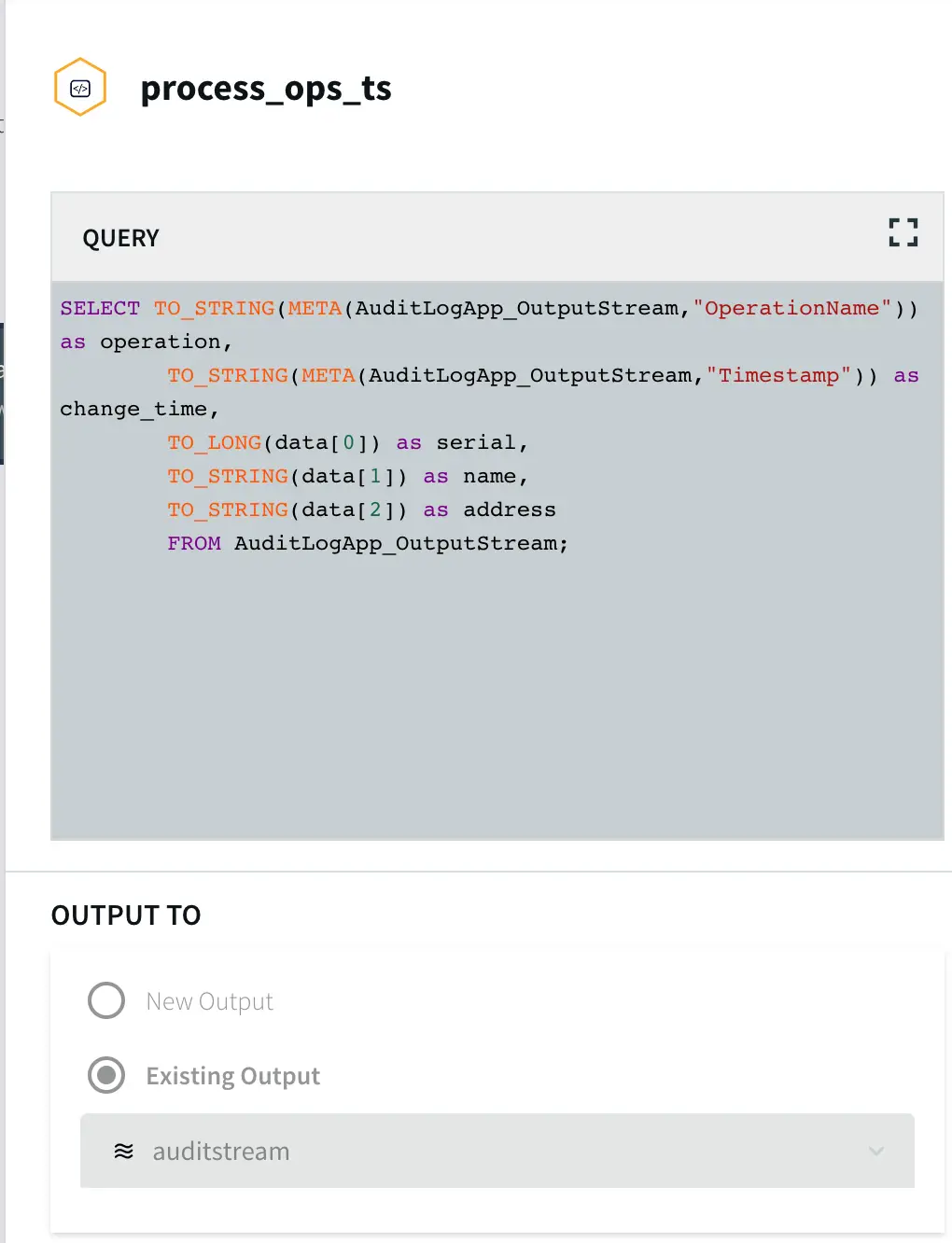
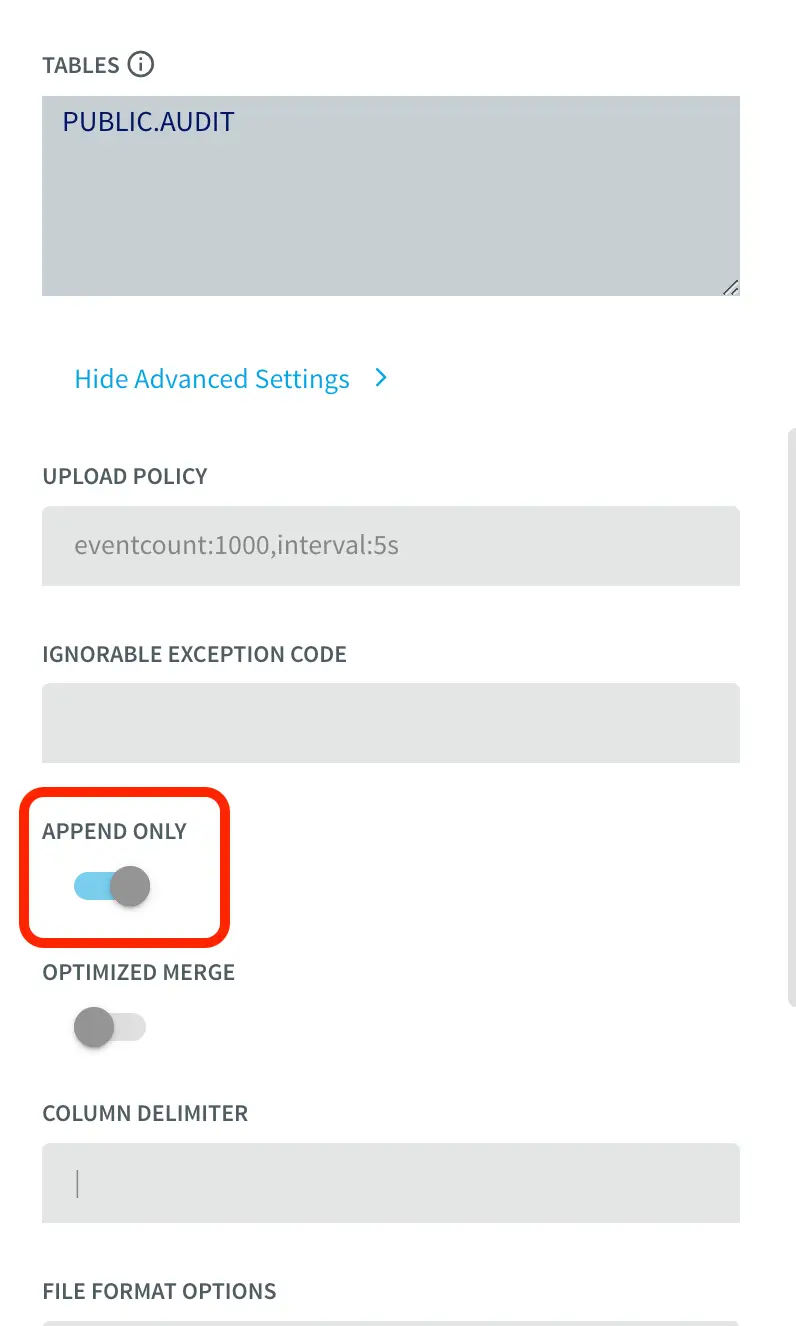
To insert data into AUDIT table, we process the input stream with a Continuous Query to include operation time and Timestamp when CDC occurred using the metadata. The APPEND ONLY setting is set to True that handles the updates and deletes as inserts in the target.
With the default value of False, updates and deletes in the source are handled as updates and deletes in the target. With Append Only set to True, Primary key updates result in two records in the target, one with the previous value and one with the new value. For more information on Snowflake Writer, please follow the Striim documentation.
Step 3: Run the app and update your source table
Once the source and target adapters are configured, deploy and run the Striim app and update your source table to stream both updated and historical data into the target tables. You can download the app TQL file from our github repo. Perform the following DMLs on your source table:
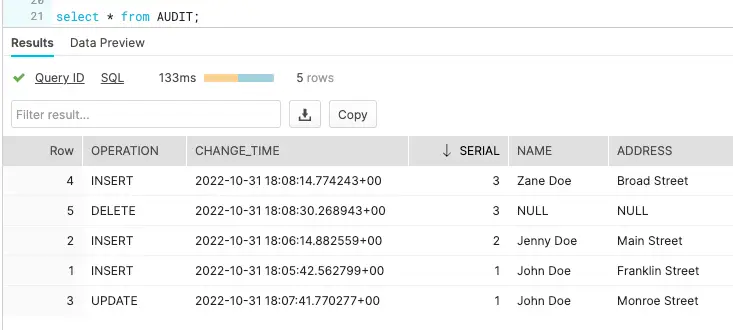
Update address for ‘John Doe’ from ‘Franklin Street’ to ‘Monroe Street’
Insert a new record for customer ‘Zane Doe’
Delete the row containing information about ‘Zane Doe’
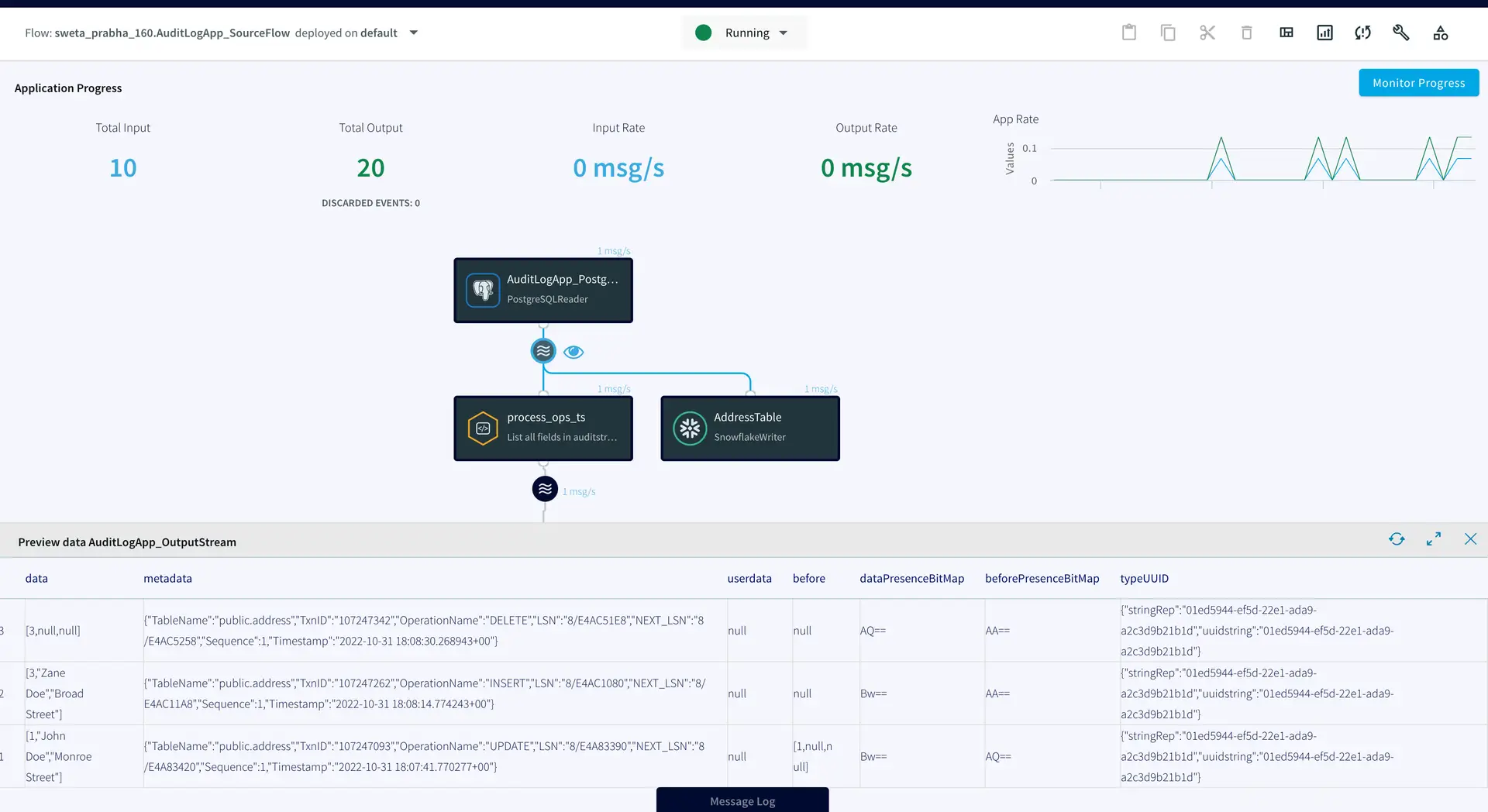
We can check the target table and preview the data stream between source and target adapters after each DML to confirm if the target table has been populated with desired records. As shown below, when a row is updated (Preview 3), an UPDATE operation on metadata is streamed, similarly for INSERT (Preview 4) and DELETE (Preview 5), operations in the source table are reflected.
The ADDRESS table in the snowflake data warehouse has the most updated record whereas AUDIT table stored all the previous records.
Setting Up the Log CDC Application
Step 1: Set up the source table on Postgres
Create a new table on your source Postgres database with the following query
CREATE TABLE Address(
“Serial” integer,
name TEXT,
address TEXT,
PRIMARY KEY (“Serial”)
);
Step 2: Set up the target tables on Snowflake
Create an ADDRESS table with the same column names and data types as your source table and AUDIT table with additional columns for operation and timestamp on snowflake.
Step 3: Configure your source and target adapters on Striim
You can download the TQL file from our github repository and deploy it by configuring your source and target as explained in this recipe.
Step 4: Perform DML operations and stream records to target tables
Deploy and run the Striim app and replicate most updated as well as historical data on your target tables.
Wrapping Up: Start your Free Trial Today
The above tutorial describes how you can use Striim to replace the Batch ETL process with a low cost CDC for audit logs. Striim’s pipelines are portable between multiple clouds across hundreds of endpoint connectors. You can create your own applications that cater to your needs. Please find the app TQL and data used in this recipe on our github repository.
As always, feel free to reach out to our integration experts to schedule a demo, or try Striim for free here.
Tools you need
Striim
Striim’s unified data integration and streaming platform connects clouds, data and applications.
PostgreSQL
PostgreSQL is an open-source relational database management system.
Snowflake
Snowflake is a cloud-native relational data warehouse that offers flexible and scalable architecture for storage, compute and cloud services.
Real-Time Customer Analytics with Change Data Capture + Streaming SQL Joins
Use Striim for real-time analytics with in-flight data processing and transformation
Benefits
Ensure Data Delivery SLAs
Monitor data delivery in real time to ensure it meets Service Level Agreements with your stakeholders
Visualize Data with Striim Dashboards
Get real-time insights for immediate decision-making
Reliable Real-Time Analytics Stream real-time data for operational analytics knowing your teams won’t fall behind
On this page
Overview
Striim is a unified data streaming and integration product that offers change data capture (CDC) enabling continuous replication from popular databases such as Oracle, SQLServer, PostgreSQL and many others to target data warehouses like BigQuery and Snowflake. Striim is a powerful tool for real-time analytics, allowing you to stream data in real time or near-real time from various sources, and analyze and transform it into a format that is readily understandable by end users.
Real-time analytics plays a major role in retail industries. For example, a multinational retail chain keeps a centralized record of all its branches in different geographical locations and needs access to real-time insights for immediate decision-making. Data streaming and integration platforms like Striim perform in-flight data processing such as filtering, transformations, aggregations, masking and enrichment of streaming data before delivering it with sub-second latency to diverse environments in the cloud or on premises. The data can be delivered on a dashboard, report or any other medium. Managers and analysts can view real-time dashboard data to oversee the supply chain and strategize demand and supply.
The following recipe demonstrates how to stream retail data from a PostgreSQL database, process it in-flight using Streaming SQL, cache, and window components in a Striim application, and deliver it to a dashboard for analysis.
Core Striim Components
PostgreSQL Reader: PostgreSQL Reader uses the wal2json plugin to read PostgreSQL change data.
Stream: A stream passes one component’s output to one or more other components. For example, a simple flow that only writes to a file might have this sequence.
Cache: A memory-based cache of non-real-time historical or reference data acquired from an external source, such as a static file of postal codes and geographic data used to display data on dashboard maps, or a database table containing historical averages used to determine when to send alerts. If the source is updated regularly, the cache can be set to refresh the data at an appropriate interval.
Continuous Query: Striim Continuous Queries are continually running SQL queries that act on real-time data and may be used to filter, aggregate, join, enrich, and transform events.
Window: A window bounds real-time data by time, event count or both. A window is required for an application to aggregate or perform calculations on data, populate the dashboard, or send alerts when conditions deviate from normal parameters.
WAction and WActionStore: A WActionStore stores event data from one or more sources based on criteria defined in one or more queries. It is an incrementally maintained view.
Dashboard: A Striim dashboard gives you a visual representation of data read and written by a Striim application
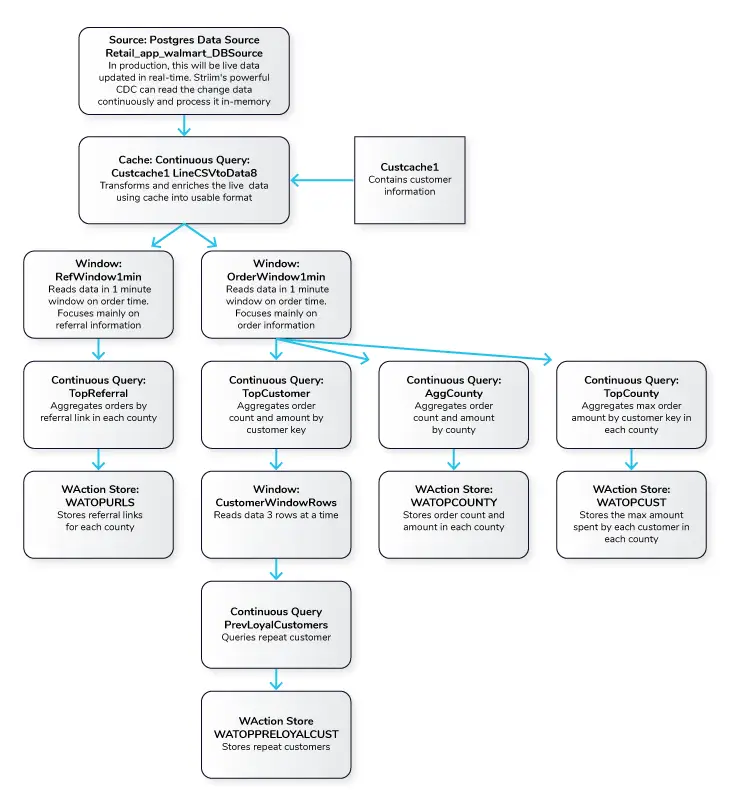
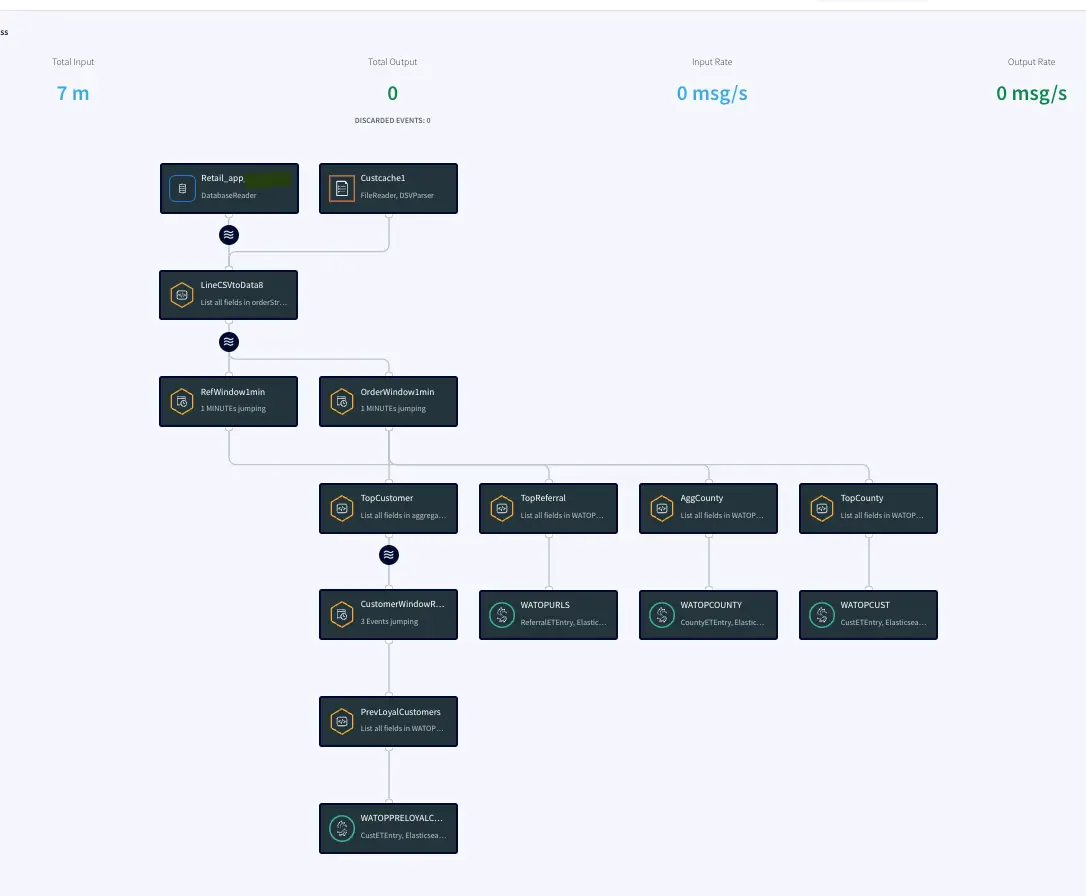
Simplified Diagram of the Striim App
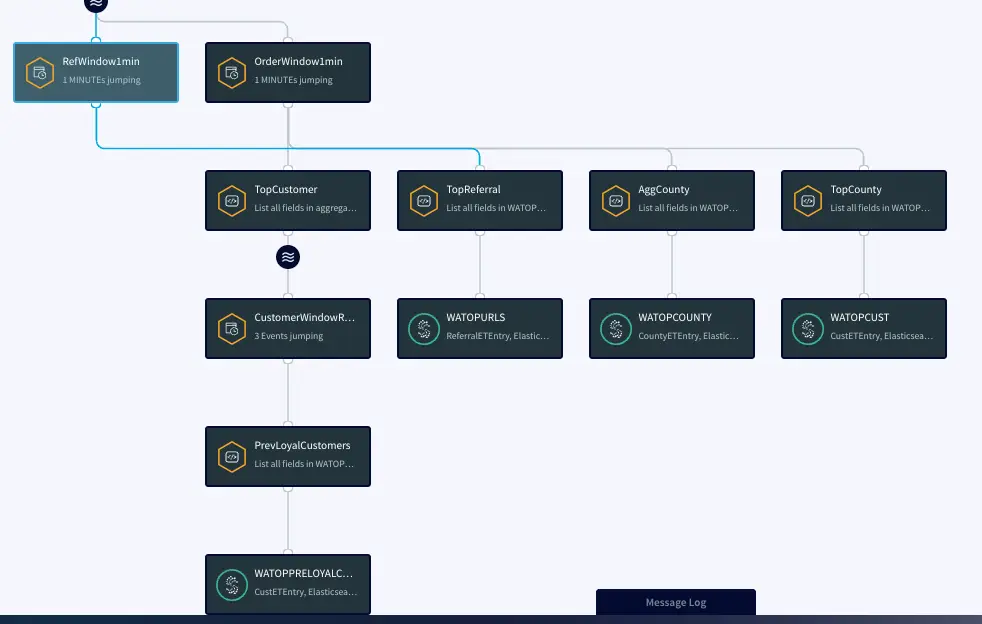
The Retail app in this recipe reads data from PostgreSQL Database and processes it into a usable format. The data is enriched using a cache containing customer details and then transformed using Continuous Queries. The transformed data is streamed with a one-minute window on order time which is further processed and stored in WActionStores. The data from the WAction component is used to populate a dashboard that shows top spenders, referrals and counties. In the production environment, data will be continuously updated on the source database which could be read with Striim’s Change Data Capture for real-time insights.
Step 1: Read Retail Data from Postgres Reader and process using CQ
For this recipe we are reading data from Postgres Database. The dataset can be found on our github repo. The data is read once and queried in a one-minute window. In production, this would be live streaming data from different sources at different locations. The metadata is processed and enriched using customer cache data and the Continuous Query Striim component.
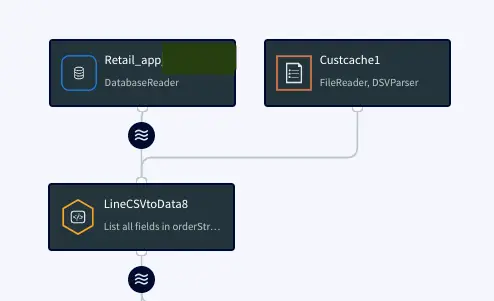
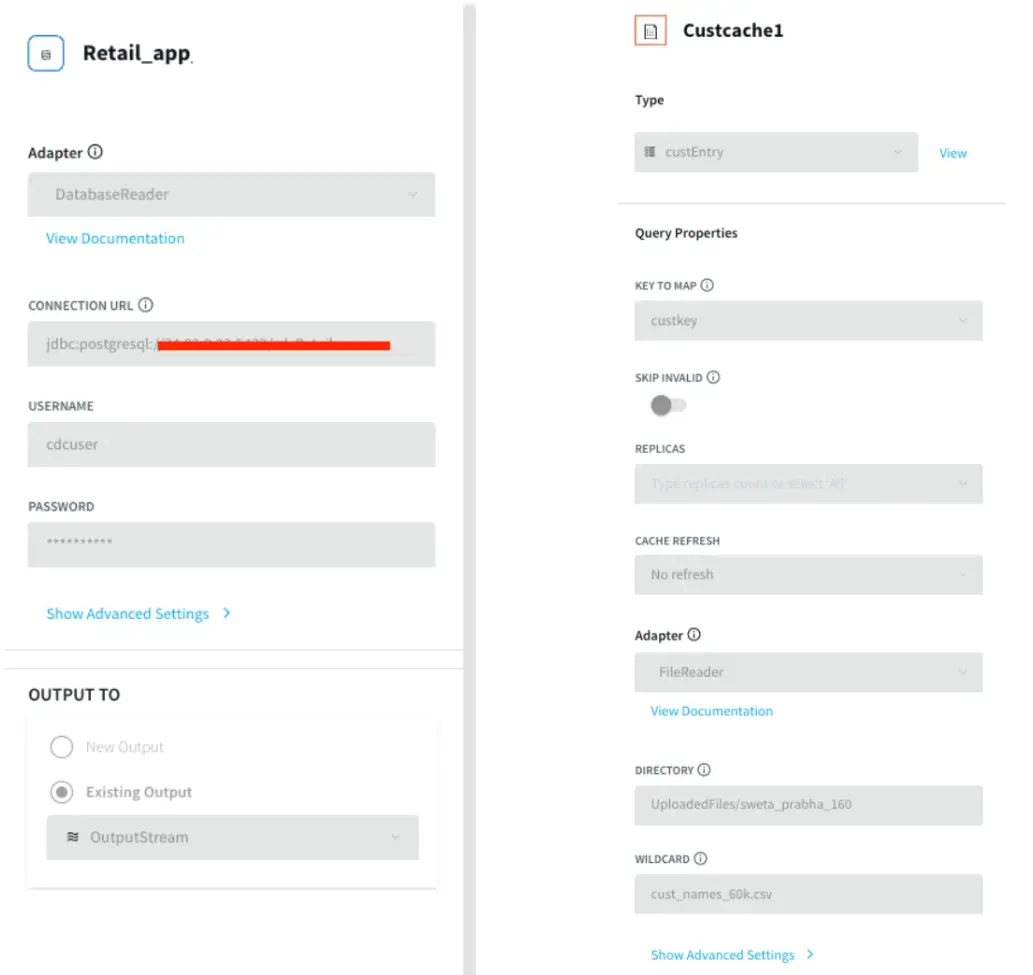
Postgres Source and csv cache: We specify the endpoints, username and password of the source Postgres database. The Cache will cache a dataset in Striim Cloud so it can be joined with a Stream using SQL.
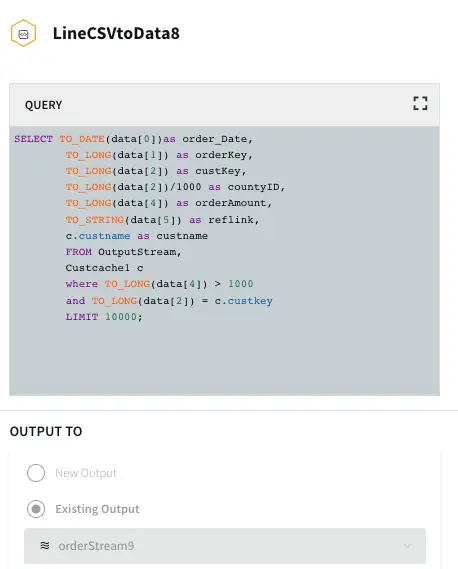
Initial Data Processing and Enrichment: The Continuous Query, LineCSVtoData8 is used to change the datatype for each field in usable format and merge the customer name from cache.
Step 2: Split data into one-minute window on Order time
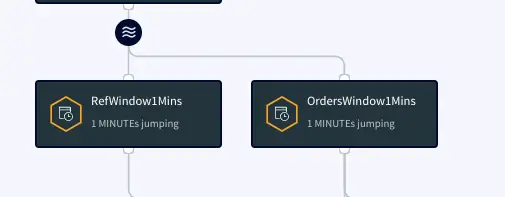
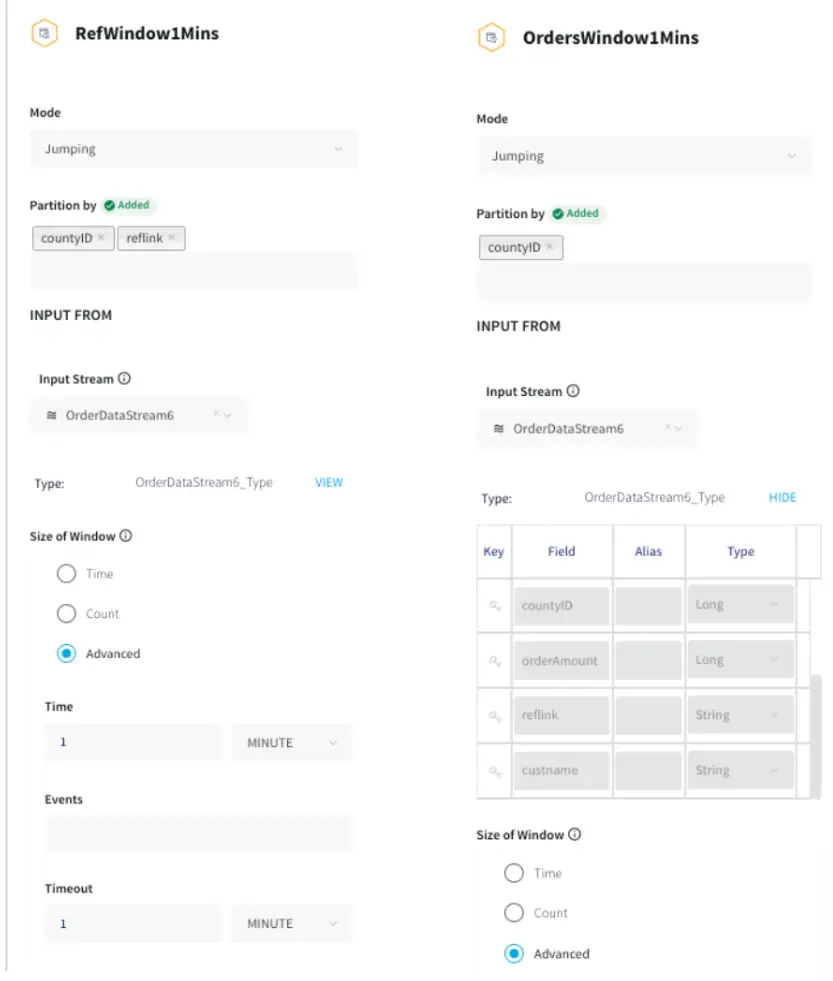
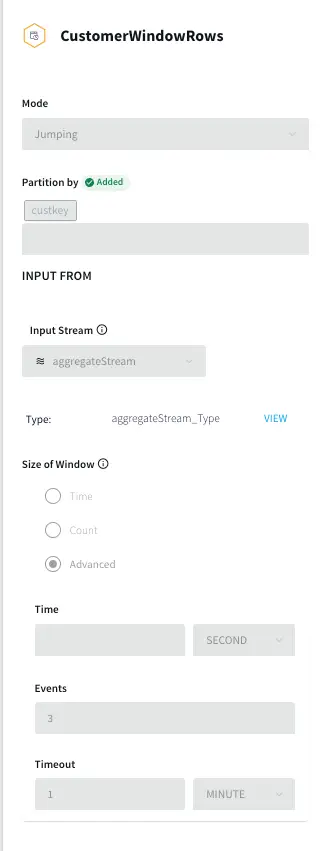
The processed data stream is split into one-minute chunks. The Window component in Striim creates a bounded dataset by a specified number of events, a period of time, or both. In this recipe, the incoming steam contains order data. There are two window components as shown below. Both the windows have jumping mode which means data is periodically updated for 1 minute interval. For RefWindow1Mins window, we have partitioned the datastream by reference link for every county. The partition by option on a time based window starts the timer separately for each. field value. The OrdersWindow1Mins partitions the data stream on countyID.
The timeout of one minute under Advanced Window settings forces the window to jump within a set period. To prevent the window from opening over longer time gaps between events, a timeout value is provided.
Step 3: Aggregate data using CQ on various fields
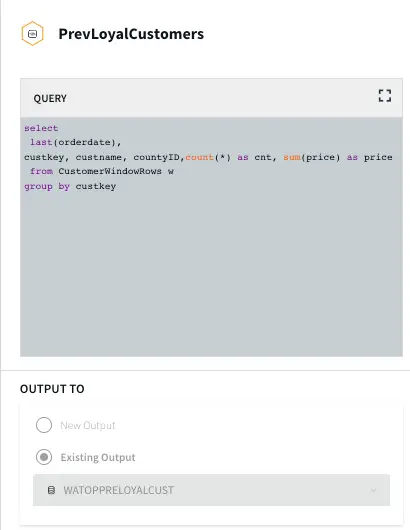
In this section continuous queries are written on orders and referral streams to aggregate data by top referral urls, top selling counties, top customers, and loyal customers. The data is then stored in the WAction component which is used to populate the Striim dashboard.
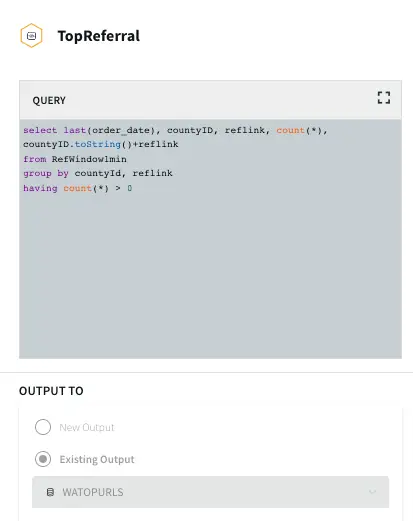
Top Referral links: The CQ counts the number of orders placed through various referral links in each county. The aggregated data is then stored in a WAction store which will be used in the Striim dashboard.
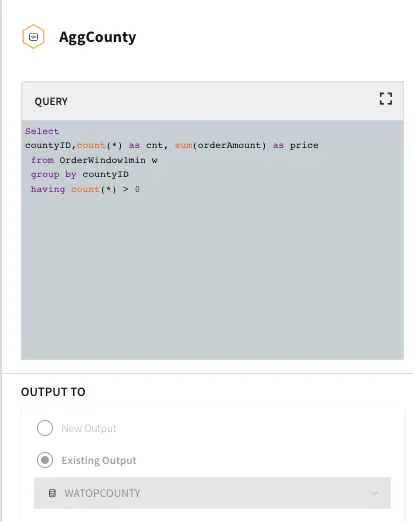
Aggregate County: In this query the total order amount and order count from each county is recorded.
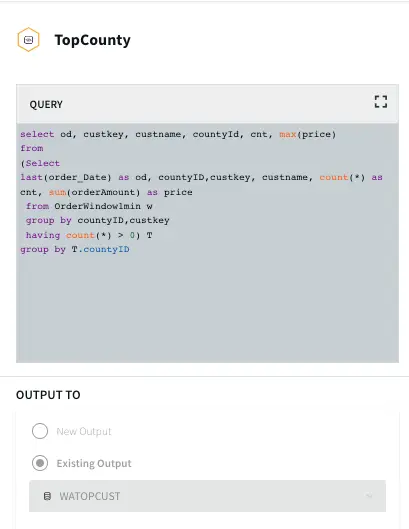
Top County: In this query the maximum order amount from customers in every county is recorded.
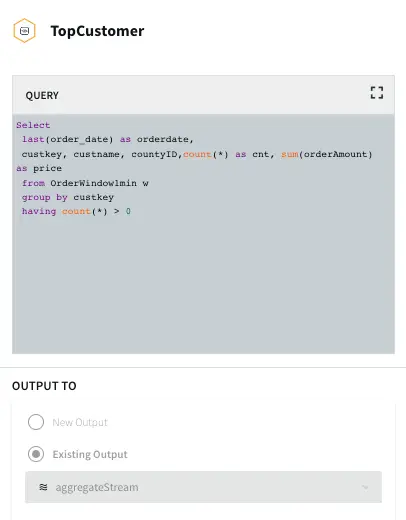
Top Customer: In this app, the order count and order amount of each customer is queried which is then partitioned to 3 events window with partition on customer key. The total order amount by each customer in a 3 event window is calculated. The data is then stored in WAction to analyze the top loyal customers with repeat orders.
Step 4: Populate the dashboard with data from WAction Stores
In this step a Striim dashboard is configured. Click on the Dashboards option on your service page as follows:
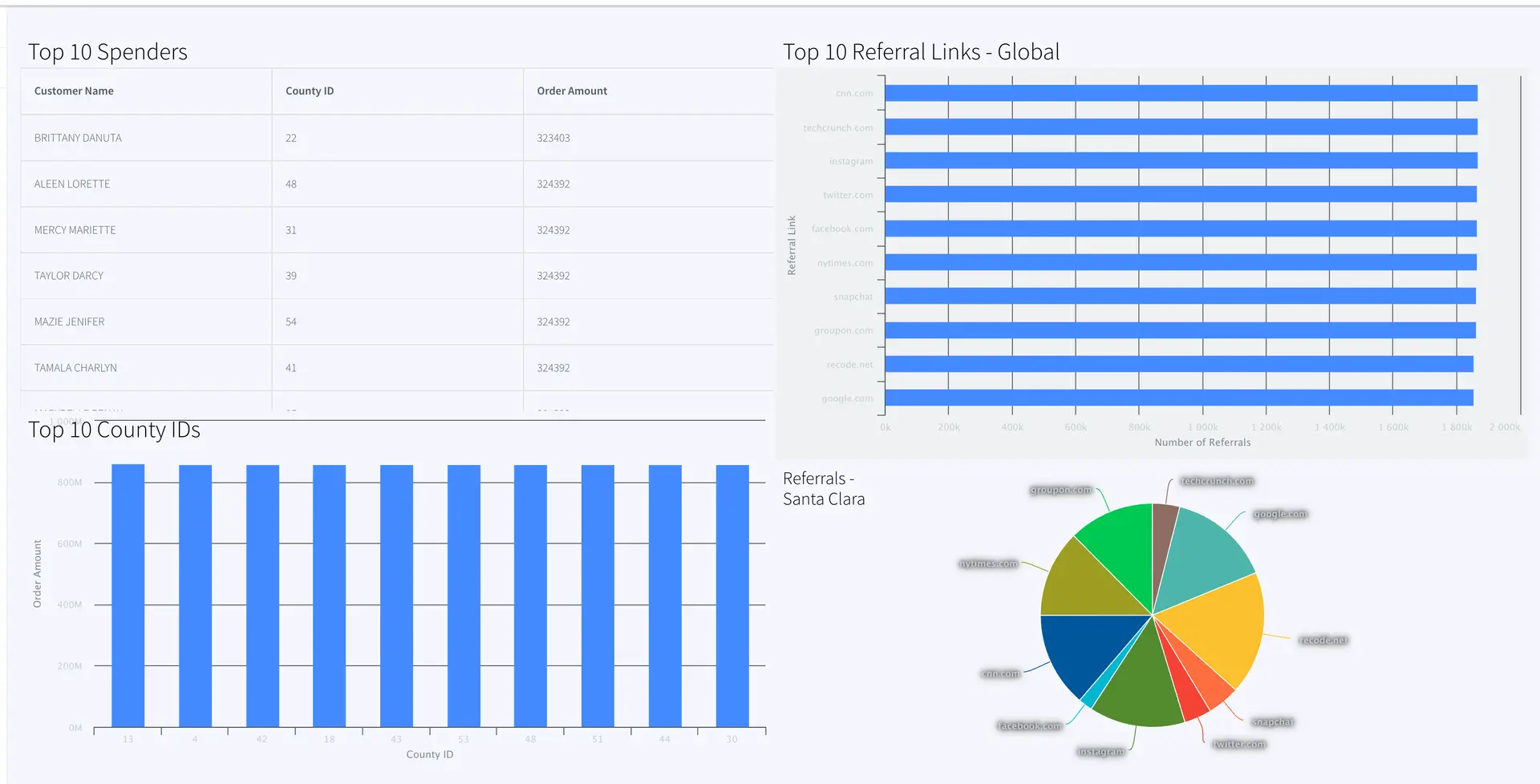
For this recipe, we have created two bar charts, one pie chart and one table. There are many more options to visualize data on the Striim dashboard. Please follow our dashboard guide to learn about various dashboard options in Striim.
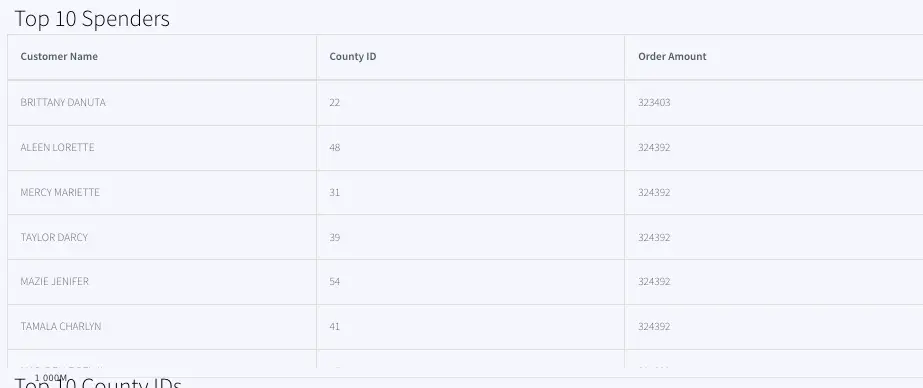
Top 10 Spenders:
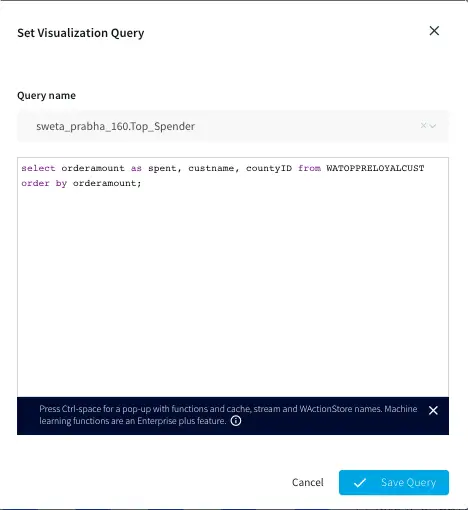
The Top 10 Spender table shows the county id, customer name and order amount of customers with the highest order amount. The data is pulled from WATOPPRELOYALCUST WAction store and ordered by orderamount.
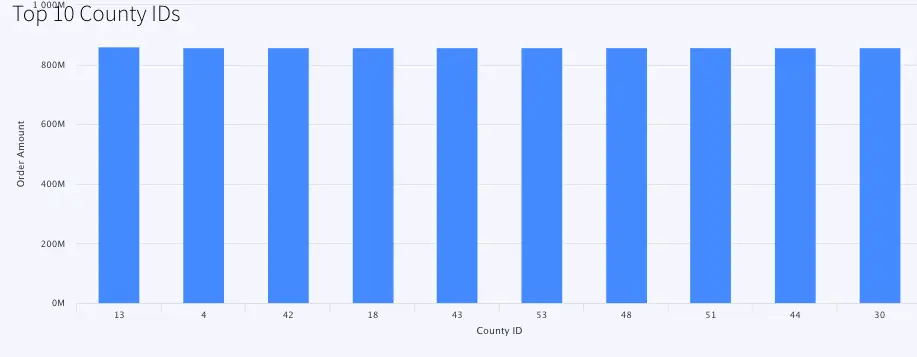
Top 10 County IDs:
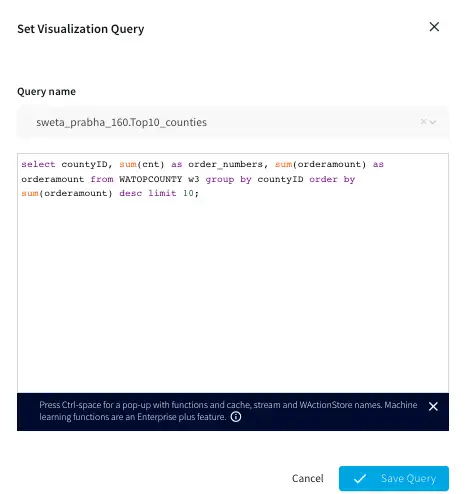
This is a bar chart that reads data from WATOPCOUNTY and orders by amount sold in each county.The top 10 county ids with total order amount are shown in the bar chart.
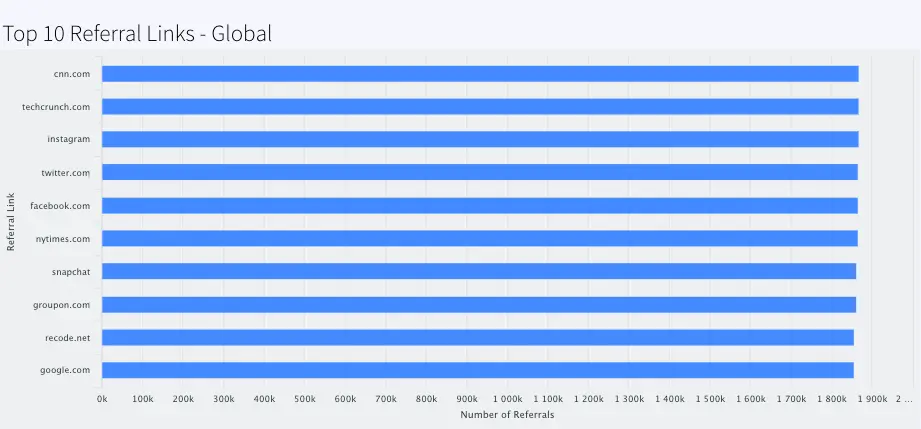
Top 10 Referral Links-Global:
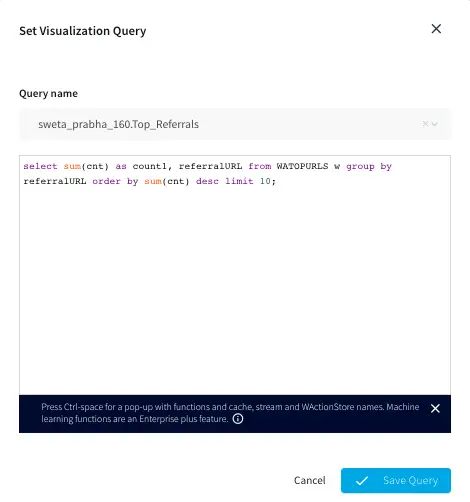
This barchart shows the top 10 referral links through which orders are placed.
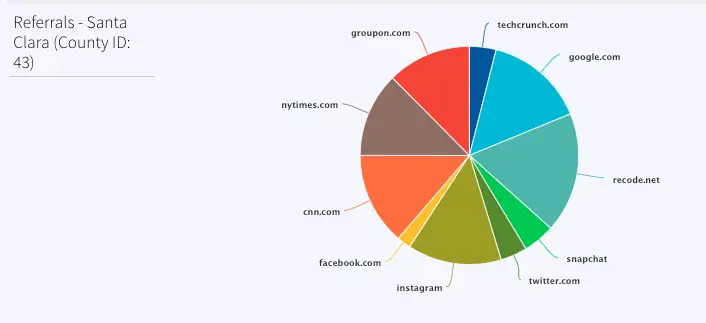
Referrals- Santa Clara (County ID: 43)
This pie chart shows the referral links for order counts sold in Santa Clara county (County id: 43). Most orders were placed through google.com, instagram and recode.net.
Final App and Dashboard
How to deploy and run this Striim Application?
Step 1: Download the TQL files
You can download the TQL files from our github repository. Deploy the Retail app on your Striim server.
Step 2: Set up the Postgres Source
The csv data used in this recipe can be downloaded from our github repository. You can use the data to populate tables in your own Postgres database. Configure the source adapter with Postgres endpoint, username, password and relevant tables.
Step 3: Deploy and Run the app
Deploy and run the retail app.
Step 4: Populate the dashboard
You can find the .json file for the dashboards in our github repository. Deploy the dashboard to visualize the retail dataset.
Wrapping Up: Start your Free Trial Today
The above tutorial describes how you can use Striim’s real-time data streaming feature to process, aggregate and enrich in-flight data and display it through a Striim dashboard for real-time analytics. Striim’s pipelines are portable between multiple clouds across hundreds of endpoint connectors. You can create your own applications and dashboards that cater to your needs. Please find the app TQL and data used in this recipe on our github repository
As always, feel free to reach out to our integration experts to schedule a demo, or try Striim for free here.
Tools you need
Striim
Striim’s unified data integration and streaming platform connects clouds, data and applications.
PostgreSQL
PostgreSQL is an open-source relational database management system.
I am excited to share with you that Striim is a proud participant in the Microsoft Intelligent Data Platform partner ecosystem as announced at Microsoft Ignite 2022. We have a history of working with Microsoft to help provide our mutual customers with access to enhanced data insights in real time, allowing them to make decisions the moment data is created. Earlier this year, Striim announced an enhanced and growing relationship with Microsoft around our Striim Cloud software-as-a-service offering.
More specifically, we said:
Microsoft customers can now leverage Striim Cloud on Microsoft Azure for continuous, streaming data integration from on-premises and cloud enterprise sources to Azure Synapse Analytics and Power BI, taking full advantage of the Microsoft Intelligent Data Platform.
The Microsoft Intelligent Data Platform promise is for customers to accelerate innovation and get more from their data, to increase their agility as environments and regulations evolve, and to do it all on an open and governed platform. This is why Striim is so pleased to partner with Microsoft to further accelerate customers’ time to value.
At Striim we continue to offer customers the ability to take full advantage of the Microsoft Intelligent Data Platform. We provide Microsoft Azure enterprise customers immediate access to critical business data in real time. With continuous, streaming data integration from on-premises and cloud enterprise sources to Azure analytics tools like Synapse and Power BI, users have an unbeatable, data-driven experience with up-to-the-second operational visibility.
We will continue to grow and enhance our relationship with Microsoft and the Intelligent Data Platform as we work toward the mutual goal of providing customers the ability to, adapt rapidly, add layers of intelligence to apps, generate predictive insights, and govern all your data—wherever it resides. As Faisal Mohamood, VP, Azure Data Integration at Microsoft says, “We look forward to continuing to grow our partnership with Striim to help our customers accelerate their data-driven digital transformation.”
In this whitepaper, we show how Striim’s streaming platform can be used to move data between a highthroughput Oracle transactional database to Google BigQuery in real time.
Striim offers a fully managed, unified data movement platform that streams data to AlloyDB with unprecedented speed and simplicity. Migrate and replicate data to AlloyDB with zero downtime and near real-time SLAs for business applications on AlloyDB.
In this episode, we host Joe Reis and Matthew Housely from Ternary Data. We’ll talk data contracts, data mesh, and their excellent book: The Fundamentals of Data Engineering.