Emergency Room Monitoring Recipe

Tutorial

Emergency Room Analytics with Data Streaming

Improve efficiency, patient care, and resource allocation with real-time data

Benefits

Real-Time Monitoring

Process incoming ER data in real-time for immediate triage and resource allocation


Enhanced Decision-Making Make informed decisions through visual dashboards that represents key metrics and KPIs 

Efficient Communication

Streaming analytics facilitate communication among healthcare teams as well as with patients for better collaboration

On this page

Healthcare Needs Real-Time Data

In the dynamic landscape of healthcare, the demand for real-time data in emergency room operations has become increasingly important. Hospital emergency rooms serve as critical hubs for patient care, responding to a myriad of medical crises with urgency and precision. The ability to monitor and analyze real-time data within these environments is critical for enhancing operational efficiency, optimizing resource allocation, and ultimately improving patient outcomes. 

As healthcare professionals navigate the complexities of emergency room settings, a comprehensive understanding of real-time data through intuitive dashboards becomes indispensable. 

This tutorial aims to show the significance of healthcare monitoring through a real-time data dashboard, providing insights into how these tools can revolutionize emergency room management, streamline workflows, and contribute to a more responsive and patient-centric healthcare system. Whether it’s tracking patient flow, resource utilization, or anticipating surges in demand, the integration of real-time data dashboards empowers healthcare providers to make informed decisions swiftly and proactively in the ever-evolving landscape of emergency care.

Why Striim for Healthcare?

Striim offers a straightforward, unified data integration and streaming platform that combines change data capture (CDC), Streaming SQL and real-time analytical dashboards as a fully managed service.The Continuous Query (CQ) component of Striim uses SQL-like operations to query streaming data with almost no latency.

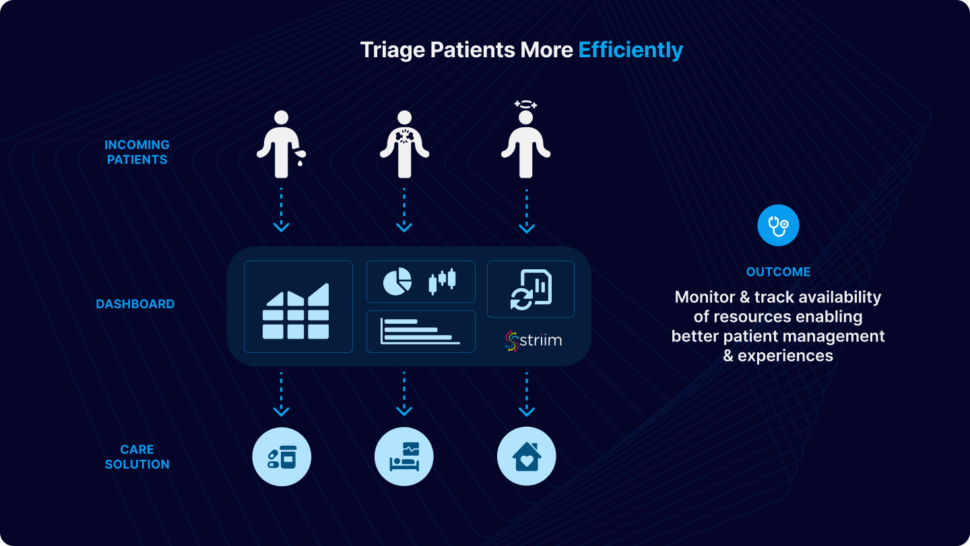
Using streaming analytics and real-time dashboards for Emergency Room (ER) monitoring processes incoming patient data in real-time, allowing for immediate triage and prioritization of patients based on the severity of their conditions. Hospitals can monitor the availability of resources such as beds, medical staff, and equipment in real-time. This allows for efficient allocation and utilization of resources. Dashboards provide a visual representation of key metrics and KPIs. Healthcare professionals can make informed decisions quickly by accessing real-time data on patient statuses, resource utilization, and overall ER operations.
Use-Case

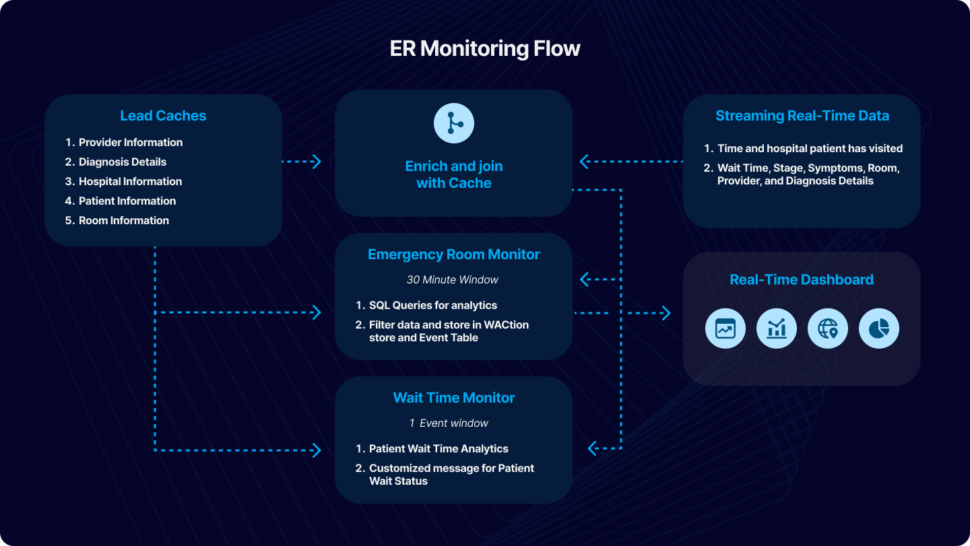
In this particular use case, patient’s data from their ER visit is continuously streamed in real-time, undergoing dynamic filtering and processing. Cache files, containing essential details such as hospital information, provider details, and patient data, are employed to enhance and integrate the data stream. The resulting processed data is utilized for immediate analytics through the use of dashboards and elastic storage.

For the purpose of this tutorial, we have simulated fictional data in CSV format to emulate a real-world scenario. The data can be streamed from diverse sources and databases supported by Striim. This application tutorial is built from four primary sections: Loading Cache, Reading and Enriching Real-Time Data Stream, Emergency Room (ER) Monitoring, and Wait Time Monitoring.

The incoming data includes fields such as Timestamp, hospital ID, wait time, stage, symptoms, room ID, provider ID, and diagnosis details. The initial step involves enriching the data using cache, which includes adding details like hospital name, geographical location, patient name, patient age, and patient location. The enriched data is subsequently merged with other cache files, encompassing room details, provider details, and diagnosis. An outer join is executed to accommodate potential null values in these columns.

Once the data is enhanced by incorporating information from the cache, ER Monitoring takes place within a 30-minute window. A window component in Striim bounds real-time data based on time (e.g., five minutes), event count (e.g., 10,000 events), or a combination of both. Complex SQL-like queries, known as Continuous Queries (CQ), transform the data for various analytics and reporting objectives. Processed data from each stream is stored in an Event Table for real-time access and a WAction store for historical records. Event tables are queried to construct a Striim dashboard for reporting purposes. We will take a detailed look at the various components of the Striim application in this tutorial.

Wait Time Monitoring is implemented to generate personalized messages for patients, notifying them about the estimated wait time. In a real-world scenario, these messages could be disseminated through text or email alerts.
To give this app a try, please download the TQL file, dashboard and the associated CSV files from our github repository. You can directly upload and run the TQL file by making a few changes discussed in the later sections. 
Core Striim Components

File Reader: Reads files from disk using a compatible parser.

Cache: A memory-based cache of non-real-time historical or reference data acquired from an external source, such as a static file of postal codes and geographic data used to display data on dashboard maps, or a database table containing historical averages used to determine when to send alerts. If the source is updated regularly, the cache can be set to refresh the data at an appropriate interval.

Stream: A stream passes one component’s output to one or more other components. For example, a simple flow that only writes to a file might have this sequence

Continuous Query: Striim Continuous queries are continually running SQL queries that act on real-time data and may be used to filter, aggregate, join, enrich, and transform events.

Window: A window bounds real-time data by time, event count or both. A window is required for an application to aggregate or perform calculations on data, populate the dashboard, or send alerts when conditions deviate from normal parameters.

WAction and WActionStore: A WActionStore stores event data from one or more sources based on criteria defined in one or more queries. These events may be related using common key fields.

Event Table: An event table is similar to a cache, except it is populated by an input stream instead of by an external file or database. CQs can both INSERT INTO and SELECT FROM an event table.

File Writer: Writes outcoming data to files 

Dashboard: A Striim dashboard gives you a visual representation of data read and written by a Striim application

Loading Cache

There are five cache files used in this application. The name and details of the files are as follows:

Providers: Provider id, firstname, lastname, hospital id, providerType

Diagnoses: Diagnosis id, name

Hospitals: Hospital id, name, city, state,zip,lat,lon

Patients: Patient id, firstname, lastname, gender, age, city, state, zip, lat, lon

Rooms: Room id, name, hospitalid, roomtype

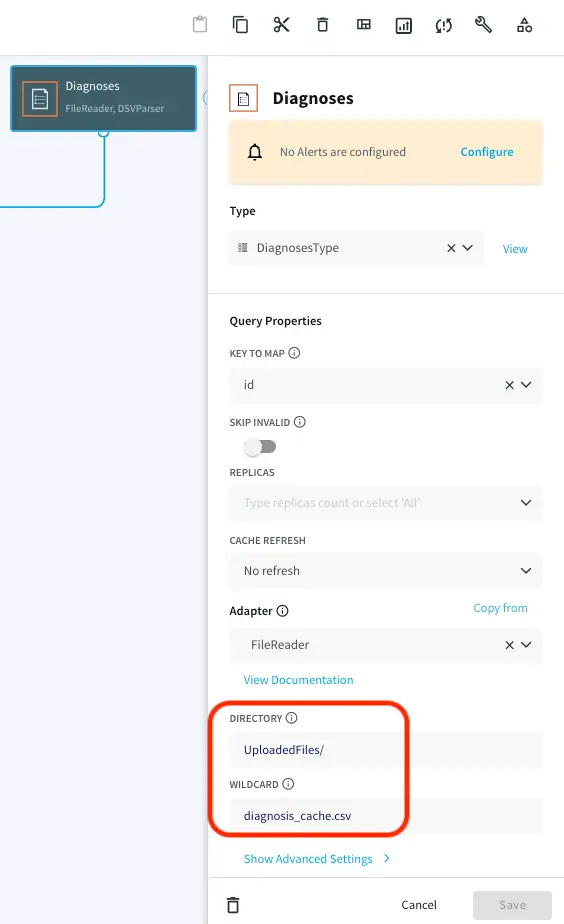
Choose ‘My files’ from the drop-down on the upper right corner and upload the cache files that you have downloaded from the github repository.

Note the path of the file and make necessary changes as shown below. Repeat this for all the five caches.
Streaming Real-Time Data

A CSV file containing patient visit data with timestamp is provided on the github repository. Upload the file in the same way as you uploaded the cache files in the previous section. Note the path of directory and edit the filereader component that reads the data as shown below:
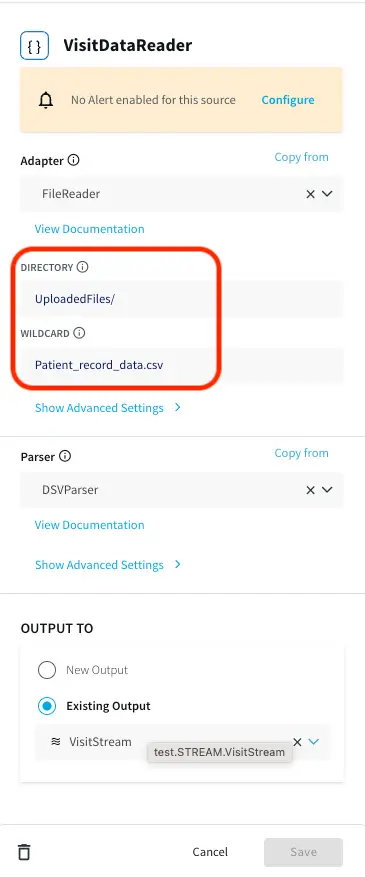
Three Continuous Queries (CQ), ParseVisitData, EnrichVisitData and AddOuterJoinsToVisitData are applied to parse the real-time data and enrich and join with cache. The queries are provided in the TQL file. The processed data is input into ER Monitor as well as Wait Time Monitor for further analytics.

Emergency Room Monitor

The data containing Timestamp, hourOfDay, patientID, hospitalId, stage, symptoms, visitDuration, stageDuration, roomId, providerId, diagnosisCode, hospitalName, hospitalLat, hospitalLon, patientAge, patientlat, patientlon, roomName, roomType, providerLastName, providerType and diagnosis is passed through a 30 min window based on timestamp column and following analytics are performed:

  • DiagnosisAnalytics
  • HandleAlerts
  • HospitalAnalytics
  • OccupancyAnalytics
  • PreviousVisitAnalytics
  • VisitsAnalytics
  • WaitTimeStatsAnalytics

We will briefly look at each of the analyses in the following section. The TQL file contains every query and can be run directly to visualize the apps and dashboard.

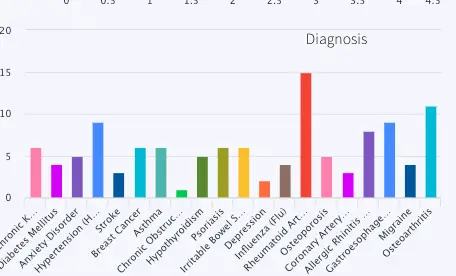
DiagnosisAnalytics: Number of patients for each type of diagnosis in the last 30 minutes is calculated. The data is visualized using a bar chart in the final dashboard.  The name of the WAction store and Event table for the processed data are DiagnosisHistory and DiagnosisCountCurrent respectively. The query reading data for the bar chart is PreviousVisitsByDiagnosis.
HandleAlerts: This analysis uses a Continuous Query to assign wait status as ‘normal’, ‘medium’ and ‘high’. It also generates alerts if the wait time does not improve in 30 minutes. The alert messages are:

Case 1: If wait time improves:
Hospital <hospital name> wait time of <last wait time> minutes is back to acceptable was <first wait time>

Case 2:  If wait time worsens:
Hospital <hospital name> wait time of <last wait time> minutes is too high was <first wait time> with <number of patients> current visits

The alert is sent to a Alert Adapter component named SendHospitalWebAlerts

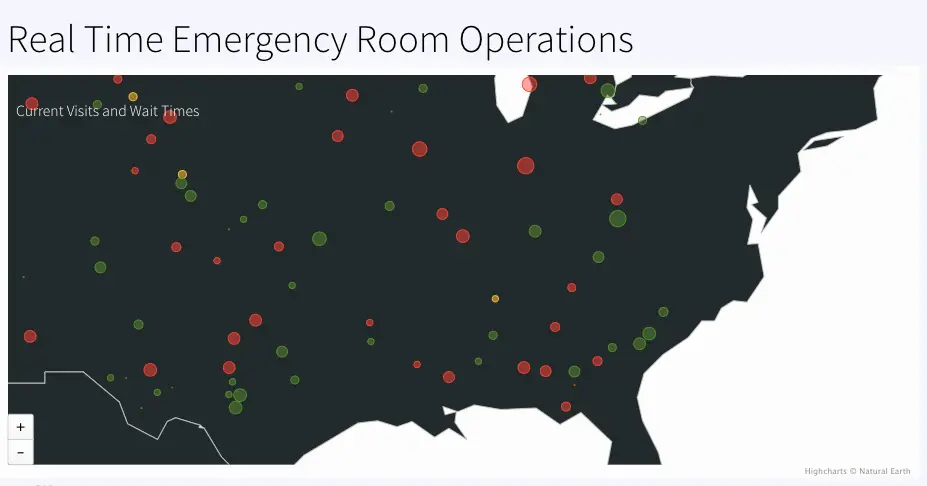
HospitalAnalytics: Calculates number of visits and waitstatus based on maximum wait-time in each hospital. The geographical information of each hospital is used to color code ‘normal’, ‘medium’ and ‘high’ wait status in the map. The event table and WAction Store where the outcoming data is stored are VisitsByHospitalCurrent and VisitsByHospitalHistory respectively.
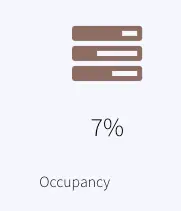
OccupancyAnalytics: Calculate the percentage of occupied rooms from a 30 mins window. The current data is stored in the event table, OccupancyCurrent. The percentage is reported as Occupancy in the dashboard.
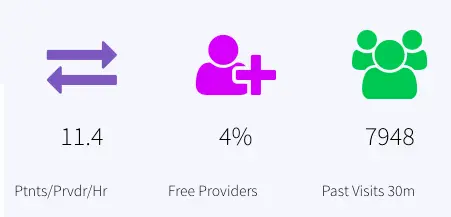
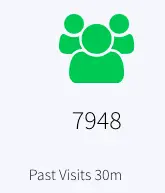
PreviousVisitAnalytics: Number of previous visits that are now Discharged, Admitted or have left in the past 30 mins are calculated. The resulting data is stored in the event table, PreviousVisitCountCurrent and WAction store PreviousVisitCountHistory. The dashboard reports ‘Past Visits 30m’ to show the previous visit count.
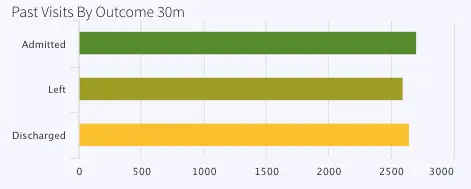
Another CQ queries the number of previous visits by stage (admitted, discharged or left) and stores current data inside event table, PreviousVisitsByStageCurrent and historical data inside WAction store, PreviousVisitsByStageHistory.

The bar chart titled ‘Past Visits By Outcome 30m’ represents this data.
VisitsAnalytics: Calculates the current visit number from the 30 min window and also the number of visits by stage.

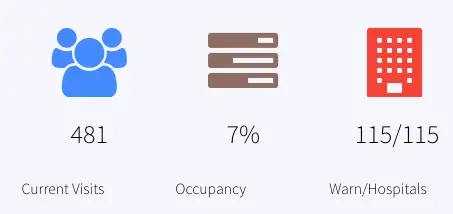
The number of current visits is stored in the event table VisitCountCurrent and historical data is stored in the WAction store VisitCountHistory. In the dashboard the current count is reported under ‘Current Visits

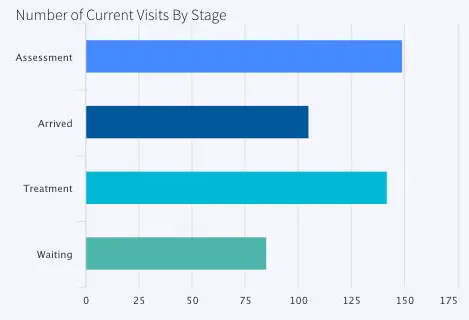
The number of visits by stage (Arrived, Waiting, Assessment or Treatment is also calculated and stored in VisitsByStageCurrent (event table) and VisitsByStageHistory (WAction Store). The data is labeled as ‘Number of Current Visits By Stage’ in the dashboard.
WaitTimeStatsAnalytics: For stage ‘waiting’, the minimum, maximum and average wait time is calculated and stored in WaitTimeStatsCurrent (Event Table) and WaitTimeStatsHistory (WAction Store). 
All data from the 30 min window is saved in the event table CurrentVisitStatus. Provider analytics is done by querying this event table and joining with cache, ‘Providers’. The data is reported in the dashboard as ‘Ptnts/Prvdr/Hr’ and ‘Free Providers

Wait Time Monitor

A jumping window streams one event at a time partitioned by patient ID and Hospital ID. The number of patients ahead of each event is calculated. 

Based on the number of patients ahead, a customized message with estimated wait time information is generated 

Eg:  “<Patient name>, you are <1st/2nd/3rd or nth> in line at <hospital name> with an estimated <duration> wait time 

The patient messages are stored in WACtion store PatientWaitMessages

Dashboards

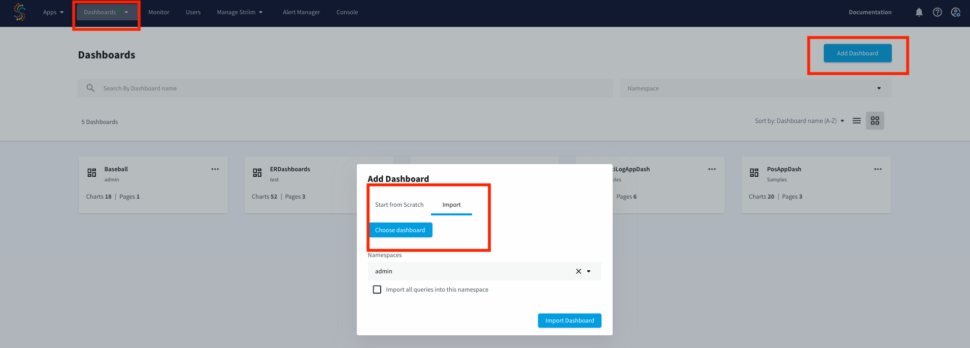
Striim offers UI dashboards that can be used for reporting. The dashboard JSON file provided in our repo can be imported for visualization of ER monitor data in this tutorial. Import the raw JSON file from your computer, as shown below:
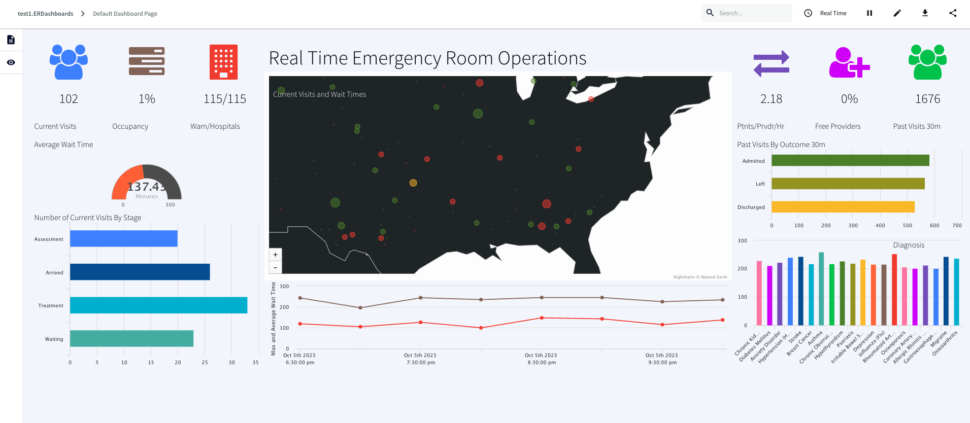
Here is a consolidated list of charts from the ER monitoring dashboard:

ActiveVisits: Number of patients that are in any other stage but “Arrived”, “Waiting”, “Assessment” or “Treatment” every 30 mins labeled as Current Visits  Queries on: VisitCountCurrent

RoomOccupancy:Percentage of rooms occupied in each 30 mins window labeled as Occupancy, Queries Event Table: OccupancyCurrent

HospitalsWithHighWaits: Number of hospital with max wait status > 45 minutes/number of hospitals with wait, labeled as Warn/Hospitals, Queries event table: CurrentVisitStatus

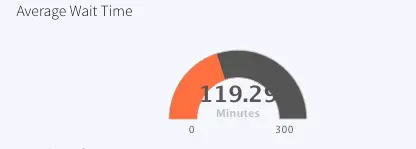
ActiveVisitWaitTime: Average wait time of all hospitals, labeled as Average Wait Time , Queries event table:  WaitTimeStatsCurrent

VisitsByStage: Number of Visits for Assessment, Arrived, Treatment and Waiting at each timestamp, labeled as Number of Current Visits By Stage, Queries event table: VisitsByStageCurrent

GetCurrentVisitsPerHospital: Number of visits every hospital (not ‘Discharged’, ‘Admitted’, ‘Left’) every 30 mins, labeled as, Real Time Emergency Room Operations , Queries event table: VisitsByHospitalCurrent

VisitDurationOverTime: Maximum wait time every 2 hours, labeled as Maximum Wait Time, Queries event table: WaitTimeStatsHistory

PatientsPerProvider: Patients/provider/hr, labeled as Ptnts/Prvdr/Hr, Queries event table: CurrentVisitStatus 

FreeProvider: Total provider(queries: Cache Providers)- provider that are busy (queries: CurrentVisitStatus), calculate percent, labeled as Free Providers

PreviousVisits: Count of Discharged, Admitted, Left from 30 mins window, labeled Past Visits 30m, Queries event table: PreviousVisitCountCurrent

PreviousVisitsByOutcome: Number of Admitted, Left or Discharged in past 30 mins, labeled: Past Visits By Outcome 30m , Queries event table: PreviousVisitsByStageCurrent

PreviousVisitsByDiagnosis: Number of Diagnosis for each disorder in past 30 mins, labeled: Diagnosis, Queries event table: DiagnosisCountCurrent
Conclusion: Reimagine Healthcare Monitoring Leveraging Real-Time Data and Dashboards with Striim

In this tutorial, you have seen and created an Emergency Room (ER) monitoring analytics dashboard powered by Striim. This use case can be leveraged in many other scenarios in healthcare, such as pharmacy order monitoring and distribution. 

Unlock the true potential of your data with Striim. Don’t miss out—start your 14-day free trial today and experience the future of data integration firsthand. To give what you saw in this recipe a try, get started on your journey with Striim by signing up for free with Striim Developer or Striim Cloud

Learn more about data streaming using Striim through our other Tutorials and Recipes.

Activating Microsoft Fabric with Real-time data for Analytics & AI

Striim, Microsoft’s strategic partner in data integration, introducing its new Microsoft Fabric adapters to enable data engineering, data science, analytics and AI user groups with a modern real-time data streaming & integration to Microsoft Fabric Data warehouse & Lakehouse

Speaker: Alok Pareek, Cofounder and Executive Vice President of Engineering and Products at Striim

Striim’s Exciting New Partnership with Yellowbrick Data: Supercharging Data Analytics

Exciting news for data-driven organizations: Striim is thrilled to announce a Technology Partnership with Yellowbrick Data. This strategic alliance opens up a world of possibilities for businesses looking to leverage the power and speed of Striim’s real-time data streaming and integration capabilities to seamlessly move data into the Yellowbrick Data Warehouse and drive lightning-fast analytics.

Striim, the frontrunner in real-time data integration and streaming analytics, has joined forces with Yellowbrick Data, renowned for its high-performance data warehousing solution. Together, we are delivering a synergy that is set to transform how companies handle data, offering a wealth of benefits to customers eager to unlock new opportunities and optimize their operations.

Here are some of the key values that this Striim and Yellowbrick Data partnership brings to customers:

  • Lightning-Fast Analytics: With Striim’s real-time data streaming and integration, coupled with Yellowbrick Data Warehouse’s exceptional performance, businesses can now achieve lightning-fast analytics. This enables organizations to gain instant insights from their data, enhancing decision-making and responsiveness.
  • Seamless Data Movement: The partnership streamlines the process of moving data into the Yellowbrick Data Warehouse. Striim’s capabilities make it easy for organizations to replicate, transform, and load data in real time, ensuring that data is always up-to-date and readily available for analytics.
  • Scalability and Flexibility: Yellowbrick Data Warehouse offers scalability and flexibility, allowing businesses to expand their data warehousing capabilities as needed. This ensures organizations can meet the demands of a growing data landscape without compromising on performance.
  • Cost-Efficiency: The combined solution provides an affordable alternative to traditional data warehousing systems. It allows businesses to achieve high-performance analytics without breaking the bank, making efficient use of their IT budgets.
  • Data Agility: Striim’s real-time data streaming and integration capabilities, when integrated with Yellowbrick Data Warehouse, offer data agility. Businesses can work with a wide range of data sources, formats, and types, ensuring they can effectively manage diverse data workloads.
  • Accelerated Insights: The partnership accelerates the data-to-insights journey. With faster data movement and analytics, organizations can capitalize on data-driven opportunities, stay competitive, and drive innovation.

“Striim is truly thrilled to embark on this transformative journey through our Technology Partnership with Yellowbrick Data,” said Phillip Cockrell, Senior Vice President of Business Development at Striim. “This collaboration empowers organizations to unleash the full potential of their data, seamlessly integrating our real-time data streaming and integration with Yellowbrick’s high-performance Data Warehouse. The speed and agility this brings to analytics is nothing short of revolutionary, and we are excited to be at the forefront of enabling businesses to drive lightning-fast insights and innovations.”

“We are excited to partner with Striim, a true frontrunner in real-time data integration and streaming analytics,” said Allen Holmes, VP of Business Development, Cloud & Global Partners at Yellowbrick Data. Striim’s expertise and technology in real-time data streaming and integration perfectly complement Yellowbrick Data’s high-performance data warehousing solution. Together, we are providing organizations with a powerful combination that enables lightning-fast analytics, seamless data movement, scalability, cost-efficiency, and data agility.“

Striim’s Technology Partnership with Yellowbrick Data is a game-changer for organizations seeking to supercharge their data analytics. By combining Striim’s real-time data streaming and integration with Yellowbrick’s high-performance data warehousing solution, businesses gain the power and speed required to make data-driven decisions in real time. In a data-centric world, this partnership empowers organizations with the tools they need to thrive and succeed in an ever-evolving landscape.


Striim integrates Microsoft Fabric to deliver real-time, AI-augmented data

Striim, a key partner for Microsoft Fabric today announced its new, low-latency, open-format data integration and streaming service for Microsoft Fabric. This service seamlessly integrates data from disparate sources, mission-critical enterprise applications, and databases into Microsoft Fabric. Through Striim’s AI-ready data streaming, we’re ushering in a new era of analytics and AI, all harmonized under a single data platform on Microsoft Azure.

What is Microsoft Fabric?

Microsoft Fabric is an end-to-end data analytics solution with full-service capabilities, including data movement, data lake, data warehouse, analytics, and business intelligence. All of these services are served by Microsoft OneLake, a unified intelligent storage layer that solves the complex problem of decentralized data teams working in silos. Striim uniquely streams low-latency data to Microsoft Fabric to power analytics and AI with fresh, real-time data with its fully managed service natively built on Microsoft Azure.

Let’s take a scenario of a large retail business that has stores across multiple cities. The business wants to gain critical real-time insights across its stores, purchases, inventory, costs incurred per store and identify patterns like seasonal sales, perform predictive analysis for inventory, sales etc. Typically to achieve this goal various teams including data engineers, sql developers, data scientists and business analysts work independently with their own datasets and data pipelines, tools & scripts causing not only duplicate efforts but also silos of storage footprint. The management of these siloed efforts quickly becomes complex including data governance, privacy, user access control and infrastructure management etc. that can result in an increased TCO for the business.

Microsoft Fabric was introduced to address this exact challenge through a unified storage layer with access control and dedicated workgroups for individual teams to work independently on the same data set. However, the data needed in Fabric Warehouse or Lakehouse resides in enterprise silos and still needs to be unified through a real-time streaming service that lets users ingest, process, enrich and load the data to the warehouse, lakehouse or Microsoft Power BI datamarts services; otherwise this integration effort has to be done independently by each data team. Striim’s service Striim for Microsoft Fabric does exactly that, offering a real-time, low latency and highly scalable data streaming service that matches the Fabric scale and serves as a single tool for all data teams in the organization with various Analytics and AI use cases.

Real time Insights in Power BI Dashboards

Let’s overview how this is accomplished in Striim. 

In our above example, the retail customer who is interested in critical business insights will simply sign up for Striim Cloud and follow three simple steps to get the data into Fabric data warehouse and lakehouse targets in less than 5 minutes to have access to real time insights in Power BI dashboards.

Step 1: Create the Striim Cloud service on Azure, this process uses Azure Kubernetes Service, deploys Striim and configures a cluster.

Step 2: Create a data pipeline with source connection details and optionally use Azure private link to securely route  data completely off of the public internet. 

Step 3: Configure Fabric target to Fabric warehouse 

Now simply monitor data being streamed from source to target/targets in real-time. Data will be directly written directly to the data warehouse in delta-parquet format so the Power BI can be configured to receive the real-time data from data warehouse tables. 

Retail customer’s requirements are consolidated and simplified across groups to get the business insights in less than 5 minutes using Microsoft Fabric Power BI. Shown below are data insights such as  sales by store, traffic to the stores by dates and cost of running stores etc.

About Striim

Striim’s Cloud based service offers a lot of inbuilt smart defaults, automation and intelligence that helps users focus on their actual business needs instead of spending their time on managing pipelines. It saves time and effort for the data engineering team, offers a no-code experience for citizen developers and real-time querying directly from pipelines for engineers and SQL developers and enables businesses with real-time data to make decisions. This unified data streaming nicely compliments the open vision of Microsoft Fabric platform.

In addition, Striim has announced support for Microsoft Fabric Mirroring for on premise SQLServer and is now available private preview. You can contact us for a demo or sign up for a trial to learn more.

Striim Fabric Resources


Comparing Snowflake Data Ingestion Methods with Striim

Introduction

In the fast-evolving world of data integration, Striim’s collaboration with Snowflake stands as a beacon of innovation and efficiency. This comprehensive overview delves into the sophisticated capabilities of Striim for Snowflake data ingestion, spanning from file-based initial loads to the advanced Snowpipe streaming integration.

Quick Compare: File-based loads vs Streaming Ingest

We’ve provided a simple overview of the ingestion methods in this table:

Feature/Aspect File-based loads Snowflake Streaming Ingest
Data Freshness SLAs 5 minutes to 1 hour Under 5 minutes. Benchmark demonstrated P95 latency of 3 seconds with 158 gb/hr of Oracle CDC ingest.
Use Cases – Ideal for batch processing and reporting scenarios
– Suitable for scenarios where near real-time data is not critical
– Bulk data uploads at periodic intervals
– Critical for operational intelligence, real-time analytics, AI, and reverse ETL
– Necessary for scenarios demanding immediate data actionability
– Continuous data capture and immediate processing
Data Volume Handling Efficiently handles large volumes of data in batches Best for high-velocity, continuous data streams
Flexibility Limited flexibility in terms of data freshness
– Good for static, predictable workloads
High flexibility to handle varying data rates and immediate data requirements
– Adaptable to dynamic workloads and suitable for AI-driven insights and reverse ETL processes
Operation Modes Supports both Append Only and Merge modes Primarily supports Append Only mode
Network Utilization Higher data transfer in bulk, but less frequent
– Can be more efficient for network utilization in certain scenarios
Continuous data transfer, which might lead to higher network utilization
Performance Optimization Batch size and frequency can be optimized for better performance
– Easier to manage for predictable workloads
Requires fine-tuning of parameters like MaxRequestSizeInMB, MaxRecordsPerRequest, and MaxParallelRequests for optimal performance
– Cost optimization is a key benefit, especially in high-traffic scenarios

File-based uploads: Merge vs Append Only

Striim’s approach to loading data into Snowflake is marked by its intelligent use of file-based uploads. This method is particularly adept at handling large data sets securely and efficiently. A key aspect of this process is the choice between ‘Merge’ and ‘Append Only’ modes.

Merge Mode: In this mode, Striim allows for a more traditional approach where updates and deletes in the source data are replicated as such in the Snowflake target. This method is essential for scenarios where maintaining the state of the data as it changes over time is crucial.

Append Only Mode: Contrarily, the ‘Append Only’ setting, when enabled, treats all operations (including updates and deletes) as inserts into the target. This mode is particularly useful for audit trails or scenarios where preserving the historical sequence of data changes is important. Append Only mode will also demonstrate higher performance in workloads like Initial Loads where you just want to copy all existing data from a source system into Snowflake.

Snowflake Writer: Technical Deep Dive on File-based uploads

The SnowflakeWriter in Striim is a robust tool that stages events to local storage, AWS S3, or Azure Storage, then writes to Snowflake according to the defined Upload Policy. Key features include:

  • Secure Connection: Utilizes JDBC with SSL, ensuring secure data transmission.
  • Authentication Flexibility: Supports password, OAuth, and key-pair authentication.
  • Customizable Upload Policy: Allows defining batch uploads based on event count, time intervals, or file size.
  • Data Type Support: Comprehensive support for various data types, ensuring seamless data transfer.

SnowflakeWriter efficiently batches incoming events per target table, optimizing the data movement process. The batching is controlled via a BatchPolicy property, where batches expire based on event count or time interval. This feature significantly enhances the performance of bulk uploads or merges.

Batch tuning in Striim’s Snowflake integration is a critical aspect that can significantly impact the efficiency and speed of data transfer. Properly tuned batches ensure that data is moved to Snowflake in an optimized manner, balancing between throughput and latency. Here are key considerations and strategies for batch tuning:

  1. Understanding Batch Policy: Striim’s SnowflakeWriter allows customization of the batch policy, which determines how data is grouped before being loaded into Snowflake. The batch policy can be configured based on event count (eventcount), time intervals (interval), or both.
  2. Event Count vs. Time Interval:
    • Event Count (eventcount): This setting determines the number of events that will trigger a batch upload. A higher event count can increase throughput but may add latency. It’s ideal for scenarios with high-volume data where latency is less critical.
    • Time Interval (interval): This configures the time duration after which data is batched and sent to Snowflake. A shorter interval ensures fresher data in Snowflake but might reduce throughput. This is suitable for scenarios requiring near real-time data availability.
    • Both: in this scenario, the batch will load when either eventcount or interval threshold is met.
  3. Balancing Throughput and Latency: The key to effective batch tuning is finding the right balance between throughput (how much data is being processed) and latency (how fast data is available in Snowflake).
    • For high-throughput requirements, a larger eventcount might be more effective.
    • For lower latency, a shorter interval might be better.
  4. Monitoring and Adjusting: Continuously monitor the performance after setting the batch policy. If you notice delays in data availability or if the system isn’t keeping up with the data load, adjustments might be necessary. You can do this by going to your Striim Console and entering ‘mon <target name>’ which will give you a detailed view of your batch upload monitoring metrics.
  5. Considerations for Diverse Data Types: If your data integration involves diverse data types or varying sizes of data, consider segmenting data into different streams with tailored batch policies for each type.
  6. Handling Peak Loads: During times of peak data load, it might be beneficial to temporarily adjust the batch policy to handle the increased load more efficiently.
  7. Resource Utilization: Keep an eye on the resource utilization on both Striim and Snowflake sides. If the system resources are underutilized, you might be able to increase the batch size for better throughput.

Snowpipe Streaming Explanation and Terminology

Snowpipe Streaming is an innovative streaming ingest API released by Snowflake. It is distinct from classic Snowpipe with some core differences:

Category Snowpipe Streaming Snowpipe
Form of Data to Load Rows Files
Third-Party Software Requirements Custom Java application code wrapper for the Snowflake Ingest SDK None
Data Ordering Ordered insertions within each channel Not supported
Load History Recorded in SNOWPIPE_STREAMING_FILE_MIGRATION_HISTORY view (Account Usage) Recorded in LOAD_HISTORY view (Account Usage) and COPY_HISTORY function (Information Schema)
Pipe Object Does not require a pipe object Requires a pipe object that queues and loads staged file data into target tables

Snowpipe Streaming supports ordered, row-based ingest into Snowflake via Channels.

Channels in Snowpipe Streaming:

  • Channels represent logical, named streaming connections to Snowflake for loading data into a table. Each channel maps to exactly one table, but multiple channels can point to the same table. These channels preserve the ordering of rows and their corresponding offset tokens within a channel, but not across multiple channels pointing to the same table.

Offset Tokens:

  • Offset tokens are used to track ingestion progress on a per-channel basis. These tokens are updated when rows with a provided offset token are committed to Snowflake. This mechanism enables clients to track ingestion progress, check if a specific offset has been committed, and enable de-duplication and exactly-once delivery of data.

Migration to Optimized Files:

  • Initially, streamed data written to a target table is stored in a temporary intermediate file format. An automated process then migrates this data to native files optimized for query and DML operations.

Replication:

  • Snowpipe streaming supports the replication and failover of Snowflake tables populated by Snowpipe Streaming and its associated channel offsets from one account to another, even across regions and cloud platforms.

Snowpipe Streaming: Unleashing Real-Time Data Integration and AI

Snowpipe Streaming, when teamed up with Striim, is kind of like a superhero for real-time data needs. Think about it: the moment something happens, you know about it. This is a game-changer in so many areas. For instance, in banking, it’s like having a super-fast guard dog that barks the instant it smells a hint of fraud. Or in online retail, imagine adjusting prices on the fly, just like that, to keep up with market trends. Healthcare? It’s about getting real-time updates on patient stats, making sure everyone’s on top of their game when lives are on the line. And let’s not forget the guys in manufacturing and logistics – they can track their stuff every step of the way, making sure everything’s ticking like clockwork. It’s about making decisions fast and smart, no waiting around. Snowpipe Streaming basically makes sure businesses are always in the know, in the now.

Striim’s integration with Snowpipe Streaming represents a significant advancement in real-time data ingestion into Snowflake. This feature facilitates low-latency loading of streaming data, optimizing both cost and performance, which is pivotal for businesses requiring near-real-time data availability.

Choosing the Right Streaming Configuration in Striim’s Integration with Snowflake

The performance of Striim’s Snowflake writer in a streaming context can be significantly influenced by the correct configuration of its streaming parameters. Understanding and adjusting these parameters is key to achieving the optimum balance between throughput and responsiveness. Let’s delve into the three critical streaming parameters that Striim’s Snowflake writer supports:

  1. MaxRequestSizeInMB:
    • Description: This parameter determines the maximum size in MB of a data chunk that is submitted to the Streaming API.
    • Usage Notes: It should be set to a value that:
      • Maximizes throughput with the available network bandwidth.
      • Manages to include data in the minimum number of requests.
      • Matches the inflow rate of data.
  2. MaxRecordsPerRequest:
    • Description: Defines the maximum number of records that can be included in a data chunk submitted to the Streaming API.
    • Usage Notes: This parameter is particularly useful:
      • When the record size for the table is small, requiring a large number of records to meet the MaxRequestSizeInMB.
      • When the rate at which records arrive takes a long time to accumulate enough data to reach MaxRequestSizeInMB.
  3. MaxParallelRequests:
    • Description: Specifies the number of parallel channels that submit data chunks for integration.
    • Usage Notes: Best utilized for real-time streaming when:
      • Parallel ingestion on a single table enhances performance.
      • There is a very high inflow of data, allowing chunks to be uploaded by multiple worker threads in parallel as they are created.

The integration of these parameters within the Snowflake writer needs careful consideration. They largely depend on the volume of data flowing through the pipeline and the network bandwidth between the Striim server and Snowflake. It’s important to note that each Snowflake writer creates its own instance of the Snowflake Ingest Client, and within the writer, each parallel request (configured via MaxParallelRequests) utilizes a separate streaming channel of the Snowflake Ingest Client.

Illustration of Streaming Configuration Interaction:

Consider an example where the UploadPolicy is set to Interval=2sec, and the streaming configuration is set to (MaxParallelRequests=1, MaxRequestSizeInMB=10, MaxRecordsPerRequest=10000). In this scenario, as records flow into the event stream, streaming chunks are created as soon as either 10MB of data has been accumulated or 10,000 records have entered the stream, depending on which condition is satisfied first by the incoming stream of events. Any events that remain outside these parameters and have arrived within 2 seconds before the expiry of the UploadPolicy interval are packed into another streaming chunk.

Real-world application and what customers are saying

The practical application of Striim’s Snowpipe Streaming integration can be seen in the experiences of joint customers like Ciena. Their global head of Enterprise Data & Analytics reported significant satisfaction with Striim’s capabilities in handling large-scale, real-time data events, emphasizing the platform’s scalability and reliability.

Conclusion and Exploring Further

Striim’s data integration capabilities for Snowflake, encompassing both file-based uploads and advanced streaming ingest, offer a versatile and powerful solution for diverse data integration needs. The integration with Snowpipe Streaming stands out for its real-time data processing, cost efficiency, and low latency, making it an ideal choice for businesses looking to leverage real-time analytics.

For those interested in a deeper exploration, we provide detailed resources, including a comprehensive eBook on Snowflake ingest optimization and a self-service, free tier of Striim, allowing you to dive right in with your own workloads!

Everett Berry on Microsoft Fabric vs Databricks. Should Databricks be worried?

Ever ask yourself how to choose between Microsoft Fabric and Databricks for your enterprise data workloads on Azure? Join this discussion with cloud pricing and cost optimization expert Everett Berry from Vantage.sh as he illuminates the differences between these two powerful data lake technologies. We delve into the depths of their unique features, pricing models, and deep integration with Azure.

Our conversation ventures into the world of AI and its transformative impact on the modern data stack. Everett offers brilliant insights into how data teams are redefining their strategies to prioritize AI in their roadmaps.

About Everett:

Everett is Head of Growth at Vantage.sh. He is known for creating one of the most widely used indexes of cloud infrastructure costs at Vantage Instances.

Follow Everett Berry on X (formerly known as Twitter)

Everett’s original article on this topic: Microsoft Fabric: Should Databricks be Worried?

What’s New In Data is a data thought leadership series hosted by John Kutay who leads data and products at Striim. What’s New In Data hosts industry practitioners to discuss latest trends, common patterns for real world data patterns, and analytics success stories.

Data Mesh Architecture: Revolutionizing Event Streaming with Striim

Data Mesh is revolutionizing event streaming architecture by enabling organizations to quickly and easily integrate real-time data, streaming analytics, and more. With the help of Striim’s enterprise-grade platform, companies can now deploy and manage a data mesh architecture with automated data mapping, cloud-native capabilities, and real-time analytics. In this article, we will explore the advantages and limitations of data mesh, while also providing best practices for building and optimizing a data mesh with Striim. By exploring the benefits of using Data Mesh for your event streaming architecture, this article will help you decide if it’s the right solution for your organization.

What is a Data Mesh and how does it work?

Data Mesh is a revolutionary event streaming architecture that helps organizations quickly and easily integrate real-time data, stream analytics, and more. It enables data to be accessed, transferred, and used in various ways such as creating dashboards or running analytics. The Data Mesh architecture is based on four core principles: scalability, resilience, elasticity, and autonomy.

Data mesh technology also employs event-driven architectures and APIs to facilitate the exchange of data between different systems. This allows for two-way integration so that information can flow from one system to another in real-time. Striim is a cloud-native Data Mesh platform that offers features such as automated data mapping, real-time data integration, streaming analytics, and more. With Striim’s enterprise-grade platform, companies can deploy and manage their data mesh with ease.

Moreover, common mechanisms for implementing the input port for consuming data from collaborating operational systems include asynchronous event-driven data sharing in the case of modern systems like Striim’s Data Mesh platform as well as change data capture (Dehghani, 220). With these mechanisms in place organizations can guarantee a secure yet quick exchange of important information across their networks which helps them maintain quality standards within their organization while also providing insights into customer behaviors for better decision making.

What are the four principles of a Data Mesh, and what problems do they solve?

A data mesh is technology-agnostic and underpins four main principles described in-depth in this blog post by Zhamak Dehghani. The four data mesh principles aim to solve major difficulties that have plagued data and analytics applications for a long time. As a result, learning about them and the problems they were created to tackle is important.

Domain-oriented decentralized data ownership and architecture

This principle means that each organizational data domain (i.e., customer, inventory, transaction domain) takes full control of its data end-to-end. Indeed, one of the structural weaknesses of centralized data stores is that the people who manage the data are functionally separate from those who use it. As a result, the notion of storing all data together within a centralized platform creates bottlenecks where everyone is mainly dependent on a centralized “data team” to manage, leading to a lack of data ownership. Additionally, moving data from multiple data domains to a central data store to power analytics workloads can be time consuming. Moreover, scaling a centralized data store can be complex and expensive as data volumes increase.

There is no centralized team managing one central data store in a data mesh architecture. Instead, a data mesh entrusts data ownership to the people (and domains) who create it. Organizations can have data product managers who control the data in their domain. They’re responsible for ensuring data quality and making data available to those in the business who might need it. Data consistency is ensured through uniform definitions and governance requirements across the organization, and a comprehensive communication layer allows other teams to discover the data they need. Additionally, the decentralized data storage model reduces the time to value for data consumers by eliminating the need to transport data to a central store to power analytics. Finally, decentralized systems provide more flexibility, are easier to work on in parallel, and scale horizontally, especially when dealing with large datasets spanning multiple clouds.

Data as a product

This principle can be summarized as applying product thinking to data. Product thinking advocates that organizations must treat data with the same care and attention as customers. However, because most organizations think of data as a by-product, there is little incentive to package and share it with others. For this reason, it is not surprising that 87% of data science projects never make it to production.

Data becomes a first-class citizen in a data mesh architecture with its development and operations teams behind it. Building on the principle of domain-oriented data ownership, data product managers release data in their domains to other teams in the form of a “product.” Product thinking recognizes the existence of both a “problem space” (what people require) and a “solution space” (what can be done to meet those needs). Applying product thinking to data will ensure the team is more conscious of data and its use cases. It entails putting the data’s consumers at the center, recognizing them as customers, understanding their wants, and providing the data with capabilities that seamlessly meet their demands. It also answers questions like “what is the best way to release this data to other teams?” “what do data consumers want to use the data for?” and “what is the best way to structure the data?”

Self-serve data infrastructure as a platform

The principle of creating a self-serve data infrastructure is to provide tools and user-friendly interfaces so that generalist developers (and non-technical people) can quickly get access to data or develop analytical data products speedily and seamlessly. In a recent McKinsey survey, organizations reported spending up to 80% of their data analytics project time on repetitive data pipeline setup, which ultimately slowed down the productivity of their data teams.

The idea of the self-serve data infrastructure as a platform is that there should be an underlying infrastructure for data products that the various business domains can leverage in an organization to get to the work of creating the data products rapidly. For example, data teams should not have to worry about the underlying complexity of servers, operating systems, and networking. Marketing teams should have easy access to the analytical data they need for campaigns. Furthermore, the self-serve data infrastructure should include encryption, data product versioning, data schema, and automation. A self-service data infrastructure is critical to minimizing the time from ideation to a working data-driven application.

Federated computational governance

This principle advocates that data is governed where it is stored. The problem with centralized data platforms is that they do not account for the dynamic nature of data, its products, and its locations. In addition, large datasets can span multiple regions, each having its own data laws, privacy restrictions, and governing institutions. As a result, implementing data governance in this centralized system can be burdensome.

The data mesh more readily acknowledges the dynamic nature of data and allows for domains to designate the governing structures that are most suitable for their data products. Each business domain is responsible for its data governance and security, and the organization can set up general guiding principles to help keep each domain in check.

While it is prescriptive in many ways about how organizations should leverage technology to implement data mesh principles, perhaps the more significant implementation challenge is how that data flows between business domains.

Deploy an API spec in low-code for your Data Mesh with Striim

For businesses looking to leverage the power of Data Mesh, Striim is an ideal platform to consider. It provides a comprehensive suite of features that make it easy to develop and manage applications in multiple cloud environments. The low-code, SQL-driven platform allows developers to quickly deploy data pipelines while a comprehensive API spec enables custom and scalable management of data streaming applications. Additionally, Striim offers resilience and elasticity that can be adjusted depending on specific needs, as well as best practices for scalability and reliability.

The data streaming capabilities provided by Striim are fast and reliable, making it easy for businesses to get up and running quickly. Its cloud agnostic features allow users to take advantage of multiple cloud environments for wider accessibility. With its comprehensive set of connectors, you can easily integrate external systems into your data mesh setup with ease.

While monolithic data operations have accelerated adoption of analytics within organizations, centralized data pipelines can quickly grow into bottlenecks due to lack of domain ownership and focus on results.

To address this problem, using a data mesh and tangential Data Mesh data architectures are rising in popularity. A data mesh is an approach to designing modern distributed data architectures that embrace a decentralized data management approach.

Benefits of Using Data Mesh Domain Oriented Decentralization approach for data enables faster and efficient real-time cross domain analysis. A data mesh is an approach that is primitively based on four fundamental principles that makes this approach a unique way to extract the value of real-time data productively. The first principle is domain ownership, that allows domain teams to take ownership of their data. This helps in domain driven decision making by experts. The second principle promotes data as a product. This also helps teams outside the domain to use the data when required and with the product philosophy, the quality of data is ensured. The third principle is a self-serve data infrastructure platform. A dedicated team provides tools to maintain interoperable data products for seamless consumption of data by all domains that eases creation of data products. The final principle is federated governance that is responsible for setting global policies on the standardization of data. Representatives of every domain agree on the policies such as interoperability (eg: source file format), role based access for security, privacy and compliance

In short, Striim is an excellent choice for companies looking to implement a data mesh solution due to its fast data streaming capabilities, low-code development platform, comprehensive APIs, resilient infrastructure options, cloud agnostic features, and features that support creating a distributed data architecture. By leveraging these features – businesses can ensure that their data mesh runs smoothly – allowing them to take advantage of real-time analytics capabilities or event-driven architectures for their operations!

Example of a data mesh for a large retailer using Striim. Striim continuously reads the operational database transaction logs from disjointed databases in their on-prem data center, continuously syncing data to a unified data layer in the cloud. From there, streaming data consumers (e.g. a mobile shopping app and a fulfillment speed analytics app) consume streaming data to support an optimal customer experience and enable real-time decision making.

Benefits of using Striim for Data Mesh Architecture

Using Striim for Data Mesh architecture provides a range of benefits to businesses. As an enterprise-grade platform, Striim enables the quick deployment and management of data meshes, to automated data mapping and real-time analytics capabilities. Striim offers an ideal solution for businesses looking to build their own Data Mesh solutions.

Striim’s low-code development platform allows businesses to rapidly set up their data mesh without needing extensive technical knowledge or resources. Additionally, they can make use of comprehensive APIs to easily integrate external systems with their data mesh across multiple cloud environments. Automated data mapping capabilities help streamline the integration process by eliminating the need for manual processing or complex transformations when dealing with large datasets from different sources.

Real-time analytics are also facilitated by Striim with its robust event-driven architectures that provide fast streaming between systems as well as secure authentication mechanisms for safeguarding customer data privacy during transmission over networks. These features offer businesses an optimal foundation on which they can confidently construct a successful data mesh solution using Striim’s best practices.

Best practices for building and optimizing a Data Mesh with Striim

Building and optimizing a data mesh with Striim requires careful planning and implementation. It’s important to understand the different use cases for a data mesh and choose the right tool for each one. For example, if data is being exchanged between multiple cloud environments, it would make sense to leverage Striim’s cloud-agnostic capabilities. It’s also important to ensure that all components are properly configured for secure and efficient communication.

Properly monitoring and maintaining a data mesh can help organizations avoid costly downtime or data loss due to performance issues. Striim provides easy-to-use dashboards that provide real-time insights into your event streams, allowing you to quickly identify potential problems. It’s also important to plan for scalability when building a data mesh since growth can often exceed expectations. Striim makes this easier with its automated data mapping capabilities, helping you quickly add new nodes as needed without disrupting existing operations.

Finally, leveraging Striim’s real-time analytics capabilities can help organizations gain greater insight into their event streams. By analyzing incoming events in real time, businesses can quickly identify trends or patterns they might have otherwise missed by simply relying on historical data. This information can then be used to improve customer experiences or develop more efficient business processes. With these best practices in mind, companies can ensure their data mesh is secure, efficient, and optimized for maximum performance.

Conclusion – Is a Data Mesh architecture the right solution for your event stream solution?

When it comes to optimizing your event stream architecture, data mesh is a powerful option worth considering. It offers numerous advantages over traditional architectures, including automated data mapping, cloud-native capabilities, scalability, and elasticity. Before committing resources towards an implementation, organizations should carefully evaluate its suitability based on their data processing needs, dataset sizes, and existing infrastructure.

Organizations that decide to implement a Data Mesh solution should use Striim as their platform of choice to reap the maximum benefits of this revolutionary architecture. With its fast data streaming capabilities, low-code development platform and comprehensive APIs businesses can make sure their Data Mesh runs smoothly and take advantage of real-time analytics capabilities and event-driven architectures.


Zero-downtime Migration from Oracle to PostgreSQL


In this webinar, we will focus on the seamless execution of a zero-downtime migration from Oracle to PostgreSQL using the powerful Striim tool. In today’s dynamic IT landscape, minimizing disruption during database migrations is paramount, and our webinar aims to provide you with expert insights and practical guidance on achieving this critical objective. Join us as we delve into the intricacies of this process, leveraging Striim’s cutting-edge capabilities to ensure a smooth transition from Oracle to PostgreSQL without any downtime.

Presented by:

Simson Chow
Sr. Cloud Solutions Architect, Striim
Back to top