Streaming Integration to Azure Cosmos DB

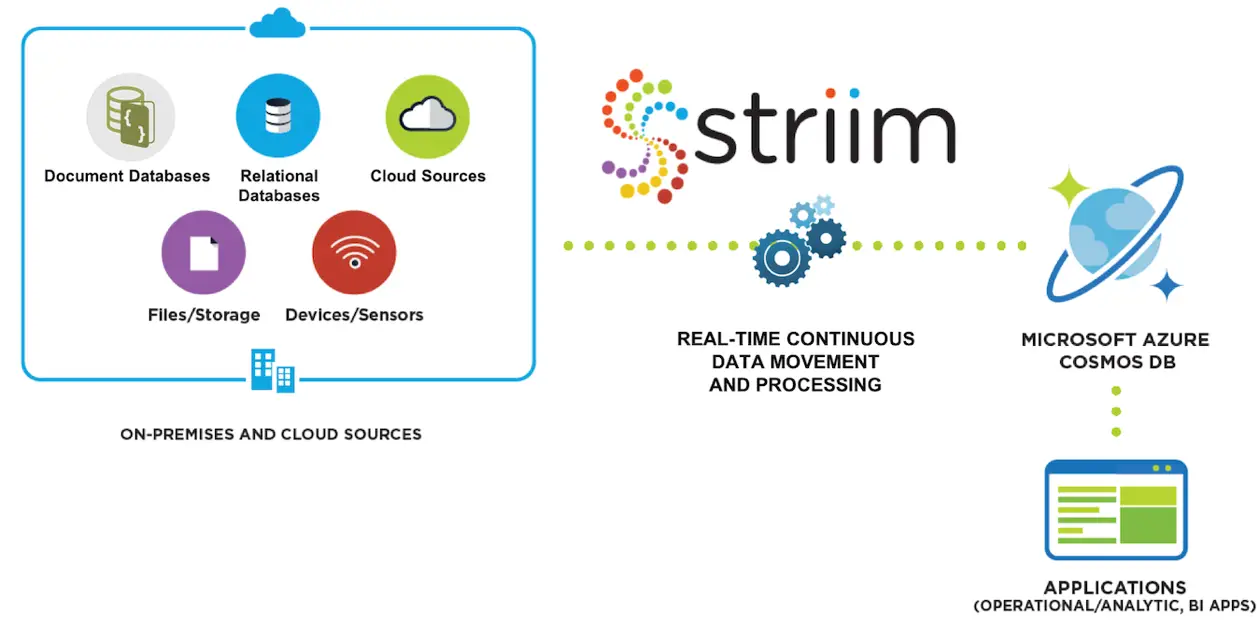
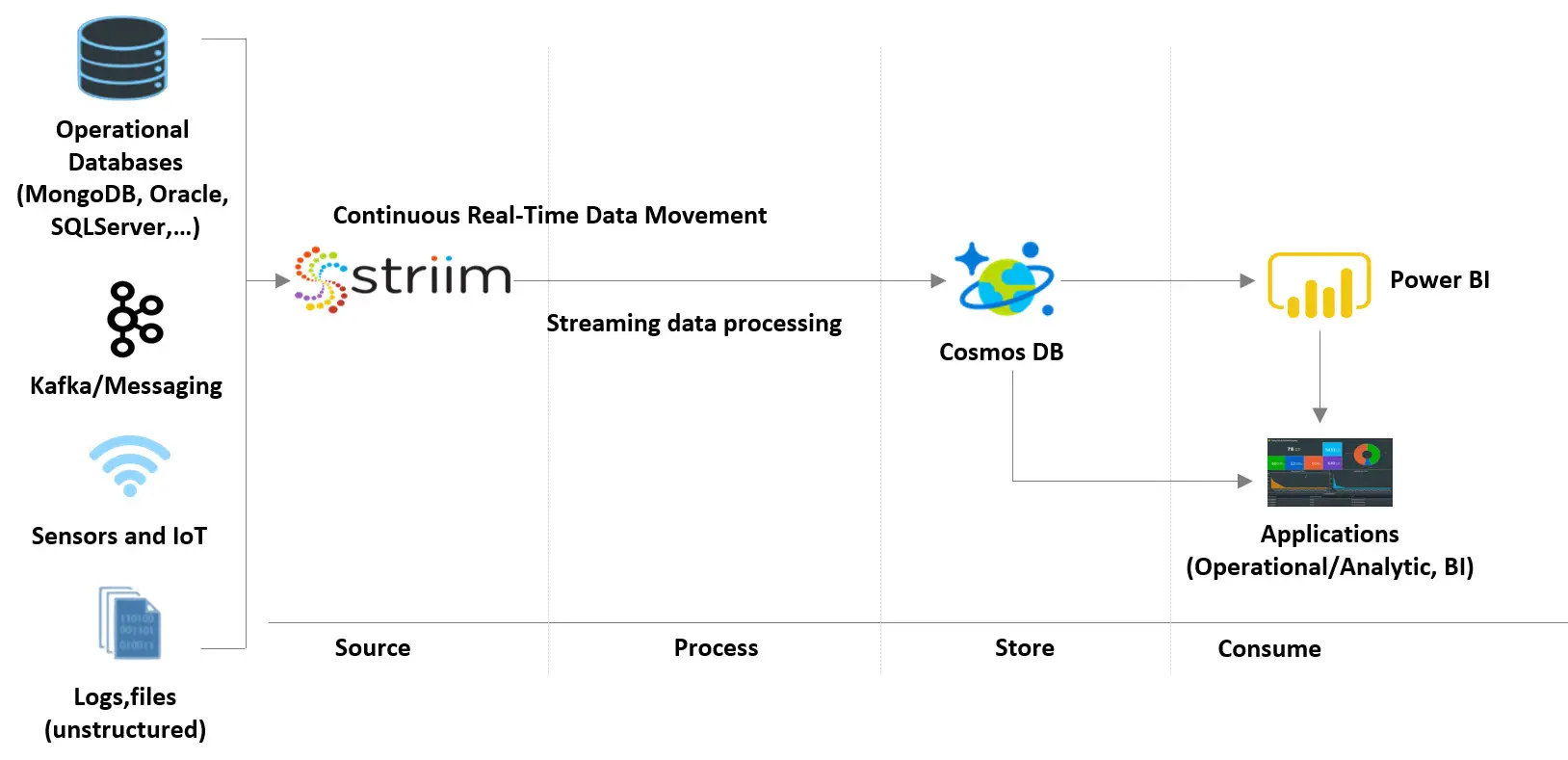
Real-time integration to Azure Cosmos DB enables companies to make the most of the environment’s globally-distributed, multi-model database service. With Striim’s streaming integration to Azure Cosmos DB solution, companies can continuously feed real-time operational data from a wide-range of on-premises and cloud-based data sources.

What is Striim?

The Striim software platform offers continuous, real-time data movement from enterprise document and relational databases, sensors, messaging systems, and log files into Azure Cosmos DB with in-flight transformations and built-in delivery validation to support real-time reporting, IoT analytics, and transaction processing.

Streaming Integration to Azure Cosmos DB

Offload Operational Reporting

  • Move real-time unstructured and structured data to Cosmos DB to support operational workloads including real-time reporting
  • Continuously collect data from a diverse set of sources (such as Internet of Things (IoT) sensors) for timely and rich insight

Accelerate and Simplify Processing

  • Perform filtering, transformations, aggregation, and enrichments in-flight before delivery to Cosmos DB
  • Avoid adding latency via stream processing
  • Easily convert structured data to document form

Ease the Cosmos DB Adoption Process

  • Use phased and zero-downtime migration from MongoDB by running them in parallel
  • Continuously visualize and monitor data pipelines with real-time alerts
  • Prevent data loss with built-in validation

How Striim Delivers Streaming Integration to Azure Cosmos DB

Low-Impact Change Data Capture from Enterprise Databases

  • Continuous, non-intrusive data ingestion for high-volume data
  • Support for databases such as Oracle, SQL Server, HPE NonStop, MySQL, PostgreSQL, MongoDB, Amazon RDS for Oracle, and Amazon RDS for MySQL
  • Real-time data collection from logs, sensors, Hadoop and message queues to support rich and timely analytics

Continuous, In-Flight Data Processing

  • In-line transformation, filtering, aggregation, enrichment to store only the data you need, in the right format
  • Uses SQL-based continuous queries via a drag-and-drop UI

Real-Time Data Delivery with Built-In Monitoring

  • Continuous verification of source and target database consistency
  • Interactive, live dashboards for streaming data pipelines
  • Real-time alerts via web, text, email

Streaming Integration to Azure Cosmos DB

To learn more about how to leverage Striim’s solution for streaming integration to Azure Cosmos DB, check out our Striim for Azure Cosmos DB solution page, schedule a brief demo with a Striim technologist, provision Striim for Cosmos DB on the Azure marketplace, or download a free trial of the Striim platform and get started today!

Streaming Integration to Azure

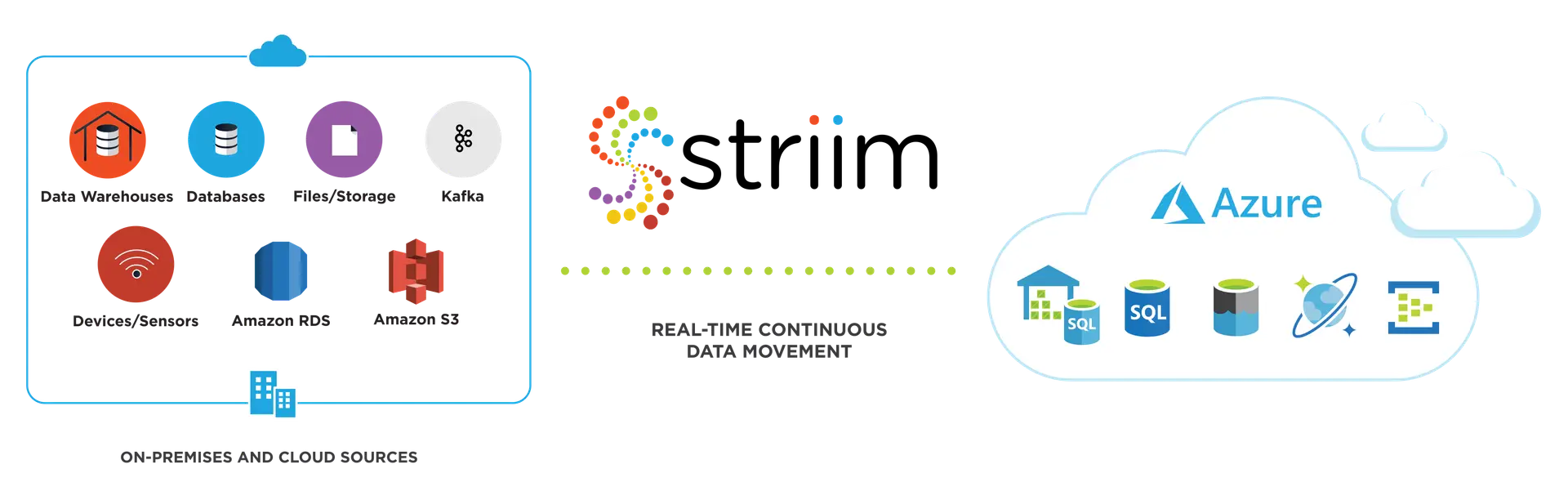
To adopt modern data warehousing, advanced big data analytics, and machine learning solutions in the Azure Cloud, businesses need streaming integration to Azure. They need to be able to continuously feed real-time operational data from existing on-premises and cloud-based data stores and data warehouses.

What is Striim?

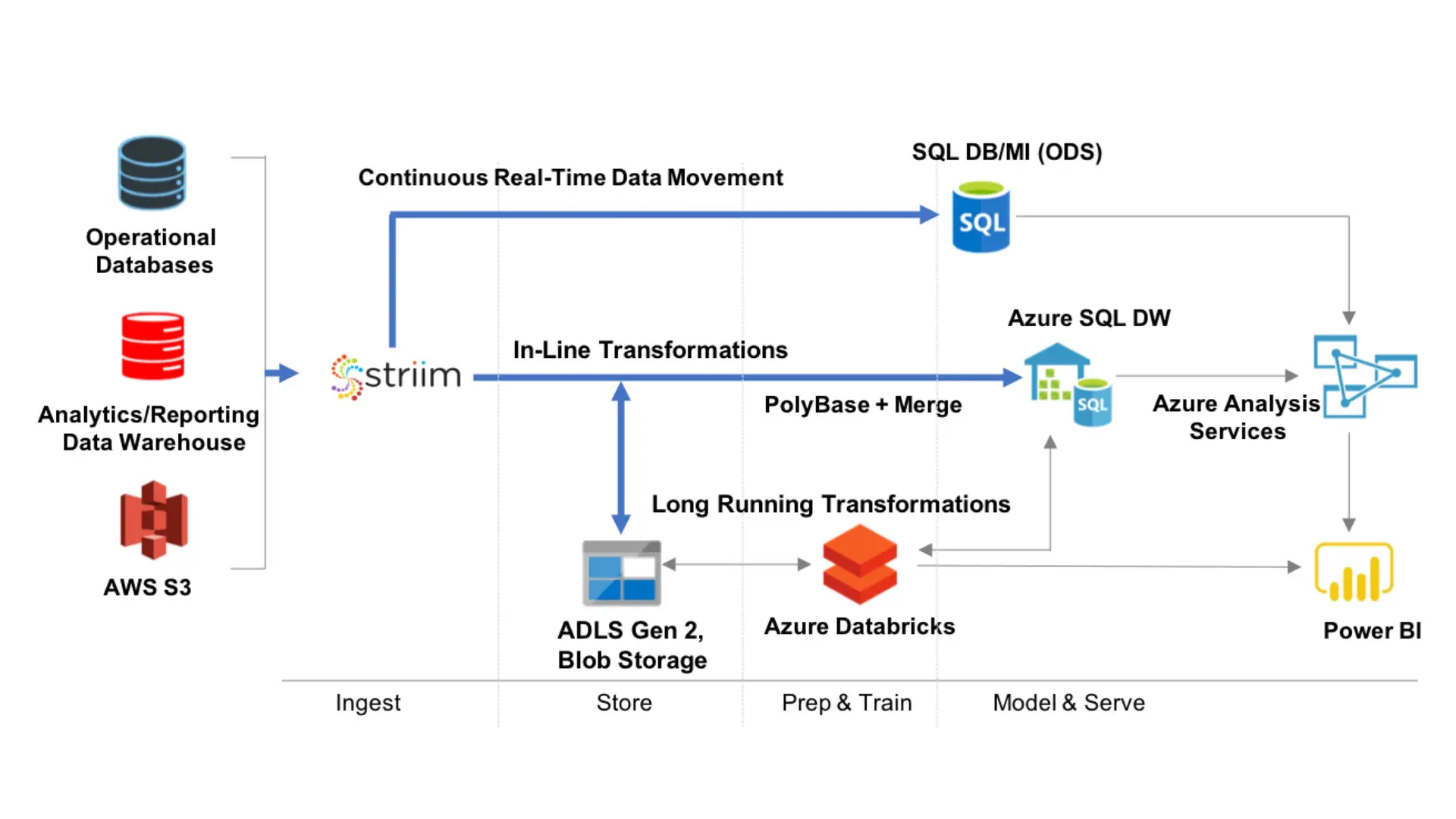
The Striim software platform offers continuous, real-time data movement from heterogeneous, on-premises systems and AWS into Azure with in-flight transformations and built-in delivery validation to make data immediately available in Azure, in the desired format.

Streaming Integration to Azure

Implement Operational Data Warehouse on Azure Cloud

  • Rapidly set up real-time data pipelines from on-prem databases and AWS to enable real-time operational data store
  • Perform transformations, including denormalization, in-flight
  • Use phased and zero downtime migration from Oracle Exadata, Teradata, AWS Redshift by running them in parallel
  • Prevent data loss with built-in validation

Run Operational Workloads in Azure Databases

  • Continuously stream on-prem and AWS data to Azure SQL DB, Cosmos DB, Azure Database for MySQL, and Azure Database for PostgreSQL
  • Use non-intrusive change data capture to avoid impacting sources
  • Offload operational reporting
  • Move data continuously from MongoDB, sensors and other sources to Cosmos DB

Use Pre-Processed, Real-Time Data for Advanced Big Data Analytics and ML

  • Feed real-time data to Azure Data Lake Storage, Azure DataBricks, and Azure HDInsight from on-prem or AWS databases, log files, messaging systems, Hadoop, and sensors
  • Pre-process data-in-motion to reduce ETL efforts and accelerate insight
  • Continuously visualize and monitor data pipelines with real-time alerts

How Striim Works to Achieve Streaming Integration to Azure

Low Impact Change Data Capture from Enterprise Databases

  • Non-stop, non-intrusive data ingestion for high-volume data
  • Support for data warehouses such as Oracle Exadata, Teradata, Amazon Redshift; and databases such as Oracle, SQL Server, HPE NonStop, MySQL, PostgreSQL, MongoDB, Amazon RDS for Oracle, Amazon RDS for MySQL
  • Real-time data collection from logs, sensors, Hadoop and message queues to support operational decision making

Continuous Data Processing and Delivery

  • In-flight transformation, incl. denormalization, filtering, aggregation, enrichment to store only the data you need, in the right format
  • Real-time data delivery to Azure SQL Data Warehouse, SQL Server on Azure, Azure SQL Database, Azure Data Lake Storage, Azure Databricks, Kafka, Azure HDInsight, and Cosmos DB

Built-In Monitoring and Validation

  • Interactive, live dashboards for streaming data pipelines
  • Continuous verification of source and target database consistency
  • Real-time alerts via web, text, emailStreaming Integration to Azure

Why Striim?

As an enterprise-grade platform with built-in high-availability, scalability, and reliability, Striim is designed to deliver tangible ROI with low TCO to meet the real-time requirements for streaming integration to Azure in mission-critical environments.

With a broad set of supported sources, Striim enables you to make virtually any data available on Azure in real time and the desired format to support next-generation cloud analytics and operational decision making on a continuous basis.

To learn more about how to use Striim for streaming integration to Azure, check out our Striim for Azure product page, schedule a short demo with a Striim technologist, or download a free trial of the Striim platform and get started today.

Setting Up Streaming ETL to Snowflake

Snowflake, the data warehouse built for the cloud, is designed to bring power and simplicity to your cloud-based analytics solutions, especially when combined with a streaming ETL to Snowflake running in the cloud.Streaming ETL to Snowflake
Snowflake helps you make better and faster business decisions using your data on a massive scale, fueling data-driven organizations. Just take a look at Snowflake’s example use cases and you can see how companies are creating value from their data with Snowflake. There’s just one key caveat – how do you get your data into Snowflake in the first place?

Approaches – ETL/CDC/ELT

There are plenty of options when it comes to using data integration technologies, including ETL to Snowflake.

Let’s start with traditional ETL. Now a 50+ year old legacy technology, ETL was the genesis of data movement and enabled batch, disk-based transformations. While ETL is still used for advanced transformation capabilities, the high latencies and immense load on your source databases leave something to be desired.

Next, there was Change Data Capture (CDC). Pioneered by the founders of Striim at their previous company, GoldenGate Software (acquired by Oracle), CDC technology enabled use cases such as zero downtime database migration and heterogeneous data replication. However, CDC lacks transformational capabilities, forcing you into an ELT approach – first landing the data into a staging area such as storage, and then transforming to its final form. While this works, the multiple hops increase your end-to-end latency and architectural complexity.

Continuously Integrating Transactional Data into Snowflake

Enter, Striim. Striim is an evolution from GoldenGate and combines the real-time nature of CDC with many of the transformational capabilities of ETL into a next-generation streaming solution for ETL to Snowflake and other analytics platforms, on-premises or in the cloud. Enabling real-time data movement into Snowflake, Striim continuously ingests data from on-premises systems and other cloud environments to Snowflake. In this quick start guide, we will walk you through, step-by-step, how to use Striim for streaming ETL to Snowflake by loading data in real time, whether you run Snowflake on Azure or AWS.

Data Flow

We’ll get started with an on-premises Oracle to Snowflake application with in-line transformations and denormalization. This guide assumes you already have Striim installed either on-premises or in the cloud, along with your Oracle database and Snowflake account configured.

After installing Striim, there are a variety of ways to create applications, or data pipelines, from a source to a target. Here, I’ll focus on using our pre-built wizards and drag-and-drop UI, but you can also build applications with the drag-and-drop UI from scratch, or using a declarative language using the CLI.

We will show how you can set up the flow between the source and target, and then how you can enrich records using an in-memory cache that’s preloaded with reference data.

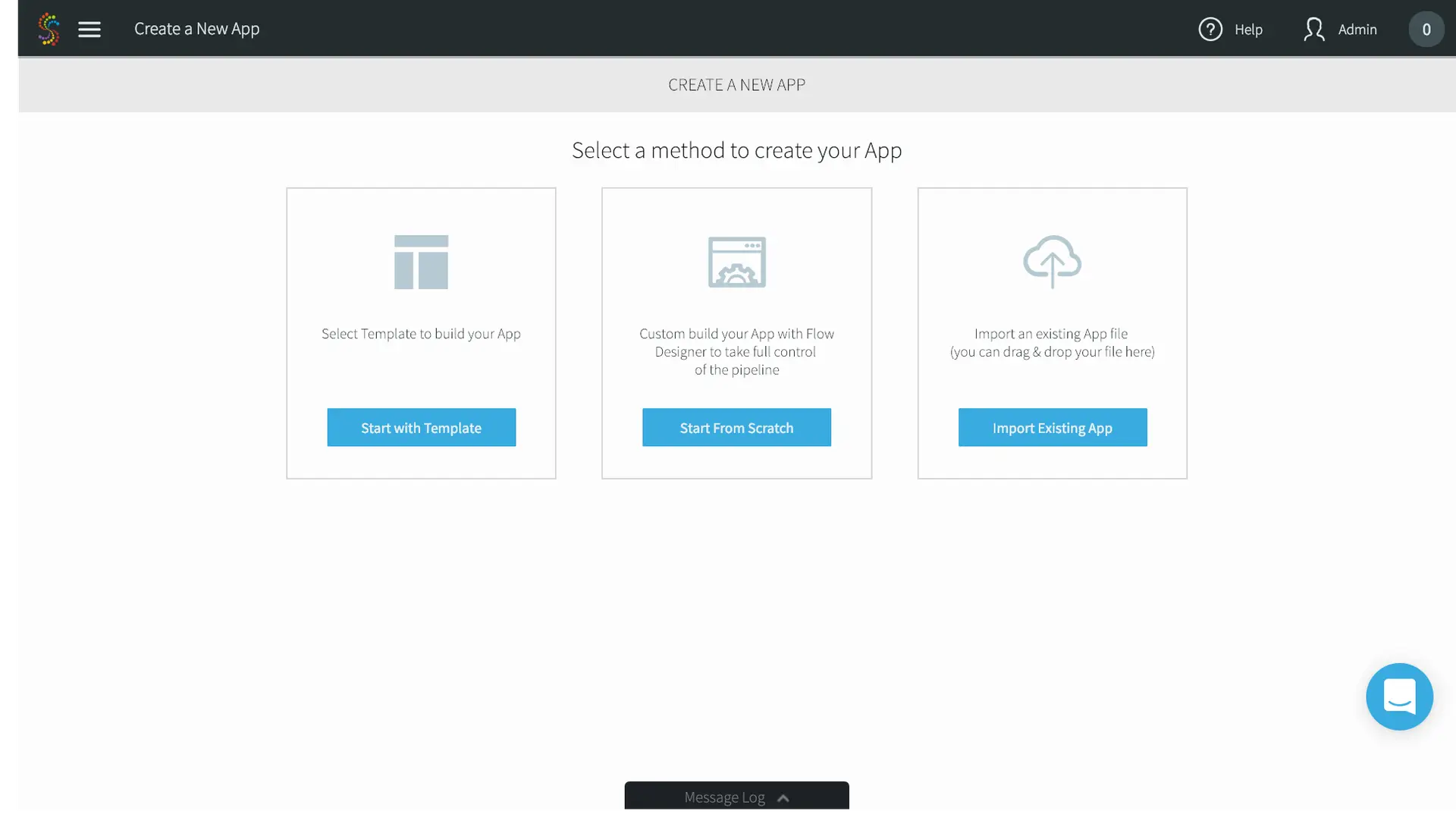
  1. In the Add App page, select Start with Template.
Striim for ETL to Snowflake

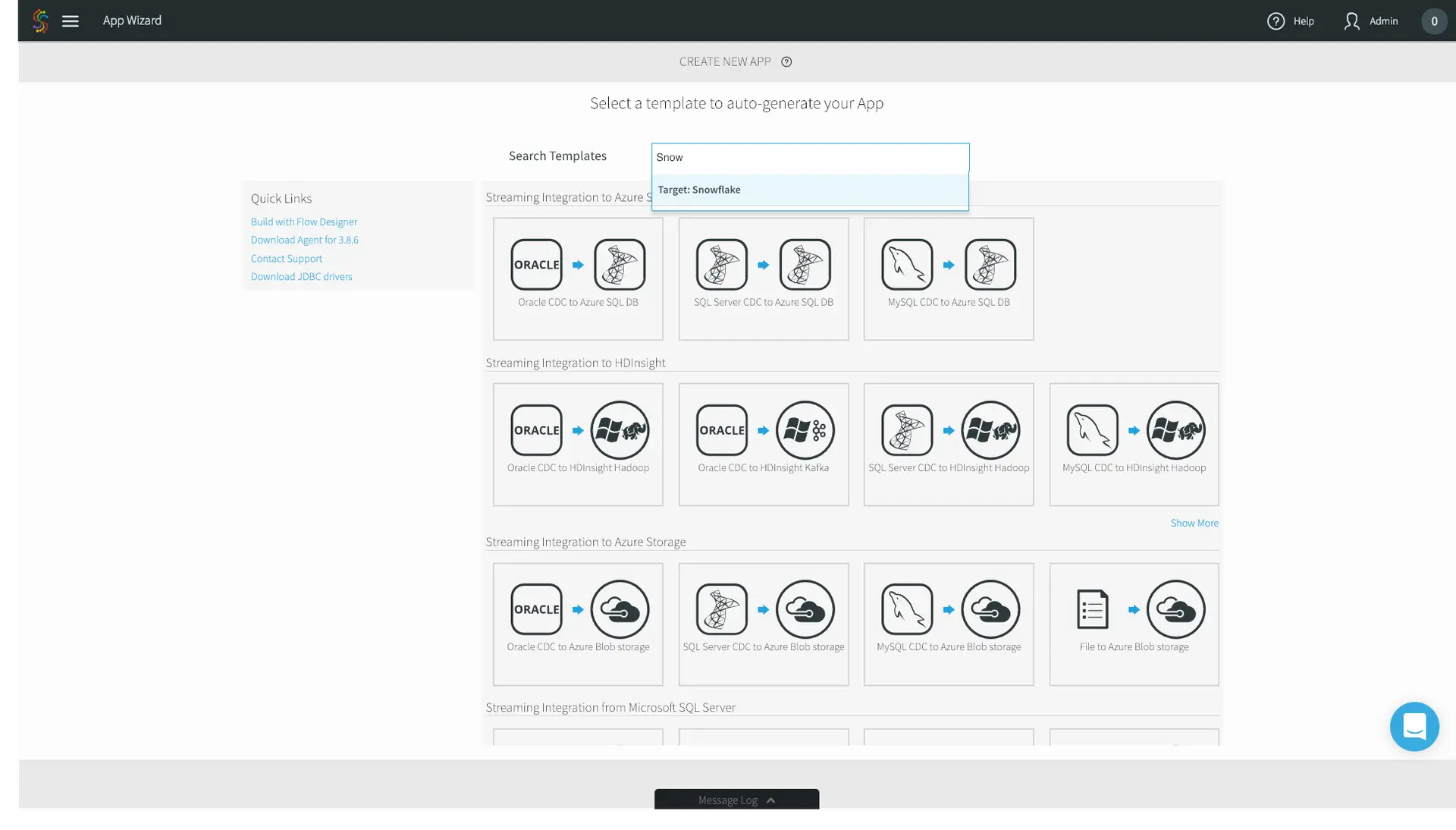
2. In the following App Wizard screen, search for Snowflake.
Striim for ETL to Snowflake

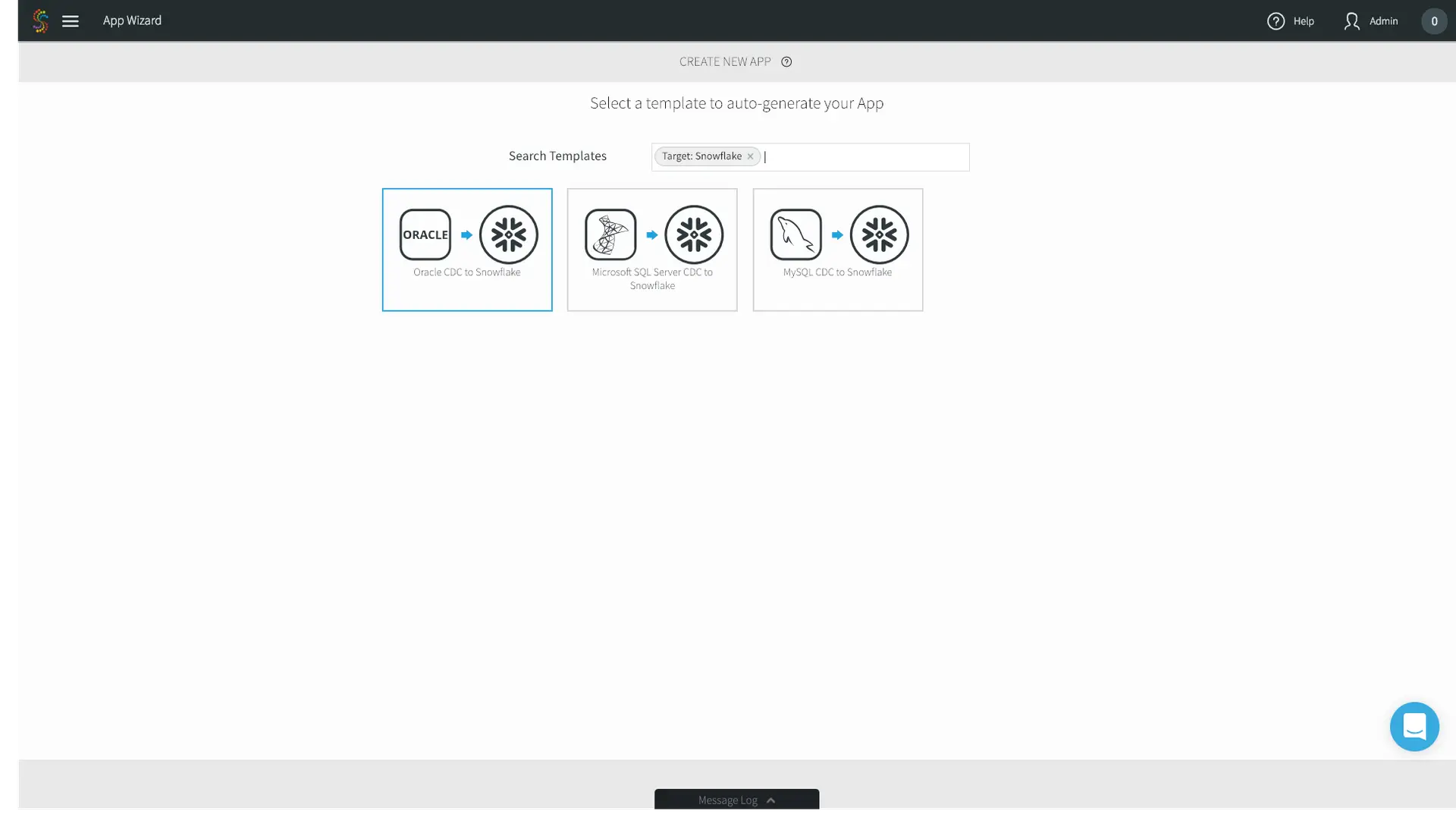
3. For this example, we’ll choose Oracle CDC to Snowflake.
Striim for ETL to Snowflake

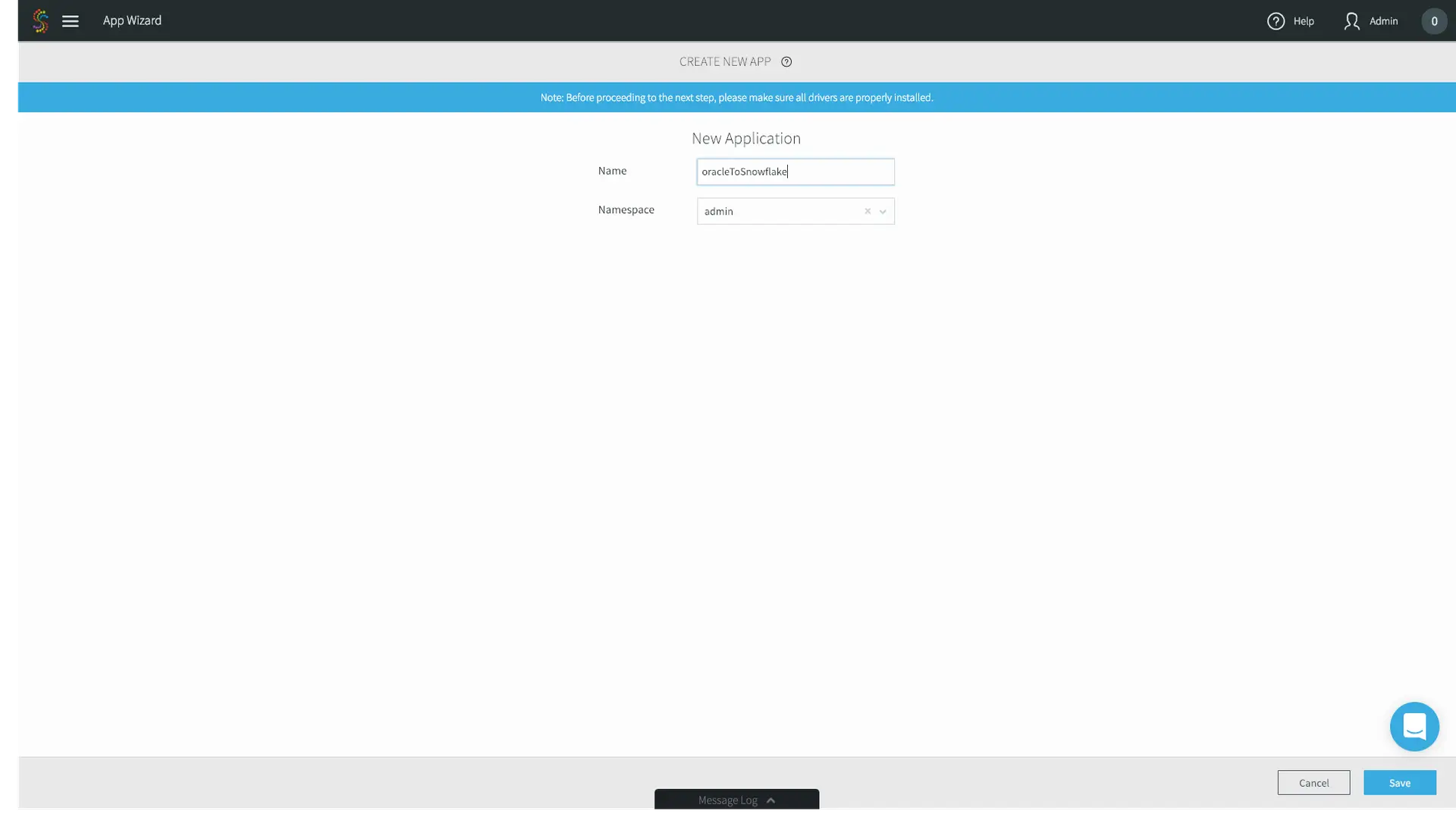
4. Name the application whatever you’d like – we’ll choose oracleToSnowflake. Go ahead and use the default admin Namespace. Namespaces are used for both application organization and enable a microservices approach when you have multiple data pipelines. Click Save.
Striim for ETL to Snowflake

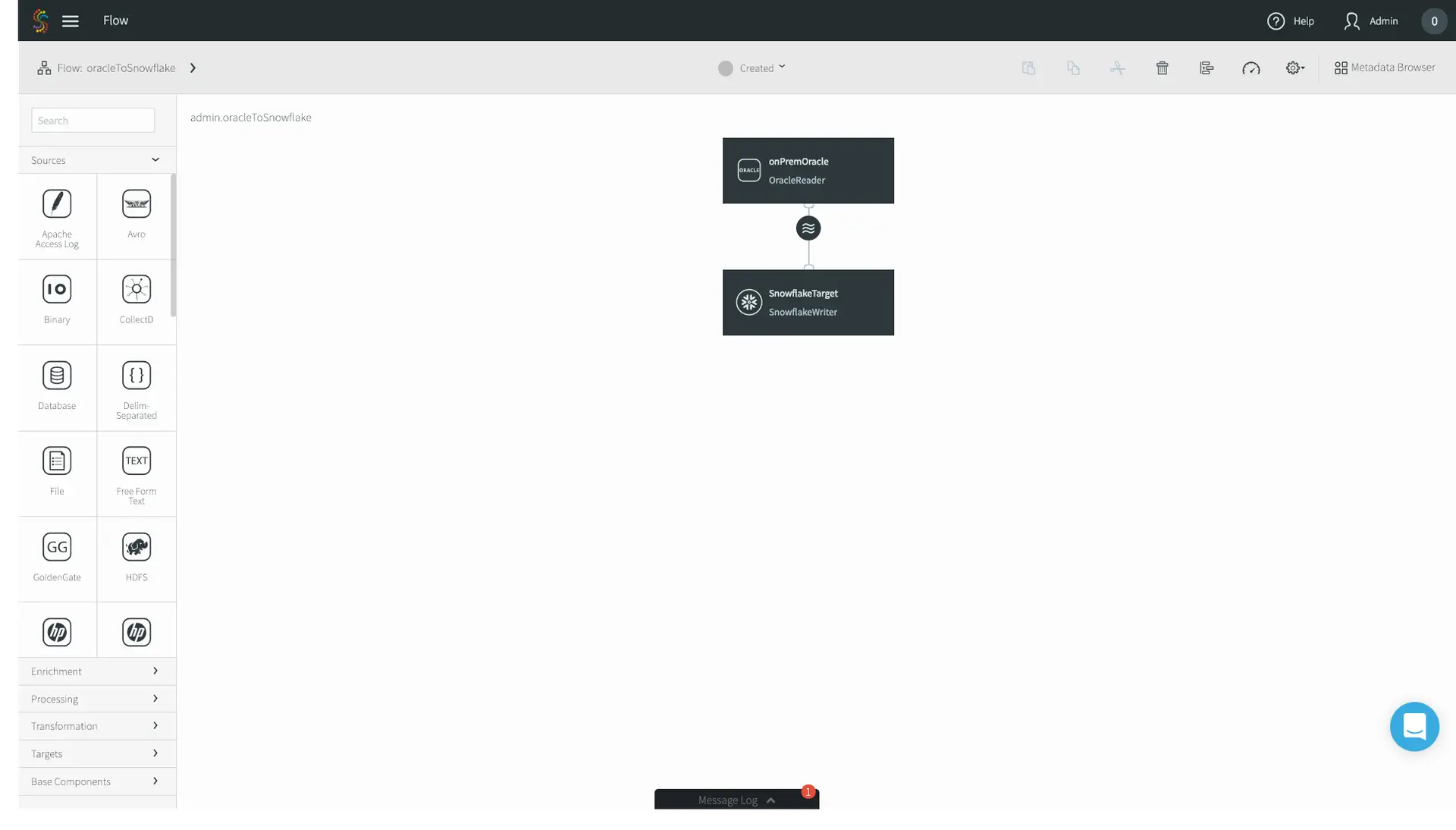
5. Follow the wizards, entering first your on-premises Oracle configuration properties, and then your Snowflake connection properties. In this case I’m migrating an Oracle orders table. Click Save, and you’ll be greeted by our drag and drop UI with the source and target pre-populated. If you want to just do a straight source-to-target migration, that’s it! However, we’ll continue this example with enrichment and denormalization, editing our application using the connectors located on the left-hand side menu bar.
Striim for ETL to Snowflake

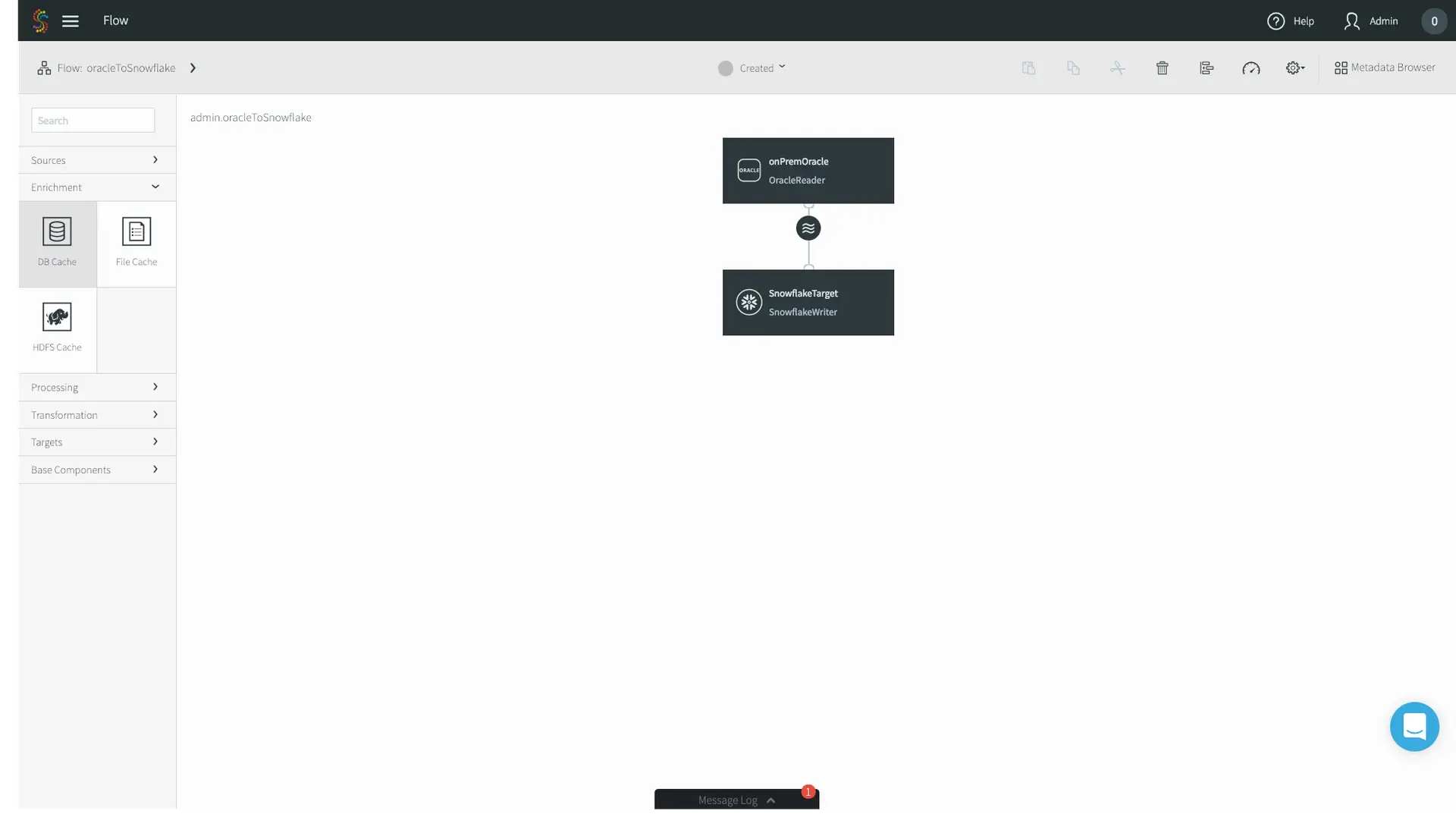
6. In this use case, we’ll enrich the Orders table with another table of the same on-premises Oracle database. Locate the Enrichment tab on the left-hand menu bar, and drag and drop the DB Cache to your canvas.
Striim for ETL to Snowflake

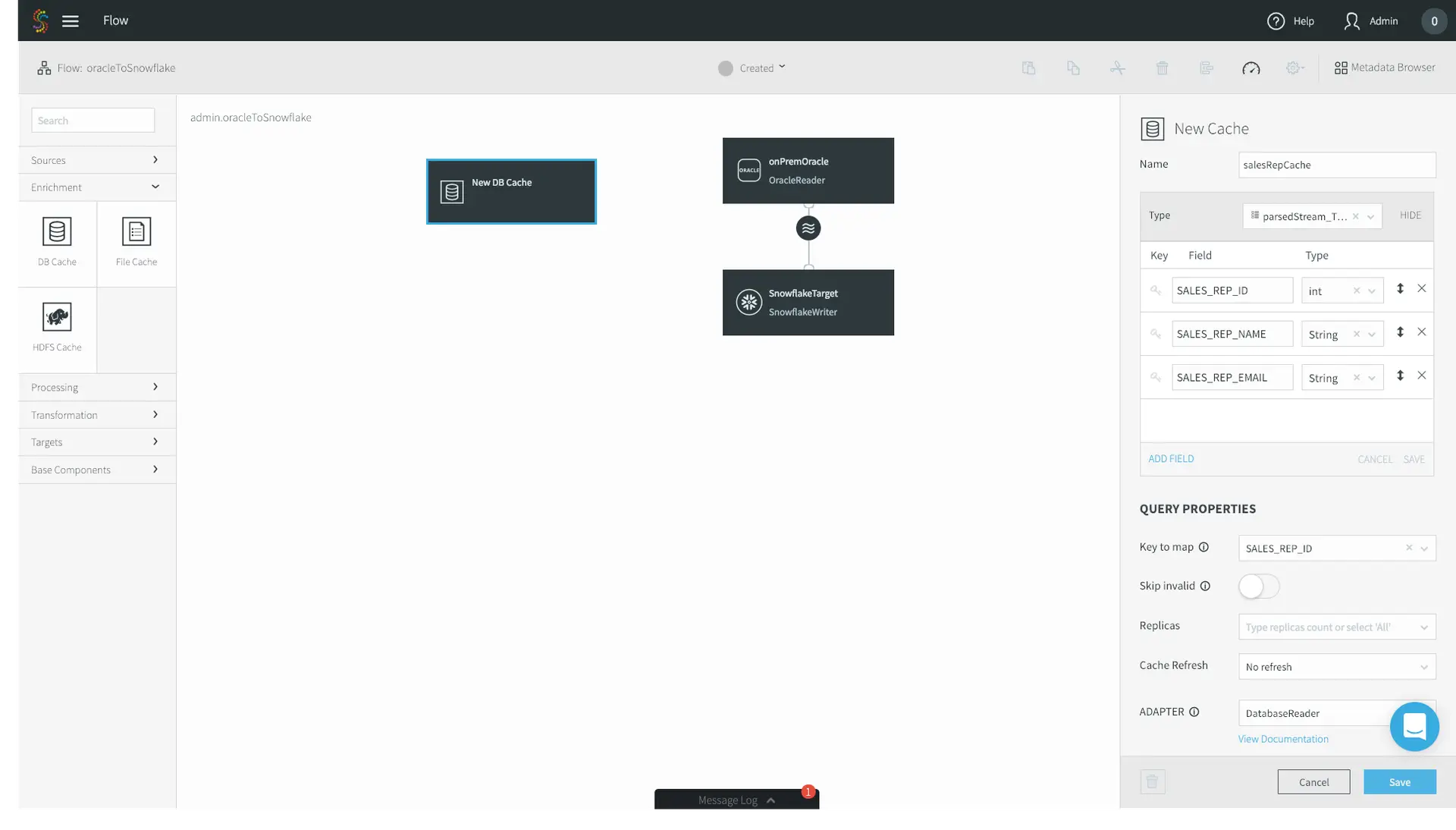
7. First, name the cache whatever you’d like – I chose salesRepCache. Then, specify the Type of your cache. In this case, my enrichment table contains three fields: ID, Name, and Email. Specify a Key to map. This tells Striim’s in-memory cache how to position the data for the fastest possible joins. Finally, specify your Oracle Username, the JDBC Connection URL, your password, and the tables that you want to use as a cache. Click Save.
Striim for ETL to Snowflake

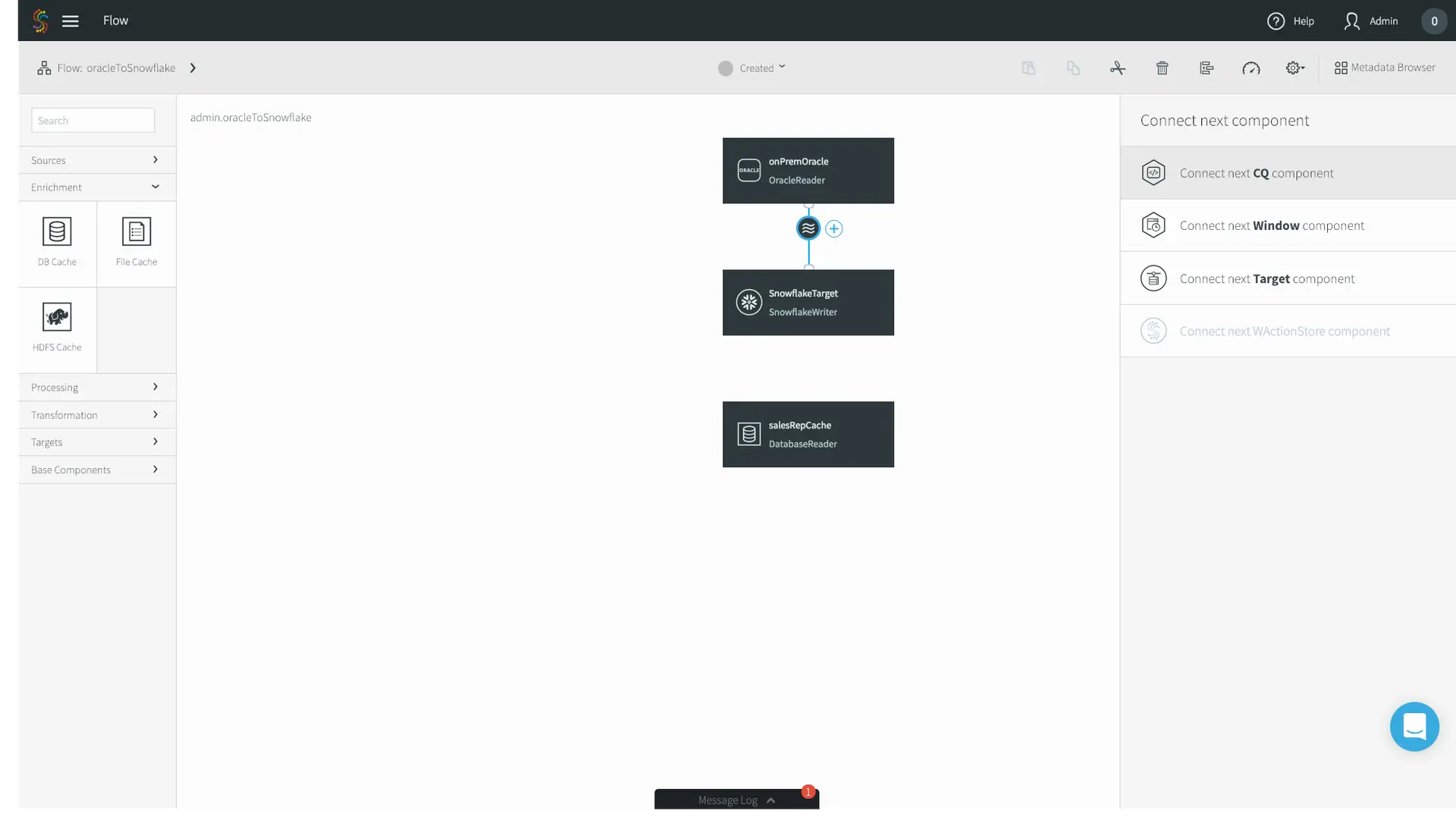
8. Now we’ll go ahead and join our streaming CDC source with the static Database Cache. Click the circular stream beneath your Oracle source, and click Connect next CQ component.
Striim for ETL to Snowflake

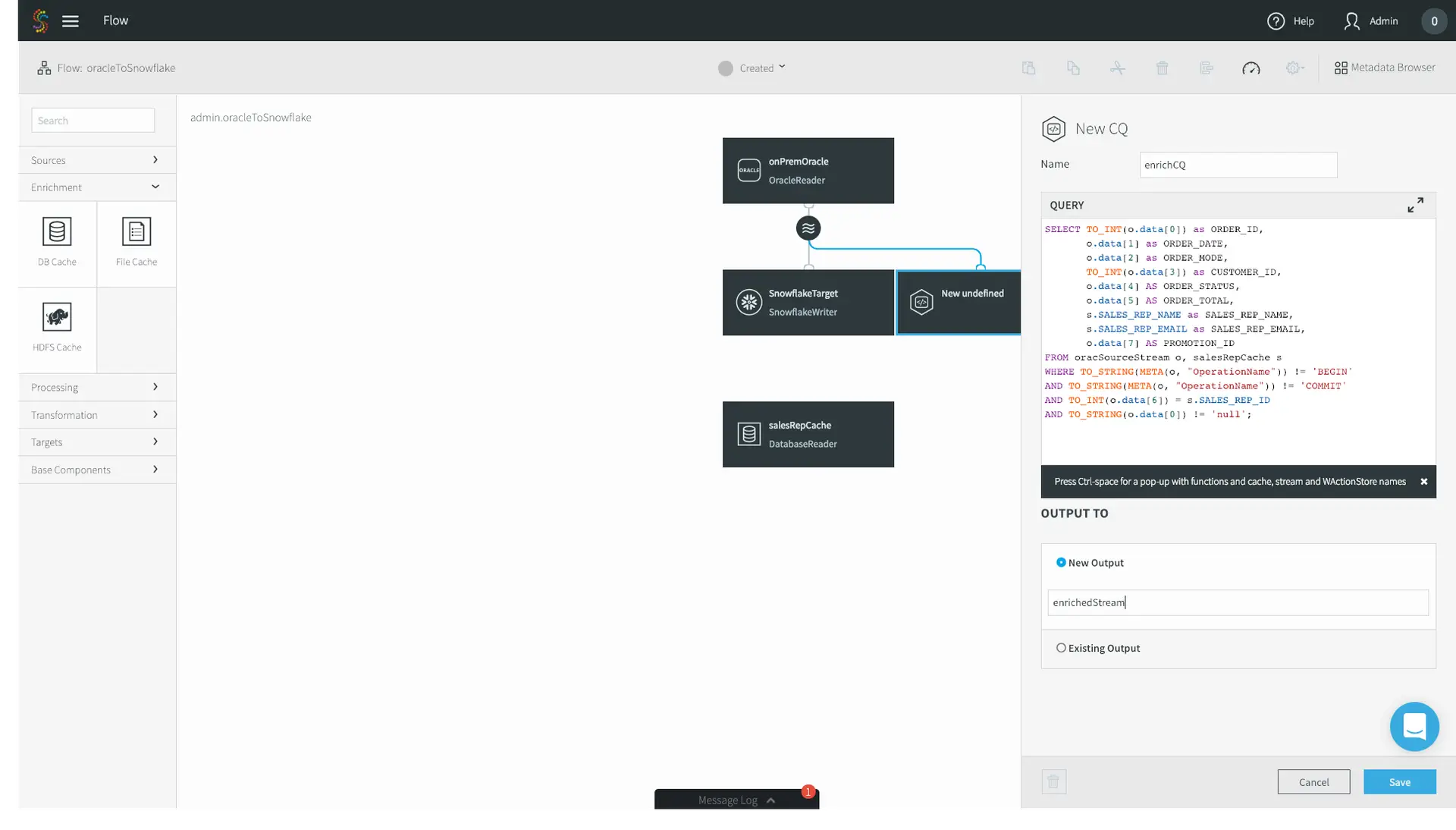
9. Application logic in Striim is expressed using Continuous Queries, or CQs. You do so using standard SQL syntax and optional Java functionality for custom scenarios. Unlike a query on a database where you run one query and receive one result, a CQ is constantly running, executing the query on an event-by-event basis as the data flows through Striim. Data can be easily pre-formatted or denormalized using CQs.

10. In this example, we are doing a few simple transformations of the fields of the streaming Oracle CDC source, as well as enriching the source with the database cache – adding in the SALES_REP_NAME and SALES_REP_EMAIL fields where the SALES_REP_ID of the streaming CDC source equals the SALES_REP_ID of the static database cache. Specify the name of the stream you want to output the result to, and click Save. Your logic here may vary depending on your use case.
Striim for ETL to Snowflake

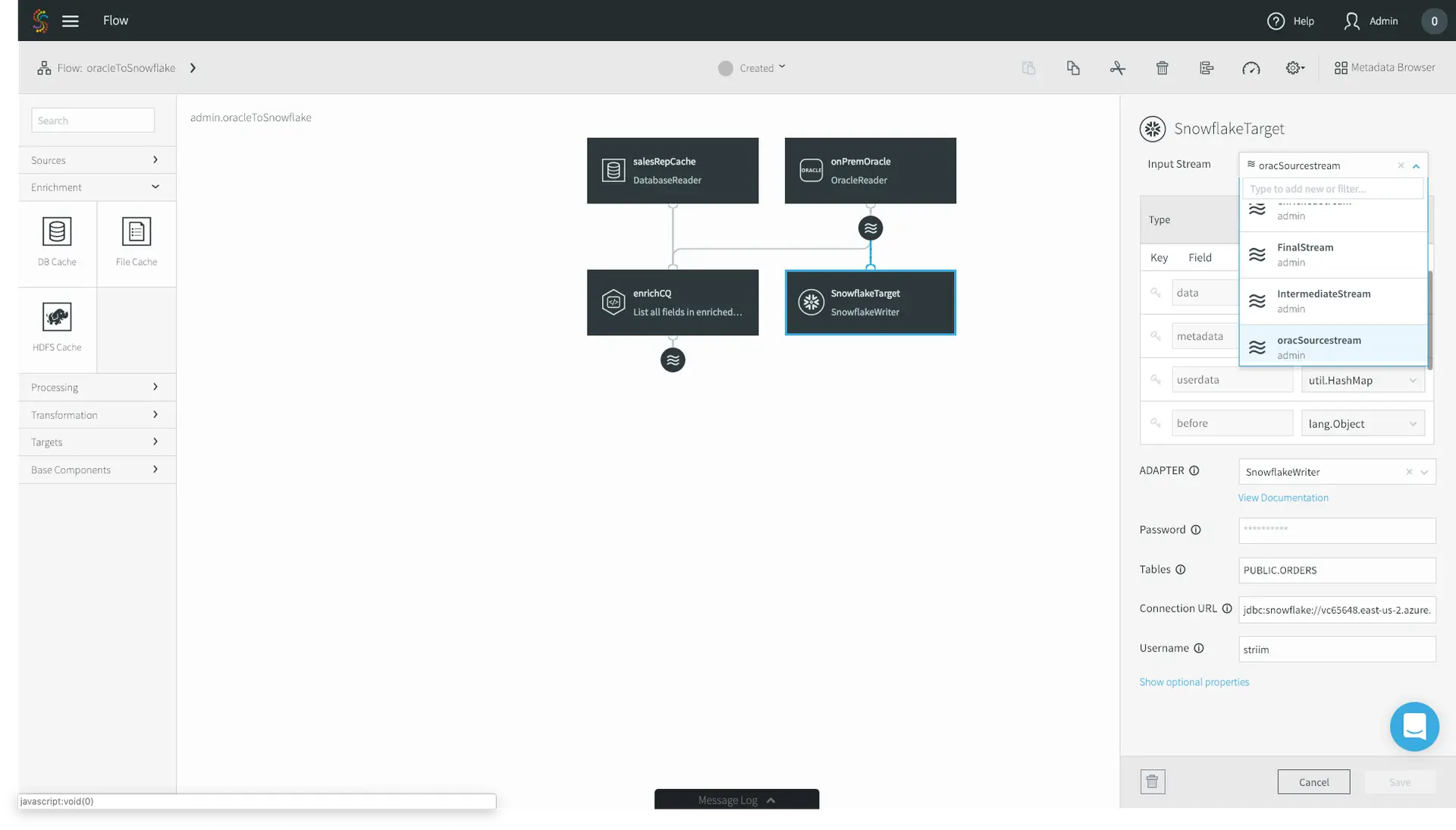
11. Lastly, we have to configure our SnowflakeTarget to read from the enrichedStream, not the original CDC source. Click on your Snowflake target and change the Input Stream from the Oracle source stream to your enriched stream. Click Save.
Striim for ETL to Snowflake

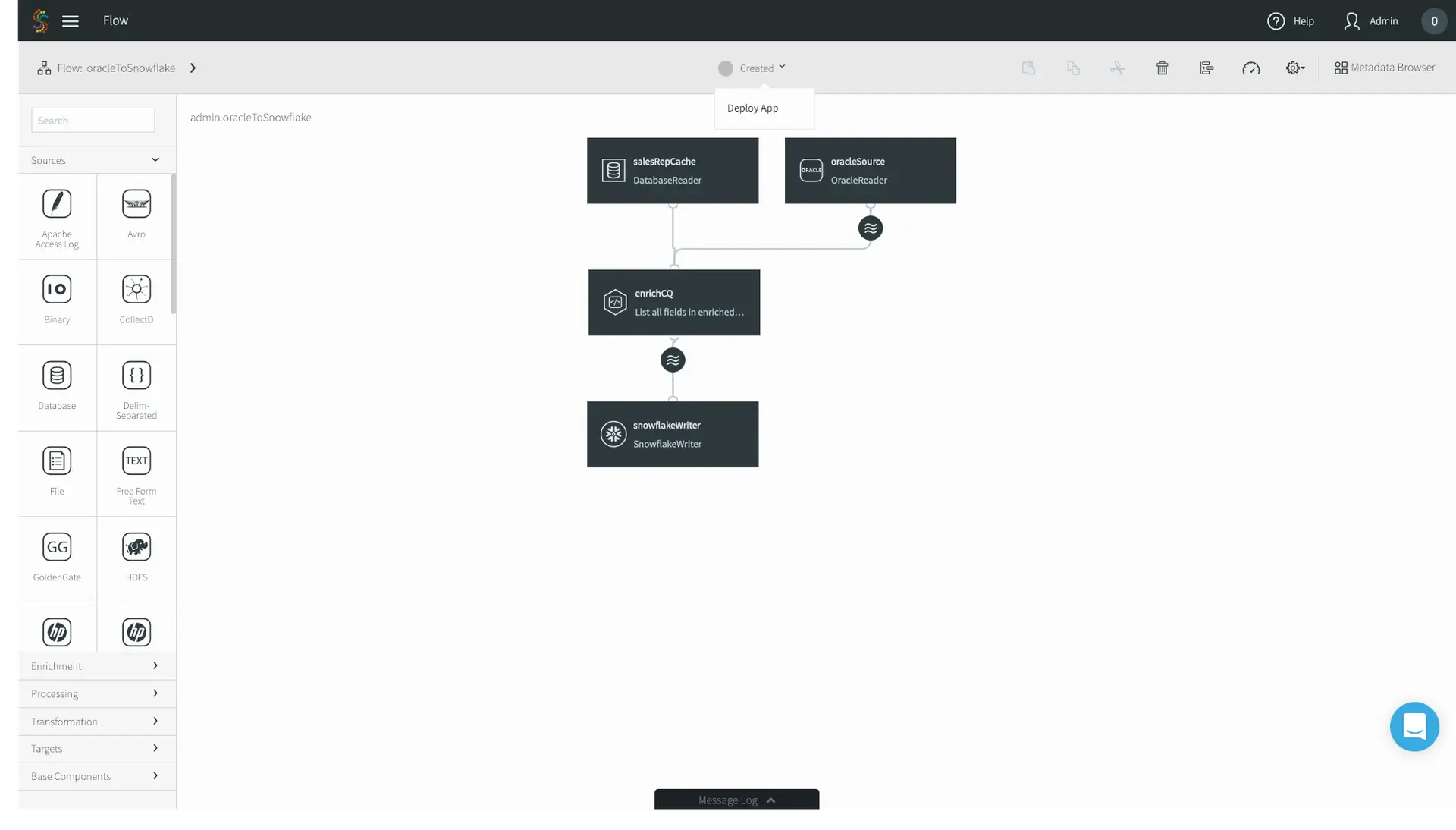
12. Now you’re good to go! In the top menu bar, click on Created and press Deploy App.
Striim for ETL to Snowflake

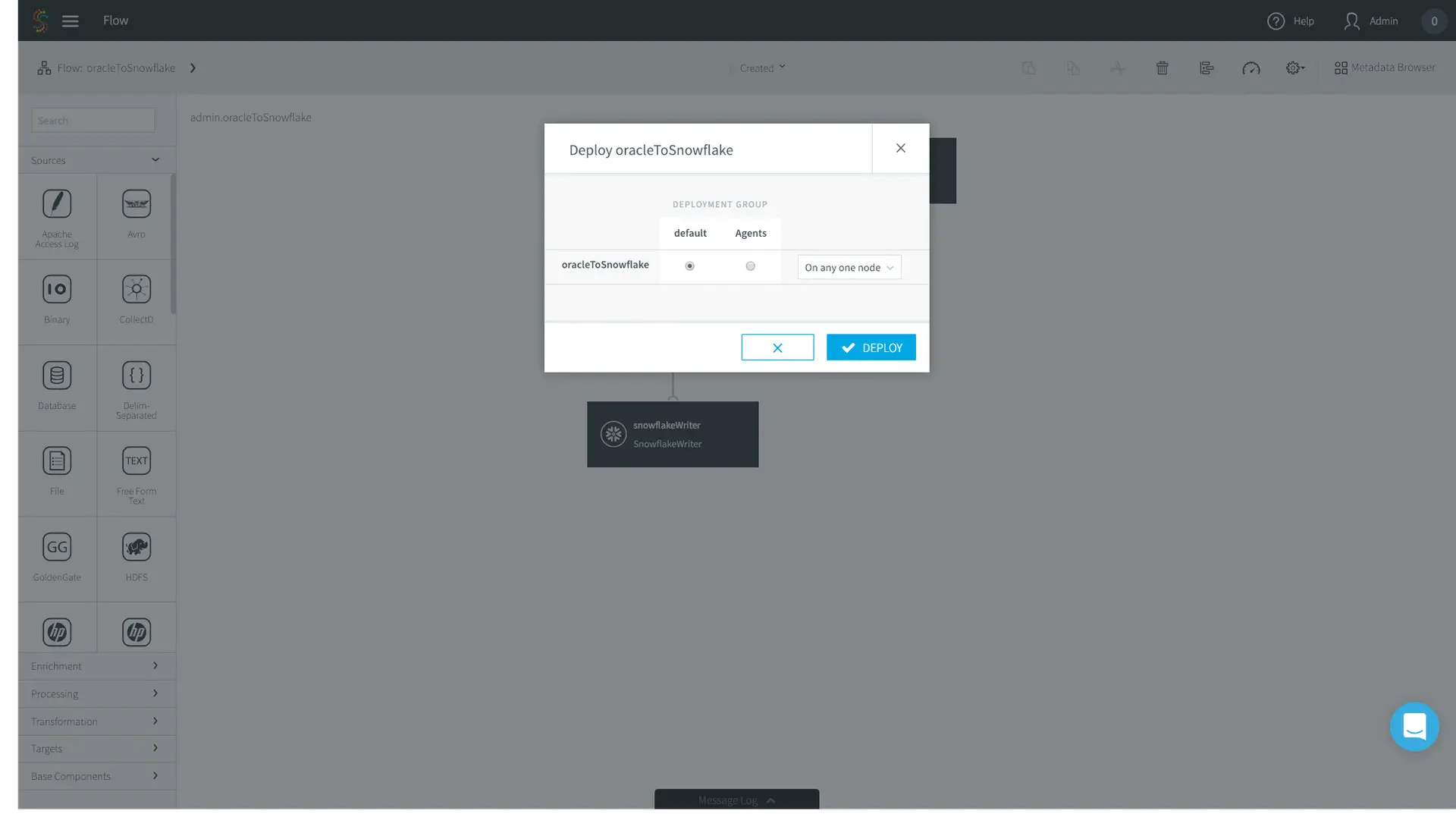
13. The deployment page allows you to specify where you want specific parts of your data pipeline to run. In this case I have a very simple deployment topology – I’m just running Striim on my laptop, so I’ll choose the default option.
Striim for ETL to Snowflake

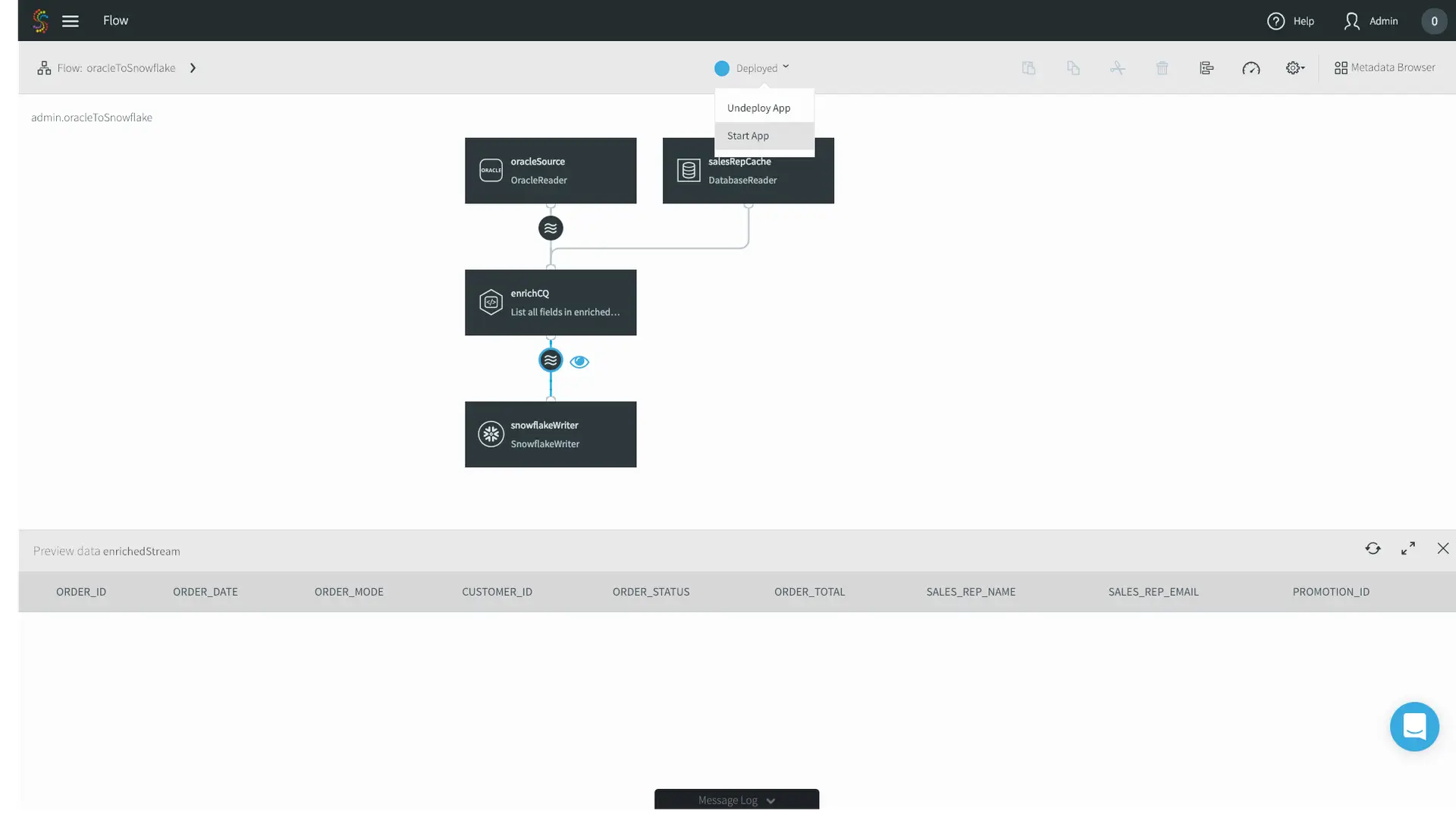
14. Click the eye next to your enrichedStream to preview your data as it’s flowing through, and press Start App in the top menu bar.
Striim for ETL to Snowflake

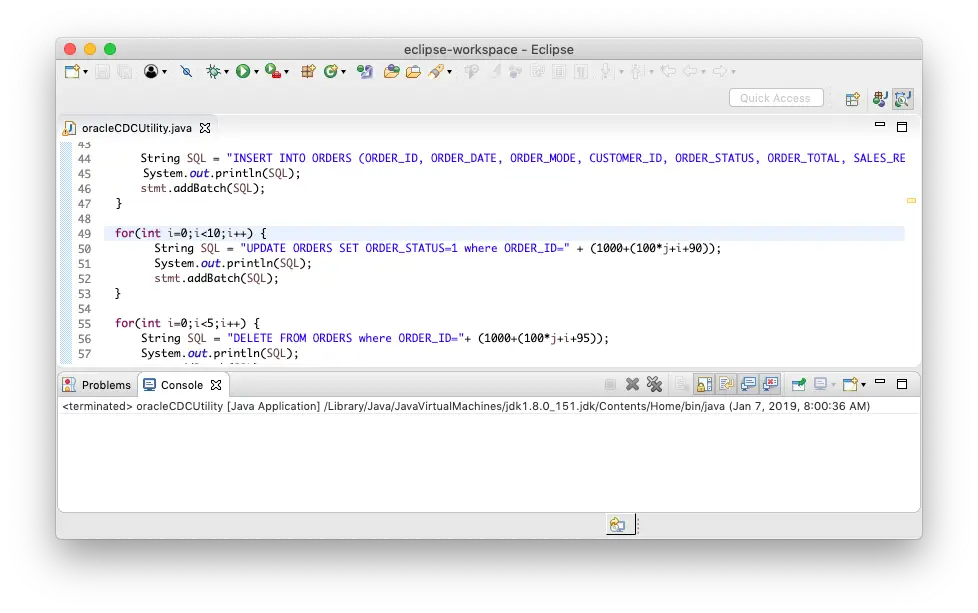
15. Now that the apps running, let’s generate some data. In this case I just have a sample data generator that is connecting to my source Oracle on-premises database.
Striim for ETL to Snowflake

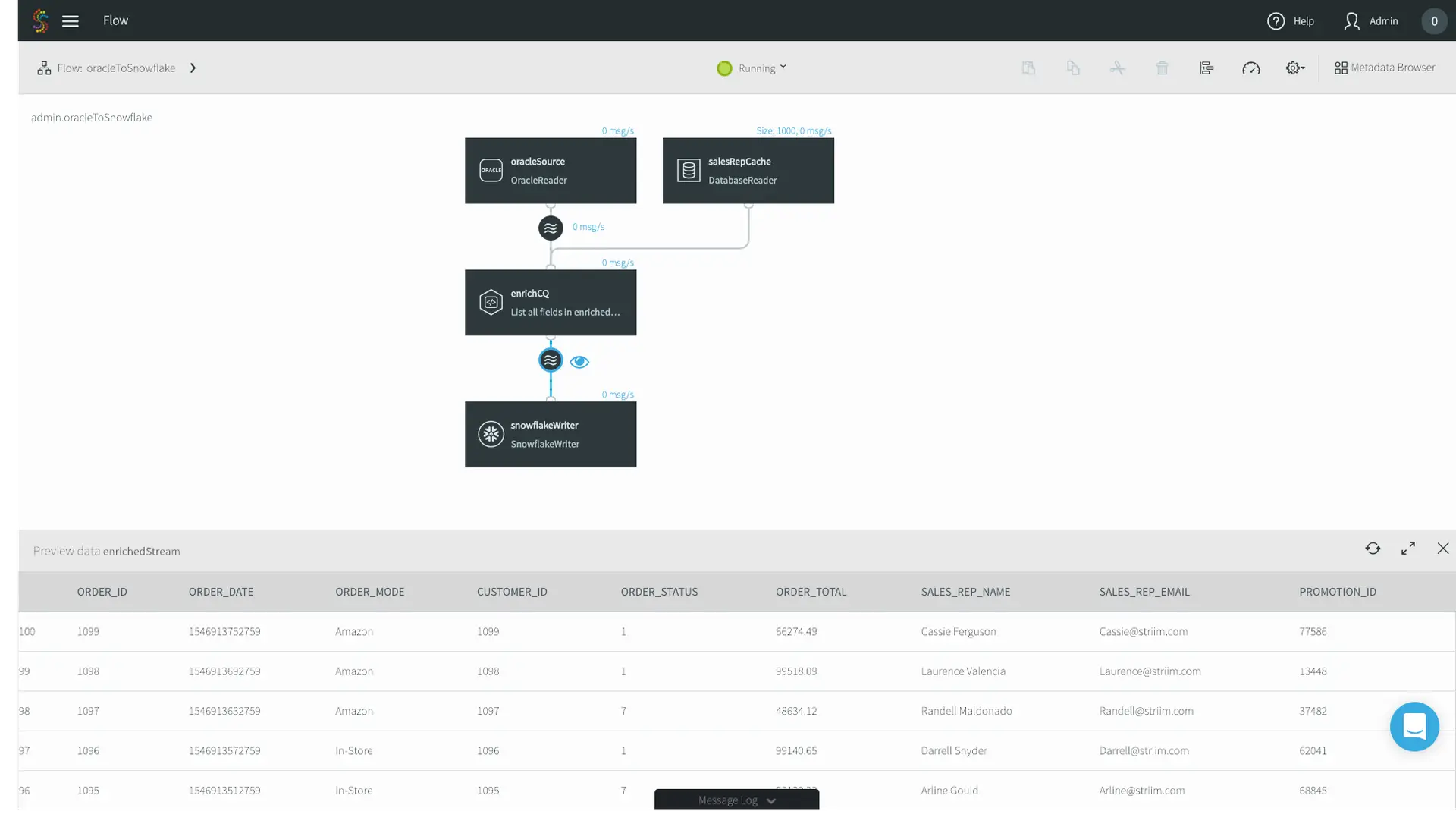
16. Data is flowing through the Striim platform, and you can see the enriched Sales Rep Name and Emails. 
Striim for ETL to Snowflake

17. Lastly, let’s go to our Snowflake warehouse and just do a simple select * query. Data is now being continuously written to Snowflake.
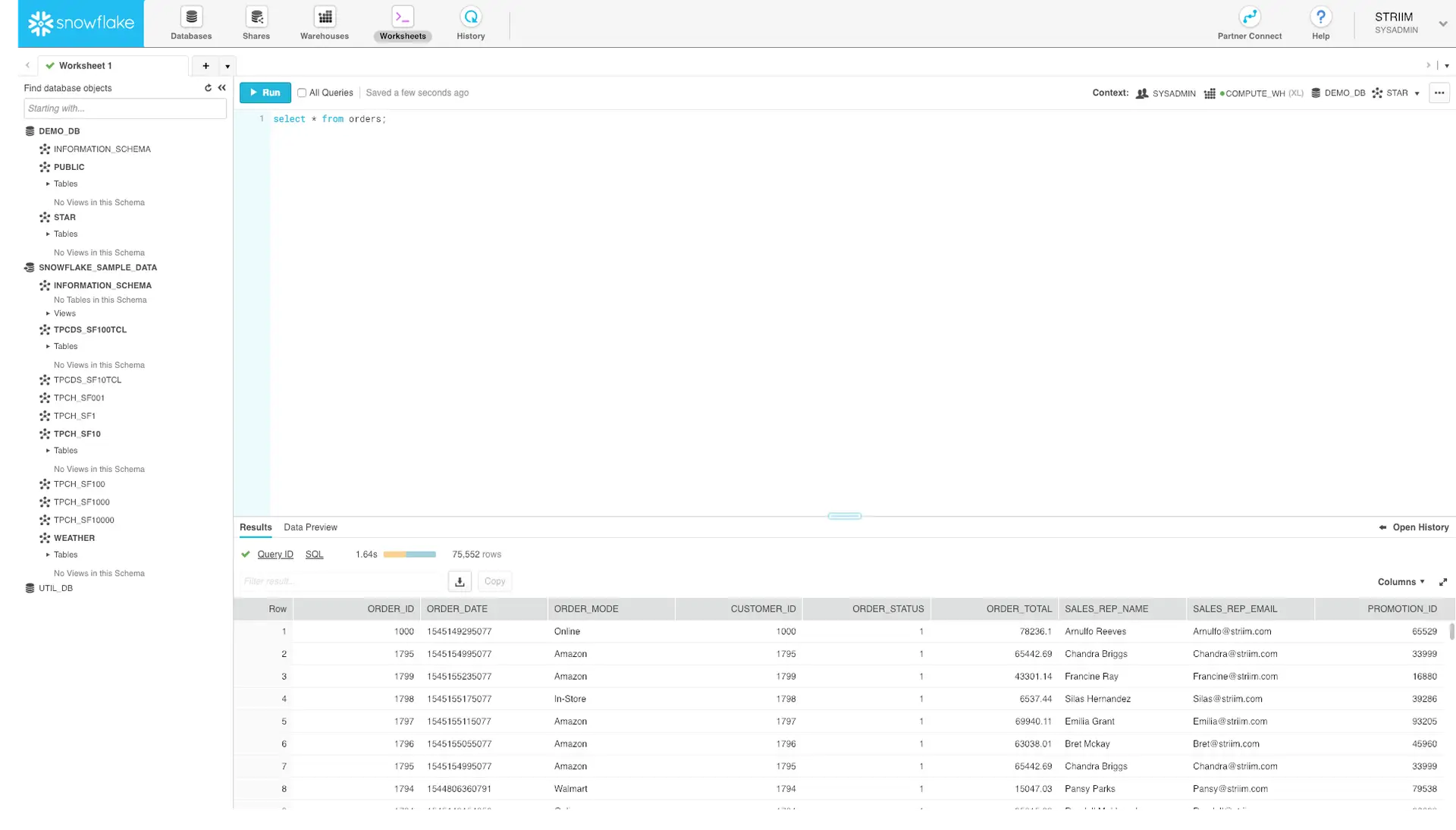
Striim for ETL to Snowflake

That’s it! Without any coding, you now have set up streaming ETL to Snowflake to load data continuously, in real time.

Interested in learning more about streaming ETL to Snowflake? Check out our Striim for Snowflake solution page, schedule a demo with a Striim technologist, or download the Striim platform to get started!

The Power of Streaming SQL for Real-Time Data Solutions

In this video, Striim Founder and CTO, Steve Wilkes, discusses streaming integration, the need for stream processing and streaming SQL, and why they’re essential to real-world real-time solutions.

To learn more about the Striim platform, go here.


Unedited Transcript:

You’ve heard about streaming integration, the need for stream processing, and often hear the term streaming SQL. But what is streaming SQL, and why is it so essential to real-world real-time solutions?

IBM created the Structured Query Language, or SQL, in the 1970s as a declarative mechanism for working with relational data. It has been used for four decades as a way of creating, modifying and querying data in almost every database on the planet. However, because databases store data before it is available for querying, this data is invariably old.

In the world of real-time data and streaming systems there is also a need to work with data, and Striim chose 5 years ago to use a variant of SQL for stream processing. This streaming SQL looks very much like the static database variant, but needs new constructs to deal with the differences between stored and real-time continuous data.

Database SQL works against an existing set of data and produces a result set. If the data changes, the SQL needs to be run again. Streaming SQL receives a continuous and never-ending amount of data, and continually produces new results as new data arrives.

The simplest things that can be done with this data are filtering and transformation. These operations work event-by-event with every input potentially creating zero or one output.

For example, if we want to limit data moving from one stream to another to a certain location, we could write a simple WHERE clause.

SELECT *
FROM OrderStream
WHERE zip = 94301

And if we want to combine first and last names into full name, we can use concatenation, with other, more complex, functions of course available.

SELECT *,
       FirstName + ‘ ‘ + LastName as FullName
FROM OrderStream
WHERE zip = 94301

However, because streaming queries receive events one-by-one, additional constructs are required for aggregate queries that work against a set of data, so windows and event tables need to be introduced.

A window contains a set of events bounded by some criteria. This could be the last 5 minutes worth of data, last 100 events, or hold events until no more arrive within a certain time. Windows can also be partitioned, so the sets are based on the criteria per some data value, for example last 100 actions carried out per customer. Event tables hold the last event that occurred for some key, for example the last temperature reading per room.

Streaming SQL can work against windows and event tables and will output results whenever there is any change. Aggregate queries against windows will recalculate whenever the window is updated, giving running counts, sums over micro-batches, or activity within a session.

For example to create a running count and sum of purchases per item in the last hour, from a stream of orders, you would use a window, and the familiar group by clause.

CREATE WINDOW OrderWindow
OVER OrderStream
KEEP WITHIN 1 HOUR
PARTITION BY itemId
 
SELECT itemId, itemName,
       COUNT(*) as itemCount,
       SUM(price) as totalAmount
FROM OrderWindow
GROUP BY itemId

Enriching data is just as easy, it uses the standard notion of a JOIN. The Striim platform supports all types of joins familiar to database users including inner, outer, cross and self-joins through nested queries.  Striim enables users to load large amounts of data into in-memory caches and event tables from databases, files, hdfs and other sources. This can be reference, context or historical data, and can be updated through the incorporation of CDC.

For example, if we want to enrich the orders stream to include details about customer and location, we can join with reference data loaded into caches from the customer table and location database.

SELECT o.orderid, o.itemname,
       o.custid, o.price, o.quantity,
       c.name, c.age, c.gender, c.zip,
       z.city, z.state, z.country
FROM OrderStream o,
     CustInfo c, ZipInfo z
WHERE o.custid = c.id
AND   c.zip = z.zip

Of course, this just scratches the surface of what can be achieved through Streaming SQL. Production queries can be much more complex, utilizing case statements and even pattern matching syntax.

Back to top