Data Streaming Platforms for Real-Time Analytics & Integration

Data leaders today are inundated with decisions to make. Decisions around how to build a thriving data team, how to approach data strategy, and of course, which technologies and solutions to choose. With so many options available, the choice can be daunting.

That’s why this guide exists. In this article, we explore the leading platforms that help organizations capture, process, and analyze data in real time. You’ll learn how these solutions address critical needs like real-time analytics, cloud migration, event-driven architectures, and operational intelligence.

We’ll explore the following platforms:

Before we dive into each tool, let’s cover a few basic concepts.

What Are Data Streaming Platforms?

Data streaming platforms are software systems that ingest, process, and analyze continuous data flows in real time or near real time, typically within milliseconds. These platforms are foundational to event-driven architectures, driving high-throughput data pipelines across diverse data sources, from IoT devices to microservices and apps.

Unlike batch processing systems, streaming platforms provide fault-tolerant, scalable infrastructure for stream processing, enabling real-time analytics, machine learning workflows, and instant data integration across cloud-native environments such as AWS and Google Cloud, while supporting various data formats via connectors and APIs.

These are powerful tools that can deliver impact for modern enterprises in more ways than one.

Benefits of Data Streaming Platforms

At their core, data streaming platforms transform data latency from a constraint into a competitive advantage.

  • Accelerated Decision-Making: Streaming platforms enable real-time data processing and analytics that detect opportunities and trends as they emerge, reducing response time from hours to milliseconds while optimizing customer experiences through instant personalization.
  • Operational Excellence through Automation: Streaming tools streamline data infrastructure by eliminating complex batch processing workflows, reducing downtime through high availability architectures, and enabling automated data quality monitoring across large volumes from various sources.
  • Innovation Catalyst: They help to form the ecosystem for building streaming applications from real-time dashboards and event-streaming use cases in healthcare to serverless, low-latency solutions that unlock new revenue streams.
  • Cost-Effective Scalability: Streaming platforms deliver high-performance data processing through managed services and open-source options that scale with data volumes, eliminating expensive data warehouses while maintaining fault tolerance and optimization capabilities.

How to Choose a Data Streaming Platform

When evaluating data streaming platforms, it’s worth looking beyond basic connectivity to consider tools that ensure continuous operations, enable immediate business value, and scale with enterprise demands.

The following criteria can help pick out solutions that deliver true real-time intelligence:

  • Real-Time Processing vs. Batch Processing Delays: Assess whether the platforms provide genuine real-time data streaming with in-memory processing, or rely on batch processing intervals, introducing latency. True real-time analytics enable immediate fraud detection, customer experiences, and operational decisions within milliseconds.
  • High Availability and Fault-Tolerant Architecture: Evaluate solutions offering multi-node, active-active clustering with automatic failover capabilities. This ensures zero downtime during node failures or cloud outages, preventing data corruption and maintaining business continuity at scale.
  • Depth of In-Stream Transformation Capabilities: Look for platforms supporting comprehensive data processing, including filtering, aggregations, enrichment, and streaming SQL without requiring third-party tools. Advanced transformation within data pipelines eliminates post-processing complexity and reduces infrastructure costs.
  • Enterprise Connectivity and Modern Data Sources: Consider support for diverse data formats beyond traditional databases—including IoT sensors, APIs, event streaming sources like Apache Kafka, and cloud-native services. Seamless integration across on-premises and multi-cloud environments ensures a unified data infrastructure.
  • Scalability Without Complexity: Examine whether platforms offer low-code/no-code options alongside horizontal scaling. This combination enables data engineers to build automated workflows rapidly while maintaining high throughput and performance as data volumes grow exponentially.

Top Data Streaming Platforms to Consider

Striim

Striim is a real-time data streaming platform that continuously moves, processes, and analyzes data from various sources to multiple destinations. The platform specializes in change data capture (CDC), streaming ETL/ELT, and real-time data pipelines for enterprise environments.

Capabilities and Features

  • Real-Time Data Integration: Captures and moves data from databases, log files, messaging systems, and cloud apps with sub-second latency. Supports 150+ pre-built connectors for sources and destinations.
  • Change Data Capture (CDC): Captures database changes in real-time from Oracle, SQL Server, PostgreSQL, and MySQL. Enables zero-downtime migrations and continuous replication without impacting source systems.
  • Streaming SQL and Analytics: Processes and transforms data in-flight using SQL-based queries and streaming analytics. Enables complex event processing, pattern matching, and real-time aggregations.
  • In-Memory Processing: Delivers high-performance data processing with built-in caching and stateful stream processing. Handles millions of events per second with guaranteed delivery and exactly-once processing.

Key Use Cases

  • Real-Time Data Warehousing: Continuously feeds data warehouses and data lakes with up-to-date information from operational systems. Enables near-real-time analytics without batch-processing delays.
  • Operational Intelligence: Monitors business operations in real-time to detect anomalies, track KPIs, and trigger alerts. Supports fraud detection, customer experience monitoring, and supply chain optimization.
  • Cloud Migration and Modernization: Migrates databases and applications from on-premises to the cloud with minimal downtime. Validates data integrity throughout migration and enables phased approaches.
  • Real-Time Data Replication: Maintains synchronized copies of data across multiple systems to ensure high availability and disaster recovery. Supports active-active replication and multi-region deployments.
  • IoT and Log Processing: Ingests and processes high-velocity data streams from IoT devices, sensors, and application logs. Performs real-time filtering, enrichment, and routing to appropriate destinations.

Pricing

Striim offers a free trial, followed by subscription and usage-based pricing that scales with data volume, connector mix, and deployment model (SaaS, private VPC/BYOC, or hybrid). Typical plans include platform access, core CDC/streaming features, and support SLAs, with enterprise options for advanced security, high availability, and premium support.

Who They’re Ideal For

Striim suits large enterprises and mid-market companies that require real-time data integration and streaming analytics, particularly those undergoing digital transformation or cloud migration. The platform serves companies with complex, heterogeneous environments that require continuous data movement across on-premises, cloud, and hybrid infrastructures, while maintaining sub-second latency.

Pros

  • Easy Setup: The drag-and-drop interface simplifies pipeline creation and reduces learning curves. Users build data flows without extensive coding.
  • Comprehensive Monitoring: Provides real-time dashboards and metrics for tracking pipeline performance. Visual tools help quickly identify and resolve issues.
  • Strong Technical Support: A responsive and knowledgeable team provides hands-on assistance during implementation. Users appreciate direct access to experts who understand complex integration scenarios.

Cons

  • High Cost: Enterprise pricing can be expensive for smaller organizations. Licensing scales with data volumes and connectors, quickly adding up.
  • Performance at Scale: Some users experience degradation when processing very high data volumes or complex transformations. Large-scale deployments may require significant optimization.
  • Connector Limitations: While offering many connectors, some lack maturity and specific features. Developing custom connectors for unsupported sources can be a complex process.

Apache Kafka

Apache Kafka is an open-source distributed event streaming platform used by thousands of companies for high-performance data pipelines, streaming analytics, data integration, and mission-critical applications. It processes and moves large volumes of data in real-time with high throughput and low latency.

Capabilities and Features

  • Core Kafka Platform: Distributed streaming system scaling to thousands of brokers, handling trillions of messages daily, storing petabytes of data. Provides permanent storage with fault-tolerant clusters and high availability across regions.
  • Kafka Connect: Out-of-the-box interface integrating with hundreds of event sources and sinks, including Postgres, JMS, Elasticsearch, and AWS S3. Enables seamless data integration without custom code.
  • Kafka Streams: A lightweight stream processing library for building data processing pipelines. Enables joins, aggregations, filters, and transformations with event-time and exactly-once processing.
  • Schema Registry (via Confluent): Central repository with a RESTful interface for defining schemas and registering applications. Supports Avro, JSON, and Protobuf formats, ensuring data compatibility.
  • Client Libraries: Support for reading, writing, and processing streams in Java, Python, Go, C/C++, and .NET. Enables developers to work with Kafka using preferred languages.

Key Use Cases

  • Messaging: High-throughput message broker decoupling data producers from processors. Provides better throughput, partitioning, replication, and fault-tolerance than traditional messaging systems.
  • Website Activity Tracking: Rebuilds user activity tracking as real-time publish-subscribe feeds. Enables real-time processing of page views, searches, and user actions at high volumes.
  • Log Aggregation: Replaces traditional solutions by abstracting files into message streams. Provides lower-latency processing and easier multi-source support with stronger durability.
  • Stream Processing: Enables multi-stage pipelines where data is consumed, transformed, enriched, and published. Common in content recommendation systems and real-time dataflow graphs.
  • Event Sourcing: Supports designs where state changes are logged as time-ordered records. Kafka’s storage capacity makes it excellent for maintaining complete audit trails.
  • Operational Metrics: Aggregates statistics from distributed apps, producing centralized operational data feeds. Enables real-time monitoring and alerting across large-scale systems.

Pricing
Apache Kafka (Open Source): Free under Apache License v2. Confluent Cloud/Platform versions have separate pricing tiers (Basic, Standard, Enterprise) based on throughput and storage.Who They’re Ideal For
Apache Kafka suits Fortune 100 companies and large enterprises requiring high-performance data streaming at scale, including financial services, manufacturing, insurance, telecommunications, and technology. It’s ideal for organizations processing millions to trillions of messages daily with mission-critical reliability and exactly-once processing.

Pros

  • High Performance and Scalability: Delivers messages at network-limited throughput with 2ms latencies, scaling elastically for massive data volumes. Expands and contracts storage and processing as needed.
  • Reliability and Durability: Provides guaranteed ordering, zero message loss, and exactly-once processing for mission-critical use cases. Fault-tolerant design ensures data safety through replication.
  • Rich Ecosystem: Offers 120+ pre-built connectors and multi-language support. Large open-source community provides extensive tooling and resources.
  • Proven Enterprise Adoption: Trusted by 80% of Fortune 100 companies with thousands using it in production. With over 5 million lifetime downloads, this demonstrates widespread adoption.

Cons

  • Operational Complexity: Requires significant expertise to deploy, configure, and maintain production clusters. Managing partitions, replication, and broker scaling challenges teams without automation.
  • Learning Curve: The distributed nature and numerous configurations create a steep learning curve for teams new to stream processing. Understanding partitions, consumer groups, and offset management takes time.
  • Resource Intensive: Requires substantial infrastructure for high-throughput scenarios. Storage and compute costs escalate with retention requirements and processing needs.

Oracle GoldenGate

Oracle GoldenGate is a long-standing, comprehensive software solution designed for real-time data replication and integration across heterogeneous environments. It is widely recognized for its ability to ensure high availability, transactional change data capture (CDC), and seamless replication between operational and analytical systems.

Capabilities and Features

  • Oracle GoldenGate Core: Facilitates unidirectional, bidirectional, and multi-directional replication to support real-time data warehousing and load balancing across both relational and non-relational databases.
  • Oracle Cloud Infrastructure (OCI) GoldenGate: A fully managed cloud service that automates data movement in real-time at scale, removing the need for manual compute environment management.
  • GoldenGate Microservices Architecture: Provides modern management tools, including a web interface, REST APIs, and a command-line interface (Admin Client) for flexible deployment across distributed architectures.
  • Data Filtering and Transformation: Enhances performance by replicating only relevant data subsets. It supports schema adaptation and data enrichment (calculated fields) in flight.
  • GoldenGate Veridata: A companion tool that compares source and target datasets to identify discrepancies without interrupting ongoing transactions.

Key Use Cases

  • Zero Downtime Migration: Critical for moving databases and platforms without service interruption, including specialized paths for migrating MongoDB to Oracle.
  • High Availability (HA) and Disaster Recovery (DR): Keeps synchronized data copies across varying systems to ensure business continuity and operational resilience.
  • Real-Time Data Integration: Captures transactional changes instantly, enabling live reporting and analytics on fresh operational data.
  • Multi-System Data Distribution: Bridges legacy systems and modern platforms, handling different schemas and data types through advanced mapping.
  • Compliance and Data Security: Filters sensitive data during replication to meet regulatory standards (e.g., GDPR, HIPAA) before it reaches target environments.

Pricing

GoldenGate uses a licensing model for self-managed environments and a metered model for its managed service on Oracle Cloud Infrastructure (OCI). Costs depend heavily on deployment type (on-prem vs. cloud), core counts, and optional features like Veridata. Enterprises typically require a custom quote from Oracle or a partner to determine exact licensing needs.

Who They’re Ideal For

Oracle GoldenGate is the go-to choice for large enterprises with complex, heterogeneous IT environments—particularly those heavily invested in the Oracle ecosystem. It is ideal for organizations where high availability, disaster recovery, and zero-downtime migration are non-negotiable requirements.

Pros

  • Broad Platform Support: Compatible with a wide range of databases, including Oracle, SQL Server, MySQL, and PostgreSQL.
  • Low Impact: Its log-based capture method ensures minimal performance overhead on source production systems.
  • Flexible Topology: Supports complex configurations, including one-to-many, many-to-one, and cascading replication.

Cons

  • High Cost: Licensing can be significantly more expensive than other market alternatives, especially for enterprise-wide deployment.
  • Complexity: Requires specialized knowledge to implement and manage, often leading to a steep learning curve for new administrators.
  • Resource Intensive: High-volume replication can demand substantial system resources, potentially requiring infrastructure upgrades.

Cloudera

Cloudera is a hybrid data platform designed to manage, process, and analyze data across on-premises, edge, and public cloud environments. Moving beyond its Hadoop roots, modern Cloudera offers unified data management with enterprise-grade security and governance for large-scale operations.

Capabilities and Features

  • Cloudera Streaming: A real-time analytics platform powered by Apache Kafka for ingestion and buffering, complete with monitoring via Streams Messaging Manager.
  • Cloudera Data Flow: A comprehensive management layer for collecting and moving data from any source to any destination, featuring no-code ingestion for edge-to-cloud workflows.
  • Streams Replication Manager: Facilitates cross-cluster Kafka data replication, essential for disaster recovery and data availability in hybrid setups.
  • Schema Registry: Provides centralized governance and metadata management to ensure consistency and compatibility across streaming applications.

Key Use Cases

  • Hybrid Cloud Streaming: Extends on-premises data capabilities to the cloud, allowing for seamless collection and processing across disparate environments.
  • Real-Time Data Marts: Supports high-volume, fast-arriving data streams that need to be immediately available for time-series applications and analytics.
  • Edge-to-Cloud Data Movement: Captures IoT and sensor data at the edge and moves it securely to cloud storage or processing engines.

Pricing

Cloudera operates on a “Cloudera Compute Unit” (CCU) model for its cloud services. Different services (Data Engineering, Data Warehouse, Operational DB) have different per-CCU costs ranging roughly from $0.04 to $0.30 per CCU. On-premises deployments generally require custom sales quotes.

Who They’re Ideal For

Cloudera is best suited for large, regulated enterprises managing petabyte-scale data across hybrid environments. It fits organizations that need strict data governance and security controls while processing both batch and real-time streaming workloads.

Pros

  • Unified Platform: Offers an all-in-one suite for ingestion, processing, warehousing, and machine learning.
  • Hybrid Capability: Strong support for organizations that cannot move entirely to the public cloud and need robust on-prem tools.
  • Security & Governance: Built with enterprise compliance in mind, offering unified access controls and encryption.

Cons

  • Steep Learning Curve: The ecosystem is vast and complex, often requiring significant training and expertise to manage effectively.
  • High TCO: Between licensing, infrastructure, and the personnel required to manage it, the total cost of ownership can be high.
  • Heavy Infrastructure: Requires significant hardware resources to run efficiently, especially for on-prem deployments.

Confluent


Confluent is the enterprise distribution of Apache Kafka, founded by the original creators of Kafka. It transforms Kafka from a raw open-source project into a complete, enterprise-grade streaming platform available as a fully managed cloud service or self-managed software.

Capabilities and Features

  • Confluent Cloud: A fully managed, cloud-native service available on AWS, Azure, and Google Cloud. It features serverless clusters that autoscale based on demand.
  • Confluent Platform: A self-managed distribution for on-premises or private cloud use, adding features like automated partition rebalancing and tiered storage.
  • Pre-built Connectors: Access to 120+ enterprise-grade connectors (including CDC for databases and legacy mainframes) to speed up integration.
  • Stream Processing (Flink): Integrated support for Apache Flink allows for real-time data transformation and enrichment with low latency.
  • Schema Registry: A centralized hub for managing data schemas (Avro, JSON, Protobuf) to prevent pipeline breakage due to format changes.

Key Use Cases

  • Event-Driven Microservices: Acts as the central nervous system for microservices, decoupling applications while ensuring reliable communication.
  • Real-Time CDC: Captures and streams changes from databases like PostgreSQL and Oracle for immediate use in analytics and apps.
  • Legacy Modernization: Bridges the gap between legacy mainframes/databases and modern cloud applications.
  • Context-Rich AI: Feeds real-time data streams into AI/ML models to ensure inference is based on the absolute latest data.

Pricing

Confluent Cloud offers three tiers:

  • Basic: Pay-as-you-go with no base cost (just throughput/storage).
  • Standard: An hourly base rate plus throughput/storage costs.
  • Enterprise: Custom pricing for mission-critical workloads with enhanced security and SLAs.

Note: Costs can scale quickly with high data ingress/egress and long retention periods.

Who They’re Ideal For
Confluent is the default choice for digital-native companies and enterprises that want the power of Kafka without the headache of managing it. It is ideal for financial services, retail, and tech companies building mission-critical, event-driven applications.

Pros

  • Kafka Expertise: As the commercial entity behind Kafka, they offer unmatched expertise and ecosystem support.
  • Fully Managed: Confluent Cloud removes the significant operational burden of managing Zookeeper and brokers.
  • Rich Ecosystem: The vast library of connectors and the Schema Registry significantly reduce development time.

Cons

  • Cost at Scale: Usage-based billing can become expensive for high-throughput or long-retention use cases.
  • Vendor Lock-in: Relying on Confluent-specific features (like their specific governance tools or managed connectors) can make it harder to migrate back to open-source Kafka later.
  • Egress Fees: Moving data across different clouds or regions can incur significant networking costs.

Estuary Flow

Estuary Flow is a newer entrant focusing on unifying CDC and stream processing into a single, developer-friendly managed service. It aims to replace fragmented stacks (like Kafka + Debezium + Flink) with one cohesive tool offering predictable pricing.

Capabilities and Features

  • Real-Time CDC: Specialized in capturing database changes with millisecond latency and minimal source impact.
  • Unified Processing: Combines streaming and batch paradigms, allowing you to handle historical backfills and real-time streams in the same pipeline.
  • Dekaf (Kafka API): A compatibility layer that allows Flow to look and act like Kafka to existing tools, without the user managing clusters.
  • Built-in Transformations: Supports SQL and TypeScript for in-flight data reshaping.

Key Use Cases

  • Real-Time ETL/ELT: Automates the movement of data from operational DBs to warehouses like Snowflake or BigQuery with automatic schema evolution.
  • Search & AI Indexing: Keeps search indexes (like Elasticsearch) and AI vector stores in sync with the latest data.
  • Transaction Monitoring: Useful for E-commerce and Fintech to track payments and inventory in real-time.

Pricing

  • Free Tier: Generous free allowance (e.g., up to 10GB/month) for testing.
  • Cloud Plan: $0.50/GB + fee per connector.
  • Enterprise: Custom pricing for private deployments and advanced SLAs.

Who They’re Ideal For

Estuary Flow is excellent for engineering teams that need “Kafka-like” capabilities and reliable CDC but don’t want to manage the infrastructure. It fits startups and mid-market companies looking for speed-to-implementation and predictable costs.

Pros

  • Simplicity: Consolidates ingestion, storage, and processing, reducing the “integration sprawl.”
  • Backfill + Stream: Uniquely handles historical data and real-time data in one continuous flow.
  • Developer Experience: Intuitive UI and CLI with good documentation for rapid setup.


Cons

  • Younger Ecosystem: Fewer pre-built connectors compared to mature giants like Striim or Confluent.
  • Documentation Gaps: As a newer platform, some advanced configurations may lack deep documentation.
  • Limited Customization: The “opinionated” nature of the platform may be too restrictive for highly bespoke enterprise architectures.

Azure Stream Analytics

Azure Stream Analytics is Microsoft’s serverless real-time analytics service. It is deeply integrated into the Azure ecosystem, allowing users to run streaming jobs using SQL syntax without provisioning clusters.

Capabilities and Features

  • Serverless: Fully managed PaaS; you pay only for the streaming units (SUs) you use.
  • SQL-Based: Uses a familiar SQL language (extensible with C# and JavaScript) to define stream processing logic.
  • Hybrid Deployment: Can run analytics in the cloud or at the “Edge” (e.g., on IoT devices) for ultra-low latency.
  • Native Integration: One-click connectivity to Azure Event Hubs, IoT Hub, Blob Storage, and Power BI.

Key Use Cases

  • IoT Dashboards: Powering real-time Power BI dashboards from sensor data.
  • Anomaly Detection: Using built-in ML functions to detect spikes or errors in live data streams.
  • Clickstream Analytics: Analyzing user behavior on web/mobile apps in real-time.

Pricing
Priced by “Streaming Units” (a blend of compute/memory) per hour. Standard rates apply, but costs can be unpredictable if job complexity requires scaling up SUs unexpectedly.

Who They’re Ideal For

This is the obvious choice for organizations already committed to the Microsoft Azure stack. It is perfect for teams that want to stand up streaming analytics quickly using existing SQL skills without managing infrastructure.

Pros

  • Ease of Use: If you know SQL, you can write a stream processing job.
  • Quick Deployment: Serverless nature means you can go from zero to production in minutes.
  • Azure Synergy: Unmatched integration with other Azure services.

Cons

  • Vendor Lock-in: It is strictly an Azure tool; not suitable for multi-cloud strategies.
  • Cost Complexity: Estimating the required “Streaming Units” for a workload can be difficult.
  • Advanced Limitations: Complex event processing patterns can be harder to implement compared to full-code frameworks like Flink.

Redpanda

Redpanda is a modern, high-performance streaming platform designed to be a “drop-in” replacement for Apache Kafka. It is written in C++ (removing the Java/JVM dependency) and uses a thread-per-core architecture to deliver ultra-low latency.

Capabilities and Features

  • Kafka Compatibility: Works with existing Kafka tools, clients, and ecosystem—no code changes required.
  • No Zookeeper: Removes the complexity of managing Zookeeper; it’s a single binary that is easy to deploy.
  • Redpanda Connect: Includes extensive connector support (formerly Benthos) for building pipelines via configuration.
  • Tiered Storage: Offloads older data to object storage (like S3) to reduce costs while keeping data accessible.

Key Use Cases

  • Ultra-Low Latency: High-frequency trading, ad-tech, and gaming where every millisecond counts.
  • Edge Deployment: Its lightweight binary makes it easy to deploy on edge devices or smaller hardware footprints.

Simplified Ops: Teams that want Kafka APIs but hate managing JVMs and Zookeeper.

Pricing

  • Serverless: Usage-based pricing for easy starting.
  • BYOC (Bring Your Own Cloud): Runs in your VPC but managed by Redpanda; priced based on throughput/cluster size.

Who They’re Ideal For

Redpanda is ideal for performance-obsessed engineering teams, developers who want a simplified “Kafka” experience, and use cases requiring the absolute lowest tail latencies (e.g., financial services, ad-tech).

Pros

  • Performance: C++ architecture delivers significantly lower latency and higher throughput per core than Java-based Kafka.
  • Operational Simplicity: Single binary, no Zookeeper, and built-in autotuning make it easier to run.
  • Developer Friendly: Great CLI and tooling designed for modern DevOps workflows.

Cons

  • Smaller Community: While growing fast, it lacks the decade-long community knowledge base of Apache Kafka.
  • Feature Parity: Some niche Kafka enterprise features may not be 1:1 (though the gap is closing).
  • Management UI: The built-in console is good but may not cover every advanced admin workflow compared to mature competitors.

Frequently Asked Questions About Data Streaming Platforms

  1. What’s the difference between a data streaming platform and a message queue? Data streaming platforms offer persistent, ordered event logs that multiple consumers can read independently, often featuring advanced capabilities such as complex event processing, stateful transformations, and built-in analytics. Traditional message queues typically delete messages after consumption and focus primarily on point-to-point messaging, lacking the same level of data retention and replayability.
  2. How do data streaming platforms handle schema evolution? Most modern platforms support schema registries that manage versioning and compatibility rules (e.g., Avro, Protobuf). These registries enforce checks when producers evolve their data structures, preventing breaking changes and ensuring downstream consumers don’t fail when a field is added or changed.
  3. What are the typical latency ranges for different platforms? Latency varies by architecture. High-performance platforms like Redpanda or Striim can achieve sub-millisecond to single-digit millisecond latencies. Traditional Kafka deployments typically operate in the 5-20ms range, while cloud-managed services may see 50-500ms depending on network conditions and configuration.
  4. How do you monitor streaming pipelines in production? Effective monitoring requires tracking key metrics like consumer lag (how far behind a consumer is), throughput (messages/sec), and error rates. Most platforms provide built-in dashboards, but enterprise teams often integrate these metrics into tools like Datadog, Prometheus, or Grafana.
  5. What are the security considerations? Security in streaming involves multiple layers: Encryption in transit (TLS/SSL), encryption at rest for persistent data, authentication (SASL/OAuth) for client connections, and authorization (ACLs/RBAC) to control who can read/write to specific topics. Compliance with standards like SOC 2 and GDPR is also a critical factor for enterprise selection.

MCP [Un]plugged: Trust, Autonomy & MCP

AI is getting more capable, but also more autonomous. As we hand over more decision-making power to agents, the biggest challenge isn’t just accuracy or scale… It’s trust.

In this episode of MCP [Un]Plugged, Jake Bengtson, VP of AI Solutions at Striim, sits down with Cal Al-Dhubaib, Head of AI and Data Science at Further, to unpack what it really takes to build confidence in agentic systems.

Beyond Migration: How Microsoft and Striim Are Modernizing the Future of Databases Together

https://www.youtube.com/watch?v=m9-Tr_Rf7FA

Modernizing databases in practice involves more than just moving data—it requires rethinking how systems, developers, and AI interact. In this episode, Shireesh Thota, Corporate Vice President of Azure Databases at Microsoft, joins Alok Pareek, co-founder and Executive Vice President of Product Development at Striim, to discuss the evolution of operational databases, the rise of real-time data movement, and what it really takes to modernize at scale.

Together, they discuss how Microsoft’s Unlimited Database Migration Program, powered by Striim, enables organizations to migrate heterogeneous sources—from SQL Server and Oracle to Postgres and beyond—into Azure with speed and precision, creating a modern data foundation ready for the next generation of intelligent applications.

Streaming Analytics: What It Is and How It Works

Is your business running in “real-time”? Many think they do, but if you look under the hood, you might find that your “live” data is already a few minutes or even hours old.

In fact, many teams are still wrestling with batch processes or have plastered a “speed layer” onto an old system. You’re likely collecting massive amounts of data from logs, sensors, and customer interactions, but unless you’re delivering data in real time, you can’t act on it fast enough to make a difference.

Streaming analytics brings data into the “now.” It’s a fundamental shift that helps you move from just reporting on what happened yesterday to responding to what’s happening in the moment. In a world driven by intelligent systems and real-time customer expectations, “good enough” real-time just doesn’t cut it anymore. Done right, streaming analytics becomes a strategic enabler that can give your organization a competitive advantage.

This guide breaks down what streaming analytics is, why it matters, and how it impacts your business. We’ll cover the common challenges, the key features to look for in a platform, and how solutions like Striim make it all possible.

Streaming Analytics vs. Data Analytics

Streaming analytics and data analytics are both powerful tools for extracting insights from data, but they differ in how they process and analyze information.

Streaming analytics refers to the real-time processing and analysis of data as it is generated. It focuses on analyzing continuous streams of data from sources like IoT devices, social media feeds, sensors, or transaction logs. The goal is to derive actionable insights or trigger immediate actions while the data is still in motion. Use streaming analytics when you need to act on data immediately, such as for fraud detection, monitoring IoT devices, or providing real-time recommendations.

Data analytics is the broader field of analyzing data to uncover patterns, trends, and insights. It typically involves working with static or historical datasets that are stored in databases or data warehouses. The analysis can be descriptive, diagnostic, predictive, or prescriptive, depending on the goal. Use data analytics when you need to analyze trends, make strategic decisions, or work with large historical datasets.

What Is Streaming Analytics?

Streaming analytics is the process of continuously capturing, processing, and analyzing data while it’s still moving. There’s no waiting for it to be stored in a database or for a batch job to run. It’s built for situations where every second counts and latency directly impacts your bottom line.

This stands apart from traditional BI dashboards that show snapshots of data, or event streaming platforms that just move data from point A to point B without transforming or analyzing it. Streaming analytics works with data from IoT sensors, application logs, financial transactions, and website activity. It can even handle unstructured data like chat logs, giving you a complete view of your business.

Streaming Analytics vs. Event Streaming

Event streaming focuses on the continuous movement of data from one system to another, acting as a pipeline to transport raw events without analyzing them. In contrast, streaming analytics goes a step further by also processing, analyzing, and deriving actionable insights from the data in real time, enabling immediate decision-making and responses.

Harness IoT and Data Analytics for Strategic Business Growth

How can IoT and data analytics help drive innovation? Explore real-world use cases like:

• Predictive maintenance, real-time monitoring, and efficient supply chain management in manufacturing
• Smart city initiatives that optimize resource management, track employee productivity, and enhance public safety
• Remote patient monitoring, predictive diagnostics, and personalized treatment plan

Investigate more possibilities for strategic business growth in this article.

Why Streaming Analytics Matters Today

The speed of business today demands faster decisions and immediate actions. Streaming analytics allows you to act in the moment, turning it from a nice-to-have feature into a competitive necessity. It solves some of the biggest headaches that slow organizations down.

Latency Is the New Bottleneck in AI

Your AI and intelligent systems are only as good as the data they receive. When you feed them stale information from batch jobs, their performance suffers. Streaming analytics gives your models a constant flow of fresh data, helping you generate insights and make predictions that are relevant right now, not based on what happened yesterday.

Micro-Batch Is Not Real-Time

In situations like fraud detection or supply chain management, waiting for the next batch cycle means you’ve already missed your chance to act. If a fraudulent purchase gets approved because your system was waiting for its next five-minute update, that’s real money lost. The opportunity cost of these small delays adds up quickly.

Fragmented Data Kills Operational Agility

When your data is trapped in different silos across on-premise and cloud systems, it’s nearly impossible to get a clear picture of your operations. Streaming analytics breaks down these walls. It lets you analyze data from multiple systems in real time without having to move it all to one central location first. This gives your teams the agility to respond to changes as they happen.

Discover how streaming analytics transforms raw, real-time data into actionable insights, enabling faster decisions and competitive agility. Read an In-Depth Guide to Real-Time Analytics.

How Streaming Analytics Works

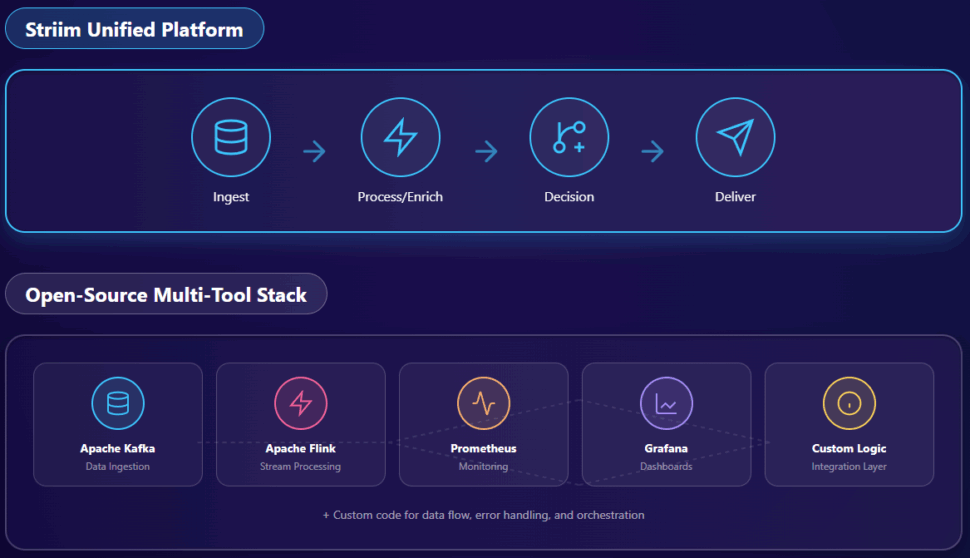
diagram contrasting Striim’s unified workflow (ingest → process/enrich → decision → deliver) with a typical open-source multi-tool stack (Kafka + Flink + separate monitoring)

Streaming analytics might sound complicated, but it follows a simple flow: ingest, process, enrich, and act. A unified platform simplifies this process, unlike fragmented approaches that require you to piece together multiple tools.

Ingest Data Continuously from Live Sources

First, you need to capture data the moment it’s created. This includes changes from databases (using Change Data Capture (CDC)), sensor readings, application logs, and more. This process needs to be fast and reliable, without slowing down your source systems. Using a platform with a wide range of connectors and strong CDC capabilities is key.

Process and Transform Data in Motion

As data flows into your pipeline, it’s filtered, transformed, or joined with other streams. This is where raw data starts to become useful. For example, you can take a customer’s website click and instantly enrich it with their purchase history from another database—all while the data is still moving.

Enrich and Apply Real-Time Logic

Next, you can apply business rules or run the data through machine learning models directly in stream. This lets you do things like score a transaction for fraud risk or spot unusual patterns in sensor data. You could even have a single stream that checks a purchase for fraud while also seeing if the customer qualifies for a special offer, all in a fraction of a second.

Deliver to Targets and Visualize Insights

Finally, the processed insights are sent where they need to go. This might be a cloud data warehouse like Snowflake, a BI tool, or a real-time dashboard. The key is to deliver the information with sub-second latency so your teams and automated systems can take immediate action.

Real-Time Data Movement and Stream Processing: 6 Best Practices 

Gain essential strategies for building reliable, scalable real-time data pipelines, emphasizing streaming-first integration, low-latency processing, and continuous data validation to enable actionable insights and operational efficiency. Read the full blog post to learn more.

Challenges in Implementing Streaming Analytics (and How to Solve Them)

While the value of streaming analytics is clear, getting it right can be challenging. Many teams struggle with the steep learning curve of open-source tools or get locked into a single cloud ecosystem. A unified platform like Striim is designed to help you sidestep these common pitfalls.

Open-source streaming stacks (Kafka/Flink/etc.): Steep learning curve, no native CDC, requires multiple tools for ingestion, processing, and monitoring.

Cloud-native tools: Strong within a single cloud but poor hybrid/multi-cloud support; risk of vendor lock-in.

Point solutions: Handle ingestion only; no in-flight transformation or decisioning.

Data Drift, Schema Evolution, and Quality Issues

Data formats and schemas can change without warning, breaking your pipelines and corrupting your analytics. With open-source tools, this often requires manual code fixes and redeployments. Striim, on the other hand, automatically detects these changes, adjusts the pipeline on the fly, and provides dashboards to help you monitor data quality.

Out-of-Order Events and Latency Spikes

Events don’t always arrive in the right order, which can throw off your analytics and trigger false alerts. Building custom logic to handle this is complicated and can break easily. Striim’s processing engine automatically handles event ordering and timing, ensuring your insights are accurate and delivered with consistent, sub-second latency.

Operational Complexity and Skill Gaps

Many streaming analytics projects fail because they require a team of experts specializing in complex systems like Kafka or Flink. Striim’s all-in-one platform makes it easier for everyone. Its low-code, SQL-based interface allows both developers and analysts to build powerful streaming pipelines without needing a PhD in distributed systems.

The Cost of False Real-Time

“Almost real-time” isn’t enough when every second matters. In some industries, a small delay in detecting fraud can result in a big financial loss. The hidden lags in micro-batch systems can have serious consequences. Striim processes data in memory to deliver true, sub-second performance across all your environments, so you can act instantly.

Striim Real-Time Analytics Quick Start

This tutorial provides a step-by-step guide to using Striim’s platform for creating real-time analytics applications. Learn how to process streaming data, build dashboards, and gain actionable insights with ease.

Must-Have Features in a Streaming Analytics Platform

Not all streaming platforms are created equal. To get the most out of your real-time data, you need a solution that does more than just move it from one place to another. Here are the features to look for.

Native Support for Real-Time Data Ingestion (including CDC)

Your platform should be able to pull in high volumes of data from all your sources—from databases and applications to IoT. It needs to offer log-based CDC to integrate with your operational databases in real time and low-impact integration with operational databases. Striim excels here with its CDC engine and support for hybrid environments.

In-Flight Data Processing and Transformation

Look for the ability to filter, join, and enrich data streams as they flow. A platform with powerful, SQL-based tools for transforming data in motion will help you turn raw information into valuable insights much faster. Look for SQL support, stateful processing, and real-time business logic. Striim’s real-time SQL (TQL) and CEP engine stands out here.

Real-Time Analytics and Decisioning Capabilities

The platform should be able to trigger alerts, update dashboards, or call other applications based on patterns it detects in the data. This includes handling everything from anomaly detection to complex fraud rules without any delay, as with Striim’s real-time alerting and monitoring workflows.

Enterprise-Grade Scale, Reliability, and Observability

You need a platform that can grow with your data volumes, support mission-critical workloads without fail, and deliver consistent sub-second latency. Strong observability tools are also essential for debugging and monitoring pipelines. With Striim, you get a distributed architecture with built-in pipeline monitoring.

Seamless Integration with Modern Data Infrastructure

A future-proof platform needs to connect easily with your existing data warehouses, like Snowflake and BigQuery, as well as messaging systems like Kafka. It must also support hybrid and multi-cloud environments, giving you the freedom to deploy your data wherever you want. Striim’s pre-built connectors and flexible deployment model stand out here.

Integrate both real-time and historical data in your ecosystem

While fresh, real-time data is crucial, ideally your platform of choice can also utilize historic data, especially for training AI and ML models. While many tools can handle either real-time updates or ingest historic data alone, the best solutions will be able to handle (and integrate) both for a rich, unified data set.

Why Choose Striim for Streaming Analytics

Trying to build a streaming analytics solution often leads to a messy collection of tools, frustrating latency issues, and complex integrations. Striim simplifies everything by combining ingestion, transformation, decisioning, and delivery into a single platform built for today’s hybrid-cloud world. The result is faster AI-driven insights, lower engineering overhead, and reliable real-time streaming at scale.

Capability Striim Open-Source Stack Cloud-Native ELT Legacy CDC
Real-Time True in-memory streaming, <1s latency Multi-tool, latency varies Often micro-batch CDC only, no transformation
CDC Native, hybrid/on-prem/cloud Requires add-on (Debezium) Limited, reloads common Yes, no enrichment
Transformation In-flight SQL + CEP Requires Flink/Spark Post-load only Not supported
Schema Evolution Auto-detect & adapt mid-stream Manual fix & redeploy Delayed handling Manual
Hybrid/Multi-Cloud Built-in, consistent SLAs Complex setup Single-cloud focus On-prem only
Ease of Use Low-code, intuitive interface High technical barrier Simple for cloud DBs DBA-focused
AI/ML AI-ready feature streams Custom to build Limited Not supported
Security Compliant with SOC 2, GDPR, HIPAA, and other major security benchmarks. Liable to security breaches and vulnerabilities. Limited Vulnerable

While there are many options out there, Striim is the leading platform that provides a complete, unified solution for streaming analytics, while other approaches only solve part of the puzzle.

Ready to stop reporting on the past and start acting in the present? Start a free trial of Striim or book a demo to see streaming analytics in action.

FAQs About Streaming Analytics

Deploying streaming analytics in hybrid or multi-cloud environments requires distributed data ingestion tools like change data capture (CDC) to collect real-time data from diverse sources without impacting performance. Regional processing nodes and edge computing reduce latency by pre-processing data closer to its source, while containerized microservices and auto-scaling ensure scalability for fluctuating workloads.

Security and compliance demand end-to-end encryption, role-based access control (RBAC), and local processing of sensitive data to meet regulations. Unified monitoring tools provide real-time observability for seamless management.

To avoid vendor lock-in, cloud-agnostic tools and open APIs ensure interoperability, while redundant nodes, multi-region replication, and self-healing pipelines enhance resilience. These adjustments enable real-time insights, scalability, and compliance across distributed systems.

Scaling streaming analytics requires in-memory processing to avoid disk I/O delays, ensuring faster throughput and lower latency. Horizontal scaling adds nodes to distribute workloads, while data partitioning and dynamic load balancing evenly distribute streams and prevent bottlenecks.

To reduce strain, stream compression minimizes bandwidth usage, and pre-aggregation at the source limits data volume. Backpressure management techniques, like buffering, maintain stability during spikes. Optimized query execution and auto-scaling dynamically adjust resources, while fault tolerance mechanisms like checkpointing ensure quick recovery from failures. These strategies enable high performance and reliability at massive scale.

Scaling streaming analytics for massive data volumes requires in-memory processing to eliminate disk I/O delays and ensure low-latency performance. Horizontal scaling adds nodes to handle growing workloads, while data partitioning and dynamic load balancing evenly distribute streams to prevent bottlenecks.

Stream compression reduces bandwidth usage, and pre-aggregation at the source minimizes the data entering the pipeline. Backpressure management, like buffering, maintains stability during spikes, while optimized query execution ensures efficient processing. Continuous monitoring and auto-scaling dynamically adjust resources, and fault tolerance mechanisms like checkpointing ensure quick recovery from failures. These strategies enable reliable, high-performance streaming at scale.

Maintaining data quality in distributed pipelines starts with real-time validation, including schema checks, anomaly detection, and automated quality controls to ensure data integrity. Data lineage tracking provides transparency, helping teams trace and resolve issues quickly, while schema evolution tools adapt to structural changes without breaking pipelines.

For consistency, event ordering and deduplication are managed using watermarking and time-windowing techniques. Fault-tolerant architectures with checkpointing and replay capabilities ensure recovery without data loss. Global data catalogs and metadata tools unify data views across environments, while real-time observability frameworks monitor performance and flag issues early. These practices ensure reliable, high-quality data for real-time decisions.

Streaming analytics supports compliance in regulated industries by embedding security, governance, and monitoring directly into the data pipeline, ensuring adherence to regulations without compromising speed. End-to-end encryption protects data both in transit and at rest, safeguarding sensitive information while maintaining low-latency processing.

Role-based access control (RBAC) and multi-factor authentication (MFA) ensure that only authorized users can access data, meeting strict access control requirements. Additionally, real-time data lineage tracking provides full visibility into how data is collected, processed, and used, which simplifies audits and ensures compliance with regulations like GDPR or HIPAA.

To address data residency requirements, streaming platforms can process sensitive data locally within specific regions while still integrating with global systems. Automated policy enforcement ensures that compliance rules, such as data retention limits or anonymization, are applied consistently across the pipeline.

Finally, real-time monitoring and alerting detect and address potential compliance violations immediately, preventing issues before they escalate. By integrating these compliance measures into the streaming architecture, organizations can meet regulatory requirements while maintaining the sub-second latency needed for real-time decision-making.

Unified streaming platforms have higher upfront costs due to licensing but offer an all-in-one solution with built-in ingestion, processing, monitoring, and visualization. This simplifies deployment, reduces maintenance, and lowers total cost of ownership (TCO) over time.

Open-source stacks like Kafka and Flink are free upfront but require significant engineering resources to integrate, configure, and maintain. Teams must manually handle challenges like schema evolution and fault tolerance, increasing complexity and operational overhead. Scaling to enterprise-grade performance often demands costly infrastructure and expertise.

Unified platforms are ideal for faster time-to-value and simplified management, while open-source stacks suit organizations with deep technical expertise and tight budgets. The choice depends on prioritizing upfront savings versus long-term efficiency.

Managing event ordering in large-scale streaming systems requires watermarking to track stream progress and time-windowing to handle late-arriving events without losing accuracy. Real-time observability tools are critical for detecting anomalies like out-of-sequence events or latency spikes, with metrics such as event lag and throughput offering early warnings.

To resolve issues, replay mechanisms can reprocess streams, while deduplication logic eliminates duplicates caused by retries. Distributed tracing provides visibility into event flow, helping pinpoint problem areas. Fault-tolerant architectures with checkpointing ensure recovery without disrupting event order. These practices ensure accurate, reliable processing at scale.

Change Data Capture (CDC) is a cornerstone of streaming analytics for operational databases, as it enables real-time data ingestion by capturing and streaming changes—such as inserts, updates, and deletes—directly from the database. This allows organizations to process and analyze data as it is generated, without waiting for batch jobs or manual exports.

CDC minimizes the impact on source systems by using log-based methods to track changes, ensuring that operational databases remain performant while still providing fresh data for analytics. It also supports low-latency pipelines, enabling real-time use cases like fraud detection, personalized recommendations, and operational monitoring.

Additionally, CDC ensures data consistency by maintaining the order of changes and handling schema evolution automatically, which is critical for accurate analytics. By integrating seamlessly with streaming platforms, CDC allows organizations to unify data from multiple operational systems into a single pipeline, breaking down silos and enabling cross-system insights.

In short, CDC bridges the gap between operational databases and real-time analytics, providing the foundation for actionable insights and faster decision-making.

To future-proof a streaming analytics system, use schema evolution tools that automatically adapt to changes like added or removed fields, ensuring pipelines remain functional. Schema registries help manage versions and maintain compatibility across components, while data abstraction layers decouple schemas from processing logic, reducing the impact of changes.

For new data sources, adopt modular architectures with pre-built connectors and APIs to simplify integration. At the ingestion stage, apply data validation and transformation to ensure new sources align with expected formats. Real-time monitoring tools can flag issues early, allowing teams to address problems quickly. These strategies create a flexible, resilient system that evolves with your data needs.

Micro-batch processing is a good choice when real-time insights are not critical, and slight delays in data processing are acceptable. It works well for use cases like periodic reporting, refreshing dashboards every few minutes, or syncing data between systems where sub-second latency isn’t required.

It’s also suitable for organizations with limited infrastructure or technical expertise, as micro-batch systems are often simpler to implement and maintain compared to true streaming analytics. Additionally, for workloads with predictable, low-frequency data updates, micro-batching can be more cost-effective by reducing the need for always-on processing.

However, it’s important to evaluate the trade-offs, as micro-batch processing may miss opportunities in scenarios like fraud detection or real-time personalization, where immediate action is essential.

Deploying streaming analytics in hybrid or multi-cloud environments requires distributed data ingestion tools like change data capture (CDC) to collect real-time data from diverse sources without impacting performance. Regional processing nodes and edge computing reduce latency by pre-processing data closer to its source, while containerized microservices and auto-scaling ensure scalability for fluctuating workloads.

Security and compliance demand end-to-end encryption, role-based access control (RBAC), and local processing of sensitive data to meet regulations. Unified monitoring tools provide real-time observability for seamless management.

To avoid vendor lock-in, cloud-agnostic tools and open APIs ensure interoperability, while redundant nodes, multi-region replication, and self-healing pipelines enhance resilience. These adjustments enable real-time insights, scalability, and compliance across distributed systems.

Scaling streaming analytics requires in-memory processing to avoid disk I/O delays, ensuring faster throughput and lower latency. Horizontal scaling adds nodes to distribute workloads, while data partitioning and dynamic load balancing evenly distribute streams and prevent bottlenecks.

To reduce strain, stream compression minimizes bandwidth usage, and pre-aggregation at the source limits data volume. Backpressure management techniques, like buffering, maintain stability during spikes. Optimized query execution and auto-scaling dynamically adjust resources, while fault tolerance mechanisms like checkpointing ensure quick recovery from failures. These strategies enable high performance and reliability at massive scale.

Scaling streaming analytics for massive data volumes requires in-memory processing to eliminate disk I/O delays and ensure low-latency performance. Horizontal scaling adds nodes to handle growing workloads, while data partitioning and dynamic load balancing evenly distribute streams to prevent bottlenecks.

Stream compression reduces bandwidth usage, and pre-aggregation at the source minimizes the data entering the pipeline. Backpressure management, like buffering, maintains stability during spikes, while optimized query execution ensures efficient processing. Continuous monitoring and auto-scaling dynamically adjust resources, and fault tolerance mechanisms like checkpointing ensure quick recovery from failures. These strategies enable reliable, high-performance streaming at scale.

Maintaining data quality in distributed pipelines starts with real-time validation, including schema checks, anomaly detection, and automated quality controls to ensure data integrity. Data lineage tracking provides transparency, helping teams trace and resolve issues quickly, while schema evolution tools adapt to structural changes without breaking pipelines.

For consistency, event ordering and deduplication are managed using watermarking and time-windowing techniques. Fault-tolerant architectures with checkpointing and replay capabilities ensure recovery without data loss. Global data catalogs and metadata tools unify data views across environments, while real-time observability frameworks monitor performance and flag issues early. These practices ensure reliable, high-quality data for real-time decisions.

Streaming analytics supports compliance in regulated industries by embedding security, governance, and monitoring directly into the data pipeline, ensuring adherence to regulations without compromising speed. End-to-end encryption protects data both in transit and at rest, safeguarding sensitive information while maintaining low-latency processing.

Role-based access control (RBAC) and multi-factor authentication (MFA) ensure that only authorized users can access data, meeting strict access control requirements. Additionally, real-time data lineage tracking provides full visibility into how data is collected, processed, and used, which simplifies audits and ensures compliance with regulations like GDPR or HIPAA.

To address data residency requirements, streaming platforms can process sensitive data locally within specific regions while still integrating with global systems. Automated policy enforcement ensures that compliance rules, such as data retention limits or anonymization, are applied consistently across the pipeline.

Finally, real-time monitoring and alerting detect and address potential compliance violations immediately, preventing issues before they escalate. By integrating these compliance measures into the streaming architecture, organizations can meet regulatory requirements while maintaining the sub-second latency needed for real-time decision-making.

Unified streaming platforms have higher upfront costs due to licensing but offer an all-in-one solution with built-in ingestion, processing, monitoring, and visualization. This simplifies deployment, reduces maintenance, and lowers total cost of ownership (TCO) over time.

Open-source stacks like Kafka and Flink are free upfront but require significant engineering resources to integrate, configure, and maintain. Teams must manually handle challenges like schema evolution and fault tolerance, increasing complexity and operational overhead. Scaling to enterprise-grade performance often demands costly infrastructure and expertise.

Unified platforms are ideal for faster time-to-value and simplified management, while open-source stacks suit organizations with deep technical expertise and tight budgets. The choice depends on prioritizing upfront savings versus long-term efficiency.

Managing event ordering in large-scale streaming systems requires watermarking to track stream progress and time-windowing to handle late-arriving events without losing accuracy. Real-time observability tools are critical for detecting anomalies like out-of-sequence events or latency spikes, with metrics such as event lag and throughput offering early warnings.

To resolve issues, replay mechanisms can reprocess streams, while deduplication logic eliminates duplicates caused by retries. Distributed tracing provides visibility into event flow, helping pinpoint problem areas. Fault-tolerant architectures with checkpointing ensure recovery without disrupting event order. These practices ensure accurate, reliable processing at scale.

Change Data Capture (CDC) is a cornerstone of streaming analytics for operational databases, as it enables real-time data ingestion by capturing and streaming changes—such as inserts, updates, and deletes—directly from the database. This allows organizations to process and analyze data as it is generated, without waiting for batch jobs or manual exports.

CDC minimizes the impact on source systems by using log-based methods to track changes, ensuring that operational databases remain performant while still providing fresh data for analytics. It also supports low-latency pipelines, enabling real-time use cases like fraud detection, personalized recommendations, and operational monitoring.

Additionally, CDC ensures data consistency by maintaining the order of changes and handling schema evolution automatically, which is critical for accurate analytics. By integrating seamlessly with streaming platforms, CDC allows organizations to unify data from multiple operational systems into a single pipeline, breaking down silos and enabling cross-system insights.

In short, CDC bridges the gap between operational databases and real-time analytics, providing the foundation for actionable insights and faster decision-making.

To future-proof a streaming analytics system, use schema evolution tools that automatically adapt to changes like added or removed fields, ensuring pipelines remain functional. Schema registries help manage versions and maintain compatibility across components, while data abstraction layers decouple schemas from processing logic, reducing the impact of changes.

For new data sources, adopt modular architectures with pre-built connectors and APIs to simplify integration. At the ingestion stage, apply data validation and transformation to ensure new sources align with expected formats. Real-time monitoring tools can flag issues early, allowing teams to address problems quickly. These strategies create a flexible, resilient system that evolves with your data needs.

Micro-batch processing is a good choice when real-time insights are not critical, and slight delays in data processing are acceptable. It works well for use cases like periodic reporting, refreshing dashboards every few minutes, or syncing data between systems where sub-second latency isn’t required.

It’s also suitable for organizations with limited infrastructure or technical expertise, as micro-batch systems are often simpler to implement and maintain compared to true streaming analytics. Additionally, for workloads with predictable, low-frequency data updates, micro-batching can be more cost-effective by reducing the need for always-on processing.

However, it’s important to evaluate the trade-offs, as micro-batch processing may miss opportunities in scenarios like fraud detection or real-time personalization, where immediate action is essential.

When Does Data Become a Decision?

For years, the mantra was simple: “Land it in the warehouse and we’ll tidy later.” That logic shaped enterprise data strategy for decades. Get the data in, worry about modeling, quality, and compliance after the fact.

The problem is, these days “later” usually means “too late.” Fraud gets flagged after the money is gone. A patient finds out at the pharmacy that their prescription wasn’t approved. Shoppers abandon carts while teams run postmortems. By the time the data looks clean on a dashboard, the moment it could have made an impact has already passed.

At some point, you have to ask: If the decision window is now, why do we keep designing systems that only prepare data for later?

This was the crux of our recent webinar, Rethinking Real Time: What Today’s Streaming Leaders Know That Legacy Vendors Don’t. The takeaway: real-time everywhere is a red herring. What enterprises actually need is decision-time: data that’s contextual, governed, and ready at the exact moment it’s used.

Define latency by the decision, not the pipeline

We love to talk about “real-time” as if it were an absolute. But most of the time, leaders aren’t asking for millisecond pipelines; rather, they’re asking to support a decision inside a specific window of time. That window changes with the decision. So how do we design for that, and not for some vanity SLA?

For each decision, write down five things:

  • Decision: What call are we actually making?
  • Window: How long before the decision loses value? Seconds? Minutes? Hours?
  • Regret: Is it worse to be late, or to be wrong?
  • Context: What data contributes to the decision?
  • Fallback: If the window closes, then what?

Only after you do this does latency become a real requirement. Sub-second pipelines are premium features. You should only buy them where they change the outcome, not spray them everywhere.

Satyajit Roy, CTO of Retail Americas at TCS, expressed this sentiment perfectly during the webinar. 

Three latency bands that actually show up in practice

In reality, most enterprise decisions collapse into three bands.

  • Sub-second. This is the sharp end of the stick: decisions that have to happen in the flow of an interaction. Approve or block the card while the customer is still at the terminal. Gate a login before the session token issues. Adapt the price of an item while the shopper is on the checkout page. Miss this window, and the decision is irrelevant, because the interaction has already moved on. 
  • Seconds to minutes. These aren’t interactive, but they’re still urgent. Think of a pharmacy authorization that needs to be resolved before the patient arrives at the counter. Or shifting inventory between stores to cover a shortfall before the next wave of orders. Or nudging a contact center agent with a better offer while they’re still on the call. You’ve got a small buffer, but the decision still has an expiration date. 
  • Hours to days. The rest live here. Compliance reporting. Daily reconciliations. Executive dashboards. Forecast refreshes. They’re important, but the value doesn’t change if they show up at 9 a.m. sharp or sometime before lunch.

Keep it simple. You can think of latency in terms of these three bands, not an endless continuum where every microsecond counts. Most enterprises would be better off mapping decisions to these categories and budgeting accordingly, instead of obsessing over SLAs no one will remember.

From batch habits to in-stream intelligence

Once you know the window, the next question is harder: what actually flows through that window? 

Latency alone doesn’t guarantee the decision will be right. If the stream shows up incomplete, out of context, or ungoverned, the outcome is still wrong, just… faster. For instance, when an AI agent takes an action, the stream it sees is the truth, whether or not that truth is accurate, complete, or safe. 

This is why streaming can’t just be a simple transport layer anymore. It has to evolve into what I’d call a decision fabric: the place where enough context and controls exist to make an action defensible.

And if the stream is the decision fabric, then governance has to be woven into it. Masking sensitive fields, enforcing access rules, recording lineage, all of it has to happen in motion, before an agent takes an action. Otherwise, you’re just trusting the system to “do the right thing” (which is the opposite of governance).

Imagine a customer denied credit because the system acted on incomplete data, or a patient prescribed the wrong medication because the stream dropped a validation step. In these cases, governance is the difference between a system you can rely on and one you can’t.

Still, it has to be pragmatic. That’s the tradeoff enterprise leaders often face: how much assurance do you need, and what are you willing to pay for it? Governance that’s too heavy slows everything down. Governance that’s too light creates risk you can’t defend.

That balance—enough assurance without grinding the system to a halt—can’t be solved by policies alone. It has to be solved architecturally. And that’s exactly where the market is starting to split. Whit Walters, Field CTO at GigaOm, expressed this perfectly while explaining this year’s GigaOm Radar Report.

A true decision fabric doesn’t wait for a warehouse to catch up or a governance team to manually check the logs. It builds trust and context into the stream itself, so that when the model or agent makes a call, it’s acting on data you can stand behind.

AI is moving closer to the data

AI is dissolving the old division of labor. You can’t draw a clean line between “data platform” and “AI system” anymore. Once the stream itself becomes the place where context is added, governance is enforced, and meaning is made, the distinction stops being useful. Intelligence isn’t something you apply downstream. It’s becoming a property of the flow.

MCP is just one example of how the boundary has shifted. A function call like get_customer_summary is baked into the governed fabric. In-stream embeddings show the same move: they pin transactions to the context in which they actually occurred. Small models at the edge close the loop further still, letting decisions happen without exporting the data to an external endpoint for interpretation.

The irony is that many vendors still pitch “AI add-ons” as if the boundary exists. They talk about copilots bolted onto dashboards or AI assistants querying warehouses. Meanwhile, the real change is already happening under their feet, where the infrastructure itself is learning to think.

The way forward

Accountability is moving upstream. Systems no longer sit at the end of the pipeline, tallying what already happened. They’re embedded in the flow, making calls that shape outcomes in real time. That’s a very different burden than reconciling yesterday’s reports.

The trouble is, most enterprise architectures were designed for hindsight. They assume time to clean, model, and review before action. But once decisions are automated in motion, that buffer disappears. The moment the stream becomes the source of truth, the system inherits the responsibility of being right, right now.

That’s why the harder question isn’t “how fast can my pipeline run?” but “can I defend the decisions my systems are already making?”

This was the thread running through Rethinking Real Time: What Today’s Streaming Leaders Know That Legacy Vendors Don’t. If you didn’t catch it, the replay is worth a look. And if you’re ready to test your own stack against these realities, Striim is already working with enterprises to design for decision-time. Book a call with a Striim expert to find out more.

SQL Server Change Data Capture: How It Works & Best Practices

If you’re reading this, there’s a chance you need to send real-time data from SQL Server for cloud migration, operational reporting or agentic AI. How hard can it be?

The answer lies in the transition. Capturing changes isn’t difficult in and of itself; it’s the act of doing so at scale without destabilizing your production environment. While SQL Server provides native Change Data Capture (CDC) functionality, making it reliable, efficient, and low-impact in a modern hybrid-cloud architecture can be challenging. If you’re looking for a clear breakdown of what SQL Server CDC is, how it works, and how to build a faster, more scalable capture strategy, you’re in the right place. This guide will cover the methods, the common challenges, and the modern tooling required to get it right.

What is SQL Server Change Data Capture (CDC)?

Change Data Capture (CDC) is a technology that identifies and records row-level changes—INSERTs, UPDATEs, and DELETEs—in SQL Server tables. It captures these changes as they happen and makes them available for downstream systems, all without requiring modifications to the source application’s tables. This capability enables businesses to feed live analytics dashboards, execute zero-downtime cloud migrations, and maintain audit trails for compliance. In today’s economy, businesses can no longer tolerate the delays of nightly or even hourly batch jobs. Real-time visibility is essential for fast, data-driven decisions. At a high level, SQL Server’s native CDC works by reading the transaction log and storing change information in dedicated system tables. While this built-in functionality provides a starting point, scaling it reliably across a complex hybrid or cloud architecture requires a clear strategy and, often, specialized tooling to manage performance and operational overhead.

Where SQL Server CDC Fits in the Modern Data Stack

Change Data Capture should not be considered an isolated feature, but a critical puzzle piece within a company’s data architecture. It functions as the real-time “on-ramp” that connects transactional systems (like SQL Server) to the cloud-native and hybrid platforms that power modern business. CDC is the foundational technology for a wide range of critical use cases, including:

  • Real-time Analytics: Continuously feeding cloud data warehouses (like Snowflake, BigQuery, or Databricks) and data lakes to power live, operational dashboards.
  • Cloud & Hybrid Replication: Enabling zero-downtime migrations to the cloud or synchronizing data between on-premises systems and multiple cloud environments.
  • Data-in-Motion AI: Powering streaming applications and AI models with live data for real-time predictions, anomaly detection, and decisioning.
  • Microservices & Caching: Replicating data to distributed caches or event-driven microservices to ensure data consistency and high performance.

How SQL Server Natively Handles Change Data Capture

SQL Server provides built-in CDC features (available in Standard, Enterprise, and Developer editions) that users must enable on a per-table basis. Once enabled, the native process relies on several key components:

  1. The Transaction Log: This is where SQL Server first records all database transactions. The native CDC process asynchronously scans this log to find changes related to tracked tables.
  2. Capture Job (sys.sp_cdc_scan): A SQL Server Agent job that reads the log, identifies the changes, and writes them to…
  3. Change Tables: For each tracked source table, SQL Server creates a corresponding “shadow table” (e.g., cdc.dbo_MyTable_CT) to store the actual change data (the what, where, and when) along with metadata.
  4. Log Sequence Numbers (LSNs): These are used to mark the start and end points of transactions, ensuring changes are processed in the correct order.

Cleanup Job (sys.sp_cdc_cleanup_job): Another SQL Server Agent job that runs periodically to purge old data from the change tables based on a user-defined retention policy.Striim SQL Server CDC While this native system offers a basic form of CDC, it was not designed for the high-volume, low-latency demands of modern cloud architectures. The SQL Server Agent jobs and the constant writing to change tables introduce performance overhead (added I/O and CPU) that can directly impact your production database, especially at scale.

How Striim MSJET Handles SQL Server Change Data Capture

Striim’s MSJET provides high-performance, log-based CDC for SQL Server without relying on triggers or shadow tables. Unlike native CDC, it eliminates the overhead of SQL Server Agent jobs and intermediate change tables. The MSJET process relies on several key components:

  • The Transaction Log: MSJET reads directly from SQL Server’s transaction log—including via fn_dblog—to capture all committed INSERT, UPDATE, and DELETE operations in real time.
  • Log Sequence Numbers (LSNs): MSJET tracks LSNs to ensure changes are processed in order, preserving transactional integrity and exactly-once delivery.
  • Pipeline Processing: As changes are read from the log, MSJET can filter, transform, enrich, and mask data in-flight before writing to downstream targets.
  • Schema Change Detection: MSJET automatically handles schema modifications such as new columns or altered data types, keeping pipelines resilient without downtime.
  • Checkpointing and Retention: MSJET internally tracks log positions and manages retention, without relying on SQL Server’s capture or cleanup jobs, which consume disk space, I/O, and CPU resources.

Key Advantage: Because MSJET does not depend on shadow tables or SQL Server Agent jobs, it avoids the performance overhead, storage consumption, and complexity associated with native CDC. This enables high-throughput, low-latency CDC suitable for enterprise-scale, real-time streaming to cloud platforms such as Snowflake, BigQuery, Databricks, and Kafka.

Common Methods for Capturing Change Data from SQL Server

SQL Server provides several methods for capturing change data, each with different trade-offs in performance, latency, operational complexity, and scalability. Choosing the right approach is essential to achieve real-time data movement without overloading the source system.

Method Performance Impact Latency Operational Complexity Scalability
Polling-Based High High (Minutes) Low Low
Trigger-Based Very High Low High Low
Log-Based Very Low Low (Seconds/Sub-second) Moderate to Low High

Polling-Based Change Capture

  • How it works: The polling method periodically queries source tables to detect changes (for example, SELECT * FROM MyTable WHERE LastModified > ?). This approach is simple to implement but relies on repetitive full or incremental scans of the data.
  • The downside: Polling is highly resource-intensive, putting load on the production database with frequent, heavy queries. It introduces significant latency, is never truly real-time, and often fails to capture intermediate updates or DELETE operations without complex custom logic.
  • The Striim advantage: Striim eliminates the inefficiencies of polling by capturing changes directly from the transaction log. This log-based approach ensures every insert, update, and delete is captured in real time with minimal source impact—delivering reliable, low-latency data streaming at scale.

Trigger-Based Change Capture

  • How it works: This approach uses database triggers (DML triggers) that fire on every INSERT, UPDATE, or DELETE operation. Each trigger writes the change details into a separate “history” or “log” table for downstream processing.
  • The downside: Trigger-based CDC is intrusive and inefficient. Because triggers execute as part of the original transaction, they increase write latency and can quickly become a performance bottleneck—especially under heavy workloads. Triggers also add development and maintenance complexity, and are prone to breaking when schema changes occur.
  • The Striim advantage: Striim completely avoids trigger-based mechanisms. By capturing changes directly from the transaction log, Striim delivers a non-intrusive, high-performance solution that preserves source system performance while providing scalable, real-time data capture.

Shadow Table (Native SQL CDC)

  • How it works: SQL Server’s native Change Data Capture (CDC) feature uses background jobs to read committed transactions from the transaction log and store change information in system-managed “shadow” tables. These tables record before-and-after values for each change, allowing downstream tools to query them periodically for new data.
  • The downside: While less intrusive than triggers, native CDC still introduces overhead on the source system due to the creation and maintenance of shadow tables. Managing retention policies, cleanup jobs, and access permissions adds operational complexity. Latency is also higher compared to direct log reading, and native CDC often struggles to scale efficiently for high-volume workloads.
  • The Striim advantage: Striim supports native SQL CDC for environments where it’s already enabled, but it also offers a superior alternative through its MSJET log-based reader. MSJET delivers the same data with lower latency, higher throughput, and minimal operational overhead—ideal for real-time, large-scale data integration.

Log-Based (MSJET)

How it works:
Striim’s MSJET reader captures change data directly from SQL Server’s transaction log, bypassing the need for triggers or shadow tables. This approach reads the same committed transactions that SQL Server uses for recovery, ensuring every INSERT, UPDATE, and DELETE is captured accurately and in order.

The downside:
Implementing log-based CDC natively can be complex, as it requires a deep understanding of SQL Server’s transaction log internals and careful management of log sequence numbers and recovery processes. However, when done right, it provides the most accurate and efficient form of change data capture.

The Striim advantage:
MSJET offers high performance, low impact, and exceptional scalability—supporting CDC rates of up to 150+ GB per hour while maintaining sub-second latency. It also automatically handles DDL changes, ensuring continuous, reliable data capture without manual intervention. This makes MSJET the most efficient and enterprise-ready option for SQL Server change data streaming.

Challenges of Managing Change Data Capture at Scale

Log-based CDC is the gold standard for accuracy and performance, but managing it at enterprise scale introduces new operational challenges. As data volumes, change rates, and schema complexity grow, homegrown or basic CDC solutions often reach their limits, impacting reliability, performance, and maintainability.

Handling Schema Changes and Schema Drift

  • The pain point: Source schemas evolve constantly—new columns are added, data types change, or fields are deprecated. These “schema drift” events often break pipelines, cause ingestion errors, and lead to downtime or data inconsistency.
  • Striim’s advantage: Built with flexibility in mind, Striim’s MSJET engine automatically detects schema changes in real time and propagates them downstream without interruption. Whether the target needs a structural update or a format transformation, MSJET applies these adjustments dynamically, maintaining full data continuity with zero downtime.

Performance Overhead and System Impact

  • The pain point: Even SQL Server’s native log-based CDC introduces operational overhead. Its capture and cleanup jobs consume CPU, I/O, and storage, while writing to change tables can further slow down production workloads.
  • When it becomes critical: As transaction volumes surge or during peak business hours, this additional load can impact response times and force trade-offs between production performance and data freshness.
  • Striim’s advantage: MSJET is engineered for high performance and low impact. By reading directly from the transaction log without relying on SQL Server’s capture or cleanup jobs, it minimizes system load while sustaining throughput of 150+ GB/hour. All CDC processing occurs within Striim’s distributed, scalable runtime, protecting your production SQL Server from performance degradation.

Retention, Cleanup, and Managing CDC Metadata

  • The pain point: Native CDC requires manual maintenance of change tables, including periodic cleanup jobs to prevent unbounded growth. Misconfigured or failed jobs can lead to bloated tables, wasted storage, and degraded query performance.
  • Striim’s advantage: MSJET removes this burden entirely. It manages retention, checkpointing, and log positions internally, no SQL Server Agent jobs, no cleanup scripts, no risk of data buildup. Striim tracks its place in the transaction log independently, ensuring reliability and simplicity at scale.

Security, Governance, and Audit Considerations

  • The pain point: Change data often includes sensitive information, such as PII, financial records, or health data. Replicating this data across hybrid or multi-cloud environments can introduce significant security, compliance, and privacy risks if not properly managed.
  • Striim’s advantage: Striim provides a comprehensive, enterprise-grade data governance framework. Its Sherlock agent automatically detects sensitive data, while Sentinel masks, tags, and encrypts it in motion to enforce strict compliance. Beyond security, Striim enables role-based access control (RBAC), filtering, data enrichment, and transformation within the pipeline—ensuring only the data that is required is written to downstream targets. Combined with end-to-end audit logging, these capabilities give organizations full visibility, control, and protection over their change data streams.

Accelerate and Simplify SQL Server CDC with Striim

Relying on native SQL Server CDC tools or DIY pipelines comes with significant challenges: performance bottlenecks, brittle pipelines, schema drift, and complex maintenance. These approaches were not built for real-time, hybrid-cloud environments, and scaling them often leads to delays, errors, and operational headaches. Striim is purpose-built to overcome these challenges. It is an enterprise-grade platform that delivers high-performance, log-based CDC for SQL Server, combining reliability, simplicity, and scalability. With Striim, you can:

  • Capture data with minimal impact: MSJET reads directly from the transaction log, providing real-time change data capture without affecting production performance.
  • Handle schema evolution automatically: Detect and propagate schema changes in real time with zero downtime, eliminating a major source of pipeline failure.
  • Process data in-flight: Use a familiar SQL-based language to filter, transform, enrich, and mask sensitive data before it reaches downstream systems.
  • Enforce security and governance: Leverage Sherlock to detect sensitive data and Sentinel to mask, tag, and encrypt it in motion. Combined with RBAC, filtering, and audit logging, you maintain full control and compliance.
  • Guarantee exactly-once delivery: Ensure data integrity when streaming to cloud platforms like Snowflake, Databricks, BigQuery, and Kafka.
  • Unify integration and analytics: Combine CDC with real-time analytics to build a single, scalable platform for data streaming, processing, and insights.

Stop letting the complexity of data replication slow your business. With Striim, SQL Server CDC is faster, simpler, and fully enterprise-ready. Interested in a personalized walkthrough of Striim’s SQL Server CDC functionality? Please schedule a demo with one of our CDC experts! Alternatively you can  try Striim for free.

How to Migrate Data from MySQL to Azure Database for MySQL

For many data teams, migrating MySQL workloads to Azure Database for MySQL is a critical step in modernizing their data platform, but maintaining uptime, preserving data integrity, and validating performance during the process can be complex.

With Striim and Microsoft Azure, those challenges become manageable. Striim’s log-based Change Data Capture (CDC) continuously streams every MySQL transaction into Azure Database for MySQL, enabling zero-data-loss replication, real-time validation, and minimal impact on live applications.

As part of the Microsoft Unlimited Database Migration Program, this joint solution helps organizations accelerate and de-risk their path to Azure. By combining proven migration tooling, partner expertise, and architectural guidance, together, Striim and Microsoft simplify every stage of the move.

This tutorial walks through the key steps and configurations to successfully migrate from MySQL to Azure Database for MySQL using Striim.

Why Use Striim for Continuous Migration

Through the Unlimited Database Migration Program, Microsoft customers gain unlimited Striim licenses to migrate as many databases as they need at no additional cost. Highlights and benefits of the program include:

  • Zero-downtime, zero-data-loss migrations. Supported sources include SQL Server, MongoDB, Oracle, MySQL, PostgreSQL, Sybase, and Cosmos. Supported targets include Azure Database for MySQL, Azure Database for PostgreSQL, Azure Database for CosmosDB, and Azure Database for MariaDB.
  • Mission-critical, heterogeneous workloads supported. Applies for SQL, Oracle, NoSQL, OSS.
  • Drives faster AI adoption. Once migrated, data is ready for real-time analytics & AI.

In this case, Striim enables continuous, log-based Change Data Capture (CDC) from MySQL to Azure Database for MySQL. Instead of relying on periodic batch jobs, Striim reads directly from MySQL binary logs (binlogs) and streams transactions to Azure in real time.

Using the architecture and configuration steps outlined below, this approach minimizes impact on production systems and ensures data consistency even as new transactions occur during migration.

Architecture Overview

This specific setup includes three components:

  • Source: an existing MySQL database, hosted on-premises or in another cloud.
  • Processing layer: Striim, deployed in Azure for low-latency data movement.
  • Target: Azure Database for MySQL (Flexible Server recommended).

Data flows securely from MySQL → Striim → Azure Database for MySQL through ports 3306 and 5432. Private endpoints or Azure Private Link are recommended for production environments to avoid public internet exposure.

Preparing the MySQL Source

Before streaming can begin, enable binary logging and create a replication user with read access to those logs:


Set the binlog format to ROW and ensure logs are retained long enough to handle any temporary network interruption.

In Striim, use the MySQL Reader component to connect to the source. This reader consumes binlogs directly, so overhead on the production system remains in the low single-digit percentage range.

You can find detailed configuration guidance in Striim’s MySQL setup documentation.

Configuring the Azure MySQL Target

Before starting the pipeline, make sure target tables exist in Azure Database for MySQL. Striim supports two methods:

  • Schema Conversion Utility (CLI): automatically generates MySQL DDL statements.
  • Wizard-based creation: defines and creates tables directly through the Striim UI.

Create a MySQL user with appropriate privileges:


The Striim environment needs network access to the MySQL instance over port 5432. Using a private IP or Azure Private Endpoint helps maintain compliance and security best practices.

Building the Migration Pipeline

A complete Striim migration includes three coordinated stages:

  1. Schema Migration – creates tables and schemas in the target.
  2. Initial Load – bulk-loads historical data from MySQL to Azure Database for MySQL.
  3. Change Data Capture (CDC) – continuously streams live transactions to keep the systems in sync.

During the initial load, Striim copies historical data using a Database Reader and Database Writer. Once complete, you can start the CDC pipeline to apply real-time updates until MySQL and Azure Database for MySQL are fully synchronized. Note that Striim automatically maps compatible data types during initial load and continuous replication.

When ready, pause writes to MySQL, validate record counts, and cut over to Azure with zero data loss. Follow Striim’s switch-over guide for sequencing the transition safely.

Working in Striim

You can build pipelines in Striim using several methods:

  • Wizards: pre-built templates that guide you through setup for common source/target pairs such as MySQL → Azure Database for MySQL.
  • Visual Designer: drag-and-drop components for custom data flows.
  • TQL scripts: Striim’s language for defining applications programmatically, suitable for CI/CD automation.

Each Striim application is backed by a TQL file, which can be version-controlled and deployed via REST API for repeatable infrastructure-as-code workflows. Below is a step-by-step demo of what you can expect.

Adding Transformations and Smart Pipelines

Beyond 1:1 replication, you can apply transformations to enrich or reshape data before writing to Azure. Striim supports in-memory processing through continuous SQL queries or custom Java functions.

For example, you can append operational metadata:


These Smart Data Pipelines allow teams to incorporate auditing, deduplication, or lightweight analytics without creating separate ETL jobs—streamlining modernization into a single migration flow.

Performance Expectations

In joint Striim and Microsoft testing, results typically show:

  • 1 TB historical load: completed in 4–6 hours
  • Ongoing CDC latency: sub-second for inserts, updates, and deletes

Throughput depends on schema complexity, hardware configuration, and network performance. For best results, deploy Striim in the same Azure region as your Azure Database for MySQL target and allocate sufficient CPU and memory resources.

Support and Enablement

The Microsoft Unlimited Database Migration Program is designed specifically to provide customers direct access to Striim’s field expertise throughout the migration process.

From end-to-end, you can expect:

  • Onboarding and ongoing support, including installation kits and walkthroughs.
  • Higher-tier service packages are available as well.
  • Direct escalation paths to Striim for issue resolution and continuous assistance during migration and replication.
  • Professional services and funding flexibility, such as ECIF coverage for partner engagements, cutover or weekend go-live standby, and pre-approved service blocks to simplify SOW approvals.

Together, these resources ensure migrations from MySQL to Azure Database for MySQL are fully supported from initial enablement through post-cutover operations, backed by Microsoft and Striim’s combined field teams.

Accelerate Your Migration Journey with Microsoft’s Unlimited Database Migration Program

With Striim and Microsoft, moving from MySQL to Azure Database for MySQL is no longer a complex, high-risk process—it’s an engineered pathway to modernization. Through the Microsoft Unlimited Database Migration Program, you can access partner expertise, joint tooling, and migration credits to move data workloads to Azure quickly and securely at no extra cost to you.

Whether your goal is one-time migration or continuous hybrid replication, Striim’s CDC engine, combined with Azure’s managed MySQL service, ensures every transaction lands with integrity. Start your modernization journey today by connecting with your Microsoft representative or visiting https://go2.striim.com/demo.

Back to top