Integrate Striim for data streaming in your containerized application
Benefits
Manage Scalable Applications
Integrate Striim with your application inside Kubernetes Engine
Capture Data Updates in real time
Use Striim’s postgrescdc reader for real time data updates
Build Real-Time Analytical ModelsUse the power of Real Time Data Streaming to build Real-Time analytical and ML models
On this page
Overview
Kubernetes is a popular tool for creating scalable applications due to its flexibility and delivery speed. When you are developing a data-driven application that requires fast real-time data streaming, it is important to utilize a tool that does the job efficiently. This is when
Striim patches into your system. Striim is a unified data streaming and integration product that offers change capture (CDC) enabling continuous replication from popular databases such as Oracle, SQLServer, PostgreSQL and many others to target data warehouses like BigQuery and Snowflake.
In this tutorial we have shown how to run a Striim application in Kubernetes cluster that streams data from Postgres to Bigquery in real time. We have also discussed how to monitor and access Striim’s logs and poll Striim’s Rest API to regulate the data stream.
Core Striim Components
PostgreSQL CDC: PostgreSQL Reader uses the wal2json plugin to read PostgreSQL change data. 1.x releases of wal2jon can not read transactions larger than 1 GB.
Stream: A stream passes one component’s output to one or more other components. For example, a simple flow that only writes to a file might have this sequence
BigQueryWriter: Striim’s BigQueryWriter writes the data from various supported sources into Google’s BigQuery data warehouse to support real time data warehousing and reporting.
Step 1: Deploy Striim on Google Kubernetes Engine
Follow the steps below to configure your Kubernetes cluster and start the required pods:
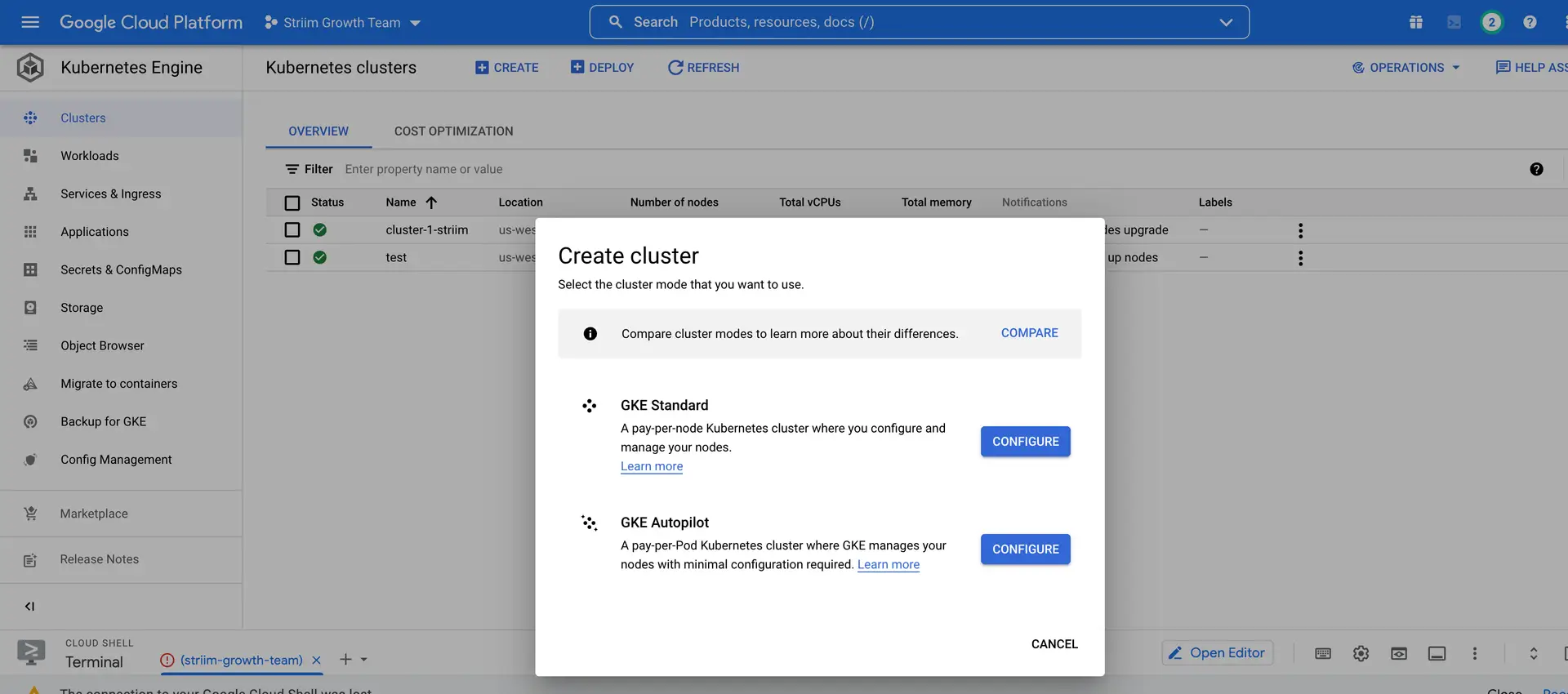
Create a cluster on GKE that will run the Striim-node and striim-metadata pods.
On your GKE, click clusters and configure a cluster with the desired number of nodes. Once the cluster is created, run the following command to connect the cluster.
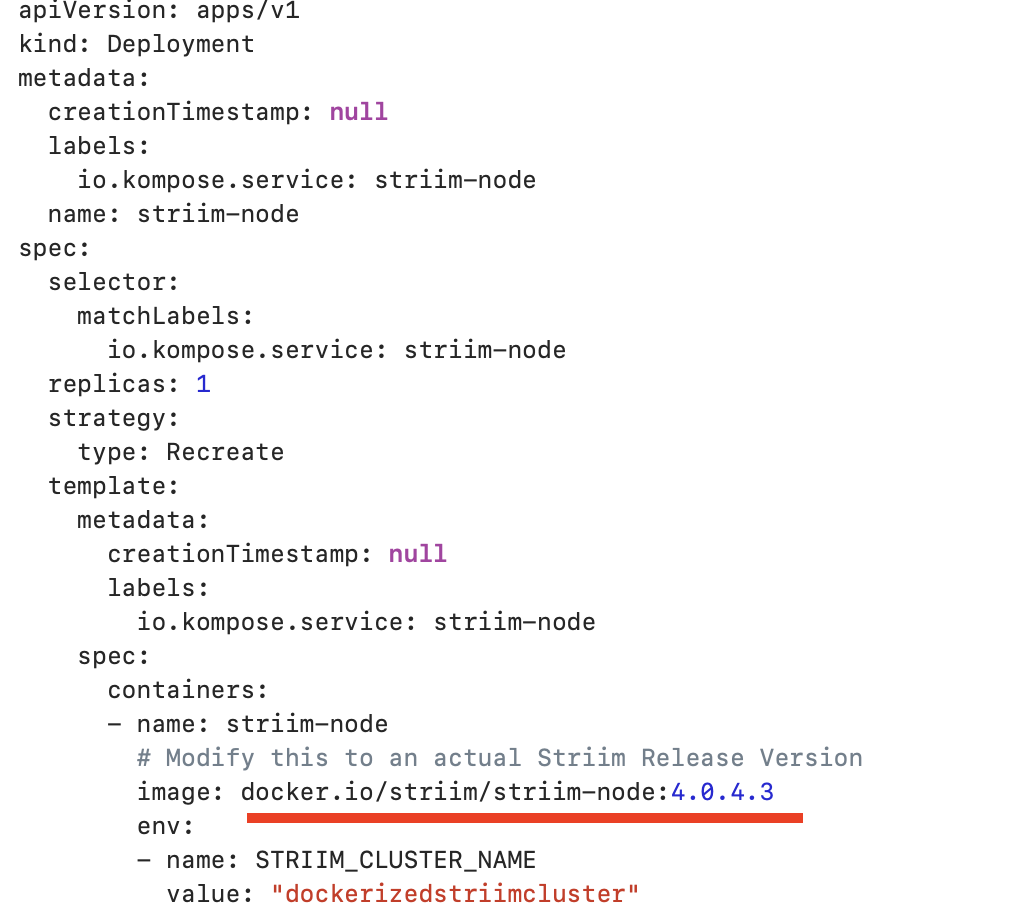
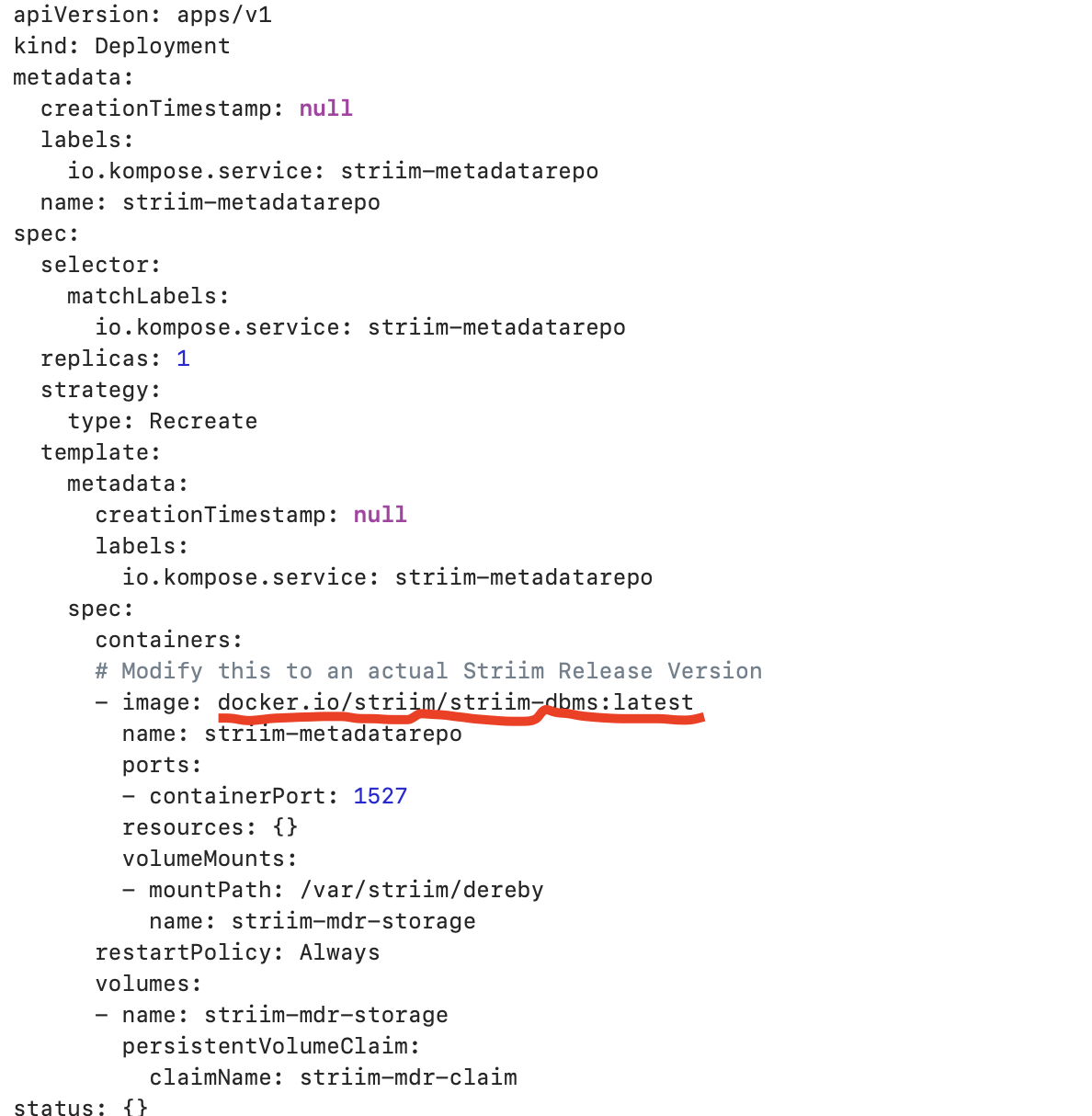
Configure the yaml file to run docker container inside K8 cluster.You can find a sample yaml file here that deploys striim-node and metadata containers. Modify the tags of striim-dbms and striim-node image with
the latest version as shown below. Modify COMPANY_NAME, FIRST_NAME, LAST_NAME and COMPANY_EMAIL_ADDRESS for the 7-days free trial use or if you have a license key, you can modify the license key section from yaml file.
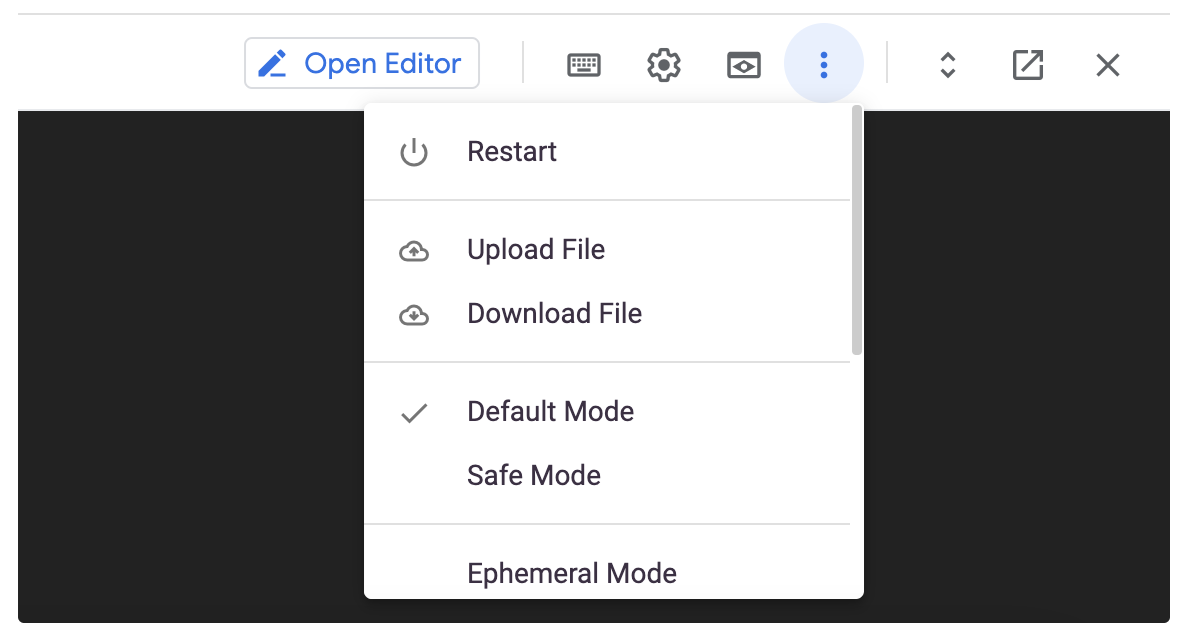
Upload the yaml file to your google cloud.
Run the following command to deploy with the yaml file. The pods will take some time to start and run successfully:
kubectl create -f {YAML_FILE_NAME>
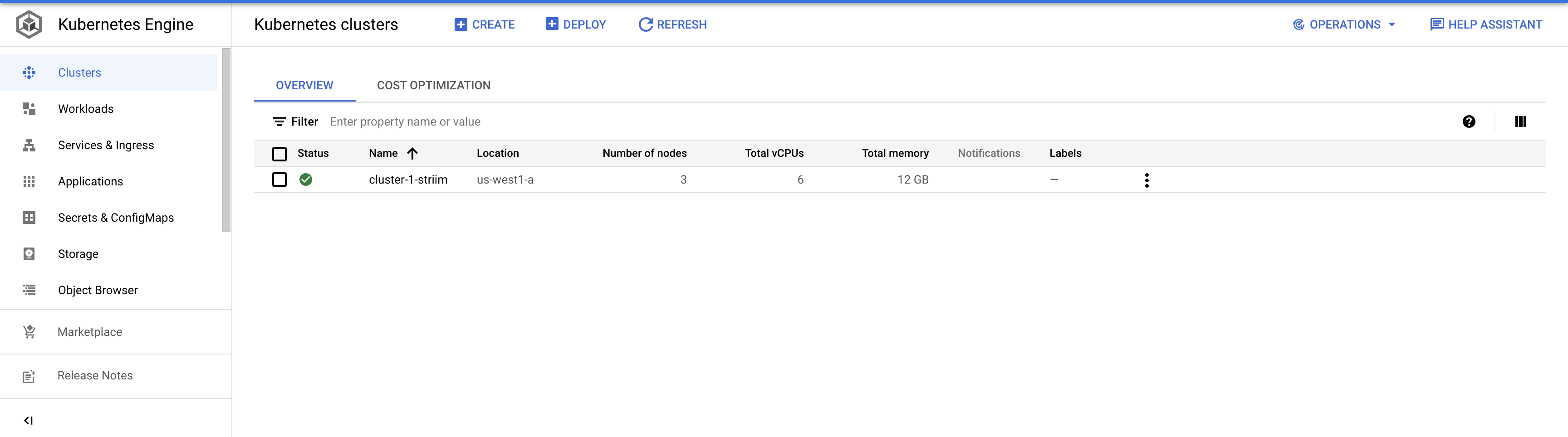
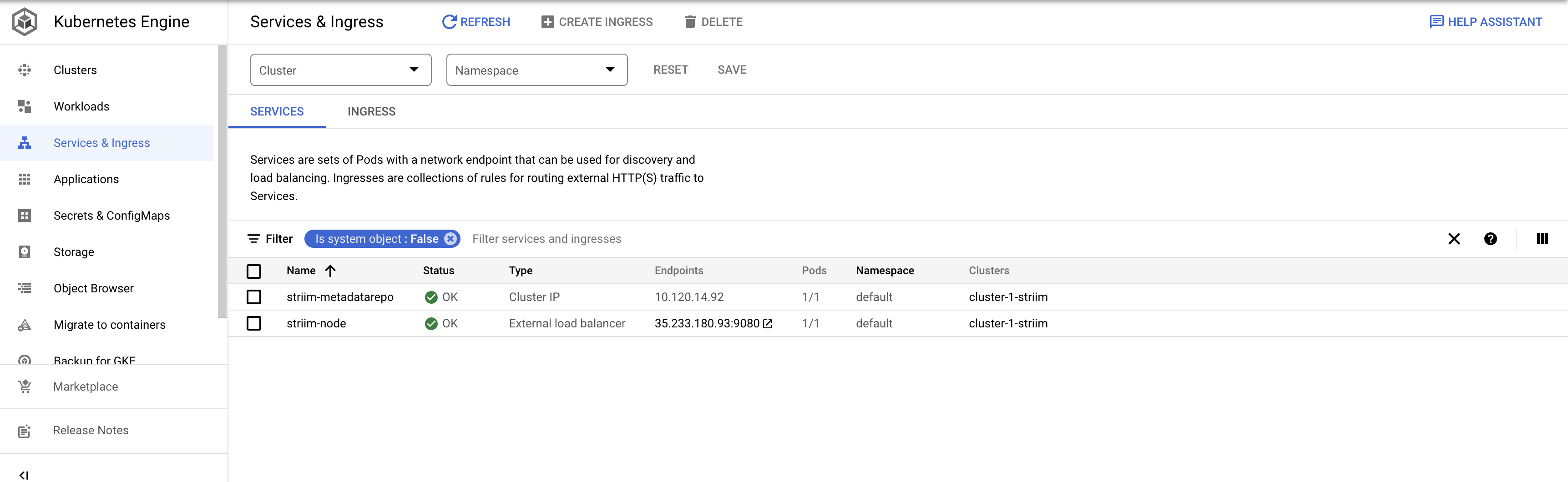
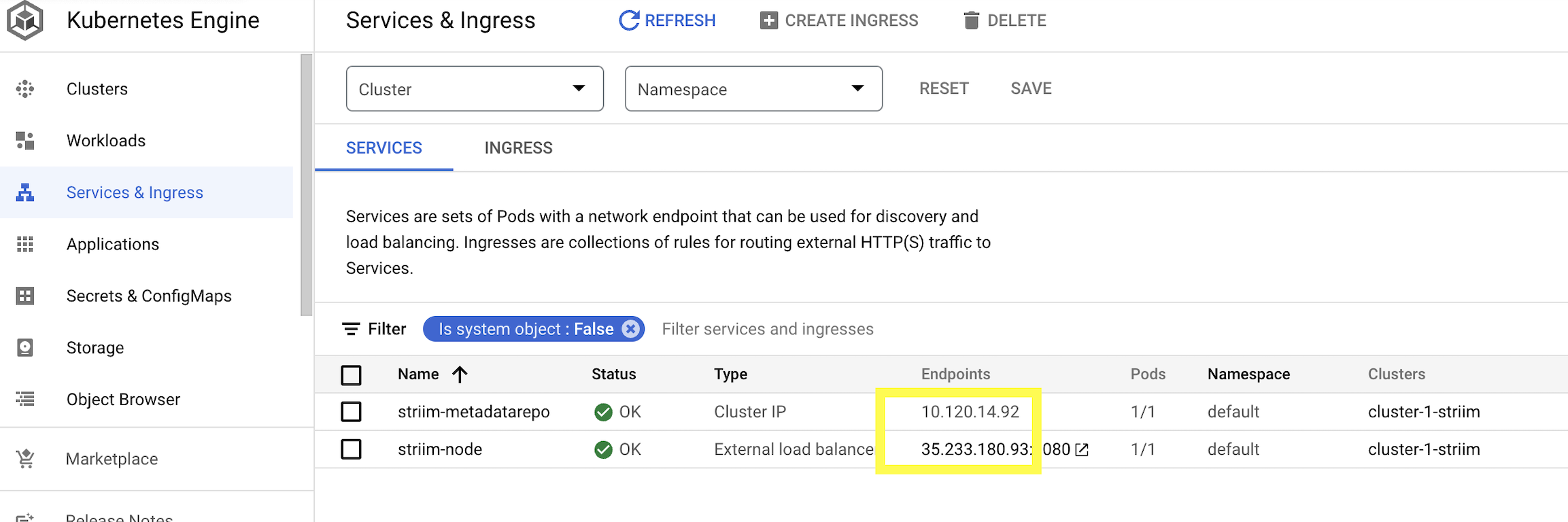
Go to Services & Ingress to check if the pods are created successfully. The OK status indicate the pods are up and running
Step 2: Configure the KeyStore Password
Enter the pod running Striim-node by running the following command.
Kubectl logs {striim-node-***pod name}
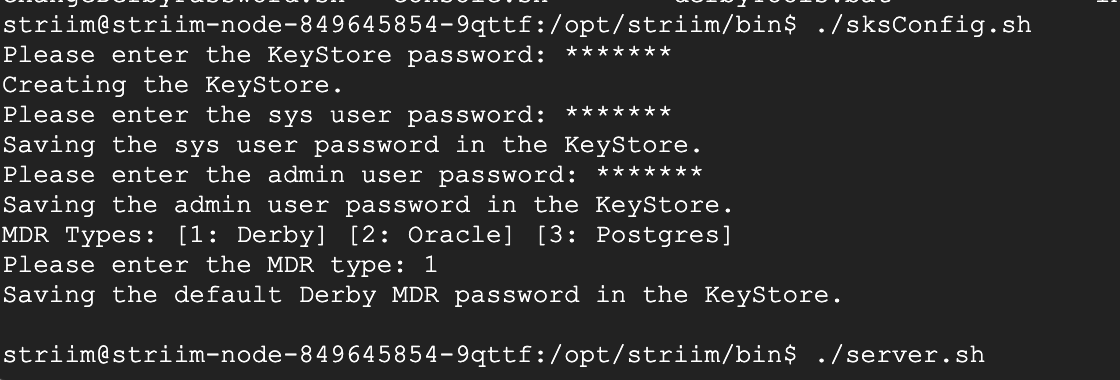
Enter the directory /opt/striim/bin/ and run the sksConfig.sh file to set the KeyStore passwords.
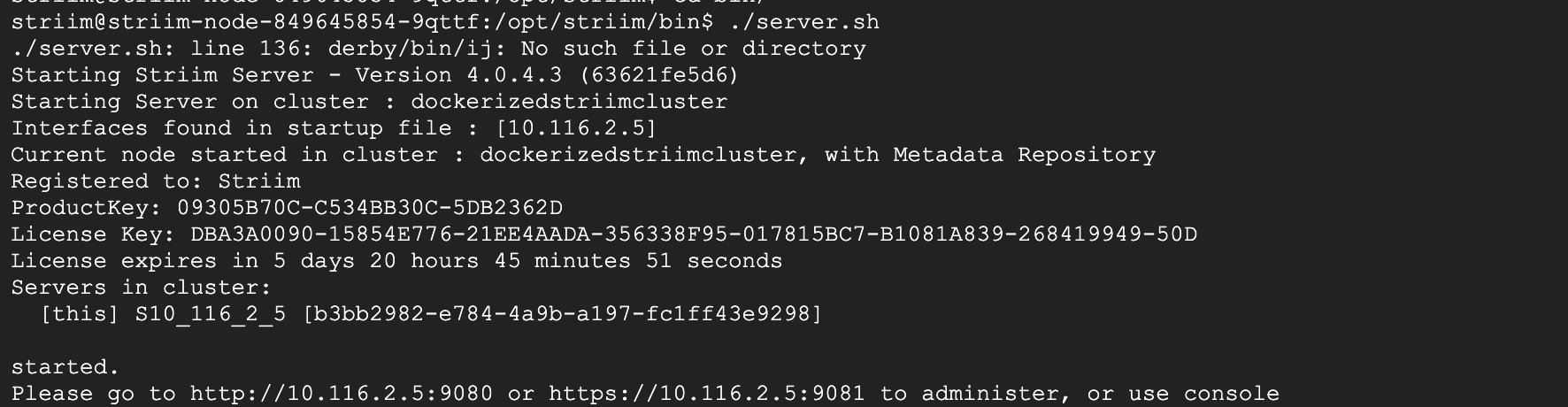
Run the server.sh file to launch Striim server through the K8 cluster. When prompted for cluster name, enter dockerizedstriimcluster or the name of cluster from yaml file.
Step 3: Access Striim Server UI
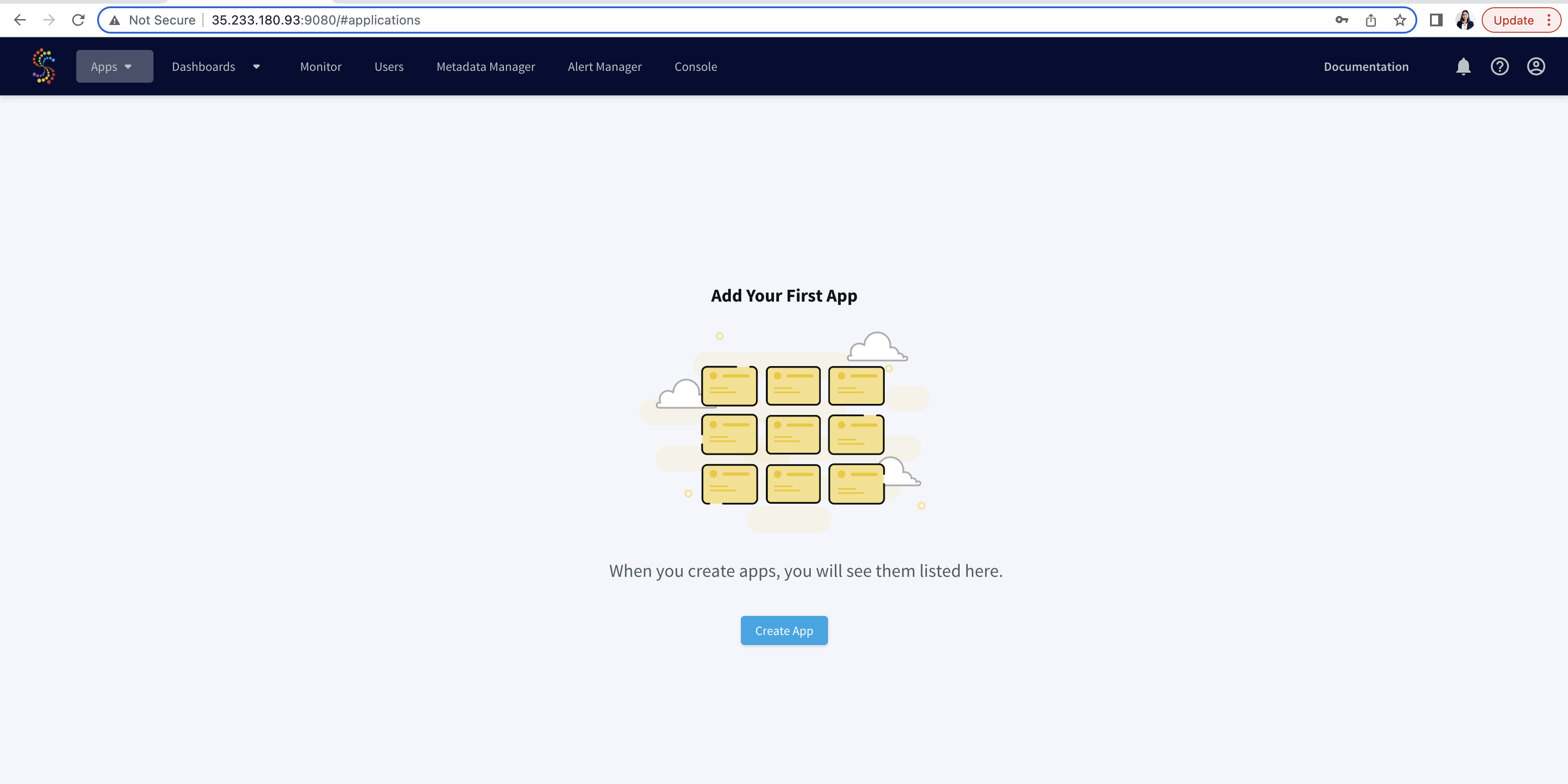
To create and run data streaming applications from UI, click on the Endpoint of strim-node as shown below. This will redirect you to Striim User Interface.
Step 4: Create and Run the postgres CDC to BigQuery streaming App
Once you are in the UI, you can follow the same steps shown in this recipe to create a postgres to Bigquery streaming app from wizard.
Monitoring Event logs and Polling Striim’s Rest API
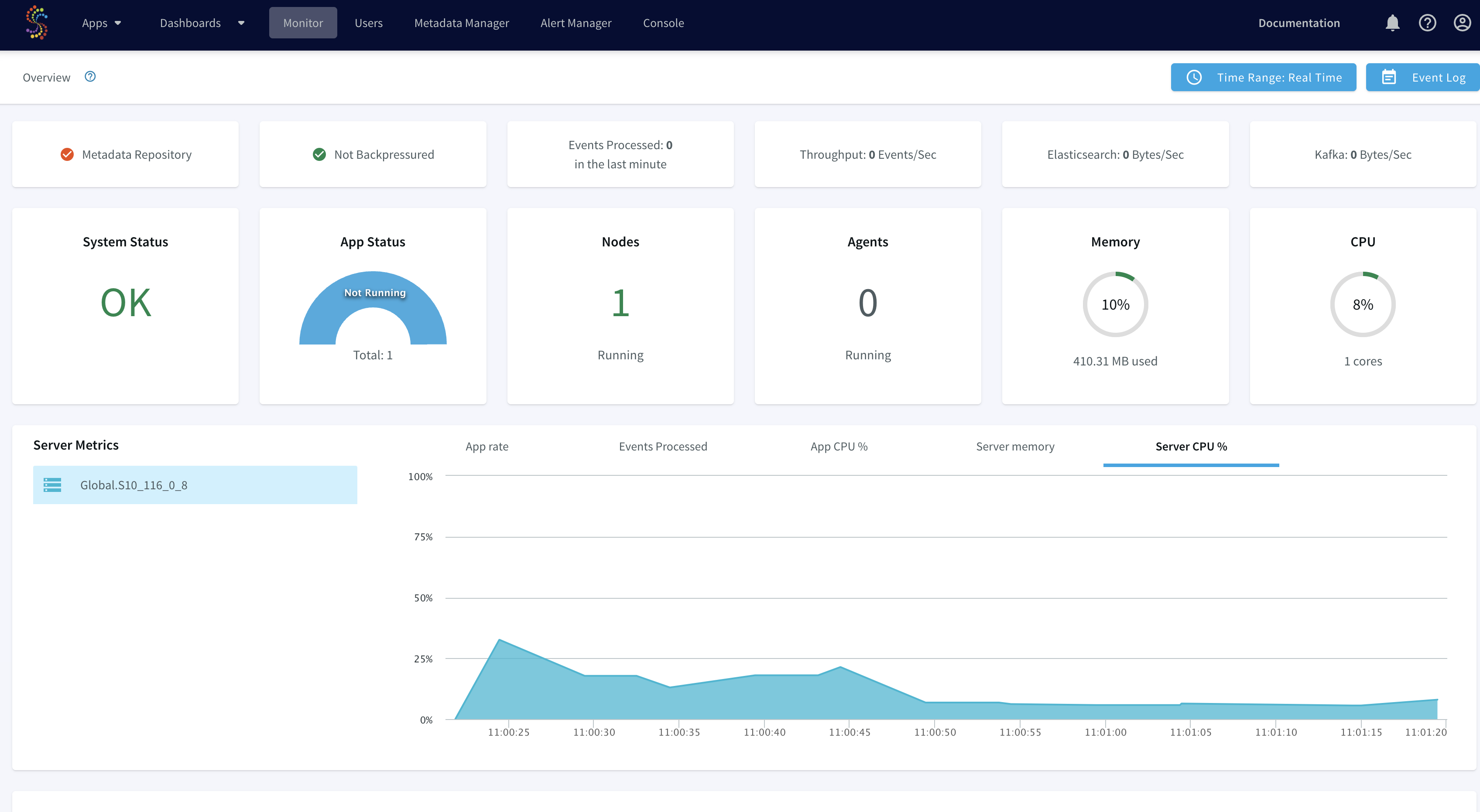
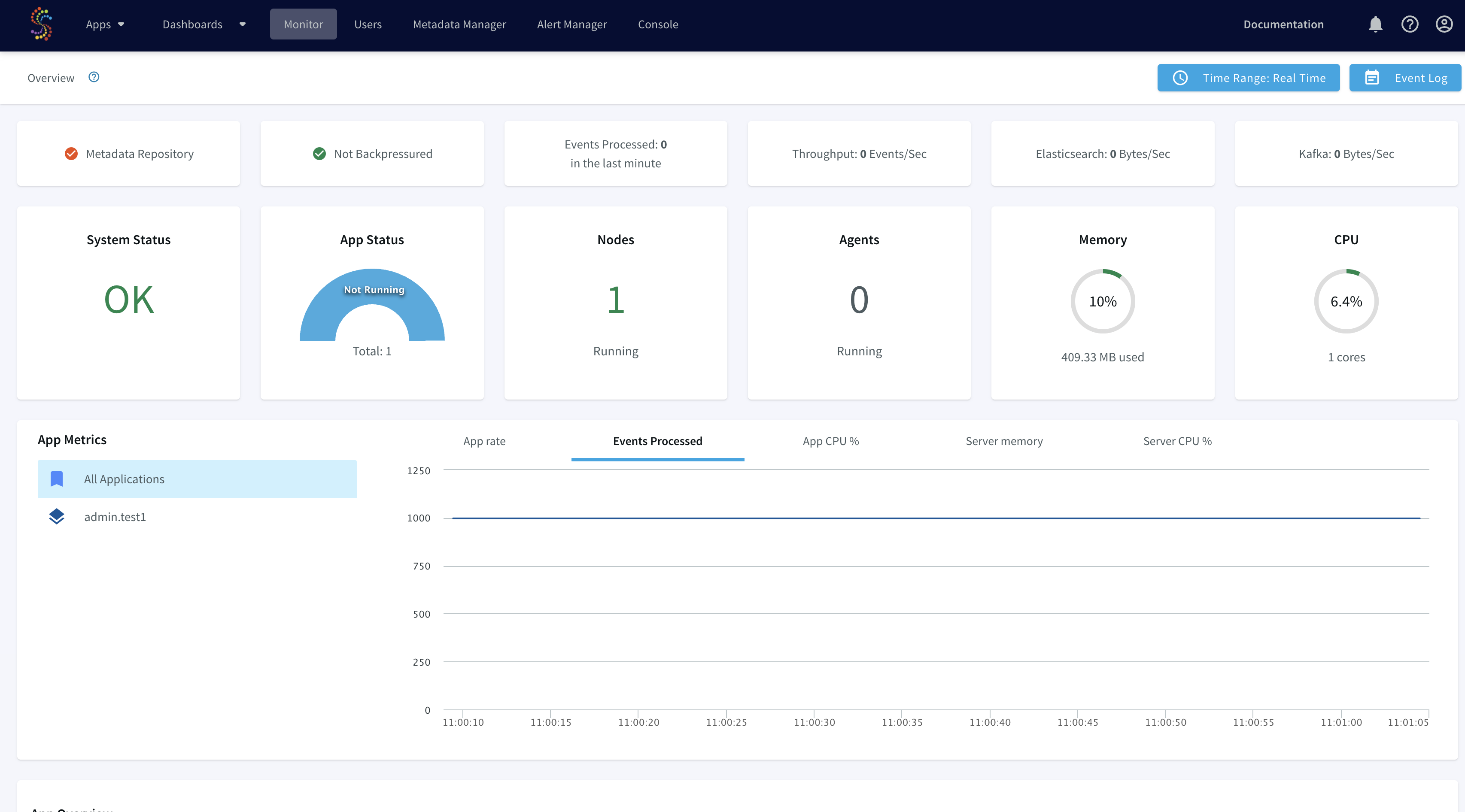
You can use the Monitor page in the web UI to retrieve summary information for the cluster and each of its applications, servers and agent. To learn more about the monitoring guide, please refer to this documentation.
You can also poll Striim’s rest API to access the data stream for monitoring the SLAs of data flow. For example, integrating the application with dbt to ensure if source data freshness is meeting the SLAs defined for the project. An authentication token must be included in
all REST API calls using the
token parameter. You can get a token using any REST client. The CLI command to request a token is:.
curl -X POST -d'username=admin&password=******' http://{server IP}:9080/security/authenticate</code> gcloud container clusters get-credentials</code>

curl -X POST

-d'username=admin&password=******' http://34.127.3.58:9080/security/authenticate

{"token":"01ecc591-****-1fe1-9448-4640d**0e52*"}sweta_prabha@cloudshell:~ (striim-growth-team)$

</code>
To learn more about Striim’s Rest API, refer to the API guide, r from Striim’s documentation.
Deploying Striim on Google Kubernetes Engine
Step 1: Deploy Striim on Google Kubernetes using YAML file
You can find the YAML file here. Make necessary changes to deploy Striim on Kubernetes
Step 2: Configure the KeyStore Password
Please follow the recipe to configure keystore password
Step 3: Create the Striim app on Striim server deployed using Kubernetes
Use the app wizard from UI to create a Striim app as shown in the recipe
Step 4: Run the Striim app
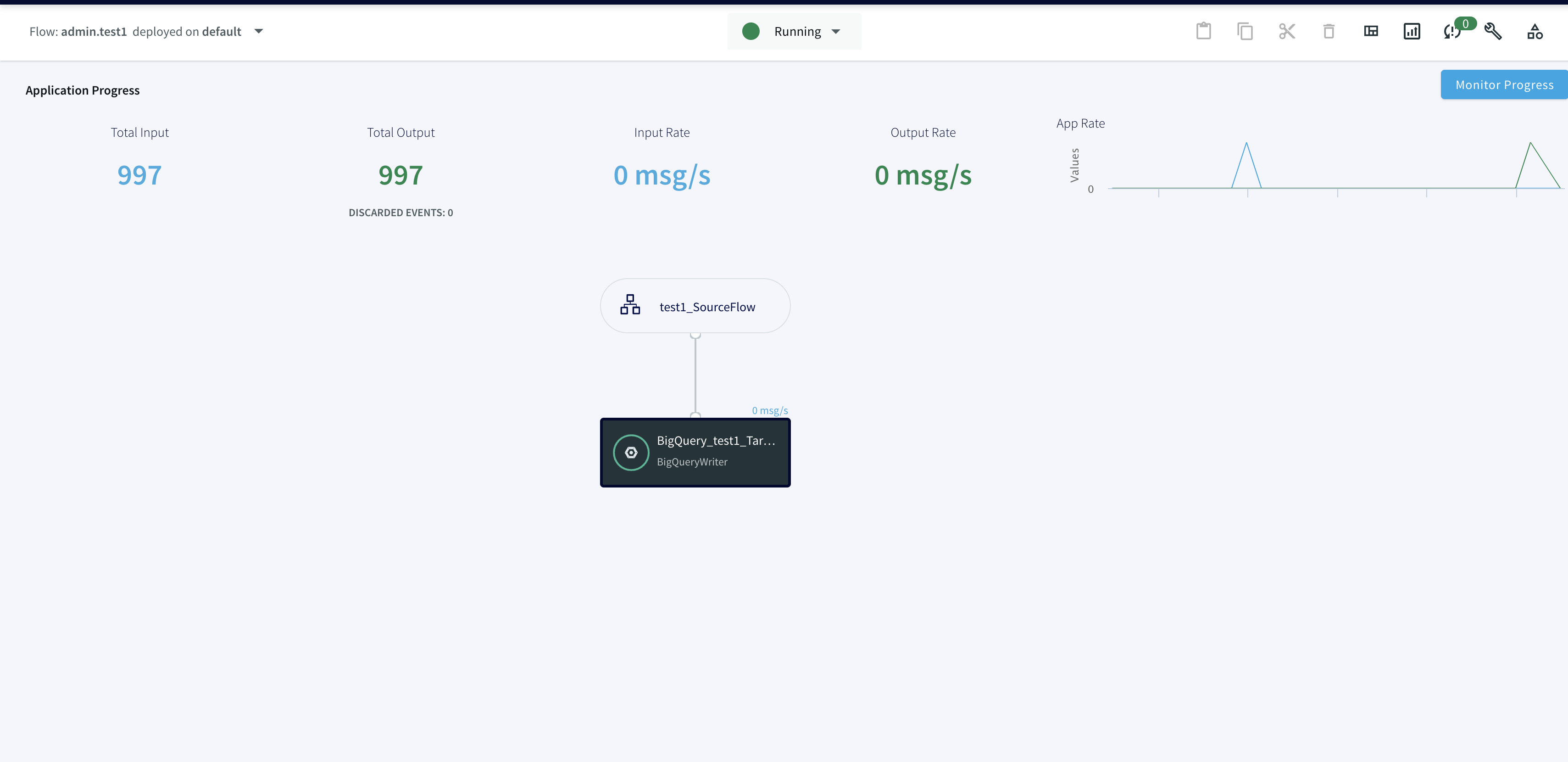
Deploy and run real-time data streaming app
Wrapping Up: Start Your Free Trial
Our tutorial showed you how a striim app can be run and deployed in Google Kubernetes cluster, a widely used container orchestration tool. Now you can integrate Striim with scalable applications managed within K8 clusters. With Striim’s integration with major
databases
and data warehouses and powerful CDC capabilities, data streaming and analytics becomes very fast and efficient.
As always, feel free to reach out to our integration experts to schedule a demo, or try Striim for free here.
Tools you need
Striim
Striim’s unified data integration and streaming platform connects clouds, data and applications.
PostgreSQL
PostgreSQL is an open-source relational database management system.
Kubernetes
Kubernetes is an open-source container orchestration tool for automatic deployment and scaling of containerized applications.
Google BigQuery
BigQuery is a serverless, highly scalable multicloud data warehouse.
According to IDC, by 2025 nearly 30% of data generated will be real time. Storing data and waiting minutes, days, or hours will no longer be sufficient (or practical) in a world that expects instantaneous responses. Companies need to ensure that they invest in technology solutions that enable real-time analytics so they can respond to key business events within seconds or milliseconds.
And responding in real time gives businesses an edge over companies that don’t. For example, instead of missing a key social media trend, an eCommerce store can jump on the trend and catch a wave of sales that it would have otherwise missed. Or a manufacturer can be alerted to a slowdown on a specific piece of equipment, and initiate repairs before it causes devastating cascading effects.
Real-Time Analytics Business Drivers
What are the business drivers behind the growth in real-time analytics? We’ve identified four key themes: customer experience, continuous innovation, business optimization, and 24/7 operations.
Customer Experience
Customer experience encompasses various facets of a customer’s interactions with an organization. First of all, customers expect accurate and up-to-date information at all times. According to Qualtrics research, customers are 80% more likely to be loyal to a company that communicates proactively about supply chain or labor shortage issues.
Furthermore, providing a good customer experience means that an organization understands what customers need (sometimes better than they do), and provides goods and services to meet those needs. Using real-time analytics, companies can provide personalized experiences that feel as though they’re tailored to each customer, in real time. For example, an online makeup retailer can recommend specific cosmetics brands based on a shopper’s purchase history, current trends, and inventory status. Instead of being a one-size-fits-all experience, online shopping becomes a 1:1 experience at scale.
Continuous Innovation
Continuous innovation refers to the data-driven introduction of new services and features based on an ongoing evaluation of available information. New services or features should be quantifiable to ensure that their success and bottom-line impact can be measured. Success should be assessed holistically based on overall impact, not solely on individual impact. For example, a company may add a new service or feature that doesn’t make money directly, but leads to a better customer experience that can in turn improve their bottom line. Organizations should be willing to fail fast and discontinue things that aren’t improving customer experience or providing a benefit to customers.
Customer problems are a key source of innovation. By observing their own customers, organizations have access to a wealth of data to inspire innovation. Furthermore, companies can glean insights by observing the problems experienced by customers of other organizations in their industry. Companies can also innovate based on problems they experience internally that could affect the bottom line.
Business Optimization
Adding, growing, and retaining customers requires well thought out investments in technology. Companies need to be able to scale and optimize their infrastructure and technology on an ongoing basis. Furthermore, in order to retain and grow their customer base, companies have to continuously improve the performance of their products or services, their response times, the freshness of their data, and more. To do this they need to quantify and measure insights relating to their online presence, productivity, and internal processes. This enables them to make much better decisions on how to optimize their business.
Many companies are also faced with the challenges associated with using legacy systems to manage their data. These systems may be prohibitively expensive to replace, or have very long replacement timescales, but the data that’s contained within those systems may be crucial for analytics. It’s essential that companies look at all the data they have – no matter where it is – and make use of that in order to optimize their business.
Reputation cost has to be factored into investments as well. Customer experience, security, and up-to-date data all factor into a company’s reputation. Organizations have to improve how they look to their customers and to the market in general, while managing with the challenges posed by their legacy systems.
Global 24/7 Operations
In the not-so-distant past, banks were open just for a few hours in the middle of the day. There was no online presence and organizations had the luxury of running batch ETL jobs overnight and they could even take down pieces of infrastructure or pause databases.
However, in today’s world global organizations need to operate 24/7. Taking down systems is no longer an option. Furthermore, services also need to be scalable and on-demand to match daily and seasonal seasonal trends. For example, in the retail industry, Black Friday has expanded from a single day to almost an entire month where companies expect much higher demand on their services. The same goes for financial services companies during tax season. And companies in the travel industry typically have to scale up around the holidays and summer.
Companies need to be able to scale up all of the services they provide; not only their core services, but also their analytics services to deal with the increased data volumes during peak times. Organizations can’t afford downtime. Customers want to get things done on their schedule. If a company is going to have any downtime, they need to at least notify customers ahead of time and give them a maintenance window. But in general, customers expect all businesses to operate 24/7 so they can access their information whenever they want.
Furthermore, if an organization has siloed or globally distributed information, it needs to be centrally available for analytics and holistic decision making.
Distilling the Key Business Requirements Driving Real-Time Analytics
In summary, there are a number of different requirements that are driving the growth in demand for real-time analytics:
All Information: Analytics must be available across all sources of information, including new services and legacy systems
Current Information: The data used for analytics must be as close to real-time as possible to provide customers and the business with timely insights
Scalable on-demand: Systems need to grow as the business does, and be able to handle seasonal and daily changes in demand
Globally Available: Analytics and access to data in general must be available wherever the business’s customers and employees reside
No Downtime: Access to source systems should not be impacted by the need for analytics on the data in those systems
Rapid Integration: New systems should be able to be added rapidly as sources for analytics as the business innovates
Justifiable ROI: The investment in analytics and integration must be offset by improvements in the business
Next Steps: How to Choose the Correct Technology for Real-Time Analytics
Real-time analytics is a key component of digital transformation initiatives as companies strive to stay ahead of the competition. But there are many challenges in the journey to real-time, including how to leverage existing investments, and how to prevent or reduce downtime during the adoption of new systems.
Learn more about how to choose the correct technology for real-time analytics in our on-demand webinar “How to Build Streaming Data Pipelines for Real-Time Analytics”.
The webinar covers topics including:
How to build real-time data streaming pipelines quickly, reliably, and at unlimited scale
Why real-time data integration is an essential component of a streaming data pipeline
Customer examples showing how streaming data pipelines enable companies to make informed decisions in real time
According to CGOC, 60% of data that’s collected today has lost some or all of its business value. Trends change rapidly; if an organization uses last month’s data to make a decision for a current problem, they may draw an erroneous conclusion, formulate the wrong response, or worse.
Today, organizations must respond to the real-time demands of their business by overhauling their data infrastructure. In this age of smartphones and IoT devices that work in real time, analyzing historical data in batches for all business tasks is not good enough. They need to do more by getting instantaneous insights through real-time analytics. This can help them to understand their customers better and respond to market changes quickly. According to Garner, by this year, more than 50% of business systems will make decisions based on real-time context data.
Real-Time Analytics Use Cases
The emergence of real-time analytics has allowed organizations to collect data from user interactions, machines, and operational infrastructure in real time. They can now act on data immediately — soon after it makes its way to their systems. This can help businesses earn a competitive edge by offering a broad array of use cases in different industries, including detecting fraud in finance, increasing the speed at which goods are delivered in the supply chain, and optimizing the management of inventory in manufacturing.
Real-Time Analytics for Supply Chain
Real-time analytics can be useful for addressing efficiencies in the supply chain. These inefficiencies are costly; they led to almost a loss of $2 billion in the UK. The supply chain industry has a complicated ecosystem due to the presence of several channels — both offline and online — and participants, such as vendors and manufacturers.
Supply chain management is always looking to improve cost savings, speed, and productivity, but the lack of real-time integration between all the external and internal stakeholders is a challenge. There’s also the equipment failure dilemma — a piece of equipment or machine is always vulnerable to failing at a critical time. Lastly, data related to supply and demand isn’t always reliable with batch processing since batch data can be a few hours (or days) old.
With the introduction of real-time analytics, the discussion has moved from merely automating processes to integrating data in real time and using it to make better decisions. Now, it’s possible to view real-time data feeds to manage the supply chain and plan better for demand and supply. Perhaps that’s why around 66% of supply chain leaders think that the use of analytics will be of critical importance to their operations in the future.
Optimizing route and train drivers
Logistics fleet managers can use real-time analytics to track shipping fleets and trucks, improve route optimization, and prevent bottlenecks, such as traffic issues, to ensure the swift and safe delivery of goods.
Modern data analytics software for transportation and logistics optimizes routes through a route planning algorithm. A route planning algorithm is fed real-time data to find the most affordable, efficient, and fastest route of delivery. For example, these algorithms can analyze real-time data on fuel consumption, weather conditions, and traffic patterns on key roadways to revise routes, minimize delivery time, and reduce the frequency of damaged and expired products. This is beneficial for drivers as well, as they can save time and avoid hurdles during their routes.
Over time, when real-time data is continuously aggregated, it can help to spot recurring issues faced by drivers. Many companies collect real-time data on fuel by installing fuel-level sensors in their vehicles. These sensors can provide data on fuel consumption, fuel level volumes, and locations and dates of refills. For instance, if two drivers drive on the same route and the sensors convey that one of them is using significantly more fuel, then the fleet manager can look into the matter.
Fleet managers can also use an electronic logging device (ELD) for driver behavior analytics. For instance, you can use an accelerometer and gyroscope with ELDs to collect real-time information on collision, braking, and harsh turning. This way, you can create awareness of safe driving among your drivers and avoid potential catastrophic future events by sending details to drivers about areas having dangerous turns.
Reducing operational risks
You can use real-time analytics to mitigate operational risks. Sometimes, there are unscheduled fleet or factory maintenance requirements that can hinder operations in the supply chain. With real-time analytics, data science–based methods can help you with estimating when your equipment might fail. For this purpose, thermal imaging, vibration analysis, infrared, and acoustics are used. Real-time analytics takes advantage of these technologies to measure and collect operations and equipment data in real time via remote sensor networks (e.g., oil sensors to detect debris from wear). This can help minimize maintenance costs.
For example, you can use an accelerometer to collect data for vibration analysis in your real-time analytics system. The accelerometer produces a voltage signal that shows the frequency and amount of vibration the machine is generating every minute or second. These signals are transformed as a fast Fourier transform (amplitude vs. frequency) or time waveform (amplitude vs. time).
With real-time analytics, vibration analysts can review this data through algorithms and assess the machine’s health and detect potential issues, such as electrical motor faults, misalignment, mechanical looseness, bearing failures, and imbalance. This also ensures that your technicians don’t always have to be in proximity to your factory for routine maintenance. In addition, it helps to know what issue your machine is facing, which can save a lot of time.
Improving supply and demand
Traditionally, supply chain management used enterprise resource planning (ERP) systems and disparate storage systems for data. This meant that shared data updates between stakeholders were based on a specific time period (e.g., daily or hourly). Today, supply and demand have constant fluctuations, making it necessary to collect and analyze data from suppliers in real time.
For example, you can view a key inventory metric in your supply chain dashboard: inventory turnover. A higher inventory turnover indicates that your products are moving quickly through the supply chain, and you are meeting the current demand. Similarly, you can analyze the latest sentiment data from social media for demand forecasting.
Real-Time Analytics for Finance
Few industries can use real-time analytics better than the finance industry. That’s because it’s synonymous with large amounts of data, extreme volatilities, and the need for detecting complex patterns in real time. Real-time analytics offers the capability to correlate, analyze, and perform actions on finance-related data like transactional data, company updates, market prices, and trading data. This data comes in large volumes from several sources every millisecond, and acting on it quickly is crucial for financial firms and banks.
Detecting stock market manipulation
Real-time analytics can help to identify trends of manipulation in markets, especially insider trading and price manipulations that are done to gain profit in real time. In stock trading, it’s common to gain profit by using dubious methods, such as insider trading or the artificial deflating/inflating of stock prices. Real-time analytics can be used to collect data from Twitter streams, newsfeeds, company announcements, and other external data streams to identify potential attempts to manipulate the market.
One of the techniques used to identify manipulation in stock pricing is Generative Adversarial Networks (GANs). In this model, a discriminator or a type of classifier is used to separate real data from fake data. A generator model is used to create fake data, which it does by getting feedback from the discriminator. The generator is used to create data that looks like manipulated stock prices, which it uses to train the generator to tell if price data is correct or fake.
Preventing money laundering
The banking sector often struggles with the detection of money laundering and payment fraud. It not only affects the bank financially but also damages its corporate image. Real-time analytics can help banks to use machine learning and Markov modeling to safeguard themselves from fraudulent activities.
Banks can use real-time analytics to transfer their specialized domain knowledge about how fraudulent behavior works to a set of rules that can analyze incoming streams of data in real time.
Markov models are used for modeling systems that undergo random changes. They model the probabilities of different states and identify the rate at which these states transition. This mechanism allows them to be used for recognizing patterns and making predictions — precisely why they are used for fraud detection to find rare transaction sequences. This way, banks can try to identify complex fraudulent activities where experienced criminals break down one transaction into multiple smaller transactions for money laundering.
Real-Time Analytics for Manufacturing
According to a BCG survey, 72% of manufacturer executives find advanced analytics “to be important.” Despite this, only 17% of them have been able to get “satisfactory” value out of it. There’s a lot of room for improvement and a shrewd implementation of real-time analytics can improve your operational efficiency.
Real-time analytics can help you to continuously track, control, and fine-tune manufacturing processes, such as managing inventory. It also allows you to view how your manufacturing plant is functioning in real time and can notify you about bottlenecks. This data can be collected from CRMs, ERPs, machines, sensors, and additional cameras installed in the facility.
Managing inventory
With real-time analytics, you can get an in-depth overview of what’s happening with your inventory in real time. This includes the sales potential, the cost of inventory, and the status of aging products. For instance, viewing a dashboard for aging products can ensure that you aren’t left with expired stock, so you can sell soon-to-be-expired items on a priority basis. You can use real-time analytics for inventory management in four ways:
Descriptive analytics: It focuses on the “what,” i.e., what are your basic figures in inventory? These are numbers that are shown on dashboards. For instance, you can view a dashboard to check the cost per unit of the newly arrived items at the warehouse.
Diagnostic analytics: Diagnostics analytics look for the root cause behind your reported data. For example, if you want to know why your organization experienced a Month-over-Month (MoM) growth, then diagnostic analytics can provide insights into the decisions that were the catalyst to it.
Predictive analytics: Predictive analytics uses your real-time data to predict what the future has in store for you. For instance, real-time analytics can use the news of the outbreak of a new COVID-19 variant to warn you about the possible shortage of PPE equipment.
Prescriptive analytics: Prescriptive analytics recommends the action that you need to take. For instance, it can tell you to fill 80% of orders for a client in a four-day time frame.
Use Striim to Power Your Real-Time Analytics Architecture
Regardless of which industry you operate in, you can use Striim to perform real-time analytics by using it as an intermediary between your source and target systems. Striim comes with plenty of convenient features. As a real-life example, take a brief look into how Striim transformed Ciena’s real-time analytics ecosystem.
Ciena’s real-time analytics architecture.
Ciena is a prominent telecommunications equipment supplier. Ciena was looking to create a modern real-time analytics ecosystem to improve the customer experience and make sharing of data access easier. Ciena used Snowflake as a data warehouse for operational reporting. They used Striim as a real-time data analytics tool to replicate changes from Ciena’s data sources — Oracle, SQL Server, MySQL, Salesforce — to Snowflake. Striim collected, filtered, aggregated, and updated this data in real time. This amounted to loading nearly 100 million events per day, enabling Ciena’s business functions (e.g., accounting, manufacturing) to perform advanced real-time analytics with better speed and ease than before.
Striim is a unified real-time data streaming and integration platform that connects over 150 sources and targets across hybrid and multi-cloud environments
For starters, here’s what you can do with Striim.
You can go through Striim’s large library of templates to find a wizard that allows you to connect and integrate your data sources. For instance, Striim can help you to move data from Oracle Database to Kafka, SQL Server CDC to Azure SQL DB, Oracle CDC to BigQuery, and many more.
The wizard helps you create a data flow application. A data flow application allows you to define how you want to collect, process, and deliver data. This can be as simple as setting up a data source and a target system and moving data through them in real time through a stream.
Your data flow applications can continuously ingest data, process it in real time, and deliver it to your targets with millisecond latency for real-time analytics and longer-range analyses including historical data.
You can gain real-time, actionable insights from your streaming data pipelines through streaming analytics. Striim also lets you build dashboards to visualize your data flows in real time.
You can configure built-in alerts in Striim for a wide range of metrics. In case of failures or errors, you can also set up automated workflows that trigger corrective actions.
To learn more about Striim, request a demo or free trial and see for yourself how Striim can be a useful addition to your real-time analytics architecture.
Replicate data from PostgreSQL to Snowflake in real time with Change Data Capture
Stream data from PostgreSQL to Snowflake
Benefits
Operational Analytics
Visualize real time data with Refresh View on Snowflake
Capture Data Updates in real time
Use Striim’s PostgreSQL CDC reader for real-time data replication
Build Real-Time Analytical ModelsUse dbt to build Real-Time analytical and ML models
On this page
Overview
Striim is a unified data streaming and integration product that offers change capture (CDC) enabling continuous replication from popular databases such as Oracle, SQLServer, PostgreSQL and many others to target data warehouses like BigQuery and Snowflake.
Change Data Capture is a critical process desired by many companies to stay up to date with most recent data. This enables efficient real-time decision making which is important for stakeholders. Striim platform facilitates simple to use, real-time data
integration, replication, and analytics with cloud scale and security.
In this tutorial, we will walk you through a use case where data is replicated from PostgreSQL to Snowflake in real time. Change events are extracted from a PostgreSQL database as they are created and then streamed to Snowflake hosted on Microsoft Azure. Follow this recipe to learn how to secure your data pipeline by creating an SSH tunnel on Striim cloud through a jump host.
Core Striim Components
PostgreSQL CDC: PostgreSQL Reader uses the wal2json plugin to read PostgreSQL change data. 1.x releases of wal2jon can not read transactions larger than 1 GB.
Stream: A stream passes one component’s output to one or more other components. For example, a simple flow that only writes to a file might have this sequence
Snowflake Writer: Striim’s Snowflake Writer writes to one or more existing tables in Snowflake. Events are staged to local storage, Azure Storage, or AWS S3, then written to Snowflake as per the Upload Policy setting.
Step 1: Launch Striim Server and connect the Postgres instance with replication attribute
Please refer to postgres CDC to BigQuery recipe to learn how to create a replication user and replication slot for the postgres database and tables. Striim collaborates with Snowflake to provide Striim’s cloud service through Snowflake’s partner connect.
Follow the steps below to connect Striim server to postgres instance containing the source database:
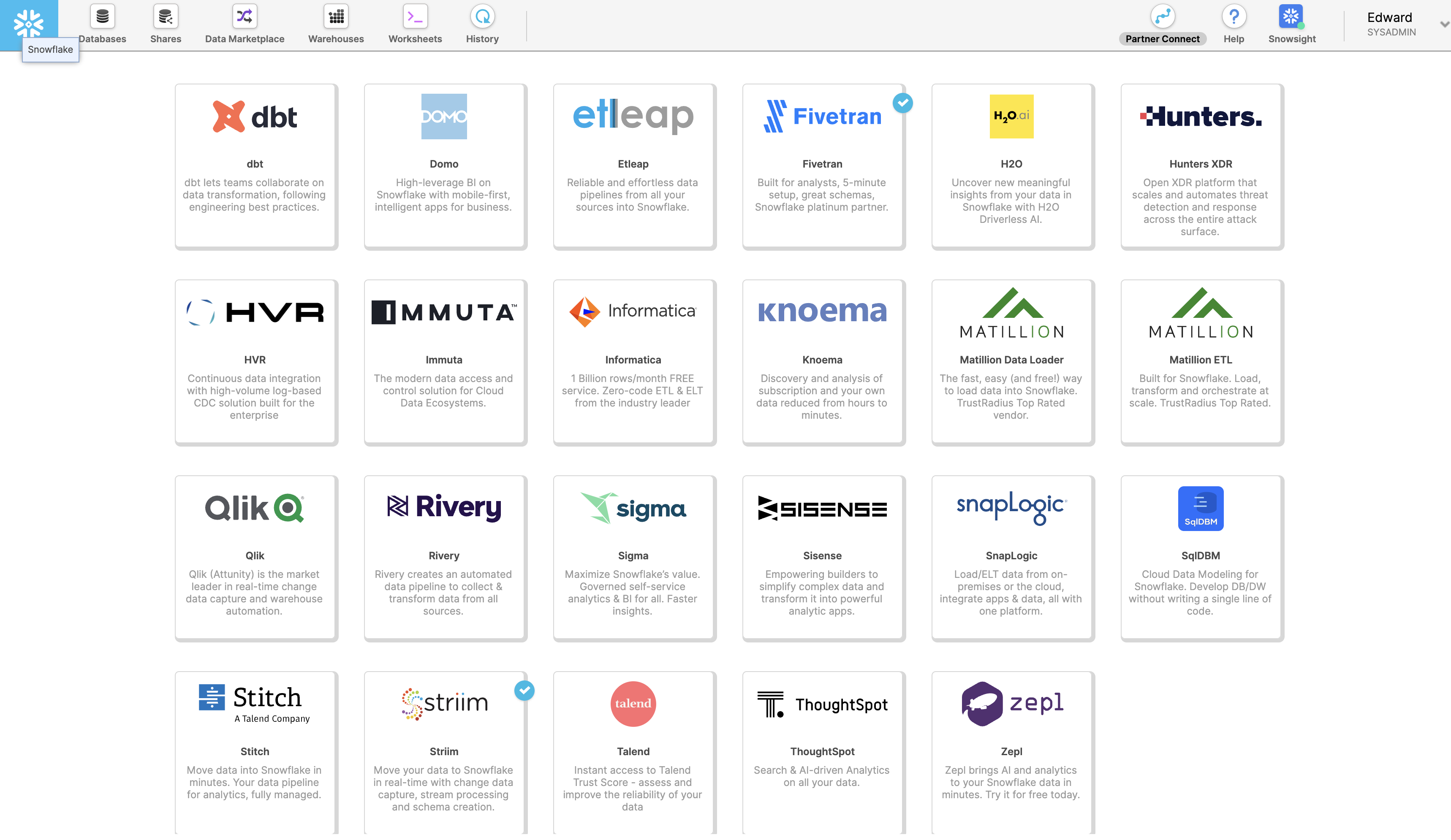
Launch Striim in Snowflake Partner Connect by clicking on “Partner Connect” in the top right corner of the navigation bar.
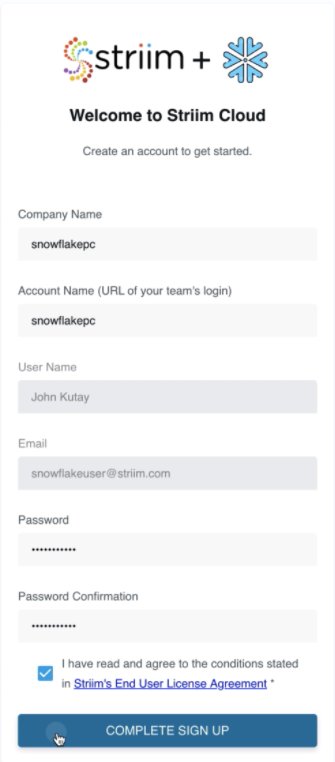
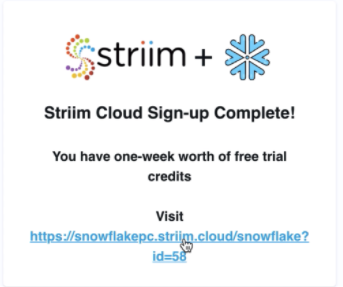
In the next window, you can launch Striim and sign up for a free trial.
Create your first Striim Service to move data to Snowflake.
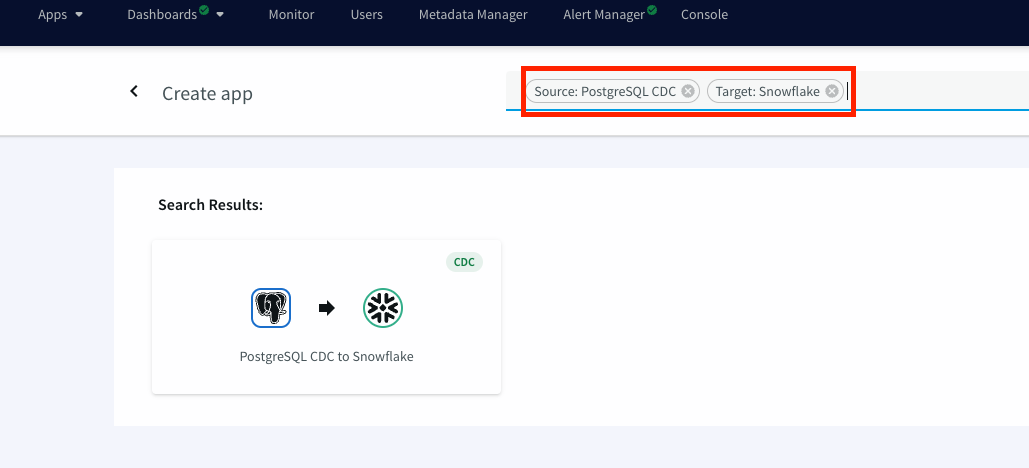
Launch the new service and use app wizard to stream data from PostgresCDC to Snowflake and Select Source and Target under create app from wizard:
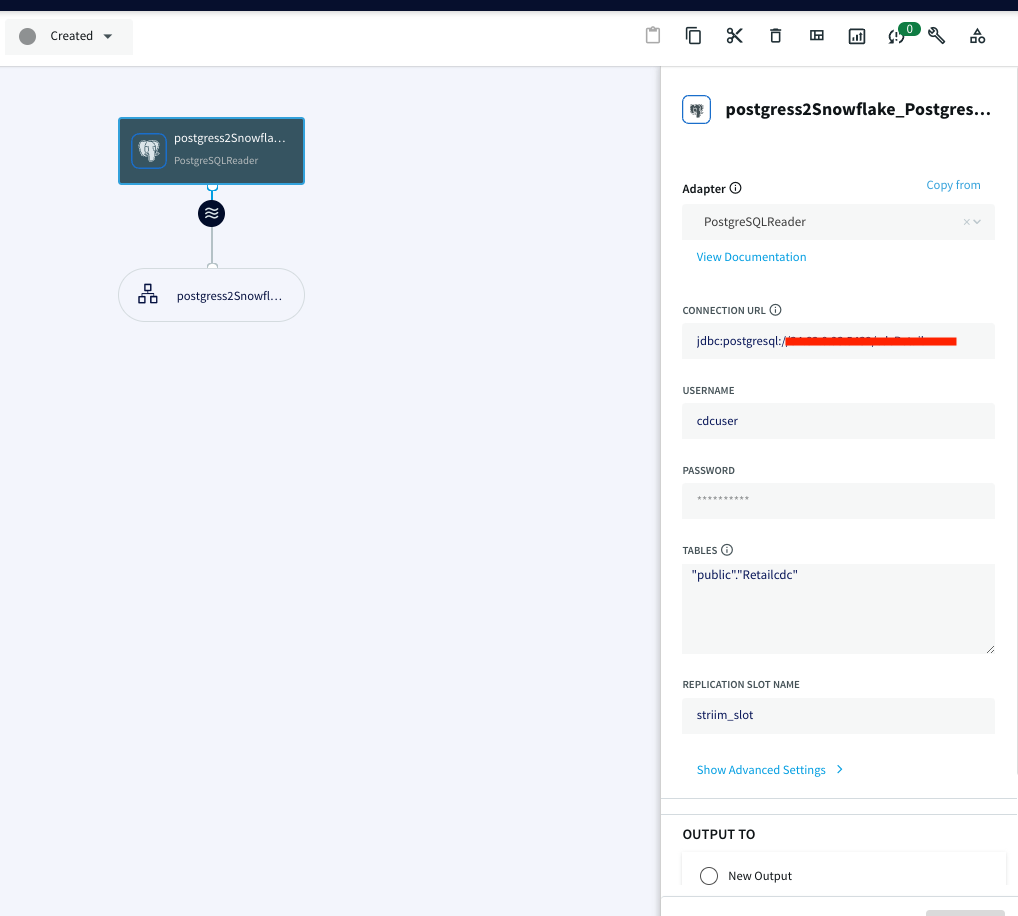
Give a name to your app and establish the connection between striim server and postgres instance .
Step 1 :
Hostname: IP address of postgres instance
Port : For postgres, port is 5432
Username & Password: User with replication attribute that has access to source database
Database Name: Source Database
Step 2 :The wizard will check and validate the connection between source to striim server
Step 3 :Select the schema that will be replicated
Step 4 :The selected schema is validated
Step 5 :Select the tables to be streamed
Step 2: Configure the target (Snowflake on Azure Cloud)
Once the connection with the source database and tables is established, we will configure the target where the data is replicated to.
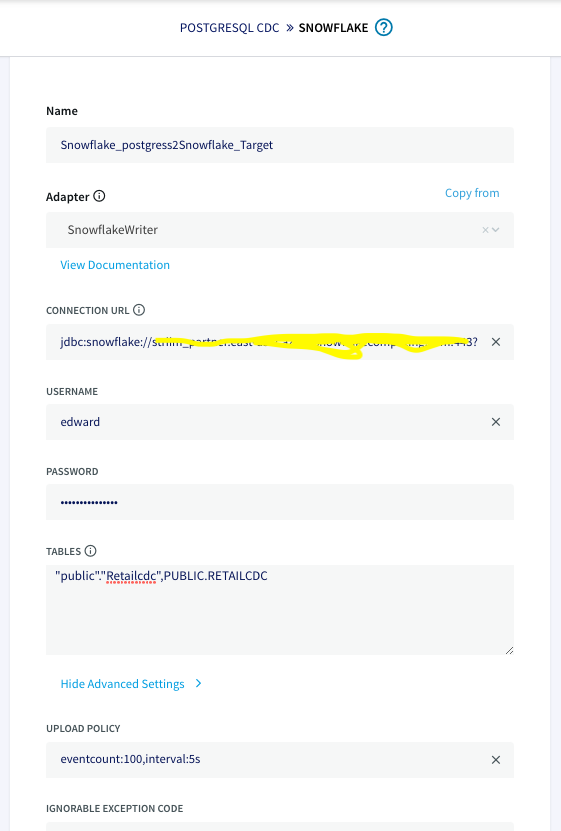
The connection url has the following format: jdbc:snowflake://YOUR_HOST-2.azure.snowflakecomputing.com:***?warehouse=warehouse_name &db=RETAILCDC&schema=public
Step 3: Deploy and Run the Striim app for Fast Data Streaming
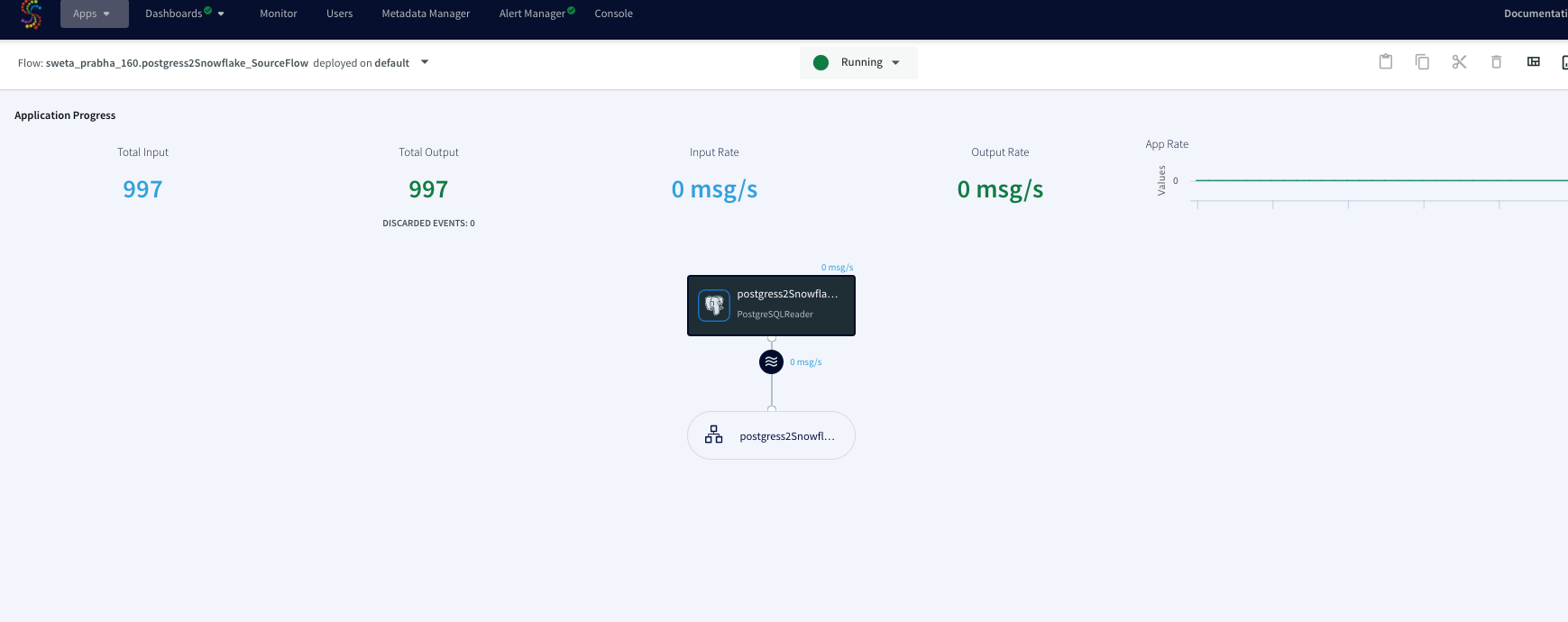
After the source and targets are configured and connection is established successfully, the app is ready to stream change data capture on the source table and replicate it onto the target snowflake table. When there is an
update on the source table, the updated data is streamed through striim app to the target table on snowflake.
Step 4: Refresh View on Snowflake
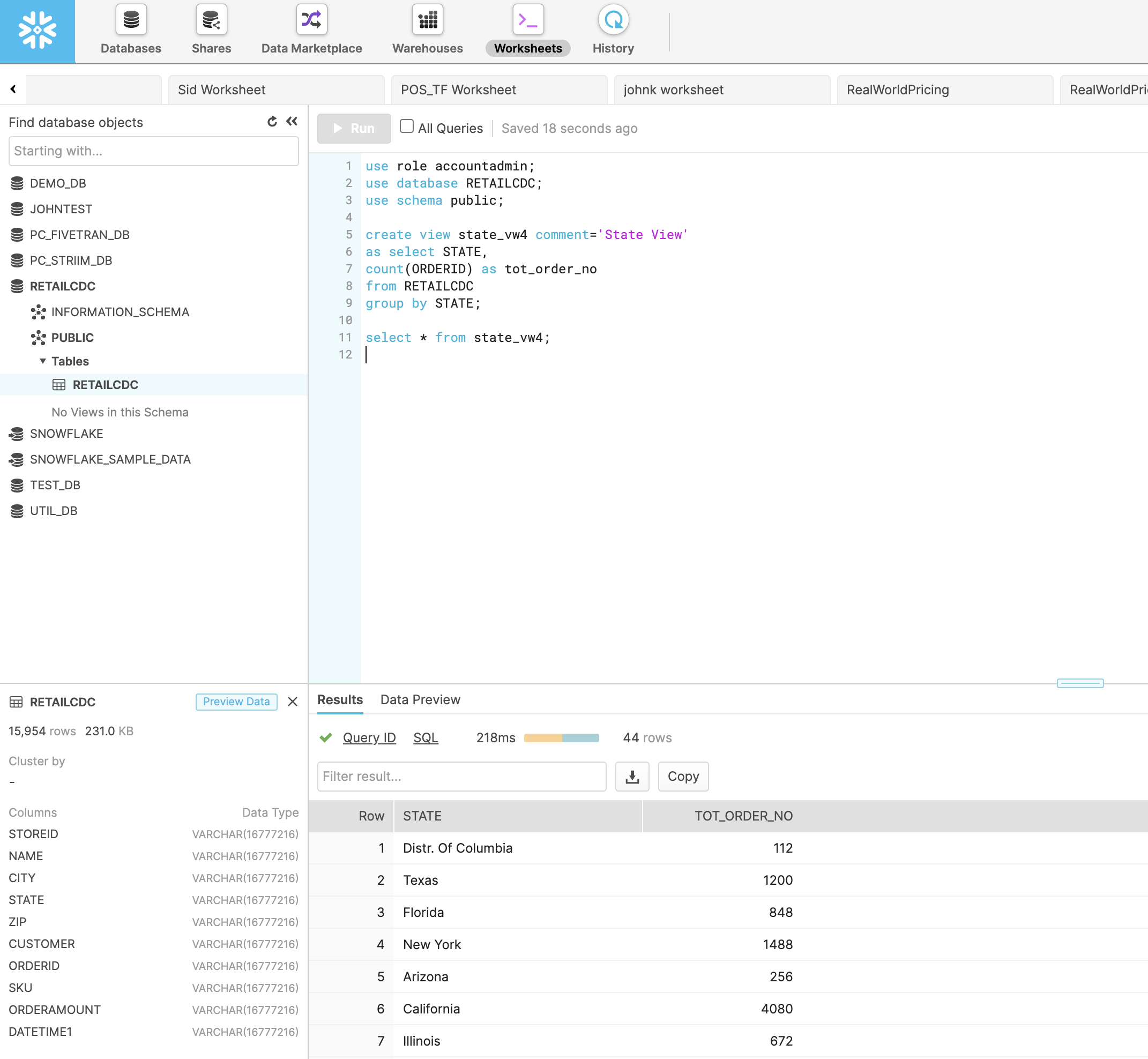
With Striim as the data streaming platform, real-time analytics can be done on target databases. In snowflake, you can write a query for refresh view of the incoming data in real-time. In this tutorial, a view is created that aggregates the total number of orders in each state at any given time.
Video Walkthrough
Here is the video showing all the steps in streaming Change Data from postgres to Snowflake and refresh view of updated data on snowflake.
Setting Up Postgres to Snowflake Streaming Application
Step 1: Download the data and Sample TQL file from our github repo
You can download the TQL files for streaming app our github repository. Deploy the Striim app on your Striim server.
Step 2: Configure your Postgres source and Snowflake target and add it to the source and target components of the app
Set up your source and target and add the details in striim app
Step 3: Run the app for fast Data Streaming
Deploy your streaming app and run it for real-time data replication
Step 4: Set up refresh view in Snowflake
Follow the recipe to write a query for refresh view of real-time data
Wrapping Up: Start Your Free Trial
Our tutorial showed you how easy it is to stream data from PostgreSQL CDC to Snowflake, a leading cloud data warehouse and do real-time analytics with a refresh view. By constantly moving your data into BigQuery, you could now start building analytics or machine learning models on top, all with minimal impact to your current systems. You could also start ingesting and normalizing more datasets with Striim to fully take advantage of your data.
As always, feel free to reach out to our integration experts to schedule a demo, or try Striim for free here.
Tools you need
Striim
Striim’s unified data integration and streaming platform connects clouds, data and applications.
PostgreSQL
PostgreSQL is an open-source relational database management system.
Snowflake
Snowflake is a cloud-native relational data warehouse that offers flexible and scalable architecture for storage, compute and cloud services.
Whether you’re a traveler waiting for your ride-share, or a large retailer keeping an eye on potential supply chain disruptions, hours-old or days-old data is obsolete. For real-time insights and experiences you need real-time analytics, powered by streaming data pipelines. But how can you build your first streaming data pipeline, as quickly and seamlessly as possible?
Join us for a live webinar with Steve Wilkes (Striim Co-Founder and CTO), where he will demystify streaming data pipelines and cover topics including:
What’s behind the explosive growth in real-time analytics (and why market-leading companies have adopted real time as the status quo)
How to build real-time data streaming pipelines quickly, reliably, and at unlimited scale
Why real-time data integration is an essential component of a streaming data pipeline
Customer examples showing how streaming data pipelines enable companies to make informed decisions in real time
Companies throughout the world generate large amounts of data, which continues to grow at a rapid pace. By 2025, the total number of data created, consumed, and stored in the world is expected to accumulate up to 181 zettabytes.
A significant amount of data is produced as live or real-time streams, also referred to as streaming data. These streams can come from a wide range of sources, including clickstream data from mobile apps and websites, IoT-powered sensors, and server logs. The ability to track and analyze streaming data has become crucial for organizations to lend support to their departmental operations.
However, there are a couple of challenges that make it difficult for organizations to deal with streaming data.
You have to collect large amounts of data from streaming sources that generate events every minute.
In its raw form, streaming data lacks structure and schema, which makes it tricky to query with analytic tools.
Today, there’s an increasing need to process, parse, and structure streaming data before any proper analysis can be done on it. For instance, what happens when someone uses a ride-hailing app? The app uses real-time data for location tracking, traffic data, and pricing to provide the most suitable driver. It also estimates how much time it’ll take to reach the destination based on real-time and historical data. The entire process from the user’s end takes a few seconds. But what if the app fails to collect and process any of this data on time? There’s no value to the app if the data processing isn’t done in real time.
Traditionally, batch-oriented approaches are used for data processing. However, these approaches are unable to handle the vast streams of data generated in real time. To address these issues, many organizations are turning to stream processing architectures as an effective solution for processing vast amounts of incoming data and delivering real-time insights for end users.
What is Stream Processing?
Stream processing is a data processing paradigm that continuously collects and processes real-time or near-real-time data. It can collect data streams from multiple sources and rapidly transform or structure this data, which can be used for different purposes. Examples of this type of real-time data include information from social media networks, e-commerce purchases, in-game player activity, and log files of web or mobile users.
The basic characteristics of data stream processing. From a presentation by Alok Pareek
Stream processing can be stateless or stateful. The state of the data tells you how previous data affects the processing of current data. In a stateless stream, the processing of current events is independent of the previous ones. Suppose you’re analyzing weblogs, and you need to calculate how many visitors are viewing your page at any moment in time. Since the result of your preceding second doesn’t affect the current second’s outcome, it’s a stateless operation.
With stateful streams, there’s context, as current and preceding events share their state. This context can help past events shape the processing of current events. For instance, a global brand would like to check the number of people buying a specific product every hour. Stateful stream processing can help to process the users who buy the product in real time. This data is then shared in a state, so it can be aggregated after one hour.
Stream Processing vs. Batch Processing
Batch processing is about processing batches containing a large amount of data, which is usually data at rest. Stream processing works with continuous streams of data where there is no start or end point in time for the data. This data is then fed to a streaming analytics tool in real time to generate instant results.
Batch processing requires that the batch data is first loaded into a file system, a database, or any other storage medium before processing can begin. It’s more practical and convenient if there’s no need for real-time analytics. It’s also easier to write code for batch processing. For example, a fitness-based product company goes through its overall revenues generated from multiple stores around the country. If it wants to look at the data at the end of the day, batch processing is good enough to adequately meet its needs.
Stream processing is better when you have to process data in motion and deliver analytics outcomes rapidly. For instance, the fitness company now wants to boost brand interest after airing a commercial. It can use stream processing to feed social media data into an analytics tool for real-time audience insights. This way, it can determine audience response and look into ways to amplify brand messaging in real time.
Is Stream Processing the Same as Complex Event Processing?
Stream processing is sometimes used interchangeably with complex event processing (CEP). Complex event processing is actually a subset of stream processing. It’s a set of techniques and concepts used to process real-time events and extract meaningful information from these event streams on a continuous basis.
CEP is linked to different data sources in an organization, where pre-built triggers are defined for specific events. When these events occur, alerts and automated actions are triggered. For example, in the stock market, when stock price data arrives, the system can match stock data with real-time and historical patterns and automate the decision to buy or sell a stock.
How Does Stream Processing Work?
Modern applications process two types of data: bounded and unbounded. Bounded data refers to a dataset of finite size — one where you can easily count the number of elements in the dataset. It has a known endpoint. For instance, a bookstore wants to know the number of books sold at the end of the day. This data is bounded because a fixed number of books were sold throughout the day and sales operations ended for the day, which means it has a known endpoint.
Unbounded data refers to a dataset that is theoretically infinite in size. No matter how advanced modern information systems are, their hardware has a limited number of resources, especially when it comes to storage capacity and memory. It’s not economical or practical to handle unbounded data with traditional approaches.
Stream processing can use a number of techniques to process unbounded data. It partitions data streams by taking a current fragment so they can become fixed chunks of records that can be analyzed. Based on the use case, this current fragment can be from the last two minutes, the last hour, or even the last 200 events. This fragment is referred to as a window. You can use different techniques to window data and process the windowing outcomes.
Next, data manipulation is applied to data accumulated in a window. This can include the following:
Basic operations (e.g., filter)
Aggregate (e.g., sum, min, max)
Fold/reduce
This way, each window has a result value.
Stream Processing Architecture
A stream processing architecture can include the following components:
Stream processor: A stream producer (also known as a message broker) uses an API to fetch data from a producer — a data source that emits streams to the stream processor. The processor converts this data into a standard messaging format and streams this output regularly to a consumer.
Real-time ETL tools: Real-time ETL tools collect data from a stream processor to aggregate, transform, and structure it. These operations ensure that your data can be made ready for analysis.
Data analytics tool: Data analytics tools help analyze your streaming data after it’s aggregated and structured properly. For instance, if you need to send streaming events to applications without compromising on latency, then you can process and persist your streams into a cluster in Cassandra. You can set up an instance in Apache Kafka to send outputs of streams of changes to your apps for real-time decision making.
Data storage: You can save your streaming data into a number of storage mediums. This can be a message broker, data warehouse, or data lake. For example, you can store your streaming data on Snowflake, which lets you perform real-time analytics with BI tools and dashboards.
Advantages of Stream Processing
Stream processing isn’t right for every organization. After all, not everyone needs real-time data. But for those who do, stream processing is essential. It makes the entire process of dealing with real-time data much smoother and more efficient. Here are some more benefits you can get from stream processing.
Easier to deal with continuous streams. With batch processing, you have to stop collecting data at some point and process it. This creates the need for a cycle of accept, aggregate, and process, which can be prohibitively complicated and increase overhead. Stream processing can identify patterns, examine results, and easily show data from several streams at once.
Can be done with affordable hardware. Batch processing allows data to accumulate and then process it, which might require powerful hardware. Stream processing deals with data as soon as it arrives and doesn’t let it build up, which is why it can be done without the need for costly hardware.
Deal with large amounts of data. Sometimes, there’s a large amount of data that can’t be stored. In these scenarios, stream processing helps you process data and retain the useful bits.
Handle the latest data sources. With the rise of IoT, there’s an increase in streaming data, which comes from a wide range of sources. Stream processing’s inherent architecture makes it a natural solution to deal with these sources.
Stream Processing Frameworks
A stream processing framework is a comprehensive processing system that collects streaming data as input via a dataflow pipeline and produces real-time analytics by delivering actionable insights. These frameworks save you from going through the hassle of building a solution to implement stream processing.
Before you get started with a stream processing framework, you need to make sure it can meet your needs. Here’s what you should consider:
Does the framework support stateful stream processing?
Does the framework support both batch and stream processing functionalities?
Does the framework offer support for your developers’ desired programming languages?
How does the framework fare in terms of scalability?
How does the framework deal with fault tolerance and crashes?
How easy is the framework to build upon?
How quickly can your developers learn to use the framework?
Answering these questions will ensure you end up with a stream processing framework that fulfills all of your needs. You don’t want to pay for new hardware to find it only does half of what you want. The following three frameworks are some of the most popular options available and fulfill each of the criteria above.
Apache Spark
Apache Spark is an analytics engine that’s built to process big data workloads on an enterprise scale. The core Spark API contains Spark Streaming, an extension that supports stream processing data streams at high throughput. It ingests data from a wide range of sources, such as TCP sockets, Kineses, and Kafka.
Spark Streaming collects real-time streams and divides them into batches of data with regular time intervals. A typical interval is between 500 milliseconds to several seconds. Spark Streaming comes with an abstraction known as DStream (Discretized Stream) to represent continuous data streams.
You can use high-level functions like window, join, and reduce to process data with complex algorithms. This data can then be sent to live dashboards, databases, and file systems, where you can use Spark’s graph processing and machine learning algorithms on your streams.
Kafka Streams
Kafka Streams is a Java API that processes and transforms data stored in Kafka topics. You can use it to filter data in a topic and publish it to another. Think of it as a Java-powered toolkit that helps you to modify Kafka messages in real time before they’re sent to external consumers.
A Kafka Stream is made of the following components:
Source processors: Used for representing a topic in Kafka and can send event data to one or several stream processors.
Stream processors: Used to perform data transformations, such as mapping, counting, and grouping, on input data streams.
Sink processors: Used for representing the output streams and are connected to a topic.
Topology: A graph that the Kafka Streams instance uses to figure out the relationship between sources, processors, and sinks.
Apache Flink
Apache Flink is an open-source distributed framework that offers stream processing for large volumes of data. It provides low latency and high throughput while also supporting horizontal scaling.
DataStream API is the primary API in Flink for stream processing. It helps you write programs in Python, Scala, and Java to perform data transformations on streams. These streams can come from various sources at once, such as files, socket streams, or message queues. The output of these streams is routed through Data Sinks, so you write this data to a target, like distributed files.
Flink doesn’t only offer runtime operators for unbounded data — it also comes with specialized operators to process bounded data by configuring the Table API or DataSet API in Flink. That means you can use Flink for both stream processing and batch analytics.
Streaming SQL
In stream processing, you can’t use normal SQL for writing queries. You can write SQL queries for bounded data that are stored in a database at the moment, but you can’t use these queries for real-time streams. For that, you need a special type of SQL known as Streaming SQL.
Streaming SQL helps you write queries for stored data as well as data that are expected to come in the future. That’s why these queries never stop running and continuously generate results as streams. For instance, if a manufacturing plant is using sensors to record temperature data for its machinery, you can represent this output as a stream. Normal SQL queries will collect stored data from your machinery’s database table, process it, and send it to the target system. Streaming SQL not only ingests stored data but also collects new data from your sensor and continuously produces it as output in real time.
The ability of stream processing architectures to analyze real-time data can have a major impact in several areas.
Fraud detection
Stream processing architectures can be pivotal in discovering, alerting, and managing fraudulent activities. They go through time-series data to analyze user behavior and look for suspicious patterns. This data can be ingested through a data ingestion tool (e.g., Striim) and can include the following:
User identity (e.g., phone number)
Behavioral patterns (e.g., browsing patterns)
Location (e.g., shipping address)
Network and device (e.g., IP information, device model)
This data is then processed and analyzed to find hidden fraud patterns. For example, a retailer can process real-time streams to identify credit card fraud during the point of sale. To do this, it can correlate customers’ interactions with different channels and transactions. In this way, any transaction that’s unusual or inconsistent with a customer’s behavior (e.g., using a shipping address from a different country) can be reviewed instantly.
Hyper-personalization
Accenture found that 91% of buyers are more likely to purchase from brands that offer personalized recommendations. Today, businesses need to improve their customer experience by introducing workflows that automate personalization.
Personalization with batch processing has some limitations. Since it uses historical data, it fails to take advantage of data that provides insights into a user’s real-time interactions that are happening at the very moment. In addition, it fails at hyper-personalization since it’s unable to use these real-time streams with customers’ existing data.
Let’s take a seller that deals in computer hardware. Their target market includes both office workers and gamers. With stream processing, the seller can process real-time data to determine which visitors are office workers who need hardware like printers, and which are gamers who are more likely to be looking for graphic cards that can run the latest games.
Log analysis
Log analysis is one of the processes that engineering teams use to identify bugs by reviewing computer-generated records (also known as logs).
In 2009, PayPal’s network infrastructure faced a technical issue, causing it to go offline for one hour. This downtime led to a loss of transactions worth $7.2 million. In such circumstances, engineering teams don’t have a lot of time; they have to quickly find the root cause of the failure via log analysis. To do this, their methods of collecting, analyzing, and understanding data in real time are key to solving the issue. Stream processing architecture makes it a natural solution. Today, PayPal uses stream processing frameworks and processed 5.34 billion payments in the fourth quarter of 2021.
Stream processing can improve log analysis by collecting raw system logs, classifying their structure, converting them into a consistent and standardized format, and sending them to other systems.
Usually, logs contain basic information like the operation performed, network address, and time. Stream processing can add meaning to this data by identifying log data related to remote/local operations, authentication, and system events. For instance, the original log stores user IP addresses but doesn’t tell their physical location. Stream processing can collect geolocation data to identify their location and add it to your systems.
Sensor data
Sensor-powered devices collect and send large amounts of data quickly, which is valuable to organizations (e.g. for predictive maintenance). They can measure a wide variety of data, such as air quality, electricity, gasses, time of flight, luminance, air pressure, humidity, temperature, and GPS. After this data is collected, it must be transmitted to remote servers where it can be processed. One of the challenges that occurs during this process is the processing of millions of records sent by the device’s sensors every second. You might also need to perform different operations like filtering, aggregating, or discarding irrelevant data.
Stream processing systems can process data from sensors, which includes data integration from different sources, and perform various actions, like normalizing data and aggregating it. To transform this data into meaningful events, it can use a number of techniques, including:
Assessment: Storing all data from sensors isn’t practical since a lot of it isn’t relevant. Stream processing applications can standardize this data after collecting it and perform basic transformations to determine if any further processing is required. Irrelevant data is then discarded, saving processing bandwidth.
Aggregation: Aggregation involves performing a calculation on a set of values to return a single output. For instance, let’s say a handbag company wants to identify fraudulent gift card use by looking over its point-of-sale (POS) machine’s sensor data. It can set a condition that tells it when gift card redemptions cross the $1,000 limit within 15 minutes. It can use stream processing to aggregate metrics continuously by using a sliding time window to look for suspicious patterns. A sliding time window is used to group records from a data stream over a specific period. A sliding window of a length of one minute and a sliding interval of 15 minutes will contain records that arrive in a one-minute window and are evaluated every 15 minutes.
Correlation: With stream processing, you can connect to streams over a specific interval to determine how a series of events occurred. For instance, in our POS example, you can set a rule that condition x is followed by conditions y and z. This rule can include an alert that notifies the management as soon as gift card redemptions in one of the outlets are 300% more than the average of other outlets.
Striim: A Unified Stream Processing and Real-time Data Integration Platform
Striim is a unified streaming and real-time data integration platform with over 150 connectors to data sources and targets. Striim gives users the best of both worlds: real-time views of streaming data plus real-time delivery to data targets (e.g. data warehouses) for larger-scale analysis and report-building. All of this is possible across hybrid and multi-cloud environments.
If you’re looking to improve your organization’s processing and management of streaming data, stream processing can be a good solution. However, you need to make sure you have the right tools to effectively implement stream processing. Striim can be your go-to tool for ingesting, processing, and analyzing real-time data streams. As a unified data integration and streaming platform — with over 150 connectors to data sources and targets — Striim brings many capabilities under one roof.
Striim can perform various operations on data streams, such as filtering, masking, aggregation, and transformation. Furthermore, streaming data can be enriched with in-memory, refreshable caches of historical data. WAction Store, a fault-tolerant, distributed results store, maintains an aggregate state. WAction Stores can be continuously queried with Tungsten Query Language (TQL), Striim’s own streaming SQL engine. TQL is 2-3x faster than Kafka’s KSQL and can help you to write queries more efficiently. Streaming data can also be visualized with custom dashboards (e.g., to detect cab-booking hotspots).
Execution time for different types of queries using Striim’s TQL vs KSQL
Ready to learn more about Striim for real-time data integration and stream processing? Get a product overview, request a personalized demo with one of our product experts, or read our documentation.












.jpg?width=456&name=webinar_streaming_data_pipelines_v3a%20(1).jpg)


