Build Data iPaaS Applications with Wizards Using Striim

Now that you have a high-level overview of the Striim platform, let’s discuss how you can build data iPaaS applications with Striim.

You can deploy the entire platform in the cloud either by bringing your own license or as a metered iPaaS service. This gives you everything – it gives you all the sources, all the targets, and all the capabilities of the platform. There are also specific versions that you can deploy for particular solutions. So, for example, if you have on-premises Oracle databases and you want to push that data, as it’s changing, say to Azure SQL Data Warehouse, you can use that specific solution. You can still work with all of the sources, but you’re limited to delivering the data into Azure SQL Data Warehouse. There are dozens of specific cloud service solutions. They also are metered; they run as iPaaS in the cloud.

There are also a lot of different flavors of iPaaS. People usually bring up the multi-tenant type of iPaaS where the vendor hosts the service for you, allowing you to login and have access within an environment to be able to build data flows, etc. Striim chose not to go that route because customers are not typically that happy with the notion of being in a joint, multi-tenant environment where they are worried about data security and being guaranteed use of resources so that their applications will run at the right speed, etc.

Instead, Striim went with the ability to purchase the platform on Azure, Google Cloud, or Amazon as a metered service. With this approach, it’s running in your cloud environments, so you control the security, data, and everything else. Customers are more comfortable with this than the notion of a multi-tenant solution for iPaaS. As you can see in this video, we have metered iPaaS solutions for data in the marketplace for all three major cloud environments – Azure, AWS, and Google Cloud.

When you are working with the platform, on-premises or in the cloud, you interact with it through our intuitive web-based UI. This provides access to existing applications, as well as being able to import and create new applications.

You can start by building or importing applications, so, for example, if you’ve already built something in development, you can import it into production. If you are starting from scratch, you begin with an empty application and drag and drop components into the flow designer. But the easier way to get going is through the wizards which provide a large number of application templates. A lot of users start with a template because it enables you to rapidly build simple data flows, and check everything is correct as you go along.

For example, if you wanted to read from a MySQL database on-premises and deliver into Azure Cosmos DB, you could name the application, “MySQLtoCosmos,” and put it in a namespace. Namespaces keep things separate, and the way our security works, you can lock things down so that only certain people have access to certain namespaces. You can do much finer-grain things than that. You can give users access to the data that’s produced as the end result of the data pipeline, but not the raw data because that may have personally identifiable information in it. In our example, we will filter all that out before we push it into the cloud.

So you create a new namespace and save it. And then you can actually build data iPaaS applications, letting the wizards walk you through setting up the connection. Once all properties are configured, it will test everything to make sure that the connection is correct. This is an important step. One of the reasons Striim introduced its many wizards and templates was to make the development process as easy, intuitive, and fast as possible.

So in these steps, we check to make sure that not only does the connection to the database work, but also that connection has the right privileges, and that change data capture (CDC) is turned on. CDC collects all the inserts, updates, and deletes as they happen in a database (this is enabled at the database level). It also checks that you can get to the database metadata so you can actually see what tables and columns there are. If any of these steps don’t work, then the wizards will tell you what to do. Basically the instructions in the manual are mirrored by steps in the wizards so people know exactly what to do. In certain cases, the wizards can even do it for you. Once the connection is verified, you get to choose your data and go on to the next step. And then finally you’ll configure your target.

To learn more about how to build data iPaaS applications with Striim, read our Striim Platform Overview data sheet, set up a quick demo with a Striim technologist, or provision the Striim platform as an iPaaS solution on Microsoft Azure, Google Cloud Platform, or Amazon Web Services.

If you missed it or would like to catch up on this iPaaS blog series, please read part 1, “The Striim Platform as a Data Integration Platform as a Service.”

 

What is Streaming SQL?esdfgv


Streaming SQL has become essential to real-world, real-time data processing solutions. But before examining what it is and how it works, we need to take a brief look back.

With the continuous and staggering growth of data volumes over the years, and the rising demands for analysis of data, Structured Query Language, or SQL, has become an essential component of data management and business analytics.What is Streaming SQL?

Because databases store data before it’s available for querying, however, this data is invariably old by the time it’s queried. Today, many organizations need to analyze data in real-time, which requires the data to be streamed. As a result of this shift, there’s a need for a new version of SQL that supports stream processing.

Enter Streaming SQL. Streaming SQL is similar to the older version of SQL, but it differs in how it addresses stored and real-time data. Streaming SQL platforms are continuously receiving flows of data. It’s this continuous nature of streaming that gives the technology its true value compared with traditional SQL solutions.

A key part of streaming SQL are windows and event tables, which trigger actions when any kind of change occurs with the data. When a window is updated, aggregate queries recalculate, and this provides results such as sums over micro-batches.

Streaming systems allow organizations to input huge volumes of data—including reference, context, or historical data—into event tables from files, databases, and various other sources. These tools enable users to write SQL-like queries for streaming data without the need to write code.

With Streaming SQL, queries are often highly complex, using case statements and pattern-matching syntax. These solutions make it easy for organizations to ingest, process, and deliver real-time data across a variety of environments—whether they are in the cloud or on-premises.

This helps enterprises quickly adopt a modern data architecture, creating streaming data pipelines to public cloud environments such as Microsoft Azure, Amazon Web Services, and Google Cloud Platform, as well as to Kafka, Hadoop, NoSQL, and relational databases.

It’s important to realize that Streaming SQL is not something that should be used to run on all data, such as massive databases with a billion rows. That’s not what it’s designed for. It’s better suited for working on smaller subsets of data, when there is a need to get quick results and immediately identify value in new data that’s being created.

One of the strengths of Streaming SQL comes from its ability to transform, filter, aggregate, and enrich data. It has the ability to combine all these functions together to enable organizations to get maximum value from the data constantly streaming into their systems.

To learn more about the power of streaming SQL, visit Striim Platform Overview product page, schedule a demo with a Striim technologist, or download a free trial of the platform and try it for yourself!


Striim Announces Strategic Partnership with Snowflake to Drive Cloud-Based Data-Driven Analytics

We are excited to announce that we’ve entered into a strategic partnership with Snowflake, the data warehouse built for the cloud, in which Striim will be used to move real-time data into Snowflake. Through this strategic partnership, Snowflake users will be empowered to gain fast insights from their cloud-based analytics.

Enterprise companies are quickly adopting Snowflake because its architecture is built from the ground up for the cloud. Snowflake offers speed, scalability, and cost-effectiveness, along with zero management. In order to attain fast analytics, you need access to real-time data, and that’s where Striim comes in. Striim is leveraging its vast real-time data integration capabilities to enable Snowflake users to collect and move data from a variety of sources into their environment to accelerate their data-driven analytics.

Striim uses low-impact change data capture (CDC) to move data from existing on-prem databases, including SQL Server, Oracle, MongoDB, HPE NonStop, PostgreSQL, MySQL and Amazon RDS. Striim can also help you migrate data warehouses such as Teradata, Netezza, Amazon Redshift, and Oracle Exadata. Additionally, Striim can collect from messaging systems, Hadoop, log files, sensors, and security devices and other systems. Striim also has analytical capabilities to monitor and measure transaction lag and alert when SLAs are not met.

Through CDC, Striim can handle large volumes of enterprise data securely and reliably. Along with its CDC capabilities, Striim adds further value through in-flight processing, transformations, and denormalization to further assist Snowflake users in providing quicker analysis by continuously delivering data to Snowflake in the right format, and with added context.

Striim has a number of use cases with customers using the solution for both online migrations and continuous integration to Snowflake.

For example, a company offering HR and well-being solutions, is a joint customer that was searching for a low-latency streaming integration solution that was scalable and also offered a secure data warehouse with analytical options. This organization’s  goal was to enable employees to instantly query their personal information, as well as allow employers to identify trends and patterns from the data.

With Striim + Snowflake, this business has been delivering real-time data and analytics using CDC from Oracle to Azure for streamlined operations. The partnership between Striim and Snowflake has dramatically enhanced the company’s operationsoperations, enabling them to make faster, smarter decisions based on their real-time data.

To learn more about the Striim-Snowflake solution and Striim’s partnership with Snowflake, please read our press release, visit our Striim for Snowflake product page, or set up a quick demo with a Striim technologist.

Google Cloud Next – Cloud Spanner Demo

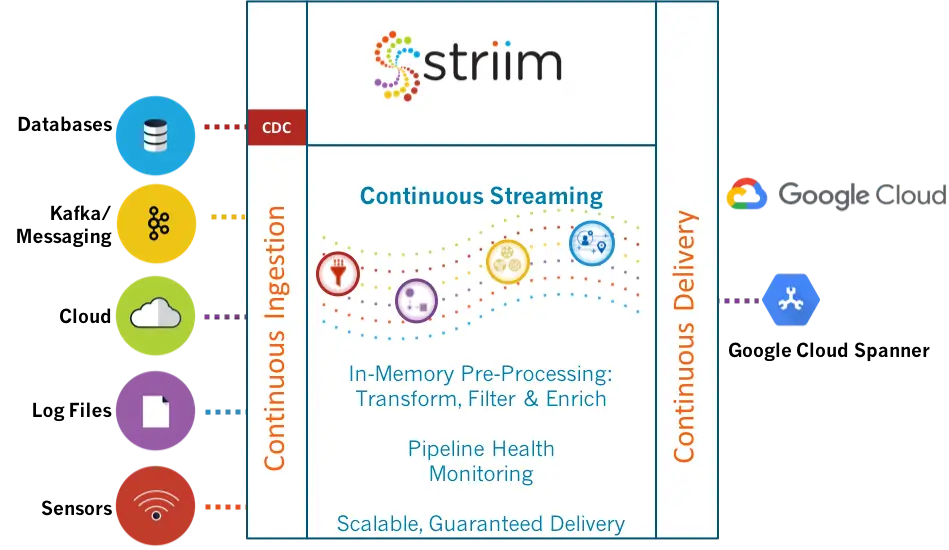
Alok Pareek, EVP of Products at Striim, and Codin Pora, Director of Partner Technology at Striim, provide a demo of the Striim platform at Google Cloud Next SF, April 2019. Alok goes into detail about how Google Cloud users can move real-time data from a variety of sources into their Google Cloud Spanner environment using the Striim platform.

Unedited Transcript:

So with that, I’d like to invite Alok and call them up to stage to give us a demo of Spanner. And their company Striim is strategic partners of ours that do basically replication and migration of data into Google cloud. Thank you. Thank you.

Thank you, Tobias. So today I’m going to show a demonstration of another. You have these wonderful endpoints on the Google cloud. How do you actually use them? How do you actually move your data into them? And I’m going to talk about in this demo how we move real time data from your applications from an on premise Oracle database into Cloud Spanner. So before I get into the demojust a little bit about Striim. Striim is the next generation platform that helps in three solution categories. These are cloud option, hybrid cloud data integration, in-memory stream processing. Today I’m going to be focusing on the cloud adoption, specifically, how do we move data into Spanner? So with that, we’re going to jump into the demo.

Okay. So what you see on the screen is the landing page. And I’m gonna keep this going pretty fast. We’re going to step into the apps part of the demo. That’s where the data pipelines are defined. That helps you move the data from on premise to Spanner. In this case, what you are seeing, there are two pipelines. One of them is meant to do an initial load or an instantiation of your existing data onto Cloud Spanner tables. And the other one is also meant to catch it up. So while you are actually moving the data, you might have very large tables, for example, or massive amounts of volumes. So how do you actually go ahead and not lose any data? And all of the consistency things that we heard about from Tobia survey earlier.

It’s important that while you are moving the data, you also don’t have disruption to your applications and to your business. So let’s step into the pipeline here. So this is a very simple pipeline. It actually has a simple flow. You have at the top a data source, which is in this case Oracle, it’s running on premise. So we connect into this Oracle database. It has a line items table. We’re going to show you a movement of about a hundred thousand records. And also there’s an order stabler where we’re going to show you the delta processing. The way this application is constructed is by using these components on the left side of the UI in the flow designer as you drag and drop one of these things and you push them into the pipeline.

And that’s how you actually construct your data flow. And once we actually go we can also step into the Spanner target definition and this is your service account and the connectivity and the config for your Spanner. We’re gonna next deploy this application or the pipeline and once we deploy it, this is where you can sort of see that I can actually run this within the Striim platform. This can be run either on premise or on the Google Cloud. We want to probably show, Codin, that there’s nothing available yet in the tables on the Spanner side. So let’s go ahead and execute a query against a line item table. And in this case you’re seeing that there are zero records there and you can take my word that there is a hundred thousand records on the Oracle side.

In the interest of time we’ll assume that and let’s go ahead and run the application. And as soon as we are on the application you can see that in the preview in the lower part of your screen, you can actually see the records running live. This is while we are uploading the data and applying them into Cloud Spanner. You can see that we have completed a 100,000 records and it was pretty fast. This morning I’d done a million records so I was holding my breath there, but that was pretty fast as well. So now you can see that the data part is completed. I mentioned to you that there’s a second phase here. That’s the change data capture phase. So this is while you’re actually executing this query, of course, this query is consistent as of a specific snapshot.

At Oracle, there’s also DML activity against your application. So how do we actually take this data? This is the second pipeline now, so we can step into pipeline number two. Codin is already deployed it and in this case we use a special reader and that actually operates against the redo logs of the Oracle database and actually monitors that. So it doesn’t actually have any impact on the production system per se, impact us in like it’s at least not doing any query impact there. We grabbed the data from the redo logs and then we are going to reapply that as DMO, as inserts, updates and so forth on the Cloud Spanner system. So let’s go ahead and run this application. We are going to generate some DML using a data generator.

And let’s go ahead and run the generator and you’ll see that there’s a number of inserts, updates and deletes against the orders table. And now let’s switch over to the Cloud Spanner system and query the order stable here. As you can see, there’s data in the orders table. This was also something that was just propagated. So this is sort of like the two phase, very fast demo of how you get data from your on prem databases into Cloud Spanner. And of course this can work against other databases that we support as well. And this a available in the Google Cloud. So with that, I’m gonna hand the control back to Tobias.

Kafka to HDFS

The real-time integration of messaging data from Kafka to HDFS augments transactional data for richer context. This allows organizations to gain optimal value from their analytics solutions and achieve a deeper understanding of operations – essential to establishing and sustaining competitive advantage.

To truly leverage the high volumes of data residing in Kafka stores, companies need to be able move it, process it, and deliver it to a variety of on-premises and cloud systems with sub-second latency. It also needs to be integrated with operational data from a wide variety of sources.

Traditional batch-based solutions are not designed for situations where data is time-sensitive – they are simply too slow. To allow organizations use their data to enhance operations, tailor services, and improve customer experiences, data delivery from Kafka to HDFS systems needs to be scalable and in real time.

Continuously Deliver Data

With Striim, companies can continuously deliver data in real time from Kafka to HDFS, as well as to a wide range of targets including Hadoop and cloud environments. Depending on the requirements of the organization, all the Kafka data can be written to a number of different targets simultaneously. In use cases where not all the data is required, data can be matched to specific criteria to deliver a highly relevant subset of data to the target.

Striim can create data flows to deliver the data from Kafka to HDFS in milliseconds, “as-is.” However, depending on how the data is going to be utilized, the user may require the data to be processed, prepared, and delivered in the right format. Striim supports continuous queries to filter, transform, aggregate, enrich, and analyze the data in-flight before delivering it with sub-second latency.

Analyze Data In-Flight

By analyzing the data in-flight, Kafka users can capture time-sensitive information as the data is flowing through the data stream. Striim pushes insights and alerts to interactive dashboards highlighting real-time data and the results of pattern matching, correlation, outlier detection, predictive analytics, and further enables drill-down and in-page filtering.

Learn more about integrating and processing Kafka to HDFS in real-time, please visit our Kafka integration page.

Our experts can show you how to get maximum value from your analytics solutions using Striim for real-time data integration from Kafka to HDFS. Please contact us to schedule a demo.

Oracle CDC to Postgres

Real-Time Data Movement with Oracle CDC to Postgres

As an open source alternative, Postgres offers a lower total cost of ownership and the ability to store structured and unstructured data. Real-time movement of transactional data using Oracle CDC to Postgres is essential to creating a rich and up-to-date view of operations and improving
customer experiences.

Oracle CDC to Postgres

IDC projects that by the year 2025, 80% of all data will be unstructured. Emails and social media posts are good examples of unstructured data. The ability to integrate unstructured, semi-structured and structured data from transactional databases into the enterprise is vital for timely and relevant analysis. To get a deep understanding from all the data an organization captures and records and to get the most value from it, it must be in the right place and in the right format – in real time.

Continuous movement of transactional data using Oracle CDC to Postgres ensures the organization is utilizing the real-time information from on-prem transactional databases and other data stores that is needed to make decisions that optimize user experience and drive higher revenue.

Moving data from enterprise databases to Postgres using traditional ETL processes introduces latency. Delays incurred while the data is being migrated or updated results in an out-of-date picture of the business, and limits the extent to which decisions can have any significant impact. Organizations also face a series of challenges managing storage and accessing the actual data that can produce real value to the organization if they move all the data as is.

How Striim Simplifies Oracle CDC to Postgres

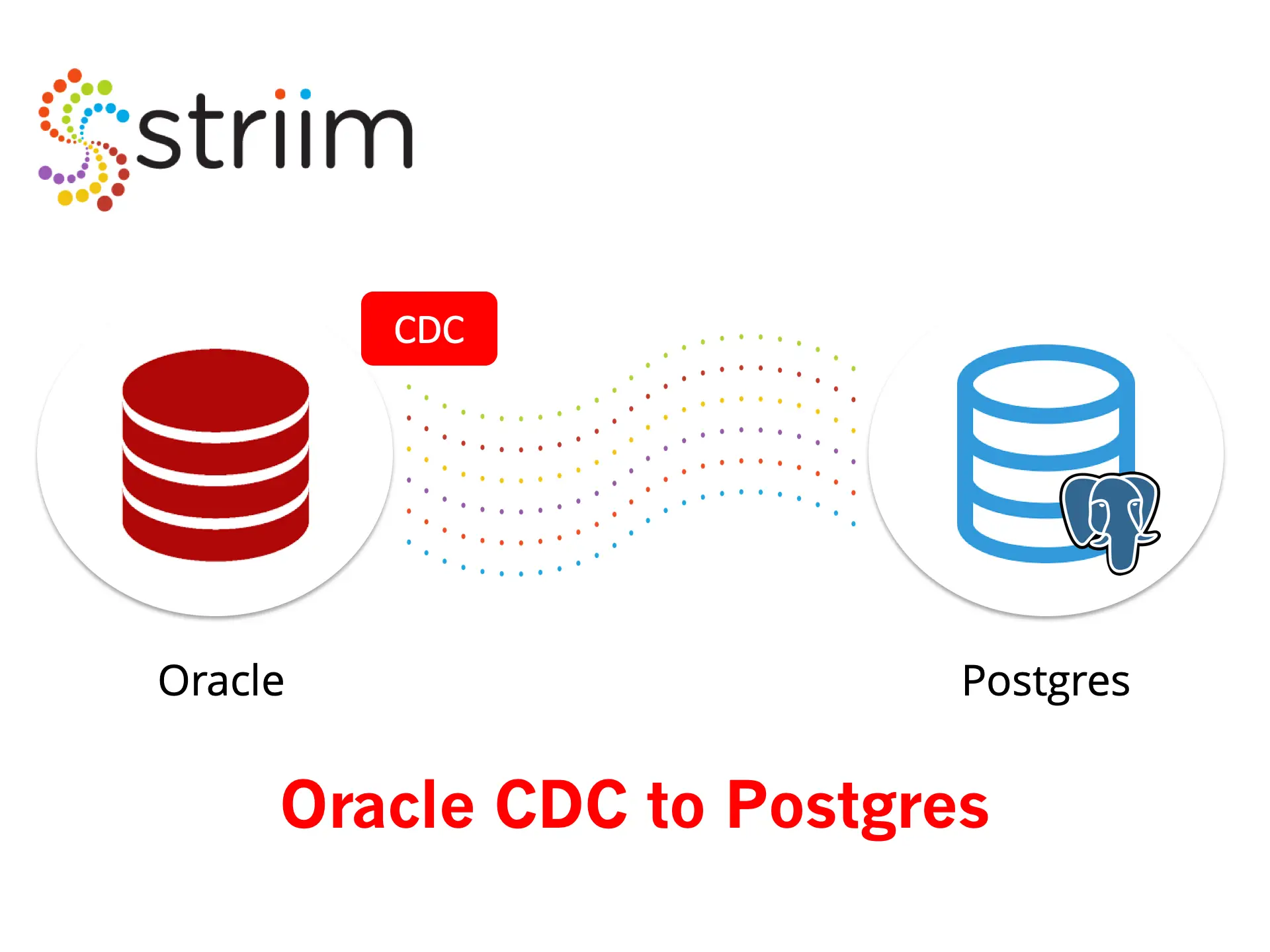
Striim enables organizations to generate real value from the transactional data residing in their existing Oracle databases. Using non-intrusive change data capture (CDC), Striim enables continuous data ingestion from Oracle to Postgres with sub-second latency. Users can easily set up ingestion via Striim’s pre-configured CDC wizards, and drag-and-drop UI.

Moving and processing data in-flight, Striim filters data that is not required and delivers what is important to Postgres – in real time. The data can also be transformed and enriched so it is delivered in the format required. Oracle CDC to Postgres allows organizations gain access to critical insights sooner and make more informed operational decisions faster.

Once the real-time data pipelines are built and the initial data load using Oracle CDC to Postgres has been performed, continuous updating with every new database transaction ensures that analytics applications have the most up-to-date information. Built-in monitoring continuously compares the source and target, validating database consistency and providing assurance that the replicated environment is completely up-to-date with the on-prem Oracle instance.

For more information on real-time data integration and processing using Striim’s Oracle CDC to Postgres solution, please visit our Change Data Capture page.

To see first-hand how easy it is to move data to Postgres using Striim’s Oracle CDC to Postgres functionality, please schedule a demo with one of our technologists.

Striim Announces Real-Time Data Migration to Google Cloud Spanner

Google Cloud Marketplace

The Striim team has been working closely with Google to deliver an enterprise-grade solution for online data migration to Google Cloud Spanner. We’re happy to announce that it is available in the Google Cloud Marketplace. This PaaS solution facilitates the initial load of data (with exactly once processing and delivery validation), as well as the ongoing, continuous movement of data to Cloud Spanner.Real-Time Migration to Google Cloud Spanner

The real-time data pipelines enabled by Striim from both on-prem and cloud sources are scalable, reliable and high-performance. Cloud Spanner users can further leverage change data capture to replicate data in transactional databases to Cloud Spanner without impacting the source database, or interrupting operations.

Google Cloud Spanner is a cloud-based database system that is ACID compliant, horizontally scalable, and global. Spanner is the database that underlies much of Google’s own data collection, and it has been designed to offer the consistency of a relational database with the scale and performance of a non-relational database.

Migration to Google Cloud Spanner requires a low-latency, low-risk solution to feed mission-critical applications. Striim offers an easy-to-use solution to move data in real time from Oracle, SQL Server, PostgreSQL, MySQL, and HPE NonStop to Cloud Spanner while ensuring zero downtime and zero data loss. Striim is also used for real-time data migration from Kafka, Hadoop, log files, sensors, and NoSQL databases to Cloud Spanner.

While the data is streaming, Striim enables in-flight processing and transformation of the data to maximize usability of the data the instant it lands in Cloud Spanner.

Learn More

To learn more about Striim’s Real-Time Migration to Google Cloud Spanner, read the related press release or provision Striim’s Real-Time Data Integration to Cloud Spanner in the Google Cloud Marketplace.

Back to top