The 7 Data Replication Strategies You Need to Know

What is Data Replication

Data replication involves creating copies of data and storing them on different servers or sites. This results in multiple, identical copies of data being stored in different locations.

Data Replication Benefits

Data replication makes data available on multiple sites, and in doing so, offers various benefits.

First of all, it enables better data availability. If a system at one site goes down because of hardware issues or other problems, users can access data stored at other nodes. Furthermore, data replication allows for improved data backup. Since data is replicated to multiple sites, IT teams can easily restore deleted or corrupted data.

Data replication also allows faster access to data. Since data is stored in various locations, users can retrieve data from the closest servers and benefit from reduced latency. Also, there’s a much lower chance that any one server will become overwhelmed with user queries since data can be retrieved from multiple servers. Data replication also supports improved analytics, by allowing data to be continuously replicated from a production database to a data warehouse used by business intelligence teams.

Replicating data to the cloud

Replicating data to the cloud offers additional benefits. Data is kept safely off-site and won’t be damaged if a major disaster, such as a flood or fire, damages on-site infrastructure. Cloud replication is also cheaper than deploying on-site data centers. Users won’t have to pay for hardware or maintenance.

multi-cloud data integration

Replicating data to the cloud is a safer option for smaller businesses that may not be able to afford full-time cybersecurity staff. Cloud providers are constantly improving their network and physical security. Furthermore, cloud sites provide users with on-demand scalability and flexibility. Data can be replicated to servers in different geographical locations, including in the nearby region.

Data Replication Challenges

Data replication technologies offer many benefits, but IT teams should also keep in mind several challenges.

First of all, keeping replicated data at multiple locations leads to rising storage and processing costs. In addition, setting up and maintaining a data replication system often requires assigning a dedicated internal team.

Replicating data across multiple copies requires deploying new processes and adding more traffic to the network. Finally, managing multiple updates in a distributed environment may cause data to be out of sync on occasion. Database administrators need to ensure consistency in replication processes.

Data Replication Methods

The data replication strategy you choose is crucial as it impacts how and when your data is loaded from source to replica and how long it takes. An application whose database updates frequently wouldn’t want a data replication strategy that could take too long to reproduce the data in the replicas. Similarly, an application with less frequent updates wouldn’t require a data replication strategy that reproduces data in the replicas several times a day.

Log-Based Incremental Replication

Some databases allow you to store transaction logs for a variety of reasons, one of which is for easy recovery in case of a disaster. However, in log-based incremental replication, your replication tool can also look at these logs, identify changes to the data source, and then reproduce the changes in the replica data destination (e.g., database). These changes could be INSERT, UPDATE, or DELETE operations on the source database.

The benefits of this data replication strategy are:

  • Because log-based incremental replication only captures row-based changes to the source and updates regularly (say, once every hour), there is low latency when replicating these changes in the destination database.
  • There is also reduced load on the source because it streams only changes to the tables.
  • Since the source consistently stores changes, we can trust that it doesn’t miss vital business transactions.
  • With this data replication strategy, you can scale up without worrying about the additional cost of processing bulkier data queries.

Unfortunately, a log-based incremental replication strategy is not without its challenges:

  • It’s only applicable to databases, such as MongoDB, MySQL, and PostgreSQL, that support binary log replication.
  • Since each of these databases has its own log formats, it’s difficult to build a generic solution that covers all supported databases.
  • In the case where the destination server is down, you have to keep the logs up to date until you restore the server. If not, you lose crucial data.

Despite its challenges, log-based incremental replication is still a valuable data replication strategy because it offers fast, secure, and reliable replication for data storage and analytics.

Key-Based Incremental Replication

As the name implies, key-based replication involves replicating data through the use of a replication key. The replication key is one of the columns in your database table, and it could be an integer, timestamp, float, or ID.

Key-based incremental replication only updates the replica with the changes in the source since the last replication job. During data replication, your replication tool gets the maximum value of your replication key column and stores it. During the next replication, your tool compares this stored maximum value with the maximum value of your replication key column in your source. If the stored maximum value is less than or equal to the source’s maximum value, your replication tool replicates the changes. Finally, the source’s maximum value becomes the stored value.

This process is repeated for every replication job that is key-based, continually using the replication key to spot changes in the source. This data replication strategy offers similar benefits as log-based data replication but comes with its own limitations:

  • It doesn’t identify delete operations in the source. When you delete a data entry in your table, you also delete the replication key from the source. So the replication tool is unable to capture changes to that entry.
  • There could be duplicate rows if the records have the same replication key values. This occurs because key-based incremental replication also compares values equal to the stored maximum value. So it duplicates the record until it finds another record of greater replication key.

In cases where log-based replication is not feasible or supported, key-based replication would be a close alternative. And knowing these limitations would help you better tackle data discrepancies where they occur.

Full Table Replication

Unlike the incremental data replication strategies that update based on changes to logs and the replication key maximum value, full table replication replicates the entire database. It copies everything: every new, existing, and updated row, from source to destination. It’s not concerned with any change in the source; whether or not some data changes, it replicates it.

The full table data replication strategy is useful in the following ways:

  • You’re assured that your replica is a mirror image of the source and no data is missing.
  • Full table replication is especially useful when you need to create a replica in another location so that your application’s content loads regardless of where your users are situated.
  • Unlike key-based replication, this data replication strategy detects hard deletes to the source.

However, replicating an entire database has notable downsides:

  • Because of the high volume of data replicated, full-table replication could take longer, depending on the strength of your network.
  • It also requires higher processing power and can cause latency duplicating that amount of data at every replication job.
  • The more you use full table replication to replicate to the same database, the more rows you use and the higher the cost to store all that data.
  • Low latency and high processing power while replicating data may lead to errors during the replication process.

Although full table replication isn’t an efficient way to replicate data, it’s still a viable option when you need to recover deleted data or there aren’t any logs or suitable replication keys.

Snapshot Replication

Snapshot replication is the most common data replication strategy; it’s also the simplest to use. Snapshot replication involves taking a snapshot of the source and replicating the data at the time of the snapshot in the replicas.

Because it’s only a snapshot of the source, it doesn’t track changes to the source database. This also affects deletes to the source. At the time of the snapshot, the deleted data is no longer in the source. So it captures the source as is, without the deleted record.

For snapshot replication, we need two agents:

  • Snapshot Agent: It collects the files containing the database schema and objects, stores them, and records every sync with the distribution database on the Distribution Agent.
  • Distribution Agent: It delivers the files to the destination databases.

Snapshot replication is commonly used to sync the source and destination databases for most data replication strategies. However, you may use it on its own, scheduling it according to your custom time.

Just like the full table data replication strategy, snapshot replication may require high processing power if the source has a considerably large dataset. But it is useful if:

  • The data you want to replicate is small.
  • The source database doesn’t update frequently.
  • There are a lot of changes in a short period, such that transactional or merge replication wouldn’t be an efficient option.
  • You don’t mind having your replicas being out of sync with your source for a while.

Transactional Replication

In transactional replication, you first duplicate all existing data from the publisher (source) into the subscriber (replica). Subsequently, any changes to the publisher replicate in the subscriber almost immediately and in the same order.

It is important to have a snapshot of the publisher because the subscribers need to have the same data and database schema as the publisher for them to receive consistent updates. Then the Distribution Agent determines the regularity of the scheduled updates to the subscriber.

To perform transactional replication, you need the Distribution Agent, Log Reader Agent, and Snapshot Agent.

  • Snapshot Agent: It works the same as the Snapshot Agent for snapshot replication. It generates all relevant snapshot files.
  • Log Reader Agent: It observes the publisher’s transaction logs and duplicates the transactions in the distribution database.
  • Distribution Agent: It copies the snapshot files and transaction logs from the distribution database to the subscribers.
  • Distribution database: It aids the flow of files and transactions from the publisher to the subscribers. It stores the files and transactions until they’re ready to move to the subscribers.

Transactional replication is appropriate to use when:

  • Your business can’t afford downtime of more than a few minutes.
  • Your database changes frequently.
  • You want incremental changes in your subscribers in real time.
  • You need up-to-date data to perform analytics.

In transactional replication, subscribers are mostly used for read purposes, and so this data replication strategy is commonly used when servers only need to talk to other servers.

Merge Replication

Merge replication combines (merges) two or more databases into one so that updates to one (primary) database are reflected in the other (secondary) databases. This is one key trait of merge replication that differentiates it from the other data replication strategies. A secondary database may retrieve changes from the primary database, receive updates offline, and then sync with the primary and other secondary databases once back online.

In merge replication, every database, whether it’s primary or secondary, can make changes to your data. This can be useful when one database goes offline and you need the other to operate in production, then get the offline database up to date once it’s back online.

To avoid data conflicts that may arise from allowing modifications from secondary databases, merge replication allows you to configure a set of rules to resolve such conflicts.

Like most data replication strategies, merge replication starts with taking a snapshot of the primary database and then replicating the data in the destination databases. This means that we also begin the merge replication process with the Snapshot Agent.

Merge replication also uses the Merge Agent, which commits or applies the snapshot files in the secondary databases. The Merge Agent then reproduces any incremental updates in the other databases. It also identifies and resolves all data conflicts during the replication job.

You may opt for merge replication if:

  • You’re less concerned with how many times a data object changes but more interested in its latest value.
  • You need replicas to update and reproduce the updates in the source and other replicas.
  • Your replica requires a separate segment of your data.
  • You want to avoid data conflicts in your database.

Merge replication remains one of the most complex data replication strategies to set up, but it can be valuable in client-server environments, like mobile apps or applications where you need to incorporate data from multiple sites.

Bidirectional Replication

Bidirectional replication is one of the less common data replication strategies. It is a subset of transactional replication that allows two databases to swap their updates. So both databases permit modifications, like merge replication. However, for a transaction to be successful, both databases have to be active.

Bi-DirectionalReplication-featuredgraphic

Here, there is no definite source database. Each database may be from the same platform (e.g., Oracle to Oracle) or from separate platforms (e.g., Oracle to MySQL). You may choose which rows or columns each database can modify. You may also decide which database is a higher priority in case of record conflicts, i.e., decide which database updates are reflected first.

Bidirectional replication is a good choice if you want to use your databases to their full capacity and also provide disaster recovery.

Your Data Replication Strategy Shouldn’t Slow You Down: Try Striim

Regardless of your type of application, there’s a data replication strategy that best suits your business needs. Combine any data replication strategies you want. Just ensure that the combination offers a more efficient way to replicate your databases according to your business objectives.

Every data replication strategy has one cost in common: the time it takes. Few businesses today can afford to have their systems slowed down by data management, so the faster your data replicates, the less negative impact it will have on your business.

Replicating your database may be time-consuming, and finding the right data replication tool to help speed up and simplify this process, while keeping your data safe, can be beneficial to your business.

Striim enables real time data replication
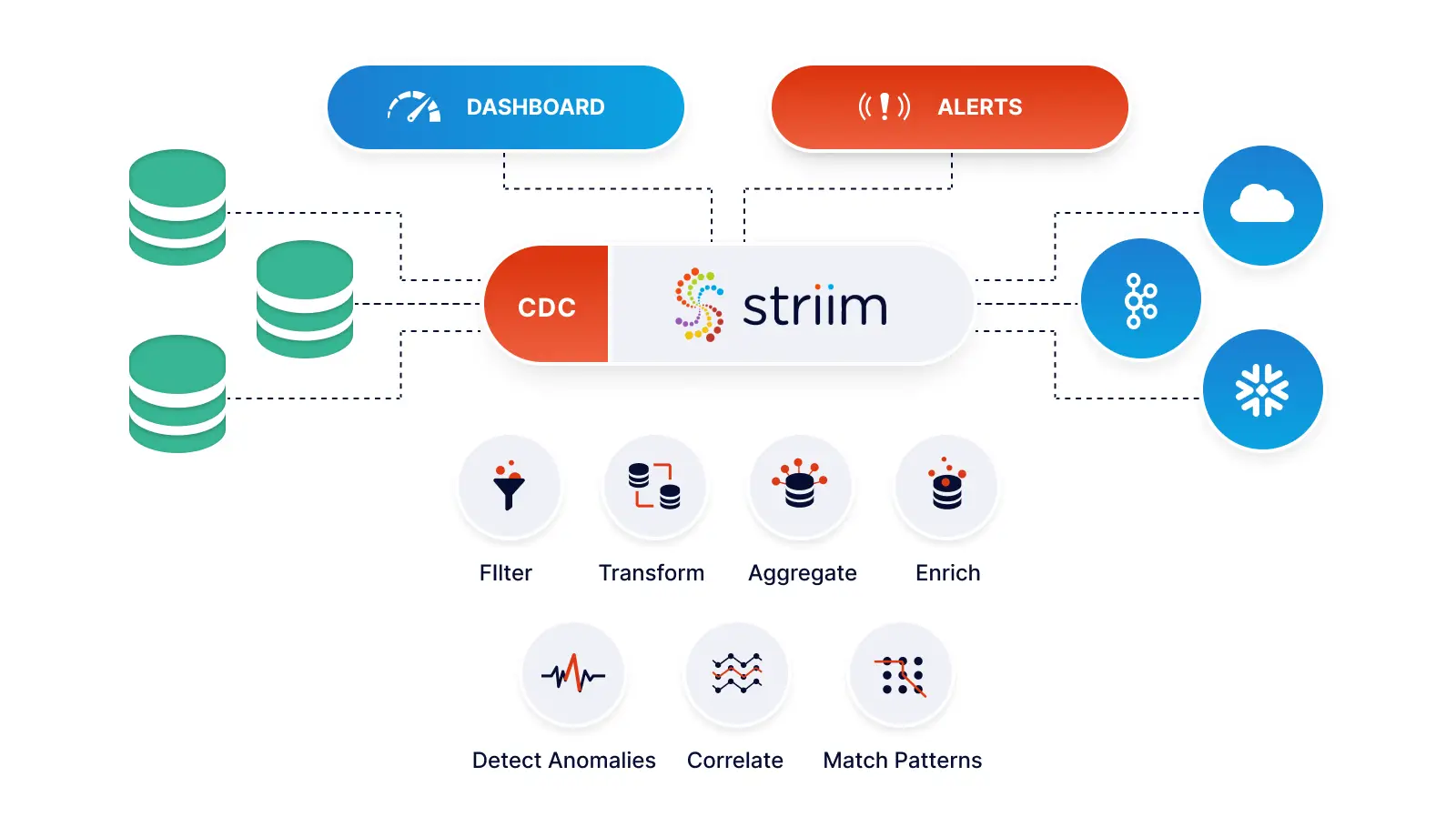
Striim is a unified real time data integration and streaming platform that connects clouds, data, and applications. With log-based change data capture from a range of databases, Striim supports real time data replication.

For fast, simple, and reliable data replication, Striim is your best bet. Striim provides real-time data replication by extracting data from databases using log-based change data capture and replicating it to targets in real time. Regardless of where your data is, Striim gets your data safely to where you need it to be and shows you the entire process, from source to destination.

Schedule a demo and we’ll give you a personalized walkthrough or try Striim at production-scale for free! Small data volumes or hoping to get hands on quickly? At Striim we also offer a free developer version.

Introducing Striim Cloud – Data Streaming and Integration as a Service

Since announcing our Series C fundraising led by Goldman Sachs we doubled down on our mission to enable companies to power their decisions in real-time, and after a year in private preview, collecting feedback from customers, testing workloads and tweaking and adjusting, we’re thrilled to announce the public launch of Striim Cloud: the industry’s first and only unified data streaming and integration fully managed service. Striim Cloud was uniquely designed to address the challenges of enterprise data streaming with an emphasis on our best-in-market change data capture, fully dedicated infrastructure (no shared data for sensitive environments), and seamless interoperability with on-premise and self-managed versions of Striim.

Cloud Architecture on Striim

Unlike other solutions in the market, Striim Cloud leverages over 5 years of experience gained from delivering our self-managed, massively scalable streaming platform to over 100 enterprise customers and 2500 deployments in 6 continents. Striim is also led by the executive team behind GoldenGate Software.

The power of Striim Cloud is also a result of collaborating closely with incredible partners like Microsoft. “Microsoft is committed to making migration to Azure as smooth as possible, while paving the way for continuous innovation for our customers. Our goal is to build technology that empowers today’s innovators to unleash the power of their data and explore possibilities that will improve their businesses and our world,” said Rohan Kumar, Corporate Vice President, Azure Data at Microsoft. “We are pleased to work with Striim to provide our customers with a fast way to replicate their data to the Azure platform and gain mission-critical insights into data from across the organization.”

With that collaboration, we’ve made Striim Cloud available with consumption-based pricing on the Azure marketplace. Microsoft Azure customers can leverage existing investments in the Azure ecosystem to power digital transformation initiatives with real-time data.

With Striim Cloud we’re offering unprecedented speed and simplicity with the following value-adds:

  • Fast setup with schema conversion and initial load into your analytics platforms
  • Low impact change data capture built by the team from GoldenGate
  • Meet fast data SLAs (sub-second delivery) with fast data streaming and end-to-end lag monitoring
  • Low cost of ownership with fully managed, fully dedicated cloud infrastructure by Striim
  • Enterprise-level security with encrypted data at-rest and in-flight
  • Consumption-based pricing; pay only for the data you successfully move from source to target and the compute you need in that moment

But don’t take my word for it, sign up for a free trial and start powering your decisions with real-time data.


Building a Multi-Cloud Data Fabric for Real-Time Analytics

DataFabric_LinkedIn_Rect_Final_Video_Thumbnail-1

Data is increasingly siloed, making it harder for companies to extract the most value from their data. This is compounded by the fact that over 90% of companies plan on having hybrid cloud and or multi-cloud operations by 2022.

Watch this on-demand webinar with James Serra (Data Platform Architecture Lead at EY) where we demystify building a multi-cloud data environment for operations and real-time analytics. We cover the following topics:

  • Pros and cons of multi-cloud vs doubling down on a single cloud
  • Enterprise data patterns such as Data Fabric, Data Mesh, and The Modern Data Stack
  • Data ingestion and data transformation in a multi-cloud/hybrid cloud environment
  • Comparison of data warehouses (Snowflake, Synapse, Redshift, BigQuery) for real-time workloads

Oracle Change Data Capture – An Event-Driven Architecture for Cloud Adoption

Tutorial

Oracle Change Data Capture – An Event-Driven Architecture for Cloud Adoption

How to replace batch ETL by event-driven distributed stream processing

Benefits

Operational Analytics 
Use non-intrusive CDC to Kafka to create persistent streams that can be accessed by multiple consumers and automatically reflect upstream schema changes

Empower Your TeamsGive teams across your organization a real-time view of your Oracle database transactions.Get Analytics-Ready DataGet your data ready for analytics before it lands in the cloud. Process and analyze in-flight data with scalable streaming SQL.
On this page

Overview

All businesses rely on data. Historically, this data resided in monolithic databases, and batch ETL processes were used to move that data to warehouses and other data stores for reporting and analytics purposes. As businesses modernize, looking to the cloud for analytics, and striving for real-time data insights, they often find that these databases are difficult to completely replace, yet the data and transactions happening within them are essential for analytics. With over 80% of businesses noting that the volume & velocity of their data is rapidly increasing, scalable cloud adoption and change data capture from databases like Oracle, SQLServer, MySQL and others is more critical than ever before. Oracle change data capture is specifically one area where companies are seeing an influx of modern data integration use cases.

To resolve this, more and more companies are moving to event-driven architectures, because of the dynamic distributed scalability which makes sharing large volumes of data across systems possible.

In this post we will look at an example which replaces batch ETL by event-driven distributed stream processing: Oracle change data capture events are extracted as they are created; enriched with in-memory, SQL-based denormalization; then delivered to the Mongodb to provide scalable, real-time, low-cost analytics, without affecting the source database. We will also look at using the enriched events, optionally backed by Kafka, to incrementally add other event-driven applications or services.

multi-usecase

Continuous Data Collection, Processing, Delivery, and Analytics with the Striim Platform

Event-Driven Architecture Patterns

Most business data is produced as a sequence of events, or an event stream: for example, web or mobile app interactions, devices, sensors, bank transactions, all continuously generate events. Even the current state of a database is the outcome of a sequence of events.

Treating state as the result of a sequence of events forms the core of several event-driven patterns.

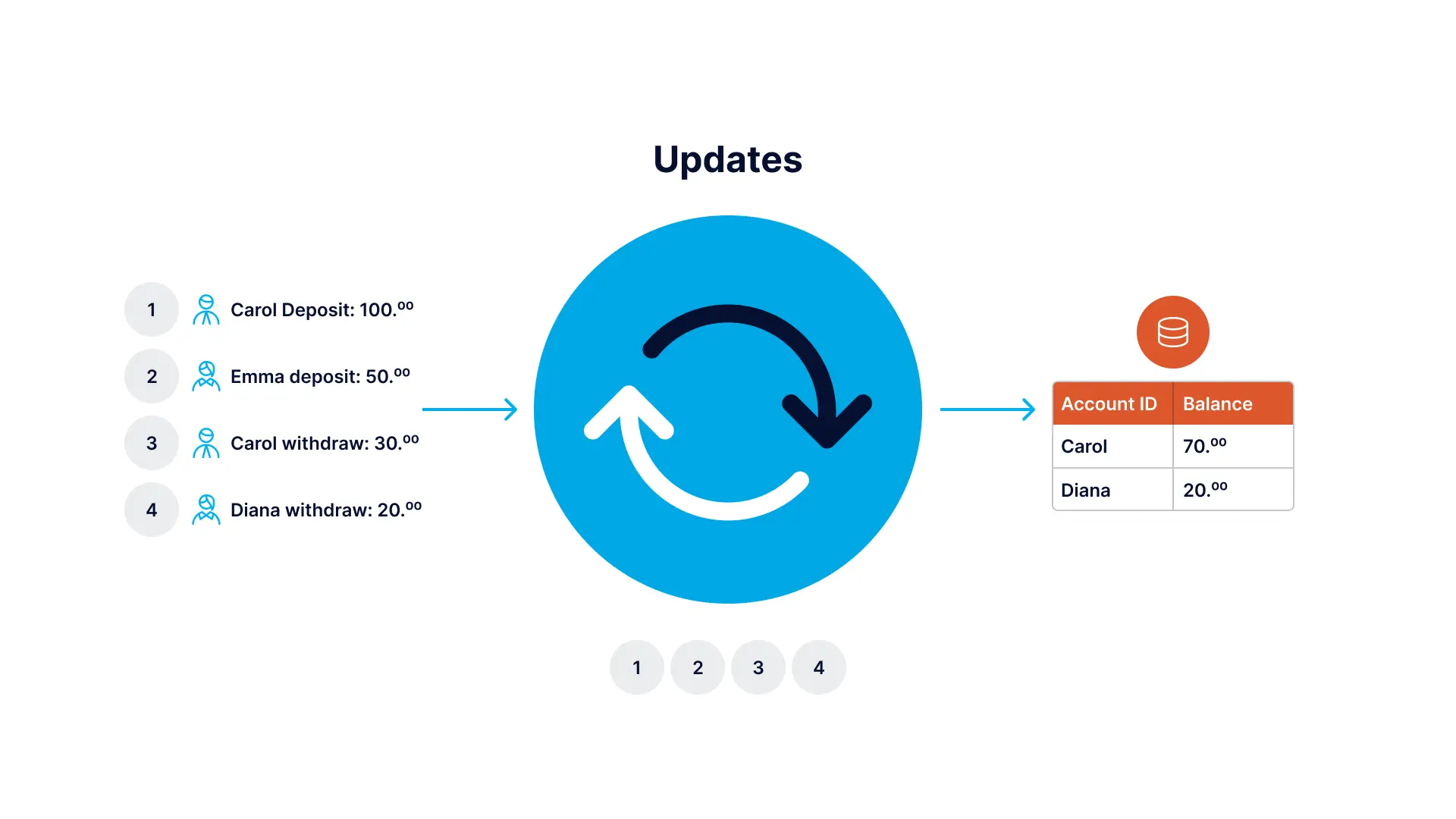
Event Sourcing is an architectural pattern in which the state of the application is determined by a sequence of events. As an example, imagine that each “event” is an incremental update to an entry in a database. In this case, the state of a particular entry is simply the accumulation of events pertaining to that entry. In the example below the stream contains the queue of all deposit and withdrawal events, and the database table persists the current account balances.

striim data flow

Imagine Each Event as a Change to an Entry in a Database

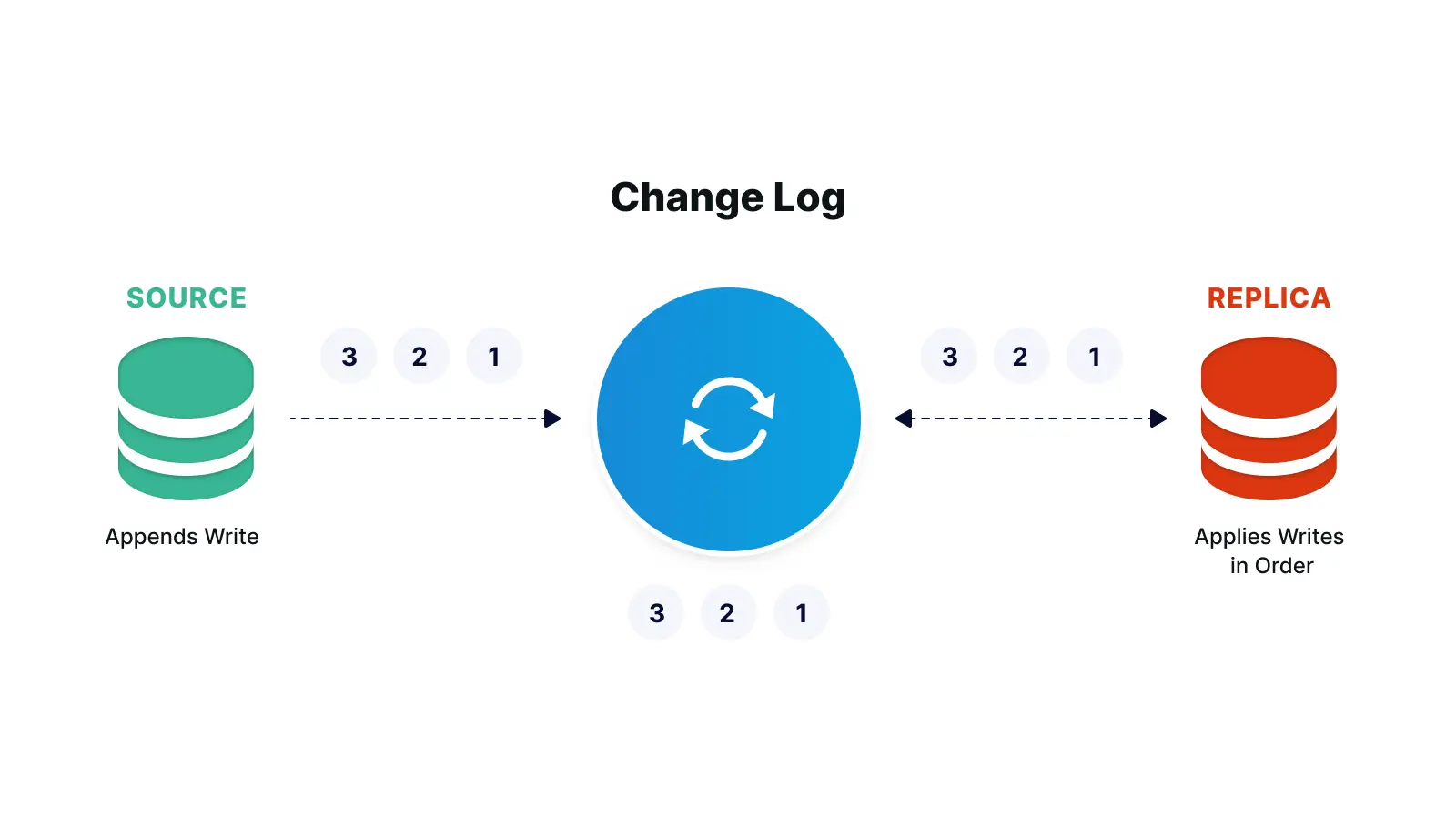
The events in the stream can be used to reconstruct the current account balances in the database, but not the other way around. Databases can be replicated with a technology called Change Data Capture (CDC), which collects the changes being applied to a source database, as soon as they occur by monitoring its change log, turns them into a stream of events, then applies those changes to a target database. Source code version control is another well known example of this, where the current state of a file is some base version, plus the accumulation of all changes that have been made to it.

striim data flow

The Change Log can be used to Replicate a Database

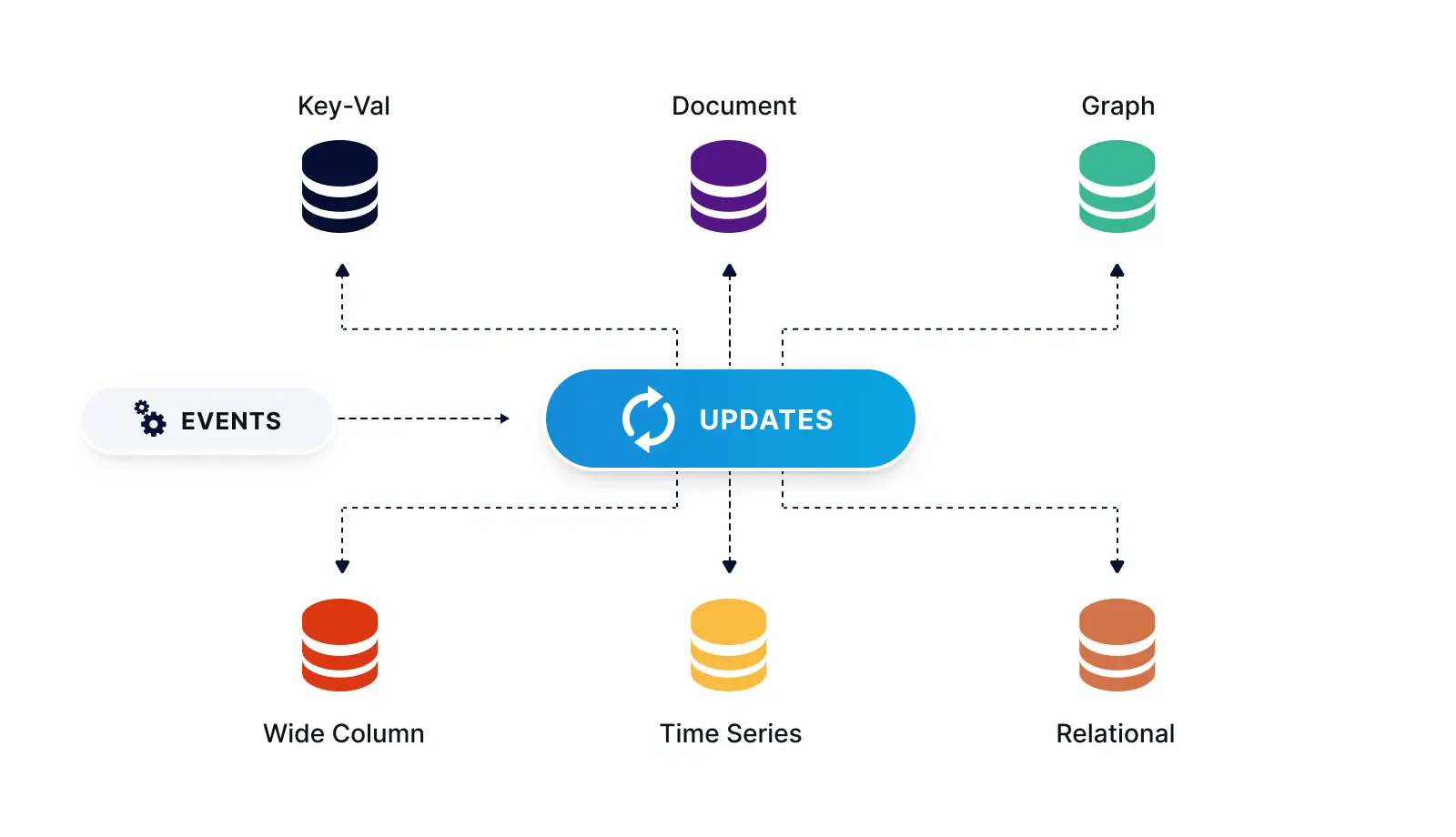
What if you need to have the same set of data for different databases, for different types of use? With a stream, the same message can be processed by different consumers for different purposes. As shown below, the stream can act as a distribution point, where, following the polygot persistence pattern, events can be delivered to a variety of data stores, each using the most suited technology for a particular use case or materialized view.

striim data flow

Streaming Events Delivered to a Variety of Data Stores

Event-Driven Streaming ETL Use Case Example

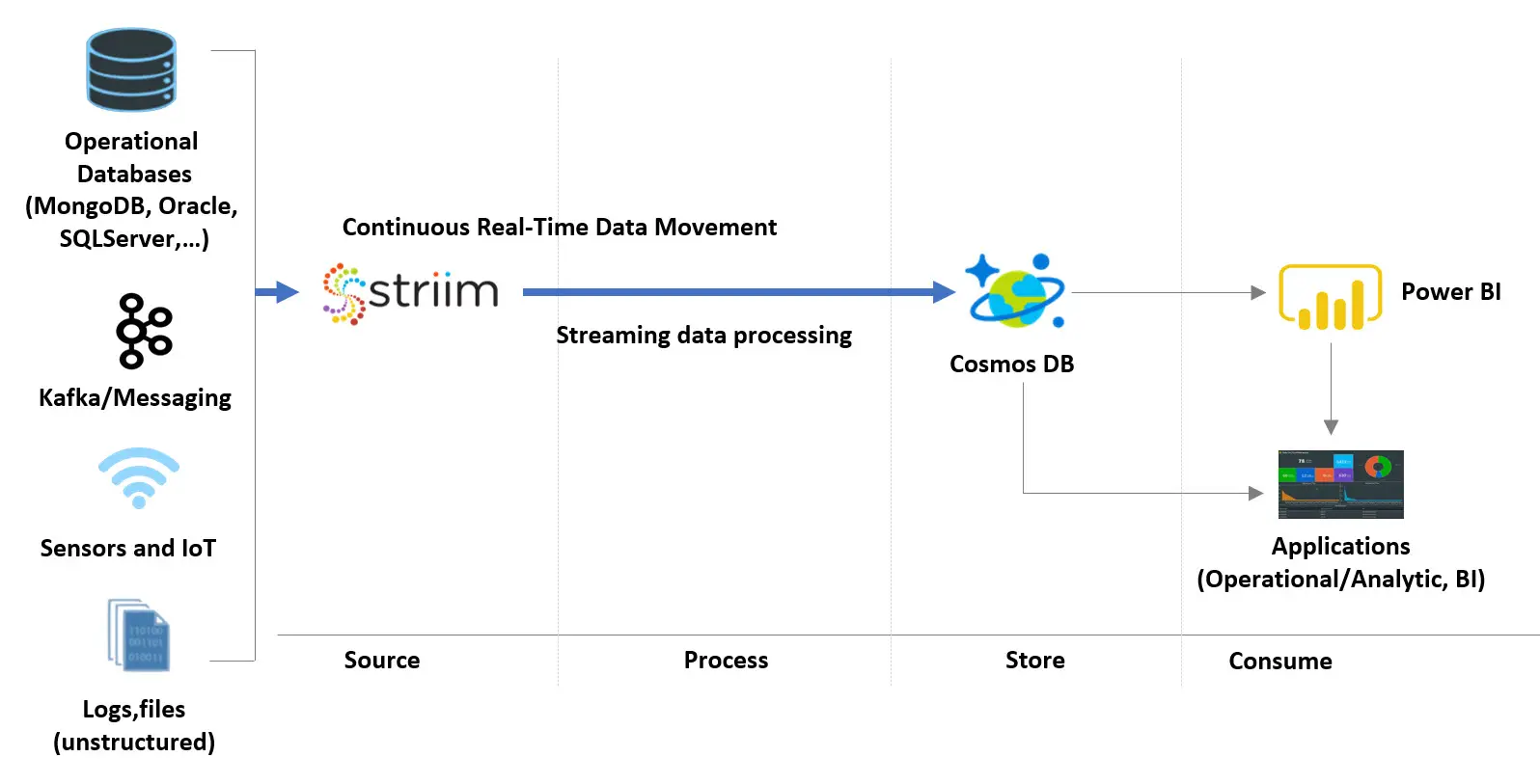
Below is a diagram of the Event-Driven Streaming ETL use case example:

cosmos

Event-Driven Streaming ETL Use Case Diagram

  1. Striim’s low-impact, real-time Oracle change data capture (CDC) feature is used to stream database changes (inserts, updates and deletes) from an Operational Oracle database into Striim

  2. CDC Events are enriched and denormalized with Streaming SQL and Cached data, in order to make relevant data available together

  3. Enriched, denormalized events are streamed to CosmosDB for real-time analytics

  4. Enriched streaming events can be monitored in real time with the Striim Web UI, and are available for further Streaming SQL analysis, wizard-based dashboards, and other applications in the cloud. You can use Striim by signing up for free Striim Developer or Striim Cloud trial.

Striim can simultaneously ingest data from other sources like Kafka and log files so all data is streamed with equal consistency. Please follow the instructions below to learn how to build a Oracle CDC to NoSQL MongoDB real-time streaming application:

Step1: Generate Schemas in your Oracle Database

You can find the csv data file in our github repository. Use the following schema to create two empty tables in your source database:

The HOSPITAL_DATA table, containing details about each hospital would be used as a cache to enrich our real-time data stream.

Schema:

				
					CREATE TABLE “<database name>”.“HOSPITAL_DATA”
(“PROVIDER_ID” VARCHAR2(10),
“HOSPITAL_NAME” VARCHAR2(50),
“ADDRESS” VARCHAR2(50),
“CITY” VARCHAR2(50),
“STATE” VARCHAR2(40),
“ZIP_CODE” VARCHAR2(10),
“COUNTY” VARCHAR2(40),
“PHONE_NUMBER” VARCHAR2(15), PRIMARY KEY (“PROVIDER_ID”));


Insert the data from this csv file to the above table.

The HOSPITAL_COMPLICATIONS_DATA contains details of complications in various hospitals. Ideally the data is streamed in real-time but for our tutorial, we will import csv data for CDC.

Schema:

				
					CREATE TABLE <database name>.HOSPITAL_COMPLICATIONS_DATA (
COMPLICATION_ID NUMBER(10,0) NOT NULL,
PROVIDER_ID VARCHAR2(10) NULL,
MEASURE_NAME VARCHAR2(100) NULL,
MEASURE_ID VARCHAR2(40) NULL,
COMPARED_TO_NATIONAL VARCHAR2(50) NULL,
DENOMINATOR VARCHAR2(20) NULL,
SCORE VARCHAR2(20) NULL,
LOWER_ESTIMATE VARCHAR2(40) NULL,
HIGHER_ESTIMATE VARCHAR2(20) NULL,
FOOTNOTE VARCHAR2(400) NULL,
MEASURE_START_DT DATE NULL,
MEASURE_END_DT DATE NULL,
);


Step 2: Replacing Batch Extract with Real Time Streaming of CDC Order Events

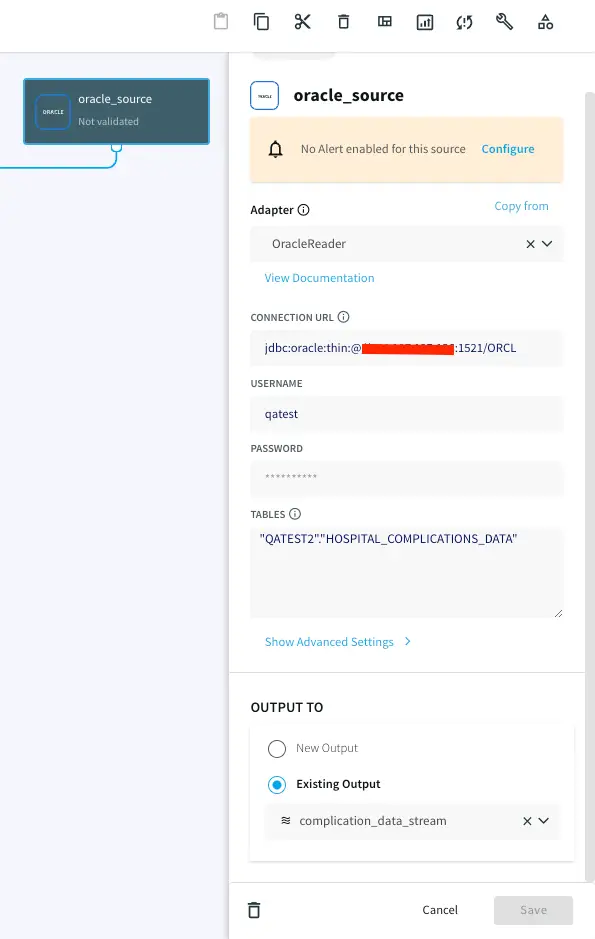
Striim’s easy-to-use CDC wizards automate the creation of applications that leverage change data capture, to stream events as they are created, from various source systems to various targets. In this example, shown below, we use Striim’s OracleReader (Oracle Change Data Capture) to read the hospital incident data in real-time and stream these insert, update, delete operations, as soon as the transactions commit, into Striim, without impacting the performance of the source database. Configure your source database by entering the hostname, username, password and table names.

Step 3: NULL Value handling

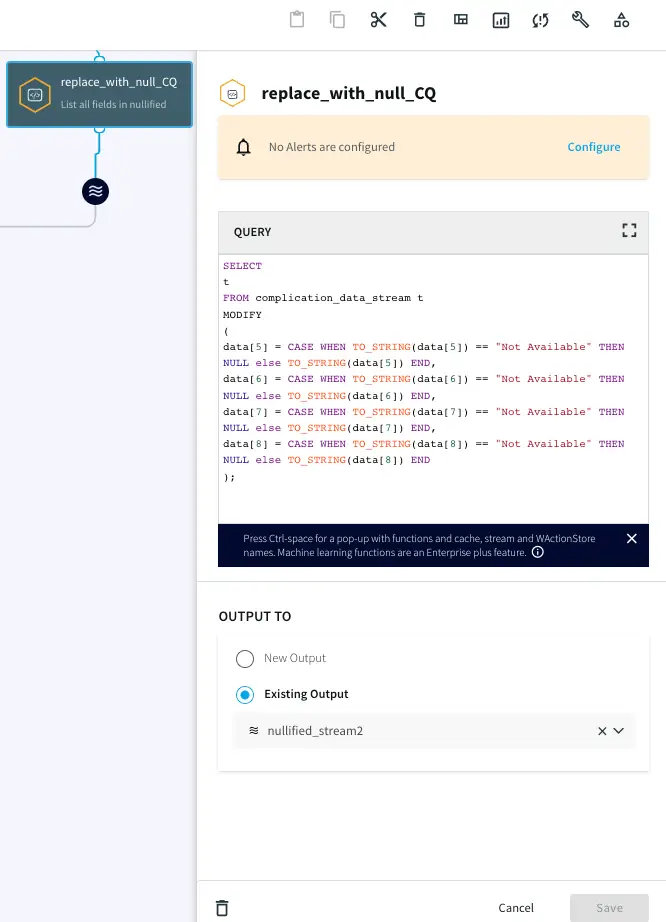
The data contains “Not Available” strings in some of the rows. Striim can manipulate the data in real-time to convert it into Null values using a Continuous Query component. Use the following query to change “Not Available” strings to Null:

				
					SELECT
t
FROM complication_data_stream t
MODIFY
(
data[5] = CASE WHEN TO_STRING(data[5]) == "Not Available" THEN NULL else TO_STRING(data[5]) END,
data[6] = CASE WHEN TO_STRING(data[6]) == "Not Available" THEN NULL else TO_STRING(data[6]) END,
data[7] = CASE WHEN TO_STRING(data[7]) == "Not Available" THEN NULL else TO_STRING(data[7]) END,
data[8] = CASE WHEN TO_STRING(data[8]) == "Not Available" THEN NULL else TO_STRING(data[8]) END
);


Step 4: Using Continuous Query for Data Processing

The hospital_complications_data has a column COMPARED_TO_NATIONAL that indicates how the particular complication compares to national average. We will process this data to generate a column called ‘SCORE_COMPARISON’ that is in the scale of GOOD, BAD, OUTLIER or NULL and is easier to read. If “Number of Cases too small”, then the SCORE_COMPARISON is “Outlier” and if “worse than national average”, then the SCORE_COMPARISON is BAD otherwise GOOD.

				
					SELECT
CASE WHEN TO_STRING(data[4]) =="Not Available" or TO_STRING(data[4]) =="Number of Cases Too Small"
THEN putUserData(t, 'SCORE_COMPARISON', "OUTLIER")
WHEN TO_STRING(data[4]) =="Worse than the National Rate"
THEN putUserData(t, 'SCORE_COMPARISON', "BAD")
WHEN TO_STRING(data[4]) =="Better than the National Rate" OR TO_STRING(data[4]) =="No Different than the National Rate"
THEN putUserData(t, 'SCORE_COMPARISON', "GOOD")
ELSE putUserData(t, 'SCORE_COMPARISON', NULL)
END
FROM nullified_stream2 t;


Step 5: Utilizing Caches For Enrichment

Relational Databases typically have a normalized schema which makes storage efficient, but causes joins for queries, and does not scale well horizontally. NoSQL databases typically have a denormalized schema which scales across a cluster because data that is read together is stored together.

With a normalized schema, a lot of the data fields will be in the form of IDs. This is very efficient for the database, but not very useful for downstream queries or analytics without any meaning or context. In this example we want to enrich the raw Orders data with reference data from the SalesRep table, correlated by the Order Sales_Rep_ID, to produce a denormalized record including the Sales Rep Name and Email information in order to make analysis easier by making this data available together.

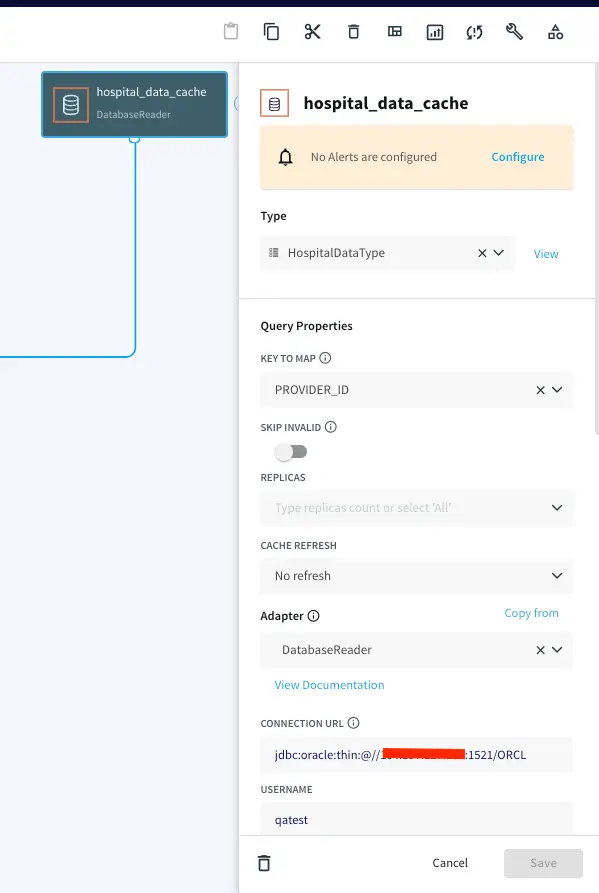
Since the Striim platform is a high-speed, low latency, SQL-based stream processing platform, reference data also needs to be loaded into memory so that it can be joined with the streaming data without slowing things down. This is achieved through the use of the Cache component. Within the Striim platform, caches are backed by a distributed in-memory data grid that can contain millions of reference items distributed around a Striim cluster. Caches can be loaded from database queries, Hadoop, or files, and maintain data in-memory so that joining with them can be very fast. In this example, shown below, the cache is loaded with a query on the SalesRep table using the Striim DatabaseReader.

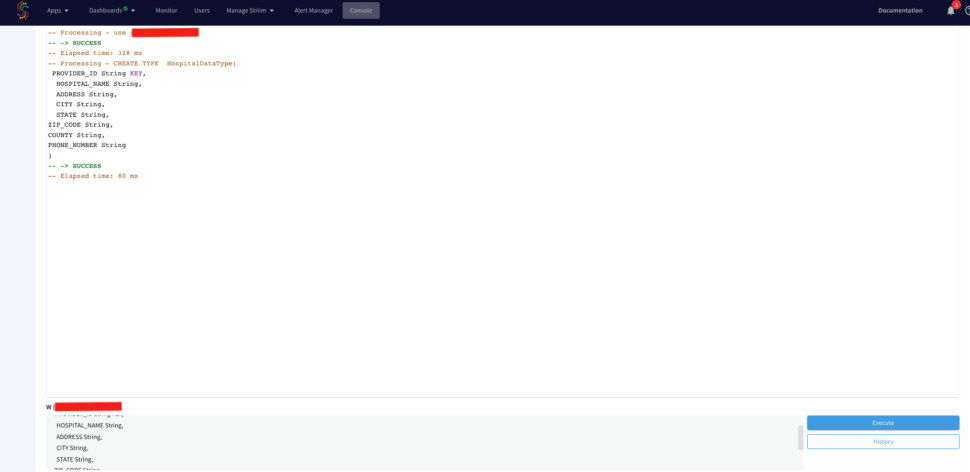
First we will define a cache type from the console. Run the following query from your console.

				
					CREATE TYPE  HospitalDataType(
PROVIDER_ID String KEY,
HOSPITAL_NAME String,
ADDRESS String,
CITY String,
STATE String,
ZIP_CODE String,
COUNTY String,
PHONE_NUMBER String
);


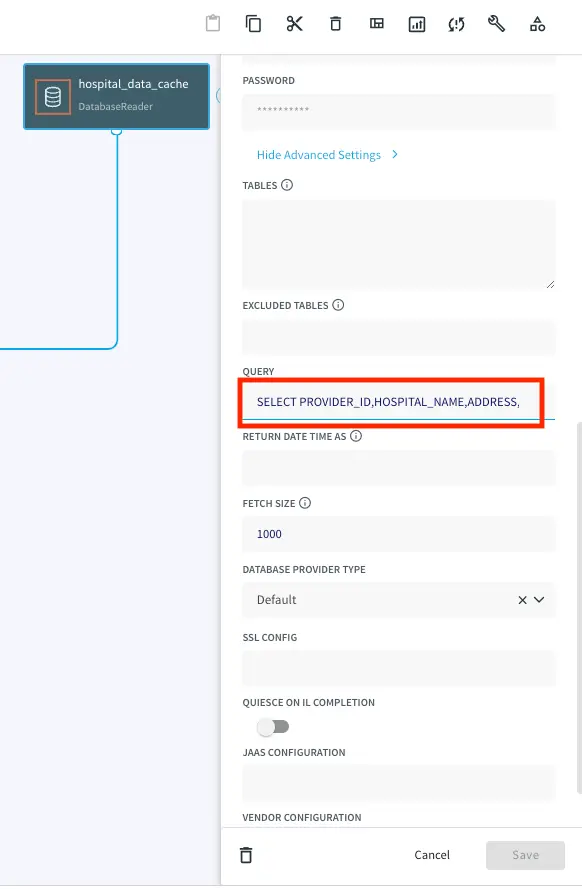
Now, drag a DB Cache component from the list of Striim Components on the left and enter your database details. The table will be queried to join with the streaming data.

Query:

				
					SELECT PROVIDER_ID,HOSPITAL_NAME,ADDRESS,CITY,STATE,ZIP_CODE,COUNTY,PHONE_NUMBER FROM QATEST2.HOSPITAL_DATA;


Step 6: Joining Streaming and Cache Data For Real Time Transforming and Enrichment With SQL

We can process and enrich data-in-motion using continuous queries written in Striim’s SQL-based stream processing language. Using a SQL-based language is intuitive for data processing tasks, and most common SQL constructs can be utilized in a streaming environment. The main differences between using SQL for stream processing, and its more traditional use as a database query language, are that all processing is in-memory, and data is processed continuously, such that every event on an input data stream to a query can result in an output.

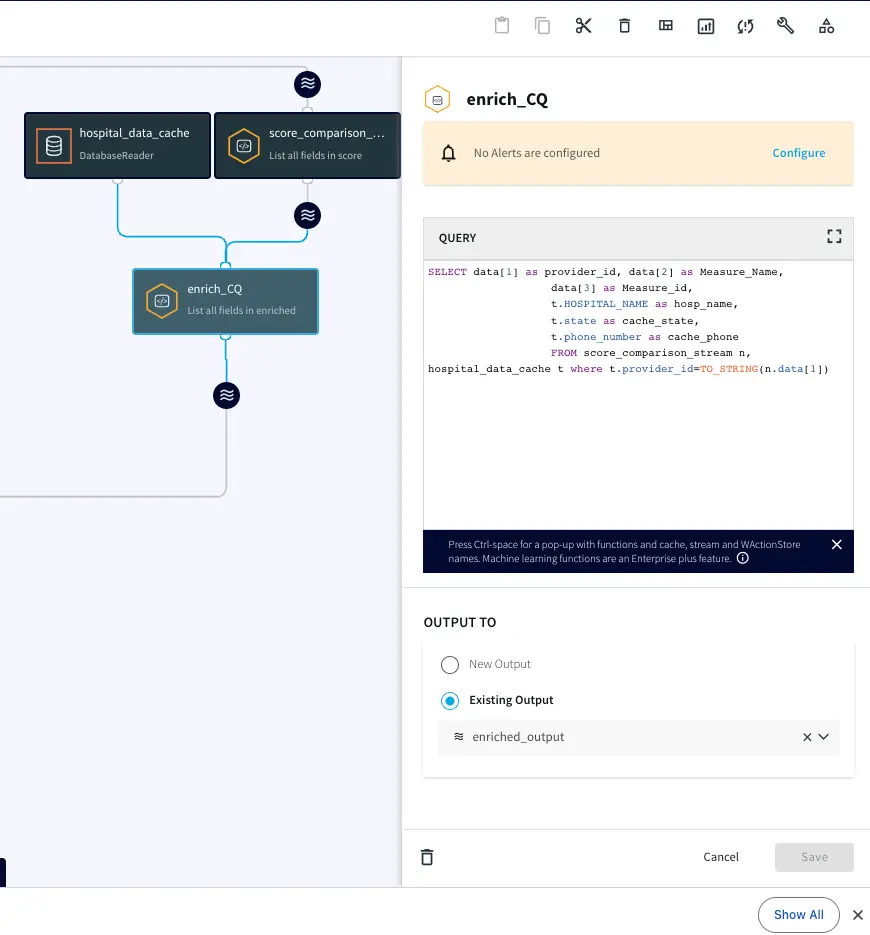
This is the query we will use to process and enrich the incoming data stream:

				
					SELECT data[1] as provider_id, data[2] as Measure_Name, data[3] as Measure_id,
t.HOSPITAL_NAME as hosp_name,
t.state as cache_state, 
t.phone_number as cache_phone
FROM score_comparison_stream n, hospital_data_cache t where t.provider_id=TO_STRING(n.data[1]);


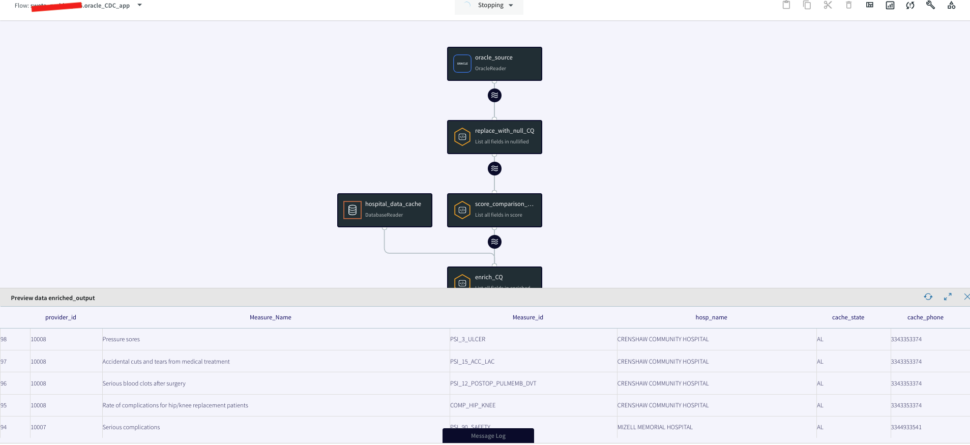
In this query, we enriched our streaming data using cache data about hospital details. The result of this query is to continuously output enriched (denormalized) events, shown below, for every CDC event that occurs for the HOSPITAL_COMPLICATIONS_DATA table. So with this approach we can join streams from an Oracle Change Data Capture reader with cached data for enrichment.

Step 7: Loading the Enriched Data to the Cloud for Real Time Analytics

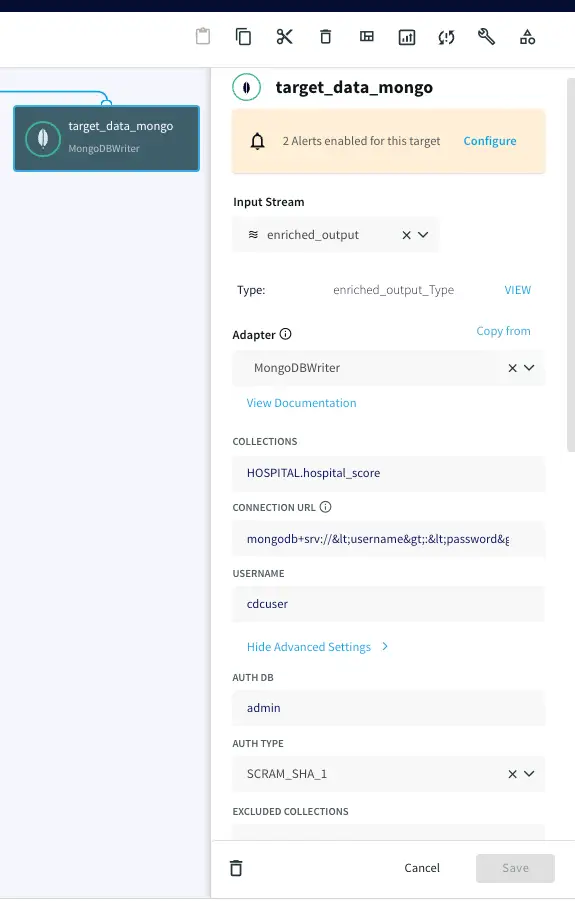
Now the Oracle CDC (Oracle change data capture) data, streamed and enriched through Striim, can be stored simultaneously in NoSQL Mongodb using Mongodb writer. Enter the connection url for your mongodb Nosql database in the following format and enter your username, password and collections name.

mongodb+srv://&lt;username&gt;:&lt;password&gt;<hostname>/

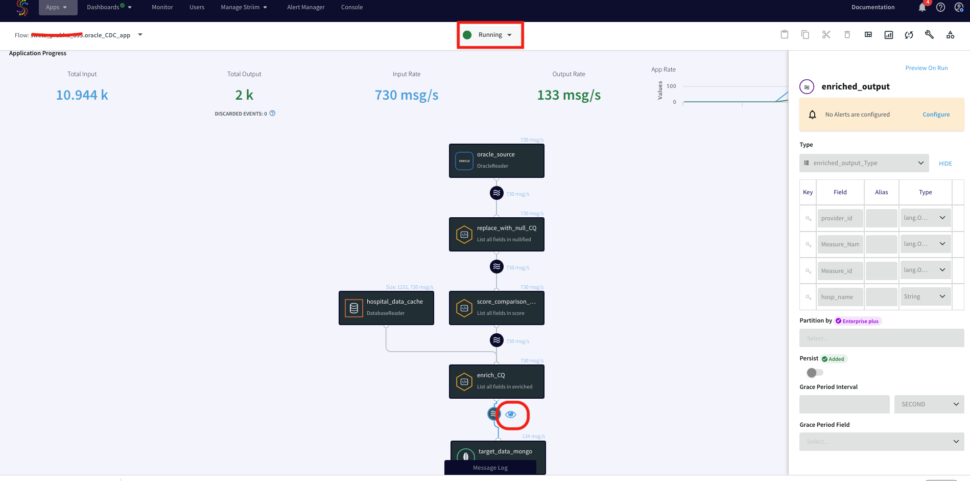
Step 8: Running the Oracle CDC to Mongodb streaming application

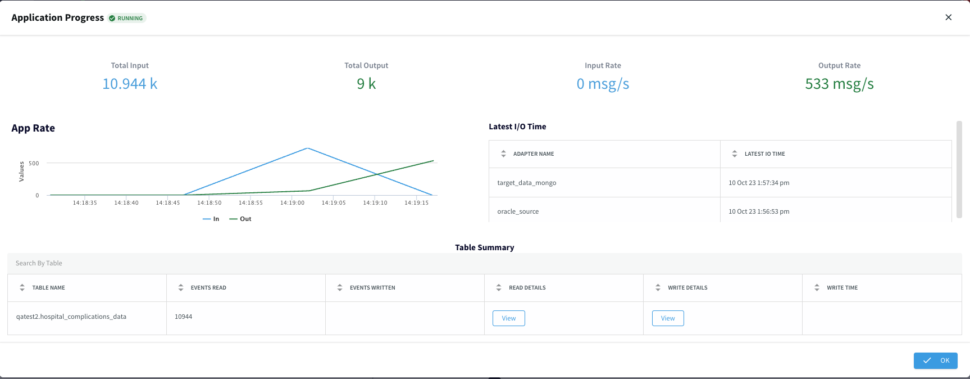
Now that the striim app is configured, you will deploy and run the CDC application. You can also download the TQL file (passphrase: striimrecipes) from our github repository and configure your own source and targets. Import the csv file to HOSPITAL_COMPLICATIONS_DATA table on your source database after the striim app has started running. The Change data capture is streamed through the various components for enrichment and processing. You can click on the ‘eye’ next to each stream component to see the data in real-time.
Using Kafka for Streaming Replay and Application Decoupling

The enriched stream of order events can be backed by or published to Kafka for stream persistence, laying the foundation for streaming replay and application decoupling. Striim’s native integration with Apache Kafka makes it quick and easy to leverage Kafka to make every data source re-playable, enabling recovery even for streaming sources that cannot be rewound. This also acts to decouple applications, enabling multiple applications to be powered by the same data source, and for new applications, caches or views to be added later.

Streaming SQL for Aggregates

We can further use Striim’s Streaming SQL on the denormalized data to make a real time stream of summary metrics about the events being processed available to Striim Real-Time Dashboards and other applications. For example, to create a running count of each measure_id in the last hour, from the stream of enriched orders, you would use a window, and the familiar group by clause.

				
					CREATE WINDOW IncidentWindow
OVER EnrichCQ
KEEP WITHIN 1 HOUR
PARTITION BY Measure_id;he familiar group by clause.
SELECT Measure_id,
COUNT(*) as MeasureCount,
FROM IncidentWindow
GROUP BY Measure_id;


Monitoring

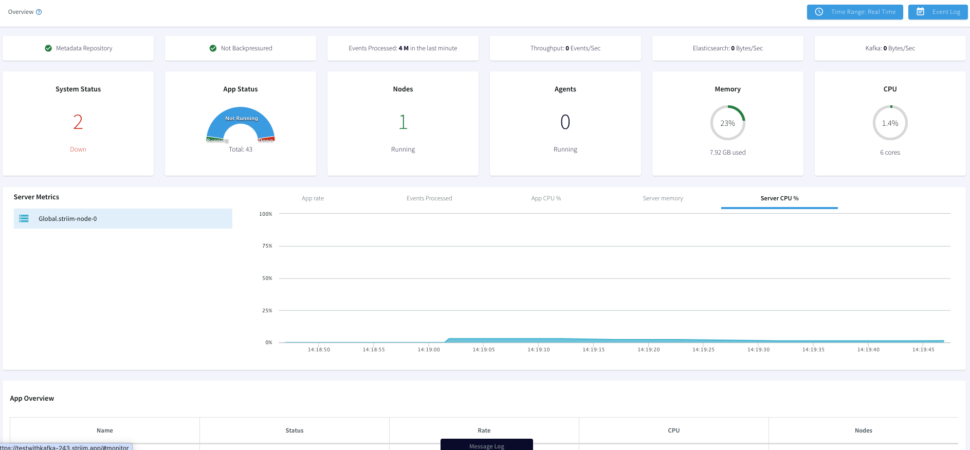
With the Striim Monitoring Web UI we can now monitor our data pipeline with real-time information for the cluster, application components, servers, and agents. The Main monitor page allows to visualize summary statistics for Events

Processed, App CPU%, Server Memory, or Server CPU%. Below the Monitor App page displays our App Resources, Performance and Components.

Summary

In this blog post, we discussed how we can use Striim to:

  1. Perform Oracle Change Data Capture to stream data base changes in real-time

  2. Use streaming SQL and caches to easily denormalize data in order to make relevant data available together

  3. Load streaming enriched data to Mongodb for real-time analytics

  4. Use Kafka for persistent streams

  5. Create rolling aggregates with streaming SQL

  6. Continuously monitor data pipelines

Wrapping Up

Striim’s power is in its ability to ingest data from various sources and stream it to the same (or different) destinations. This means data going through Striim is held to the same standard of replication, monitoring, and reliability.


In conclusion, this recipe showcased a shift from batch ETL to event-driven distributed stream processing. By capturing Oracle change data events in real-time, enriching them through in-memory, SQL-based denormalization, and seamlessly delivering to the Azure Cloud, we achieved scalable, cost-effective analytics without disrupting the source database. Moreover, the enriched events, optionally supported by Kafka, offer the flexibility to incrementally integrate additional event-driven applications or services.

To give anything you’ve seen in this recipe a try, sign up for our developer edition or sign up for Striim Cloud free trial.

An Overview of Reverse ETL: A New Approach to Make Your Operational Teams More Data-Driven

data silo stats

Consider the following stats: the 2020 Vena Industry Benchmark Report found that 57% of finance teams see data silos as a challenge; Treasure Data’s Customer Journey Report noted 47% of marketers find it hard to access their information due to data silos, and a Forrester study stated that 51% of sales professionals aren’t satisfied with how their organizations provide customer data. To sum up, non-technical users are struggling with data access. So, what’s causing these data silos?

Most organizations store their data in a data warehouse. Due to the inherent structure of the extract, transform, and load (ETL) process, this data is mainly used by data scientists, data engineers, and data analysts. These roles do their best to provide data to other non-data departments like customer success, sales, and marketing. However, these non-data departments need a better form of data access and analytical insights. That’s where reverse ETL can be a game-changer.

Reverse ETL is a new addition to the modern data ecosystem that can make organizations more data-driven. It empowers operational teams to get access to transformed data in their day-to-day business platforms, such as ERPs, CRMs, and MarTech tools.

What is ETL vs. Reverse ETL?

How does Reverse ETL work?

Why Should You Adopt Reverse ETL?

Beat Your Competition with a Personalized Customer Experience

What Is ETL vs. Reverse ETL?

The ETL process takes data from a source, such as customer touchpoints (e.g., CRM), processes/transforms this data, then stores it at a target, which is usually a data warehouse. The reverse ETL does the opposite by swapping the source and destination, i.e., it takes data from the data warehouse and sends it to operational business platforms.

Another difference between ETL and reverse ETL is their approach to data transformations. With ETL, data engineers perform data transformation before loading data into a data warehouse. This data can be used by data scientists and data analysts who analyze it for different purposes, such as building reports and dashboards.

In reverse ETL, data engineers perform data transformation on the data in the data warehouse so that third-party tools can use it immediately. This data is used by marketers, sales professionals, customer success managers, and other non-data roles to make data-driven decisions.

For instance, your BI report shows cost per lead (CPL) data that you need to send to a CRM system. In that case, your data engineer has to perform data transformations via SQL in your data warehouse. This transformation isolates your CPL data, formats it for your on-site platform, and adds it into the CRM, so your marketing experts can use this data for their campaigns.

How Does Reverse ETL Work?

Reverse ETL solutions deliver real-time data to operational and business platforms (like Salesforce, Intercom, Zendesk, MailChimp, etc.). It is a process that turns your data warehouse into a data source and the operational and business platforms into a data destination. Making data readily available to these platforms can give your front-line teams a 360-degree view of customer data. They can use data-driven decision-making for personalized marketing campaigns, smart ad targeting, proactive customer feedback, and other use cases.
The modern data stack
The modern data stack. Strim (a real-time data integration and streaming ETL tool) continuously feeds data to your cloud data warehouse, where it can be processed and analyzed by members of the data team. Reverse ETL activates your data, making it accessible in platforms used by your front-line teams.

One might wonder: why are we moving the data back to those SaaS tools after moving data from them to data warehouses? That’s because sometimes, data warehouses can fail to address data silos.

Your key business metrics might be isolated in your data warehouse, limiting your non-data departments from making the most of your data. With traditional ETL, these departments are highly dependent on your data teams. They have to ask data analysts to send a report every time they need relevant insights. Likewise, once they add a new SaaS tool to their workflow, they rely on your data engineer to write custom API connectors. These issues can slow the speed of data access and availability for your front-line business users. Fortunately, reverse ETL can plug this gap.

Reverse ETL can help you to sync your KPIs (e.g., customer lifetime value) with your operational platforms. It ensures your departments can get real-time and accurate insights to pave the way for data-driven decision-making.

Why Should You Adopt Reverse ETL?

Reverse ETL solves a myriad of issues by democratizing data access, saving your data resources, and automating workflows.

It democratizes data beyond the data team

Reverse ETL enables data teams to channel data insights to other operational business teams in their usual workflow. Data becomes accessible and actionable because it is streamed directly from the data warehouse to platforms like CRMs, advertising, marketing automation, and customer support ticketing systems.

Providing more in-depth knowledge to the front-line team, such as your customer success team, can help your team members to make better decisions. It ensures that your front-line personnel are now equipped with comprehensive insights that can help them to personalize the customer experience. For instance, your data science team used complex modeling to segment your customer data, which is updated every week. Your customer success team can use reverse ETL to import this data automatically to an email platform and send personalized emails.

It reduces the engineering burden on data engineers

Traditionally, data engineers will have to build API connectors to channel data from the data warehouse to the operational business platforms. These API connectors come with a myriad of challenges, which include:

  1. Writing APIs and maintaining them is challenging for data engineers.
  2. It can take a few days to map fields from a source of truth (e.g.,data lake) to a SaaS app.
  3. Often, these APIs are unable to process real-time data transfer.

Reverse ETL is designed to address these challenges. For starters, these reverse ETL tools come with built-in connectors. For this reason, data teams don’t have to write API connectors and maintain them. Previously, data teams might have only written a limited number of connectors. However, reverse ETL’s out-of-the-box connectors mean that companies can send data into more systems now.

Moreover, ETL tools consist of a visual interface that allows you to populate SaaS fields automatically. Reverse ETL tools can help you to define what triggers the movement of data between your data warehouse and operational business platforms to move data in real time.

As a result, you can save your data engineers’ time, and they can now turn their focus to other pressing data issues.

It automates and distributes data flow across multiple apps

Reverse ETL eliminates the manual process of switching between apps to get information. Reverse ETL feeds relevant KPIs and metrics to the operational systems at a pre-established frequency. This way, it can automate a number of workflows.
For instance, consider that your sales team uses Zendesk Sell as a CRM. One of the things that they do manually is to track freemium accounts and look for ways to turn them into paid users. For this purpose, your account managers need to jump back and forth between BI and CRM tools to view where these users are placed in the sales funnel.

What reverse ETL can do is to load your product data into Zendesk from your data warehouse and generate an alert that notifies the account managers as soon as a freemium account crosses a defined threshold in your sales funnel.

While Reverse ETL has many benefits, the long-term payoff is in an improved customer experience. By addressing ETL’s woes, reverse ETL puts contextual information at the fingertips of your customer-facing teams. The end result is a seamless, personalized service that enriches the customer experience.

Beat Your Competition With a Personalized Customer Experience

Every organization wants to get the most value out of the data in their data warehouse — because therein lies the answers to serving customers better and creating hyper-personalized experiences. By feeding comprehensive insights to the front-line teams, reverse ETL can help you to improve your customer personalization.

Suppose there’s a winter clothing brand that has the data to identify buyers who bought their winter coats last winter. If they want to launch a winter sale for their previous customers, reverse ETL can help their marketing teams to view detailed information from their tools. This is done by pulling the relevant data directly from the data warehouse and placing it in the software they are already using. They can use this data access to work on a hyper-personalized marketing campaign to appeal to those customers. Hence, by using reverse ETL, you can get a unified view of the customer in all your tools.

In many cases, data has a short shelf life, and needs to be acted on quickly. For example, SaaS companies that follow the Product Led Growth (PLG) model continuously collect product usage data. If a user hits a key milestone in product usage, or gets stuck at a certain point, this information can be shared with the sales or customer support teams for personalized outreach and support at exactly the right moment. Waiting hours or days to act on insights may mean a lost customer or upgrade opportunity.

A real-time data pipeline starts with a streaming ETL platform like Striim that continuously delivers data to your data warehouse. Once there, customer data can be synced to your applications to support your customer-facing team members. Real-time data pipelines underpin superior customer experiences and increased revenue.

To learn more about how Striim supports real-time data integration use cases, please get in touch or try Striim for free today.


Stream Data from PostgreSQL to Google BigQuery with Striim Cloud – Part 1

Tutorial

Stream Data from PostgreSQL to Google BigQuery with Striim Cloud – Part 1

Use Striim Cloud to stream data securely from PostgreSQL database into Google BigQuery

Benefits

Operational Analytics
Analyze real-time operational, transactional data from PostgreSQL in BigQuery

Secure Data Transfer
Secure data-at-rest and in-flight with simple SSH tunnel configuration and automatic encryption

Build Real-Time Analytical ModelsUse the power of Real Time Data Streaming to build Real-Time analytical and ML models
On this page

Overview

Striim is a next generation Cloud Data Integration product that offers change data capture (CDC) enabling continuous replication from popular databases
such as Oracle, SQLServer, PostgreSQL and many others.

In addition to CDC connectors, Striim has hundreds of automated adapters for file-based data (logs, xml, csv), IoT data (OPCUA, MQTT), and applications such as Salesforce and SAP. Our SQL-based stream processing engine makes it easy to
enrich and normalize data before it’s written to targets like BigQuery and Snowflake.

Traditionally Data warehouses that required data to be transferred use batch processing but with Striim’s streaming platform data can be replicated in real-time efficiently.

Securing the in-flight data is very important in any real world application. A jump host creates an encrypted public connection into a secure environment.

In this tutorial, we’ll walk you through how to create a secure SSH tunnel between Striim cloud and your on-premise/cloud databases with an example where data is streamed securely from PostgreSQL database into Google
BigQuery
through SSH tunneling.

Core Striim Components

PostgreSQL Reader: PostgreSQL Reader uses the wal2json plugin to read PostgreSQL change data. 1.x releases of wal2jon can not read transactions larger than 1 GB.

Stream: A stream passes one component’s output to one or more other components. For example, a simple flow that only writes to a file might have this sequence

BigQueryWriter: Striim’s BigQueryWriter writes the data from various supported sources into Google’s BigQuery data warehouse to support real time data warehousing and reporting.

(Optional) Step 1: Secure connectivity to your database

Striim provides multiple methods for secure connectivity to your database. For Striim Developer, you can allowlist the IP address in your email invite.

In Striim Cloud, you can either allow your service IP or follow the below steps to configure a jump server.

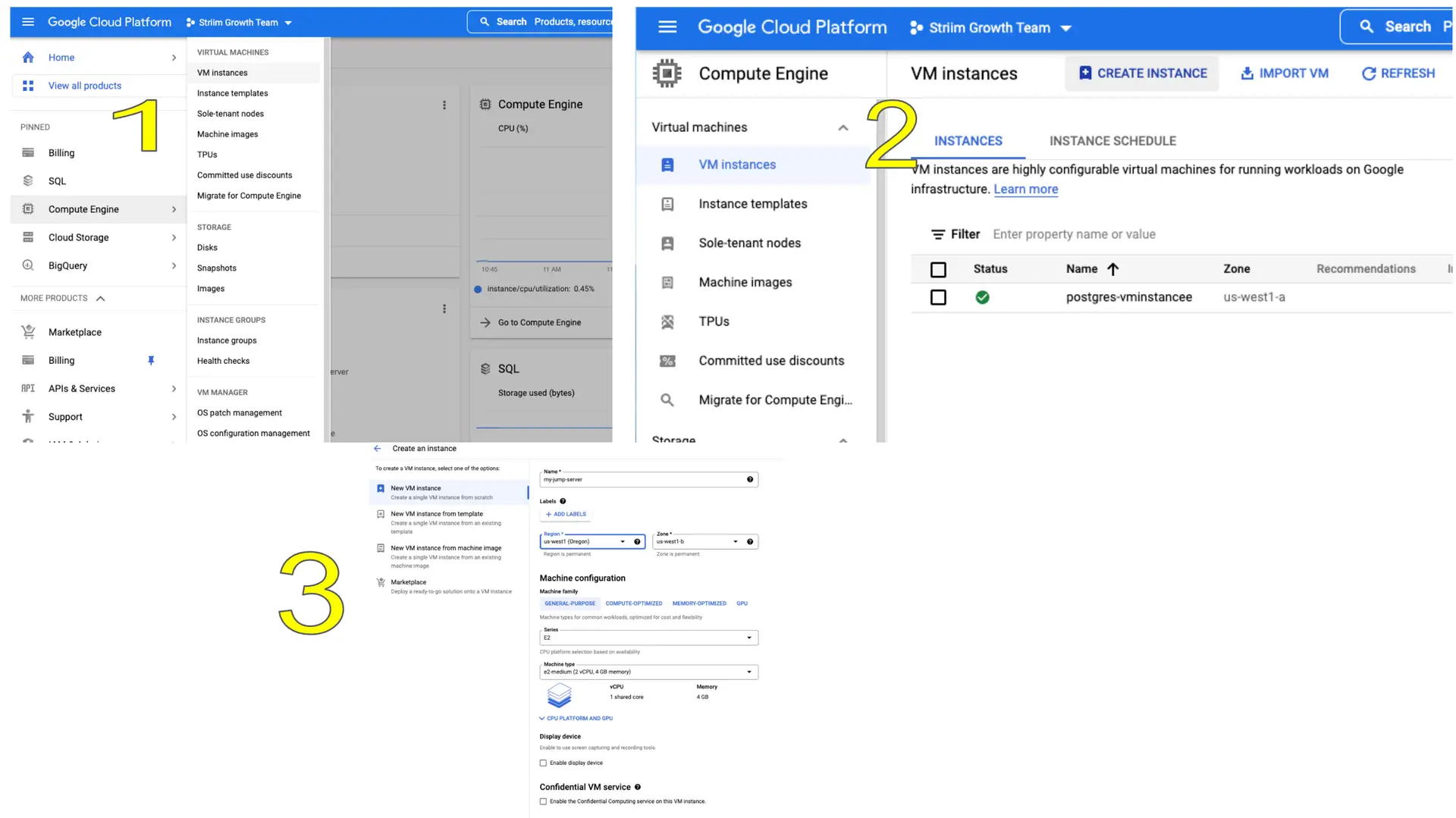
Follow the steps below to set up your jump server on Google Compute Engine:

Go to google cloud console -> Compute Engine -> VM instances and create a new VM instance that would act as the jump server.

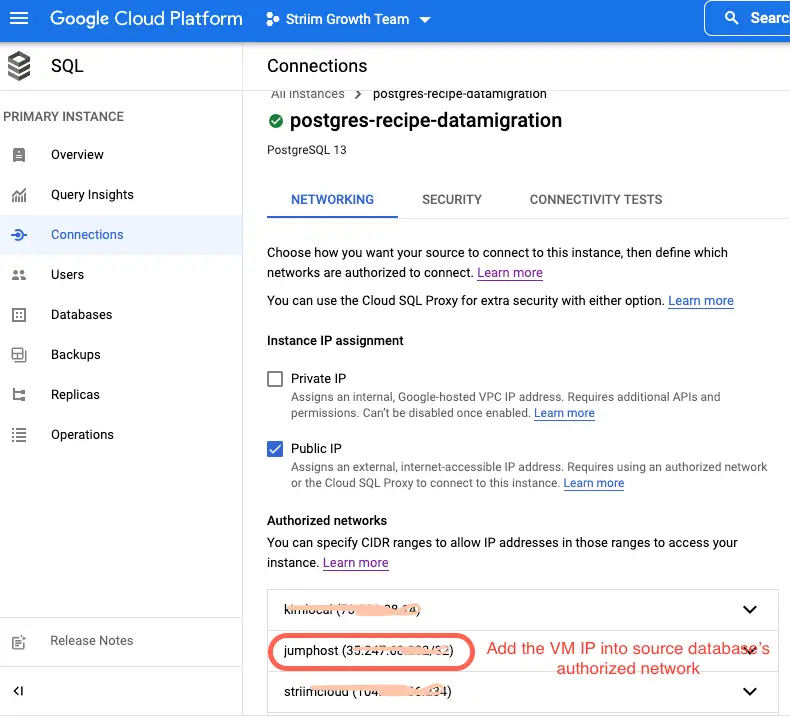
Add the jump server’s IP address to authorized networks of source database, in this case postgres instance

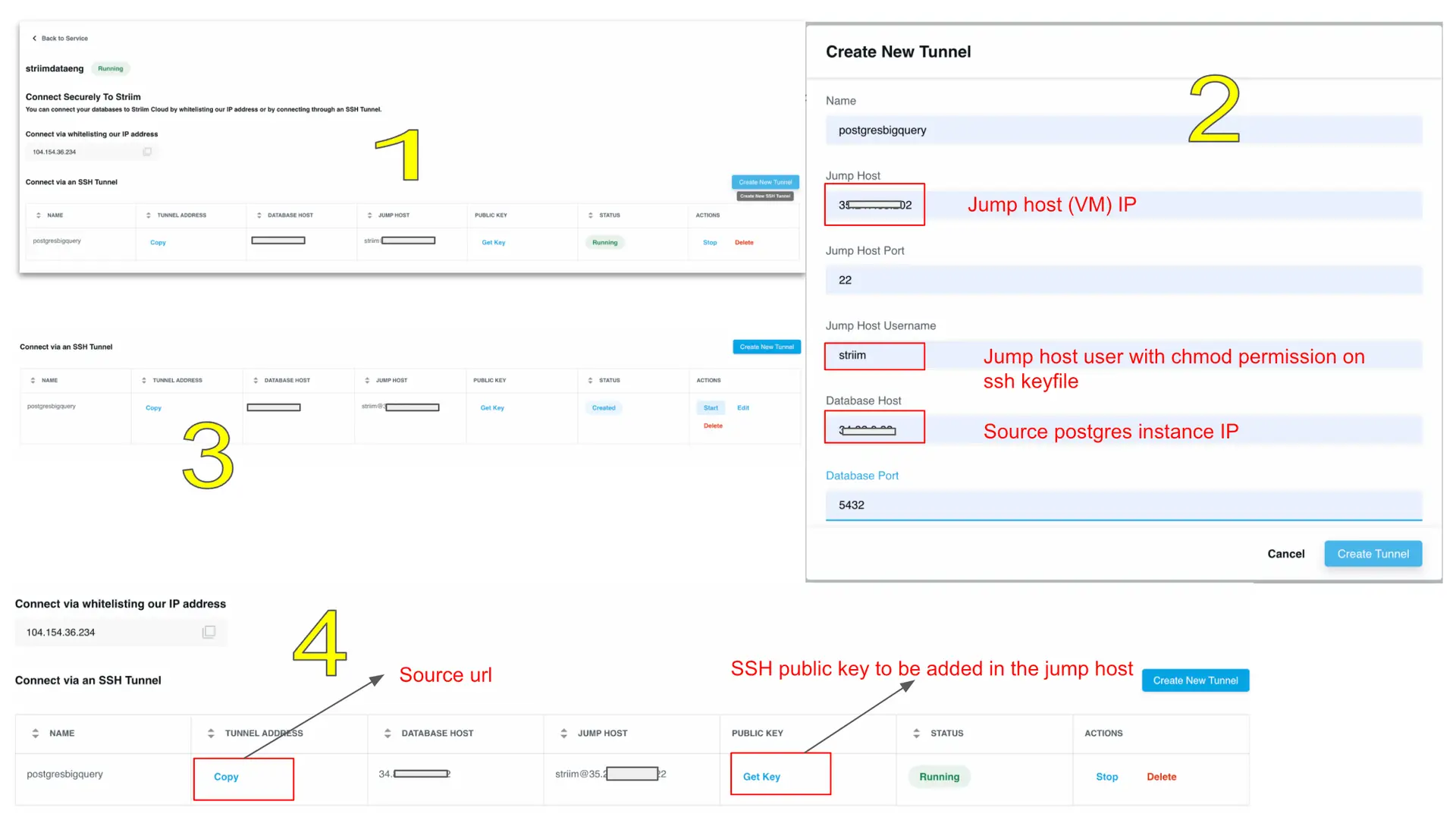
Step 2: Create SSH tunnel on Striim Cloud

Once the jump host is set up, an SSH tunnel will be created from Striim Cloud UI to establish a connection to the source database through the jump server.

Follow the steps below to configure an SSH tunnel between source database and Striim cloud:

Go to striim cloud console and launch a service instance. Under security create a new SSH tunnel and configure it as below.

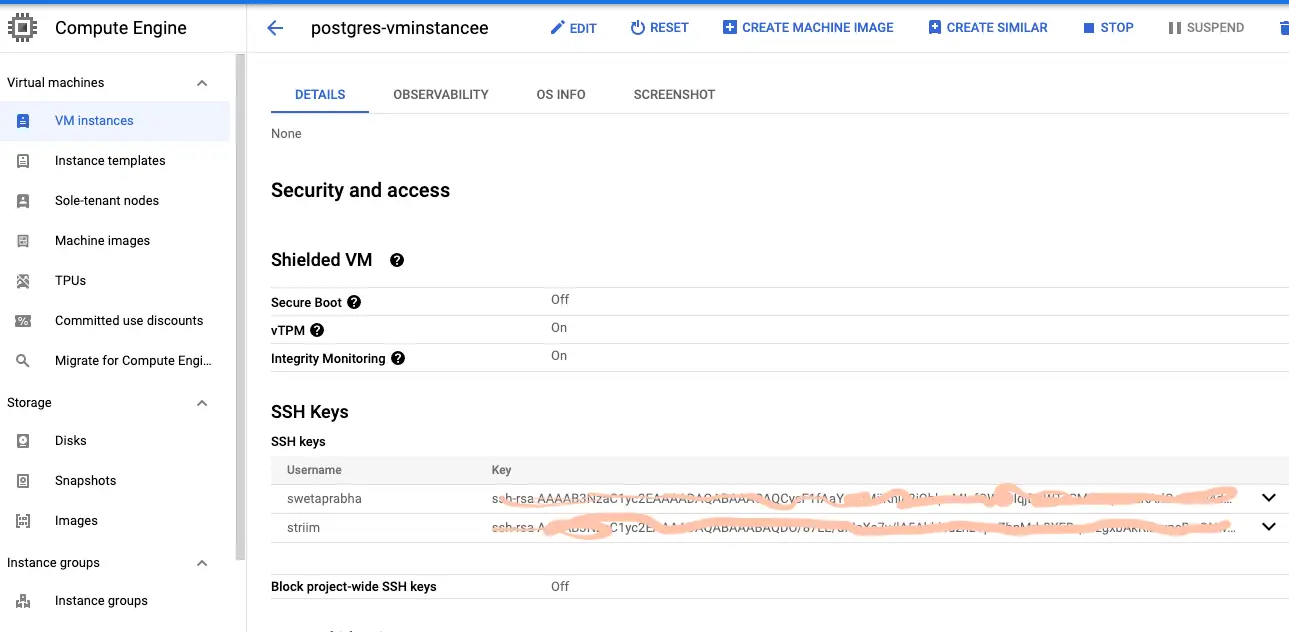
Go to jump server (VM instance) and add the service key copied from the above step’

Now Striim server is integrated with both postgres and Bigquery and we are ready to configure Striim app for data migration.

Step 3: Launch Striim Server and Connect the Postgres Instance

For this recipe, we will host our app in Striim Cloud but there is always a free trial to see the power of Striim’s Change Data Capture.

Follow the steps below to connect Striim server to postgres instance containing the source database:

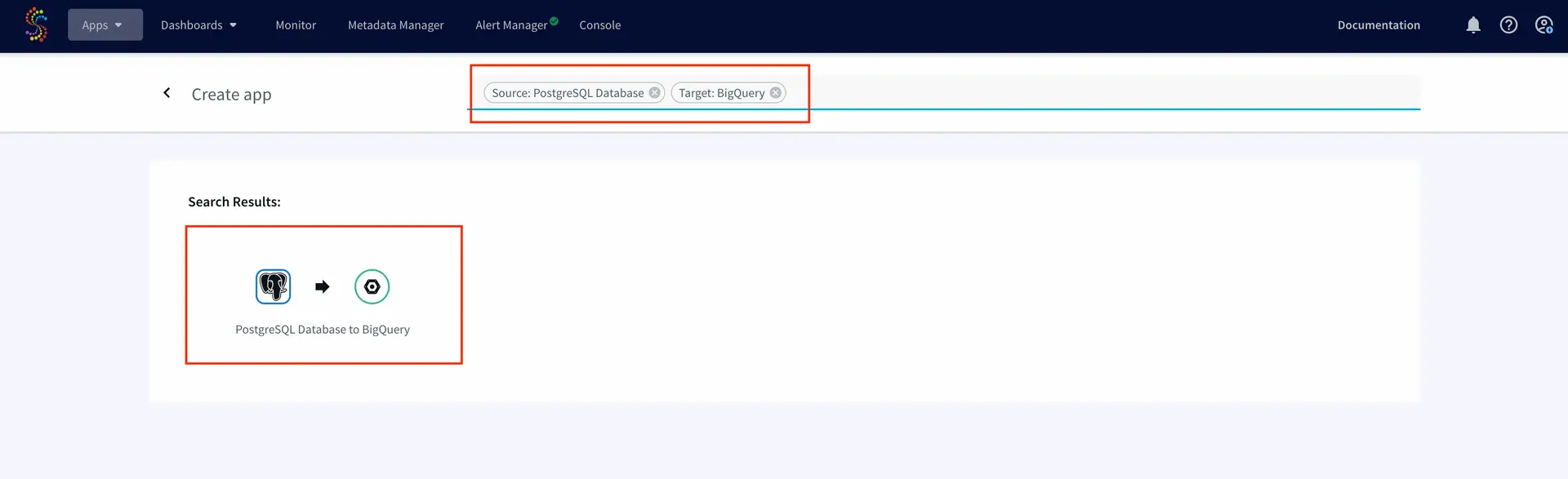
Click on Apps to display the app management screen:

Click on Create app :

Select Source and Target under create app from wizard:

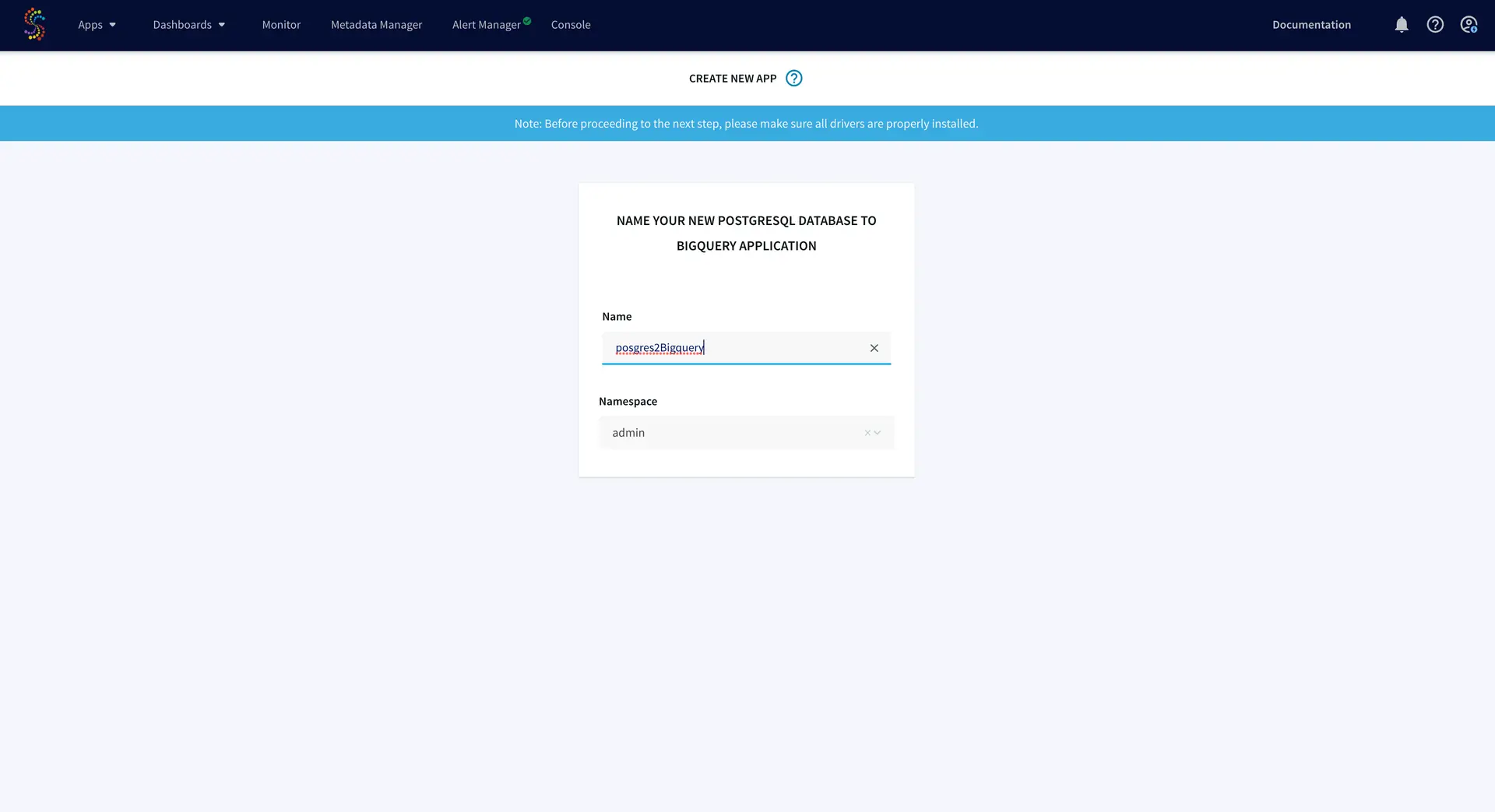
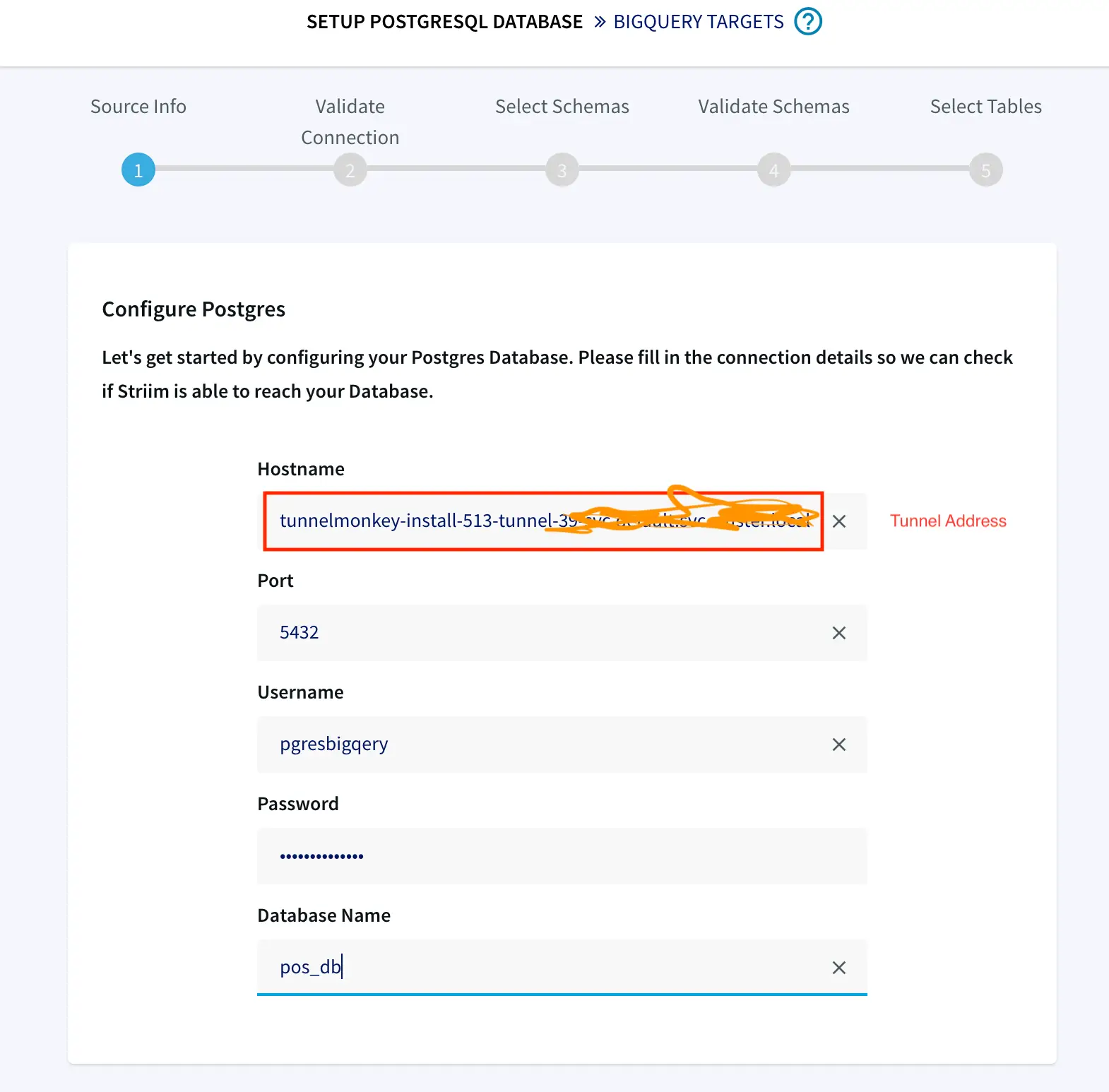
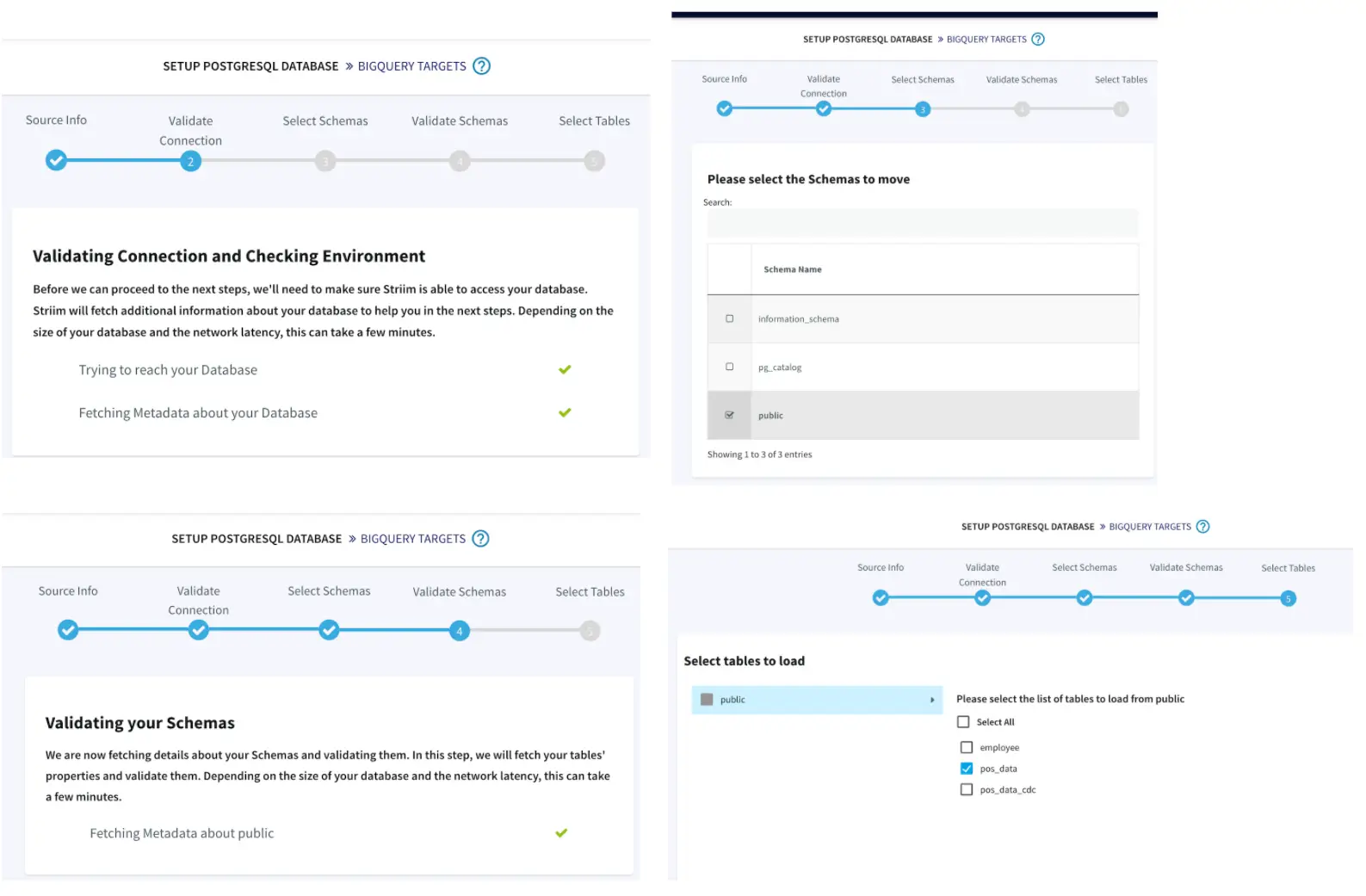
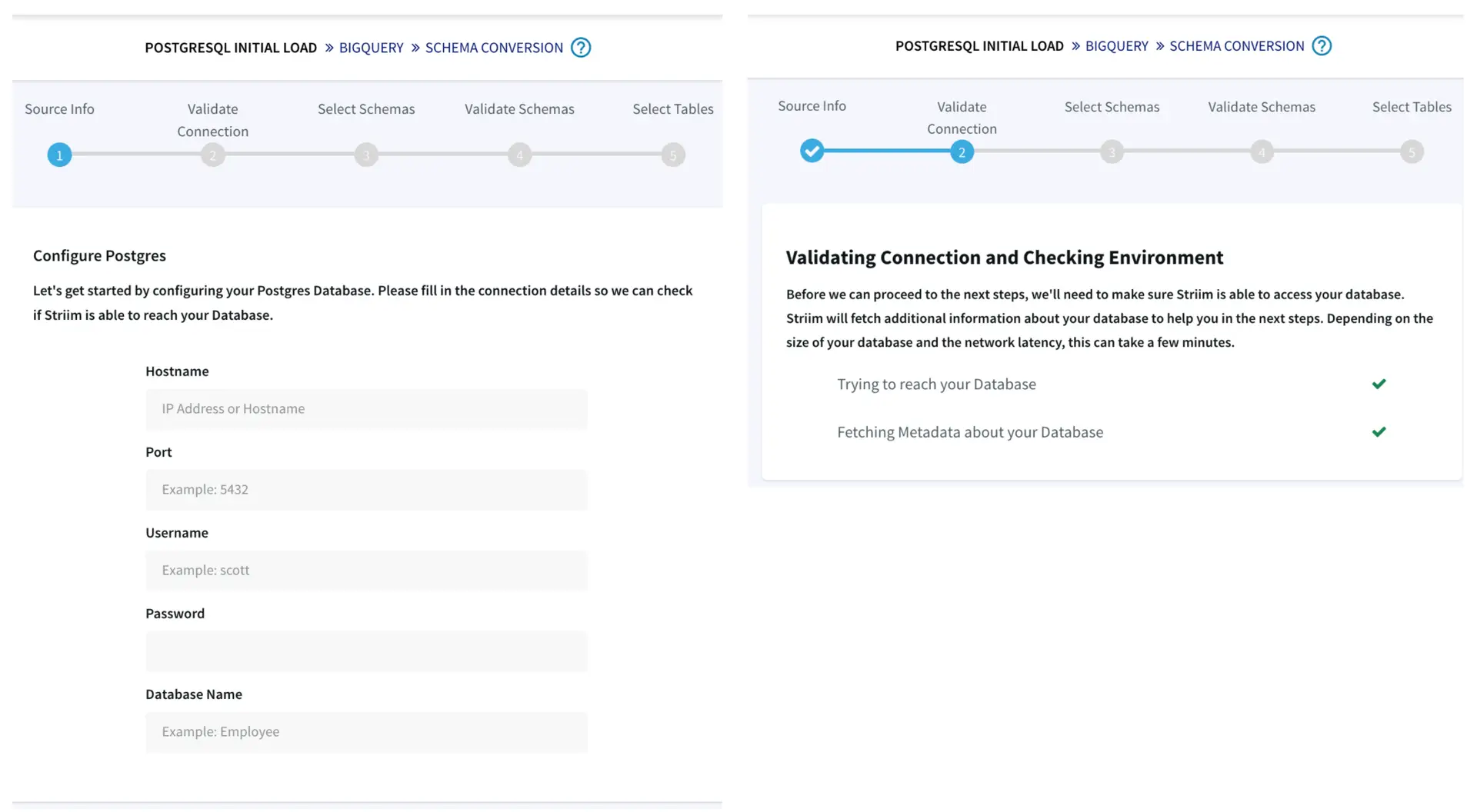
Give a name to your app and establish the connection between striim server and postgres instance.


Once the connection between posgres and striim server is established, we will link the target data warehouse, in this case Google Bigquery. Striim also offers schema conversion feature where table schema can be validated for both source and target that
helps in migration of source schema to the target database.


Step 4: Targeting Google Bigquery

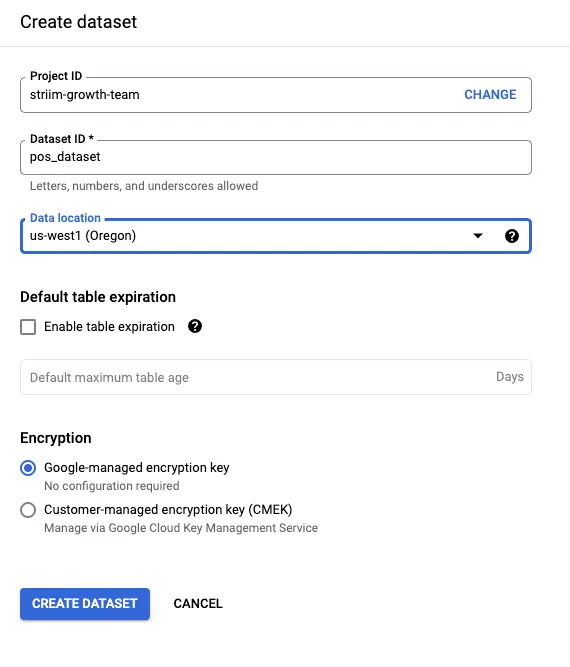
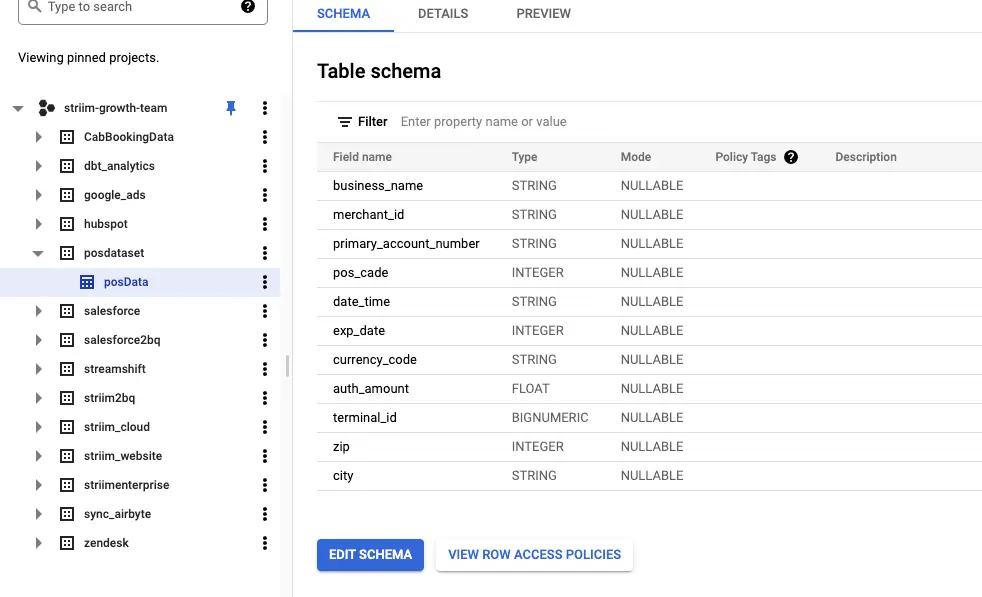
You have to make sure the instance of Bigquery mirrors the tables in the source database.This can be done from Google Cloud Console interface.Under the project inside Google Bigquery, create the dataset and an emty table containing all the columns that is populated
with data migrated from postgres database.

Follow the steps below to create a new dataset in Bigquery and integrating with Striim app using a service account:

Create a dataset with tables mirroring the source schema.

Go back to app wizard and enter the service key of your BigQuery instance to connect the app with target data warehouse

Now Striim server is integrated with both postgres and Bigquery and we are ready to configure Striim app for data migration.

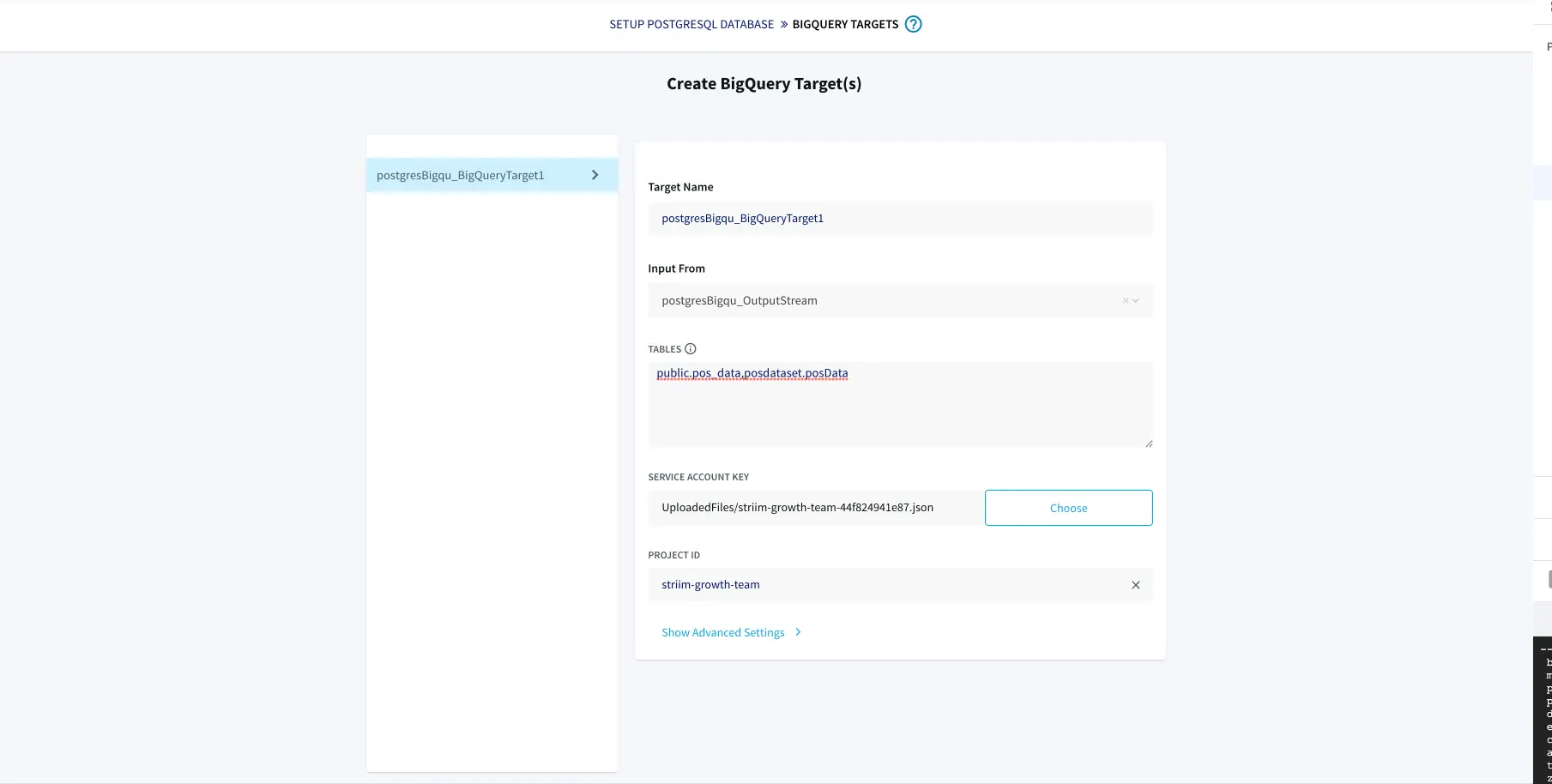
Step 5: Configure Striim app using UI

With source, target and Striim server integrated for data migration, a few configuration on the easy to understand app UI is made before deploying and running the app.

  • Click on source and add the connection url (tunnel address), user name and password in proper format:
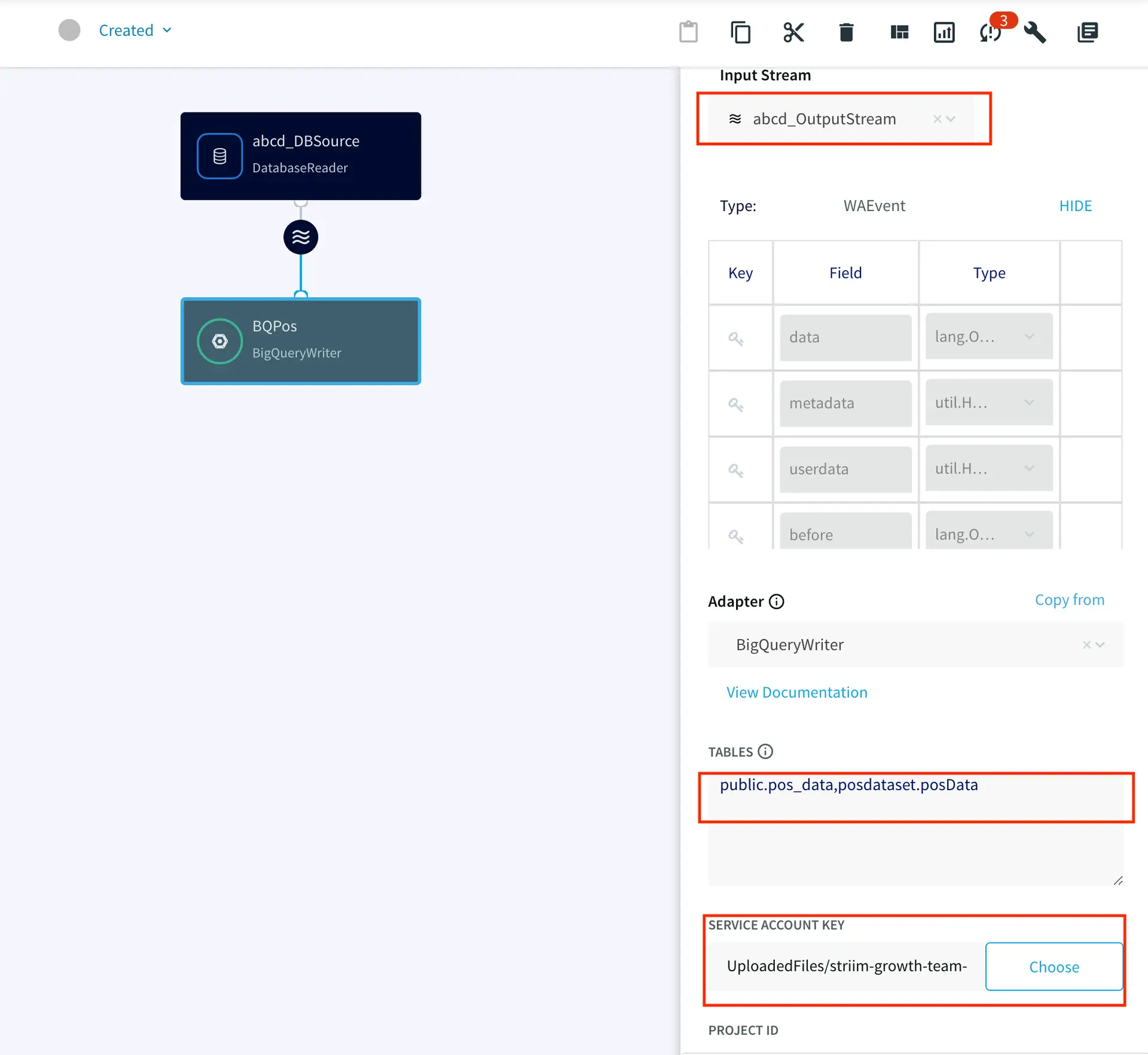
  • Click on target and add the input stream, source and target tables and upload the service key for Bigquery instance

    Now the app is good to go for deployment and data migration.

Step 6: Deploy and Run the Striim app for Fast Data Migration

In this section you will deploy and run the final app to visualize the power of Change Data Capture in Striim’s next generation technology.

Setting up the Postgres to BigQuery Streaming App

Step 1: Follow the recipe to configure your jump server and SSh tunnel to Striim cloud.

Step 2: Set up your Postgres Source and BigQuery Target.

Step 3: Create Postgres to BQ Striim app using wizard as shown in the recipe

Step 4: Migrate your data from source to Target by deploying your striim app

Wrapping Up: Start Your Free Trial

Our tutorial showed you how easy it is to migrate data from PostgreSQL to Google BigQuery, a leading cloud data warehouse. By constantly moving your data into BigQuery, you could now start building analytics or machine
learning models on top, all with
minimal impact to your current systems. You could also start ingesting and normalizing more datasets with Striim to fully take advantage of your data when combined with the power of BigQuery.

As always, feel free to reach out to our integration experts to schedule a demo, or try Striim for free here.

Tools you need

Striim

Striim’s unified data integration and streaming platform connects clouds, data and applications.

PostgreSQL

PostgreSQL is an open-source relational database management system.

Google BigQuery

BigQuery is a serverless, highly scalable multicloud data warehouse.

Google Compute Engine

Google Compute Engine offers a scalable number of Virtual Machines. In this use case a VM instance will serve as jump host for SSH tunneling

What Is DataOps and How Can It Add Value to Your Organization?

data

According to a study by Experian, 98% of companies rely on data to enhance their customer experience. In today’s data age, getting data analytics right is more essential than ever. Organizations compete based on how effective their data-driven insights are at helping them with informed decision-making.

However, executing analytics projects is a bane for many. According to Gartner, more than 60% of data analytics projects bite the dust due to fast-moving and complex data landscapes.

Recognizing the modern data challenges, organizations are adopting DataOps to help them handle enterprise-level datasets, improve data quality, build more trust in their data, and exercise greater control over their data storage and processes.

What Is DataOps?

DataOps is an integrated and Agile process-oriented methodology that helps you develop and deliver analytics. It is aimed at improving the management of data throughout the organization.

There are multiple definitions of DataOps. Some think it’s a magic bullet that solves all data management issues. Others think that it just introduces DevOps practices for building data pipelines. However, DataOps has a broader scope that goes beyond data engineering. Here’s how we define it:

DataOps is an umbrella term that can include processes (e.g., data ingestion), practices (e.g., automation of data processes), frameworks (e.g., enabling technologies like AI), and technologies (e.g., a data pipeline tool) that help organizations to plan, build, and manage distributed and complex data architectures. This includes management, communication, integration and development of data analytics solutions, such as dashboards, reports, machine learning models, and self-service analytics.

DataOps aims to eliminate silos between data, software development, and DevOps teams. It encourages line-of-business stakeholders to coordinate with data analysts, data scientists, and data engineers.

The goal of DataOps is to use Agile and DevOps methodologies to ensure that data management aligns with business goals. For instance, an organization sets a target to increase their lead conversion rate. DataOps can make a difference by creating an infrastructure that provides real-time insights to the marketing team, which can convert more leads.

In this scenario, an Agile methodology can be useful for data governance, where you can use iterative development to develop a data warehouse. Likewise, it can help data science teams use continuous integration and continuous delivery (CI/CD) to build environments for the analysis and deployment of models.

DataOps Can Handle High Data Volume and Versatility

Companies have to tackle high amounts of data compared to a few years ago. They have to process it in a wide range of formats (e.g., graphs, tables, images), while their frequency of using that data varies, too. For example, some reports might be required daily, while others are needed on a weekly, monthly, or ad-hoc basis. DataOps can handle these different types of data and tackle varying big data challenges.

With the advent of the Internet of Things (IoT), organizations have to tackle the demons of heterogeneous data as well. This data comes from wearable health monitors, connected appliances, and smart home security systems.

To manage the incoming data from different sources, DataOps can use data analytics pipelines to consolidate data into a data warehouse or any other storage medium and perform complex data transformations to provide analytics via graphs and charts.

DataOps can use statistical process control (SPC) — a lean manufacturing method — to improve data quality. This includes testing data coming from data pipelines, verifying its status as valid and complete, and meeting the defined statistical limits. It enforces the continuous testing of data from sources to users by running tests to monitor inputs and outputs and ensure business logic remains consistent. In case something goes wrong, SPC notifies data teams with automated alerts. This saves them time as they don’t have to manually check data throughout the data lifecycle.

DataOps Can Secure Cloud Data

Around 75% of companies are expected to move their databases into the cloud by 2022. However, many organizations struggle with data protection after migrating their data to the cloud. According to a survey, 70% of companies have to deal with a security breach in the public cloud.

DataOps borrows some of its elements from DevSecOps — short for development, security, and operations. This fusion is also known as DataSecOps, which can help with data protection. DataSecOps brings a security-focused approach where security is embedded in all data operations and projects from the start.

DataSecOps offers security by focusing on five areas:

  1. Awareness – Improve the understanding of data sets and their sensitivity by using data dictionaries or data catalogs.
  2. Policy – Incorporate and uphold a data access policy that makes it crystal clear who can access data and what form of data they can access.
  3. Anonymization – Introduce anonymization into the data access’ security layer, ensuring that business users, who aren’t supposed to view personal identifiable information (PII) data, aren’t able to see it in the first place.
  4. Authentication – Provide a user interface for managing data access and tools.
  5. Audit – Offer the ability to track, report, and audit access when required, as well as develop and monitor access control.

DataOps Can Improve Time to Value

The time it takes to turn a raw idea into something of value is integral to businesses. DataOps reduces lead time with its Agile-based development processes. The waiting time across phases decreases too. In addition, the approach of building and making releases in small fragments enables solutions to be implemented in a gradual manner.

If you develop data solutions at a slow pace, then it might lead to shadow IT. Shadow IT happens when other departments build their own solutions without the approval or involvement of the IT department.

DataOps can increase your development speed by getting feedback to you faster via sprints. Sprints are short iterations where a team is tasked with completing a specific amount of work. A sprint review occurs at the end of each sprint, which allows continuous feedback from data consumers. This feedback also brings more clarity by allowing the feedback to steer the development and create a solution that your data consumer wants.

DataOps Can Automate Repetitive and Menial Tasks

Around 18% of a data engineer’s time is spent on troubleshooting. DataOps brings a focus to automation to help data professionals save time and focus on more valuable high-priority tasks.

Consider one of the most common tasks in the data management lifecycle: data cleaning. Some data professionals have to manually modify and remove data that is incomplete, duplicate, incorrect, or flawed in any way. This process is repetitive and doesn’t require any critical thinking. You can automate it by either setting your customized scripts or installing a built-in data cleaning software.

Some other processes that can be automated include:

  • Simplifying data maintenance tasks like tuning a data warehouse
  • Streamlining data preparation tasks with a tool like KNIME
  • Improving data validation to identify flags and typos, such as types and range

Build Your Own DataOps Architecture with Striim

streaming data pipeline
Striim is a real-time data integration platform that connects over 100 sources and targets across public and private clouds

To develop your own DataOps architecture, you need a reliable set of tools that can help you improve your data flows, especially when it comes to key aspects of DataOps, like data ingestion, data pipelines, data integration, and the use of AI in analytics. Striim is a unified real-time data integration and streaming platform that integrates with over 100 data sources and targets, including databases, message queues, log files, data lakes, and IoT. Striim ensures the continuous flow of data with intelligent data pipelines that span public and private clouds. To learn more about how you can implement DataOps with Striim, get a free demo today

Striim Now Offers Native Integration With Microsoft Azure Cosmos DB

We are excited to announce our new Striim Database Migration Service, StreamShift that provides native integration with Microsoft Azure Cosmos DB. We have worked hard to resolve any pain points around data integration, migration and data analytics for Azure Cosmos DB users. Striim provides a rich user experience, cost effective data movement, enhanced throughput throttling, and flexibility with over 100 native connectors.

Problem

Traditional ETL data movement methods are not suitable for today’s analytics or database migration needs. Batch ETL methods introduce latency by periodically reading from the source data service and writing to target data warehouses or databases after a scheduled time. Any analytics or conclusions made from the target data service are done on old data, delaying business decisions, and potentially creating missed business opportunities. Additionally, we often see a hesitancy to migrate to the cloud where users are concerned of taking any downtime for their mission critical applications. 

Azure Cosmos DB users need native integration that supports relational databases, non-relational and document databases as sources and offers flexibility to fine-tune Azure Cosmos DB target properties.

Striim’s latest integration with Cosmos DB solves the problem

The Striim software platform offers continuous real-time data movement from a wide range of on-premises and cloud-based data sources to Azure. While moving the data, Striim has in-line transformation and processing capability (e.g., denormalization). You can use Striim to move data into the main Azure services, such as Azure Synapse, Azure SQL Database, Azure Cosmos DB, Azure Storage, Azure Event Hubs, Azure Database for MySQL and Azure Database for PostgreSQL, Azure HDInsight, in a consumable form, quickly and continuously. 

Striim offers real-time uninterrupted continuous data replication with automatic data validation, which assures zero data loss and data corruption.

Even though Striim can move data to various other Azure targets, in this blog we will focus on Azure Cosmos DB use cases that were recently released.

Supported sources for Azure Cosmos DB as a target:

Source Target
SQL Azure Cosmos DB
MongoDB Azure Cosmos DB
Cassandra Azure Cosmos DB
Oracle Azure Cosmos DB
MySQL Azure Cosmos DB
PostgreSQL Azure Cosmos DB
Salesforce Azure Cosmos DB
HDFS Azure Cosmos DB
MSJet Azure Cosmos DB

Architecture

The architecture below shows how Striim can replicate data from a range of sources including heterogeneous databases to various targets on Azure. However, this blog will focus on Azure Cosmos DB.

Striim for Azure


Low-Impact Change Data Capture

Striim uses CDC (Change Data Capture) to extract change data from the database’s underlying transaction logs in real time, which minimizes the performance load on the RBMS by eliminating additional queries. 

  • Non-stop, non-intrusive data ingestion for high-volume data
  • Support for data warehouses such as Oracle Exadata, Teradata, Amazon Redshift; and databases such as Oracle, SQL Server, HPE Nonstop, MySQL, PostgreSQL, MongoDB, Amazon RDS for Oracle, Amazon RDS for MySQL
  • Real-time data collection from logs, sensors, Hadoop, and message queues to support operational decision making

Continuous Data Processing and Delivery

  • In-flight transformations – including denormalization, filtering, aggregation, enrichment – to store only the data you need, in the right format 

Built-In Monitoring and Validation

  • Interactive, live dashboards for streaming data pipelines
  • Continuous verification of source and target database consistency
  • Real-time alerts via web, text, email

Use case: Replicating On-premises MongoDB data to Azure Cosmos DB

Let’s take a look at how to migrate data from MongoDB to the Azure Cosmos DB API for MongoDB within Striim. Using the new native Azure Cosmos DB connector users can now set properties like collections, RUs, partition key, exclude collections, batch policy, retry policy, etc. before replication.

To get started, in your Azure Cosmos DB instance, create a database mydb containing the collection employee with the partition key /name.

After installing Striim either locally or through the Azure Marketplace, you can take advantage of the Web UI and wizard-based application development to migrate and replicate data to Azure Cosmos DB in only a few steps.

  1. Choose MongoDB to Azure Cosmos DB app from applications available on Striim
  2. Enter your source MongoDB connection details and select the databases and collections to be moved to Azure Cosmos DB.
  3. Striim users now will have customized options to choose the Azure Cosmos DB target APIs between Mongo, Cassandra, or Core (SQL). Throughput (RU/s) calculation and cost can be calculated using Azure Cosmos DB capacity calculator and appropriate partition key must be chosen for the target. The details can be referred directly within Striim’s configuration wizard.
  4. Enter the target Azure Cosmos DB connection details and map the MongoDB to Azure Cosmos DB collections.

That’s it! Striim will handle the rest from validating the connection string and properties required for the data pipeline to automatically moving the data validating the data on the target. After completing the wizard, you’ll arrive at the Flow Designer page, and start seeing data replicated in real time.

Let’s take another example, say we have an on-premises Oracle database with the customer table shown below. While migrating this Oracle database to Azure Cosmos DB we may want to mask or hide the customer Telephone number and SSN columns. 

In two simple steps, we can achieve this in flight with Striim. 

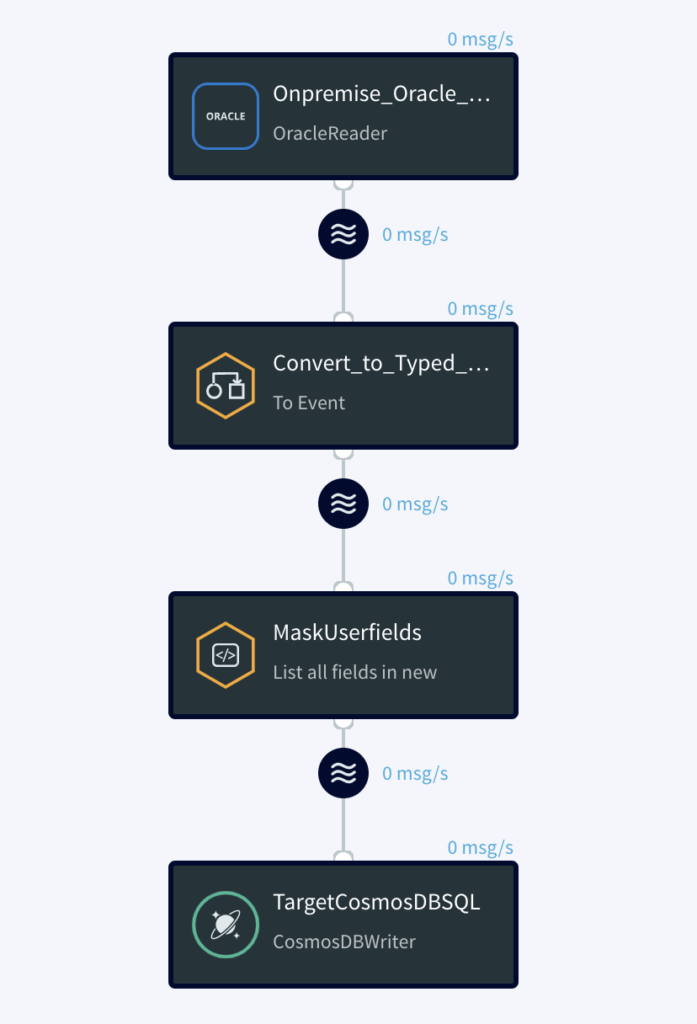
Step 1 – Create App: Within the Striim UI create an application with a source Oracle Reader. In the left-hand menu bar under the Event Transformers tab, drag and drop the To DB Event Transformer. Then, drag and drop the Field Masker onto the pipeline and specify the fields to be masked. Insert type conversion of WA event type to Typed event and create Field Mask component and select the fields to be masked. In our case we want the Telephone number field to be partially masked and SSN to be fully masked. Lastly, drag and drop a Cosmos DB Target to write to Cosmos DB.

Step 2 – Run App: Deploy and run the app. Check the target Azure Cosmos DB Data Explorer you should see the customer phone number and SSN are masked.

Instead of using these out of the box transformations within the UI, you can also write SQL statements using a Continuous Query (CQ), or Java code using an Open Processor (OP) component. The OP can also be used to merge multiple source documents into a single Azure Cosmos DB document. For our example, you can use the attached SQL statement in a CQ instead of the two transformation components.  

SELECT CUSTOMER_ID AS CUSTOMER_ID, 
FIRST_NAME AS FIRST_NAME, 
LAST_NAME AS LAST_NAME, 
CITY_NAME AS CITY_NAME, 
ADDRESS AS ADDRESS, 
maskCreditCardNumber(TELEPHONE_NUMBER, “ANONYMIZE_PARTIALLY”) AS TELEPHONE_NUMBER, 
maskCreditCardNumber(SSN, “ANONYMIZE_COMPLETELY”) AS SSN FROM converted_events2 i;
Source table
Source table


Striim flow design
Striim flow design


Target Cosmos DB Data explorer output


Benefits

  • Purpose-built service with specific configuration parameters to control scale, performance and cost
  • Driving continuous cloud service consumption through ongoing data flow (vs. scheduled batch load).
  • In-flight transformations – including denormalization, filtering, aggregation, enrichment – to store only the data you need, in the right format 
  • Allowing low-latency data to be available in Azure for more valuable workloads.
  • Mitigating risks in Azure adoption by enabling a phased transition, where customers can use their existing and new Azure systems in parallel. Striim can move real-time data from customers’ existing data warehouses such as Teradata and Exadata, and on-prem or cloud-based OLTP systems, such as Oracle, SQLServer, PostgreSQL, MySQL, and HPE Nonstop using low-impact change data capture (CDC).

Interested in learning more about Striim’s native integration with Azure Cosmos DB? Please visit our listing on the Azure Marketplace.

Back to top