Ganesh Bushnam, Mahadevan Lakshminarayanan and John Kutay

2 Posts

Real-Time Streaming Sentiment Analysis with Striim, OpenAI, and LangChain

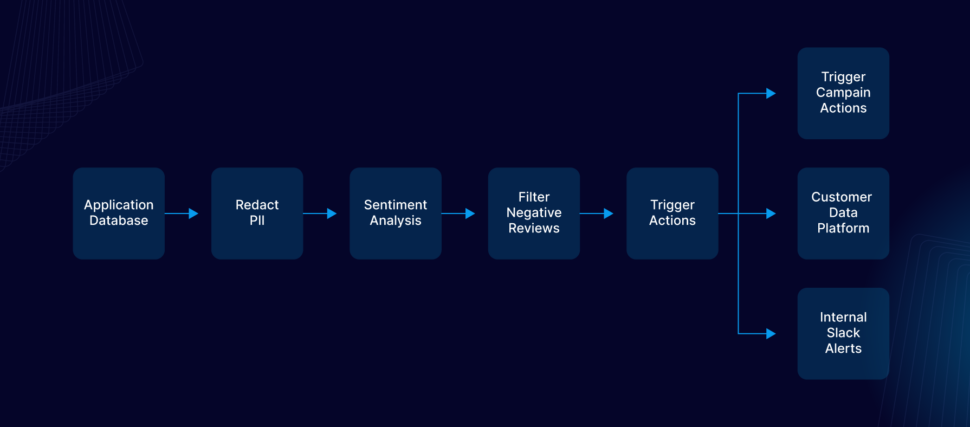
In this post, we’ll walk through how to build a real-time AI-powered sentiment analysis pipeline using Striim, OpenAI, and LangChain with a simple, high performance pipeline.
Real-time sentiment analysis is essential for applications such as monitoring and responding to customer feedback, detecting market sentiment shifts, and automating responses in conversational AI. However, implementing it often requires setting up Kafka and Spark clusters, infrastructure, message brokers, third-party data integration tools, and complex event processing frameworks, which add significant overhead, operational costs, and engineering complexity. Similarly, traditional machine learning approaches require large labeled datasets, manual feature engineering, and frequent model retraining, making them difficult to implement in real-time environments.

Striim eliminates these challenges by providing a fully integrated streaming, transformation, and AI processing platform that ingests, processes, and analyzes sentiment in real-time with minimal setup.

We’ll walk you through the design covering the following,

  1. Building the AI Agent using Striim’s open processor
  2. Using Change Data Capture (CDC) technology to capture the review contents in real time using Striim Oracle CDC Reader.
  3. Group the negative reviews in Striim partitioned windows
  4. Generate real time notifications using Striim Alert manager if the number of negative reviews exceeds the threshold values and transform them into actions for the business.
Why Sentiment Analysis using Foundation Models? How is it different from traditional Machine Learning Based Approaches?

Sentiment analysis has traditionally relied on supervised machine learning models trained on labeled datasets, where each text sample is explicitly categorized as positive, negative, or neutral. These models typically require significant pre-processing, feature engineering, and domain-specific training to perform effectively. However, foundation models, such as large language models (LLMs), simplify sentiment analysis by leveraging their vast pretraining on diverse text corpora.

One of the key differentiators of foundation models is their unsupervised learning approach. Unlike traditional models that require labeled sentiment datasets, foundation models learn patterns, relationships, and contextual meanings from large-scale, unstructured text data without explicit supervision. This enables them to generalize sentiment understanding across multiple domains without additional training.

Why Real-Time Streaming Instead of Batch Jobs?

Real-time sentiment analysis enables businesses to make swift, data-driven decisions by transforming customer feedback, social media discussions, and other textual data into actionable insights as they occur. Unlike batch-based analysis, which processes data in scheduled intervals, real-time analysis ensures that organizations can respond immediately when sentiment changes.

  • Instant Decision-Making – Businesses can act on customer feedback, social media trends, and emerging issues in the moment, rather than waiting for delayed batch processing. This allows proactive engagement rather than reactive damage control.
  • Crisis Management – In cases of negative publicity, brand reputation issues, or product complaints, real-time sentiment analysis enables companies to intervene quickly, mitigating risks before they escalate.
  • Enhanced Customer Experience – Organizations can integrate real-time sentiment analysis with tools like Slack, Salesforce, and Microsoft Dynamics, allowing automated alerts and instant responses to customer feedback. This improves customer satisfaction and fosters stronger relationships.
  • Competitive Advantage – Companies that react faster to market sentiment gain a strategic edge over competitors who rely on delayed batch analysis, enabling them to pivot business strategies and marketing efforts in real time.
  • Dynamic Trend Monitoring – Social media sentiment and public opinion shift rapidly. Real-time analysis ensures businesses stay updated on trending topics, emerging concerns, and viral events, helping them adjust messaging and engagement strategies on the fly.
  • Fraud and Risk Detection – In industries like finance and cybersecurity, real-time sentiment analysis can detect anomalies and suspicious activities (e.g., sudden spikes in negative sentiment around a stock or service) and trigger automated responses to mitigate risks proactively.

By integrating real-time sentiment analysis into business communication and CRM platforms like Slack, Salesforce, and Microsoft Dynamics, organizations can automate workflows, trigger alerts, and enable teams to respond instantly to sentiment shifts—leading to smarter decision-making, better customer experiences, and greater operational efficiency.

Problem statements

A centralized Oracle database is used by the feedback systems.

The business analytics team has been collecting the feedback in batches, manually process and coming up with insights to improve the customer experience at the stores with negative feedback. 

  1. Real-time data synchronization : The submitted feedback must be captured in real-time without impacting the performance of the centralised Oracle database
  2. Real-time analysis of the feedback : The captured feedback must be immediately analysed to figure out the sentiment.
  3. Real-time windowing and notification : The negative feedback should be grouped by stores, notifications should be generated upon hitting threshold and sent to the external system for converting the data to action.

Solution

Striim has all the necessary features for the use case and the problem statements described.

  1. Reader : Capture real-time changes from Oracle database.
  2. Open processor : Extended program used to analyse the real time events carrying the content of the feedback using AI.
  3. Continuous query : Filter the negative review and send downstream
  4. Partitioned window : Group the negative reviews for each store and send downstream upon hitting threshold.
  5. Alert subscription : Send web alert notification to the user whenever the partitioned window sends down an event.
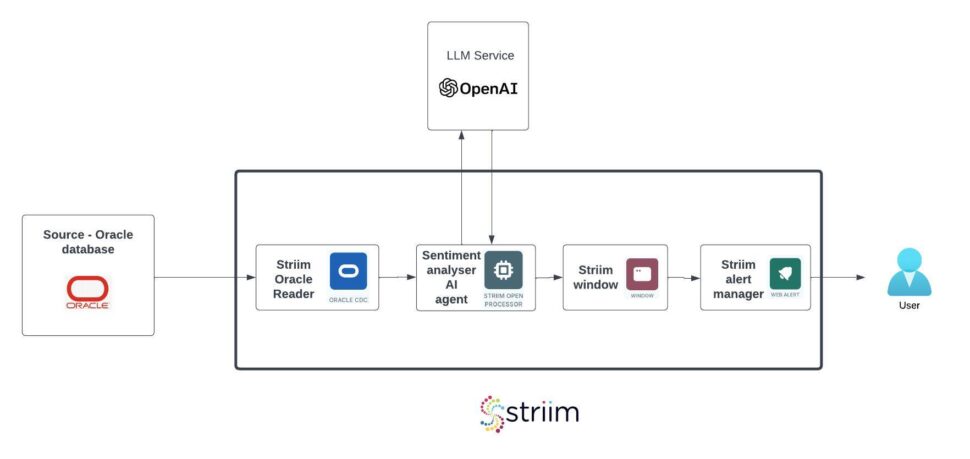
Step by step instructions

Set up Striim Developer 5.0

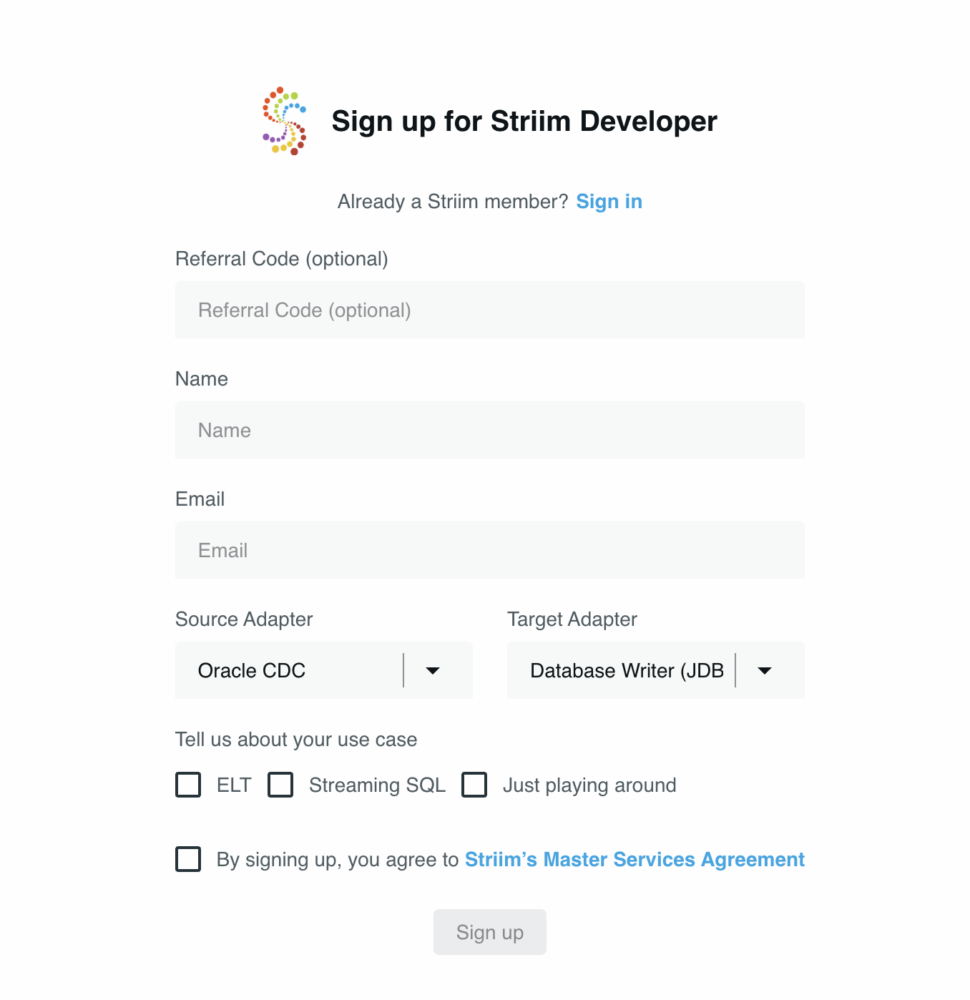
  1. Sign up for Striim developer edition for free at https://signup-developer.striim.com/.
  2. Select Oracle CDC as the source and Database Writer as the target in the sign-up form.
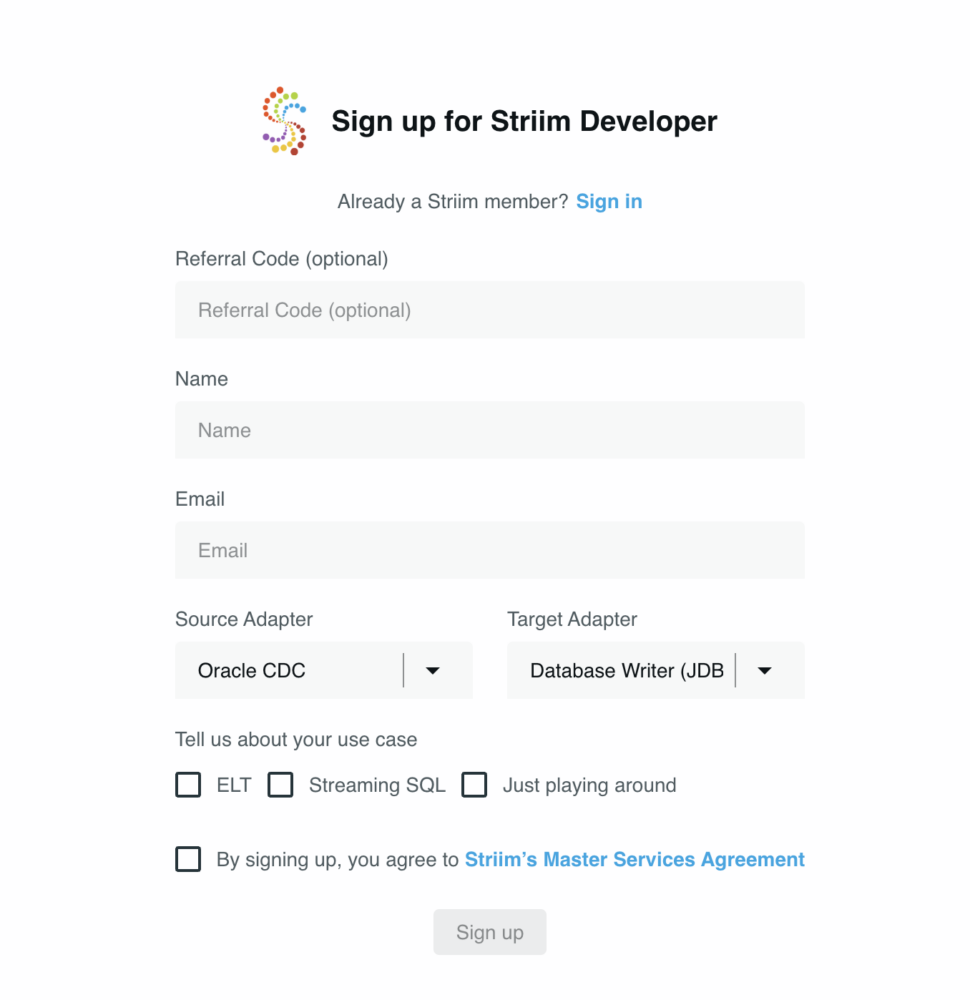
Prepare the table in Oracle

A simple table is created in the Oracle database and is used for the demo :

				
					CREATE TABLE STORE_REVIEWS(
REVIEW_ID VARCHAR(1024),
STORE_ID VARCHAR(1024),
REVIEW_CONTENT varchar(1024))


Create the Striim application

Step 1: Go to Apps -> Create An App -> Start from scratch -> name the app
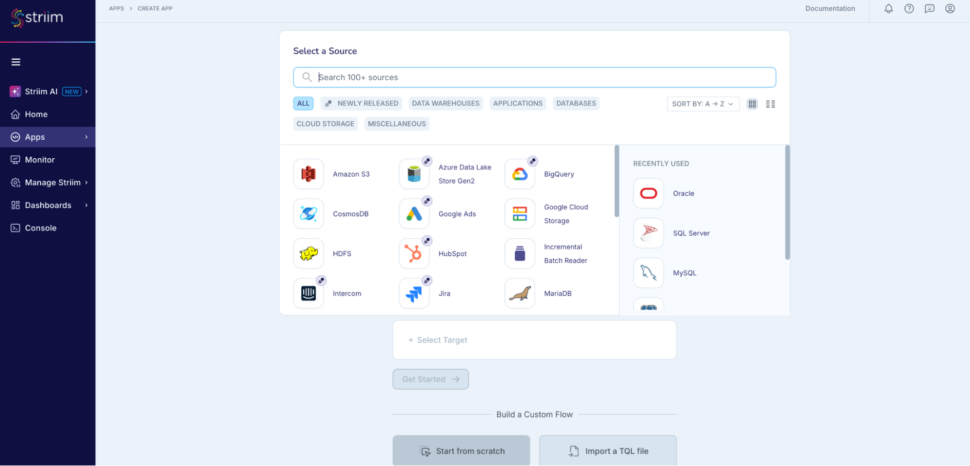
Step 2: Add an Oracle CDC reader to read the live reviews from the oracle database
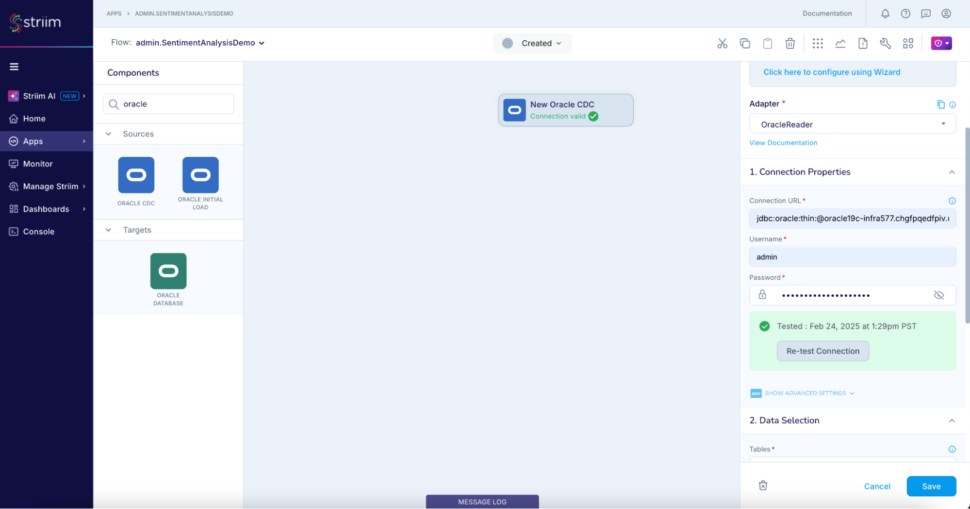
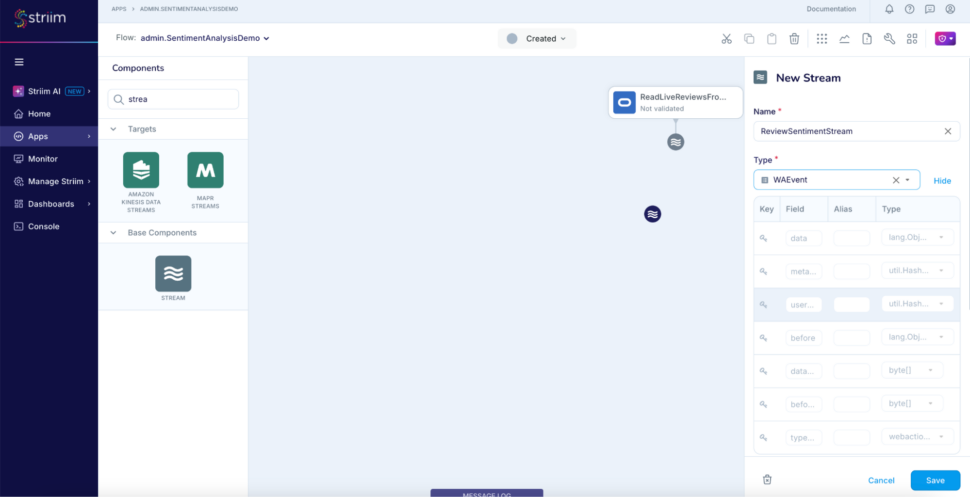
Step 3: Add another stream to use as output for the analyser AI agent
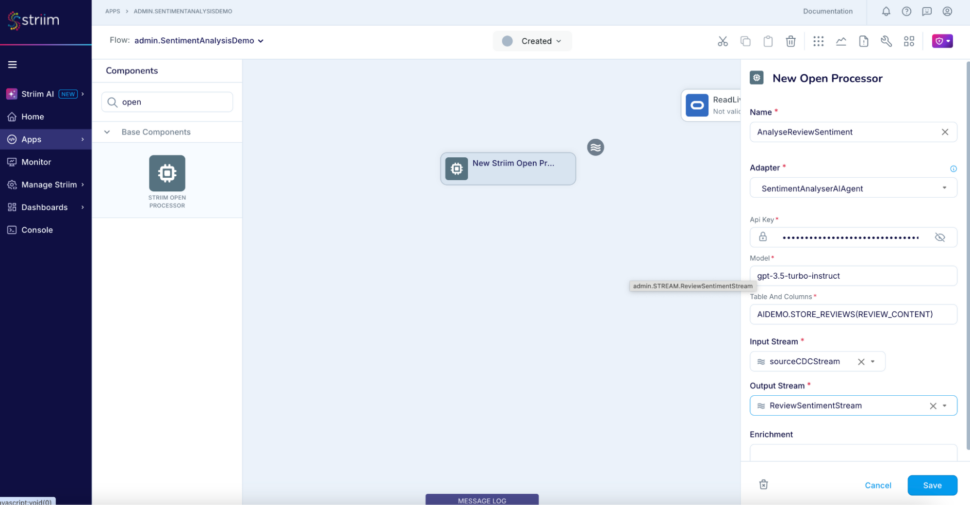
Step 4: Add an open processor  using SentimentAnalyser AIAgent to analyse the sentiment of the value of column REVIEW_CONTENT

				
					code here;


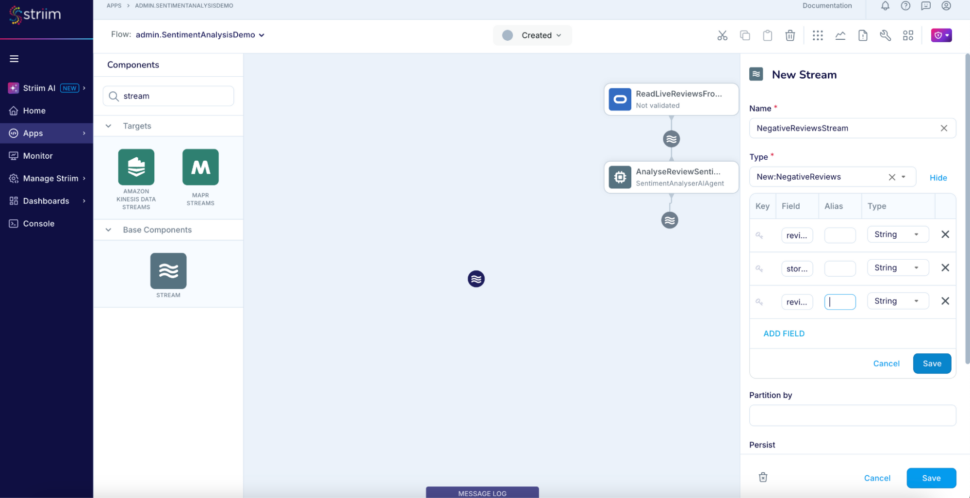
Step 5: Add another stream named NegativeReviewsStream to use a typed stream as output for the Continuous Query component which filters the negative reviews. Add a new type while defining the stream with three fields review_id. store_id, review_sentiment.
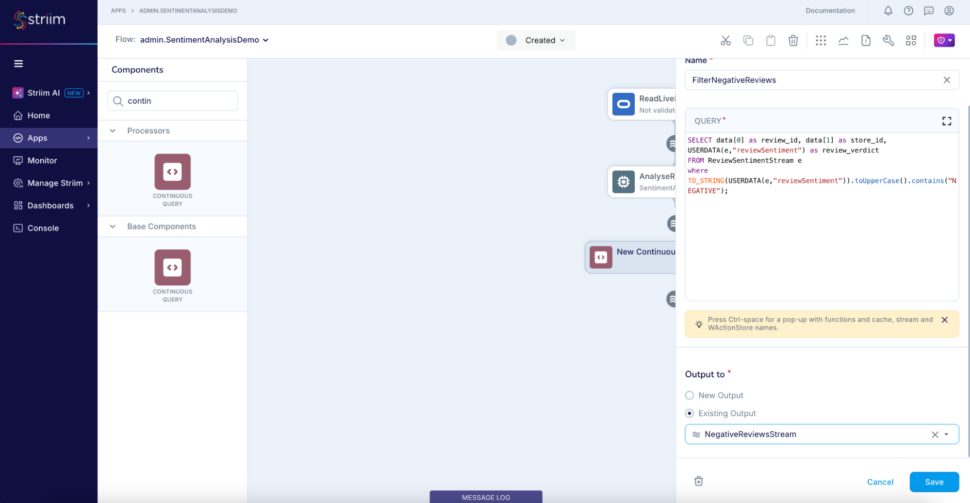
Step 6: Add a CQ that takes input from the ReviewSentimentStream, filters and outputs only the negative reviews to the stream we just created – NegativeReviewsStream.

				
					SELECT data[0] as review_id, data[1] as store_id, USERDATA(e,"reviewSentiment") as review_verdict
FROM ReviewSentimentStream e
where TO_STRING(USERDATA(e,"reviewSentiment")).toUpperCase().contains("NEGATIVE")


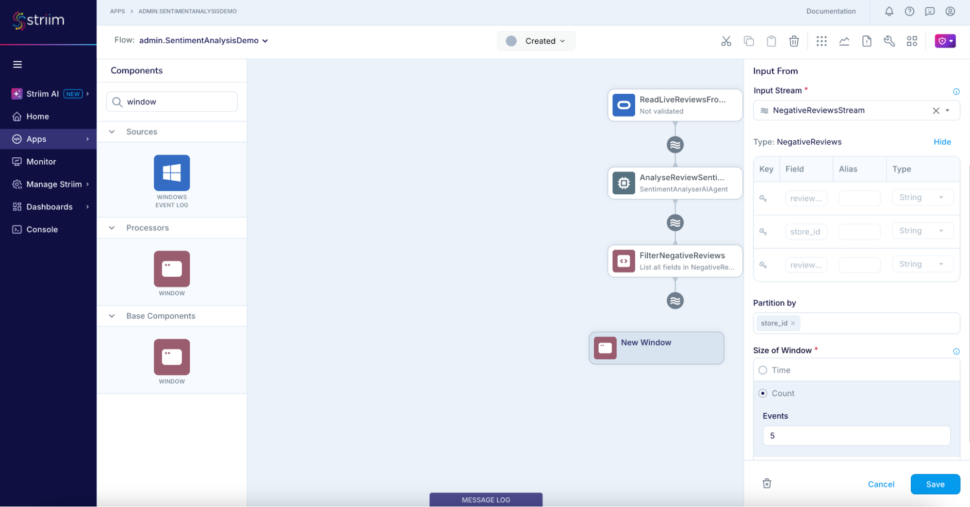
Step 7: Add a jumping window to partition the negative reviews based on the store_id which will be consumed downstream for generating the alert below.
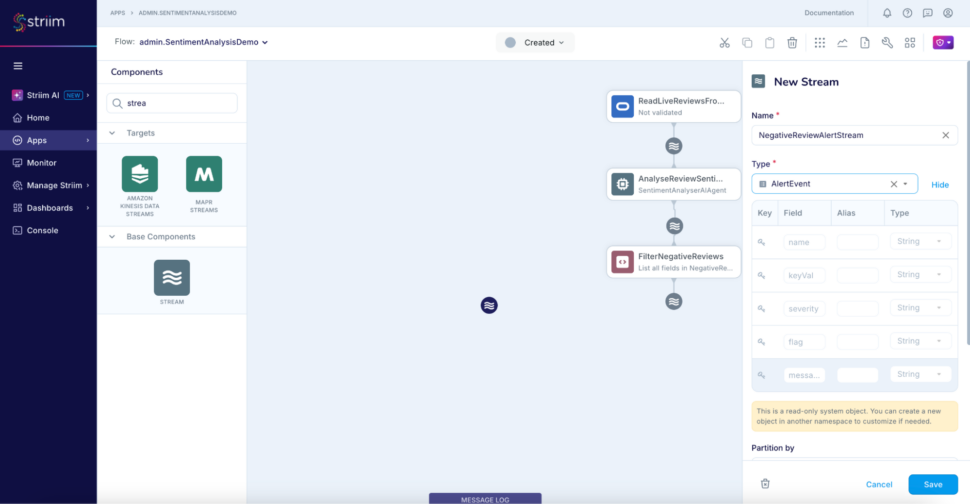
Step 8: Add another stream NegativeReviewAlertStream of type AlertEvent to use for the alert subscription.
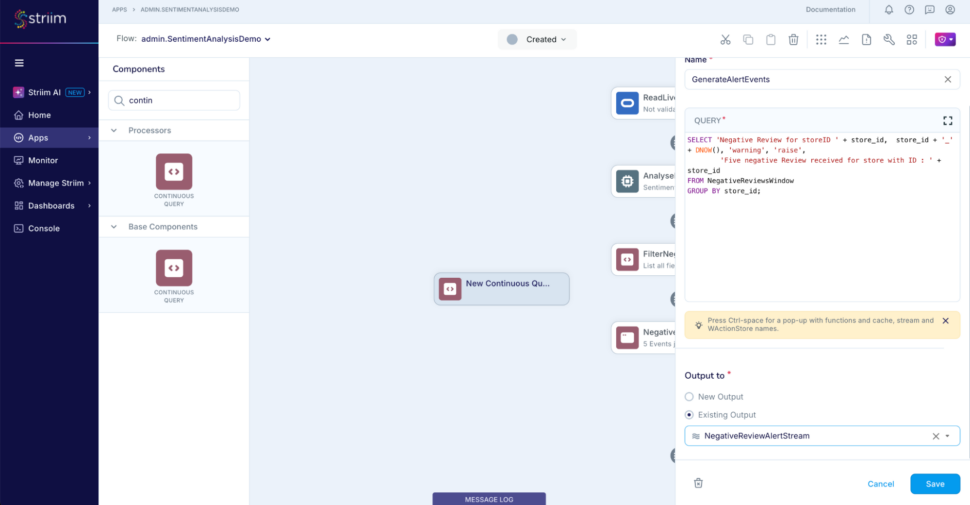
Step 9: Add the final CQ to construct the alerts whenever the window releases an event

				
					SELECT 'Negative Review for storeID ' + store_id,  store_id + '_' + DNOW(), 'warning', 'raise',
        'Five negative Review received for store with ID : ' + store_id
FROM NegativeReviewsWindow
GROUP BY store_id


Step 10: Add a web alert subscription and use the stream NegativeReviewAlertStream as input
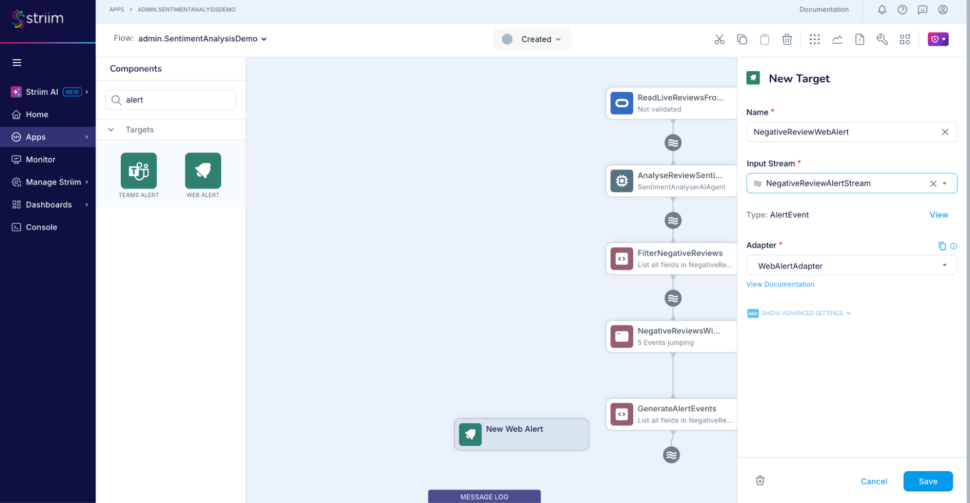
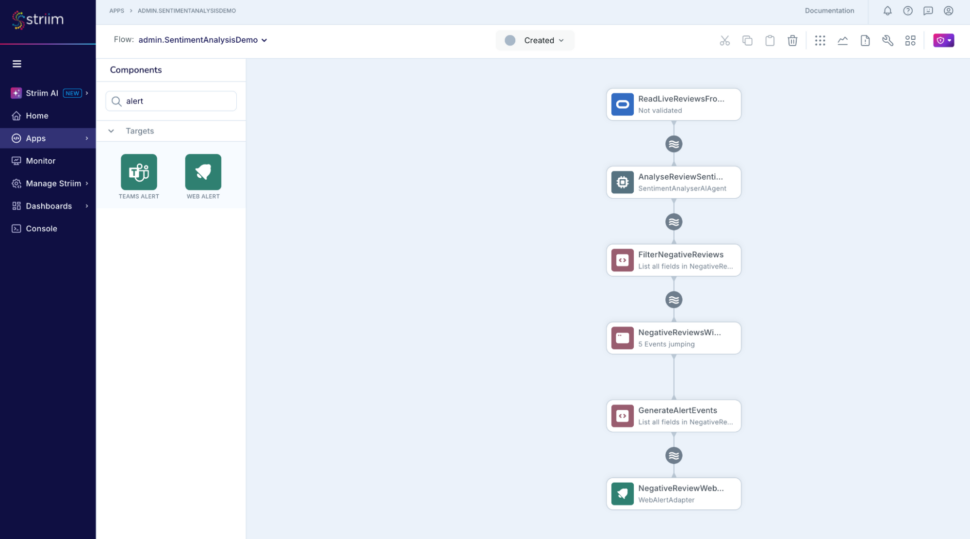
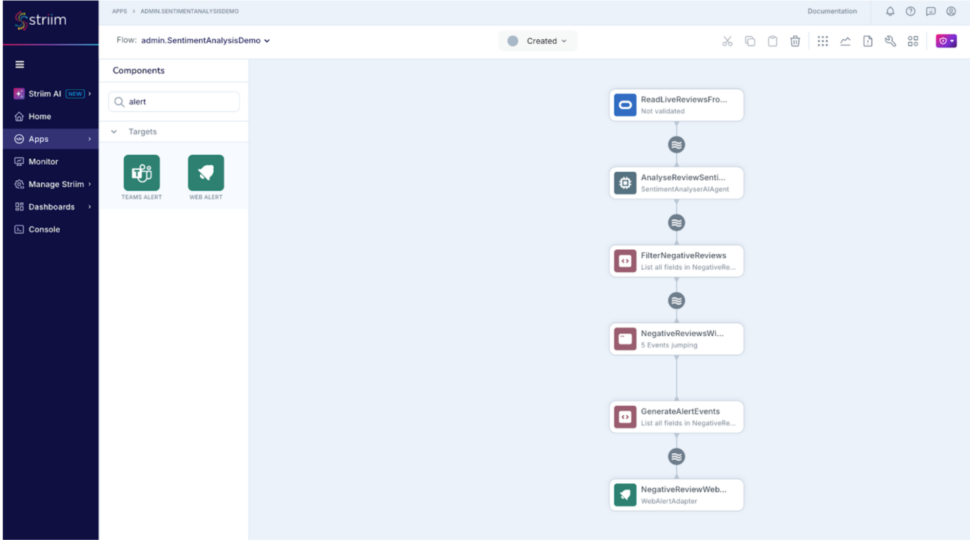
Finally the application should look like this :
(please note that you can alternatively import this TQL and modify the connection details and credentials as necessary as well : RealtimeSentimentAnalysisDemo.tql
Run the Streaming application with AI Agent

Following DMLs are used for demonstration purposes : 

				
					-- A positive review for store 1	
INSERT INTO STORE_REVIEWS values(1001,'0e26a9e92e4036bfaa68eb2040a8ec97','Great in-store customer service and helpful staff. Found exactly what I was looking for!');
-- A neutral review for store 1
INSERT INTO STORE_REVIEWS values(1002,'0e26a9e92e4036bfaa68eb2040a8ec97','The store was fine, but nothing stood out. Average shopping experience.');
-- A negative reviews for store 2
INSERT INTO STORE_REVIEWS values(1003, 'ed85bf829a36c67042503ffd9b6ab475', 'The store is understaffed. The products are not organised well.')
-- 5 negative reviews for store 1
INSERT INTO STORE_REVIEWS values(1004,'0e26a9e92e4036bfaa68eb2040a8ec97','The store was messy and disorganized. Hard to find what I needed.');
INSERT INTO STORE_REVIEWS values(1005,'0e26a9e92e4036bfaa68eb2040a8ec97','Terrible experience, long lines, and the staff was rude. Wont be coming back.');
INSERT INTO STORE_REVIEWS values(1006,'0e26a9e92e4036bfaa68eb2040a8ec97',' waited too long to check out, and the cashier was unhelpful.');
INSERT INTO STORE_REVIEWS values(1007,'0e26a9e92e4036bfaa68eb2040a8ec97','The store was out of stock for many items. Very frustrating.');
INSERT INTO STORE_REVIEWS values(1008,'0e26a9e92e4036bfaa68eb2040a8ec97','The return policy is terrible, and I had to wait forever to get help.');


A combination of 5 reviews are generated for one store in this example, this would mean that the AI agent would categorise these and the jumping window will release an event downstream for the store and the web alert adapter would publish a web alert.

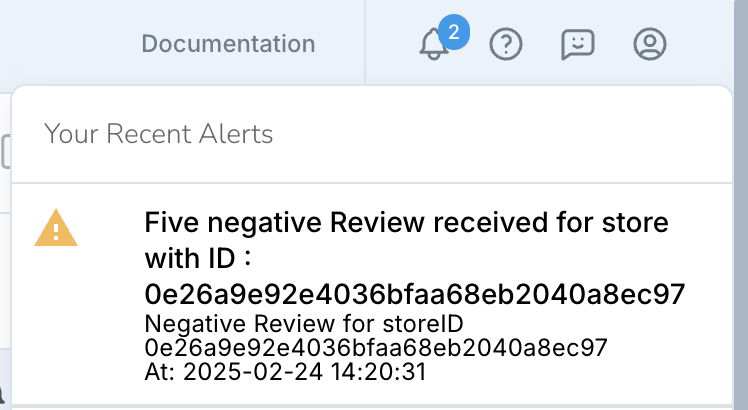
The can also be configured as a slack or a teams alert using Striim’s other alert subscription components. More here – https://www.striim.com/docs/platform/en/configuring-alerts.html

There we go! Data to decisions and AI in real-time.

SentimentAnalyser AI Agent Implementation

Please follow the instructions in Striim docs to build and load the open processor – https://www.striim.com/docs/platform/en/using-striim-open-processors.html

Download the java class SentimentAnalyserAIAgent from this location and the modified pom.xml file from this location.

Conclusion

Experience the power of real-time sentiment analysis with Striim. Get a demo or start your free trial today to see how you can convert real time data to decision coupled with AI techniques to deliver better, faster, and more responsive customer experiences.

Real-Time RAG: Streaming Vector Embeddings and Low-Latency AI Search

Imagine searching for products on an online store by simply typing “best eco-friendly toys for toddlers under $50” and getting instant, accurate results—while the inventory is synchronized seamlessly across multiple databases. This blog dives into how we built a real-time AI-powered hybrid search system to make that vision a reality. Leveraging Striim’s advanced data streaming and real-time embedding generation capabilities, we tackled challenges like ensuring low-latency data synchronization, efficiently creating vector embeddings, and automating inventory updates.

We’ll walk you through the design decisions that balanced consistency, efficiency, and scalability and discuss opportunities to expand this solution to broader Retrieval-Augmented Generation (RAG) use cases. Whether you’re building cutting-edge AI search systems or optimizing hybrid cloud architectures, this post offers practical insights to elevate your projects.

What is RAG?

Retrieval-Augmented Generation (RAG) enhances the capabilities of large language models by incorporating external data retrieval into the generation process. It allows the model to fetch relevant documents or data dynamically, ensuring responses are more accurate and context-aware. RAG bridges the gap between static model knowledge and real-time information, which is crucial for applications that require up-to-date insights. This hybrid approach significantly improves response relevance, especially in domains like e-commerce and customer service.

Why Vector Embeddings and Similarity Search?

Vector embeddings translate natural language text into numerical representations that capture semantic meaning. This allows for efficient similarity searches, enabling the discovery of products even if queries differ from stored descriptions. Embedding-based search supports fuzziness, matching results that aren’t exact but are contextually relevant. This is essential for natural language search, as it interprets user intent beyond simple keyword matching. The combination of embeddings and similarity search improves the user experience by providing more accurate and diverse search results.

Why Real-time RAG Instead of Batch-Based Data Sync?

Real-time RAG ensures that inventory changes are reflected instantly in the search engine, eliminating stale or outdated results. Unlike batch-based sync, which can introduce latency, real-time pipelines offer continuous updates, improving accuracy for fast-moving inventory. This minimizes the risk of selling unavailable products and enhances customer satisfaction. Real-time synchronization also supports dynamic environments where product data changes frequently, aligning search capabilities with the latest inventory state.

How We Designed the Embedding Generator for Performance

In designing the Vector Embedding Generator, we addressed the challenges associated with token estimation, handling oversized input data, and managing edge cases such as null or empty input strings. These design considerations ensure that the embedding generation process remains robust, efficient, and compatible with various AI models.

Token Estimation and Handling Large Data

Google Vertex AI

Vertex AI simplifies handling large data inputs by silently truncating input data that exceeds the token limit and returning an embedding based on the truncated input. While this approach ensures that embeddings are always generated regardless of input size, it raises concerns about data loss affecting embedding quality. We have an ongoing effort to analyze how this truncation impacts embeddings and whether improvements can be made to mitigate potential quality issues.

OpenAI

OpenAI enforces strict token limits, returning an error if input data exceeds the threshold (e.g., 2048 or 3092 tokens). To handle this, we integrated a tokenizer library into the Embedding Generator’s backend to estimate token counts before sending data to the API. The process involves:

  1. Token Count Estimation: Input strings are tokenized to determine the estimated token count.
  2. Iterative Truncation: If the token count exceeds the model’s limit, we truncate the input to 75% of its current size and recalculate the token count. This loop continues until the token count falls within the model’s threshold.
  3. Submission to Model: The truncated input is then sent to OpenAI for embedding generation.

For instance, if an OpenAI model has a token limit of 3092 and the estimated token count for incoming data is 4000, the system will truncate the input to approximately 3000 tokens (75%) and re-estimate. This iterative process ensures compliance with the token limit without manual intervention.

Handling Null or Empty Input

When generating embeddings, edge cases like null or empty input can result in API errors or undefined behavior. To prevent such scenarios, we adopted a solution inspired by discussions in the OpenAI developer forum: the use of a default vector.

Characteristics of the Default Vector:

  • Dimensionality: Matches the size of embeddings generated by the specific model (e.g., 1536 dimensions for OpenAI’s text-embedding-ada-002).
  • Structure: The vector contains a value of 1.0 at the first index, with all other indices set to 0.0.
    • Example:[1.0, 0.0, 0.0, … , 0.0]

By returning this default vector, we ensure the system gracefully handles cases where input data is invalid or missing, enabling downstream processes to continue operating without interruptions.

Summary of Implementation:

  1. Preprocessing
    • Estimate token counts and handle truncation for models with strict token limits (OpenAI).
    • Allow silent truncation for models like Google Vertex AI but analyze its impact.
  2. Error Handling
    • For null or empty data, return a default vector matching the model’s embedding dimensions.
  3. Scalability
    • These mechanisms are integrated seamlessly into the Embedding Generator, ensuring compatibility across multiple data streams and models without manual intervention.

This design enables developers to generate embeddings confidently, knowing that token limits and edge cases are managed effectively.

Tutorial: Using the Embeddings Generator for Search

An e-commerce company aims to build an AI-powered hybrid search that enables users to describe their needs in natural language.

Their inventory management system is in Oracle database and the store front search database is maintained in the Azure PostgetSQL.

Current problem statements are:

  1. Data Synchronization: Inventory data from Oracle must be replicated in real-time to the storefront’s search engine to ensure data consistency and avoid stale information.
  2. Vector Embedding Generation: Product descriptions need vector embeddings to facilitate similarity searches. The storefront must support storing and querying these embeddings.
  3. Real-Time Updates: Ongoing changes in the inventory (such as product details or stock updates) need to be reflected immediately in the search engine.
  4. Embedding Updates: Updates to products in the inventory should trigger real-time embedding regeneration to prevent outdated or inaccurate similarity search results.

Solution

Striim has all the necessary features for the use case and the problem statements described.

  1. Readers to capture initial snapshot and real-time changes from Oracle database.
  2. Embedding generator to generate vector embeddings for text content.
  3. Writers to deliver the data along with the embeddings to Postgres database.

Striim Features :

  1. Readers: Capture the initial snapshot and ongoing real-time changes from the Oracle database.
  2. Embedding Generator: Creates vector embeddings for product descriptions.
  3. Writers: Deliver updated data and embeddings to the PostgreSQL database.

PostgreSQL with pgvector:

  1. Supports storing vector embeddings as a specific data type.
  2. Enables similarity search functionality directly within the database.

Note: The search engine for this solution is implemented in Python for demonstration purposes. OpenAI is used for embedding generation and for summarisation of the results.

Design Choices and Rationale

  1. Striim for Data Integration: Chosen for its seamless real-time change capture (CDC) from Oracle to PostgreSQL.
    1. Alternative could be to have an independent application/script periodically but would be inefficient and expensive to have this developed for the initial load and change data capture, also would be difficult to maintain over a period of time for various data sources which might also need to be synced to the store front database (Postgres)
  2. OpenAI Embeddings: Ensures high-quality embeddings compatible across pipeline stages.
  3. Striim Embedding generator: Enables in-flight embedding generation while the data is being synced instead of having to move the data separately and then generate and update the embedding.
    1. Alternative is to have separate listeners/triggers/scripts in the search front database (Postgres) to generate and update the embeddings every time the data changes. This could be very expensive and not be very accurate as the data changes and the embedding changes can go out of sync.
  4. pgvector: Facilitates native vector searches, reducing system complexity.
    1. Alternative design choices were to choose the standalone vector databases but they do not provide the flexibility pgvector provides as we can store the actual data and the embeddings in a relational database setup compared to vector databases where we need to maintain metadata for each vector database and cross lookup for actual data from a different database/source while summarising the similarity search results. Eg., the embeddings would be in one place which needs to be queried using similarity search query whereas price or rating-based filters need to be applied elsewhere.
  5. Python Search Engine: Provides flexibility and integration simplicity.
    1. This is a convenient choice to make use of the python libraries, more details are included in the upcoming sections

Future Work

  1. Expand embedding model options beyond OpenAI and make it generic
    1. This is already done for the Striim Embedding generator as it supports VertexAI as well. We could consider supporting self-hosted models.
  2. Expand the support for non-textual input.
  3. Expand the implementation to generically cover any use case and have the application interface integrated with Striim UI.
    1. Current implementation as a proof of concept is tightly coupled with the e-commerce use case and it’s data set.

Step-by-step instructions

Set up Striim Developer 5.0

  1. Sign up for Striim developer edition for free at https://signup-developer.striim.com/.
  2. Select Oracle CDC as the source and Database Writer as the target in the sign-up form.

Prepare the dataset

The dataset can be downloaded from this link:  https://raw.githubusercontent.com/GoogleCloudPlatform/python-docs-samples/main/cloud-sql/postgres/pgvector/data/retail_toy_dataset.csv

(selected set of 800 toys from the Kaggle dataset – https://www.kaggle.com/datasets/promptcloud/walmart-product-details-2020)

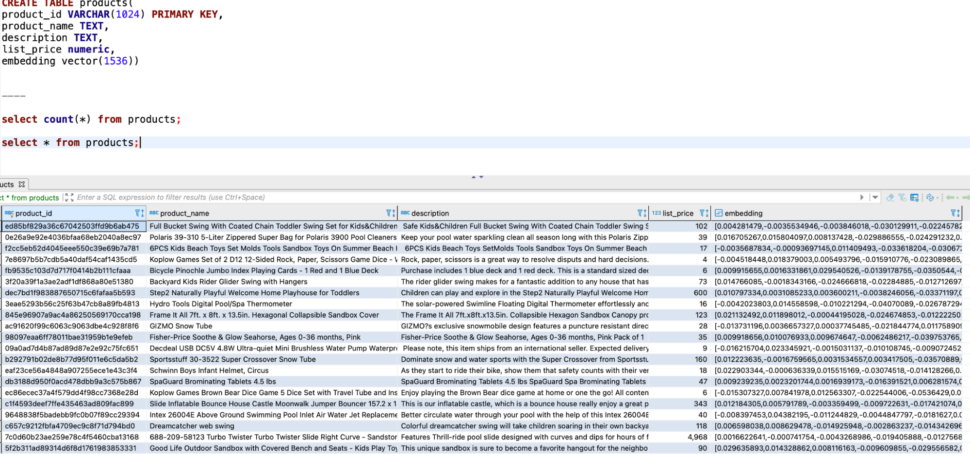
Have the above data imported into Oracle. Please use the following table definition to import the data :


A peek into the data :

Create Embedding generator

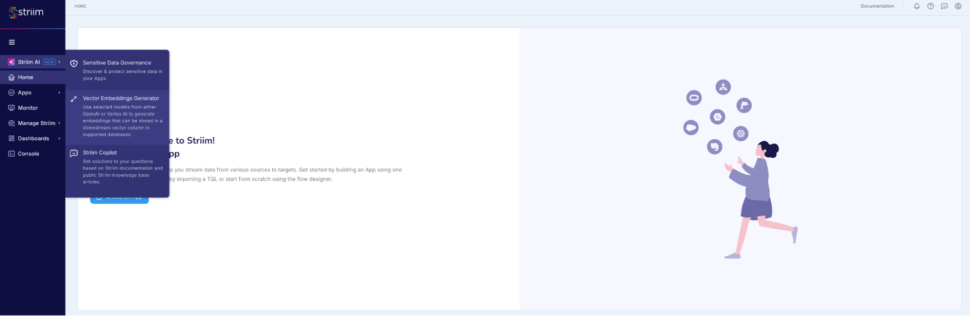
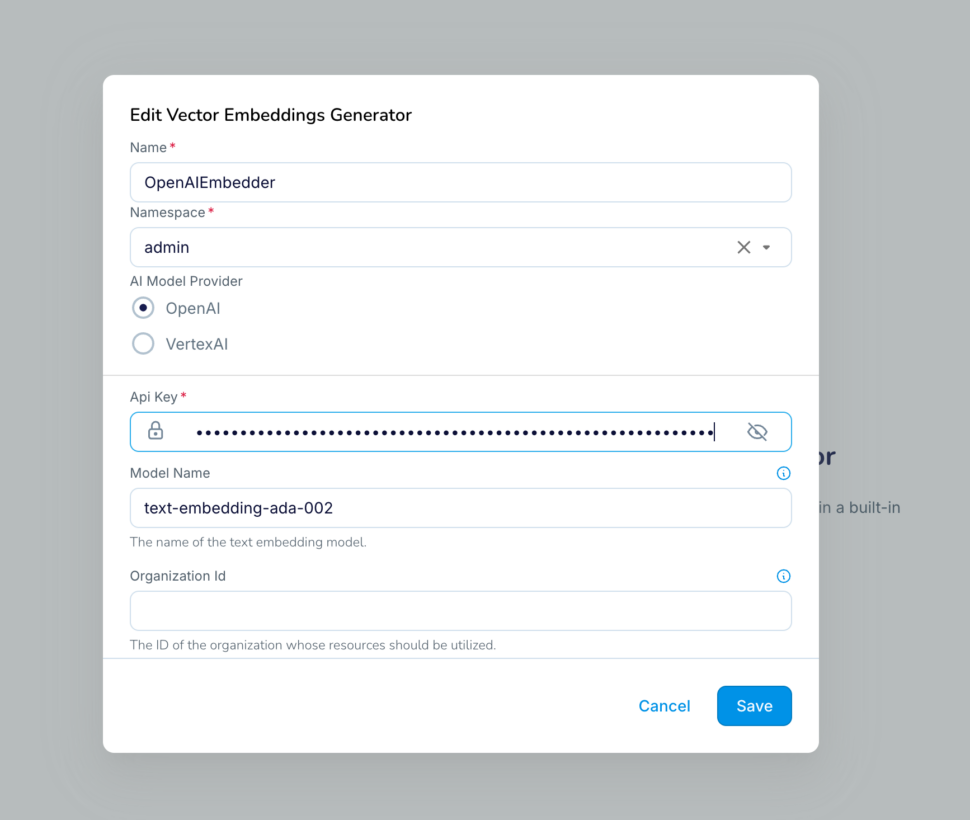
Go to StriimAI -> Vector Embeddings Generator and create a new Embeddings Generator

  1. Provide a unique name for the embedding generator.
  2. Choose OpenAI as model provider
  3. Enter the API key copied over from your OpenAI platform account – https://platform.openai.com/settings/organization/api-keys
  4. Enter “text-embedding-ada-002” as the model
    1. The same model should be used in the Python code for converting the user query into embedding before similarity search as well.
  5. Later in this blog, the above embedding generator will be used in the pipeline for generating vectors using a Striim builtin function – generateEmbeddings()

Setup the automated data pipeline from Oracle to Postgres

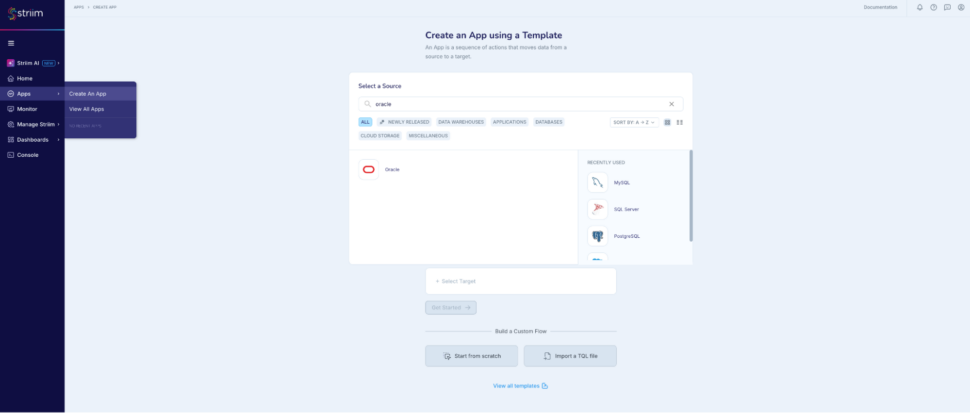
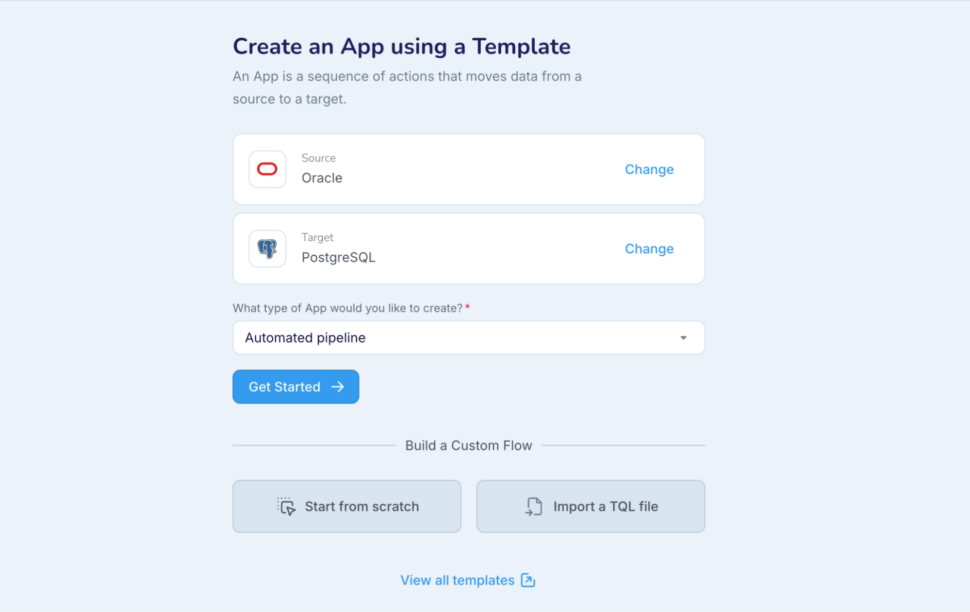
Go to Apps -> Create An App -> Choose Oracle as Source and Azure Postgres as Target

Follow the guided wizard flow to configure the pipeline with source, target connection details and the table selection. In the review screen, make sure to choose the “Save & Exit option”

Note: Please follow the prerequisites for Oracle CDC from Striim doc – https://striim.com/docs/en/configuring-oracle-to-use-oracle-reader.html

The table used in Postgres :


Please note that the embedding column is created additionally in Postgres.

Customize the Striim pipeline

  1. Go back to the pipeline using Apps -> View All Apps
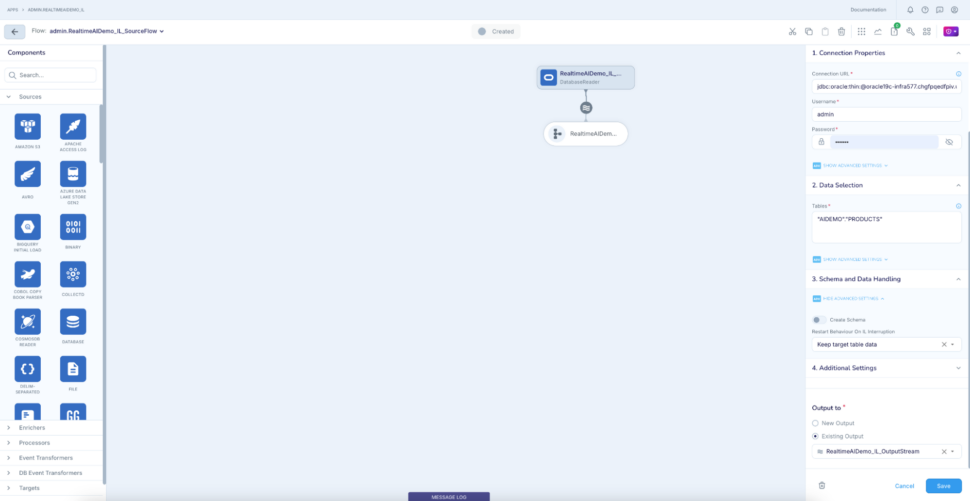
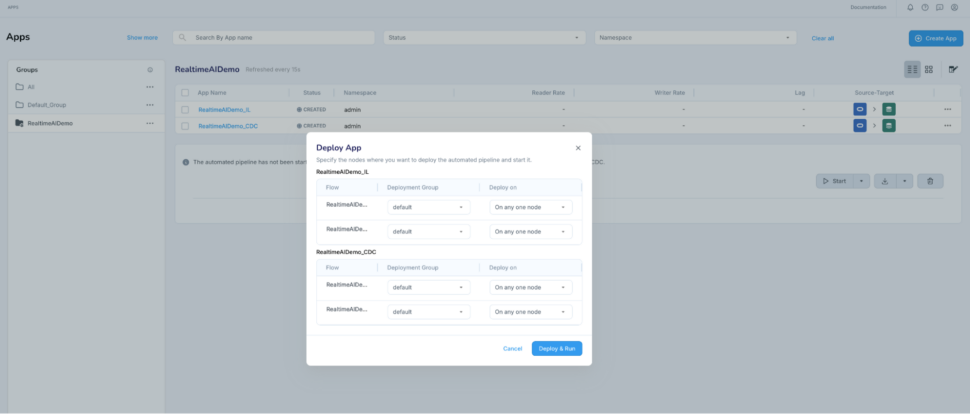
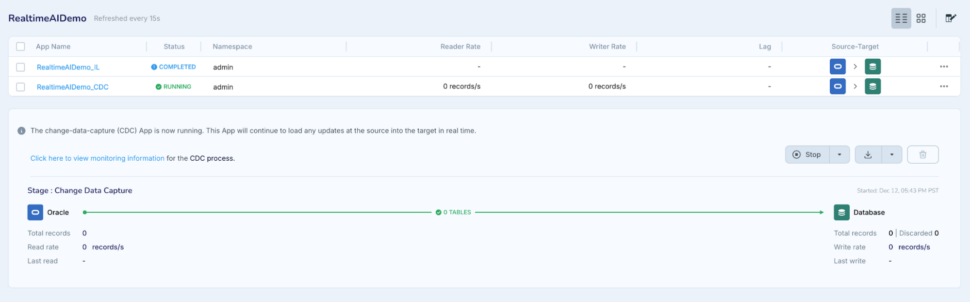
  2. Open the IL app RealTimeAIDemo_IL
  3. Open the reader configuration -> Disable “Create Schema” under “Schema and Data Handling” as we are creating the schema on Postgres already.

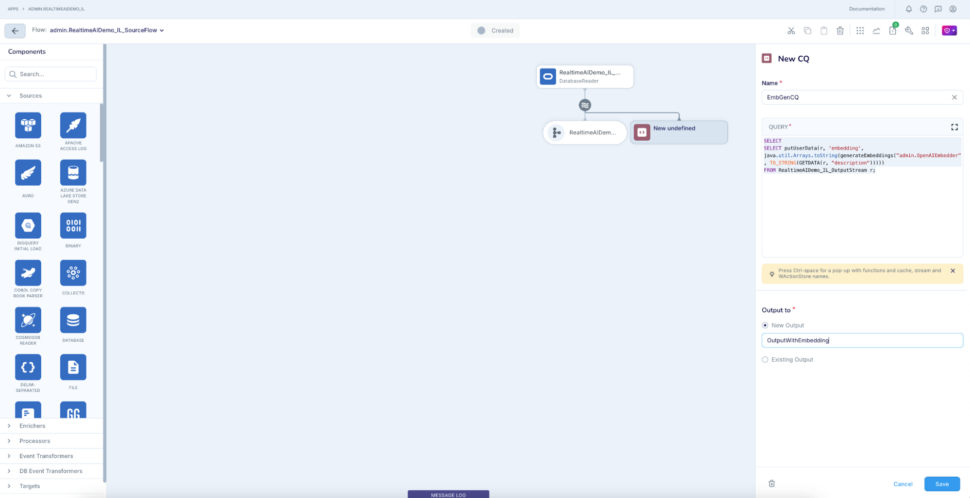
Click the output stream of the reader and add a Continuous Query component (CQ) to it to generate embeddings for the description column using the embedding generator we created above.

The CQ essentially puts the embeddings into the userdata section of the source  event, which can be used to write to the embedding column in Postgres table.

Here the output of the generateEmbedding() function will be placed as part of the ‘embedding’ section (as part of the user data)  in the source event.


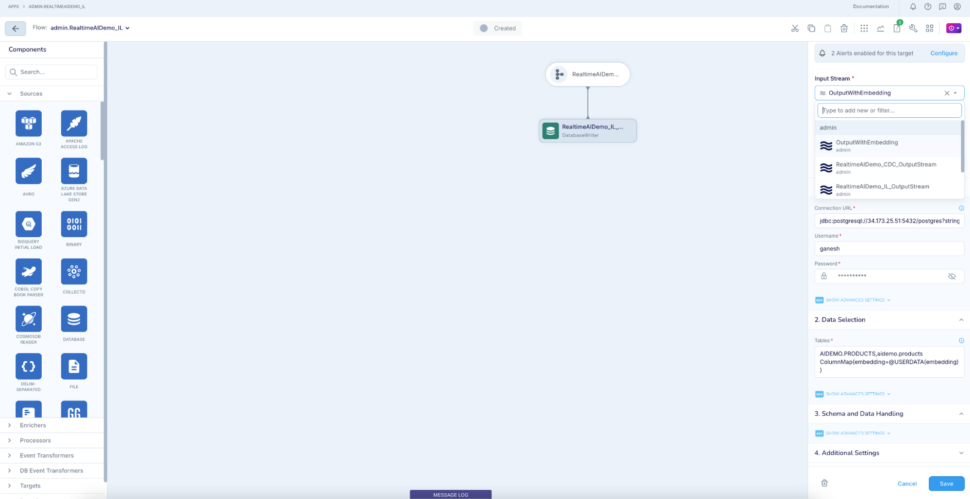
Click to the target and change the input stream to the output of CQ (OutputWithEmbedding).  In the Tables property, also add a mapping for embedding column under Data Selection :

AIDEMO.PRODUCTS,aidemo.products ColumnMap(embedding=@USERDATA(embedding)

This will insert or update the ‘embedding’ column of the Postgres table with the generated vectors from the generateEmbedding() call. This column holds the vector value of the ‘description’ column value.

Perform the same steps for the CDC app in the pipeline as well.

  1. Go back to the pipeline using Apps -> View All Apps
  2. Open the CDC app RealTimeAIDemo_CDC and perform the same steps as done for the RealTimeAIDemo_IL application (i.e calling generateEmbedding function and columnMap())

Create Gen AI application using python

Next step is to build a python application, which does the following:

  1. Accepts user query in natural text for searching a product
  2. Converts the Query to embeddings using Open AI
  3. Performs similarity search using PG vector extension functionality in Azure Database for PostgreSQL
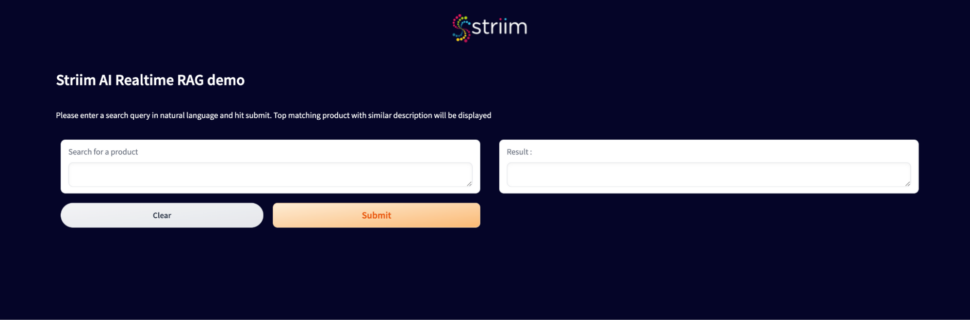
  4. Returns a response generated using LLM service with the top matching product details

  1. Please click here to download this python application.
  2. asyncpg is used to connect to Postgres
  3. OpenAIEmbeddings (langchain.embeddings) is used to generate embeddings for the user query
    1. Please note that you need to use the same model in the Striim embedding generator
  4. langchain.chains.summarize is used for summarisation (model used : gpt-3.5-turbo-instruct)
  5. Query used to perform the similarity search :


    1. Similarity threshold of 0.7, max matches of 5 are used as experimentation but only one closest result is picked for summarisation
  1. gradio is used to present in a simple UI

Start the pipeline to perform the initial snapshot load

Once the initial load is complete, the pipeline will automatically transition to CDC phase. Verify the data in Postgres table and confirm that embeddings are stored as well.

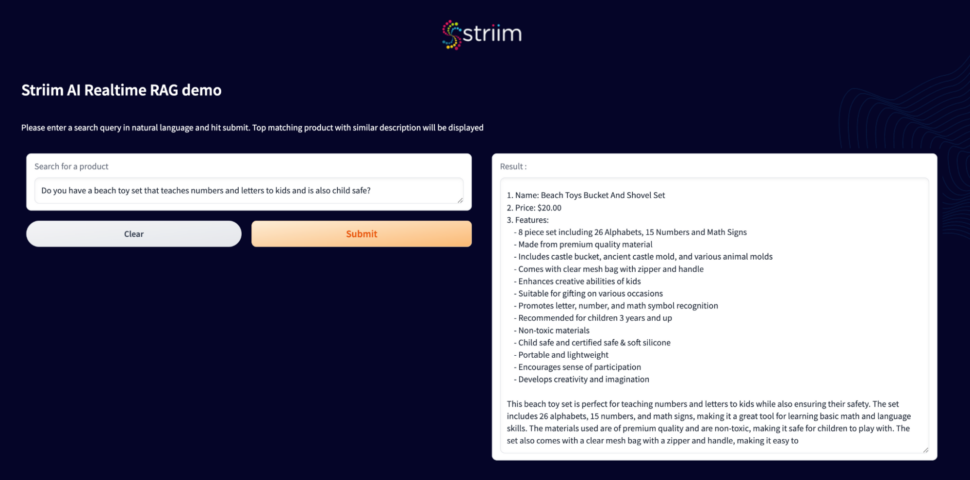
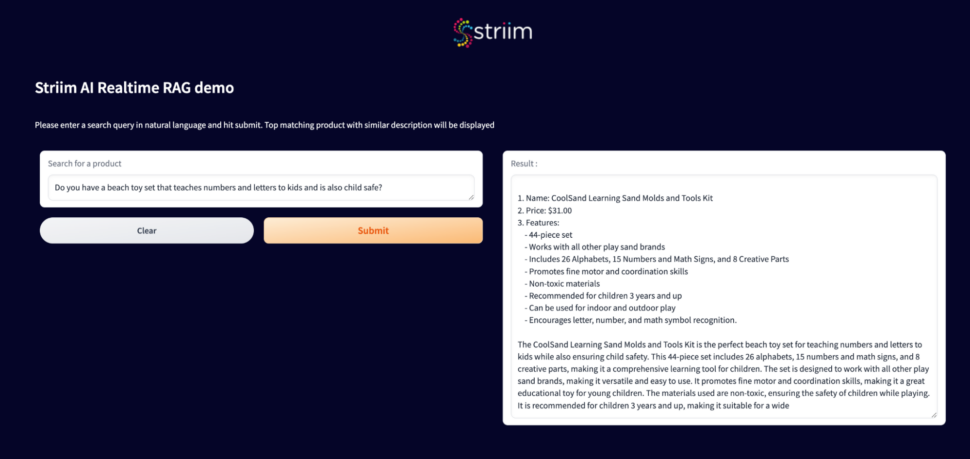
Run the similarity search python application and verify that it fetches the results using the similarity search of pgvector.

Capture the real-time changes from the Oracle database and generate on the fly vector conversion

Perform a simple change in your source Oracle database to make a better product description for the product with id : ’20e597d8836d9e5fa29f2bd877fc3e0a’


Striim pipeline would instantly capture the change and deliver it to the Postgres table along with the updated vector embedding.

Run the same query in the search interface to notice that a fresh result shows up :

Now the same query would result in a different product id since the query works against the recently updated data in the Oracle database.

There we go! Real-time integration and consistent data everywhere!

Conclusion

Experience the power of real-time RAG with Striim. Get a demo or start your free trial today to see how we enable context-aware, natural language-based search with real-time data consistency—delivering smarter, faster, and more responsive customer experiences!

References and credits

Inspired by the Google notebook which showcased the use case and also had reference to the curated dataset: Building AI-powered data-driven applications using pgvector, LangChain and LLMs

Back to top