Striim 5.0 Release: Streamline Data Integration with ServiceNow Reader and Writer

Striim’s new 5.0 release introduces the ServiceNow Reader and Writer adapters, a game-changing feature that enhances how companies integrate and manage their data with ServiceNow. By seamlessly reading from and writing to ServiceNow’s platform, Striim enables businesses to optimize workflows and improve operational efficiency like never before.

What Does It Do?

The ServiceNow Reader and Writer adapters leverage ServiceNow’s REST APIs to read from and write into the tables and objects within the ServiceNow instance. The ServiceNow Reader emits WAEvents, which can then be propagated to various target systems supported by Striim. Whether it’s integrating with CRM systems like Salesforce or pushing data to analytics platforms, this powerful feature streamlines the movement of data and ensures that businesses have access to real-time insights.

How Do You Use It?

Using Striim’s ServiceNow Reader and Writer adapters is straightforward. The reader allows you to pull data from your ServiceNow platform in real-time, making it ideal for applications that require constant updates, such as customer service and IT operations. With this functionality, you can ensure that your systems are always working with the latest data, enabling more responsive and efficient operations.

Meanwhile, the writer enables reverse ETL functionality, allowing you to push insights from analytics systems back into ServiceNow. This makes it easier to implement use cases like Next Best Action or Real-Time Personalization. By doing so, your teams are provided with the most up-to-date information to act on, ensuring more informed decisions and optimized customer interactions.

Want to dive deeper? Check out the doc and explore more.

How Does Striim Add Value?

Striim brings immense value by providing the fastest way to read from ServiceNow in real-time, enhancing operational workflows and ensuring your data is always fresh. It also supports a wide range of data warehouses and data lake applications, enabling companies to move their ServiceNow data quickly for building analytical reports, identifying trends, and optimizing process automation. With Striim’s power of real-time data migration, businesses can extract greater value from their ServiceNow data, improving decision-making and operational efficiency.

Transform Your Business Today!

Striim’s ServiceNow Reader and Writer are the perfect tools to help you transform your business, ensuring that your workflows and data integration processes remain agile and efficient. 

Ready to power your business with real-time data? Try Striim today with a free trial or book a demo to see it in action.

Start Your Free Trial | Schedule a Demo

Striim 5.0 Release: Unlock Real-Time Marketing Insights with the Google Ads Reader

Real-time insights are crucial for making data-driven decisions and staying ahead of the competition. Striim 5.0’s latest feature, the Google Ads Reader, helps businesses unlock the full potential of their Google Ads data by providing seamless, real-time integration with analytical systems like BigQuery and Snowflake. Let’s dive into what this feature can do, how to use it, and the value Striim adds to your business.

What Does It Do?

The Google Ads Reader enables businesses to sync their Google Ads data in real time using the Google Ads API v15. This integration simplifies the process of reading, analyzing, and acting on your ads data by directly feeding it into powerful analytics platforms. Whether you’re analyzing campaign performance, user engagement, or ad effectiveness, Striim helps you create smart, efficient data pipelines that provide valuable insights for better decision-making.

How Do You Use It?

Striim’s Google Ads Reader supports three modes of operation, allowing you to choose the best approach based on your needs:

  1. Initial Load: Start by setting the mode in the Google Ads Reader to load your historical data, providing a baseline for further analysis.
  2. Incremental Load: Once the initial load is complete, use the “Incremental Load” mode for near real-time continuous replication. The adapter reads new source data at regular intervals, ensuring your insights stay up to date.
  3. Automated Mode: In this mode, the reader completes the initial load at the application’s start time. After that, it automatically begins polling for incremental changes at the specified interval, making it a seamless and hands-off solution for ongoing data synchronization.

Want to dive deeper? Check out the doc and explore more.

How Does Striim Add Value?

Striim’s real-time data integration offers significant advantages for businesses looking to optimize their marketing strategies:

  • Real-Time Data Integration: Striim allows you to ingest and process data in real time, writing it directly into popular data warehouses like Google BigQuery and Snowflake. This enables faster, more informed decisions, helping you respond quickly to shifts in market dynamics and customer behavior.
  • Historical Data Analysis: With Striim, you can bypass Google Ads’ data retention limits and store historical data for long-term trend analysis. This feature allows you to track the performance of your ads campaigns over time, providing deeper insights into what works and what doesn’t.

Transform Your Business with Real-Time Insights

Striim’s Google Ads Reader makes it easy to integrate your Google Ads data into your analytics systems for smarter, data-driven marketing decisions. Ready to power your business with real-time data? Try Striim today with a free trial or book a demo to see it in action.

Start Your Free Trial | Schedule a Demo


Striim 5.0 Release: Unlock Real-Time Insights with the JIRA Reader Integration

Striim 5.0 Release: Unlock Real-Time Insights with the JIRA Reader Integration

Striim 5.0 brings exciting new features that streamline real-time data management and empower businesses to make data-driven decisions faster. Among these, the new Atlassian JIRA Reader stands out as a key innovation, enabling seamless integration with JIRA, a powerful issue tracking system widely used for bug tracking and project management. In this post, we’ll explore what the JIRA Reader does, how to use it, and the value Striim adds to your business.

What Does the JIRA Reader Do?

The JIRA Reader in Striim 5.0 facilitates the movement of data from a JIRA instance to any supported Striim target system. By leveraging JIRA’s REST APIs (version 9.11), it reads tables and objects from JIRA and emits WAEvents, which can be propagated to Striim’s target systems. Whether you’re analyzing project data, bug reports, or team performance, the JIRA Reader can help you manage and analyze this data in real-time. For a comprehensive list of supported targets, you can check out Striim’s documentation.

How Do You Use It?

Using the JIRA Reader is simple. The reader operates in “Automated” mode, where it first performs an initial load of data from your JIRA instance, starting at the application’s specified time. Once the initial load is complete, it automatically begins polling for incremental changes at the configured interval, ensuring continuous data synchronization. This automated process saves time and reduces the need for manual intervention, making it easy to keep your data fresh and up to date.

Want to dive deeper? Check out the doc and explore more.

How Does Striim Add Value?

Striim’s JIRA Reader enhances your ability to manage large-scale data with high throughput and low latency. Real-time data flow ensures that you can process and analyze information as it comes in, offering immediate insights for decision-making.

For example, by using the JIRA Reader, you can create real-time reports on project progress, bug data, team velocity, and key performance indicators (KPIs). Writing JIRA project data into data lakes or warehouses enables you to identify patterns, potential problems, and areas for improvement. With this kind of actionable insight, your business can make smarter decisions, improve processes, and boost team productivity.

Transform Your Business Today!

The JIRA Reader feature, combined with Striim’s real-time capabilities, helps businesses stay agile and responsive in today’s fast-paced environment. By integrating your JIRA data with Striim’s platform, you unlock the power of data-driven decision-making and continuous improvement.

Ready to power your business with real-time data? Try Striim today with a free trial or book a demo to see it in action.

Start Your Free Trial | Schedule a Demo


Striim 5.0 Release: Unleash Real-Time HubSpot Integration with Our Latest Connector

As businesses increasingly rely on HubSpot’s customer platform for marketing, sales, customer service, and more, the ability to seamlessly move data in real time is a game changer. Striim 5.0 introduces the HubSpot Reader, a powerful connector that integrates your HubSpot CRM data with any target system. With Striim’s robust real-time data movement capabilities, you can unlock the full potential of your HubSpot data to enhance analytics, streamline operations, and improve customer experiences.

What Does It Do?

Striim’s HubSpot Reader uses HubSpot APIs to extract data from your CRM platform, emitting WAEvents that can be processed with continuous queries or directed to a Striim target. This connector supports three distinct modes:

  • Initial Load: Pulls all existing data from HubSpot, ideal for creating a foundational dataset.
  • Incremental Load: Captures and replicates new source data in near real-time, ensuring your systems are always up to date.
  • Automated Mode: Combines both approaches, completing an initial load before transitioning to incremental updates automatically.

This flexibility allows businesses to tailor data movement workflows to their specific needs, whether for one-time migrations or ongoing synchronization.

How Do You Use It?

Using the HubSpot Reader is simple and adaptable. After configuring the mode of operation, you can seamlessly connect to HubSpot to read data and direct it to any target supported by Striim, including leading data warehouses and data lakes.

For example:

  • Begin with an Initial Load to build a comprehensive dataset from your HubSpot environment.
  • Switch to Incremental Load to enable continuous replication, capturing changes like new leads, updated deals, or customer interactions.
  • Use Automated Mode to eliminate manual intervention, ensuring uninterrupted, real-time updates.

Want to dive deeper? Check out the doc and explore more.

How Does Striim Add Value?

Striim enhances the value of your HubSpot data by integrating it with various systems to support advanced analytics, improve customer support, and boost operational efficiency. With real-time data migration, businesses gain faster decision-making and up-to-date insights. Its seamless integration capabilities connect HubSpot to data warehouses, lakes, or operational systems, providing a unified view of your business. Additionally, Striim offers enhanced flexibility for diverse use cases, from creating analytical reports and optimizing marketing campaigns to elevating customer support workflows.

Experience the Power of Striim 5.0

Striim 5.0 takes HubSpot data integration to the next level with a connector that’s as flexible as it is powerful. Whether you’re laying the groundwork for data-driven initiatives or fine-tuning your existing workflows, the HubSpot Reader ensures real-time, reliable data movement.

Ready to power your business with real-time data? Try Striim today with a free trial or book a demo to see it in action.

Start Your Free Trial | Schedule a Demo

Striim 5.0 Release: Supercharge Customer Service with the Zendesk Reader

Real-time access to data is essential for delivering outstanding customer experiences. Striim’s 5.0 release introduces the Zendesk Reader, a powerful tool that enables businesses to seamlessly integrate their Zendesk data into their broader data ecosystem. This integration enhances decision-making and helps teams improve customer service efficiency by providing timely insights from their help desk management system.

What Does It Do?

The Striim Zendesk Reader ingests data from Zendesk’s cloud-based help desk platform and emits WAEvents, which can be processed through continuous queries or directed to any supported Striim target. By leveraging the Zendesk API, the reader reads the user’s objects and tables, delivering data directly to the Striim platform. This provides a streamlined way to access and use critical customer service data for business analytics and decision-making.

How Do You Use It?

The Zendesk Reader can be used in two modes: the initial load mode and incremental load mode. For an initial load, you can set the mode in the Intercom Reader, allowing you to extract all relevant Zendesk data for the first time. After the initial load, you can switch to “Incremental Load” mode for near real-time continuous replication. This mode enables the adapter to read new source data at regular intervals, ensuring that you always have the latest updates flowing through your systems.

To use the Zendesk Reader, the user should have access to a Zendesk instance or an Access token of the OAuth client registered to the instance. This ensures the necessary permissions are in place for data extraction and integration.

Want to dive deeper? Check out the doc and explore more.

How Does Striim Add Value?

Striim’s Zendesk Reader delivers immense value by enabling real-time data flow with high throughput and low latency. This ensures the seamless handling of large-scale data, giving businesses immediate access to valuable insights. By writing data in real time to a data warehouse, you can build a comprehensive Customer Data Platform (CDP) to enhance your customer insights and decision-making processes.

Plus, Striim empowers businesses to integrate Zendesk data with machine learning (ML) and analytics systems for advanced workflows like Next Best Action, LTV (Lifetime Value) Analysis, and churn analysis. These integrations allow you to anticipate customer needs and make data-driven decisions that improve customer satisfaction and retention.

Transform Your Business Today!

Ready to power your business with real-time data? Try Striim today with a free trial or book a demo to see it in action.

Start Your Free Trial | Schedule a Demo


5.0 Release: Unlocking the Power of Snowflake CDC for Real-Time Data Replication

What is Snowflake CDC?

Snowflake CDC (Change Data Capture) is a method that enables real-time data replication from Snowflake databases by tracking and capturing changes made to tables. Using a specialized Snowflake Reader, it enables continuous replication after an initial load, ensuring that any data manipulation language (DML) changes like inserts, updates, and deletes are identified and captured in near real-time.

What Does It Do?

The Snowflake Reader is designed to monitor and read changes occurring in a Snowflake database. It identifies changes in tables through a “CHANGES” clause, querying the table at incrementing time intervals to ensure up-to-date information. This process is ideal for scenarios where keeping track of ongoing data modifications is essential for accurate analytics, reporting, or operational use cases.

The Snowflake Reader can capture both DML changes and certain limited DDL (Data Definition Language) changes, keeping your data in sync and allowing you to confidently use Snowflake as a dynamic, continuously updated data source.

How Do You Use It?

  1. Initial Load: Start by using the standard Database Reader to load your data into Snowflake for the first time.
  2. Continuous Replication: Once the initial load is complete, the Snowflake Reader takes over, enabling CDC to maintain ongoing updates in real time. This setup is beneficial for applications that require near real-time data synchronization, reducing latency and ensuring the data stays fresh.

Want to dive deeper? Check out the doc and explore more.

How Does Striim Add Value?

Striim’s Snowflake CDC functionality supports several high-impact use cases:

  • Reverse ETL: Many organizations need to read analytics results from Snowflake and apply those insights directly in operational systems like CRM, SCM, or other transactional databases. With Snowflake CDC, Striim enables this seamless reverse ETL process, allowing data like customer lifetime value (LTV) or churn predictions to be easily updated across systems.
  • Data Warehouse Consolidation: Companies with multiple departmental data warehouses can use Snowflake CDC to continuously sync data across these instances, ensuring a consistent and consolidated view at the corporate level.

Additional Highlights

  • Snowflake CDC Reader supports all Snowflake data types, except for the Vector type, making it flexible enough to handle diverse data requirements.

Ready to power your business with real-time data? Try Striim today with a free trial or book a demo to see it in action.

Start Your Free Trial | Schedule a Demo


Scaling Databases in the AI Era: Insights from Andy Pavlo (Carnegie Mellon University)

Get More Insights In Your Inbox

Join us for a deep dive into the world of databases with CMU professor Andy Pavlo. We discuss everything from OLTP vs. OLAP, the challenges of distributed databases, and why cloud-native databases require a fundamentally different approach than legacy systems. We discuss modern Vector Databases, RAG, Embeddings, Text to SQL and industry trends.

You can follow Andy’s work on:

What’s New In Data is a data thought leadership series hosted by John Kutay who leads data and products at Striim. What’s New In Data hosts industry practitioners to discuss latest trends, common patterns for real world data patterns, and analytics success stories.

Real-Time Analytics: Upleveling the Modern Customer Experience

Customer expectations have evolved beyond simply receiving timely responses. Consumers now expect personalized experiences that make every interaction with a brand feel personal and relevant. 

To meet these rising expectations, businesses are investing in real-time customer analytics—a strategic approach that enables them to understand, predict, and respond to customer behavior as it happens. In fact, according to a Gartner survey, nearly 80% of companies are increasing their investments in customer experience initiatives to stay competitive in the digital age. The result? An enhanced customer experience that drives loyalty, revenue growth, and sustainable success.

The Importance of Delivering Instant, Personalized Experiences

Generic messaging isn’t appealing to today’s customers — they expect more. They want to feel understood, valued, and personally connected to brands. Imagine visiting a website that recognizes your unique preferences and offers suggestions that truly resonate with your lifestyle. Instead of encountering one-size-fits-all content, the experience adapts to you—highlighting products that complement your previous choices or even tailoring messages to suit your local context and current environment.

This personalized touch transforms the way you interact with a brand. It creates a sense of ease and relevance, making you feel like the brand truly “gets” you. When every interaction feels thoughtfully designed around your needs, it not only enhances your shopping journey but also builds trust and fosters loyalty. In a world where time is precious and options are abundant, these tailored experiences become the key to turning a casual browser into a dedicated customer.

Now, let’s dive into how real-time data and analytics tie in. 

How Real-Time Data Directly Contributes to Customer Experience 

Real-time analytics is only as effective as the data it relies on. To truly transform customer interactions, brands must harness up-to-the-minute information that reflects every nuance of customer behavior. Without this dynamic input, any attempt at personalization risks being outdated by the time it reaches the customer. Real-time data empowers companies to analyze interactions across various channels—whether online or in-store—and immediately adjust the experience to meet individual needs. This agility can be the difference between a one-size-fits-all approach and a truly engaging, bespoke customer journey.

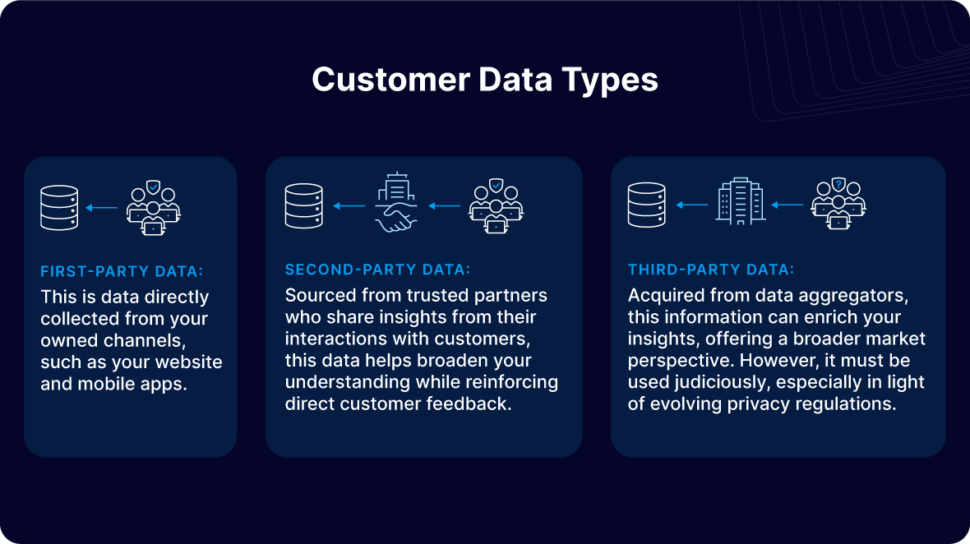
This instant personalization is built on a well-structured data strategy that combines three key types of data:

  • First-Party Data: This is data directly collected from your owned channels, such as your website and mobile apps.
  • Second-Party Data: Sourced from trusted partners who share insights from their interactions with customers, this data helps broaden your understanding while reinforcing direct customer feedback.
  • Third-Party Data: Acquired from data aggregators, this information can enrich your insights, offering a broader market perspective. However, it must be used judiciously, especially in light of evolving privacy regulations.
By integrating these diverse data sources, companies can transform raw information into actionable insights. Every customer touchpoint—be it browsing a website, receiving an email, or visiting a store—can be optimized in real time, ensuring that each interaction is as engaging and relevant as possible.

Yet, while the benefits of real-time data are clear, many companies still struggle with the necessary infrastructure. Legacy systems, siloed databases, and outdated analytics tools often impede the swift collection, processing, and application of data. 

Without a modern, agile data infrastructure, even the best personalization strategies can falter, resulting in delayed interactions and missed opportunities to connect with customers when it matters most. To fully leverage real-time data for a superior customer experience, businesses must invest in robust, scalable systems that can keep pace with the rapid flow of information in today’s digital landscape.

Enhancing the Entire Customer Journey

A holistic view of the customer journey is crucial in today’s competitive landscape. Real-time analytics offers a comprehensive look at every step a customer takes—from initial awareness to post-purchase engagement. This continuous flow of data allows companies to identify bottlenecks, understand how customers interact with various touchpoints, and make immediate improvements where needed.

For example, if analytics reveal that a particular webpage is causing customers to drop off during the checkout process, a real-time alert can prompt the team to investigate and optimize the page—whether by simplifying the form, improving the user interface, or even offering a live support chat. Similarly, journey reports and attribution analyses help trace the paths that lead to successful conversions, enabling brands to replicate positive experiences across other channels.

By continuously monitoring the customer journey and making data-driven adjustments, companies can ensure a smoother, more engaging experience that evolves alongside customer needs.

How to Implement Real-Time Analytics to Improve Customer Experience 

Transitioning to real-time analytics might seem like a daunting, resource-intensive task, but a strategic, phased approach can make the process manageable and highly effective.

Here’s how to begin. 
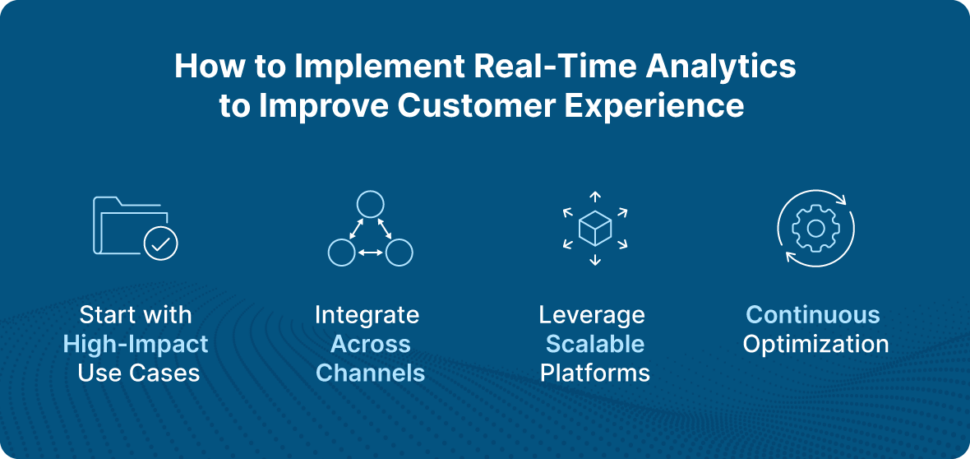
Start with High-Impact Use Cases

Focus initially on the areas where real-time data can make the most significant impact—such as personalization and loyalty. This allows your team to see immediate benefits and build internal support for broader initiatives.

Integrate Across Channels

Ensure your data infrastructure can handle inputs from various sources—online interactions, in-store purchases, mobile app engagements, and more. A unified view of customer behavior is key to delivering truly personalized experiences.

Leverage Scalable Platforms

Platforms like Striim offer robust solutions that combine data ingestion, processing, and analytics in one place. These tools are designed to grow with your needs, helping you integrate third-party data where appropriate and maintain compliance with evolving privacy standards.

Continuous Optimization

Use the insights gained from real-time data not just to react, but to proactively enhance the customer journey. Experiment with different loyalty strategies, test new personalization tactics, and refine your approach based on what the data tells you.

Looking Ahead: The Future of Customer Analytics

As technology advances, real-time analytics is poised to become even more integral to customer experience strategies. The evolution of AI and machine learning is enabling businesses to not only react to customer behavior but also predict it. This predictive capability means that brands are starting to anticipate customer needs before they arise, offering proactive recommendations and solutions that further enhance satisfaction and loyalty.

Emerging technologies, such as the Internet of Things (IoT), are also broadening the spectrum of available data. By integrating IoT devices, companies can gain insights into customer behavior in physical spaces—such as tracking in-store movements or monitoring product interactions—thereby adding another layer of depth to the customer experience.

In this new era, success is defined by the ability to blend data-driven insights with human creativity, crafting experiences that feel both personalized and authentic.

The Role of AI in Real-Time Analytics

By combining AI with real-time analytics with integrative platforms like Striim in parallel with AI-ready cloud data warehouses like Snowflake, businesses can create hyper-personalized, adaptive experiences that drive deeper customer connections and long-term loyalty.

Real-World Example: Morrisons 

Morrisons, one of the UK’s largest supermarket chains, has embraced real-time analytics to elevate its customer experience. By integrating critical data from its Retail Management System (RMS) and Warehouse Management System (WMS) into Google BigQuery via Striim, Morrisons now gains immediate visibility into stock levels and product availability. 


This shift from batch processing to real-time data access enables the company to promptly identify and resolve inventory issues, optimize replenishment, and ensure that shelves are consistently stocked. As a result, customers enjoy a more reliable and satisfying shopping experience—whether they’re shopping in-store or online—with up-to-date product information and timely promotions that cater to their needs.

The Future of Customer Experience is Here

Real-time analytics is no longer a futuristic concept—it is the foundation of modern customer engagement. By enabling instantaneous personalization and a continuously optimized customer journey, real-time analytics helps brands build lasting, meaningful relationships with their customers. 

For companies looking to embark on this journey, starting small and building on high-impact use cases can pave the way for a comprehensive transformation. With strategic tools and platforms available today, the path to delivering truly exceptional customer experiences is clearer than ever. Ready to discover how Striim can help your business leverage real-time data and analytics to enhance customer experience? Get a demo today

Streaming Salesforce Data into Google BigQuery to Build Business Reports

Introduction

At Striim, we use our Salesforce Reader to read from our Salesforce account and write into Google BigQuery where we join data from HubSpot to create Looker reports that multiple internal teams (Sales, Customer Success and Finance) use for reporting, analysis and drive action items for their departments.

This recipe shows how you can build a data pipeline to read data from Salesforce and write to BigQuery.  Striim’s Salesforce Reader will first read the existing tables from the configured Salesforce dataset and then write them to the target BigQuery project using the BigQuery Writer, a process called “initial load” in Striim and “historical sync” or “initial snapshot” by others.  After completing the initial load, the Salesforce Reader will automatically transition to continuously reading updates to the configured Salesforce datasets, and then writing these source updates to the target BigQuery project using the BigQuery Writer.You can use the recipe to write into any of Striim supported targets.

Benefits

  • Act in Real Time – Predict, automate, and react to business events as they happen, not minutes or hours later.
  • Empower Your Teams – Give teams across your organization a real-time view into operational data.

Step – 1 – Prep Work

Setting up Salesforce as a source
Make sure you have the permissions to be able to access the objects in the Salesforce account that you would like to read the data from. These are the permissions that will be required for Automated OAuth:

  • Access the identity URL service
  • Manage Salesforce services
  • Manage user data via APIs
  • Perform requests at any time

Google BigQuery Target

Striim setup details

  • Get started on your journey with Striim by signing up for free on Striim’s Developer Edition.

Step – 2 – Create Striim Application

In Striim, App (application) is the component that holds the details of the data pipeline – source & target details, other logical components organized into one or more flows.

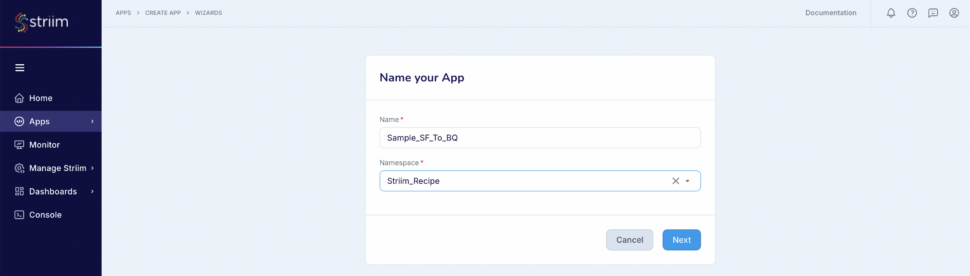
Below steps will help you create an application (refer – Screenshot-1):

  1. Click on Apps (left-hand panel) to create your application.
  2. Enter Source:Salesforce Target:BigQuery (as shown in the screenshots-1,2,3 below)
  3. For this recipe, we are going to use Salesforce Reader with App type as automated (screenshot-3)
  4. Click on “Get Started” button.

(Screenshot- 1 – App selection based on source & target)
(Screenshot- 2 – Select the Salesforce Reader (first in the list as shown below))
(Screenshot- 3 – Target selected is BigQuery and App type should be “Automated”)

  1. Provide a name for your application
  2. Create a new namespace
  3. Click the “Next” button

(Screenshot- 4 – Striim App Creation)

Step – 3 – Configuring Salesforce as Source

Before we jump into the connection to the source, lets understand Connection Profile and Target schema creation that are required for our pipeline creation.

  1. Connection Profile – Connection profile allows you to specify the properties required to connect to an external data source once and use that set of properties in multiple sources and/or targets in multiple applications. The authentication types supported by Connection profiles are OAuth for Salesforce and ServiceAccount for Big Query.
  2. Target Schema creation – Keep this enabled to experience the power of Striim where all the required schemas and tables are created for you by Striim (if they don’t exist already). Note – Permissions are the only key requirement that you need to make sure of. For this recipe you will need to provide the service account key which is also mentioned in the next step.

(Screenshot- 5 Gathering source details to connect)

Enable “Use Connection Profile”

(Screenshot- 6 – Connection Profile creation)

In the “New Salesforce Connection Profile” dialog:

  1. Connection Profile Name – provide a name to identify this connection
  2. Namespace –  Select the namespace. In this case we have used the namespace where the App is created and you can do the same.
  3. Host – We are connecting to the Prod instance and hence it is not required. If you are connecting to a non-prod account like sandbox, then provide the host (for example: striim–ferecipe.sandbox.my.salesforce.com ). Note: Please do not specify https:// in the host field.

(Screenshot-7- Creation of Connection Profile for Salesforce)

Click on “Sign in using OAuth”

  1. You will be redirected to the Salesforce login page where you can provide your credentials.
  2. After successfully logging in you will see the below – screenshot-8

(Screenshot- 8 – Salesforce account authenticated)

  1. The Connection profile dialog should have success messages for the connection and Test. (refer Screenshot-9 below)
  2. Click on Save.

(Screenshot- 9 –  Successful creation of Connection profile for Source)

  1. Striim will check on the source and environment access and then enable the “Next” button.
  2. In the next screen, select the Salesforce object(s) that you want to move into Big Query and click “Next”.

(Screenshot- 10 –  Source Object selection)

Step – 4 – Configuring BigQuery as Target

  1. Choose the service account key.
  2. The “Project ID” will get auto-populated from the service account key. (Screenshot-11, 12)

(Screenshot-11 – BigQuery credential upload)

  1. Either select an existing data set or create a new one. For this recipe we have created a new data set.
  2. Click on “Next” button

(Screenshot-12 – Target Configuration)

Striim will validate the target connectivity and enable the “Next” button.

(Screenshot- 13 – Target checks and validation)

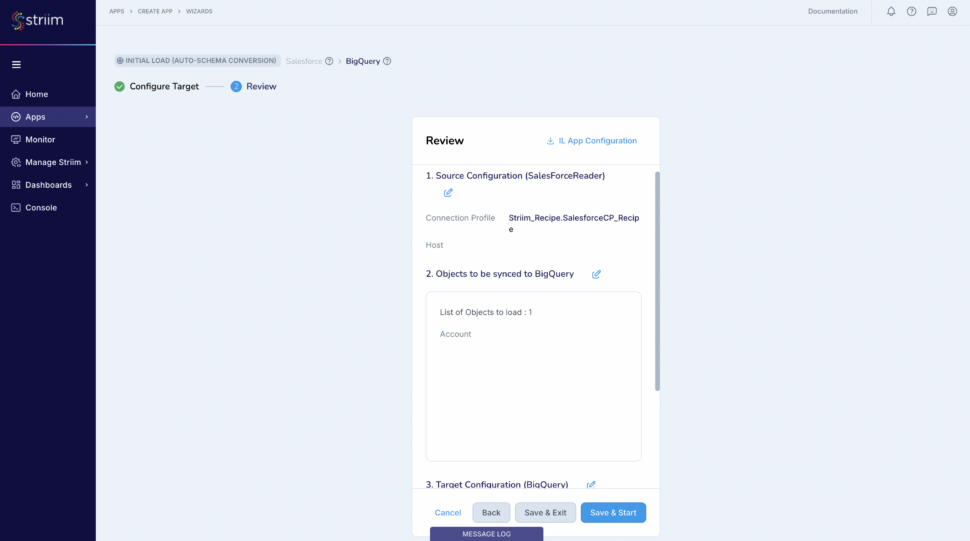
Review all the details of the data pipeline that we just created and click on “Save & Start”.

(Screenshot- 14 – Pipeline Review)

You have successfully created an app that will move your Salesforce data into Google BigQuery!

(Screenshot- 15 – Successful App Creation)

Step – 5 – Running and Monitoring your application

As the Striim App starts running,the dashboards and monitors (screenshot- 16,17) show the real-time data movement along with various metrics (ex- memory and CPU usage) that we capture. Refer to our documentation for more details on monitoring.

(Screenshot- 16 – Monitoring Dashboard)

(Screenshot-17 – Metrics overview)

In the application that we just created you will be able to experience the real-time data movement into the target thereby being able to predict, automate, and react to business events as they happen, not minutes or hours later. The data from Big Query is then joined with our Hubspot data to create Looker reports.

Related Information

  • In addition to the Salesforce Reader, Striim offers other Salesforce related adapters –  Salesforce CDC, Salesforce Writer, Salesforce Pardot, Salesforce Platform Event Reader and Salesforce Push Topic Reader.
  • You can also look into another Salesforce recipe where we read from Salesforce and write into Azure Synapse.
  • Learn more about data streaming using Striim through our other Tutorials and Recipes.
  • More details about increasing throughput using parallel threads and recovery are here.

Conclusion

While this recipe has provided you steps to create a pipeline for your Salesforce data, do check all the application adapters that Striim supports to read from and write to.

If you have any questions regarding Salesforce adapter or any other application adapters reach out to us at applicationadapters_support@striim.com

How The Motley Fool Uses Snowflake And Striim To Empower Smarter Investing Decisions

Manaen Schlabach, Data Administrator at The Motley Fool, shares how Snowflake and Striim enable reliable, scalable, and cost-effective data delivery to support smarter investing tools like Fool IQ.

By integrating Snowflake and Striim, The Motley Fool achieved a 10x improvement in the reliability and timeliness of their replication processes. The unified solution, deployed in less than 20 days, tracks membership and campaign activity, allowing timely adjustments to increase value for members.

With features like Snowpipe integration, The Motley Fool reduces costs while delivering accurate, actionable data. As they continue to embrace AI and LLMs, they remain committed to empowering individual investors with world-class tools.

Discover how The Motley Fool uses Snowflake and Striim to make the world smarter, happier, and richer!

Back to top