John Kutay

49 Posts

Top Confluent Alternatives

Confluent

Confluent has established itself as a prominent name in the world of real-time data. Built by the original creators of Apache Kafka, Confluent provides a data streaming platform designed to help businesses harness the continuous flow of information from their applications, websites, and systems.

The primary appeal of Confluent lies in its promise to tame the complexity of Apache Kafka. Raw Kafka is a powerful, open-source technology, but it demands deep technical expertise to deploy effectively.

While Confluent provides a path to adopting data streaming, it is not a one-size-fits-all solution. Many organizations find that the operational overhead, opaque pricing models, and a fragmented ecosystem of necessary add-ons create significant challenges down the line. As the need for real-time data becomes more critical, businesses are increasingly looking for more user-friendly and cost-effective alternatives for their enterprise.

Where Confluent Falls Short as a Data Streaming Solution

Despite its market position, Confluent’s platform presents several challenges that can hinder an organization’s ability to implement a truly seamless and cost-effective data streaming strategy. These shortcomings often lead businesses to seek out more integrated and transparent alternatives.

  • Requires deep Kafka expertise and complex setup: Operating and scaling Confluent, particularly in on-premise or non-cloud-native environments, demands significant technical know-how of Kafka’s intricate architecture.
  • Lacks native CDC and advanced transformation capabilities: Users must integrate separate tools like Debezium for Change Data Capture (CDC) and Apache Flink for complex transformations, which increases latency, cost, and operational overhead.
  • Opaque, usage-based pricing can drive up costs: The resource-based pricing model often leads to unexpectedly high costs, especially for high-throughput workloads or use cases requiring long-term data retention.
  • Limited out-of-the-box observability: Confluent’s built-in monitoring features are minimal. Achieving real-time, end-to-end visibility across data pipelines requires custom development or dedicated, third-party observability tools.
  • Connector access may be restricted or costly: Many essential connectors for popular enterprise systems are gated behind premium tiers, making full integration more difficult and expensive to achieve.

Alternative Solutions to Confluent for Data Streaming
Striim

Striim

Striim is a unified, real-time data integration and streaming platform that offers an all-in-one alternative to the fragmented Confluent ecosystem. Recognized on platforms like Gartner Peer Insights, businesses choose Striim to simplify the creation of smart data pipelines. It enables them to stream, process, and deliver data from enterprise databases, cloud applications, and log files to virtually any target in real time. This allows for rapid development of real-time analytics, AI and ML applications, and cloud integration initiatives without the steep learning curve of raw Kafka.

Ready to see Striim in action? Book a demo or start a free trial.

Striim’s Pros and Cons

Pros:

  • All-in-One Platform: Combines data integration, streaming, and processing in a single solution.
  • Native, Low-Impact CDC: Built-in Change Data Capture from enterprise databases without requiring third-party tools.
  • Powerful In-Flight Processing: Enables complex transformations and enrichments on data in motion—before it lands in its destination.
  • Performance and Scale: Engineered for high-throughput, low-latency workloads.
  • Broad Connectivity: Offers hundreds of pre-built connectors for a wide range of data sources and targets.
  • Enterprise-Ready: Includes built-in high availability, security, and governance features.
  • Hybrid/Multi-Cloud Native: Deploys consistently across on-premises, cloud, and edge environments.

Cons:

  • Advanced Feature Learning Curve: While the platform is overwhelmingly user-friendly, mastering its most advanced transformation and deployment capabilities requires some learning. To help, Striim offers an expansive academy where users can get to grips with the platform and its core capabilities, with videos, quizzes, and interactive learning modules. 
  • Not a pure message broker: While Striims powers real-time streaming to and from Kafka, its primary focus is on end-to-end integration and processing data, not just queuing like raw Kafka.

Top Features of Striim

  • Built-in Change Data Capture (CDC): Enables real-time data replication from enterprise databases without third-party tools—unlike Confluent’s reliance on Debezium.
  • Prebuilt connectors for enterprise and cloud systems: Simplifies integration with databases, warehouses, cloud storage, and messaging platforms—reducing setup time and complexity.
  • Hybrid and multi-cloud support: Deploys easily across on-prem, cloud, or edge environments, making it ideal for organizations with complex infrastructure.
  • Intuitive UI and visual pipeline designer: Lowers the barrier to entry for data teams by eliminating the need to manage Kafka internals directly.
  • Sub-second latency with built-in monitoring: Ensures fast, reliable data delivery with end-to-end visibility—no need to stitch together external monitoring tools.

Striim: A Unified Platform for Real-Time Data Integration

  • Confluent relies on third-party tools like Debezium for CDC, adding setup time and operational overhead. Striim includes native CDC connectors as part of an all-in-one platform, making it faster and easier to stream data from enterprise databases.
  • Kafka-based pipelines often require custom code or external systems for transformation and filtering. Striim handles in-flight transformations natively, enabling real-time processing without added complexity.
  • Achieving reliable, lossless delivery in Confluent often demands deep tuning and custom monitoring. Striim offers built-in delivery guarantees, observability, and alerting, giving teams end-to-end visibility and control from a single interface.

How Striim Simplifies Deployment Across Multi-Cloud Environments

  • Deploying and managing Confluent outside of Confluent Cloud can be resource-intensive and complex. Striim is designed for multi-cloud environments, offering a consistent, low-overhead experience everywhere.
  • Confluent often demands deep Kafka expertise to manage topics, brokers, and schema registries. Striim offers a visual UI, integrated monitoring, and fewer moving parts, so data teams can move faster without needing deep knowledge of Kafka.
  • Many key Confluent connectors are gated behind premium tiers or require manual setup. Striim includes a wide range of prebuilt, production-ready connectors, accelerating integration with critical systems.

For a deeper dive into modern data integration, download the eBook: How to Choose the Right CDC Solution.

Kafka

Apache Kafka

Apache Kafka is the open-source distributed event streaming platform that Confluent is built upon. It is a mature, highly scalable, and durable publish-subscribe messaging system. Businesses choose raw Apache Kafka when they have deep engineering expertise and require maximum control over their infrastructure. You can find community and professional reviews on sites like G2.

Pros and Cons

  • Pros: Highly scalable and fault-tolerant, massive open-source community, unparalleled performance for high-throughput scenarios, and complete vendor neutrality.
  • Cons: Extremely complex to set up, manage, and scale without a dedicated team; lacks built-in tools for management, monitoring, and security; requires integrating other systems for schema management and connectors.

Top Features

  • High-throughput, low-latency message delivery.
  • Durable and replicated storage of event streams.
  • A rich ecosystem of client libraries for various programming languages.
  • Scalable, distributed architecture that can handle trillions of events per day.
  • The Kafka Connect framework for building and running reusable connectors.

Redpanda

Redpanda

Redpanda is a modern streaming data platform that is API-compatible with Kafka. It positions itself as a simpler, more performant, and more cost-effective alternative by being written in C++ and engineered to be self-sufficient without requiring Zookeeper. Small and medium-sized businesses opt for Redpanda to get Kafka-like capabilities with lower operational overhead, reduced latency, and a smaller resource footprint. This makes it suitable for both performance-critical applications and resource-constrained environments. See user reviews on TrustRadius.

Pros and Cons

  • Pros: Kafka API compatibility, no Zookeeper dependency simplifies architecture, lower tail latencies, and improved resource efficiency.
  • Cons: Redpanda’s ecosystem is young compared to Kafka, some advanced Kafka features may not be fully mature, and being a commercial open-source product, some features are enterprise-only.

Top Features

  • A single-binary deployment model for simplicity.
  • Built-in schema registry and HTTP proxy.
  • Data-oriented architecture optimized for modern hardware (NVMe, multi-core CPUs).
  • Tiered storage for cost-effective, long-term data retention.
  • High performance with a thread-per-core model.
Amazon MSK

Amazon MSK (Managed Streaming for Apache Kafka)

Amazon MSK is a fully managed AWS service that makes it easy to build and run applications that use Apache Kafka to process streaming data. It manages the provisioning, configuration, and maintenance of Kafka clusters, including handling tasks like patching and failure recovery. Businesses choose MSK to offload the operational burden of managing Kafka to AWS, allowing them to focus on application development while leveraging deep integration with other AWS services.

Pros and Cons

  • Pros: Fully managed by AWS, simplified cluster provisioning and scaling, seamless integration with the AWS ecosystem (S3, Lambda, Kinesis), and enterprise-grade security features.
  • Cons: Can lead to cloud vendor lock-in with AWS, pricing can be complex to predict and potentially high, and offers less control over the underlying Kafka configuration compared to a self-managed setup.

Top Features

  • Automated provisioning and management of Apache Kafka clusters.
  • Multi-AZ replication for high availability.
  • Integration with AWS Identity and Access Management (IAM) for security.
  • Built-in monitoring via Amazon CloudWatch.
  • Serverless tier (MSK Serverless) that automatically provisions and scales resources.

Google Cloud Pub/Sub

Google Cloud Pub/Sub

Google Cloud Pub/Sub is a serverless, global messaging service. It allows for simple and reliable communication between independent applications. Pub/Sub is known for asynchronous workflows and event-driven architectures within the Google Cloud ecosystem. It excels at decoupling services and ingesting event data at scale.

Pros and Cons

  • Pros: Fully serverless architecture, scales automatically, provides global message delivery, and integrates deeply with Google Cloud services.
  • Cons: It is not Kafka-compatible, which can be a hurdle for teams with existing Kafka tools. It also locks into Google Cloud’s ecosystem.

Top Features

  • Push and pull message delivery.
  • At-least-once delivery guarantee.
  • Filtering messages based on attributes.
  • Global availability with low latency.
  • Integration with IAM and other Google Cloud security services.
Azure Event Hubs

Azure Event Hubs

Azure Event Hubs is a big data streaming platform and event ingestion service. Managed by Microsoft Azure, it can stream millions of events per second. Companies invested in the Azure ecosystem leverage Event Hubs to build real-time analytics pipelines, especially for application telemetry and device data from IoT.

Pros and Cons

  • Pros: Massively scalable, integrates with the Azure stack, and offers a Kafka-compatible API endpoint.
  • Cons: Primarily designed for ingestion; complex processing often requires other Azure services. It also results in Azure vendor lock-in.

Top Features

  • A premium tier offering a Kafka-compatible endpoint.
  • Dynamic scaling with Auto-inflate.
  • Capture events directly to Azure Blob Storage or Data Lake Storage.
  • Geo-disaster recovery.
  • Secure access through Azure Active Directory and Managed Service Identity.

Other Popular Confluent Alternatives

Aiven

Aiven

Aiven provides managed services for popular open-source data technologies, including a robust Apache Kafka offering. Businesses use Aiven to deploy production-grade fully-managed Kafka clusters on their preferred cloud provider (AWS, GCP, Azure) without handling the operational overhead. It’s ideal for teams who want a reliable, hosted Kafka solution with strong support.

Pros and Cons

  • Pros: Multi-cloud portability, fully managed service, and bundles other tools like PostgreSQL and OpenSearch.
  • Cons: Can be more costly than self-management and offers less granular control over Kafka configurations.

Tibco Messaging

Tibco Messaging

TIBCO Messaging offers a suite of high-performance messaging products for enterprise-level data distribution. It’s chosen by large organizations, often with existing TIBCO investments, for its mission-critical reliability and performance in complex systems. It is not a pure Kafka solution but can integrate with it.

Pros and Cons

  • Pros: Enterprise-grade security and reliability, part of a broad integration ecosystem, and includes strong commercial support.
  • Cons: Complex, can be expensive, and represents a more traditional approach to messaging compared to cloud-native platforms.
Strimzi

Strimzi

Strimzi is an open-source project that simplifies running Apache Kafka on Kubernetes. It uses Kubernetes Operators to automate the deployment, management, and configuration of a Kafka cluster. Strimzi is for organizations committed to a cloud-native, Kubernetes-first strategy that want to manage Kafka declaratively.

Pros and Cons

  • Pros: Kubernetes-native automation, strong community support, and simplifies Kafka operations on K8s.
  • Cons: Requires significant Kubernetes expertise and is a self-managed solution, meaning you are responsible for the underlying infrastructure.

Choosing the Right Streaming Platform 

The data streaming landscape is diverse with a host of powerful alternatives to Confluent. The right choice will depend on your organization’s goals, existing infrastructure, and technical expertise. Cloud-native platforms like Pub/Sub and Event Hubs offer simplicity at the cost of vendor lock-in. While managed Kafka providers like Aiven and Amazon MSK reduce operational burden, but can limit control. Modern challengers like Redpanda and WarpStream promise a more efficient Kafka experience.

For organizations seeking to move beyond simply managing a message broker, a unified platform is often the most direct path to value. Instead of stitching together separate tools for ingestion, transformation, and monitoring, an all-in-one solution like Striim accelerates the delivery of real-time, actionable insights, so you can act on your data the instant it’s born.

Ready to see how a unified approach can simplify your data architecture? Book a personalized demo of Striim today.

A Comprehensive Guide to Operational Analytics

Recent studies highlight the critical role of data in business success and the challenges organizations face in leveraging it effectively. A 2023 Salesforce study revealed that 80% of business leaders consider data essential for decision-making. However, a Seagate report found that 68% of available enterprise data goes unleveraged, signaling significant untapped potential for operational analytics to transform raw data into actionable insights.

Operational analytics unlocks valuable insights by embedding directly into core business functions. It leverages automation to streamline processes and reduce reliance on data specialists. Here’s why operational analytics is key to improving your organizational efficiency — and how to begin.

What Is Operational Analytics?

Operational analytics, a subset of business analytics, focuses on improving and optimizing daily operations within an organization. While business intelligence (BI) typically centers on the “big picture” — such as long-term trends, strategic planning, and organizational goals — operational analytics is about the “small picture.” It hones in on the granular, day-to-day decisions that collectively drive efficiency and effectiveness in real-time environments.

For example, consider a hospital seeking to streamline operations. To do so, the team would answer questions including:

  • How many nurses are required per shift?
  • How long should it take to transfer a patient to the ICU?
  • How can patient wait times be reduced?

Operational analytics can answer these questions by providing actionable insights that drive efficiency and throughput. By analyzing real-time data, it helps organizations make data-informed decisions that directly improve daily workflows and overall performance.

Here’s another example: A customer service team can monitor ticket volumes in real-time, allowing them to prioritize responses without switching between tools. Similarly, a logistics coordinator can dynamically adjust delivery routes based on current traffic or weather conditions, ensuring smoother operations and greater agility. These examples illustrate how operational analytics seamlessly integrates into everyday processes, enabling teams to respond quickly and effectively to changing circumstances.

Operational analytics also excels in providing real-time feedback loops that BI does not typically offer. Where BI might analyze the success of a marketing campaign after its conclusion, operational analytics can inform ongoing campaigns by highlighting immediate trends, such as engagement spikes or content underperformance, enabling in-the-moment adjustments.

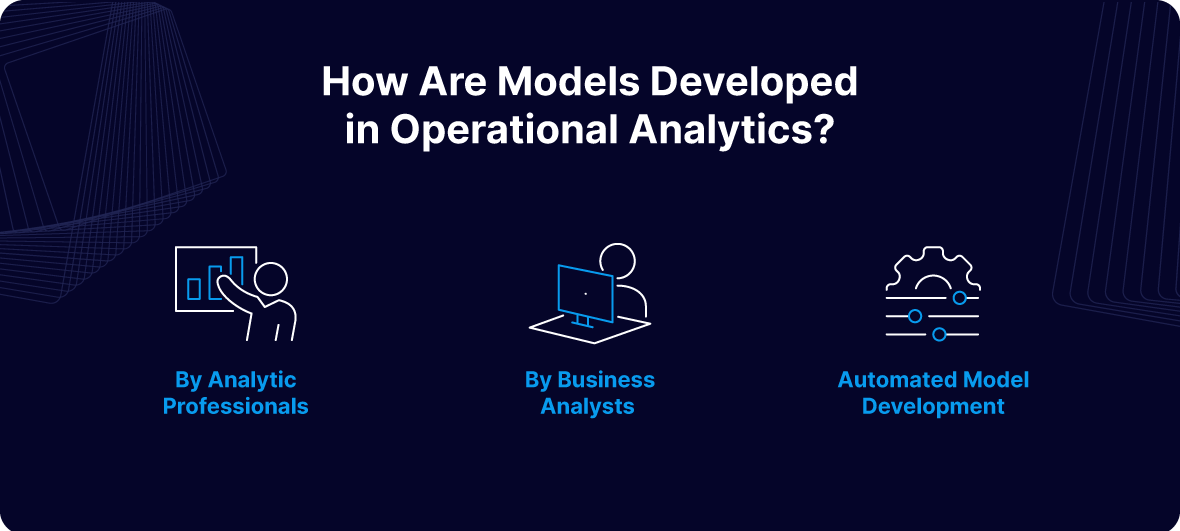
How Are Models Developed in Operational Analytics?

Analytic models are the backbone of operational analytics, helping organizations understand data, generate predictions, and make informed business decisions. There are three primary approaches to building models in operational analytics:

1. Model Development by Analytic Professionals

Analytic specialists, such as data scientists or statisticians, frequently lead the development of sophisticated models. They utilize advanced techniques including cluster analysis, cohort analysis, and regression analysis to uncover patterns and insights.

Models developed by these professionals generally follow one of the following approaches:

  • Specialized Modeling Tools: Tools designed for tasks like data access, cleaning, aggregation, and analysis.
  • Scripting Languages: Languages like Python and R that provide robust libraries for statistical and quantitative analysis.

As a result, this approach delivers highly customized and precise models but requires significant expertise in both statistics and programming.

2. Model Development by Business Analysts

For organizations with limited needs, hiring an analytic specialist may not be feasible. Instead, these teams can leverage business analysts who bring a combination of business understanding and familiarity with data.

Typically a business analyst:

  • Understands operational workflows and data collection processes.
  • Leverages BI tools for reporting and basic analytics.

While they may lack the technical depth of data scientists, business analysts use tools like Power BI and Tableau, which provide built-in functionalities and automation for model building. These tools allow them to extract and analyze data without the need for advanced programming knowledge, striking a balance between ease of use and analytical capability. Therefore, this is a great option for businesses that don’t have the resources to tap analytic professionals.

3. Automated Model Development

Automated model development leverages software to build models with minimal human intervention. This approach involves:

  • Defining decision constraints and objectives.
  • Using the software to experiment with different approaches for various customer scenarios.
  • Allowing the software to learn from results over time to refine and optimize the model.

Through experimentation, the software identifies the most effective strategies, ultimately creating a model that adapts to customer preferences and operational needs. This method is particularly valuable for scaling analytics and reducing reliance on specialized skills.

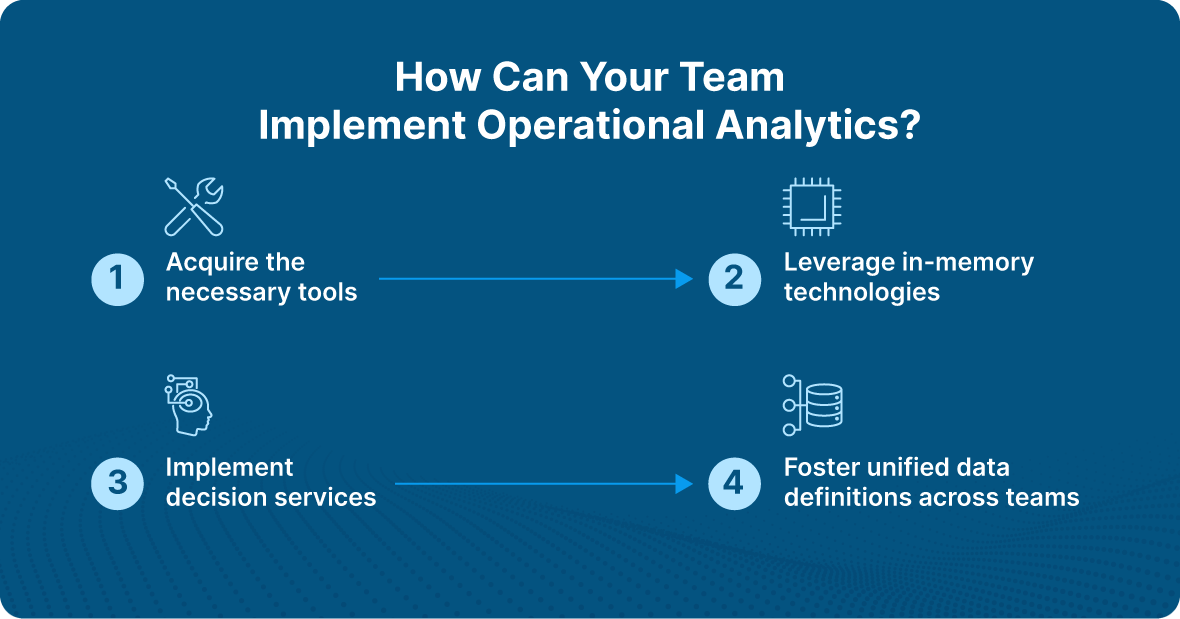
How Can Your Team Implement Operational Analytics?

Implementing operational analytics requires leveraging the right technologies, processes, and collaboration to ensure real-time, actionable insights drive efficiency and decision-making. Here’s how to do so effectively:

1. Acquire the Necessary Tools

The foundation of operational analytics lies in having the right tools to handle diverse data sources and deliver real-time insights. Key components include:

  • ETL Tools: To extract, transform, and load data from systems such as enterprise resource planning (ERP) software, customer relationship management (CRM) platforms, and other operational systems.
  • BI Platforms: For data visualization and reporting.
  • Data Repositories: Data lakes or warehouses to store and manage vast datasets.
  • Specialized Tools for Data Modeling: These tools help create and refine analytics models to fit operational needs.

Real-time data processing capabilities are crucial for operational analytics, as they enable organizations to respond to changes immediately, improving agility and effectiveness.

2. Leverage In-Memory Technologies

Traditional BI tasks often rely on disk-stored database tables, which can cause latency. With the reduced cost of memory, in-memory technologies provide a faster alternative.

  • How It Works: By loading data into a large memory pool, organizations can run entire algorithms directly within memory, reducing latency and accelerating insights.
  • Use Cases: Financial institutions, for instance, use in-memory technologies to update risk models daily for thousands of securities and scenarios, enabling rapid investment and hedging decisions.

In-memory technologies are particularly valuable for real-time operational analytics, where speed and performance are critical to decision-making.

3. Implement Decision Services

Decision services are callable services designed to automate decision-making by combining predictive analytics, optimization technologies, and business rules.

  • Key Benefits: They isolate business logic from processes, enabling reuse across multiple applications and improving efficiency.
  • Example: An insurance company can use decision services to help customers determine the validity of a claim before filing.

To ensure effective implementation, decision services must access all existing data infrastructure components, such as data warehouses, BI tools, and real-time data pipelines. This access ensures decisions are based on the most current and relevant information.

4. Foster Unified Data Definitions Across Teams

A shared understanding of data is essential to avoid delays and inconsistencies in operational analytics implementation. Ensure alignment across your analytics, IT, and business teams by:

  • Standardizing Data Definitions: Consistency in modeling, testing, and reporting processes ensures smooth collaboration.
  • Prioritizing Real-Time Alignment: Unified data definitions help ensure that real-time insights are actionable and reliable for all stakeholders.

Which Industries Benefit from Operational Analytics?

Operational analytics has the potential to transform a variety of industries by enabling real-time insights, improving efficiency, and enhancing decision-making.

Sales

Many organizations focus on collecting new data but overlook the untapped potential in their existing sales tools like Intercom, Salesforce, and HubSpot. This lack of insight can hinder their ability to optimize sales strategies.

Operational analytics helps businesses better utilize their existing data by creating seamless data flows within operational systems. With more contextual data:

  • Sales representatives can improve lead scoring, targeting prospects with greater accuracy to boost conversions.
  • Real-time, enriched data enables segmentation of customers into distinct categories, allowing tailored messaging that addresses specific pain points.

These improvements empower sales teams to act on high-quality data, driving better outcomes.

Industrial Production

Operational analytics supports predictive maintenance, enabling businesses to detect potential machine failures before they occur. Here’s how it works:

  1. Identify machines that frequently disrupt production.
  2. Analyze machine history and failure patterns (e.g., overheating motors).
  3. Develop a model to predict failure probabilities.
  4. Feed sensor data, such as temperature and vibration metrics, into the model.

Over time, the model learns from historical and real-time data to provide accurate failure estimates. Benefits include:

  • Advanced planning of maintenance schedules to minimize downtime.
  • Improved inventory management by identifying spare parts needed in advance.

These predictive capabilities enhance operational efficiency and reduce costly disruptions.

Supply Chain

Operational analytics can optimize supply chain processes by extracting insights from the vast data generated across procurement, processing, and distribution.

For example, a point-of-sale (PoS) terminal connected to a demand signal repository can use operational analytics to:

  • Enable real-time ETL processes, sending live data to a central repository.
  • Anticipate consumer demand with greater precision.

Additionally, prescriptive analytics within operational analytics helps manufacturers evaluate their supply chain partners. For instance:

  • Identify suppliers with recurring delays due to diminished capacity or economic instability.
  • Use this insight to address performance issues with suppliers or explore alternative partnerships.

By uncovering inefficiencies and enabling proactive decision-making, operational analytics strengthens supply chain reliability and responsiveness.

Real-World Operational Analytics Example

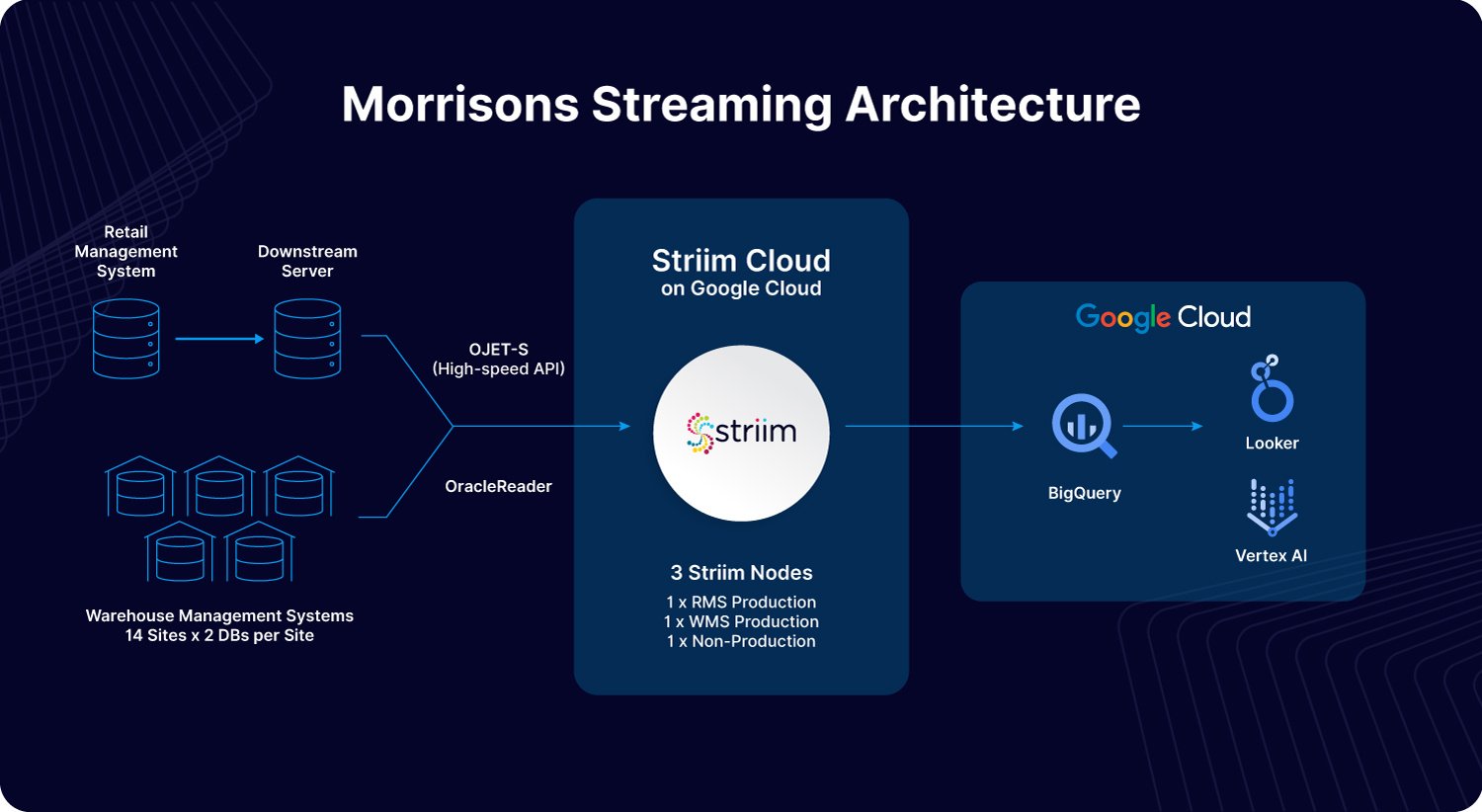
Morrisons, one of the UK’s largest supermarket chains, demonstrates how operational analytics can drive real-time decision-making and operational efficiency. By leveraging Striim’s real-time data integration platform, Morrisons modernized its data infrastructure to seamlessly connect systems such as its Retail Management System (RMS) and Warehouse Management System (WMS). This integration enabled Morrisons to ingest and analyze critical datasets in Google Cloud’s BigQuery, providing immediate insights into stock levels and operational performance.

For example, operational analytics allowed Morrisons to implement “live-pick” replenishment processes, ensuring on-shelf availability while reducing waste and inefficiencies. Real-time visibility into KPIs such as inventory levels, shrinkage, and availability empowered their teams—from senior leadership to store staff—to make informed decisions instantly. By embedding analytics into daily workflows, Morrisons created a data-driven culture that improved customer satisfaction and operational agility. This transformation highlights the power of operational analytics to optimize processes and enhance outcomes in the retail industry.

What Tools Are Available for Operational Analytics?

One common challenge with operational analytics is ensuring that tools can sync and share data seamlessly. Reliable data flow between applications is essential, yet many software platforms only move data into a data warehouse, leaving the task of operationalizing that data unresolved. Data latency further complicates the issue, making it difficult to display up-to-date insights on dashboards. This is where Striim stands out, offering powerful capabilities to address these challenges.

Striim provides real-time integrations for virtually any type of data pipeline. Whether you need to move data into or out of a data warehouse, Striim ensures that operational systems receive data quickly and reliably. Additionally, Striim allows users to build customized dashboards for operational analytics, providing actionable insights in real time.

Gaining Employee Buy-In for Operational Analytics

Adopting operational analytics often involves organizational changes that may challenge existing workflows. Decisions based on analytics can shift responsibilities, empowering junior staff to make decisions they previously deferred to senior colleagues. This shift can create unease among employees used to manual decision-making processes.

To ensure a smooth transition, organizations should involve employees from the start, demonstrating how operational analytics can enhance their work. Automation can free up time for more meaningful tasks, improving overall productivity and reducing repetitive workloads. By gaining employee confidence and highlighting the benefits, organizations can foster acceptance and ensure a successful rollout of operational analytics.

Improve Efficiency with Operational Analytics

Operational analytics empowers organizations to optimize daily operations by transforming raw data into actionable, real-time insights. Unlike traditional business intelligence, which focuses on long-term strategies, operational analytics hones in on immediate, tactical decisions, enhancing efficiency and agility.

Industries like retail, industrial production, and supply chain management use operational analytics to drive predictive maintenance, improve customer segmentation, and ensure real-time decision-making. Tools like Striim facilitate seamless data integration, real-time dashboards, and reduced latency, enabling businesses to respond proactively to operational challenges. By aligning technology, processes, and employee buy-in, operational analytics fosters a data-driven culture that enhances performance and drives success.

Ready to unlock the power of real-time insights with Striim? Get a demo today.

An In-Depth Guide to Real-Time Analytics

It’s increasingly necessary for businesses to make immediate decisions. More importantly, it’s crucial these decisions are backed up with data. That’s where real-time analytics can help. Whether you’re a SaaS company looking to release a new feature quickly, or own a retail shop trying to better manage inventory, these insights can empower businesses to assess and act on data quickly to make better decisions. As a result, you’ll enjoy empowered decision-making, know how to respond to the latest trends, and boost operational efficiency.

We’re here to walk you through everything you need to know about real-time analytics. Whether you want to learn more about the benefits of real-time analytics or dive deeper into the most significant characteristics of a real-time analytics system, we’ll ensure you have a robust understanding of how real-time analytics move your business forward. 

What is real-time analytics?

So, what is real time analytics? And more importantly, how does real-time analytics work? 

Real-time analytics refers to pulling data from different sources in real-time. Then, the data is analyzed and transformed into a format that’s digestible for target users, enabling them to draw conclusions or immediately garner insights once the data is entered into a company’s system. Users can access this data on a dashboard, report, or another medium.

Moreover, there are two forms of real-time analytics. These include: 

On-demand real-time analytics

With on-demand real-time analytics, users send a request, such as with an SQL query, to deliver the analytics outcome. It relies on fresh data, but queries are run on an as-needed basis. 

The requesting user varies, and can be a data analyst or another team member within the organization who wants to gain insight into business activity. For instance, a marketing manager can leverage on-demand real-time analytics to identify how users on social media react to an online advertisement in real time. 

Continuous real-time analytics

On the contrary, continuous real-time analytics takes a more proactive approach. It delivers analytics continuously in real time without requiring a user to make a request. You can view your data on a dashboard via charts or other visuals, so users can gain insight into what’s occurring down to the second.

One potential use case for continuous real-time analytics is within the cybersecurity industry. For instance, continuous real-time analytics can be leveraged to analyze streams of network security data flowing into an organization’s network. This makes threat detection a possibility. 

In addition to the main types of real-time analytics, streaming analytics also plays a crucial role in processing data as it flows in real-time. Let’s dive deeper into streaming analytics now. 

What’s the difference between real-time analytics and streaming analytics? 

Streaming analytics focuses on analyzing data in motion, unlike traditional analytics, which deals with data stored in databases or data warehouses. Streams of data are continuously queried with Streaming SQL, enabling correlation, anomaly detection, complex event processing, artificial intelligence/machine learning, and live visualization. Because of this, streaming analytics is especially impactful for fraud detection, log analysis, and sensor data processing use cases.

How does real-time analytics work?

To fully understand the impact of real-time analytics processing, it’s necessary to understand how it works. 

1. Collect data in real time

Every organization can leverage valuable real-time data. What exactly that looks like varies depending on your industry, but some examples include:

  • Enterprise resource management (ERP) data: Analytical or transactional data
  • Website application data: Top source for traffic, bounce rate, or number of daily visitors
  • Customer relationship management (CRM) data: General interest, number of purchases, or customer’s personal details
  • Support system data: Customer’s ticket type or satisfaction level

Consider your business operations to decide the type of data that’s most impactful for your business. You’ll also need to have an efficient way of collecting it. For instance, say you work in a manufacturing plant and are looking to use real-time analytics to find faults in your machinery. You can use machine sensors to collect data and analyze it in real time to deduct if there are any signs of failure.

For collection of data, it’s imperative you have a real-time ingestion tool that can reliably collect data from your sources. 

2. Combine data from various sources

Typically, you’ll need data from multiple sources to gain a complete analysis. If you’re looking to analyze customer data, for instance, you’ll need to get it from operational systems of sales, marketing, and customer support. Only with all of those facets can you leverage the information you have to determine how to improve customer experience. 

To achieve this, combine data from the sum of your sources. For this purpose, you can use ETL (extract, transform, and load) tools or build a custom data pipeline of your own and send the aggregated data to a target system, such as a data warehouse. 

3. Extract insights by analyzing data

Finally, your team will extract actionable insights. To do this, use statistical methods and data visualizations to analyze data by identifying underlying patterns or correlations in the data. For example, you can use clustering to divide the data points into different groups based on their features and common properties. You can also use a model to make predictions based on the available data, making it easier for users to understand these insights.

Now that you have an answer to the question, “how does real time analytics work?” Let’s discuss the difference between batch and real-time processing. 

Batch processing vs. real-time processing: What’s the difference? 

Real-time analytics is made possible by the way the data is processed. To understand this, it’s important to know the difference between batch and real-time processing.

Batch Processing

In data analytics, batch processing involves first storing large amounts of data for a period and then analyzing it as needed. This method is ideal when analyzing large aggregates or when waiting for results over hours or days is acceptable. For example, a payroll system processes salary data at the end of the month using batch processing.

“Sometimes there’s so much data that old batch processing (late at night once a day or once a week) just doesn’t have time to move all data and hence the only way to do it is trickle feed data via CDC,” says Dmitriy Rudakov, Director of Solution Architecture at Striim

Real-time Processing

With real-time processing, data is analyzed immediately as it enters the system. Real-time analytics is crucial for scenarios where quick insights are needed. Examples include flight control systems and ATM machines, where events must be generated, processed, and analyzed swiftly.

“Real-time analytics gives businesses an immediate understanding of their operations, customer behavior, and market conditions, allowing them to avoid the delays that come with traditional reporting,” says Simson Chow, Sr. Cloud Solutions Architect at Striim. “This access to information is necessary because it enables businesses to react effectively and quickly, which improves their ability to take advantage of opportunities and address problems as they arise.” 

Real-Time Analytics Architecture

When implementing real-time analytics, you’ll need a different architecture and approach than you would with traditional batch-based data analytics. The streaming and processing of large volumes of data will also require a unique set of technologies.

With real-time analytics, raw source data rarely is what you want to be delivered to your target systems. More often than not, you need a data pipeline that begins with data integration and then enables you to do several things to the data in-flight before delivery to the target. This approach ensures that the data is cleaned, enriched, and formatted according to your needs, enhancing its quality and usability for more accurate and actionable insights.

Data integration

The data integration layer is the backbone of any analytics architecture, as downstream reporting and analytics systems rely on consistent and accessible data. Because of this, it provides capabilities for continuously ingesting data of varying formats and velocity from either external sources or existing cloud storage.

It’s crucial that the integration channel can handle large volumes of data from a variety of sources with minimal impact on source systems and sub-second latency. This layer leverages data integration platforms like Striim to connect to various data sources, ingest streaming data, and deliver it to various targets.

For instance, consider how Striim enables the constant, continuous movement of unstructured, semi-structured, and structured data – extracting it from a wide variety of sources such as databases, log files, sensors, and message queues, and delivering it in real-time to targets such as Big Data, Cloud, Transactional Databases, Files, and Messaging Systems for immediate processing and usage.

Event/stream processing

The event processing layer provides the components necessary for handling data as it is ingested. Data coming into the system in real-time are often referred to as streams or events because each data point describes something that has occurred in a given period. These events typically require cleaning, enrichment, processing, and transformation in flight before they can be stored or leveraged to provide data. 

Therefore, another essential component for real-time data analytics is the infrastructure to handle real-time event processing.

Event/stream processing with Striim

Some data integration platforms, like Striim, perform in-flight data processing. This includes filtering, transformations, aggregations, masking, and enrichment of streaming data. These platforms deliver processed data with sub-second latency to various environments, whether in the cloud or on-premises.

Additionally, Striim can deliver data to advanced stream processing platforms such as Apache Spark and Apache Flink. These platforms can handle and process large volumes of data while applying sophisticated business logic.

Data storage

A crucial element of real-time analytics infrastructure is a scalable, durable, and highly available storage service to handle the large volumes of data needed for various analytics use cases. The most common storage architectures for big data include data warehouses and lakes. Organizations seeking a mature, structured data solution that focuses on business intelligence and data analytics use cases may consider a data warehouse. Data lakes, on the contrary, are suitable for enterprises that want a flexible, low-cost big data solution to power machine learning and data science workloads on unstructured data.

It’s rare for all the data required for real-time analytics to be contained within the incoming stream. Applications deployed to devices or sensors are generally built to be very lightweight and intentionally designed to produce minimal network traffic. Therefore, the data store should be able to support data aggregations and joins for different data sources — and must be able to cater to a variety of data formats.

Presentation/consumption

At the core of a real-time analytics solution is a presentation layer to showcase the processed data in the data pipeline. When designing a real-time architecture, keep this step at the forefront as it’s ultimately the end goal of the real-time analytics pipeline. 

This layer provides analytics across the business for all users through purpose-built analytics tools that support analysis methodologies such as SQL, batch analytics, reporting dashboards, and machine learning. This layer is essentially responsible for:

  • Providing visualization of large volumes of data in real time
  • Directly querying data from big stores, like data lakes and warehouses 
  • Turning data into actionable insights using machine learning models that help businesses deliver quality brand experiences 

What are Key Characteristics of a Real-Time Analytics System? 

To verify that a system supports real-time analytics, it must have specific characteristics. Those characteristics include: 

Low latency

In a real-time analytics system, latency refers to the time between when an event arrives in the system and when it is processed. This includes both computer processing latency and network latency. To ensure rapid data analysis, the system must operate with low latency. “Businesses can access the most accurate data since the system responds quickly and has minimal latency,” says Chow. 

High availability

Availability refers to a real-time analytics system’s ability to perform its function when needed. High availability is crucial because without it:

  • The system cannot instantly process data
  • The system will find it hard to store data or use a buffer for later processing, particularly with high-velocity streams 

Chow adds, “High availability guarantees uninterrupted operation.” 

Horizontal scalability 

Finally, a key characteristic of a successful real-time analytics system is horizontal scalability. This means the system can increase capacity or enhance performance by adding more servers to the existing pool. In cases where you cannot control the rate of data ingress, horizontal scalability becomes crucial, as it allows you to adjust the system’s size to handle incoming data effectively. “When the business adds more servers, the horizontal scalability feature of the system increases its flexibility even more by enabling it to handle more data and users,” shares Chow. “When combined, these characteristics ensure the system’s scalability, speed, and reliability as the business grows.” 

According to Rudakov, these three capabilities are crucial for several reasons. “[Low latency is important] because in order to move data for reasons above the operator needs data to get triggered ASAP with lowest latency possible,” he says. “Secondly, the system needs to be redundant with recovery support so that if it fails it comes back quickly and has no data loss. Finally, if the data is not moving fast enough, the operator needs to be able to easily scale the data moving system, i.e. add parallel components into the pipeline and add nodes into the cluster.” 

Rudakov adds that’s exactly why Striim is the right choice for a real-time analytics platform. “Striim provides all real time platform necessary elements described above: low latency pipeline controls such as CDC readers to read data in real time from database logs, recovery, batch policies, ability to run pipelines in parallel and finally multi-node cluster to support HA and scalability,” he says. “Additionally, it supports an easy drag and drop interface to create pipelines in a simple SQL based language (TQL).” 

Benefits of Real-Time Analytics

There are countless benefits of real-time analytics. Some include: 

To Optimize the Customer Experience 

According to an IBM/NRF report, post-pandemic customer expectations regarding online shopping have evolved considerably. Now, consumers seek hybrid services that can help them move seamlessly from one channel to another, such as buy online, pickup in-store (BOPIS), or order online and get it delivered to their doorstep. According to the IBM/NRF report, one in four consumers wants to shop the hybrid way. 

In order to enable this, however, retailers must access real-time analytics to move data from their supply chain to the relevant departments. Organizations today need to monitor their rapidly changing contexts 24/7. They need to process and analyze cross-channel data immediately. Just consider how Macy’s leveraged Striim to improve operational efficiency and create a seamless customer experience. “In many scenarios, businesses need to act in real time and if they don’t their revenue and customers get impacted,” says Rudakov. 

Real-time analytics also enhances personalization. It enables brands to deliver tailored content to consumers based on their actions on channels like websites, mobile apps, SMS, or email—instantly.

“Having access to real-time data allows a retail store to quickly respond to changes in demand for a certain item by adjusting inventory levels, launching focused marketing campaigns, or adjusting pricing techniques,” says Chow. “Similarly, companies may move quickly to address potential problems—like a drop in website performance or a decrease in consumer satisfaction—and mitigate negative consequences before they escalate.” 

To Stay Proactive and Act Quickly 

Another way businesses can leverage real-time analytics is to stay proactive and act quickly in case of an anomaly, such as with fraud detection. Unfortunately, fraud is a reality for innumerable businesses, regardless of size. However, real-time analytics can help organizations identify theft, fraud, and other types of malicious activities. Because of this, leveraging real-time analytics is a powerful way to ensure your business is staying proactive and able to move quickly if something goes wrong. 

This is especially important as these malicious online activities have seen a surge over the past few years. Consumers lost more than $10 billion to fraud in 2023, according to the Federal Trade Commission

“At some point a major credit card company used our platform to read network access logs and call an ML model to detect hacker attempts on their network,” shares Rudakov. 

For example, companies can use real-time analytics by combining it with machine learning and Markov modeling. Markov modeling is used to identify unusual patterns and make predictions on the likelihood of a transaction being fraudulent. If a transaction shows signs of unusual behavior, it then gets flagged. 

To Improve Decision-Making

Using up-to-date information allows organizations to know what they are doing well and improve. Conversely, it allows them to identify pitfalls and determine how to improve. 

For instance, if a piece of machinery isn’t working optimally in a manufacturing plant, real-time analytics can collect this data from sensors and generate data-driven insights that can help technicians resolve it. 

Real-time Use Cases in Different Industries

The benefits of real-time analytics vary just as the use cases do. Let’s walk through several use cases of real-time analytics platforms. 

Supply chain

Real-time analytics in supply chain management can enable better decision-making. Managers can view real-time dashboard data to oversee the supply chain and strategize demand and supply. “Management of the supply chain is another example [of a real-time analytics use case]. By monitoring shipments and inventory data, real-time analytics allow companies to quickly fix delays or shortages,” says Chow. 

Some of the other ways real-time analytics can help organizations include:

  • Feed live data to route planning algorithms in the logistics industry. These algorithms can analyze real-time data to optimize routes and save time by going through traffic patterns on roadways, weather conditions, and fuel consumption. 
  • Use aggregation of real-time data from fuel-level sensors to resolve fuel issues faced by drivers. These sensors can provide data on fuel level volumes, consumption, and dates of refills. 
  • Collect real-time data from electronic logging devices (ELD) to study driver behavior and improve it. This data provides valuable insights into driving patterns, enabling fleet managers to implement targeted training and safety measures 

Finance

In certain industries, such as commodities trading, market fluctuations require organizations to be agile. Real-time analytics can help in these scenarios by intercepting changes and empowering organizations to adapt to rapid market fluctuations. Financial firms can use real-time analytics to analyze different types of financial data, such as trading data, market prices, and transactional data. 

Consider the case of Inspyrus (now MineralTree), a fintech company seeking to improve accounts payable operations for businesses. The company wanted to ensure its users could get a real-time view of their transactional data from invoicing reports. However, their existing stack was unable to support real-time analytics, which meant that it took a whole hour for data updates, whereas some operations could even take weeks. There were also technical issues with moving data from an online transaction processing (OLTP) database to Snowflake in real time. 

By utilizing Striim, Inspyrus ingested real-time data from an OLTP database, loaded it into Snowflake, and transformed it there. It then used an intelligence tool to visualize this data and create rich reports for users. As a result, Inspyrus users are able to view reports in real time and utilize insights immediately to fuel better decisions. 

Use Striim to power your real-time analytics infrastructure

Your real-time analytics infrastructure can be only as good as the tool you use to support it. Striim is a unified real-time data integration and streaming platform that enables real-time analytics that can offer a range of benefits in this regard. It can help you:

  • Collect data non-intrusively, securely, and reliably, from operational sources (databases, data warehouses, IoT, log files, applications, and message queues) in real time
  • Stream data to your cloud analytics platform of choice, including Google BigQuery, Microsoft Azure Synapse, Databricks Delta Lake, and Snowflake
  • Offer data freshness SLAs to build trust among business users
  • Perform in-flight data processing such as filtering, transformations, aggregations, masking, enrichment, and correlations of data streams with an in-memory streaming SQL engine
  • Create custom alerts to respond to key business events in real time

When seeking a real-time analytics platform, look no further than Striim. Striim, a unified real-time data integration and streaming platform, connects clouds, data, and applications. You can leverage it to connect hundreds of enterprise sources, all while supporting data enrichment, the creation of complex in-flight data transformations with Striim, and more. “Striim uses log-based Change Data Capture (CDC) technology to capture real-time changes from the source database and continuously replicate the data in-memory to multiple target systems, all without disrupting the source database’s operation,” says Chow. 

Ready to discover how Striim can help evolve how you process data? Sign up for a demo today.

What are Smart Data Pipelines? 9 Key Smart Data Pipelines Capabilities

When implemented effectively, smart data pipelines seamlessly integrate data from diverse sources, enabling swift analysis and actionable insights. They empower data analysts and business users alike by providing critical information while protecting sensitive production systems. Unlike traditional pipelines, which can be hampered by various challenges, smart data pipelines are designed to address these issues head-on.

Today, we’ll dive into what makes smart data pipelines distinct from their traditional counterparts. We’ll explore their unique advantages, discuss the common challenges you face with traditional data pipelines, and highlight nine key capabilities that set smart data pipelines apart.

What is a Smart Data Pipeline? 

A smart data pipeline is a sophisticated, intelligent data processing system designed to address the dynamic challenges and opportunities of today’s fast-paced world. In contrast to traditional data pipelines, which are primarily designed to move data from one point to another, a smart data pipeline integrates advanced capabilities that enable it to monitor, analyze, and act on data as it flows through the system.

This real-time responsiveness allows organizations to stay ahead of the competition by seizing opportunities and addressing potential issues with agility. For instance, your smart data pipeline can rapidly identify and capitalize on an emerging social media trend, allowing your business to adapt its marketing strategies and engage with audiences effectively before the trend peaks. This gets you ahead of your competition. Alternatively, it can also help mitigate the impact of critical issues, such as an unexpected schema change in a database, by automatically adjusting data workflows or alerting your IT team to resolve the problem right away. 

In addition to real-time monitoring and adaptation, smart data pipelines leverage features such as machine learning for predictive analytics. This enables businesses to anticipate future trends or potential problems based on historical data patterns, facilitating proactive decision-making. Moreover, a decentralized architecture enhances data accessibility and resilience, ensuring that data remains available and actionable even in the face of system disruptions or increased demand.

To fully comprehend why traditional data pipelines are insufficient, let’s walk through some of their hurdles. 

What are the Challenges of Building Data Pipelines? 

Traditional data pipelines face several persistent issues that reveal the need for smarter solutions. Luckily, smart data pipelines can mitigate these problems.  

According to Dmitriy Rudakov, Director of Solution Architecture at Striim, there are two primary features that smart data pipelines have that traditional ones don’t. “[The] two main aspects [are] the ability to act in real time, and integration with SQL / UDF layer that allows any type of transformations,” he shares.

Furthermore, with traditional data pipelines, data quality remains a significant challenge, as manual cleansing and integration of separate sources can cause trouble. As a result, errors and inconsistencies can be introduced into your data. Integration complexity adds to the difficulty, with custom coding required to connect various data sources, leading to extended development times and maintenance hassles. Then, there’s the question of scalability and data volume. This is problematic for traditional pipelines as they often struggle with the increasing scale and velocity of data, resulting in performance bottlenecks. Plus, high infrastructure costs are another hurdle. 

With traditional data pipelines, the data processing and transformation stages can be rigid and labor-intensive, too. This makes it near impossible to adapt to new data requirements rapidly. Finally, traditional pipelines raise questions about pipeline reliability and security, as they are prone to failures and security vulnerabilities.

By moving to a smart data pipeline, you can rest assured that your data is efficiently managed, consistently available, and adaptable to evolving business needs. Let’s dive deeper into key aspects of smart data pipelines that allow them to address all of these concerns. 

9 Key Features of Smart Data Pipelines

Here are nine key capabilities of Smart Data Pipelines that your forward-thinking enterprise cannot afford to overlook.

Real-time Data Integration

Smart data pipelines are adept at handling real-time data integration, which is crucial for maintaining up-to-date insights in today’s dynamic business environment. These pipelines feature advanced connectors that interface seamlessly with a variety of data sources, such as databases, data warehouses, IoT devices, messaging systems, and applications. The best part? This all happens in real time. 

Rudakov believes this is the most crucial aspect of smart data pipelines. “I would zoom into [the] first [capability as the most important] — real time, as it gives one an ability to act as soon as an event is seen and not miss the critical time to help save money for the business. For example, in the IoT project we did for a car breaks manufacturer, if the quality alert went out too late the company would lose critical time to fix the device.” 

By supporting real-time data flow, smart pipelines ensure that data is continuously updated and synchronized across multiple systems. This enables businesses to access and utilize current information instantly, which facilitates faster decision-making and enhances overall operational efficiency. While traditional data pipelines face delays and limited connectivity, smart data pipelines are agile, and therefore able to keep pace with the demands of real-time data processing.

Location-agnostic

Another feature of the smart data pipeline is that it offers flexible deployment, making it truly location-agnostic. Your team can launch and operate smart data pipelines across various environments, whether the data resides on-premises or in the cloud.

This capability allows organizations to seamlessly integrate and manage data across various locations without being constrained by the physical or infrastructural limitations of traditional pipelines.

Additionally, smart data pipelines are able to operate fluidly across both on-premises and cloud environments. This cross-environment functionality gives businesses an opportunity to develop a hybrid data architecture tailored to their specific requirements. 

Whether your organization is transitioning to the cloud, maintaining a multi-cloud strategy, or managing a complex mix of on-premises and cloud resources, smart data pipelines adapt to all of the above situations — and seamlessly. This adaptability ensures that data integration and processing remain consistent and efficient, regardless of where the data is stored or how your infrastructure evolves.

Applications on streaming data

Another reason smart data pipelines emerge as better than traditional is thanks to their myriad of uses. The utilization of smart data pipelines extend beyond simply delivering data from one place to another. Instead, smart data pipelines enable users to easily build applications on streaming data, ideally with a SQL-based engine that’s familiar to developers and data analysts alike. It should allow for filtering, transforming, and data enrichment, for use cases such as PII masking, data denormalization, and more.

Smart data pipelines also incorporate machine learning on streaming data to make predictions and detect anomalies (Think: fraud detection by financial institutions). They also enable automated responses to critical operational events via alerts, live monitoring dashboards, and triggered actions. 

Scalability

Scalability is another key capability. The reason smart data pipelines excel in scalability is because they leverage a distributed architecture that allocates compute resources across independent clusters. This setup allows them to handle multiple workloads in parallel efficiently, unlike traditional pipelines which often struggle under similar conditions.

Organizations can easily scale their data processing needs by adding more smart data pipelines, easily integrating additional capacity without disrupting existing operations. This elastic scalability ensures that data infrastructure can grow with business demands, maintaining performance and flexibility.

Reliability

Next up is reliability. If your organization has ever experienced the frustration of a traditional data pipeline crashing during peak processing times—leading to data loss and operational downtime—then you understand why reliability is of paramount importance. 

For critical data flows, smart data pipelines offer robust reliability by ensuring exactly-once or at-least-once processing guarantees. This means that each piece of data is processed either once and only once, or at least once, to prevent data loss or duplication. They are also designed with failover capabilities, allowing applications to seamlessly switch to backup nodes in the event of a failure. This failover mechanism ensures zero downtime, maintaining uninterrupted data processing and system availability even in the face of unexpected issues.

Schema evolution for database sources

Furthermore, these pipelines can handle schema changes in source tables—such as the addition of new columns—without disrupting data processing. Equipped with schema evolution capabilities, these pipelines allow users to manage Data Definition Language (DDL) changes flexibly. 

Users can configure how to respond to schema updates, whether by halting the application until changes are addressed, ignoring the modifications, or receiving alerts for manual intervention. This is invaluable for pipeline operability and resilience.

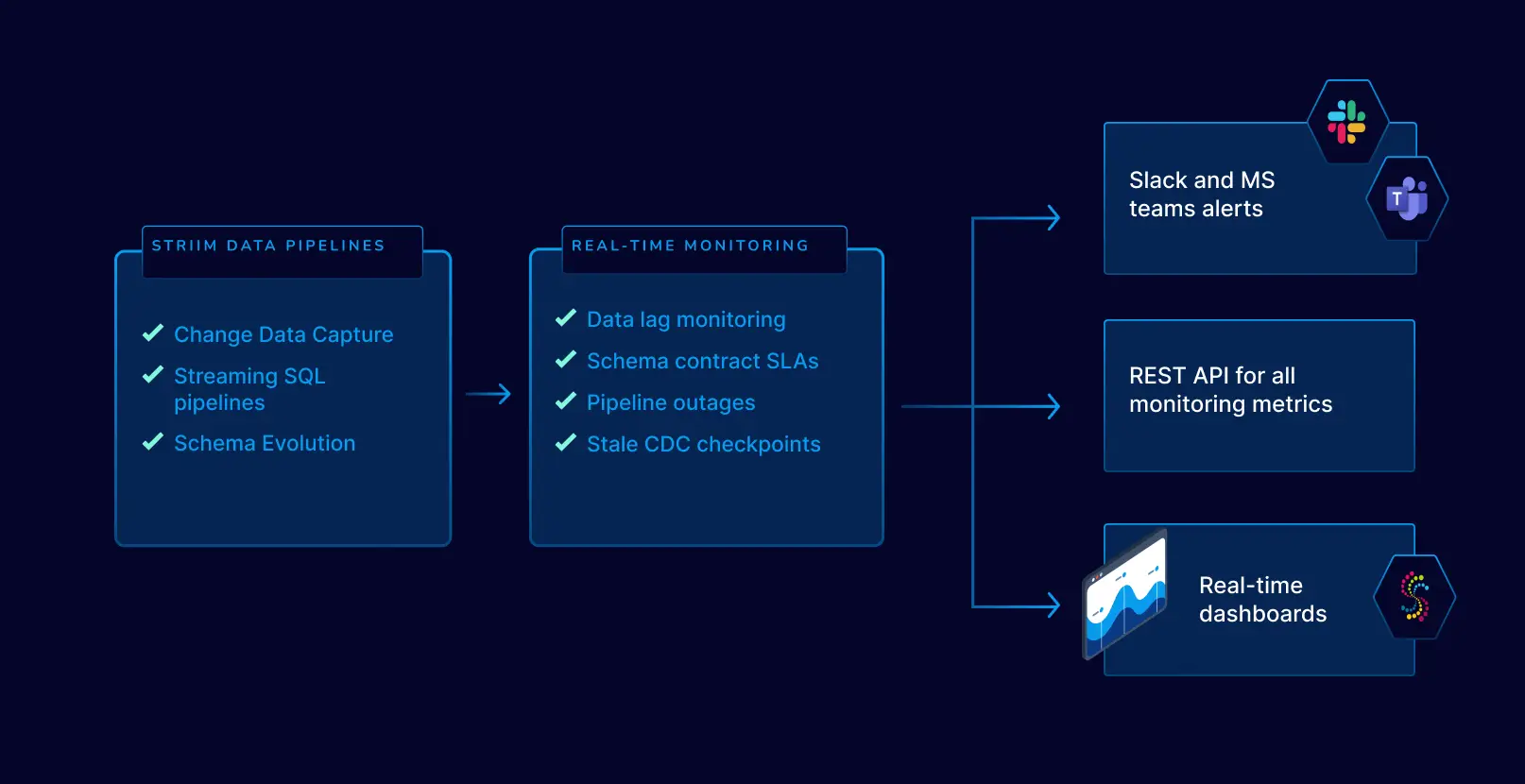
Pipeline monitoring

The integrated dashboards and monitoring tools native to smart data pipelines offer real-time visibility into the state of data flows. These built-in features help users quickly identify and address bottlenecks, ensuring smooth and efficient data processing. 

Additionally, smart data pipelines validate data delivery and provide comprehensive visibility into end-to-end lag, which is crucial for maintaining data freshness. This capability supports mission-critical systems by adhering to strict service-level agreements (SLAs) and ensuring that data remains current and actionable.

Decentralized and decoupled

In response to the limitations of traditional, monolithic data infrastructures, many organizations are embracing a data mesh architecture to democratize access to data. Smart data pipelines play a crucial role in this transition by supporting decentralized and decoupled architectures. 

This approach allows an unlimited number of business units to access and utilize analytical data products tailored to their specific needs, without being constrained by a central data repository. By leveraging persisted event streams, Smart Data Pipelines enable data consumers to operate independently of one another, fostering greater agility and reducing dependencies. This decentralized model not only enhances data accessibility but also improves resilience, ensuring that each business group can derive value from data in a way that aligns with its unique requirements.

Able to do transformations and call functions

A key advantage of smart data pipelines is their ability to perform transformations and call functions seamlessly. Unlike traditional data pipelines that require separate processes for data transformation, smart data pipelines integrate this capability directly. 

This allows for real-time data enrichment, cleansing, and modification as the data flows through the system. For instance, a smart data pipeline can automatically aggregate sales data, filter out anomalies, or convert data formats to ensure consistency across various sources.

Build Your First Smart Data Pipeline Today

Data pipelines form the basis of digital systems. By transporting, transforming, and storing data, they allow organizations to make use of vital insights. However, data pipelines need to be kept up to date to tackle the increasing complexity and size of datasets. Smart data pipelines streamline and accelerate the modernization process by connecting on-premise and cloud environments, ultimately giving teams the ability to make better, faster decisions and gain a competitive advantage.

With the help of Striim, a unified, real-time data streaming and integration platform, it’s easier than ever to build Smart Data Pipelines connecting clouds, data, and applications. Striim’s Smart Data Pipelines offer real-time data integration to over 100 sources and targets, a SQL-based engine for streaming data applications, high availability and scalability, schema evolution, monitoring, and more. To learn how to build smart data pipelines with Striim today, request a demo or try Striim for free.

Declarative, Fully Managed Data Streaming Pipelines

Data pipelines can be tricky business —failed jobs, re-syncs, out-of-memory errors, complex jar dependencies, making them not only messy but often disastrously unreliable. Data teams want to innovate and do awesome things for their company, but they get pulled back into firefighting and negotiating technical debt.

The Power of Declarative Streaming Pipelines

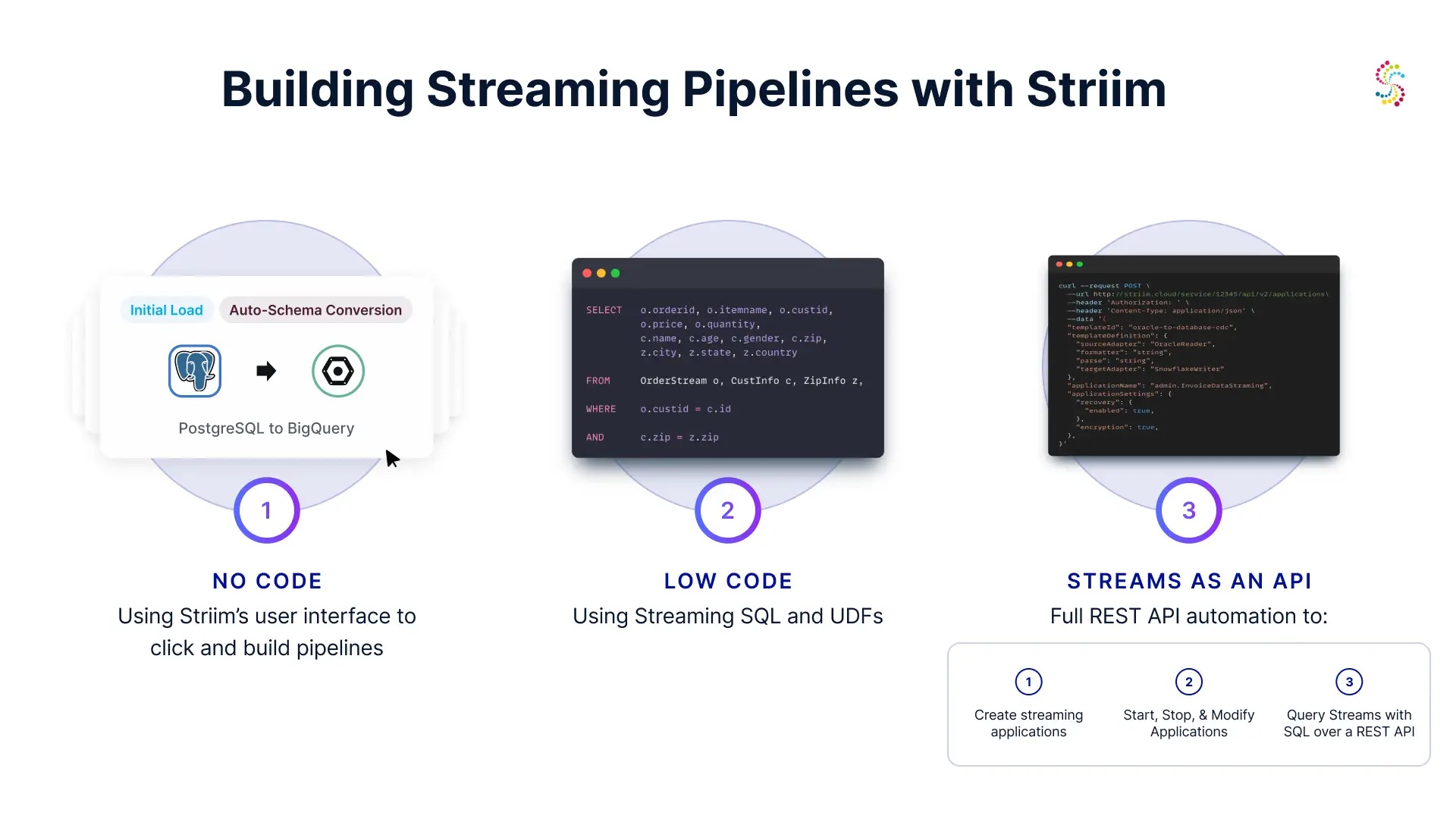
Declarative pipelines allow developers to specify what they want to achieve in concise, expressive code. This approach simplifies the creation, management, and maintenance of data pipelines. With Striim, users can leverage SQL-based configurations to define source connectors, target endpoints, and processing logic, making the entire process intuitive and accessible, all while delivering highly consistent, real-time data applied as merges and append-only change-records.

How Striim pipelines work

Striim pipelines streamline the process of data integration and real-time analytics. A pipeline starts with defining a source, which could be a database, log, or other data stream. Striim supports advanced recovery semantics such as A1P (At Least Once Processing) or E1P (Exactly Once Processing) to ensure data reliability.

You can see the full list of connectors stream supports here. →

The data flows into an output stream, which can be configured to reside in-memory for low-latency operations or be Kafka-based for distributed processing. Continuous queries on these materialized streams allow real-time insights and actions. Windowing functions enable efficient data aggregation over specific timeframes. As the data is processed, it is materialized into downstream targets such as databases or data lakes. Striim ensures data accuracy by performing merges with updates and deletes, maintaining a true and consistent view of the data across all targets.

Here we’ll look at an application that reads data from Stripe, replicates data to BigQuery in real-time, then while the data is in flight, detect declined transactions and send slack alerts in real-time.

Striim’s Stripe Analytics Pipeline

Let’s dive into a practical example showcasing the power and simplicity of Striim’s streaming pipelines. The following is a Stripe analytics application that reads data from Stripe, processes it for fraudulent transactions, and generates alerts.

Application Setup

The first step is to create an application that manages the data streaming process. The `StripeAnalytics` application is designed to handle Stripe data, process fraudulent transactions, and generate alerts.

This statement initializes the `StripeAnalytics` application with an automatic recovery interval of 5 seconds, ensuring resilience and reliability. You can see we define ‘Recovery 5 second interval’. This handles the checkpointing for at least once or exactly once deliver from source to target with transactional support.

Reading from Stripe

Next, we define the source to read data from Stripe. The `StripeReaderSource` reads data at 10-second intervals and outputs it to a stream called `StripeStream`. The ‘automated’ mode denotes that schemas will be propagated to downstream targets (data warehouses, databases), an initial load of historical data will load, before starting the live CDC.


Striim streams are in-memory by default, but can be backed up to our managed Kafka or to your external Confluent Kafka cluster.

Writing to BigQuery

The processed data is then written to BigQuery for storage and analysis. The `BigQueryWriter` takes data from the `StripeStream` and loads it into BigQuery, automatically creating the necessary schemas.


Fraud Detection

To detect fraudulent transactions, we use a jumping window to keep the last two rows for each `customer_id`. This window is defined over a stream called `FraudulentStream`.


A continuous query (`FetchFraudulentTransactions`) is then created to pull declined transactions from the `StripeStream` and insert them into the `FraudulentStream`.


Generating Alerts

To notify the relevant parties about fraudulent transactions, we generate alert events. The `GenerateAlertEvents` query groups the declined transactions by `customer_id` and inserts them into the `FraudulentAlertStream`.


Sending Alerts to Slack

Finally, we create a subscription to send these alerts to a Slack channel. The `FraudulentWebAlertSubscription` uses the `SlackAlertAdapter` to deliver alerts to the specified channel.


Completing the Application

We conclude the application definition with the `END APPLICATION` statement.


Striim’s declarative approach offers several benefits:

  1. Simplicity: SQL-based streaming pipelines make it easy to define rich processing logic.
  2. Scalability: Striim handles large volumes of data efficiently by scaling up and horizontally as a fully managed service, ensuring real-time processing and delivery.
  3. Flexibility: The ability to integrate with various data sources and targets provides unparalleled flexibility.
  4. Reliability: Built-in recovery mechanisms ensure data integrity and continuous operation.
  5. Consistency: Striim delivers consistent data across all targets, maintaining accuracy through precise merges, updates, and deletes.
  6. Portability: Striim can be deployed in our fully managed service, or run in your own cloud a multi-node cluster containerized with kubernetes.

Monitoring and Reliability

Are your reports stale? Is data missing or inconsistent? Striim allows you to drill down into these metrics and gives you out-of-the-box slack alerts so your pipelines are always running on autopilot.

Conclusion

Striim’s declarative, fully managed data streaming pipelines empower your data team to harness the power of real-time data. By simplifying the process of creating and managing data pipelines, Striim enables organizations to focus on deriving insights and driving value from their data. The Stripe analytics application is a prime example of how Striim can streamline data processing, replication and alerting on anomalies, making it an invaluable tool for modern data-driven enterprises. You can try Striim for free. No credit card, no sales call, just 14 days of fast data striiming.

Change Data Capture Best Practices with a ‘Read Once, Stream Anywhere’ Pattern in Striim

Note: To follow best practices guide, you must have the Persisted Streams add-on in Striim Cloud or Striim Platform.

Introduction

Change Data Capture (CDC) is a critical methodology, particularly in scenarios demanding real-time data integration and analytics. CDC is a technique designed to efficiently capture and track changes made in a source database, thereby enabling real-time data synchronization and streamlining the process of updating data warehouses, data lakes, or other systems.

Change Data Capture to Multiple Subscribers

It is common for organizations to stream transactional data from a database to multiple consumers – whether it be different lines of the business or separate technical infrastructure (databases, data warehouses, and messaging systems like Kafka). 

However, a common anti-pattern in CDC implementation is creating a separate read client for each subscriber. This might seem intuitive but is actually inefficient due to competing I/O and additional overhead created on the source database. 

The more efficient approach is to have a single read client that pipes out to a stream, which is then ingested by multiple writers. Striim addresses this challenge through its implementation of Persistent Streams, which manage data delivery and recovery across application boundaries.

Concepts and definitions for this article

  1. Striim App: Deployable Directed Acyclic Graph (DAG) of data processing components in Striim. 
  2. Stream: Time-ordered log of events transferring data between processing components.
  3. Source (e.g., OracleReader): Captures real-time data changes from an external system and emits a stream of events
  4. Targets: Writes a stream of events to various external systems.
  5. Router: Directs data from an input stream to two or more stream components based on rules 
  6. Continuous Query (CQ): Processes data streams using a rich Streaming SQL language
  7. Persistent Streams: Transfers data between components in a durable, replayable manner.
  8. Transaction log:A chronological record of all transactions and the database changes made by each transaction, used for ensuring data integrity and recovery purposes.

Enhanced Role of Persistent Streams in Striim for Data Recovery and Application Boundary Management

Persistent Streams in Striim play a critical role in data recovery and managing data flows across application boundaries. They address a common challenge in data streaming applications: ensuring data consistency and integrity, especially during recovery processes and when data crosses boundaries between different applications. 

In-Memory Streams vs. Persistent Streams

In traditional streaming setups without Persistent Streams, data recovery and consistency across application boundaries can be problematic. Consider the following scenario with two Striim applications (App1 and App2):

A database transaction log is a chronological record of all transactions and the database changes made by each transaction, used for ensuring data integrity and recovery purposes.

Persistent Streams for Recovery and Application Boundary Negotiation

To mitigate these challenges, Persistent Streams offer a more sophisticated approach:

In this setup, Persistent Streams allow for a more controlled and error-free data flow, especially during restarts or recovery processes. Here’s how they work:

  1. Rewind and Reprocessing:  Persistent Streams enable the rewinding of data flows, allowing components to reprocess a portion of the stream backlog. This ensures that data flows are reset properly during recovery.  
  1. Independent Checkpoints: Each subscribing application (example App2)  maintains its own checkpoint on the Persistent Stream. This means that each app interacts with the stream independently, enhancing data consistency and integrity.  
  1. Private Stream Management: Applications can stop, start, or reposition their interaction with the Persistent Stream without affecting other applications. This autonomy is crucial for maintaining uninterrupted data processing across different applications.  
  1. Controlled Data Flow: Each application reads from the Persistent Stream at its own pace, reaching the current data head and then waiting for new data as needed. This controlled flow prevents data loss or duplication that can occur with traditional streams.  
  1. Flexibility for Upstream Applications: The upstream application (like App1 in our example) can write data into the Persistent Stream at any time, without impacting the downstream applications. This flexibility is vital for dynamic data environments.

Designing pipelines to read once, stream anywhere 

Application Boundary Negotiation with Persistent Streams

Persistent Streams in Striim play a pivotal role in managing data flows across application boundaries, ensuring Exactly Once Processing. They provide a robust mechanism for recovery by rewinding data flows and allowing reprocessing of the stream backlog. For example, in a scenario where two applications share a stream:

In this setup, Persistent Streams allow each application to maintain its own checkpoint and process data independently, avoiding issues like data duplication or missed data that can occur when traditional streams are used across application boundaries. This approach ensures that each downstream application can operate independently, maintaining data integrity and consistency.

Kafka-backed Streams in Striim

Striim offers integration with Kafka, either fully managed by Striim or with an external Kafka cluster, to manage Persistent Streams. This add-on is available in both Striim Cloud and Striim Platform.

See enabling Kafka Streams in Striim Platform (self-hosted). 

To create a Persistent Stream, follow the steps in our documentation. 

To set up Persistent Streams in Striim Cloud, simply check the ‘Persistent Streams’ box when launching your service. You can then use the ‘admin.CloudKafkaProperties’ to automatically persist your streams to the Kafka cluster fully managed by Striim.

Striim Router for Load Distribution

Striim provides several methods to distribute and route change data capture streams to multiple subscribers. To route data based on simple rules (e.g. table name, operation type), we generally recommend using a Striim Router component. 

A Router component to channel events to related streams based on specific conditions. Each DatabaseWriter is connected to a stream defined by the Router.

				
					CREATE STREAM CustomerTableGroupStream OF Global.WAEvent;
CREATE STREAM DepartmentTableGroupStream OF Global.WAEvent;
CREATE OR REPLACE ROUTER event_router INPUT FROM OracleCDCOut AS src 
CASE
    WHEN meta(src, "TableName").toString().equals("QATEST.DEPARTMENTS") OR 
         meta(src, "TableName").toString().equals("QATEST.EMPLOYEES") OR 
         meta(src, "TableName").toString().equals("QATEST.TASKS") THEN
        ROUTE TO DepartmentTableGroupStream,
    WHEN meta(src, "TableName").toString().equals("QATEST.CUSTOMERS") OR 
         meta(src, "TableName").toString().equals("QATEST.ORDERS") THEN
        ROUTE TO CustomerTableGroupStream;


The event router is assigned the task of routing incoming data from the OracleCDCOut source to various streams, determined by predefined conditions. This ensures efficient data segregation and processing based on the incoming event’s table name.

Flow Representation:

The Reader reads from the “interested tables” and writes to a single stream. The Router then uses table name-based case statements to direct the events to multiple writers.

Designing the Striim Apps with Resource Isolation

For a read once, Write Anywhere CDC pattern, you will create Striim apps that handle reading from a source database, moving data with Persistent Streams, and routing data to various consumers.

Be sure to enable Recovery on all applications created in this process. Review Striim docs on steps to enable recovery.

CDC Reader App: An app with a CDC reader that connects to the source Database that outputs to the Persistent Stream

For each database that you will perform CDC from, create an application to source data and route to downstream consumers.

Sample TQL:

				
					CREATE OR REPLACE APPLICATION CDC_App USE EXCEPTIONSTORE TTL : '7d', RECOVERY 10 seconds ;
CREATE SOURCE OracleCDC USING Global.OracleReader ( 
  Username: 'cdcuser', 
  ConnectionURL:<your connection URL>, 
  Password: <your password>, 
  ReplicationSlotName: 'striiim_slot', 
  Password_encrypted: 'true', 
  Tables: <your tables>
  connectionRetryPolicy: 'retryInterval=30, maxRetries=3', 
  FilterTransactionBoundaries: true ) 
OUTPUT TO CDCStream PERSIST USING admin.CloudKafkaProperties;
END APPLICATION CDC_App;


This app will then contain a CQ or a Router to route the ‘CDCStream’ to multiple streams. For simplicity and minimizing event data, we recommend using the Router. Create a Router to route data from the persistent CDCStream to an in-memory stream for each downstream app that you will create. 

The entire app will have the below components..

Sample TQL:

				
					CREATE OR REPLACE APPLICATION CDC_App USE EXCEPTIONSTORE TTL : '7d', RECOVERY 10 seconds ;
CREATE SOURCE OracleCDC USING Global.OracleReader ( 
  Username: 'cdcuser', 
  ConnectionURL:<your connection URL>, 
  Password: <your password>, 
  ReplicationSlotName: 'striiim_slot', 
  Password_encrypted: 'true', 
  Tables: <your tables>
  connectionRetryPolicy: 'retryInterval=30, maxRetries=3', 
  FilterTransactionBoundaries: true ) 
OUTPUT TO CDCStream PERSIST USING admin.CloudKafkaProperties;
CREATE STREAM CustomerTableGroupStream OF Global.WAEvent PERSIST USING admin.CloudKafkaProperties ;
CREATE STREAM DepartmentTableGroupStream OF Global.WAEvent PERSIST USING admin.CloudKafkaProperties;
CREATE OR REPLACE ROUTER event_router INPUT FROM CDCStream AS src 
CASE
    WHEN meta(src, "TableName").toString().equals("QATEST.DEPARTMENTS") OR 
         meta(src, "TableName").toString().equals("QATEST.EMPLOYEES") OR 
         meta(src, "TableName").toString().equals("QATEST.TASKS") THEN
        ROUTE TO DepartmentTableGroupStream,
    WHEN meta(src, "TableName").toString().equals("QATEST.CUSTOMERS") OR 
         meta(src, "TableName").toString().equals("QATEST.ORDERS") THEN
        ROUTE TO CustomerTableGroupStream;
END APPLICATION CDC_App;


Create apps for each downstream subscriber

Now you will create an app that reads data from the Database CDC Stream App’s streams.

				
					CREATE OR REPLACE APPLICATION CustomerTableGroup_App USE EXCEPTIONSTORE TTL : '7d', RECOVERY 10 seconds ;
CREATE TARGET WriteCustomerTable USING DatabaseWriter (
  connectionurl: 'jdbc:mysql://192.168.1.75:3306/mydb',
  Username:'striim',
  Password:'******',
  Tables: <your tables>
) INPUT FROM CDC_App.CustomerTableGroupStream;
END APPLICATION CustomerTableGroup_App;


Here we will create the second application that reads data from Database CDC Stream App’s streams:

				
					CREATE OR REPLACE APPLICATION Departments_App USE EXCEPTIONSTORE TTL : '7d', RECOVERY 10 seconds ;
CREATE TARGET WriteDepartment USING DatabaseWriter (
  connectionurl: 'jdbc:mysql://192.168.1.75:3306/mydb',
  Username:'striim',
  Password:'******',
  Tables: <your tables>
) INPUT FROM CDC_App.DepartmentTableGroupStream;
END APPLICATION DepartmentsApp;


You can repeat this pattern n-number of times for n-number of consumers. It’s also worth noting you can have multiple consumers (Striim apps with a Target component) on the same physical target data platform – e.g. multiple Striim Targets for a single Snowflake instance. For instance, you may split out the target for a few critical tables that require dedicated compute and runtime resources to integrate. 

Once you’ve designed these Striim applications, they will be independently recoverable and maintain their own upstream checkpointing with Striim’s best-in-class transaction watermarking capabilities. 

Designing the Striim Apps with Resource Sharing

To consolidate runtime and share resources between consumers, you can also bundle both Targets in the same Striim app. This means if one consumer goes down, it will halt the pipeline for all consumers. If your workloads are uniform and you have no operational advantages from decoupling, you can easily keep all the components in the same app.

You would simply create all components within one application.

				
					CREATE OR REPLACE APPLICATION CDC_App USE EXCEPTIONSTORE TTL : '7d', RECOVERY 10 seconds ;
CREATE SOURCE OracleCDC USING Global.OracleReader ( 
  Username: 'cdcuser', 
  ConnectionURL:<your connection URL>, 
  Password: <your password>, 
  ReplicationSlotName: 'striiim_slot', 
  Password_encrypted: 'true', 
  Tables: <your tables>
  connectionRetryPolicy: 'retryInterval=30, maxRetries=3', 
  FilterTransactionBoundaries: true ) 
OUTPUT TO CDCStream PERSIST USING admin.CloudKafkaProperties;
CREATE STREAM CustomerTableGroupStream OF Global.WAEvent PERSIST USING admin.CloudKafkaProperties;
CREATE STREAM DepartmentTableGroupStream OF Global.WAEvent PERSIST USING admin.CloudKafkaProperties;
CREATE OR REPLACE ROUTER event_router INPUT FROM CDCStream AS src 
CASE
    WHEN meta(src, "TableName").toString().equals("QATEST.DEPARTMENTS") OR 
         meta(src, "TableName").toString().equals("QATEST.EMPLOYEES") OR 
         meta(src, "TableName").toString().equals("QATEST.TASKS") THEN
        ROUTE TO DepartmentTableGroupStream,
    WHEN meta(src, "TableName").toString().equals("QATEST.CUSTOMERS") OR 
         meta(src, "TableName").toString().equals("QATEST.ORDERS") THEN
        ROUTE TO CustomerTableGroupStream;
CREATE TARGET WriteCustomer USING DatabaseWriter (
  connectionurl: 'jdbc:mysql://192.168.1.75:3306/mydb',
  Username:'striim',
  Password:'******',
  Tables: <your tables>
) INPUT FROM CDC_App.CustomerTableGroupStream;
CREATE TARGET WriteDepartment USING DatabaseWriter (
  connectionurl: 'jdbc:mysql://192.168.1.75:3306/mydb',
  Username:'striim',
  Password:'******',
  Tables: <your tables>
) INPUT FROM CDC_App.DepartmentTableGroupStream;
END APPLICATION CDC_App;


Grouping Tables

Striim provides exceptional flexibility processing multi-variate workloads by allowing you to group different tables into their own apps and targets. As demonstrated above, you can either group tables into their own target in the same app (in the resource sharing example), or provide fine-grained resource isolation by grouping tables into their own target into their own respective Striim app. An added benefit is you can still use a single source to group tables. 

Here are some criteria for group tables

  • Data freshness SLAs
    • Group tables into a Striim target based on data freshness SLA. You can configure and tune the Striim target’s batchpolicy/uploadpolicy based on the SLA
  • Data volumes
    • Group tables with similar transaction volumes into their own apps and targets. This will allow you to optimize the performance of delivering data to business consumers. 
  • Tables with relationships – such as Foreign Keys – should also be grouped together

After you group your tables into their respective targets based on the above criteria, you can apply heuristic-based tuning to get maximum performance, cost reduction, and service uptime. 

Tuning Pipelines for Performance

We recommend heuristic-based tuning of Striim applications to meet the business and technical performance requirements of your data pipelines. You can set your Striim Target adapters batch policy accordingly:

  1. Choose a Data Freshness SLA for the concerned set of tables you are integrating to the target – defined as N.
  2. Measure the number of DMLs created by your source database during the  timeframe of ‘N’ – defined as M.

Tuning Change Data Capture Pipelines

When writing to Data Warehouse targets such as Google BigQuery, Snowflake, Microsoft Fabric and Databricks, Striim’s target writers have a property called ‘BatchPolicy’ (or UploadPolicy) which defines the interval in which batches should be uploaded to the Target systems. The BatchPolicy combines a time interval and a number of events, loading events to the target based on whichever criterion is met first.

Batches are created on a per table basis, regardless of how many tables are defined in your Target’s ‘tables’ property. Using the above variables, set your BatchPolicy as

Time interval: N/2. (where N is the Data Freshness SLA you are trying to achieve)

Events: (number of events produced in N time period)

This means we will create batches to upload to your target at either a time of N/2 OR  for every M events. These analytical systems are efficiently designed for large data ingress in periodic chunks, Striim recommends setting N/2 and M to values that maximize the write performance of the target system to meet business SLAs and technical objectives.

Slower than expected upload performance often occurs when batches from various tables are enqueued faster than they are dequeued. However, if jobs are enqueued sequentially as batch policies expire and job processing does not keep up, the queue will grow and fail to sustain workload demands. This reduced write performance results in delays (lag) in data availability and can lead to reliability issues such as out-of-memory (OOM) conditions or API service contention, especially during streaming uploads.

Excessive enqueueing of batches can occur from causes other than target performance. 

  1. Rapid Batch Policy Expiration:  A common cause of rapid expiration is setting a low EventCount in the BatchPolicy. The batch policy would expire and enqueue target loads faster than the time required for upload and merge operations, leading to an increasing backlog. To mitigate this, adjust the EventCount and Interval values in the BatchPolicy.
  2. High Source Input Rate: An elevated rate of incoming data can intensify the upload contention. A diverse group of high frequency tables may require implementing multiple target writers. Each additional writer increases the number of job processing compute threads and effectively increases the available load processing queues servicing the target system. While beneficial for compute parallelism this may increase quota usage and or resource utilization of the target data system. 
  3. High Average Wait Time in Queue: Reducing the number of batches by increasing batch size and extending time intervals can also be effective in alleviating these bottlenecks and enhancing overall system performance.

To monitor and address bottlenecked uploads causing latency, processing delays, and OOM errors, focus on the following monitoring metrics:

  • Set Alerts for SourceIdle and TargetIdle customized to be describe your data freshness SLA of n.  
  • Run ‘LEE <source> <target>’ command
    • If LEE is within n, then you may be meeting your freshness SLA. However there’s still a possibility that your last transaction read watermark is greater than n. In which case validate with the below steps
  • Run ‘Mon <source>’ command
    • If the current time minus ‘Reader Last Timestamp’ is less than n,  then you may be meeting your freshness SLAs. However if that number is greater than n, you can start triaging the rest of the pipeline with the below steps.
  • Run ‘Mon <target>’ command
    • The following metrics are critical for diagnosis of issues. The time it takes to load data is heavily influenced by the below metrics:
  • Avg Integration Time in ms – Indicates the average time for batches to successfully write to the target based on current runtime performance
  • Avg Waiting time in Queue in ms – Indicates the average time a batch is queued for integration to the target.
  • Total Batches Queued – Indicates the number of batches queued for integration to the target.
  • Batch Accumulation Time – The time it takes for a batch hit the expiration threshold
    • Update your BatchPolicy’s time interval value. This value should be equal to  ‘Avg Integration Time in MS’ * the total number of tables in a writer
    • If there are a significant number of batches queuing up (using Total Batches Queued) , and ‘Average integration time in ms’ is greater than ‘n’, then increase the Batchpolicy interval value. Test again with incremental values until you are consistently meeting your SLAs.
      • If your target is Snowflake – keep in mind the file upload size should be between 100-250 mb at most before copy performance begins to degrade
    • An alternative to increasing the batch sizes is splitting the tables into another target and using the same heuristic. Creating a Target dedicated to high volume tables allocates dedicated compute to its respective tables. However if you hit CPU bottlenecks at a Striim service level, you may need to increase your Striim service size.

Note: If a Striim Target is a Data Warehouse writer utilizing ‘optimized merge’ setting and a source is generating many Primary Key (PK) updates, each update will be batched separately and write performance will decline.

FAQ

Q: What if I have tables with different data delivery SLAs and priorities? E.g. my ‘Orders table’ has a 1 minute SLA and my ‘Store Locations’ table has a 1 hour SLA. 

A: You can use a Router to split the CDC Reader’s Persistent Stream into multiple persistent streams, then create an Striim app with its own target for each set of tables with varying SLAs. 

Q: What if I don’t have the Persistent Streams add-on in Striim? Can I follow these steps?

A: You can still minimize overhead on your source database by running one reader per database, but you will need to design a solution to handle recovery across apps if you have multiple consumers or prepare to do full re-syncs in the event of a transient failure.  

Conclusion

Optimizing CDC in Striim involves leveraging key components like Persistent Streams, Routers, and Continuous Queries. The ‘Read Once, Write Anywhere’ pattern, facilitated by Persistent Streams, ensures efficient data distribution, integrity, and recovery across application boundaries. This approach is essential for effective real-time data integration and analytics in modern business environments.

Comparing Snowflake Data Ingestion Methods with Striim

Introduction

In the fast-evolving world of data integration, Striim’s collaboration with Snowflake stands as a beacon of innovation and efficiency. This comprehensive overview delves into the sophisticated capabilities of Striim for Snowflake data ingestion, spanning from file-based initial loads to the advanced Snowpipe streaming integration.

Quick Compare: File-based loads vs Streaming Ingest

We’ve provided a simple overview of the ingestion methods in this table:

Feature/Aspect File-based loads Snowflake Streaming Ingest
Data Freshness SLAs 5 minutes to 1 hour Under 5 minutes. Benchmark demonstrated P95 latency of 3 seconds with 158 gb/hr of Oracle CDC ingest.
Use Cases – Ideal for batch processing and reporting scenarios
– Suitable for scenarios where near real-time data is not critical
– Bulk data uploads at periodic intervals
– Critical for operational intelligence, real-time analytics, AI, and reverse ETL
– Necessary for scenarios demanding immediate data actionability
– Continuous data capture and immediate processing
Data Volume Handling Efficiently handles large volumes of data in batches Best for high-velocity, continuous data streams
Flexibility Limited flexibility in terms of data freshness
– Good for static, predictable workloads
High flexibility to handle varying data rates and immediate data requirements
– Adaptable to dynamic workloads and suitable for AI-driven insights and reverse ETL processes
Operation Modes Supports both Append Only and Merge modes Primarily supports Append Only mode
Network Utilization Higher data transfer in bulk, but less frequent
– Can be more efficient for network utilization in certain scenarios
Continuous data transfer, which might lead to higher network utilization
Performance Optimization Batch size and frequency can be optimized for better performance
– Easier to manage for predictable workloads
Requires fine-tuning of parameters like MaxRequestSizeInMB, MaxRecordsPerRequest, and MaxParallelRequests for optimal performance
– Cost optimization is a key benefit, especially in high-traffic scenarios

File-based uploads: Merge vs Append Only

Striim’s approach to loading data into Snowflake is marked by its intelligent use of file-based uploads. This method is particularly adept at handling large data sets securely and efficiently. A key aspect of this process is the choice between ‘Merge’ and ‘Append Only’ modes.

Merge Mode: In this mode, Striim allows for a more traditional approach where updates and deletes in the source data are replicated as such in the Snowflake target. This method is essential for scenarios where maintaining the state of the data as it changes over time is crucial.

Append Only Mode: Contrarily, the ‘Append Only’ setting, when enabled, treats all operations (including updates and deletes) as inserts into the target. This mode is particularly useful for audit trails or scenarios where preserving the historical sequence of data changes is important. Append Only mode will also demonstrate higher performance in workloads like Initial Loads where you just want to copy all existing data from a source system into Snowflake.

Snowflake Writer: Technical Deep Dive on File-based uploads

The SnowflakeWriter in Striim is a robust tool that stages events to local storage, AWS S3, or Azure Storage, then writes to Snowflake according to the defined Upload Policy. Key features include:

  • Secure Connection: Utilizes JDBC with SSL, ensuring secure data transmission.
  • Authentication Flexibility: Supports password, OAuth, and key-pair authentication.
  • Customizable Upload Policy: Allows defining batch uploads based on event count, time intervals, or file size.
  • Data Type Support: Comprehensive support for various data types, ensuring seamless data transfer.

SnowflakeWriter efficiently batches incoming events per target table, optimizing the data movement process. The batching is controlled via a BatchPolicy property, where batches expire based on event count or time interval. This feature significantly enhances the performance of bulk uploads or merges.

Batch tuning in Striim’s Snowflake integration is a critical aspect that can significantly impact the efficiency and speed of data transfer. Properly tuned batches ensure that data is moved to Snowflake in an optimized manner, balancing between throughput and latency. Here are key considerations and strategies for batch tuning:

  1. Understanding Batch Policy: Striim’s SnowflakeWriter allows customization of the batch policy, which determines how data is grouped before being loaded into Snowflake. The batch policy can be configured based on event count (eventcount), time intervals (interval), or both.
  2. Event Count vs. Time Interval:
    • Event Count (eventcount): This setting determines the number of events that will trigger a batch upload. A higher event count can increase throughput but may add latency. It’s ideal for scenarios with high-volume data where latency is less critical.
    • Time Interval (interval): This configures the time duration after which data is batched and sent to Snowflake. A shorter interval ensures fresher data in Snowflake but might reduce throughput. This is suitable for scenarios requiring near real-time data availability.
    • Both: in this scenario, the batch will load when either eventcount or interval threshold is met.
  3. Balancing Throughput and Latency: The key to effective batch tuning is finding the right balance between throughput (how much data is being processed) and latency (how fast data is available in Snowflake).
    • For high-throughput requirements, a larger eventcount might be more effective.
    • For lower latency, a shorter interval might be better.
  4. Monitoring and Adjusting: Continuously monitor the performance after setting the batch policy. If you notice delays in data availability or if the system isn’t keeping up with the data load, adjustments might be necessary. You can do this by going to your Striim Console and entering ‘mon <target name>’ which will give you a detailed view of your batch upload monitoring metrics.
  5. Considerations for Diverse Data Types: If your data integration involves diverse data types or varying sizes of data, consider segmenting data into different streams with tailored batch policies for each type.
  6. Handling Peak Loads: During times of peak data load, it might be beneficial to temporarily adjust the batch policy to handle the increased load more efficiently.
  7. Resource Utilization: Keep an eye on the resource utilization on both Striim and Snowflake sides. If the system resources are underutilized, you might be able to increase the batch size for better throughput.

Snowpipe Streaming Explanation and Terminology

Snowpipe Streaming is an innovative streaming ingest API released by Snowflake. It is distinct from classic Snowpipe with some core differences:

Category Snowpipe Streaming Snowpipe
Form of Data to Load Rows Files
Third-Party Software Requirements Custom Java application code wrapper for the Snowflake Ingest SDK None
Data Ordering Ordered insertions within each channel Not supported
Load History Recorded in SNOWPIPE_STREAMING_FILE_MIGRATION_HISTORY view (Account Usage) Recorded in LOAD_HISTORY view (Account Usage) and COPY_HISTORY function (Information Schema)
Pipe Object Does not require a pipe object Requires a pipe object that queues and loads staged file data into target tables

Snowpipe Streaming supports ordered, row-based ingest into Snowflake via Channels.

Channels in Snowpipe Streaming:

  • Channels represent logical, named streaming connections to Snowflake for loading data into a table. Each channel maps to exactly one table, but multiple channels can point to the same table. These channels preserve the ordering of rows and their corresponding offset tokens within a channel, but not across multiple channels pointing to the same table.

Offset Tokens:

  • Offset tokens are used to track ingestion progress on a per-channel basis. These tokens are updated when rows with a provided offset token are committed to Snowflake. This mechanism enables clients to track ingestion progress, check if a specific offset has been committed, and enable de-duplication and exactly-once delivery of data.

Migration to Optimized Files:

  • Initially, streamed data written to a target table is stored in a temporary intermediate file format. An automated process then migrates this data to native files optimized for query and DML operations.

Replication:

  • Snowpipe streaming supports the replication and failover of Snowflake tables populated by Snowpipe Streaming and its associated channel offsets from one account to another, even across regions and cloud platforms.

Snowpipe Streaming: Unleashing Real-Time Data Integration and AI

Snowpipe Streaming, when teamed up with Striim, is kind of like a superhero for real-time data needs. Think about it: the moment something happens, you know about it. This is a game-changer in so many areas. For instance, in banking, it’s like having a super-fast guard dog that barks the instant it smells a hint of fraud. Or in online retail, imagine adjusting prices on the fly, just like that, to keep up with market trends. Healthcare? It’s about getting real-time updates on patient stats, making sure everyone’s on top of their game when lives are on the line. And let’s not forget the guys in manufacturing and logistics – they can track their stuff every step of the way, making sure everything’s ticking like clockwork. It’s about making decisions fast and smart, no waiting around. Snowpipe Streaming basically makes sure businesses are always in the know, in the now.

Striim’s integration with Snowpipe Streaming represents a significant advancement in real-time data ingestion into Snowflake. This feature facilitates low-latency loading of streaming data, optimizing both cost and performance, which is pivotal for businesses requiring near-real-time data availability.

Choosing the Right Streaming Configuration in Striim’s Integration with Snowflake

The performance of Striim’s Snowflake writer in a streaming context can be significantly influenced by the correct configuration of its streaming parameters. Understanding and adjusting these parameters is key to achieving the optimum balance between throughput and responsiveness. Let’s delve into the three critical streaming parameters that Striim’s Snowflake writer supports:

  1. MaxRequestSizeInMB:
    • Description: This parameter determines the maximum size in MB of a data chunk that is submitted to the Streaming API.
    • Usage Notes: It should be set to a value that:
      • Maximizes throughput with the available network bandwidth.
      • Manages to include data in the minimum number of requests.
      • Matches the inflow rate of data.
  2. MaxRecordsPerRequest:
    • Description: Defines the maximum number of records that can be included in a data chunk submitted to the Streaming API.
    • Usage Notes: This parameter is particularly useful:
      • When the record size for the table is small, requiring a large number of records to meet the MaxRequestSizeInMB.
      • When the rate at which records arrive takes a long time to accumulate enough data to reach MaxRequestSizeInMB.
  3. MaxParallelRequests:
    • Description: Specifies the number of parallel channels that submit data chunks for integration.
    • Usage Notes: Best utilized for real-time streaming when:
      • Parallel ingestion on a single table enhances performance.
      • There is a very high inflow of data, allowing chunks to be uploaded by multiple worker threads in parallel as they are created.

The integration of these parameters within the Snowflake writer needs careful consideration. They largely depend on the volume of data flowing through the pipeline and the network bandwidth between the Striim server and Snowflake. It’s important to note that each Snowflake writer creates its own instance of the Snowflake Ingest Client, and within the writer, each parallel request (configured via MaxParallelRequests) utilizes a separate streaming channel of the Snowflake Ingest Client.

Illustration of Streaming Configuration Interaction:

Consider an example where the UploadPolicy is set to Interval=2sec, and the streaming configuration is set to (MaxParallelRequests=1, MaxRequestSizeInMB=10, MaxRecordsPerRequest=10000). In this scenario, as records flow into the event stream, streaming chunks are created as soon as either 10MB of data has been accumulated or 10,000 records have entered the stream, depending on which condition is satisfied first by the incoming stream of events. Any events that remain outside these parameters and have arrived within 2 seconds before the expiry of the UploadPolicy interval are packed into another streaming chunk.

Real-world application and what customers are saying

The practical application of Striim’s Snowpipe Streaming integration can be seen in the experiences of joint customers like Ciena. Their global head of Enterprise Data & Analytics reported significant satisfaction with Striim’s capabilities in handling large-scale, real-time data events, emphasizing the platform’s scalability and reliability.

Conclusion and Exploring Further

Striim’s data integration capabilities for Snowflake, encompassing both file-based uploads and advanced streaming ingest, offer a versatile and powerful solution for diverse data integration needs. The integration with Snowpipe Streaming stands out for its real-time data processing, cost efficiency, and low latency, making it an ideal choice for businesses looking to leverage real-time analytics.

For those interested in a deeper exploration, we provide detailed resources, including a comprehensive eBook on Snowflake ingest optimization and a self-service, free tier of Striim, allowing you to dive right in with your own workloads!

Using Kappa Architecture to Reduce Data Integration Costs

Kappa Architectures are becoming a popular way of unifying real-time (streaming) and historical (batch) analytics giving you a faster path to realizing business value with your pipelines.

Treating batch and streaming as separate pipelines for separate use cases drives up complexity, cost, and ultimately deters data teams from solving business problems that truly require data streaming architectures.

Kappa Architecture combines streaming and batch while simultaneously turning data warehouses and data lakes into near real-time sources of truth.

Showing how Kappa unifies batch and streaming pipelines

The development of Kappa architecture has revolutionized data processing by allowing users to quickly and cost-effectively reduce data integration costs. Kappa architecture is a powerful data processing architecture that enables near-real-time data processing, making it ideal for companies needing to quickly process large amounts of data. Striim offers an easy-to-use platform with drag-and-drop functionality and pre-built components that make it simple to build a kappa architecture. In this article, we will take a look at the benefits and drawbacks of kappa architecture, how Striim makes it easier to use, what infrastructure you need for your kappa architecture, and how you can start designing your own kappa architecture with a free version of Striim’s unified data integration and streaming platform.

Overview of kappa architecture

Kappa architecture is a powerful data processing architecture that enables near-real-time data processing. By combining batch and stream processing techniques, companies are able to process large volumes of data quickly and efficiently, even with frequent changes in the data structure. Two different systems are required for creating a kappa architecture: one for streaming data and another for batch processing. Stream processors, storage layers, message brokers, and databases make up the basic components of this architecture.

The goal of kappa architecture is to reduce the cost of data integration by providing an efficient and real-time way of managing large datasets. By eliminating manual processes such as ETL (extract-transform-load) systems, companies can save time and money while still leveraging advanced technologies like machine learning and artificial intelligence (AI). Striim offers an intuitive UI with drag-and-drop functionality as well as prebuilt components to help users design their own custom kappa architectures. With its free version also available, businesses can start building their own system right away without needing expensive consultants or weeks spent configuring complex systems.

In conclusion, kappa architectures have revolutionized the way businesses approach big data solutions – allowing them to take advantage of cutting edge technologies while reducing costs associated with manual processes like ETL systems. With Striim’s unified platform making it easier than ever before to build a custom kappa architecture tailored exactly towards your business needs – you can get started designing your own system today!

Benefits of kappa architecture for data integration

Kappa architecture is quickly gaining popularity due to its ability to enable near-real-time data processing and reduce the complexity associated with data integration. By utilizing a single codebase for both streaming and batch processing, businesses can reap multiple benefits from this solution. This simplification drastically cuts down on development resources needed as well as infrastructure setup and maintenance costs. Additionally, it allows for efficient processing of both real-time and historical data which eliminates the need for multiple versions of the same dataset or manually managed systems.

The versatility offered by kappa architectures makes them suitable for many industries such as healthcare, finance, retail, telecoms energy and more. Companies can leverage this technology to create analytics solutions that are tailored to their individual needs that are capable of handling substantial amounts of streaming data in real-time without any latency issues. Moreover, users can design their own system with Striim’s unified platform which features an intuitive UI with drag-and-drop functionality – plus they offer a free version so businesses can get started straight away!

In summation, kappa architectures offer immense advantages for those looking to reduce their data integration costs while using cutting edge technologies. With Striim’s unified platform businesses have access to a range of features that make designing their own system easy and straightforward – all at an affordable cost or even free!

Drawbacks of kappa architecture

Kappa architecture has revolutionized the way businesses process and store data, allowing them to take advantage of cutting edge technologies while reducing costs associated with manual processes. However, this technology is not without its drawbacks.

The complexity of setting up and maintaining a kappa architecture can be very high, requiring specialized engineers to ensure that all components are properly configured and functioning correctly. Additionally, without a centralized system for managing data, it can be difficult for businesses to maintain data governance across their organization. This lack of centralization also means that each component must be independently managed, leading to higher costs in terms of additional computing resources.

Another limitation of kappa architecture is scalability. As more data is processed through the system, it will require more computing resources in order to remain efficient and effective. This makes scaling the architecture complex and costly, as businesses will need to invest in additional hardware or cloud computing services in order to handle larger volumes of data processing.

Finally, kappa architectures are not suitable for all types of data processing tasks. While they are well suited for near-real-time analytics applications, they may not be the best choice for batch processing jobs or those that require intensive computation or machine learning algorithms. It’s important for businesses to assess their individual needs before deciding if kappa architectures are the right choice for reducing their data integration costs.

How Striim overcomes these drawbacks to make Kappa simple and affordable

Kappa architecture is an incredibly powerful tool for businesses looking to quickly and cost-effectively reduce data integration costs, but it does have some drawbacks that can make it difficult to use. Striim’s platform overcomes these drawbacks by making it easy and affordable to build a Kappa architecture.

Striim’s real-time streaming capabilities allow users to capture data from over 150 sources in near-real time, which eliminates the need for manual processes. Striim users can also see cost reduction of over 90% when using its smart data pipelines.

In addition, Striim has a range of pricing plans available, so businesses can find the plan that best suits their needs from its free Striim Developer tier to the Mission Critical offering which is the industry’s only horizontally scalable, unified data streaming platform as a managed service for maximum uptime SLAs and performance.

The intuitive UI, drag-and-drop functionality, and pre-built components make building a Kappa architecture quick and easy. This reduces the complexity associated with configuration and maintenance, allowing users to get up and running in no time. Plus, Striim’s free version allows users to start designing their kappa architecture without any upfront cost – making it perfect for businesses of all sizes. It also provides granular control for data contracts for data delivery and schema SLAs.With its real-time streaming capabilities, cloud integration options, pricing plans that fit various budgets, intuitive UI with drag-and drop functionality and pre-built components – as well as its free version – Striim makes building a Kappa architecture simple and affordable. This makes it the ideal tool for businesses looking to reduce their data integration costs while taking advantage of cutting edge technologies.

Choosing the right infrastructure for kappa architecture

When setting up a kappa architecture, businesses have to choose between cloud and on-premise solutions. Cloud-based architectures are more cost-effective but lack the control of an on-premise setup. On the other hand, an on-premise architecture provides more control but can be more expensive and difficult to manage. Each option has its own advantages and disadvantages, so companies should carefully weigh their needs before deciding which type of infrastructure is right for them.

The components needed to create a successful kappa architecture vary depending on the setup chosen, but generally include storage, compute, networking resources, and some form of data integration software. Companies should ensure they have enough resources available in order to avoid any performance issues as data volumes increase over time. Additionally, businesses should plan for scalability and high availability in order to ensure that their system can handle large amounts of data without disruption or loss of service.

Cost optimization is also an important consideration when building a kappa architecture. Companies need to balance performance requirements with financial constraints in order to get the most out of their investment while still ensuring reliability and stability. Additionally, they should follow industry best practices such as using containerized workloads for portability and leveraging managed services such as databases and message brokers whenever possible. Finally, companies should keep abreast of emerging trends in kappa architectures such as serverless computing or streaming automation tools that could help them further reduce costs while improving efficiency and scalability.

Ultimately, choosing the right infrastructure for a kappa architecture requires careful consideration of individual needs while keeping cost optimization in mind. Businesses should assess their performance requirements alongside financial constraints in order to build a reliable system that meets both goals while taking advantage of industry best practices and emerging trends wherever possible.

Leveraging Striim’s unified data integration and streaming platform to build your kappa architecture

Building a kappa architecture with Striim’s unified data integration and streaming platform is an easy and cost-effective solution that can help businesses reduce their data integration costs. With its intuitive UI, drag-and-drop functionality and pre-built components, Striim’s platform makes it simple to construct the architecture quickly.

The platform is optimized to support a wide range of data sources, including both structured and unstructured data. This allows users to easily manage all their data in one place, while also allowing them to scale up or down as needed for peak performance. Additionally, Striim’s platform provides cloud integration options for popular cloud platforms like Amazon Web Services and Microsoft Azure.

Striim’s platform is designed with scalability in mind, making it easy for businesses to handle large volumes of real-time streaming data without any latency issues or downtime. Additionally, the platform provides automated monitoring capabilities that enable companies to ensure their architecture remains reliable and stable. Furthermore, the platform also offers several other features that make it easier for businesses to manage their kappa architectures such as advanced analytics tools, machine learning algorithms, security features and more.

In addition to its powerful features, Striim’s unified data integration and streaming platform comes with a free version that allows users to get started quickly and cost-effectively – without having to pay any upfront costs. This makes it an ideal choice for businesses looking for ways to reduce their data integration costs while taking advantage of cutting edge technologies like kappa architectures.

Start architecting your Kappa Architecture today by talking to one of our specialists or trying Striim for free.

Striim Achieves Google Cloud Ready — Cloud SQL Designation

We are proud to announce that Striim has successfully achieved Google Cloud Ready –  Cloud SQL Designation for Google Cloud’s fully managed relational database service for MySQL, PostgreSQL, and SQL Server. This exciting new designation recognizes Striim’s unwavering partnership efforts with Google Cloud and the joint commitment to be part of a customer’s cloud adoption and app modernization journey and become instrumental in their business innovations.

Alok Pareek the Co-founder and Executive Vice President of Products and Engineering at Striim shared that: “Striim is excited to be part of the Google Cloud Ready — Cloud SQL designation. Major enterprise customers leverage Striim to continuously move data from on-premise and cloud-based mission-critical databases into Google Cloud SQL for digital transformation. Striim seamlessly connects to Cloud SQL and enables operational data to be synced via snapshot and incremental CDC workloads in real time. This helps our joint customers innovate for example by feeding ML models in real time and leveraging Cloud SQL’s generative AI capabilities such as using the new pgvector PostgreSQL extension for storing vector embeddings.”

The Google Cloud Ready – Cloud SQL designation is designed to help businesses get started quickly with their cloud-based projects. Through this program, customers can deploy applications on the cloud with confidence knowing that they are backed by a trusted partner who has been through rigorous testing and certification processes. Our team is excited about this opportunity to continue to work closely with Google Cloud —and we’re eager to help customers leverage their existing investments in cloud technologies while leveraging our expertise in data streaming to Cloud SQL targets.

Being part of the program, Striim continues to collaborate closely with Google Cloud partner engineering and Cloud SQL teams to develop joint roadmaps and provide Google-approved and industry-standard solutions for integration use cases.

Striim is committed to providing comprehensive support for Google Cloud services across all industries. Our team of experienced engineers will work closely with customers to ensure successful deployments on Google Cloud while preserving their current data architecture. We are thrilled about this new partnership with Google Cloud and look forward to helping our customers take advantage of all its features for efficient database management.

If you’re interested in learning more about Striim’s launch partnership with Google Cloud Ready — Cloud SQL designation, please visit us at booth 532 during Google Next 2023 from August 29-31 in San Francisco!


Democratizing Data Streaming with Striim Developer

Everyone wants real-time data…in theory. You see real-time stock tickers on TV, you use real-time odometers when you’re driving to gauge your speed, when you check the weather in your app. 

Yet the “Modern Data Stack” is largely focussed on delivering batch processing and reporting on historical data with cloud-native platforms. While these cloud analytics platforms have transformed business operations, we are still missing the real-time piece of the puzzle and many data engineers feel inclined to think real-time is simply out of their organization’s reach. As a result, companies don’t have a real-time, single source of truth for their business nor can they take in-the-moment actions on customer behavior.

Why? Real-time data is currently synonymous with spinning up complex infrastructure, cobbling together multiple projects, and figuring out the integrations to internal systems yourself.  The more valuable work of delivering fresh data to enable real-time data-driven applications in the business seems like an afterthought compared to the engineering prerequisites. 

Now there is another way…

Striim is a simple unified data integration and streaming platform that uniquely combines change data capture, application integration, and  Streaming SQL as a fully managed service that is used by the world’s top enterprises to truly deliver real-time business applications. 

With Striim Developer, we’ve opened up the core piece of Striim’s Streaming SQL and Change Data Capture engine as a free service to stream up to 10 million events per month with an unlimited number of Streaming SQL queries. Striim Developer includes:

  • CDC connectors for PostgreSQL, MongoDB, SQLServer, MySQL, and MariaDB
  • SaaS connectors for Slack, MS Teams, Salesforce, and others
  • Streaming SQL, Sliding and Jumping Windows, Caches to join data from databases and data warehouses like Snowflake 
  • Source and Target connectors for BigQuery, Snowflake, Redshift, S3, GCS, ADLS, Kafka, Kinesis, and more

Now any data engineer can quickly get started prototyping streaming use cases for production use with no upfront cost. You can even use Striim’s synthetic continuous data generator and plug it into your targets to see how real-time data behaves in your environment. 

What happens when you hit your monthly 10 million event quota? We simply pause your account and you can resume using it the following month without losing your pipelines. You also download your pipelines as code and upgrade to Striim Cloud in a matter of clicks. No effort wasted. 

Use cases you can address in Striim Developer:

  • Act on anomalous customer behavior by comparing real-time data with their historical norms, then alert internally in Slack or Teams
  • Implement data contracts on database schemas and freshness SLAs with Striim’s CDC, Streaming SQL, and schema evolution rules
  • Compute moving averages, aggregations, and run regressions on streaming data from Kafka or Kinesis using SQL. 

If you’d like to join our first cohort of Striim Developers, you can sign up here.

If you’d like to get an overview from a data streaming expert first, request a demo here. 

Back to top