Sweta Prabha

12 Posts

Recover your CDC pipeline on Striim after planned downtime or cluster failure with no loss of data

Tutorial

Recover your CDC pipeline on Striim after planned downtime or cluster failure with no loss of data

Use Striim to recover or autoresume your data stream after server failure

Benefits

Restart your data pipeline after planned or unplanned failure from where it left off.

Resume data streaming automatically by assigning retry interval for planned outages

Avoid duplicate data from source to target table after recovery from CDC pipeline failure

On this page

Overview

Striim is a next generation unified data streaming product that offers change data capture (CDC) from popular databases such as Oracle, SQLServer, PostgreSQL and many others. Server downtime is defined as the amount of time organizations are offline. This is an unavoidable event for most companies and can be either planned due to maintenance or IT-related tasks or unplanned due to system crashes or connectivity issues.

Data Pipelines are majorly affected by server failovers. In 2009, PayPal’s network infrastructure faced a technical issue, causing it to go offline for one hour. This downtime led to a loss of transactions worth $7.2 million. In these circumstances real-time streaming with a strong recovery feature is one of the most efficient solutions.

With few limitations, Striim applications can be recovered after planned downtime or most cluster failures with no loss of data. In the following recipe, we have shown how to enable ‘RECOVERY’ and ‘AUTO RESUME’ features in Striim  that can be utilized to handle failovers along with real-time streaming. Striim allows data pipelines to pick up from where it left during the failover, thus avoiding loss of data or duplicates in the target table. Please find the github link for this application here.

Core Striim Components

PostgreSQL CDC: PostgreSQL Reader uses the wal2json plugin to read PostgreSQL change data. 1.x releases of wal2jon can not read transactions larger than 1 GB.

Stream: A stream passes one component’s output to one or more other components. For example, a simple flow that only writes to a file might have this sequence

Snowflake Writer: Striim’s Snowflake Writer writes to one or more existing tables in Snowflake. Events are staged to local storage, Azure Storage, or AWS S3, then written to Snowflake as per the Upload Policy setting.

Enabling Recovery from System Failures

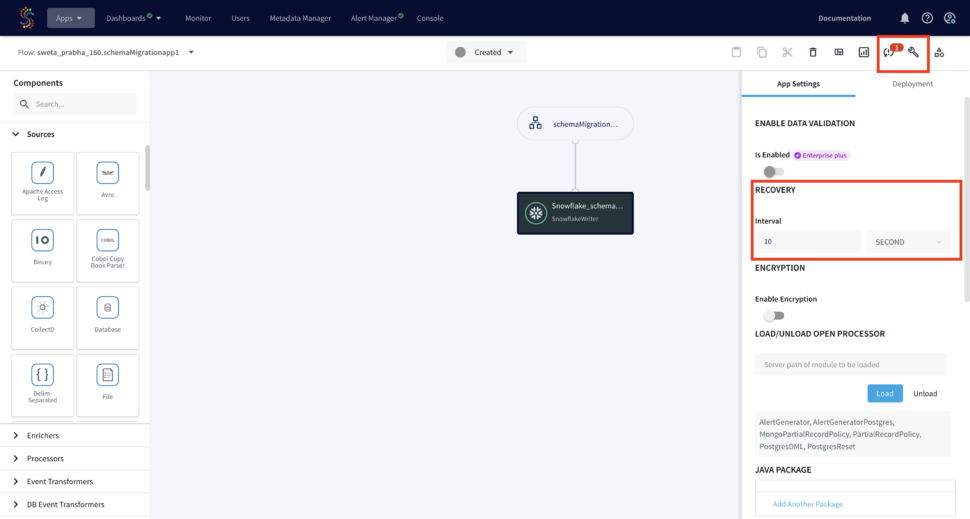
Striim supports recovery from system failures through Recovery and Autoresume features. For recovery of WAction stores, persistence streams must be enabled on every WAction store within the Striim application. Before enabling Recovery, create your app using flow designer. In the following use-case, our source is postgres CDC and target is Snowflake. You can refer to our recipes and tutorials for detailed steps on creating striim app from flow designer, both using wizard or from scratch.You can configure the Recovery and Autoresume setting from flow designer as follows:

On the upper right corner under app configuration -> App settings, specify the time interval for ‘RECOVERY’.With this setting, Striim will record a recovery checkpoint every ten seconds (or time specified by the user), provided it has completed recording the previous checkpoint. When recording a checkpoint takes more than ten seconds, Striim will start recording the next checkpoint immediately. When the Striim application is restarted after a system failure, it will resume exactly where it left off.
Running the Streaming App before Failover

The postgres CDC to Snowflake streaming application is deployed and run. When one row is inserted to the source table, it is replicated into the target table.

Running the Streaming App after Failover

When a failover occurs, the app stops and the last checkpoint is recorded. When recovery is enabled, DatabaseWriter uses the table specified by the Checkpoint Table property to store information used to ensure that there are no missing or duplicate events after recovery.

The failover occurred after the first row was replicated to target table:

When the app is restarted, it takes some time to start from where the application left off:

During failover, two more rows were added to the source table which was picked up by the striim app and once the server was up, two more rows were replicated to the target table.

The following snapshots show the source (Postgres) and target (Snowflake) tables and we can see there is no repetition on the target table even though the app started after a failover.

You can also monitor the checkpoint with console commands. To see detailed recovery status, enter MON . in the console (see Using the MON command). If the status includes “late” checkpoints, we recommend you Contact Striim support, as this may indicate a bug or other problem (though it will not interfere with recovery).

To see the checkpoint history, enter SHOW . CHECKPOINT HISTORY in the console.

Automatically Restarting an Application after a Crash

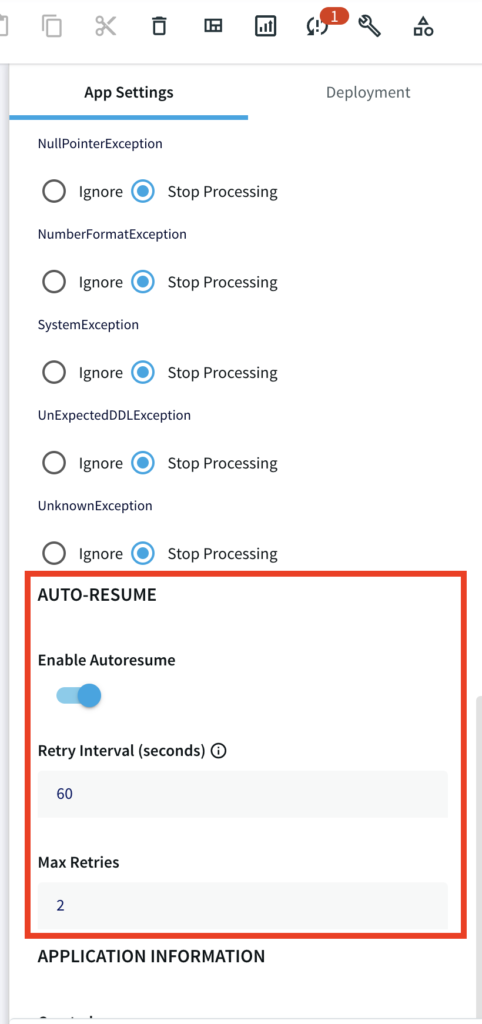
If known transient conditions such as network outages cause an application to crash, you may configure it to restart automatically after a set period of time. You can enable auto resume feature with desired retry interval and maximum retries under App Setting in the flow design as follows:
Setting Up Striim app for CDC pipeline recovery

Step 1: Download the data and Sample TQL file from our github repo

You can download the TQL files for streaming app our github repository. Deploy the Striim app on your Striim server. It should have failure recovery enabled. If you are creating your app from wizard please follow the steps shown in the recipe

Step 2: Configure your source and target

Configure your source and Target in the striim components.

Step 3:Run app before failover

Deploy your streaming app and run it for real-time data replication

Step 4: Run app after failover

Run the Striim app after Failover. Check the source and target for the recovered data

Wrapping Up: Start your Free Trial Today

The above tutorial showed you how to enable recovery for any planned or unplanned server outages or failovers. With Striim’s powerful CDC technology and recovery feature, you can rely on your real-time data pipeline for any analytical purposes even when there is a failover. Striim supports a multitude of sources and targets . This can be utilized to build reliable streaming applications with desired databases and data warehouses.

As always, feel free to reach out to our integration experts to schedule a demo, or try Striim for free here.

Tools you need

Striim

Striim’s unified data integration and streaming platform connects clouds, data and applications.

PostgreSQL

PostgreSQL is an open-source relational database management system.
Snowflake

Snowflake is a cloud-native relational data warehouse that offers flexible and scalable architecture for storage, compute and cloud services.

PostgreSQL CDC to Snowflake data pipeline with Schema Evolution and Data Contracts

Tutorial

PostgreSQL CDC to Snowflake data pipeline with Schema Evolution and Data Contracts

Use Striim to capture and propagate schema changes while performing real-time CDC from PostgreSQL to Snowflake

Benefits

Reduce data downtime by building pipelines resilient to schema changes

Create smart rules to keep schemas in sync without propagating problematic DDL

Automatically keep schemas and models in sync with your operational database.

On this page

Overview

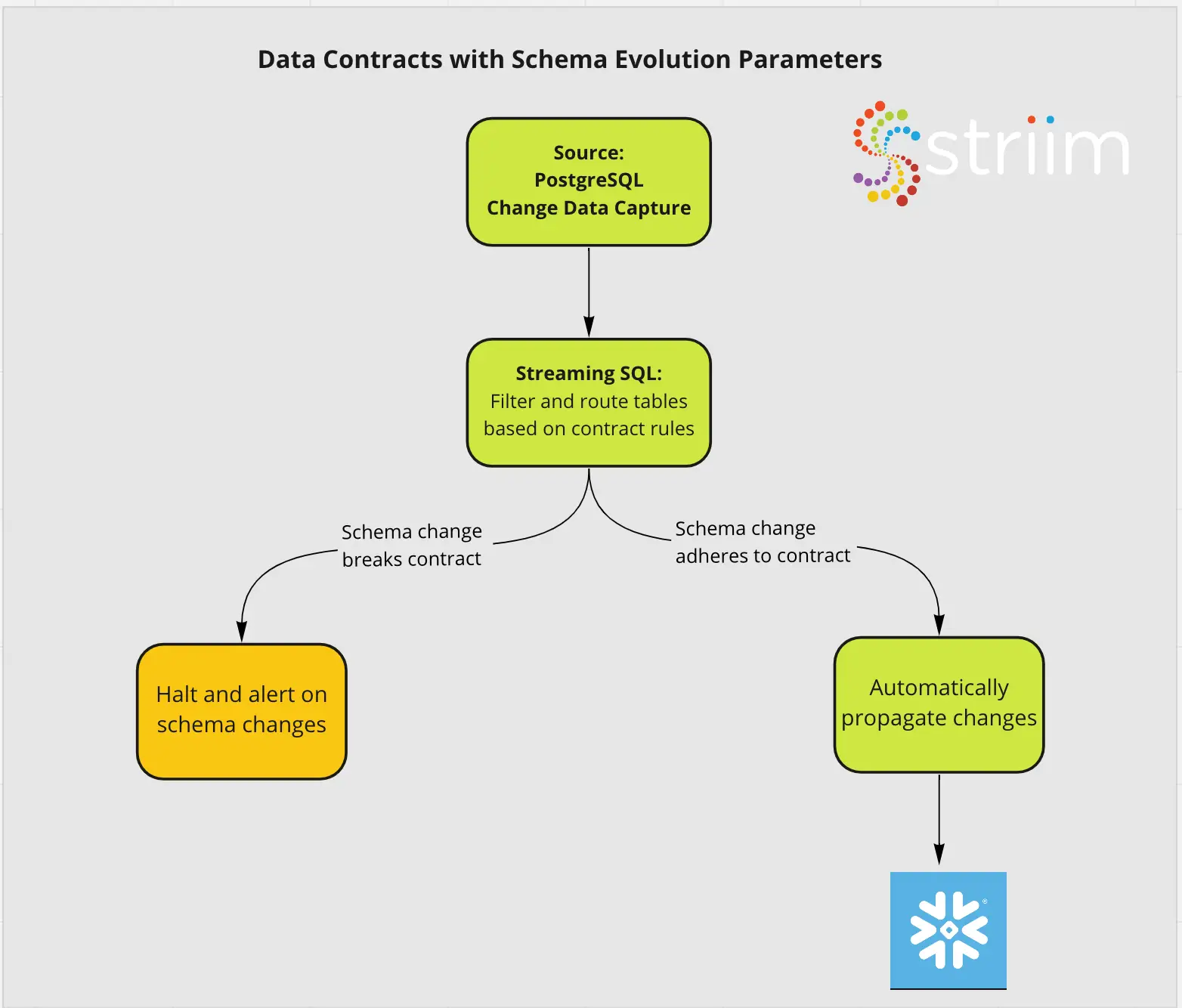
Striim is a next generation unified data streaming product that offers change data capture (CDC) from popular databases such as Oracle, SQLServer, PostgreSQL and many others. To maximize uptime and operational success, Striim can enforce Data Contracts with Schema Evolution. Data Contracts are a way to align on the function of critical data pipelines with technical and business stakeholders. For instance, you may have an analytics team that wants to automatically add all new tables to their pipelines. On the other hand, you may have a software development team that will need to block and immediately be alerted on all new schema changes. 

Data Contracts can also be applied on Data Freshness SLAs. These can be managed by Striim’s Smart Alerts. However we will go over that in a separate recipe. Here we are simply focussed on enforcing Data Contracts on schemas. 

Striim can capture common DDL statements in the source table and replicate those changes to the target tables, or take other actions such as quiescing or halting the application. To know more about the supported CDC sources and adapters, please follow this link.

In one of our previous recipes, we have shown how to create a replica slot and cdc user to stream CDC changes from the PostgreSQL source table in real-time. In this tutorial we have configured a Striim app that captures schema evolution like CREATE TABLE, ALTER TABLE (eg. add column) and DROP TABLE and delegate the changes to the target through striim. In case of a new column, the target table updates with the new column. For CREATE and DROP TABLE, Striim’s message logs notify the new DDL change for any further action by the user. Please follow the steps below to configure your source database and Striim app for capturing schema evolution. Please refer to our github repository for all codes, datasets and tql file of this app.

Core Striim Components

PostgreSQL CDC: PostgreSQL Reader uses the wal2json plugin to read PostgreSQL change data. 1.x releases of wal2jon can not read transactions larger than 1 GB.

Stream: A stream passes one component’s output to one or more other components. For example, a simple flow that only writes to a file might have this sequence

Snowflake Writer: Striim’s Snowflake Writer writes to one or more existing tables in Snowflake. Events are staged to local storage, Azure Storage, or AWS S3, then written to Snowflake as per the Upload Policy setting.

Step 1: Create a Replication Slot and Replication User

For a CDC application on a postgres database, make sure the following flags are enabled for the postgres instance:

Create a user with replication attribute by running the following command on google cloud console:

CREATE USER replication_user WITH REPLICATION IN ROLE cloudsqlsuperuser LOGIN PASSWORD ‘yourpassword’;

Follow the steps below to set up your replication slot for change data capture:

Create a logical slot with wal2json plugin.

Step 2: Configure PostgreSQL CDDL Capture Procedure and CDDL Tracking Table

CDDL stands for “Common Data Definition Language”. Striim supports Create Table, Alter Table (Add, Modify, Drop, Add primary key and adding unique constraints) and Drop Table for handling schema evolution or CDDL.The source adapter must be able to capture the CDDLs executed on the interested tables and schema and the target adapter must be able to process DDL WAEvents sent by the source adapter.

For PostgreSQL CDDL Capture procedure and Tracking, a set of SQL scripts has to be executed on the source database by the customer with the superuser role. Firstly, the schema is created if it does not already exist and an empty table with DDL Capture fields is created that will record the DDL changes. 

CREATE SCHEMA IF NOT EXISTS striim;
CREATE TABLE IF NOT EXISTS striim.ddlcapturetable
  (
    event           TEXT,
    tag             TEXT,
    classid         OID,
    objid           OID,
    objsubid        INT,
    object_type     TEXT,
    schema_name     TEXT,
    object_identity TEXT,
    is_extension    BOOL,
    query           TEXT,
    username        TEXT DEFAULT CURRENT_USER,
    db_name TEXT DEFAULT Current_database(),
    client_addr     INET DEFAULT Inet_client_addr(),
    creation_time   TIMESTAMP DEFAULT now()
  ); 

The next step is to write a PostgreSQL function that collects DDL change logs from pg_stat_activity and inserts into ddlcapturetable. The function shown below is called ‘ddl_capture_command()’ which is executed inside two event triggers in the next section.

GRANT USAGE ON SCHEMA striim TO PUBLIC;
GRANT SELECT, INSERT ON TABLE striim.ddlcapturetable TO PUBLIC;

create or replace function striim.ddl_capture_command() returns event_trigger as $$
declare v1 text;
r record;
begin

    select query into v1 from pg_stat_activity where pid=pg_backend_pid();
    if TG_EVENT='ddl_command_end' then
        SELECT * into r FROM pg_event_trigger_ddl_commands();
        if r.classid > 0 then
            insert into striim.ddlcapturetable(event, tag, classid, objid, objsubid, object_type, schema_name, object_identity, is_extension, query)
            values(TG_EVENT, TG_TAG, r.classid, r.objid, r.objsubid, r.object_type, r.schema_name, r.object_identity, r.in_extension, v1);
        end if;
    end if;
    if TG_EVENT='sql_drop' then
            SELECT * into r FROM pg_event_trigger_dropped_objects();
            insert into striim.ddlcapturetable(event, tag, classid, objid, objsubid, object_type, schema_name, object_identity, is_extension, query)
            values(TG_EVENT, TG_TAG, r.classid, r.objid, r.objsubid, r.object_type, r.schema_name, r.object_identity, 'f', v1);
    end if;
end;
$$ language plpgsql strict;
 

Once the ddlcapture table is created and ddl_capture_command() function is defined, two event triggers are executed as follows.

CREATE EVENT TRIGGER pg_get_ddl_command on ddl_command_end                    EXECUTE PROCEDURE striim.ddl_capture_command();
CREATE EVENT TRIGGER pg_get_ddl_drop on sql_drop                              EXECUTE PROCEDURE striim.ddl_capture_command();

Step 3: Create the CDC app that handles Schema Evolution on Striim SaaS

There is an additional CDDL configuration in source and target which was not required in traditional CDC DML streaming app. For the CDDL configuration in the source database, click on ‘Show Advanced Setting’ as shown below.

Enable ‘SCHEMA EVOLUTION-CDDL CAPTURE’ and enter the name of the CDDL TRACKING TABLE that we created in Step 2. The CDDL ACTION property is ‘Process’.

For the Snowflake target under ‘Show Advanced Setting’, ‘Process’ is selected under CDDL ACTION. This ensures the ALTER TABLE changes in the source table are replicated into the target table in Snowflake.

Note: you must create tables in Snowflake yourself manually or use Striim’s schema creation wizard.

To transfer your schema and tables from postgres to snowflake using schema creation wizard, follow the steps shown below:

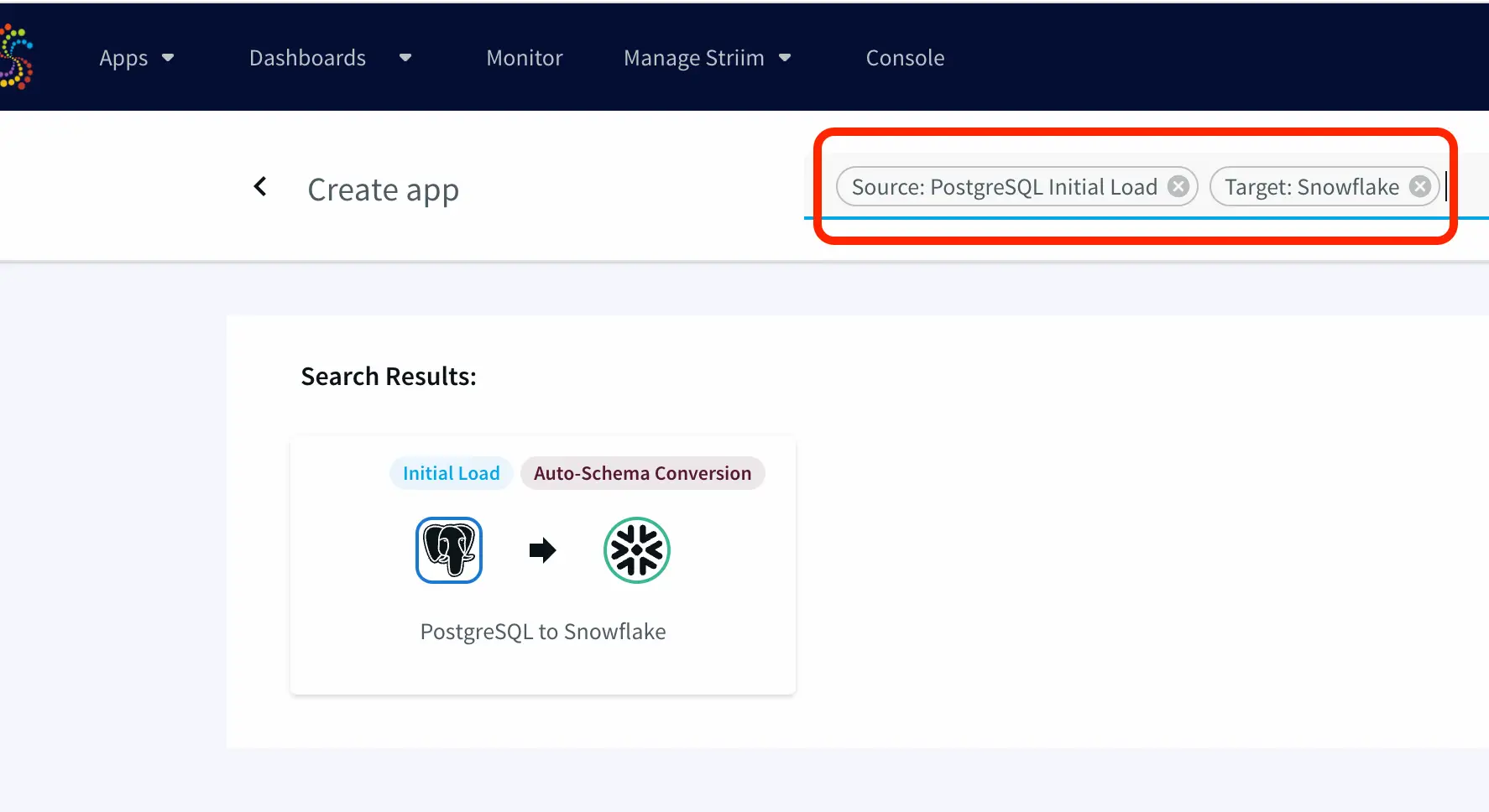
Step 1: Create a new app with Postgres Initial Load as source and Snowflake as target


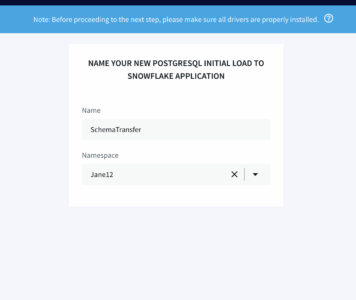
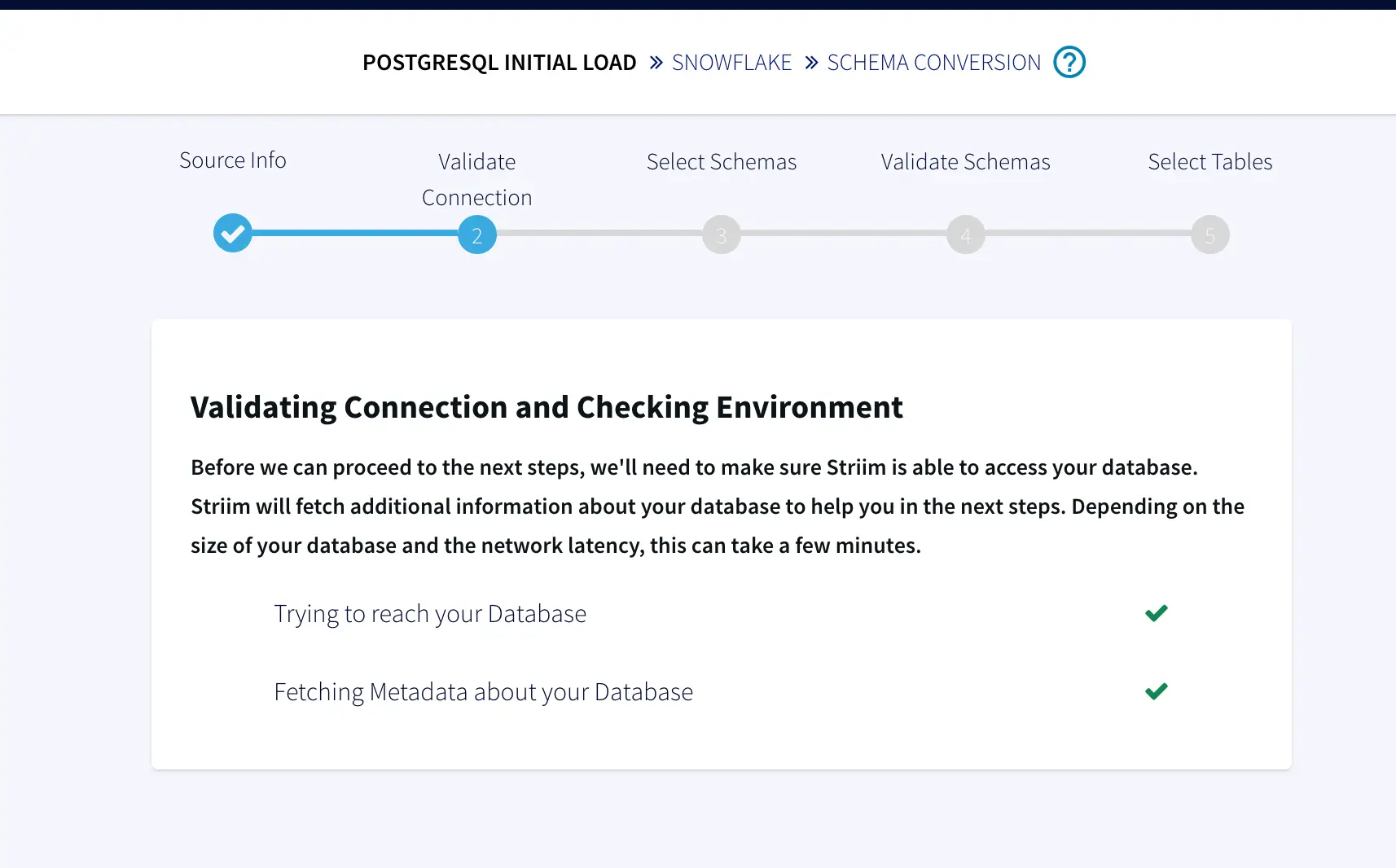
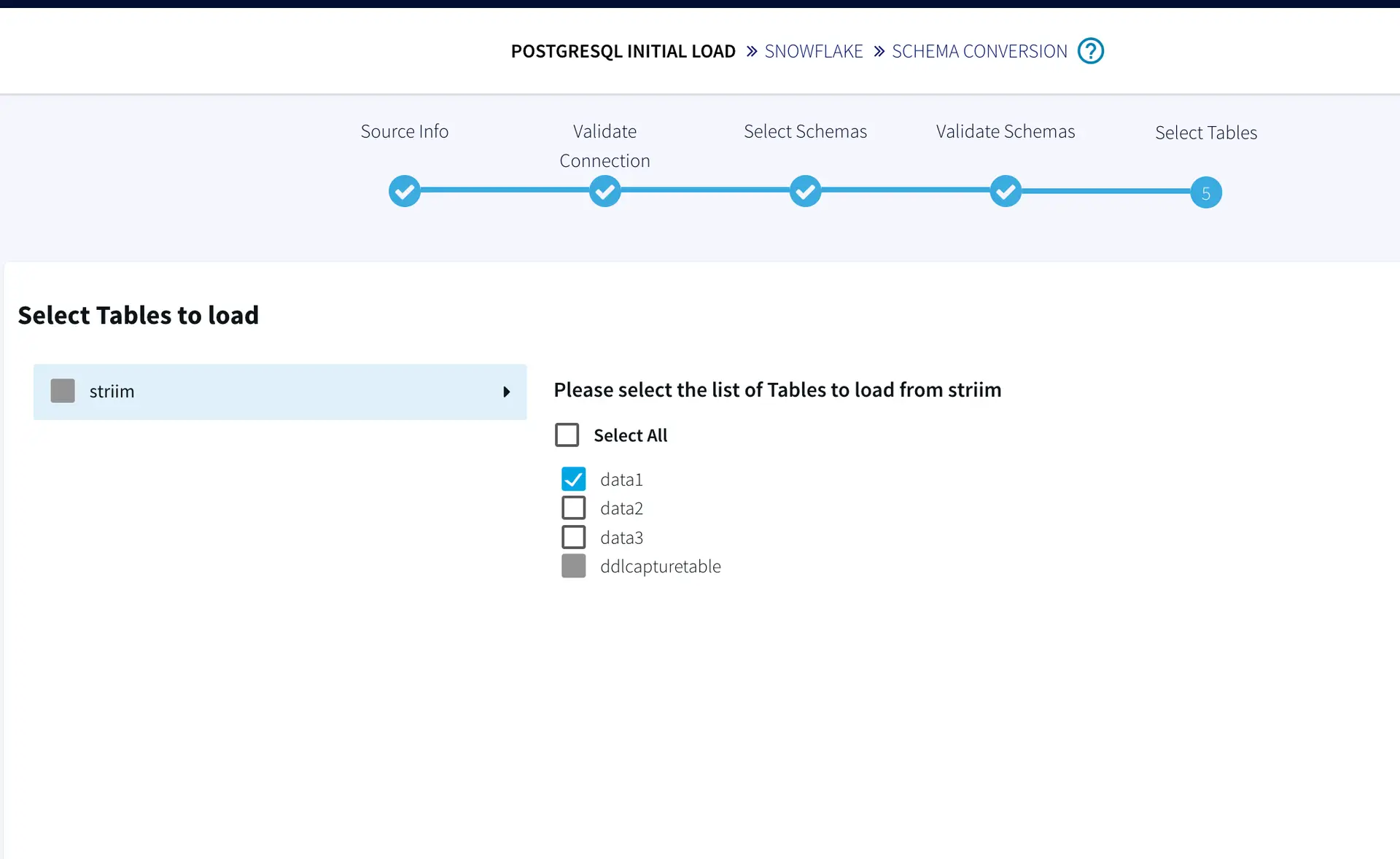
Step 2: Follow the app wizard and select your schema and tables in your Postgres source

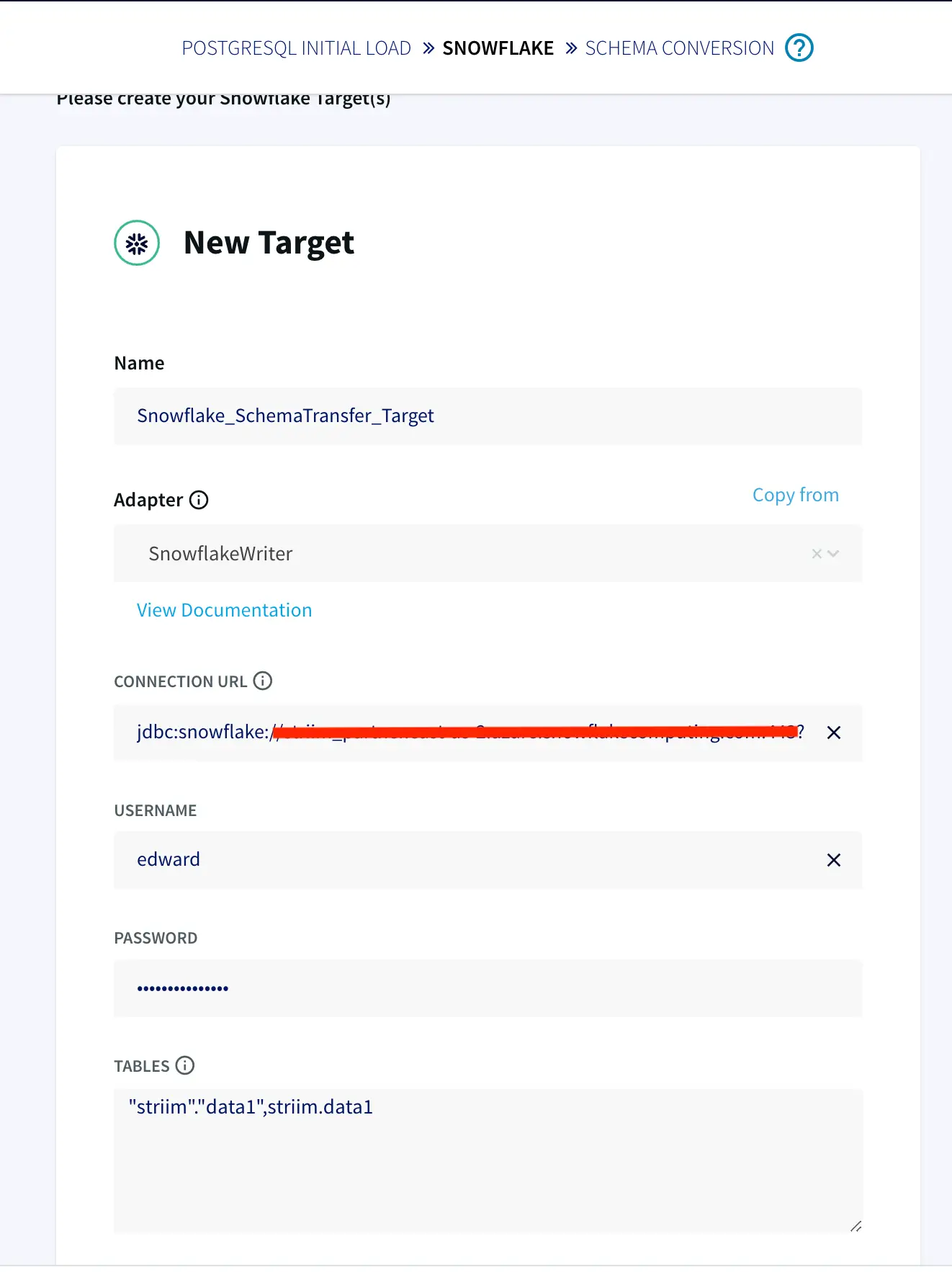
Step 3: Configure your Snowflake wizard as shown below

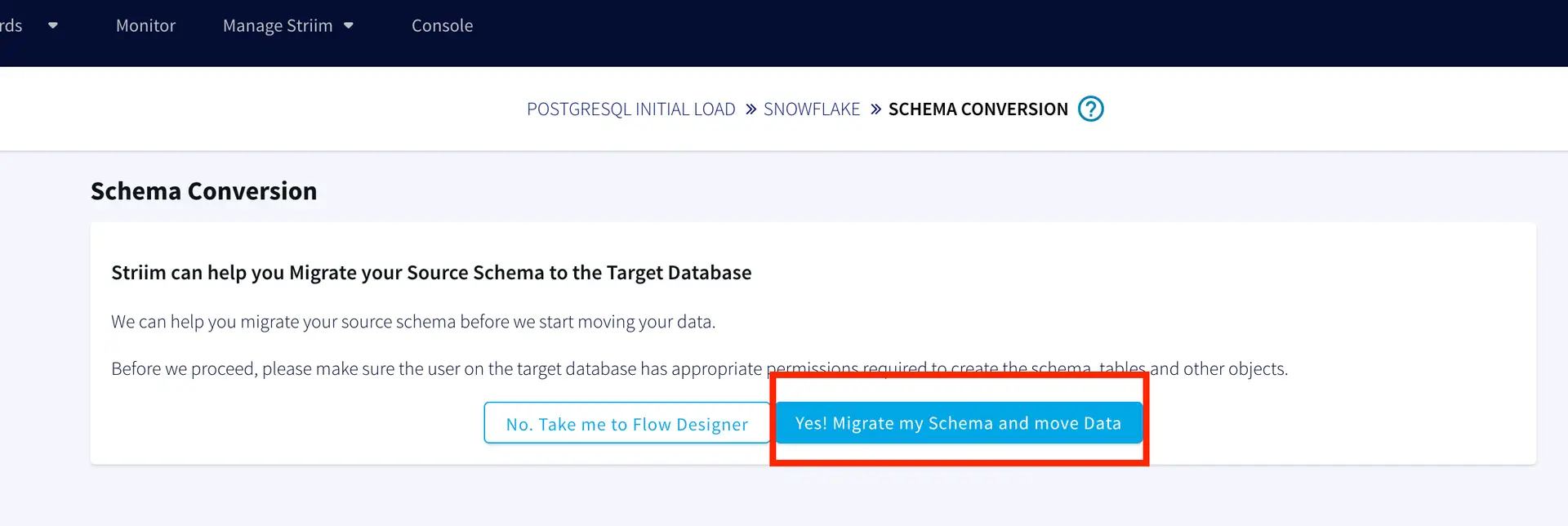
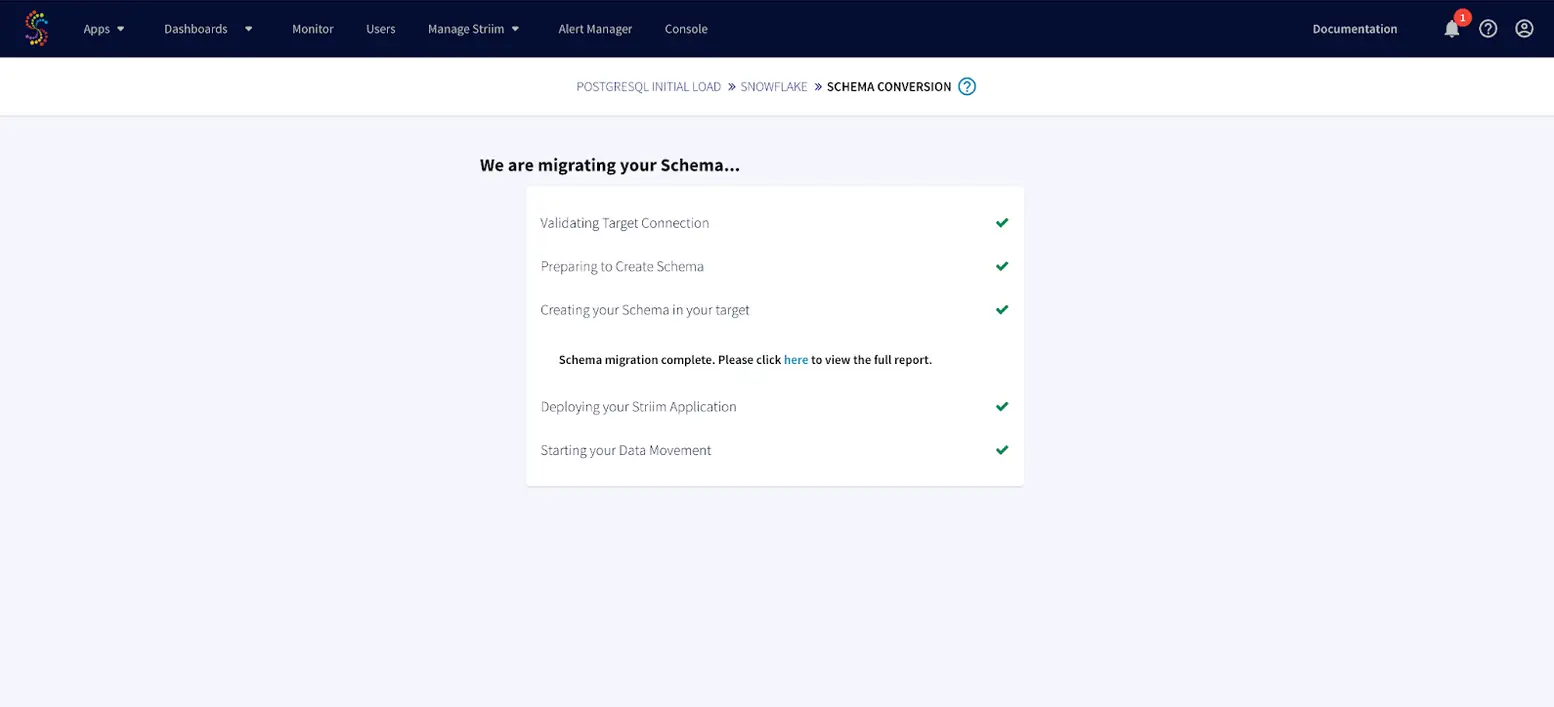
Step 4: Select Schema Migration to migrate your schema from Postgres to Snowflake


Step 4: Run the App and check the message logs and target table for any DDL changes.

For this tutorial, I have used a sample table ‘data1’ containing two columns ‘Name’ and ‘Salary’. When a new column ‘Sex’ is added, it is streamed and the target table in snowflake is updated.

Enable ‘SCHEMA EVOLUTION-CDDL CAPTURE’ and enter the name of the CDDL TRACKING TABLE that we created in Step 2. The CDDL ACTION property is ‘Process’.


For the Snowflake target under ‘Show Advanced Setting’, ‘Process’ is selected under CDDL ACTION. This ensures the ALTER TABLE changes in the source table are replicated into the target table in Snowflake.

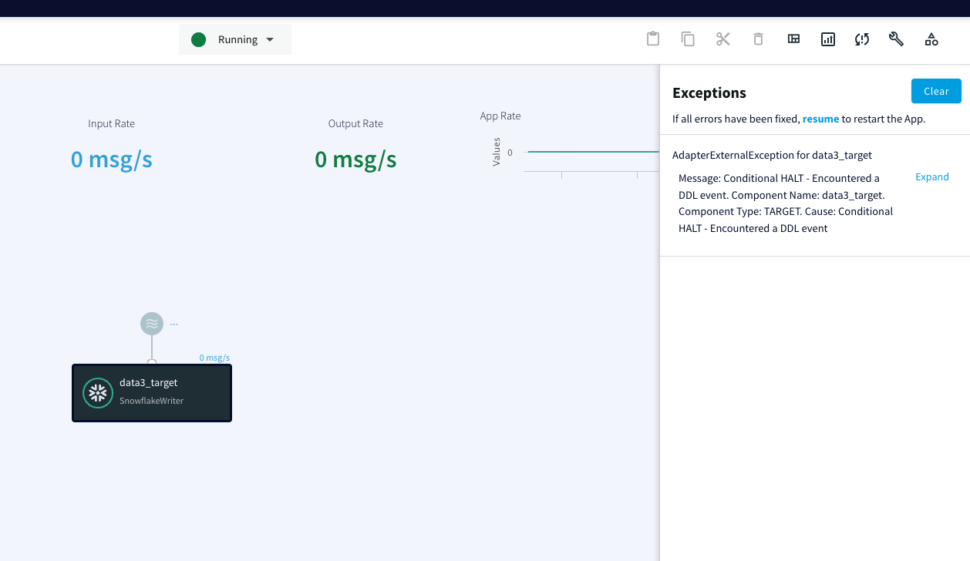
When we add a new table ‘data3’  into the schema, DDL Operation is ignored but the message log notifies the user about the new change. The metadata from the message log can be used to set alert for different types of DDL operations

Static Tables

There are four types of action labels for CDDL supported source and target adapters. Striim can also handle data replication sources that contain tables with static schema. The four actions that can be executed on capturing CDDLs are:

Process:  This is the default action behavior that parses the DDL query and streams into the target table

Ignore: The DDL events will be captured and stored into internal metadata repository but will not be sent to the downstream consumers

Quiesce: When a DDL event is captured on the interested tables, source adapters will issue the Quiesce command and DDL operation will not be sent to downstream consumers. This action label is specific to Source Adapters only.

Halt: On receiving DDL action from upstream, the adapters will halt the app. This action is important when we want to halt the application when DDL is executed on static tables.

Here is an example showing a striim app with one static table. Since there are multiple tables in the source, we specify the action label ‘HALT’ on the target adapter.

You can also create a separate app for static tables that reads from the same source stream. This would not halt the data streams for other tables while a DDL is executed on static tables. Configure a separate app with the same source stream as follows. The source app is still running while the app containing the target app with a static table is halted.

Setting Up Striim app to capture Schema Evolution

Step 1: Create Replication Slot and Replication User on Postgres

Follow this recipe to create a Replication Slot and user for Change Data Capture. The replication user reads change data from your source database and replicates it to the target in real-time.

Step 2: Setup CDDL Capture Procedure and CDDL Tracking Table

Follow the recipe to configure PostgreSQL CDDL Capture Procedure and CDDL Tracking Table. You can find the sql queries in our github repository

Step 3: Create CDC app on Striim server

Create the CDC app that handles Schema Evolution on Striim SaaS as shown in the recipe

Step 4: Deploy and Run the Striim app

Run the App and check the message logs and target table for any DDL changes.

Wrapping Up: Start your Free Trial Today

Our tutorial showed you how to handle schema evolution in PostgreSQL database and stream the CDC to Snowflake target, a leading cloud data warehouse through Striim SaaS. By constantly moving your data into Snowflake, you could track the schema changes as well as build analytics or machine learning models, all with minimal impact to your current systems. You could also start ingesting and normalizing more datasets with Striim to fully take advantage of your data.

As always, feel free to reach out to our integration experts to schedule a demo, or try Striim for free here.

Tools you need

Striim

Striim’s unified data integration and streaming platform connects clouds, data and applications.

PostgreSQL

PostgreSQL is an open-source relational database management system.

Snowflake

Snowflake is a cloud-native relational data warehouse that offers flexible and scalable architecture for storage, compute and cloud services.

Back to top