Now that you have a high-level overview of the Striim platform, let’s discuss how you can build data iPaaS applications with Striim.
You can deploy the entire platform in the cloud either by bringing your own license or as a metered iPaaS service. This gives you everything – it gives you all the sources, all the targets, and all the capabilities of the platform. There are also specific versions that you can deploy for particular solutions. So, for example, if you have on-premises Oracle databases and you want to push that data, as it’s changing, say to Azure SQL Data Warehouse, you can use that specific solution. You can still work with all of the sources, but you’re limited to delivering the data into Azure SQL Data Warehouse. There are dozens of specific cloud service solutions. They also are metered; they run as iPaaS in the cloud.
There are also a lot of different flavors of iPaaS. People usually bring up the multi-tenant type of iPaaS where the vendor hosts the service for you, allowing you to login and have access within an environment to be able to build data flows, etc. Striim chose not to go that route because customers are not typically that happy with the notion of being in a joint, multi-tenant environment where they are worried about data security and being guaranteed use of resources so that their applications will run at the right speed, etc.
Instead, Striim went with the ability to purchase the platform on Azure, Google Cloud, or Amazon as a metered service. With this approach, it’s running in your cloud environments, so you control the security, data, and everything else. Customers are more comfortable with this than the notion of a multi-tenant solution for iPaaS. As you can see in this video, we have metered iPaaS solutions for data in the marketplace for all three major cloud environments – Azure, AWS, and Google Cloud.
When you are working with the platform, on-premises or in the cloud, you interact with it through our intuitive web-based UI. This provides access to existing applications, as well as being able to import and create new applications.
You can start by building or importing applications, so, for example, if you’ve already built something in development, you can import it into production. If you are starting from scratch, you begin with an empty application and drag and drop components into the flow designer. But the easier way to get going is through the wizards which provide a large number of application templates. A lot of users start with a template because it enables you to rapidly build simple data flows, and check everything is correct as you go along.
For example, if you wanted to read from a MySQL database on-premises and deliver into Azure Cosmos DB, you could name the application, “MySQLtoCosmos,” and put it in a namespace. Namespaces keep things separate, and the way our security works, you can lock things down so that only certain people have access to certain namespaces. You can do much finer-grain things than that. You can give users access to the data that’s produced as the end result of the data pipeline, but not the raw data because that may have personally identifiable information in it. In our example, we will filter all that out before we push it into the cloud.
So you create a new namespace and save it. And then you can actually build data iPaaS applications, letting the wizards walk you through setting up the connection. Once all properties are configured, it will test everything to make sure that the connection is correct. This is an important step. One of the reasons Striim introduced its many wizards and templates was to make the development process as easy, intuitive, and fast as possible.
So in these steps, we check to make sure that not only does the connection to the database work, but also that connection has the right privileges, and that change data capture (CDC) is turned on. CDC collects all the inserts, updates, and deletes as they happen in a database (this is enabled at the database level). It also checks that you can get to the database metadata so you can actually see what tables and columns there are. If any of these steps don’t work, then the wizards will tell you what to do. Basically the instructions in the manual are mirrored by steps in the wizards so people know exactly what to do. In certain cases, the wizards can even do it for you. Once the connection is verified, you get to choose your data and go on to the next step. And then finally you’ll configure your target.
As businesses adopt Amazon Web Services, streaming data integration to AWS – with change data capture (CDC) and stream processing – becomes a necessary part of the solution.
You’ve already decided that you want to enable integration to AWS. This could be to Amazon RDS or Aurora, Amazon Redshift, Amazon S3, Amazon Kinesis, Amazon EMR, or any number of other technologies.
You may want to migrate existing applications to AWS, scale elastically as necessary, or use the cloud for analytics or machine learning, but running applications in AWS, as VMs or containers, is only part of the problem. You also need to consider how to you move data to the cloud, ensure your applications or analytics are always up to date, and make sure the data is in the right format to be valuable.
The most important starting point is ensuring you can stream data to the cloud in real time. Batch data movement can cause unpredictable load on cloud targets, and has a high latency, meaning your data is often hours old. For modern applications, having up-to-the-second information is essential, for example to provide current customer information, accurate business reporting, or for real-time decision making.
Moving Data to Amazon Web Services in Real-Time
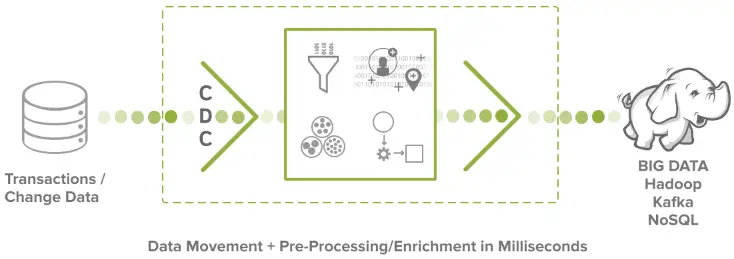
Streaming data integration to AWS from on-premise systems requires making use of appropriate data collection technologies. For databases, this is change data capture, or CDC, which directly and continuously intercepts database activity, and collects all the inserts, updates, and deletes as events, as they happen. Log data requires file tailing, which reads at the end of one or more files across potentially multiple machines and streams the latest records as they are written. Other sources like IoT data, or third party SaaS applications, also require specific treatment in order to ensure data can be streamed in real time.
Once you have streaming data, the next consideration is what processing is necessary to make the data valuable for your specific AWS destination, and this depends on the use-case.
Use Cases
For database migration or elastic scalability use-cases, where the target schema is similar to the source, moving raw data from on-premise databases to Amazon RDS or Aurora may be sufficient. The important consideration here is that the source applications typically cannot be stopped, and it takes time to do an initial load. This is why collecting and delivering database change, during and after the initial load, is essential for zero downtime migrations.
For real-time applications sourcing from Amazon Kinesis, or analytics use-cases built on Amazon Redshift or Amazon EMR, it may be necessary to perform stream processing before the data is delivered to the cloud. This processing can transform the data structure, and enrich it with additional context information, while the data is in-flight, adding value to the data and optimizing downstream analytics.
Striim’s Streaming Integration to AWS
Striim’s streaming integration to AWS can continuously collect data from on-premise, or other cloud databases, and deliver to all of your Amazon Web Services endpoints. Striim can take care of initial loads, as well as CDC for the continuous application of change, and these data flows can be created rapidly, and monitored and validated continuously through our intuitive UI.
With Striim, your cloud migrations, scaling, and analytics can be built and iterated-on at the speed of your business, ensuring your data is always where you want it, when you want it.
AWS cloud migration requires more than just being able to run in VMs or cloud containers. Applications rely on data, and that data needs to be migrated as well.
In most cases, the original applications are essential to the business, and cannot be stopped during this process. Since it takes time to migrate the data, and time to verify the application after migration, it is essential that data changes are collected, and delivered during and after that initial load.
As the data is so crucial to the business, and change data will be continually applied for a long time, mechanisms that verify that the data is delivered correctly are an important aspect of any AWS cloud migration.
Migration Monitoring Demo
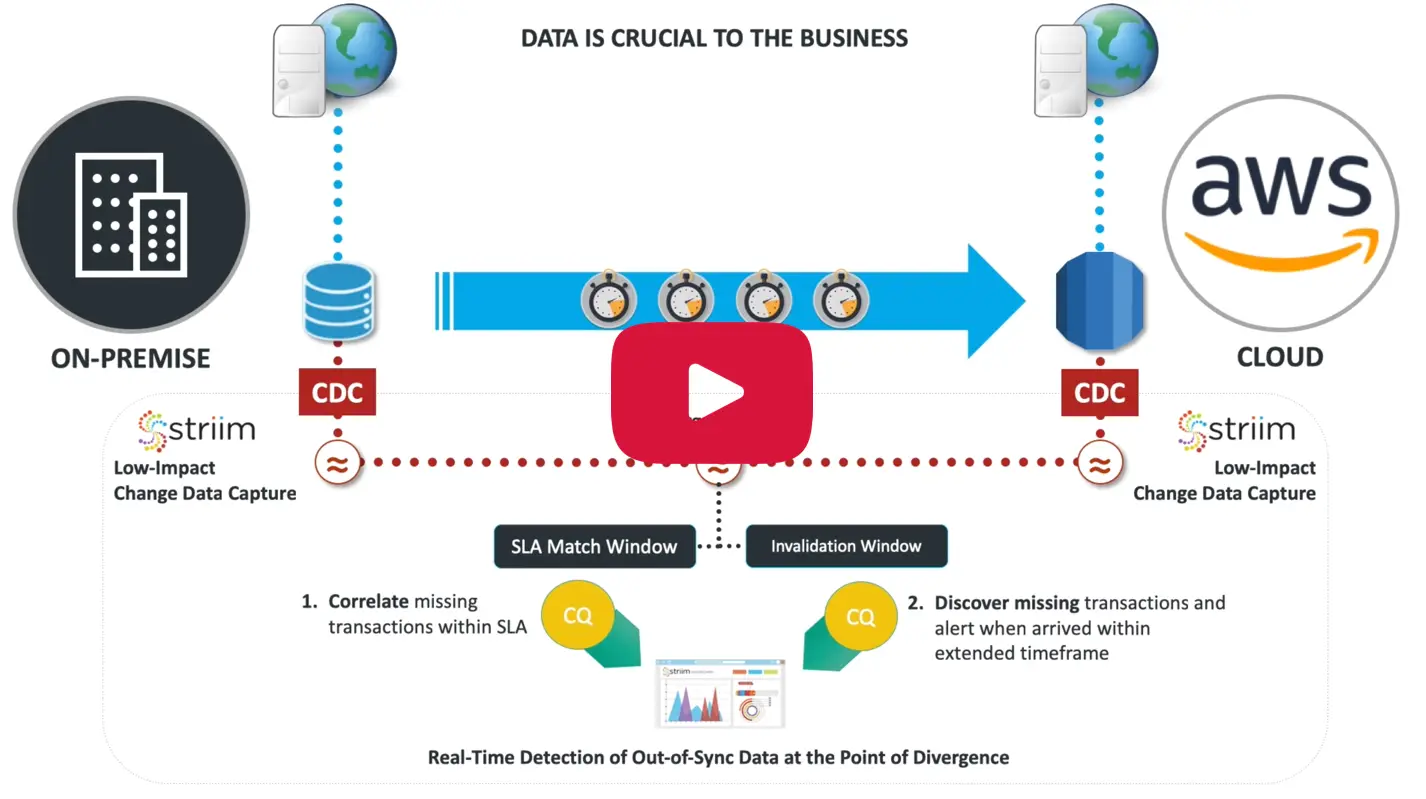
In this Migration Monitoring Demo we will show how, by collecting change data from source and target and matching transactions applied to each in real time, you can ensure your cloud database is completely synchronized with on-premise, and detect any data divergence when migrating from an on-premise database.
Key Challenges
The key challenges with monitoring AWS cloud migration include:
Enabling data migration without a production outage with monitoring during and after migration.
Detecting out-of-sync data should any divergence occur with this detection happening immediately at the time of divergence, preventing further data corruption.
Running the monitoring solution non-intrusively with low overhead and obtaining sufficient information to enable fast resynchronization
In our scenario, we are monitoring the migration of an on-premise application to AWS. A Striim dashboard shows real-time status, complete with alerts, and is powered by a continuously running data pipeline. The on-premise application uses an Oracle Database and cannot be stopped. The database transactions are continually replicated to an Amazon Aurora MySQL Database. The underlying migration solution could be either Striim’s Migration Solution or other solutions such as AWS DMS.
The objective is to monitor ongoing migration of transactions and alert when any transactions go out-of-sync, indicating any potential data discrepancy. This is achieved in the Striim platform through its continuous query processing layer. Transactions are continuously collected from the source and target databases in real-time and matched within a time window. If matching transactions do not occur within a period of time, they are considered long-running. If no match occurs in an additional time period, the transaction is considered missing. Alerts are generated in both cases.
Results
The number of alerts for missing transactions and long-running transactions are displayed in the dashboard. Transaction rates and operation activity are also available in the dashboard and can be displayed for all tables, or for critical tables and users.
You can immediately see live updates and alerts when the transactions do not get propagated to the target within a user configured window, with long-running transaction that eventually make it to the target also tracked.
The dashboard is user-customizable, making it easy to add additional visualizations for specific monitoring as necessary.
You have seen how Striim can be used for continuous monitoring of your on-premise to AWS cloud migration. For more information, visit our AWS solution page, schedule a demo with a Striim technologist, or get started immediately using a download from our website, or via the AWS marketplace.
In this blog post, we’re going to tackle the basics behind what streaming integration is, and why it’s critical for enterprises looking to adopt a modern data architecture. Let’s begin with a working definition of streaming integration.
What is Streaming Integration?
You’ve heard about streaming data and streaming data integration and you’re wondering, why is it an essential part of any enterprise infrastructure?
Well, streaming integration is all about continuously moving any enterprise data with real high throughput in a scalable fashion, while processing that data, correlating it, and analyzing it in-memory so that you can get real value out of that data, and visibility into it in a verifiable fashion.
And streaming data integration is the foundation for so many different use cases in this modern world, especially if you have legacy systems and you need to modernize, you need to use new technologies to get the right answers from your data, and you need to do that continuously, in real time.
Why Streaming Integration?
Now that we’ve outlined a high-level understanding of what streaming integration is, let’s discuss why it’s important. You now know streaming integration is an essential part of enterprise modernization. But why? Why streaming integration and why now?
Well, streaming data integration is all about treating your data the way it should be treated. Batch data is an artifact of technology and technology history – that storage was cheap, and memory and CPU were expensive. And so, people would store lots of data and then process it later.
But data is not created in batches. Data is created row-by-row, line-by-line, event-by-event as things in the real world happen. So, if you’re treating your data in batches, you’re not respecting it; you’re not treating it the way that it’s created. In order to do that, you need to collect that data and process it as it’s being produced, and do all of this in a streaming fashion. And that’s what streaming integration is all about.
If you’re interested in learning more about streaming data integration and why it’s needed, please visit our Real-Time Data Integration Solution page, or view the wide variety of sources and targets that Striim supports.
In this series of blog-based tutorials, we are guiding you through the process of building data flows for streaming integration and analytics applications using the Striim platform. This tutorial focuses on SQL-based stream processing for Apache Kafka with in-memory enrichment of streaming data. For context, please check out Part One of the series where we created a data flow to continuously collect change data from MySQL and deliver as JSON to Apache Kafka.
In this tutorial, we are going to process and enrich data-in-motion using continuous queries written in Striim’s SQL-based stream processing language. Using a SQL-based language is intuitive for data processing tasks, and most common SQL constructs can be utilized in a streaming environment. The main differences between using SQL for stream processing, and its more traditional use as a database query language, are that all processing is in-memory, and data is processed continuously, such that every event on an input data stream to a query can result in an output.
The first thing we are going to do with the data is extract fields we are interested in, and turn the hierarchical input data into something we can work with more easily.
Transforming Streaming Data With SQL
You may recall the data we saw in part one looked like this:
This is the structure of our generic CDC streams. Since a single stream can contain data from multiple tables, the column values are presented as arrays which can vary in size. Information regarding the data is contained in the metadata, including the table name and operation type.
The PRODUCT_INV table in MySQL has the following structure:
LOCATION_IDint(11) PK
PRODUCT_IDint(11) PK
STOCKint(11)
LAST_UPDATEDtimestamp
The first step in our processing is to extract the data we want. In this case, we only want updates, and we’re going to include both the before and after images of the update for stock values.
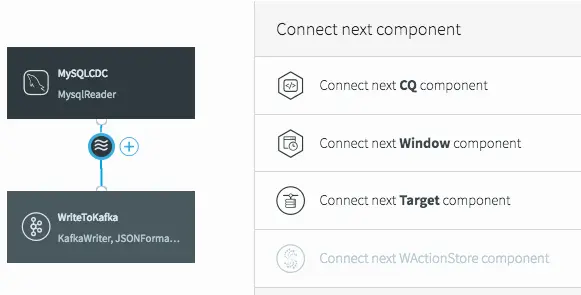
To do the processing, we need to add a continuous query (CQ) into our dataflow. This can be achieved in a number of ways in the UI, but we will click on the datastream, then on the plus (+) button, and select “Connect next CQ component” from the menu.
Connect Next CQ Component to Add to Our First Continuous Query
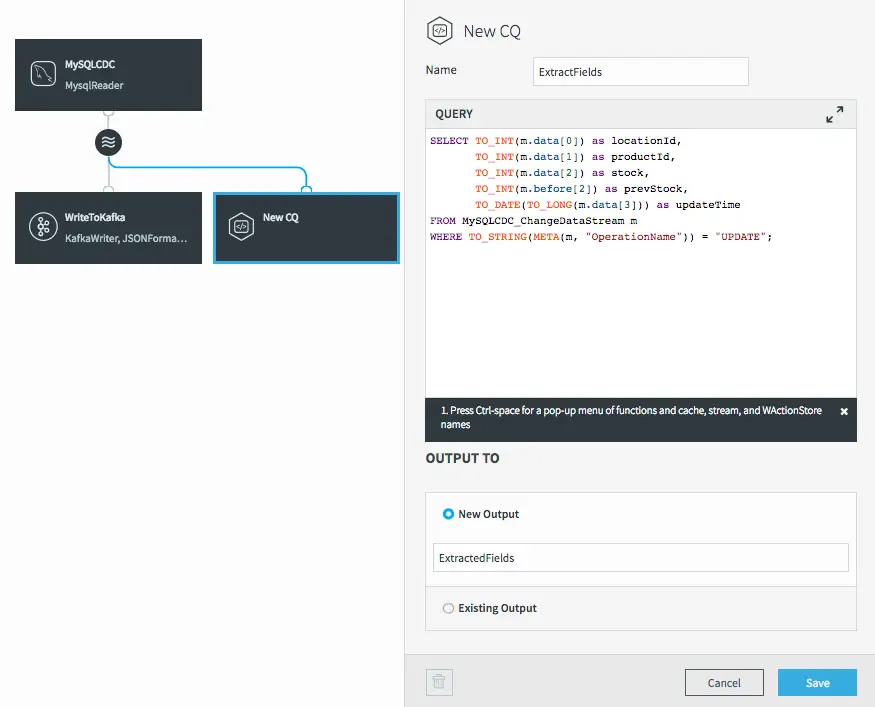
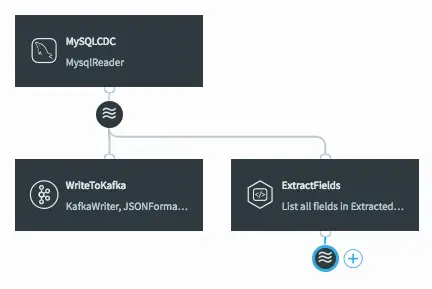
As with all components in Striim, we need to give the CQ a name, so let’s call it “ExtractFields”. The processing query defaults to selecting everything from the stream we were working with.
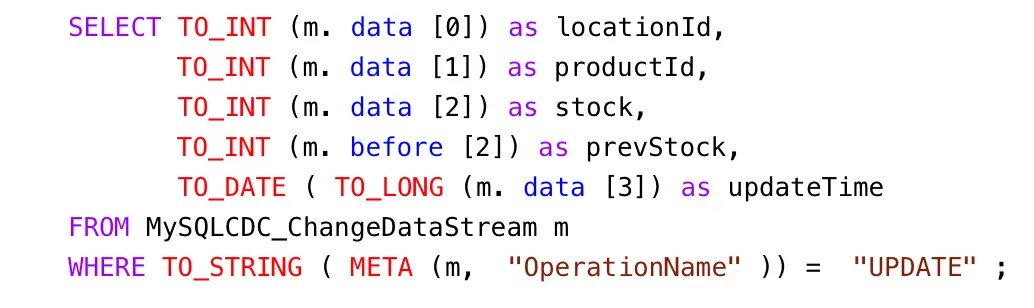
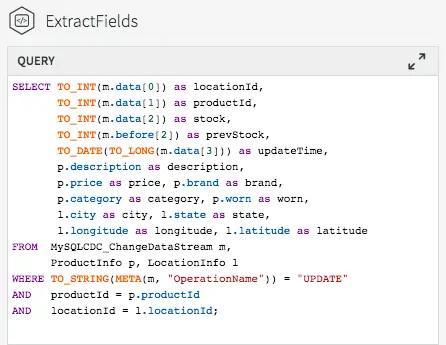
But we want only certain data, and to restrict things to updates. When selecting the data we want, we can apply transformations to convert data types, access metadata, and many other data manipulation functions. This is the query we will use to process the incoming data stream:
Notice the use of the data array (what the data looks like after the update) in most of the selected values, but the use of the before array to obtain the prevStock.
We are also using the metadata extraction function (META) to obtain the operation name from the metadata section of the stream, and a number of type conversion functions (TO_INT for example) to force data to be of the correct data types. The date is actually being converted from a LONG timestamp representing milliseconds since the EPOCH.
</code>
The final step before we can save this CQ is to choose an output stream. In this case we want a new stream, so we’ll call it “ExtractedFields”.
Data-flow with Newly Added CQ
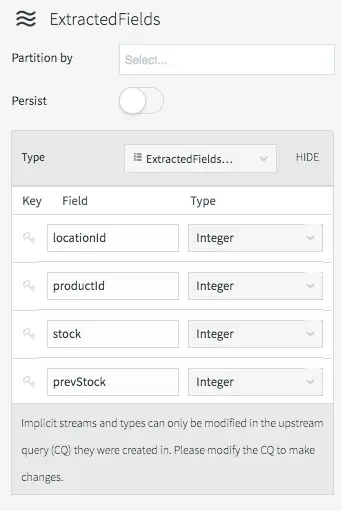
When we click on Save, the query is created alongside the new output stream, which has a data type to match the projections (the transformed data we selected in the query).
After Clicking Save, the New CQ and Stream Are Added
The data type of the stream can be viewed by clicking on the stream icon.
Stream Properties Showing Generated Type Division
There are many different things you can do with streams themselves, such as partition them over a cluster, or switch them to being persistent (which utilizes our built-in Apache Kafka), but that is a subject for a later blog.
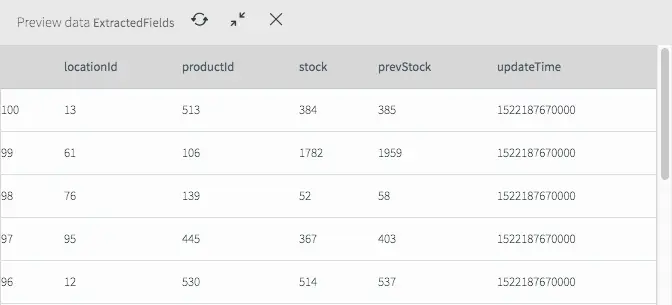
If we deploy and start the application (see the previous blog for a refresher) then we can see what the data now looks like in the stream.
Extracted Fields Viewed by Previewing Data Streams
As you can see it looks very different from the previous view and now only contains the fields we are interested in for the remainder of the application.
But at the moment, this new stream currently goes nowhere, while the original data is still being written to Kafka.
Writing Transformed Data to Kafka
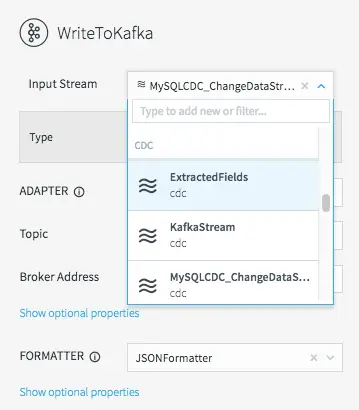
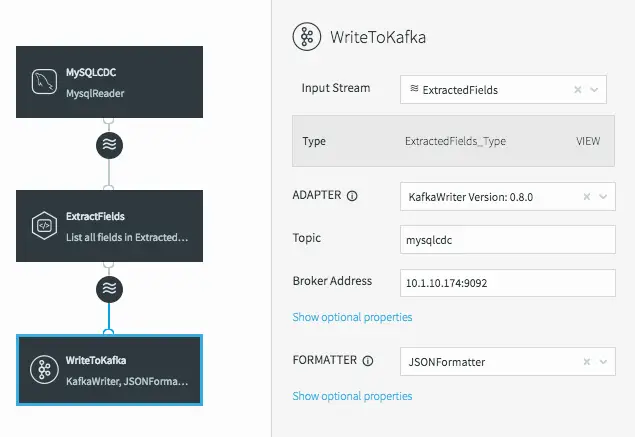
To fix this, all we need to do is change the input stream for the WriteToKafka component.
Changing the Kafka Writer Input Stream
This changes the data flow, making it a continuous linear pipeline, and ensures our new simpler data structure is what is written to Kafka.
Linear Data Flow Including Our Process CQ Before Writing to Kafka
Utilizing Caches For Enrichment
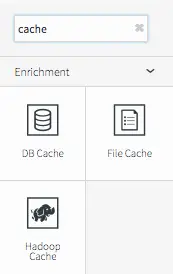
Now that we have the data in a format we want, we can start to enrich it. Since the Striim platform is a high-speed, low latency, SQL-based stream processing platform, reference data also needs to be loaded into memory so that it can be joined with the streaming data without slowing things down. This is achieved through the use of the Cache component. Within the Striim platform, caches are backed by a distributed in-memory data grid that can contain millions of reference items distributed around a Striim cluster. Caches can be loaded from database queries, Hadoop, or files, and maintain data in-memory so that joining with them can be very fast.
A Variety of In-Memory Caches Are Available for Enrichment
In this example we are going to use two caches – one for product information loaded from a database, and another for location information loaded from a file.
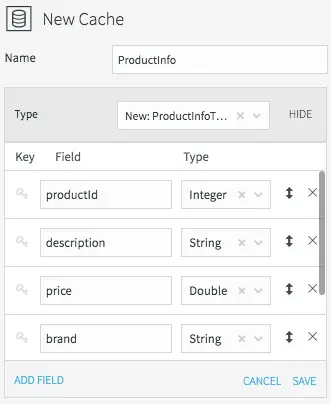
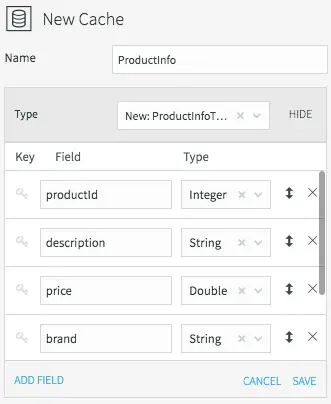
Setting the Name and Datatype for the ProductInfo Cache
All caches need a name, data type, lookup key, and can optionally be refreshed periodically. We’ll call the product information cache “ProductInfo,” and create a data type to match the MySQL PRODUCT table, which contains details of each product in our CDC stream. This is define in MySQL as:
PRODUCT_IDint(11) PK
DESCRIPTIONvarchar(255)
PRICEdecimal(8,2)
BRANDvarchar(45)
CATEGORYvarchar(45)
WORNvarchar(45)
The lookup key for this cache is the primary key of the database table, or productId in this case.
All we need to do now is define how the cache obtains the data. This is done by setting the username, password, and connection URL information for the MySQL database, then selecting a table, or a query to run to access the data.
Configuring Database Properties for the ProductInfo Cache
When the application is deployed, the cache will execute the query and load all the data returned by the query into the in-memory data grid; ready to be joined with our stream.
Loading the location information from a file requires similar steps. The file in question is a comma-delimited list of locations in the following form:
Location ID, City, State, Latitude, Longitude, Population
We will create a File Cache called “LocationInfo” to read and parse this file, and load it into memory assigning correct data types to each column.
Setting the Name and Datatype for the LocationInfo Cache
The lookup key is the location id.
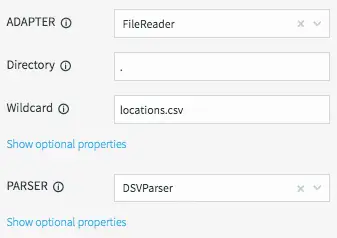
We will be reading data from the “locations.csv” file present in the product install directory “.” using the DSVParser. This parser handles all kinds of delimited files. The default is to read comma-delimited files (with optional header and quoted values), so we can keep the default properties.
Configuring FileReader Properties for the LocationInfo Cache
As with the database cache, when the application is deployed, the cache will read the file and load all the data into the in-memory data grid ready to be joined with our stream.
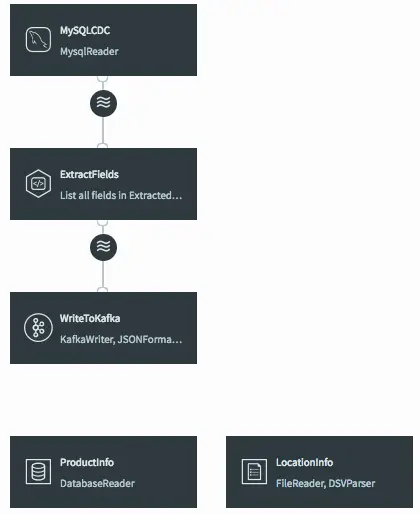
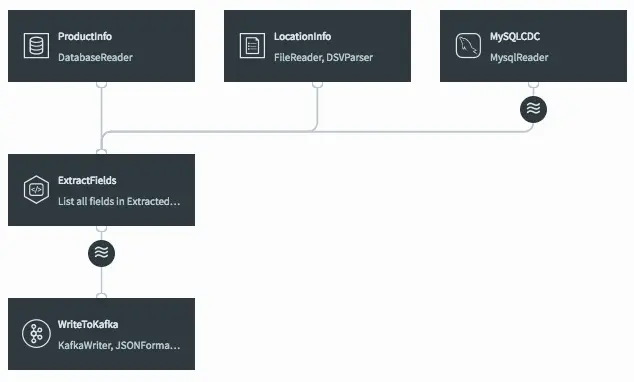
Dataflow Showing Both Caches Currently Ready to be Joined
Joining Streaming and Cache Data For Enrichment With SQL
The final step is to join the data in the caches with the real-time data coming from the MySQL CDC stream. This can be achieved by modifying the ExtractFields query we wrote earlier.
Full Transformation and Enrichment Query Joining the CDC Stream with Cache Data
All we are doing here is adding the ProductInfo and LocationInfo caches into the FROM clause, using fields from the caches as part of the projection, and including joins on productId and locationId as part of the WHERE clause.
The result of this query is to continuously output enriched (denormalized) events for every CDC event that occurs for the PRODUCT_INV table. If the join was more complex – such that the ids could be null, or not match the cache entries – we could change to use a variety of join syntaxes, such as OUTER joins, on the data. We will cover this topic in a subsequent blog.
When the query is saved, the dataflow changes in the UI to show that the caches are now being used by the continuous query.
Dataflow After Joining Streaming Data with Caches in the CQ
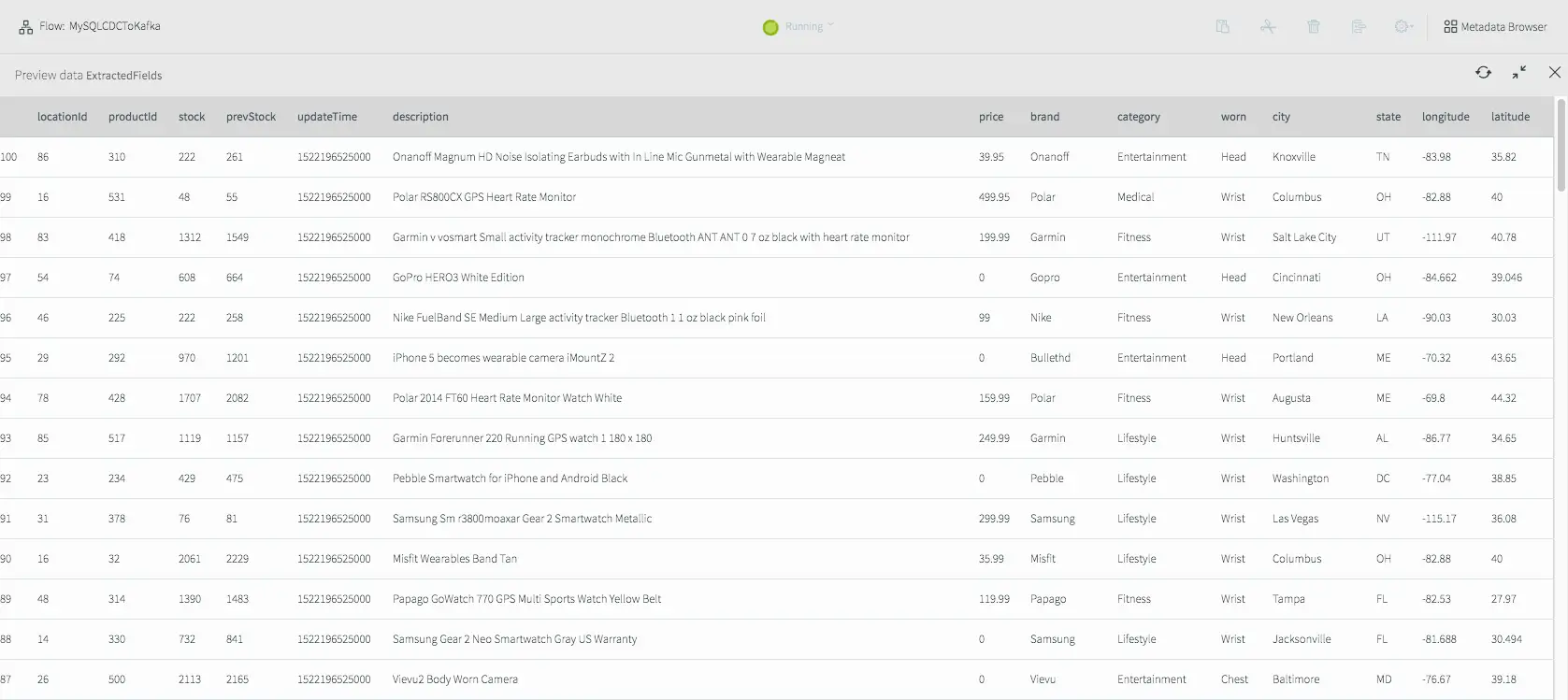
If we deploy and start the application, then preview the data on the stream prior to writing to Kafka we will see the fully-enriched records.
Results of Previewing Data After Transformation and Enrichment
The data delivered to Kafka as JSON looks like this.
{
“locationId“:9,
“productId“:152,
“stock“:1277,
“prevStock“:1383,
“updateTime“:”2018-03-27T17:28:45.000-07:00”,
“description“:”Dorcy 230L ZX Series Flashlight”,
“price“:33.74,
“brand“:”Dorcy”,
“category“:”Industrial”,
“worn“:”Hands”,
“city“:”Dallas”,
“state“:”TX”,
“longitude“:-97.03,
“latitude“:32.9
}
As you can see, it is very straightforward to use the Striim platform to not only integrate streaming data sources using CDC with Apache Kafka, but also to leverage SQL-based stream processing and enrich the data-in-motion without slowing the data flow.
In the next tutorial, I will delve into delivering data in different formats to multiple targets, including cloud blob storage and Hadoop.
In Part 4 of this blog series, we shared how the Striim platform facilitates data processing and preparation, both as it streams in to Kafka, and as it streams out of Kafka to enterprise targets. In this 5th and final post in the “Making the Most of Apache Kafka” series, we will focus on enabling streaming analytics for Kafka data, and wrap it up with a discussion of some of Striim’s enterprise-grade features: scalability, reliability (including exactly once processing), and built-in security.
Streaming Analytics for Kafka
To perform analytics on streaming Kafka data, you probably don’t want to deliver the data to Hadoop or a database before analyzing it, because you will lose the real-time nature of Kafka. You need to do the analytics in-memory, as the data is flowing through, and be able to surface the results of the analytics through visualizations in a dashboard.
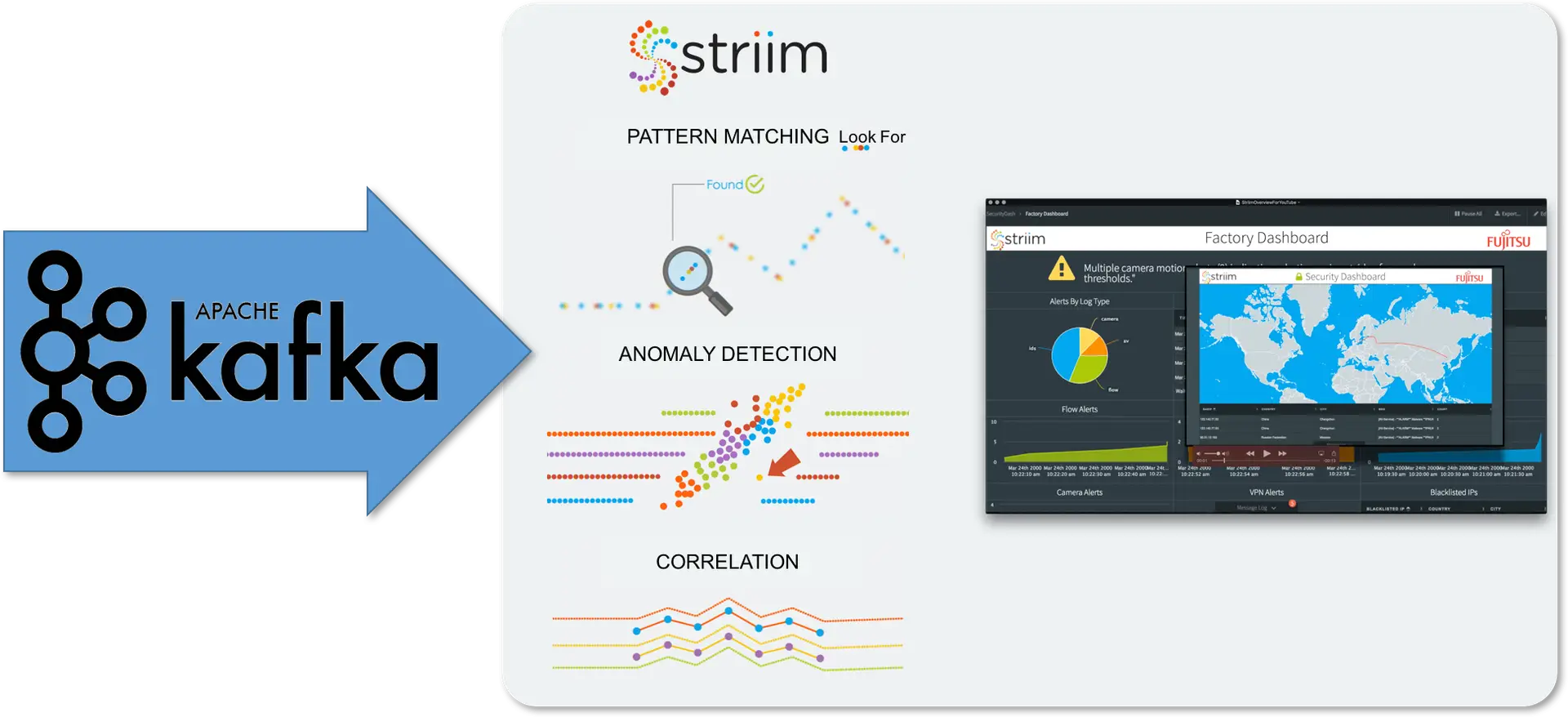
Kafka analytics can involve correlation of data across data streams, looking for patterns or anomalies, making predictions, understanding behavior, or simply visualizing data in a way that makes it interactive and interrogable.
The Striim platform enables you to perform Kafka analytics in-memory, in the same way as you do processing – through SQL-based continuous queries. These queries can join data streams together to perform correlation, and look for patterns (or specific sequences of events over time) across one or more data streams utilizing an extensive pattern-matching syntax.
Continuous statistical functions and conditional logic enable anomaly detection, while built-in regression algorithms enable predictions into the future based on current events.
Of course, analytics can also be rooted in understanding large datasets. Striim customers have integrated machine learning into data flows to perform real-time inference and scoring based on existing models. This utilizes Striim in two ways.
Firstly, as mentioned previously, you can prepare and deliver data from Kafka (and other sources) into storage in your desired format. This enables the real-time population of raw data used to generate machine learning models.
Secondly, once a model has been constructed and exported, you can easily call the model from our SQL, passing real-time data into it, to infer outcomes continuously. The end result is a model that can be frequently updated from current data, and a real-time data flow that can matches new data to the model, spots anomalies or unusual behavior, and enables proactive responses.
The final piece of analytics is visualizing and interacting with data. The Striim Platform UI includes a complete Dashboard builder that an enables custom, use-case-specific dashboards to be rapidly created to effectively highlight real-time data and the results of analytics. With a rich set of visualizations, and simple query-based integration with analytics results, dashboards can be configured to continually update and enable drill-down and in-page filtering.
Putting It All Together
Building a platform that makes the most of Kafka by enabling true stream processing and analytics is not easy. There are multiple major pieces of in-memory technology that have to be integrated seamlessly and tuned in order to be enterprise-grade. This means you have to consider the scalability, reliability and security of the complete end-to-end architecture, not just a single piece.
Joining streaming data with data cached in an in-memory data grid, for example, requires careful architectural consideration to ensure all pieces run in the same memory space, and joins can be performed without expensive and time-consuming remote calls. Continually processing and analyzing hundreds of thousands, or millions, of events per second across a cluster in a reliable fashion is not a simple task, and can take many years of development time.
The Striim Platform has been architected from the ground up to scale, and Striim clusters are inherently reliable with failover, recovery and exactly-once processing guaranteed end-to-end, not just in one slice of the architecture.
Security is also treated holistically, with a single role-based security model protecting everything from individual data streams to complete end-user dashboards.
If you want to make the most of Kafka, you shouldn’t have to architect and build a massive infrastructure, nor should you need an army of developers to craft your required processing and analytics. The Striim Platform enables Data Scientists, Business Analysts and other IT and data professionals to get the most value out of Kafka without having to learn, and code to, APIs.
When delivering data to Kafka, or writing Kafka data to a downstream target like HDFS, it is essential to consider the structure and content of the data you are writing. Based on your use case, you may not require all of the data, only that which matches certain criteria. You may also need to transform the data through string manipulation or data conversion, or only send aggregates to prevent data overload.
Most importantly, you may need to add additional context to the Kafka data. A lot of raw data may need to be joined with additional data to make it useful.
Imagine using CDC to stream changes from a normalized database. If you have designed the database correctly, most of the data fields will be in the form of IDs. This is very efficient for the database, but not very useful for downstream queries or analytics. IoT data can present a similar situation, with device data consisting of a device ID and a few values, without any meaning or context. In both cases, you may want to enrich the raw data with reference data, correlated by the IDs, to produce a denormalized record with sufficient information.
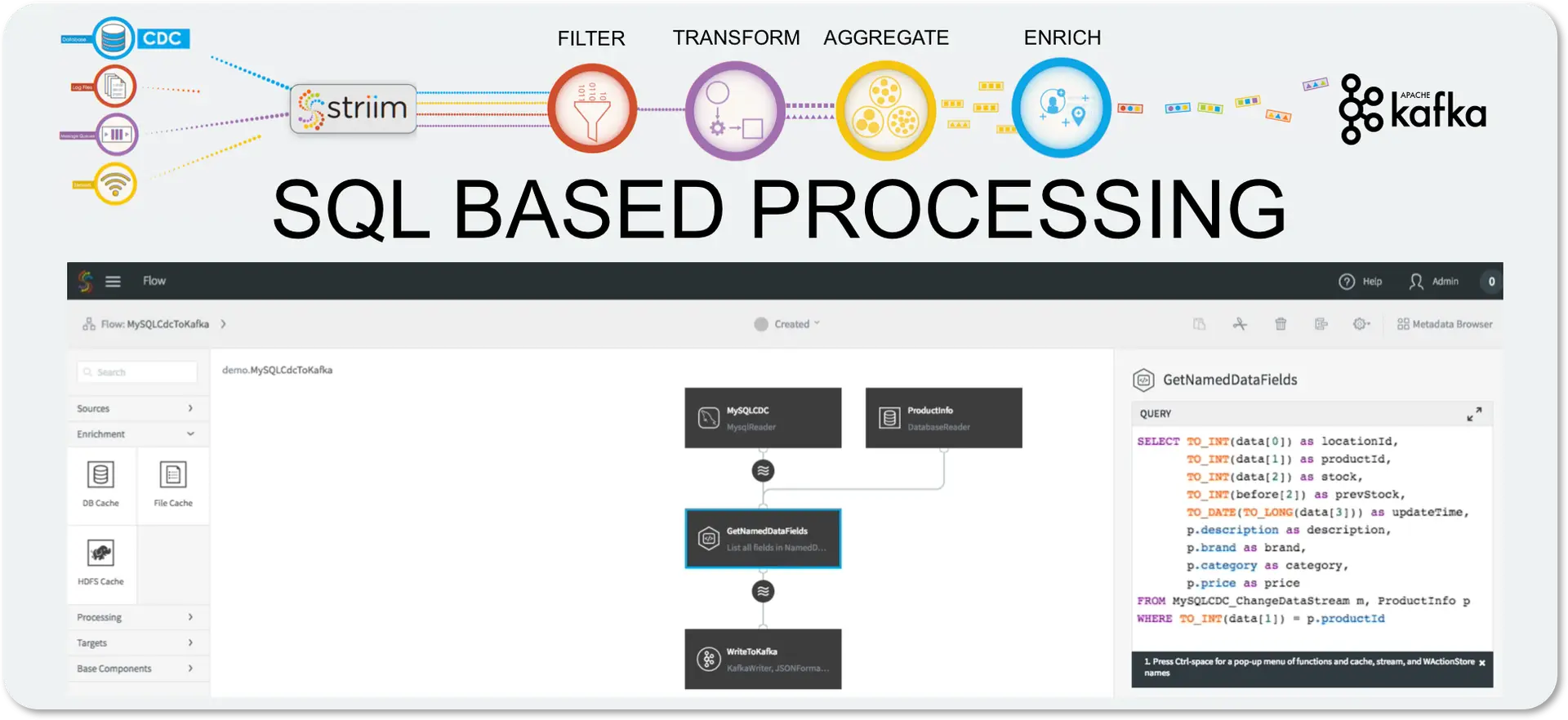
The key tenets of stream processing and data preparation – filtering, transformation, aggregation and enrichment – are essential to any data architecture, and should be easy to apply to your Kafka data without any need for developers or complex APIs.
The Striim Platform simplifies this by using a uniform approach utilizing in-memory continuous queries, with all of the stream processing expressed in a SQL-like language. Anyone with any data background understands SQL, so the constructs are incredibly familiar. Transformations are simple and can utilize both built-in and Java functions, CASE statements and other mechanisms. Filtering is just a WHERE clause.
Aggregations can utilize flexible windows that turn unbounded infinite data streams into continuously changing bounded sets of data. The queries can reference these windows and output data continuously as the windows change. This means a one-minute moving average is just an average function over a one-minute sliding window.
Enrichment requires external data, which is introduced into the Striim Platform through the use of distributed caches (otherwise known as a Data Grid). Caches can be loaded with large amounts of reference data, which is stored in-memory across the cluster. Queries can reference caches in a FROM clause the same way as they reference streams or windows, so joining against a cache is simply a JOIN in a query.
Multiple stream sources, windows and caches can be used and combined together in a single query, and queries can be chained together in directed graphs, known as data flows. All of this can be built through the UI or our scripting language, and can be easily deployed and scaled across a Striim cluster, without having to write any code.
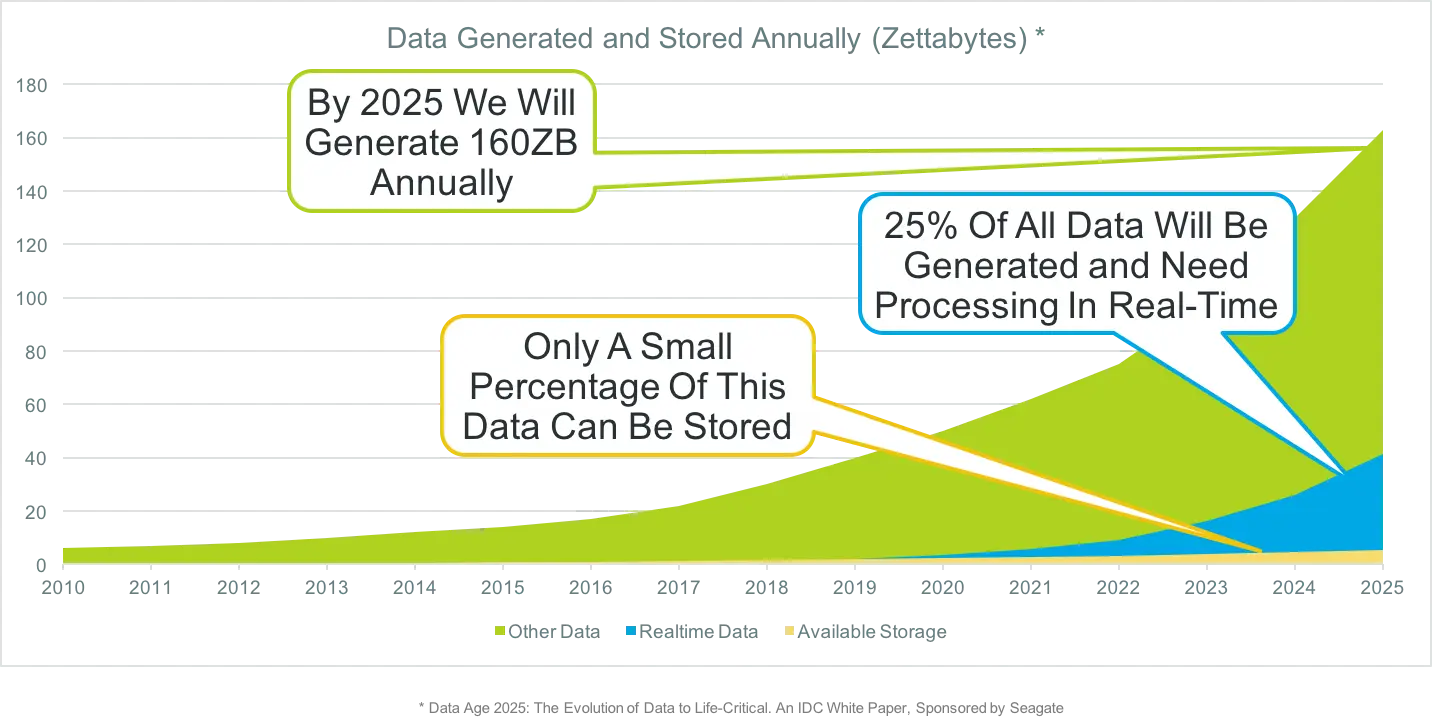
In a recent contributed article for RTInsights, The Rise of Real-Time Data: Prepare for Exponential Growth, I explained how the predicted huge increase in data sources and data volumes will impact the way we need to think about data.
The key takeaway is that, if we can’t possibly store all the data being generated, “the only logical conclusion is that it must be collected, processed and analyzed in-memory, in real-time, close to where the data is generated.”
The article explains general concepts, but doesn’t go into details of how this can be achieved in a practical sense. The purpose of this post is to dive deeper by showing how Striim can be utilized for data modernization tasks, and help companies handle the oncoming tsunami of data.
The first thing to understand is that Striim is a complete end-to-end, in-memory platform. This means that we do not store data first and analyze it afterwards. Using one of our many collectors to ingest data as it’s being generated, you are fully in the streaming world. All of our processing, enrichment, and analysis is performed in-memory using arbitrarily complex data flows.
This diagram shows how Striim combines multiple, previously separate, in-memory components to provide an easy-to-use platform – a new breed of middleware – that only requires knowledge of SQL to be productive.
It is the use of SQL that makes filtering, transformation, aggregation and enrichment of data so easy. Almost all developers, business analysis and data scientists know SQL, and through our time-series extensions, windows and complex event processing syntax, it’s quite simple to do all of these things.
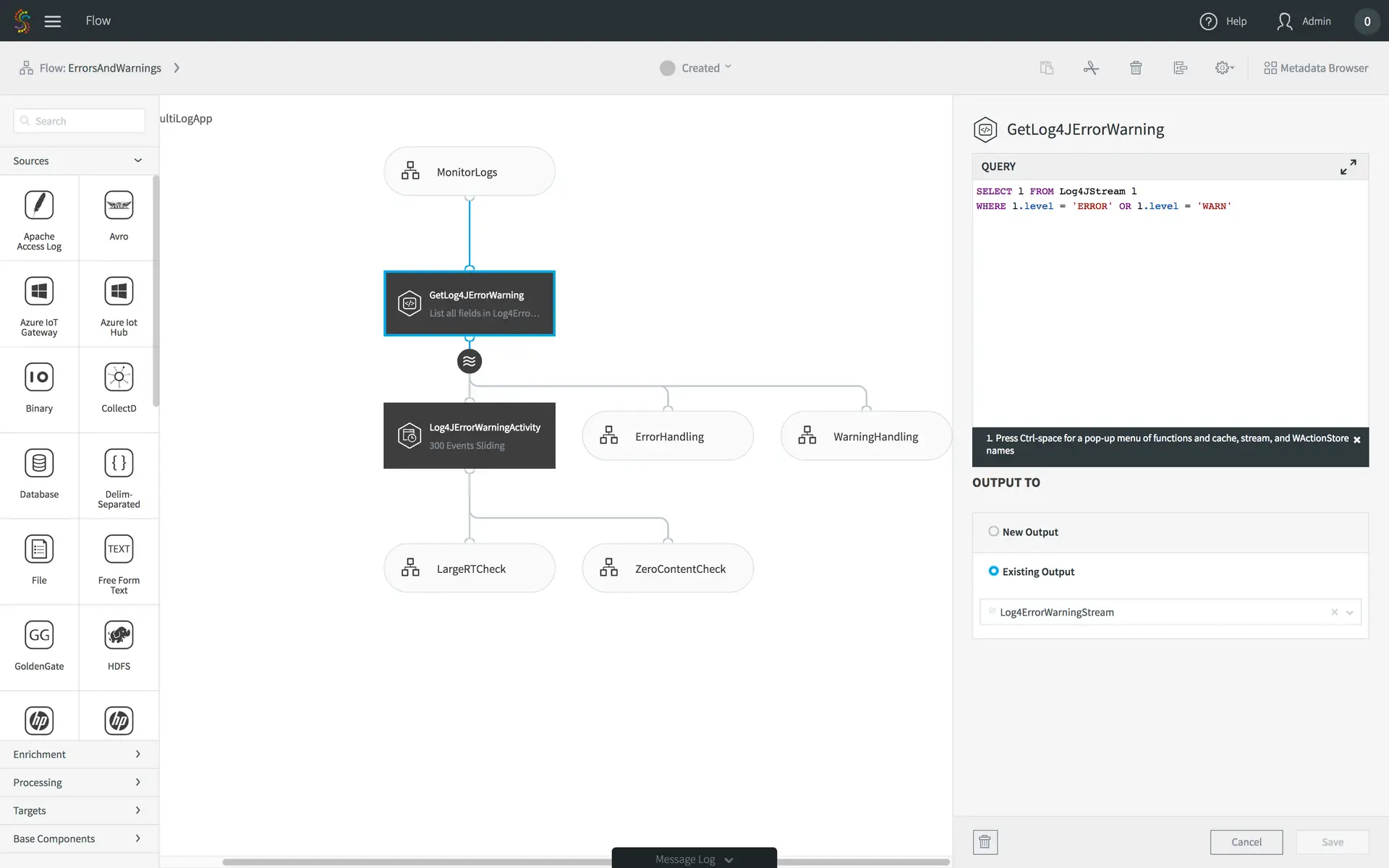
Let’s start with something easy first – filtering. Anyone that knows SQL will recognize immediately that filtering is done with a WHERE clause. Our platform is no different. Here’s an example piece of a large data flow that analyzes web and application activity for SLA monitoring purposes.
The application contains many parts, but this aspect of the data flow is really simple. The source is a real-time feed from Log4J files. In this data flow, we only care about the errors and warnings, so we need to filter out everything but them. The highlighted query does just that. Only Log4J entries with status ERROR or WARN will make it to the next stage of the processing.
If you have hundreds of servers generating files, you don’t need the excess traffic and storage for the unwanted entries; they can be filtered at the edge.
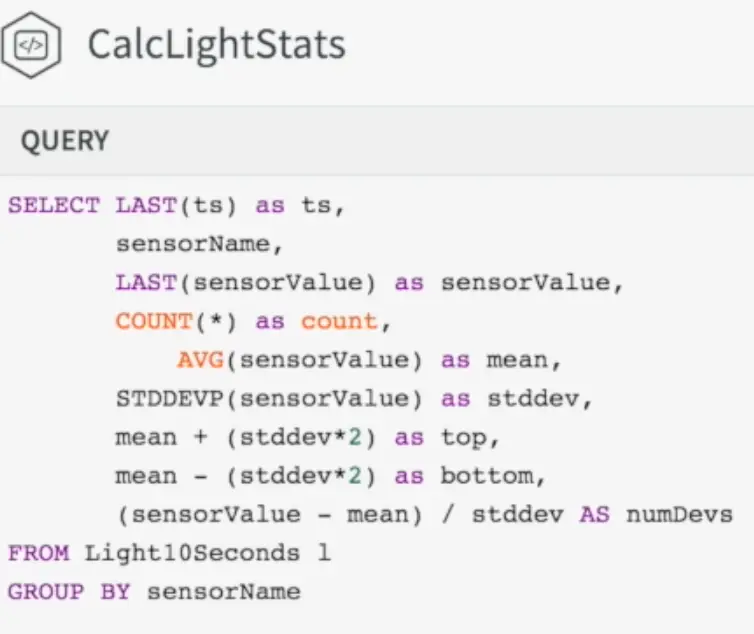
Aggregation is similarly obvious to anyone that knows SQL – you use aggregate functions and GROUP BY. However, for streaming real-time data you need to add in an additional concept – windows. You can’t simply aggregate data on a stream because it is inherently unbounded and continuous. Any aggregate would just keep on increasing forever. You need to set bounds, and this is where windows come in.
In this example on the right, we have a 10-second window of sensor data, and we will output new aggregates for each sensor whenever the window changes.
This query could then be used to detect anomalous behavior, based on values jumping two standard deviations up or down, or extended to calculate other statistical functions.
The final basic concept to understand is enrichment – this is akin to a JOIN in SQL, but has been optimized to function for streaming real-time data. Key to this is the converged in-memory architecture and Striim’s inclusion of a built-in In-Memory Data Grid. Striim’s clustered architecture has been designed specifically to enable large amounts of data to be loaded in distributed caches, and joined with streaming data without slowing down the data flow. Customers have loaded tens of millions of records into memory, and still maintained very high throughput and low latency in their applications.
The example on the left is taken from one of our sample applications. Data is coming from point of sale machines, and has already been aggregated by merchant by the time it reaches this query.
Here we are joining with address information that includes a latitude and longitude, and merchant data to enrich the original record.
Previously, we only had the merchant id to work with, without any further meaning. Having this additional context makes the data more understandable, and enhances our ability to perform analytics.
While these things are important for streaming integration of enterprise data, they are essential in the world of IoT. But, as I mentioned in my previous blog post, Why Striim Is Repeatedly Recognized as the Best IoT Solution, IoT is not a single technology or market… it is an eco-system and does not belong in a silo. You need to think of IoT data as part of the corporate data assets, and increase its value by correlating with other enterprise data.
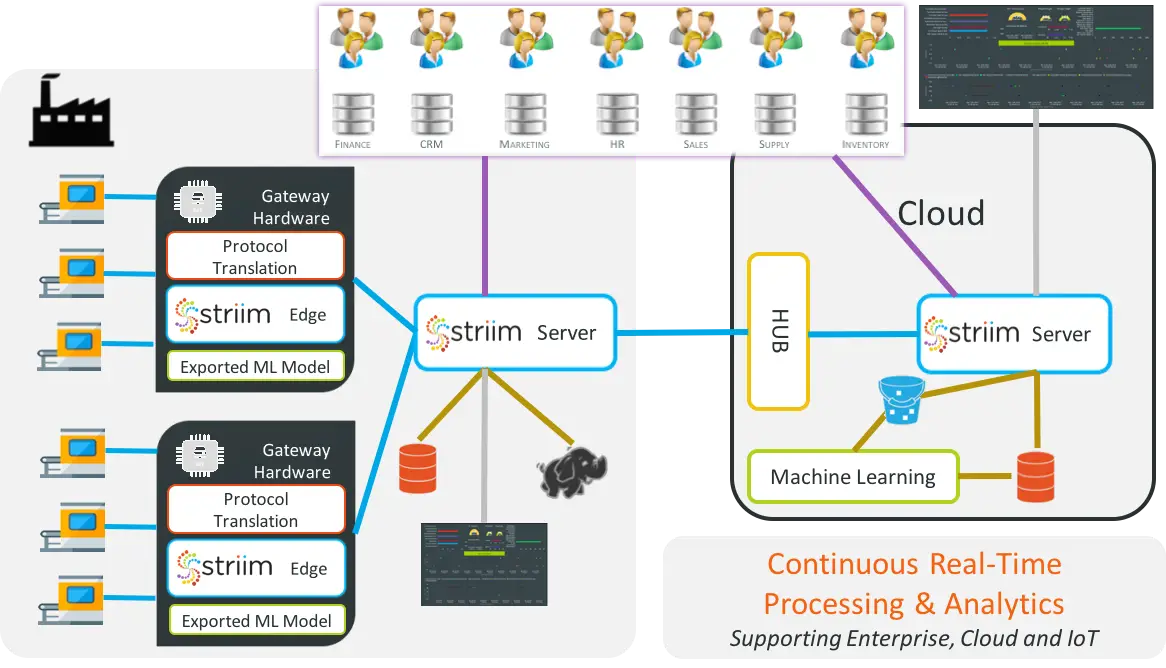
As the data volumes increase, more and more processing and analytics will be pushed to the edge, so it is important to consider a flexible architecture like Striim’s that enables applications to be split between the edge, on-premise and the cloud.
So how can Striim help you prepare for exponential growth in data volumes? You can start by transitioning, use-case by use-case, to a streaming-first architecture, collecting data in real-time rather than batches. This will ensure that data flows are continuous and predictable. As the data volumes increase, collection, processing and analytics can all be scaled by adding more edge, on-premise, and cloud servers. Over time, more and more processing and analytics is handled in real-time, and the tsunami of data becomes something you have planned for and can manage.
If you are looking to create an end-to-end in-memory streaming platform that is used by Enterprises for mission critical applications, it is essential that the platform is Enterprise Grade. In a recent presentation at the In-Memory Computing Summit, I was asked to explain exactly what this means, and divulge the best practices to achieving an enterprise-grade, in-memory computing architecture based on what we have learned in building the Striim platform.
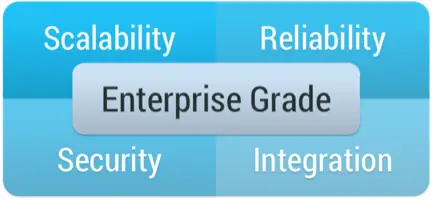
There are four major components to an enterprise-grade, in-memory computing platform: namely scalability, reliability, security and integration.
Scalability is not just about being able to add additional boxes, or spin up additional VMs in Amazon. It is about being able increase the overall throughput of a system to be able to deal with an expanded workload. This needs to take into account not just an increase in the amount of data being ingested, but also additional processing load (more queries on the same data) without slowing down the ingest. You also need to take into account scaling the volume of data you need to hold in-memory and any persistent storage you may need. All of this should happen as transparently as possible without impacting running data flows.
For mission-critical enterprise applications, Reliability is an absolutely requirement. In-memory processing and data-flows should never stop, and should guarantee processing of all data. In many cases, it is also imperative that results are generated once-and-only-once, even in the case of failure and recovery. If you are doing distributed in-memory processing, data will be partitioned over many nodes. If a single node fails, the system not only needs to pick up from where the failed node left off, it also needs to repartition over remaining nodes, recover state, and know what results have been written where.
Another key requirement is Security. The overall system needs an end-to-end authentication and authorization mechanism to protect data flow components and any external touch points. For example, a user who is able to see the end results of processing in a dashboard may not have the authority to query an initial data stream that contains personally identifiable information. Additionally any data in-flight should be encrypted. In-memory computing, and the Striim platform specifically, generally does not write intermediate data to disk, but does transmit data between nodes for scalability purposes. This inter-node data should be encrypted, especially over standard messaging frameworks such as Kafka that could easily be tapped into.
The final Enterprise Grade requirement is Integration. You can have the most amazing in-memory computing platform, but if it does not integrate with you existing IT infrastructure it is a barren data-less island. There are a number of different things to consider from an integration perspective. Most importantly, you need to get data in and out. You need to be able to harness existing sources, such as databases, log files, messaging systems and devices, in the form of streaming data, and write the results of processing to existing stores such as a data warehouse, data lake, cloud storage or messaging systems. You also need to consider any data you may need to load into memory from external systems for context or enrichment purposes, and existing code or algorithms you may have that may form part of your in-memory processing.
You can build an in-memory streaming platform without taking into account any of these requirements, but it would only be suitable for research or proof-of-concept purposes. If software is going to be used to run mission-critical enterprise data flows, it must address these criteria and follow best practices to play nicely with the rest of the enterprise.
Striim has been designed from the ground-up to be Enterprise Grade, and not only meets these requirements, but does so in an easy-to-use and robust fashion.
In subsequent blogs I will expand upon these ideas, and provide a framework for ensuring your streaming integration and analytics use cases make the grade.
Here at Striim, we have been living and breathing Big Data Streaming Analytics for four years now. We believe that no Enterprise Data Strategy is complete without Streaming Integration AND Streaming Analytics. In fact, we are successfully helping organizations of all sizes discover the benefits of leveraging streaming integration and intelligence (the two i’s of Striim) to deliver the real-time insights they need.
I therefore find it very encouraging that some of the world’s most respected analysts are also seeing value in this space. Recently Forrester Research published, “The Forrester Wave™: Big Data Streaming Analytics, Q1 2016.” 15 vendors were covered in this report, and it is encouraging to see how thought around this space has matured.
An example of this is the importance of Context. In the latest report, there are a dozen mentions of “context,” including in the subtitle of the report: “Streaming Analytics Are Critical To Building Contextual Insights For Internet-of-Things, Mobile, Web, and Enterprise Applications.”
We started Striim with Context as one of our most critical objectives, and the importance of Context cannot be over-emphasized. Most often the raw data feeds derived from enterprise databases via change data capture (CDC), log files, or IoT do not contain sufficient information to make decisions. In order to ready the data for querying, or to deliver relevant insights, it is almost always necessary to join the raw data with reference or historical information to add context. Striim has been architected from day one to perform this task without slowing down your data flow.
As a relative newcomer to the space, we were very pleased to be considered a Strong Performer in this report, and were impressed by the authors’ keen understanding of what we believe to be our top differentiators.
The only reference to Change Data Capture (CDC) in the entire report relates to Striim. In any streaming architecture, the most effective way to extract real-time information from enterprise applications is to capture the change in their underlying databases as it happens. Whether the application is an in-house CRM solution, Billing System, Point of Sale, or ATM Transactions Processor, the end result of the application is to update a database.
Most DBAs strictly forbid running SQL against a production database, so if you want to know what’s happening in these applications, without having to intrusively modify them, you need CDC. Striim is the only streaming analytics platform to provide CDC as a fully integrated component of the platform.
We believe that Streaming Integration is a pre-requisite for Streaming Analytics, and a platform isn’t complete without it. As such, we have ensured that we provide a great number of data collectors (including CDC and IoT) and targets (including Kafka and Cloud), and we made the internal processing of the data easy through our SQL-like language.
We found it extremely astute that the Forrester report cited Complex Event Processing (CEP) capabilities.. This is the ability to spot patterns of events over time across one or more streams; patterns that may indicate something important is happening. We believe that CEP won’t survive as a standalone technology, and is instead a key component of any streaming analytics platform.
There is one aspect of our product that wasn’t highlighted, and that is Streaming Visualization. Anyone who has tried it knows that it is extremely difficult to build dashboards and reports to truly analyze your streaming data in real time, unless that capability is integrated into the platform.
Striim’s real-time dashboards can be built easily using a drag-and-drop interface, and rapidly deliver insights into your analysis. You don’t even need full-blown analytics to use our visualizations. We have customers, for example, who are performing streaming integration from enterprise databases via CDC to Kafka, who simply want to monitor this integration and drill down into specifics through our dashboards.
If you are thinking about Big Data Streaming Analytics, it is important to consider the entire eco-system. The actual analysis part is, in fact, a small piece of the puzzle, and requires that you can first collect, process, enrich and correlate the data in a real-time fashion. Once you have analyzed it, you most likely also need to visualize and report on it, and send alerts for critical events. It’s hard to piece together multiple technologies to achieve this, or to focus all of your efforts on coding when you would rather empower your analysts. Instead, please consider a single end-to-end streaming analytics platform, like Striim, that enables all of this, and more.






 The lookup key for this cache is the primary key of the database table, or productId in this case.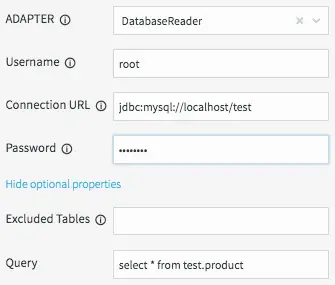



 In a recent contributed article for RTInsights,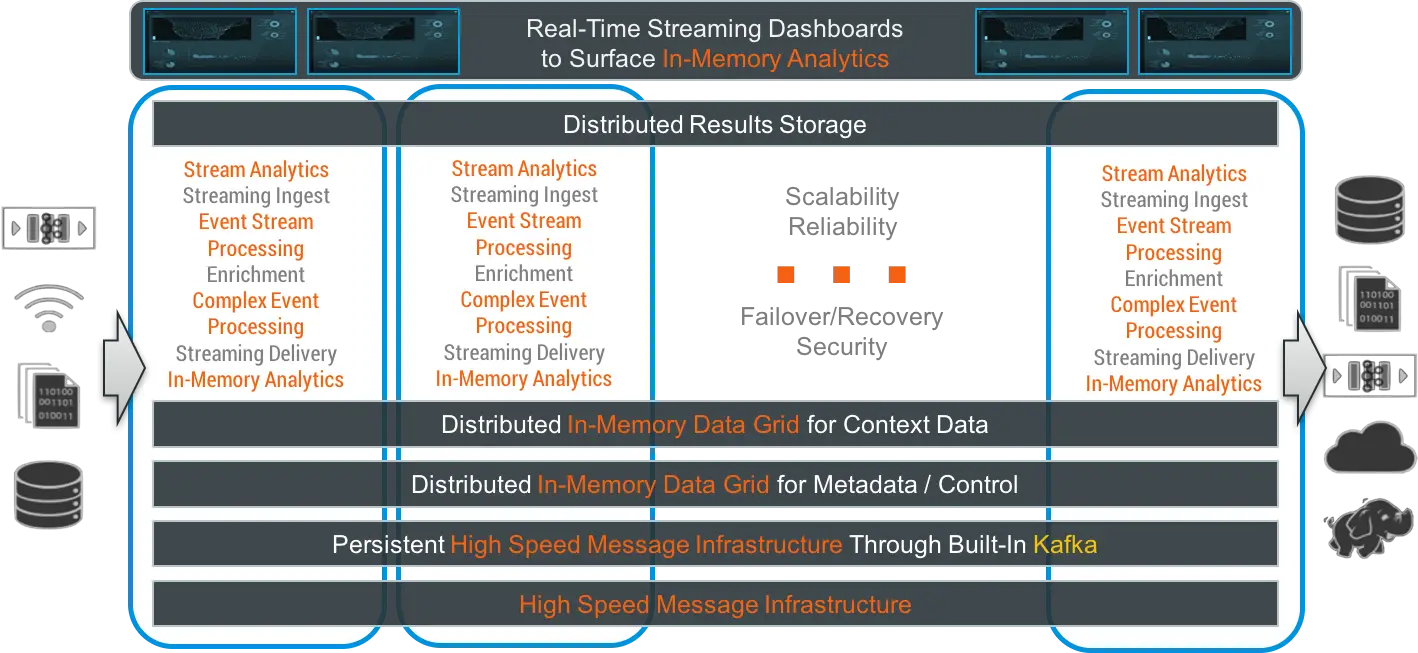
 and GROUP BY. However, for streaming real-time data you need to add in an additional concept – windows. You can’t simply aggregate data on a stream because it is inherently unbounded and continuous. Any aggregate would just keep on increasing forever. You need to set bounds, and this is where windows come in.
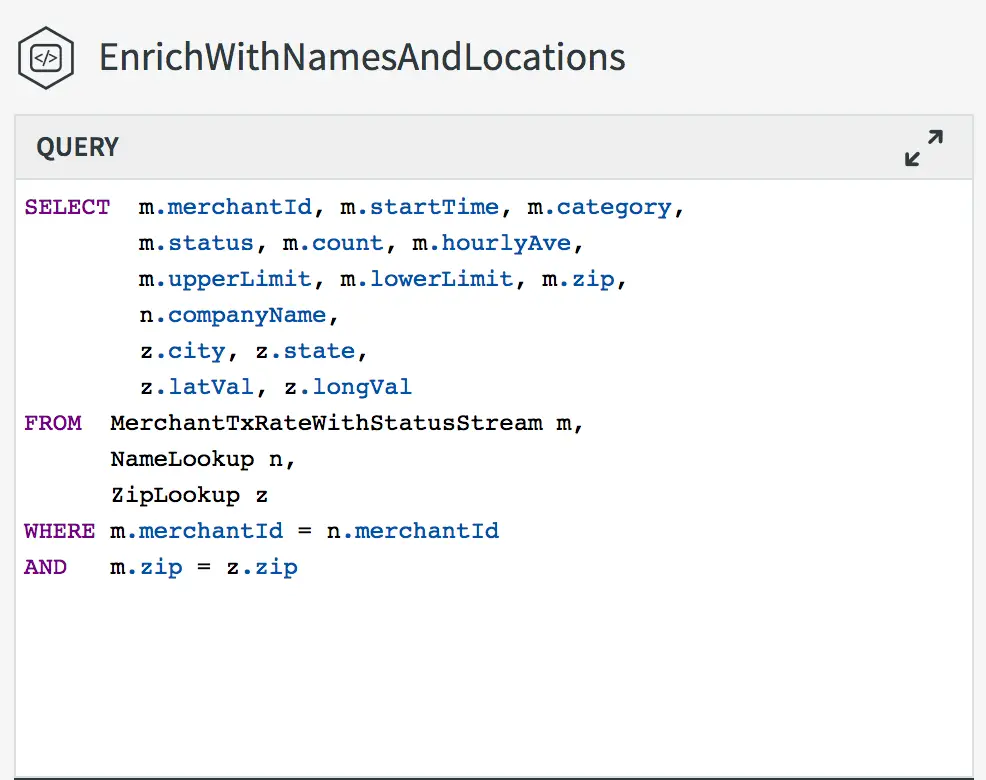 The example on the left is taken from one of our sample applications. Data is coming from point of sale machines, and has already been aggregated by merchant by the time it reaches this query.