Ananda Venkatesha

5 Posts

Striim Cloud for Application Integration

Introducing Striim Cloud for Application Integration: A fully managed, simple, and scalable SaaS service for application connectors. With this new application integration service, users can stream real-time CRM, ERP, Billing, and Payment data from their cloud applications to data warehouses in minutes with zero coding. Instantly unlock the value of your application data through real-time insights, reports, and dashboards for your businesses. Data integration users can now take advantage of a single service that can join the application and transactional data to generate business-critical insights.

The number of cloud applications has exploded; research says enterprises, on average, deploy 500 applications, and the adoption of new applications is growing. Businesses that continuously deploy these applications are facing inevitable challenges in controlling data integration and presenting insightful data to their management and customers. As the leader in change data capture (CDC) from databases, Striim is introducing the new service Striim Cloud for Application Integration, which is built on a proven real-time streaming, scalable, and highly available Striim Cloud platform.

As a Google Cloud native, fully managed service, Striim removes the complexity of data integration, allowing businesses to focus on deriving valuable insights without worrying about the underlying technical challenges. This combination of ease of use, exceptional performance, and comprehensive management makes applications like HubSpot, Stripe, Zendesk, and more an ideal choice for organizations aiming to leverage their data for strategic advantage.

Key features:

  • Offers dedicated single-tenant architecture & modern network security features to ensure the highest level of data security 
  • Automated schema creation, initial load of historical data, and continuous syncs in real-time to BigQuery
  • Secure, OAuth connectivity and SAML 2.0 Authentication
  • Ability to transform data in-flight, in real-time to deliver business-ready application data to BigQuery
  • Real-time monitoring of data delivery and data quality SLAs

Getting Started:

This blog covers getting started on Striim Cloud for Application integration solutions with an example of our new HubSpot connector. With just a few clicks steps and without coding, anyone in the organization with access to their cloud application and BigQuery can set up the pipeline and show the value of application data to the management in minutes.

Simply follow these easy steps to build your first data streaming pipeline between HubSpot and BigQuery:

  1. Login to Google Marketplace, search for Striim or HubSpot
  2. Subscribe to a 10-day Trial or purchase the plan
  3. Signup with Striim Cloud
  4. Create the first integration service (Infra)
  5. Create your first pipeline (Requires HubSpot and BigQuery access) 

Step 1: Log in to Google Marketplace

Go to Google Marketplace, search for Striim or HubSpot, and select the solution HubSpot connector by Striim.

Step 2: Choose & subscribe to the plan

Striim offers a 10-day trial through the marketplace, if you want first to see the value, simply select the trial plan. Provide your billing account information to Google, read the Striim Cloud SLA, and agree to proceed. In this step, Google redirects users to the Striim Cloud signup page. Go ahead and sign up and activate your account.

Step 3: Signup with Striim Cloud

After the subscription step in the marketplace, Google will redirect users to the Striim Cloud Signup page as shown below. Sign up with the email address and unique domain name, typically a department or company name, to generate a Striim Cloud tenant with a url to access the service. You may need to activate your account from your email inbox and sign in before going to the next step

Step 4: Create Application Adapter service (Infrastructure to create pipelines)

Select the region and create a service. Striim Cloud automatically creates the infrastructure required to run Striim adapter data pipelines, including K8s cluster, networking, and storage services, and configures Striim software with all smart defaults.

After the service is in a running state, simply Launch the service to get started.


Step 5: Create the first data pipeline to stream HubSpot data to BigQuery

After launching the service, users will land on the Application Connectors homepage. Simply select the HubSpot to Bigquery wizard.

Configure HubSpot and BigQuery pipeline using the wizard, by default Striim creates the schema on the target (BigQuery) for your selected objects in HubSpot and the wizard automatically validates connections, permissions, and necessary requirements. 

Configure BigQuery with access; the service account key can be stored securely in the key vault. Check Striim documentation on how to use key vaults to store keys.

Wizard validates both the selected objects on the source and the dataset selected on the BigQuery and summarizes for users to confirm before starting to stream the data.

With that, the user is all set to stream data, and the  Striim for Application Adapter service starts moving data from Hubspot to BigQuery.

Striim integrates Microsoft Fabric to deliver real-time, AI-augmented data

Striim, a key partner for Microsoft Fabric today announced its new, low-latency, open-format data integration and streaming service for Microsoft Fabric. This service seamlessly integrates data from disparate sources, mission-critical enterprise applications, and databases into Microsoft Fabric. Through Striim’s AI-ready data streaming, we’re ushering in a new era of analytics and AI, all harmonized under a single data platform on Microsoft Azure.

What is Microsoft Fabric?

Microsoft Fabric is an end-to-end data analytics solution with full-service capabilities, including data movement, data lake, data warehouse, analytics, and business intelligence. All of these services are served by Microsoft OneLake, a unified intelligent storage layer that solves the complex problem of decentralized data teams working in silos. Striim uniquely streams low-latency data to Microsoft Fabric to power analytics and AI with fresh, real-time data with its fully managed service natively built on Microsoft Azure.

Let’s take a scenario of a large retail business that has stores across multiple cities. The business wants to gain critical real-time insights across its stores, purchases, inventory, costs incurred per store and identify patterns like seasonal sales, perform predictive analysis for inventory, sales etc. Typically to achieve this goal various teams including data engineers, sql developers, data scientists and business analysts work independently with their own datasets and data pipelines, tools & scripts causing not only duplicate efforts but also silos of storage footprint. The management of these siloed efforts quickly becomes complex including data governance, privacy, user access control and infrastructure management etc. that can result in an increased TCO for the business.

Microsoft Fabric was introduced to address this exact challenge through a unified storage layer with access control and dedicated workgroups for individual teams to work independently on the same data set. However, the data needed in Fabric Warehouse or Lakehouse resides in enterprise silos and still needs to be unified through a real-time streaming service that lets users ingest, process, enrich and load the data to the warehouse, lakehouse or Microsoft Power BI datamarts services; otherwise this integration effort has to be done independently by each data team. Striim’s service Striim for Microsoft Fabric does exactly that, offering a real-time, low latency and highly scalable data streaming service that matches the Fabric scale and serves as a single tool for all data teams in the organization with various Analytics and AI use cases.

Real time Insights in Power BI Dashboards

Let’s overview how this is accomplished in Striim. 

In our above example, the retail customer who is interested in critical business insights will simply sign up for Striim Cloud and follow three simple steps to get the data into Fabric data warehouse and lakehouse targets in less than 5 minutes to have access to real time insights in Power BI dashboards.

Step 1: Create the Striim Cloud service on Azure, this process uses Azure Kubernetes Service, deploys Striim and configures a cluster.

Step 2: Create a data pipeline with source connection details and optionally use Azure private link to securely route  data completely off of the public internet. 

Step 3: Configure Fabric target to Fabric warehouse 

Now simply monitor data being streamed from source to target/targets in real-time. Data will be directly written directly to the data warehouse in delta-parquet format so the Power BI can be configured to receive the real-time data from data warehouse tables. 

Retail customer’s requirements are consolidated and simplified across groups to get the business insights in less than 5 minutes using Microsoft Fabric Power BI. Shown below are data insights such as  sales by store, traffic to the stores by dates and cost of running stores etc.

About Striim

Striim’s Cloud based service offers a lot of inbuilt smart defaults, automation and intelligence that helps users focus on their actual business needs instead of spending their time on managing pipelines. It saves time and effort for the data engineering team, offers a no-code experience for citizen developers and real-time querying directly from pipelines for engineers and SQL developers and enables businesses with real-time data to make decisions. This unified data streaming nicely compliments the open vision of Microsoft Fabric platform.

In addition, Striim has announced support for Microsoft Fabric Mirroring for on premise SQLServer and is now available private preview. You can contact us for a demo or sign up for a trial to learn more.

Striim Fabric Resources


Striim Cloud on AWS: Unify your data with a fully managed change data capture and data streaming service

Businesses of all scales and industries have access to increasingly large amounts of data, which need to be harnessed effectively. According to an IDG Market Pulse survey, companies collect data from 400 sources on average. Companies that can’t process and analyze it to glean useful insights for their operations are falling behind.

Thousands of companies are centralizing their analytics and applications on the AWS ecosystem. However, fragmented data can slow down the delivery of great product experiences and internal operations.

We are excited to launch Striim Cloud on AWS: a real-time data integration and streaming platform that connects clouds, data and applications with unprecedented speed and simplicity.

With a serverless experience to build smart data pipelines in minutes, Striim Cloud on AWS helps you unify your data in real time with out-of-the box support for the following targets: 

  • AWS S3
  • AWS Databases on RDS and Aurora 
  • AWS Kinesis
  • AWS Redshift
  • AWS MSK
  • Snowflake
  • Databricks with Delta Lake on S3

along with over 100 additional connectors available at your fingertips as a fully managed service.

Striim Cloud runs natively on AWS services like EKS, VPC, EBS, Cloudwatch, and S3 enabling it to offer infinite large-scale, high performance, and reliable data streaming. 

How does Striim Cloud bring value to the AWS ecosystem?

Striim enables you to ingest and process real-time data from over one hundred streaming sources. This includes enterprise databases via Change Data Capture, transactional data, and AWS Cloud environments. When you run Striim on AWS, it lets you create real-time data pipelines for Redshift, S3, Kinesis, Databricks, Snowflake and RDS for enterprise workloads. 

Sources and targets

Striim supports more than 120+ sources and targets. It comes with pre-built data connectors that can automate your data movement from any source to AWS Redshift or S3 within a few minutes. 

With Striim, all your team needs to do is to hit a few clicks for configuration, and an automated pipeline will be created between your source and AWS targets. Some of the sources Striim supports include:

  • Databases: Oracle, Microsoft SQL Server, MySQL, PostgreSQL, etc.
  • Data Streams: Kafka, JMS, IBM MQ, Rabbit MQ, IoT data over MQTT
  • Data formats: JSON, XML, Parquet, Free Form Text, CSV, and XML
  • AWS targets: RDS for Oracle, RDS for MySQL, RDS for SQL Server, Amazon S3, Databricks via Delta Lake on S3, Snowflake, Redshift, and Kinesis
  • Additional targets: Over 100 additional connectors including custom Kafka endpoints with Striim’s full-blown schema registry support

Change data capture

Change data capture (CDC) is a process in ETL used to track changes to data in databases (e.g., insert, update, delete) and stream those changes to target systems like Redshift. However, CDC approaches like trigger-based CDC or timestamps can affect the performance of the source system. 

Striim supports the latest form of CDC — log-based CDC — which can reduce overhead on source systems by retrieving transaction logs from databases. It also helps move data continuously in real time in a non-intrusive manner. Learn about log-based CDC in detail here.                   

Streaming SQL

Standard SQL can only work with bounded data that are stored in a system. While dealing with streaming data in Redshift, you can’t use standard SQL because you are dealing with unbounded data, i.e., data that keep coming in. Striim provides a Streaming SQL engine that helps your data engineers and business analysts write SQL-style declarative queries over streaming data. These queries never stop running and can continuously produce outputs as streams.  

Data transformation and enrichment 

Data transformation and enrichment are critical steps to creating operational data products in the form of tables and materialized views with minimal cost and duplication of data. To organize these data into a compatible format for the target system, Striim helps you perform data transformation with Streaming SQL. This can include operations such as joining, cleaning, correlating, filtering, and enriching. For example, enriching helps you to add context to your data (e.g., by adding geographical information to customer data to understand their behavior). 

What makes Striim unique in this regard is that it not only supports data transformation for batch data, but it also supports in-flight transformations for real-time streams with a full blown Streaming SQL engine called Tungsten. 

Use case: How can an apparel business analyze data with Striim? 

Suppose there’s a hypothetical company, Acme Corporation, which sells apparel across the country. The management wants to make timely business decisions that can help them to increase sales and minimize the number of lost opportunities due to delays in decision-making. Some of the questions that can help them to make the right decisions include the following: 

  • Which product is trending at the moment?
  • Which store and location received the highest traffic last month?
  • What’s the inventory status across warehouses?

Currently, all store data is stored in a transaction database (Oracle). Imagine you’re Acme Corporation’s data architect. You can generate and visualize answers to the above questions by building a data pipeline in two steps:

  1. Use Striim Cloud Enterprise to stream data from Oracle to Amazon Redshift. 
  2. After data is loaded into Redshift, use Amazon QuickSight service to show data insights and create dashboards. 

Here’s how the flow will look: 

Striim Cloud AWS

In this blog, we will show you how you can configure and manage Striim Cloud Enterprise on AWS to create this pipeline for your apparel business within a few minutes. 

Sign up for Striim Cloud

Signing up for Striim Cloud Enterprise is simple: just visit striim.com, get a free trial and sign up for the AWS solution. Activate your account by following the instructions. 

Sign up for Striim on AWS


Once you are signed in, create a Striim Cloud service, which essentially runs in the background and creates a dedicated Kubernetes cluster (EKS service on AWS) to host your pipeline, as you can see in the picture below. 


Kubernetes cluster


Once the cluster is ready and before launching your service, configure secure connections using the secure SSH connection configuration, as seen below.


SSH connection

Create a pipeline for Oracle to Amazon Redshift

To create a pipeline, simply type Source: Oracle and target Amazon to see all the supported targets. In our example, we are selecting Amazon S3 as our target. This could be Amazon Redshift, Kinesis, etc.

S3 target

The wizard will help you walk through the simple process with source and target credentials. The service automatically validates the credentials, connects to the sources, and fetches the list of schemas and tables available on the sources for your selection, as shown below.

wizard 1


wizard 2

On the target side, enter Amazon Redshift Access Key and secret key with the appropriate S3 bucket name and Object names to write Oracle data into, as depicted in the image below.

New target

Follow the wizard to finish the configuration, which creates a data pipeline that collects historical data from the Oracle database and moves them to Amazon Redshift. For example, you can see the total number of sales across all branches during the last week.  

In the next step, you can create an Oracle CDC pipeline via Striim to stream real-time change data coming in from different stores into Oracle to Redshift. Now, you can see real-time store data.

Pipeline to Amazon RedShift
A data pipeline streaming data from the source (Oracle) to Amazon RedShift

A data pipeline streaming data from the source (Oracle) to Amazon RedShift

Your data engineers can use streaming SQL to join, filter, cleanse, and enrich data on the real-time data stream before it’s written to the target system (S3). A monitoring feature offers real-time stream views for further low-latency insights. 

Once data becomes available on Redshift, your data engineer can create dashboards and set up metrics for the relevant business use cases such as:

  • Current product trending
  • Store and location with the highest traffic last month
  • Inventory status dashboard across warehouses; quantity sold by apparel, historic graph vs. latest (last 24 hours)

Data like current trending products can be easily shared with management for real-time decision-making and the creation of business strategies.

For example, here’s a real-time view of the apparel trends by city:

Apparel trends by city

And below are insights on the overall business, where you can see the top-selling and bottom-selling locations. The management can use this information to try out new strategies to increase sales in the bottom-selling locations, such as by introducing discounts or running a more aggressive social media campaign in those locations.

Striim is available for other cloud environments, too

Like AWS, Striim Cloud is available on other leading cloud ecosystems like Google Cloud and Microsoft Azure. You can use Striim with Azure to move data between on-premises and cloud enterprise sources while using Azure analytics tools like Power BI and Synapse. Similarly, you can use Striim with Google Cloud to move real-time data to analytics systems, such as Google BigQuery, without putting any significant load on your data sources. 

Learn more about them here and here.


Striim Cloud on Google Cloud

Introducing Striim Cloud on Google Cloud: a fully managed and unified cloud solution offering real time data streaming and integration

Insights-driven organizations grow an average of 30% per year, but with ever-increasing data sources, formats, and volumes, it’s a huge undertaking to integrate and unify it all. While homegrown tools, scripts, and third party utilities may offer temporary relief, it can become unwieldy to manage them across multiple teams and environments. And then you add in the need for low latency — because who wants stale data? — and the struggles with scalability to keep up with company growth.

With the release of Striim Cloud on Google. Remove data silos: Connect your sources and targets and manage your data pipelines within one console. Cloud, we’re excited to offer a solution for data scientists, database admins, and businesses that rely on data.

Starting today, Striim Cloud can be purchased on the Google Cloud marketplace. Striim Cloud on Google Cloud delivers five key benefits:

  1. Get started quickly: Launch smart data pipelines within ten minutes of sign up.
  2. Remove data silos: Connect your sources and targets and manage your data pipelines within one console.
  3. Reduce total cost of ownership: Replace multiple tools with a single platform. Pay as you go based on consumption and quickly scale as needed.
  4. Ensure business continuity: Protect your business with daily backups, disaster recovery, uptime SLA of 99.5% and high availability.
  5. Rest easy with enterprise-grade features: Proven at enterprise scale with petabytes of data securely and reliably moved every day to the cloud.

Striim Cloud is built on our popular Striim Enterprise platform – proven at enterprise scale. Even though Striim Cloud is designed with simplicity in mind, it is also secure, reliable, and comprehensive.

Striim Cloud gives you extensive options to control and customize your data pipelines. Services come with daily backups, built-in disaster recovery and an uptime SLA of 99.5%. This blog will take you through a sample use case, but Striim Cloud is capable of much more than this specific use case.

Striim Cloud offers great return-on-investment and delivers immediate value to cloud customers as shown below:

value_proposition_Striim_Cloud

Striim Cloud Example Use Case: Build a Ticketing Application on Google BigQuery

To give you a quick tour of Striim Cloud, we’re going to walk through a use case for a ticketing application used to sell tickets for football and baseball games. The app is running an on-premise Oracle database. Our objective is to move data to BigQuery with millisecond latency so we can analyze the data and glean insights — like the number of tickets sold by game, by state, or by stadium — to facilitate real-time business decisions. The same flow is shown in the architecture diagram below, along with other capabilities of Striim Cloud on Google Cloud.

Striim Cloud on Google Cloud

Start by going to the Striim Cloud Enterprise solution on the Google Cloud Marketplace. Go through the standard marketplace SaaS solution purchase flow and sign up with Striim Cloud as shown in the image below. Alternatively, you can also sign up for the trial from Striim.com.


Striim Cloud


Once you sign up for Striim Cloud, it takes less than ten minutes to get your first data pipeline up and running through a simple and intuitive user flow. It’s a three step process:

  1. Create a cloud service
  2. Create a Striim app for your data pipeline
  3. Set up content and speed

Create a cloud service: 

In this step you only need to provide the cluster name — Striim Cloud applies smart defaults for everything else. However, if desired you can change the default cluster size, modify security options, sign-in options, user roles, and more.

Cloud service

Create an app for your smart data pipeline:

Next, you create a Striim app — essentially a data pipeline — using drag-and-drop elements or a wizard-based flow. Once again, Striim Cloud automatically applies smart defaults in the app. In our example, we’re creating an Oracle to BigQuery pipeline with source and target credentials for Striim Cloud to connect securely. Striim Cloud connects and validates the connection in this step for a better user experience.

smart data pipeline app

Validating connection

Set up content and speed: 

In the third and final configuration steps, select content like schemas, collections, and tables on the source and map to the corresponding schemas, collections, and tables on the target. Striim Cloud automatically does most of the heavy lifting including auto-schema conversions and data-type conversions.

Striim Cloud offers many advanced features such as data transform, enrich, mask, encrypt, and correlate in the pipeline.

As your data is ingested and delivered, you can monitor its progress and watch real-time ticket data landing in BigQuery. With Striim Cloud, you can easily create actionable data insights and a dashboard for a real-time view of ticket sales data.

Striim Cloud monitoring

Striim Cloud offers many more features and capabilities for real-time data streaming and analytics. Learn more about Striim Cloud here and contact us for a trial or demo.


Striim Now Offers Native Integration With Microsoft Azure Cosmos DB

We are excited to announce our new Striim Database Migration Service, StreamShift that provides native integration with Microsoft Azure Cosmos DB. We have worked hard to resolve any pain points around data integration, migration and data analytics for Azure Cosmos DB users. Striim provides a rich user experience, cost effective data movement, enhanced throughput throttling, and flexibility with over 100 native connectors.

Problem

Traditional ETL data movement methods are not suitable for today’s analytics or database migration needs. Batch ETL methods introduce latency by periodically reading from the source data service and writing to target data warehouses or databases after a scheduled time. Any analytics or conclusions made from the target data service are done on old data, delaying business decisions, and potentially creating missed business opportunities. Additionally, we often see a hesitancy to migrate to the cloud where users are concerned of taking any downtime for their mission critical applications. 

Azure Cosmos DB users need native integration that supports relational databases, non-relational and document databases as sources and offers flexibility to fine-tune Azure Cosmos DB target properties.

Striim’s latest integration with Cosmos DB solves the problem

The Striim software platform offers continuous real-time data movement from a wide range of on-premises and cloud-based data sources to Azure. While moving the data, Striim has in-line transformation and processing capability (e.g., denormalization). You can use Striim to move data into the main Azure services, such as Azure Synapse, Azure SQL Database, Azure Cosmos DB, Azure Storage, Azure Event Hubs, Azure Database for MySQL and Azure Database for PostgreSQL, Azure HDInsight, in a consumable form, quickly and continuously. 

Striim offers real-time uninterrupted continuous data replication with automatic data validation, which assures zero data loss and data corruption.

Even though Striim can move data to various other Azure targets, in this blog we will focus on Azure Cosmos DB use cases that were recently released.

Supported sources for Azure Cosmos DB as a target:

Source Target
SQL Azure Cosmos DB
MongoDB Azure Cosmos DB
Cassandra Azure Cosmos DB
Oracle Azure Cosmos DB
MySQL Azure Cosmos DB
PostgreSQL Azure Cosmos DB
Salesforce Azure Cosmos DB
HDFS Azure Cosmos DB
MSJet Azure Cosmos DB

Architecture

The architecture below shows how Striim can replicate data from a range of sources including heterogeneous databases to various targets on Azure. However, this blog will focus on Azure Cosmos DB.

Striim for Azure


Low-Impact Change Data Capture

Striim uses CDC (Change Data Capture) to extract change data from the database’s underlying transaction logs in real time, which minimizes the performance load on the RBMS by eliminating additional queries. 

  • Non-stop, non-intrusive data ingestion for high-volume data
  • Support for data warehouses such as Oracle Exadata, Teradata, Amazon Redshift; and databases such as Oracle, SQL Server, HPE Nonstop, MySQL, PostgreSQL, MongoDB, Amazon RDS for Oracle, Amazon RDS for MySQL
  • Real-time data collection from logs, sensors, Hadoop, and message queues to support operational decision making

Continuous Data Processing and Delivery

  • In-flight transformations – including denormalization, filtering, aggregation, enrichment – to store only the data you need, in the right format 

Built-In Monitoring and Validation

  • Interactive, live dashboards for streaming data pipelines
  • Continuous verification of source and target database consistency
  • Real-time alerts via web, text, email

Use case: Replicating On-premises MongoDB data to Azure Cosmos DB

Let’s take a look at how to migrate data from MongoDB to the Azure Cosmos DB API for MongoDB within Striim. Using the new native Azure Cosmos DB connector users can now set properties like collections, RUs, partition key, exclude collections, batch policy, retry policy, etc. before replication.

To get started, in your Azure Cosmos DB instance, create a database mydb containing the collection employee with the partition key /name.

After installing Striim either locally or through the Azure Marketplace, you can take advantage of the Web UI and wizard-based application development to migrate and replicate data to Azure Cosmos DB in only a few steps.

  1. Choose MongoDB to Azure Cosmos DB app from applications available on Striim
  2. Enter your source MongoDB connection details and select the databases and collections to be moved to Azure Cosmos DB.
  3. Striim users now will have customized options to choose the Azure Cosmos DB target APIs between Mongo, Cassandra, or Core (SQL). Throughput (RU/s) calculation and cost can be calculated using Azure Cosmos DB capacity calculator and appropriate partition key must be chosen for the target. The details can be referred directly within Striim’s configuration wizard.
  4. Enter the target Azure Cosmos DB connection details and map the MongoDB to Azure Cosmos DB collections.

That’s it! Striim will handle the rest from validating the connection string and properties required for the data pipeline to automatically moving the data validating the data on the target. After completing the wizard, you’ll arrive at the Flow Designer page, and start seeing data replicated in real time.

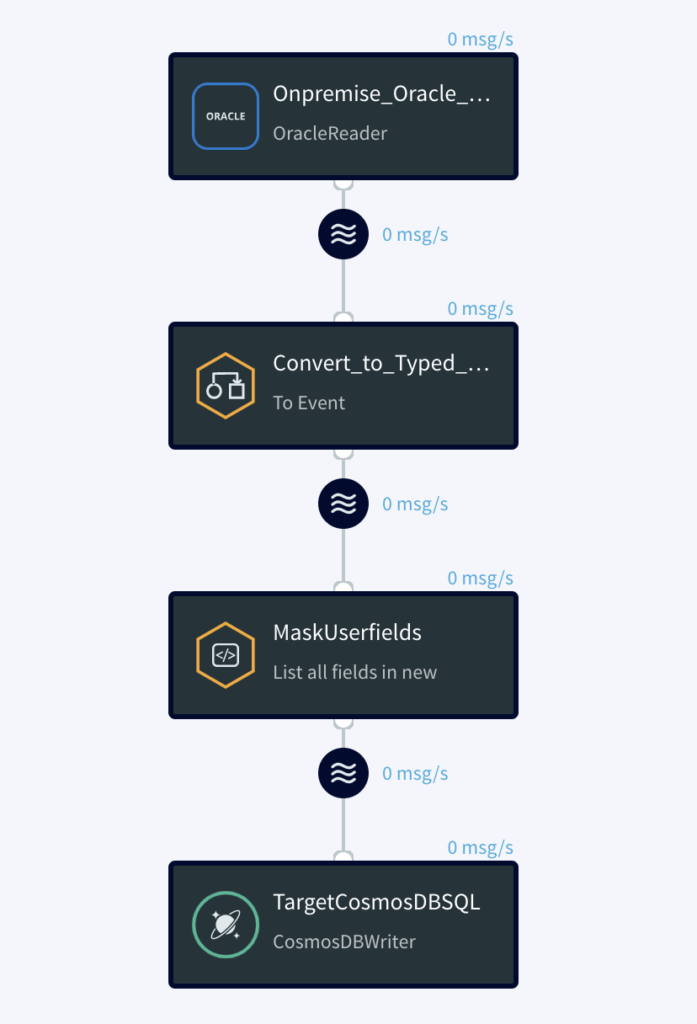
Let’s take another example, say we have an on-premises Oracle database with the customer table shown below. While migrating this Oracle database to Azure Cosmos DB we may want to mask or hide the customer Telephone number and SSN columns. 

In two simple steps, we can achieve this in flight with Striim. 

Step 1 – Create App: Within the Striim UI create an application with a source Oracle Reader. In the left-hand menu bar under the Event Transformers tab, drag and drop the To DB Event Transformer. Then, drag and drop the Field Masker onto the pipeline and specify the fields to be masked. Insert type conversion of WA event type to Typed event and create Field Mask component and select the fields to be masked. In our case we want the Telephone number field to be partially masked and SSN to be fully masked. Lastly, drag and drop a Cosmos DB Target to write to Cosmos DB.

Step 2 – Run App: Deploy and run the app. Check the target Azure Cosmos DB Data Explorer you should see the customer phone number and SSN are masked.

Instead of using these out of the box transformations within the UI, you can also write SQL statements using a Continuous Query (CQ), or Java code using an Open Processor (OP) component. The OP can also be used to merge multiple source documents into a single Azure Cosmos DB document. For our example, you can use the attached SQL statement in a CQ instead of the two transformation components.  

SELECT CUSTOMER_ID AS CUSTOMER_ID, 
FIRST_NAME AS FIRST_NAME, 
LAST_NAME AS LAST_NAME, 
CITY_NAME AS CITY_NAME, 
ADDRESS AS ADDRESS, 
maskCreditCardNumber(TELEPHONE_NUMBER, “ANONYMIZE_PARTIALLY”) AS TELEPHONE_NUMBER, 
maskCreditCardNumber(SSN, “ANONYMIZE_COMPLETELY”) AS SSN FROM converted_events2 i;
Source table
Source table


Striim flow design
Striim flow design


Target Cosmos DB Data explorer output


Benefits

  • Purpose-built service with specific configuration parameters to control scale, performance and cost
  • Driving continuous cloud service consumption through ongoing data flow (vs. scheduled batch load).
  • In-flight transformations – including denormalization, filtering, aggregation, enrichment – to store only the data you need, in the right format 
  • Allowing low-latency data to be available in Azure for more valuable workloads.
  • Mitigating risks in Azure adoption by enabling a phased transition, where customers can use their existing and new Azure systems in parallel. Striim can move real-time data from customers’ existing data warehouses such as Teradata and Exadata, and on-prem or cloud-based OLTP systems, such as Oracle, SQLServer, PostgreSQL, MySQL, and HPE Nonstop using low-impact change data capture (CDC).

Interested in learning more about Striim’s native integration with Azure Cosmos DB? Please visit our listing on the Azure Marketplace.

Back to top