John Kutay

49 Posts

8 Reasons You Need Change Data Capture Solutions

half life of data

Data is the new oil, but it’s only useful if you can move, analyze, and act on it quickly. A Nucleus Research study shows that tactical data loses half its value 30 minutes after it’s generated, while operational data loses half its value after eight hours.

Change data capture (CDC) plays a vital role in the efforts to ensure that data in IT systems is quickly ingested, transformed, and used by analytics and other types of platforms. Change data capture is a software process that identifies changes to data in source systems and replicates those changes to target systems. And this process can be achieved using various change data capture methods, such as table deltas and database log mining.

Failure to handle data effectively prevents companies from taking advantage of their data assets. To help teams modernize their data environment, we explore reasons why you need to change data capture solutions and different tactics you can use.

1. Change Data Capture accelerates reporting and business intelligence

CDC enables companies to quickly move data from different systems, like customer relationship management (CRM) or enterprise resource planning (ERP), into a single dashboard. Faster data collection then leads to timely reporting and improved business intelligence capabilities.

Improved reporting and business intelligence benefit businesses in different ways. One way is that companies may use CDC to report on customer purchases more quickly. Access to timely purchase data would then enable sales teams to offer qualifying customers special offers sooner and close the deal.

Another way manufacturers can use CDC to their benefit is to ensure that data generated by production machines is moved instantaneously to reporting or intelligence dashboards. Analysts can then discover that, for example, specific manufacturing lines are slower than usual. These findings can be used not only to fix the inefficient machines but also to better manage supply chain operations.

2. Change Data Capture connects different database systems

CDC helps teams with incompatible database systems share data in near real-time. One way to do that is by using CDC to populate a staging database with data from different systems. Users can then access the staging database without negatively affecting the performance of primary databases.

CDC especially benefits mid- to large-sized companies that often use a number of different database systems. Support agents in mid- to large-sized companies often need to access data on products purchased by customers, a piece of information typically managed by sales teams. In this case, CDC can be used to move relevant data to a data mart and have support agents access it to get the information they need.

CDC also helps companies better integrate their IT infrastructure following an acquisition or merger. Corporate systems often tend to be different or even incompatible. This challenge can be solved by merging disparate data sets into a single repository, which allows teams to access data and carry out their reporting and analysis work. The repository can also feed data to new systems. And the original databases can continue running for as long as necessary.

3. Change Data Capture pushes data to multiple lines of business

Companies can use CDC to continuously update a data mart with sales or customer data and have different lines of business access that data through web apps. Providing data through data marts reduces the user traffic previously directed to remote databases, including CRM or ERP.

Manufacturers can also use change data capture to ensure customer data, such as canceled or changed orders, is promptly forwarded to various business units, such as production and finance teams. Employees can then take appropriate measures to change a manufacturing deadline or update a sales forecast.

4. Change Data Capture handles two-way data flows

CDC helps companies instantaneously collect and share business data. Such two-way data flows provide departments with the information needed to make new decisions and policies.

Take, for instance, an insurance business. When working on new pricing models or business strategies, corporate teams need to collect and access multiple data points. They need to review data on client responses to past pricing models. Changes in consumer behavior, such as unusual buying patterns in specific regions, are of interest as well. CDC solutions can be used to feed all of these data points into the systems used by the corporate teams. Armed with these insights, teams can then develop better rates and policies. But if these pieces of information aren’t refreshed continuously, insurers may create policies using outdated data.

And information on new policies and rates needs to be quickly pushed to customer-facing apps and systems used by sales agents. Failure to do so may cause agents to prepare inaccurate offers to potential clients, for example. Once again, CDC solutions can be used to push data to specific apps or systems.

5. Change Data Capture improves a master data management system

IT teams can use CDC to draw data from multiple databases and continuously update the master data management (MDM) system, a master record of critical data. CDC, in combination with data integration tech, can transform or adjust data so it reaches MDM in the desired format. Various departments and systems can then pull data from the MDM system or use it for reporting, analysis, and operational purposes.

6. Change Data Capture integrates apps with otherwise incompatible databases

Businesses can use data integration platforms with CDC capabilities to integrate certain software tools into otherwise incompatible in-house database systems. Doing so provides teams with more flexibility when it comes to choosing and deploying business apps. Employees can now focus on working with apps that help the company reach its business goals instead of worrying about database compatibility.

7. Change Data Capture reduces pressure on operational databases

Companies can use CDC to create a copy of operational databases that users can then access. This reduces the stress on vital production systems by diverting heavy user traffic to a secondary database that’s constantly refreshed. The primary operational databases are then less likely to suffer issues, such as unanticipated downtime or poor performance.
Analytics queries, in particular, can consume a lot of processing power. Diverting them to secondary databases removes a major source of stress to the production system.

8. Change Data Capture acts as an integral part of your disaster recovery or backup plan

Businesses can use CDC to maintain the standby copy of their data that can be accessed in the event of a disaster. And disaster recovery solutions are mandatory in some industries where failures can lead to catastrophic consequences for users and businesses. CDC-powered disaster recovery plans can thus prevent major disruptions.

How to select Change Data Capture tools

Companies evaluate potential CDC solutions based on various factors. And while some companies may have industry-specific requirements, there are certain features that any platform with change data capture capabilities should have, including:

    • Support for log reading
    • Transaction integrity
    • In-flight change data processing
    • Distributed processing in a clustered environment
    • Continuous monitoring of change data streams
    • Real-time delivery to a wide range of targets

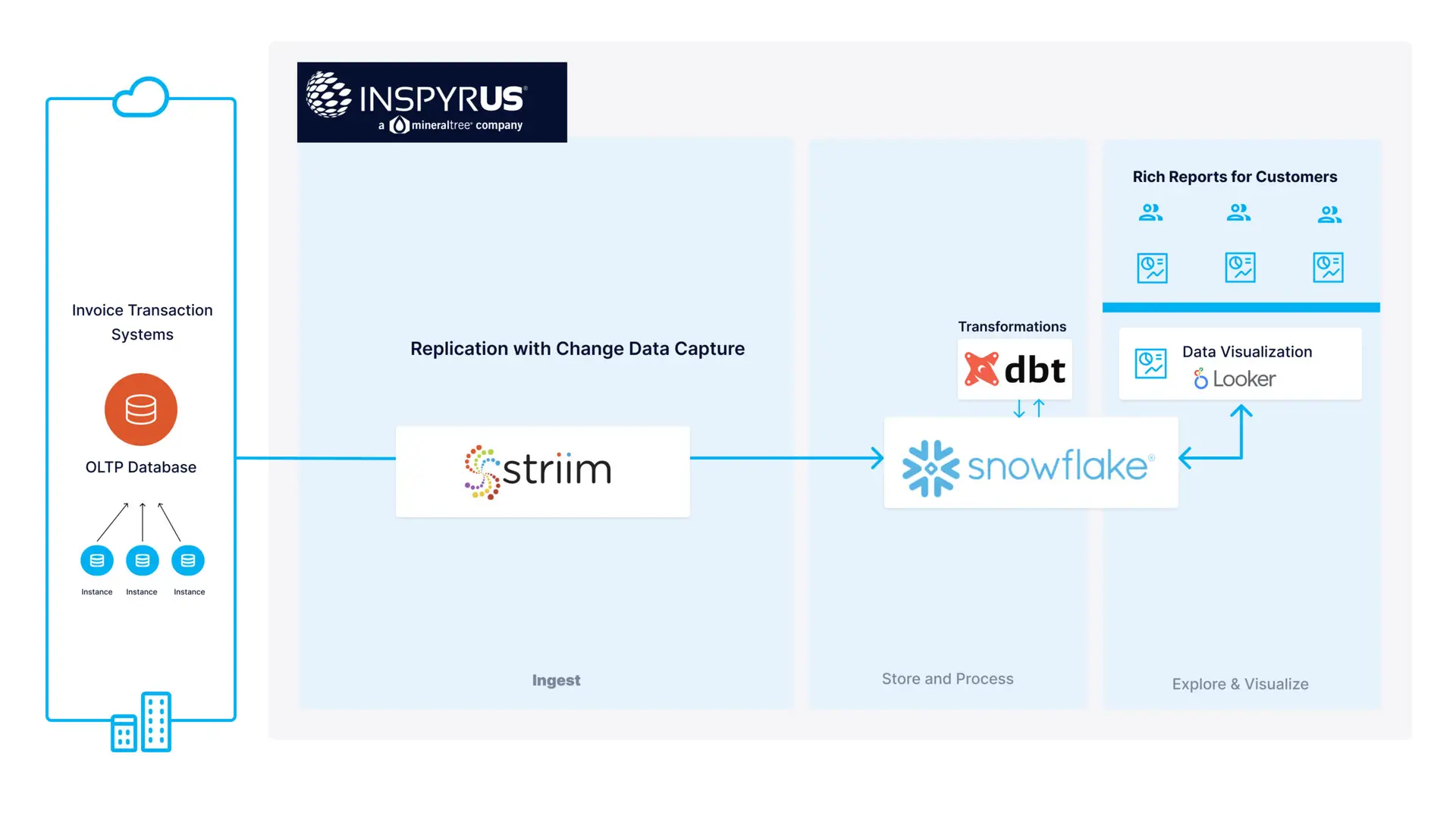
The fintech startup Inspyrus, for instance, is using Striim’s CDC capabilities to feed real-time operational data from its databases to Snowflake. As a result, customers can now access visualized real-time invoicing data and enjoy improved business intelligence reports.

Supercharging business growth

From improving data flows to strengthening data recovery solutions, change data capture can be of use in many ways. Getting the most value out of this technology is of vital importance. CDC enables teams to move and act on data quickly, producing new insights and business opportunities. And only then are companies able to use data as a fuel that supercharges their growth.

A Guide to Modern Database Replication

Cloud database replication

With the rise of digital-first experiences, companies are grappling with more data than ever before. Gartner notes that 70% of organizations using cloud services today plan to increase their cloud spending to support digital experiences.  They elaborate by stating  “Cloud adoption therefore becomes a significant means to stay ahead in a post-COVID-19 world focused on agility and digital touch points.” 

Given the rapid adoption of cloud technologies, integration with core private cloud and on-premise operations is a critical requirement. This is where modern database replication platforms will play a significant role to enable this strategy.

What is Data Replication?

Data replication is the process of copying data at different physical and virtual location in a manner where each instance of the data is consistent – increasing availability and accessibility across networks. There are several technical implications and caveats of data replication including consistency tradeoffs between eventual consistency versus and strong consistency in the context of a single distributed system.

What is Database Replication?

Database replication is the process of copying data from a source database to one or more target databases. A widely-used approach for database replication is replaying the data manipulation language (or DML) statements from the source database to the relevant targets with minimal latency to ensure data is consistent across each instance.

database replication

Database Replication in a Distributed World

In a multi-instance cloud environment with endless distributed applications, file systems, storage systems, databases, and data warehouses, every enterprise is striving to implement a single source of truth to drive their analytics and operations.

Yet as industry thought leader and lauded database researcher Dr. Michael Stonebraker notes, “One size does not fit all.” . The key to supporting diverse data management operations and analytics at scale is a modern data replication strategy. 

However, as Striim Co-Founder and EVP of Product Alok Pareek notes in his lecture at Boston University’s Department of Computer Science , there is significant complexity in handling change streams to reliably deliver database replication for real-world use cases.

Change stream complexity

We will elaborate on how those challenges are addressed in the section below, but first we will provide some context on the problem.

Why Data Replication?

Reliable data replication in a digital-first world is critical to every business. In retail, it can be the difference between a sale and an abandoned cart, a blocked suspicious transaction versus thousands of dollars lost in fraud, and an on-time delivery versus a lost package. 

Retail integ

8 Key Categories to Evaluate Modern Database Replication Platforms 

There are 8 key feature categories to consider when looking at modern data replication platforms to support digital-first experiences and cloud adoption. The high level goals of these features should deliver the following

  • Low latency replication
  • Distributed architecture
  • Support Replication across private and public clouds

One real world example of a modern database replication architecture is Macy’s implementation that uses Striim for replication to Google Cloud. Macy’s approach can handle peak, holiday transaction workloads:

1. Change data capture 

The ability to mine transaction logs and change-data from applications in real-time is the core requirement of data replication platforms. While change data capture (or CDC) has been around for decades, modern implementations take into account new interfaces to change streams.

This allows companies to build change data capture topologies that meet the scale of distributed cloud platforms. Striim’s ground-up, distributed architecture widely separates itself from legacy CDC tools that rely fully on brittle, file-based buffering.

Modern Database Replication 2

2. Observable data at every step

3. SQL-based access and transformation of real-time data

When combining data across multiple sources into a single ‘source-of-truth’, modern data replication solutions be able to transform data with SQL-constructs that data managers are already proficient with. 

4. Horizontally scalable

Here is just a short list of tools in a modern data stack are built to scale horizontally on commodity hardware 

  • Azure PostgreSQL Hyperscale
  • BigQuery (fully managed)
  • Databricks
  • Apache Kafka
  • Apache Spark 
  • MongoDB
  • MariaDB
  • Snowflake (fully managed)
  • And the list goes on…

See a trend here?

Yet legacy database replication tools are built to scale vertically on a single machine. This was suitable for the era of scaling cores vertically on proprietary machines running on-premise, but does not meet the needs of modern data management.

A modern database replication solution should support multi-node deployments across clouds to help unify your data at scale with maximum reliability.

5. A single view of metadata across nodes

Building on to the last point – a horizontally distributed replication platform would be impossible to manage without a single, queryable view into your objects. 

6. Data delivery SLAs for minimum latency

In the example noted above, Macy’s modern replication stack was built to deliver end-to-end latencies under 200 milliseconds – even with Black Friday loads of 7500+ transactions per second (or 19 billion transactions a month). Choosing a data replication platform that can handle peak loads and monitor latency is critical to operate at scale.

7. Flexibility between ETL and ELT

A modern data replication tool should give users the choice to rely on external transformation tools like DBT when applicable. However, in the case of low-latency transformation requirements and custom EtLT, modern database replication should support streaming transformations. In some cases data needs to be formatted and transformed just to adhere to the format of the target data warehouse. In those cases ELT is not a suitable solution. 

8. Data validation at scale

Modern data replication platforms should give users the ability to query data validation statistics to ensure all data read from a source application are successfully written to their target platform. A practical use case would be reporting organization-wide data reliability. If your data validation dashboard shows that your source database is hours behind your target data warehouse, you can immediately notify other orgs that data may be stale while you triage the issue with root causes ranging from a server outage or bottlenecked resources in the data warehouse. 


A Guide to Building a Multi-Cloud Strategy: Up Your Data Game

Using two or more public cloud providers has become almost a norm over the past few years. Gartner predicts that over 75% of midsized and large companies will deploy a multi-cloud and/or hybrid IT strategy by 2021. A multi-cloud strategy enables companies to use the best possible cloud for specific tasks and to more effectively store, compute, and analyze data.

But from security concerns to data integration needs, using multiple clouds is riddled with challenges. To help companies execute their IT initiatives, we’ll examine different aspects of a multi-cloud strategy and data integration in a multi-cloud environment.

What is a multi-cloud strategy

multi-cloud data integration

A multi-cloud strategy involves using multiple cloud providers to host data, run apps, build infrastructure, and deliver IT services. Multi-cloud typically means using more than one of the big three cloud providers (Amazon Web Services, Microsoft Azure, and Google Cloud), as well as other, smaller providers. Users can deploy both public and private clouds.

The end goal is to have providers play to their strengths. A company may find, for instance, that a specific cloud platform is more suitable for bare metal compute in the cloud, another is stronger for cloud data warehousing, while another platform is better equipped to handle machine learning. Using several clouds to handle different workloads has become the best practice for many companies.

Cloud vendors are well aware of the rise of multi-cloud, and they adjust their products accordingly. Google, for instance, now offers BigQuery Omni, a multi-cloud version of its popular analytics tool. Users of this software can now connect to their data stored on Google Cloud, AWS, and Azure without moving or copying data sets.

What is the difference between hybrid cloud versus multi-cloud

Multi-cloud sometimes gets confused with hybrid cloud. Multi-cloud means using multiple cloud providers, while hybrid cloud is about combining various cloud and on-premises systems.

Think of multi-cloud as a strategy for gaining efficiency through using public and private clouds from different cloud vendors. Companies opt for this approach to meet specific technical or business requirements.

And think of hybrid cloud as infrastructure that consists of on-premises servers, private clouds, and public clouds. For instance, Hess Corporation, an energy business, is using hybrid cloud. The company has migrated its IT infrastructure to the AWS Cloud but runs parts of its core businesses using on-premises systems.

How a multi-cloud strategy elevates your data game

Adopting a multi-cloud strategy elevates your data game by enabling your IT team to accomplish the following:

1. Increase productivity: Using top resources from various cloud vendors allows you to be more productive. One vendor could efficiently handle your large data transfers, while the other could excel in deep learning capabilities.

2. Increase flexibility: Apart from productivity, working with different cloud providers offers more flexibility. IT teams could face unique challenges when deploying certain apps and may need to use AWS to store data and Azure for data processing. Having access to multiple clouds makes this possible.

3. Cut costs: Companies can move their workloads between different cloud applications and take advantage of dynamic pricing. Having nodes in several clouds thus helps organizations to cut cloud costs.

4. Avoid vendor lock-in: A multi-cloud strategy ensures companies aren’t tied to a single cloud provider and its protocols, proprietary systems, and pricing. Companies can avoid costly lock-ins and explore other providers when needed.

5. Recover from disasters: If your primary cloud fails, you can move data, workflows, and systems to a backup cloud. A multi-cloud strategy is a failover solution that ensures that your mission-critical apps are always available.

6. Improve response time: Working with multiple cloud vendors allows companies to store data in data centers closest to their customers. Such proximity to end-users reduces latency and improves the response times of cloud services.

7. Comply with laws: Data privacy and governance regulations, such as the General Data Protection Regulation (GDPR), often require that sensitive data be held in specific jurisdictions. A multi-cloud strategy provides companies with different options on where to store their data.

Challenges of a multi-cloud strategy

Using a multi-cloud strategy to increase the value of your cloud environments requires overcoming the following challenges:

1. Architectural complexity: Migrating to a multi-cloud environment typically requires making changes to data architecture, particularly if an organization has vast on-premises architecture.

2. Extra agility: A multi-cloud strategy may offer more flexibility, but IT teams need to be extra agile with managing nodes in multiple cloud applications and shifting between them when required.

3. Security concerns: Managing and moving data in various clouds require that organizations defend a wider attack surface and deal with more security threats.

4. Data governance: Regulations such as the GDPR hold both users and providers of cloud services accountable for privacy breaches. A multi-cloud strategy means organizations are responsible for data governance in multiple clouds.

Key considerations when choosing a multi-cloud integration platform

Integrating data, apps, and other assets in a multi-cloud environment requires the use of integration platforms. When deciding on which platform to use, make sure it can

  • work with on-premises and cloud systems;
  • transform data into a consumable format;
  • manage and monitor data streams in a single console; and
  • deliver data to multiple cloud targets without needing separate integration apps.

Without multi-cloud integration, each cloud will become siloed. Data sharing will be limited, and organizations won’t get value from their data.

The importance of a robust data integration platform thus can’t be overstated. It allows companies the flexibility to use new cloud solutions without manually setting up point-to-point integrations. On top of that, change data capture can be used to sync data across clouds in near real-time. Monitoring data in a single console helps data teams manage a complex IT environment more easily, while having a single solution for extracting data simplifies integration architecture complexity.

Extracting more value from data

A multi-cloud strategy is a default option for many midsized and large companies. Working with multiple cloud vendors enables businesses to use the best possible solution for different workloads. Data teams can be more productive and flexible. As a result, companies get more value from their data and are more likely to achieve a competitive advantage.

ETL vs ELT: Key Differences and Latest Trends

ETL vs ELT Infographic
An overview of ETL vs ELT. Both ETL and ELT enable analysis of operational data with business intelligence tools. In ETL, the data transformation step happens before data is loaded into the target (e.g. a data warehouse). In ELT, data transformation is performed after the data is loaded into the target.

Overview

ETL (extract, transform, load) has been a standard approach to data integration for decades. But the rise of cloud computing and the need for self-service data integration has enabled the development of new approaches such as ELT (extract, load, transform).

In a world of ever-increasing data sources and formats, both ETL and ELT are essential data science tools. But what are the differences? Is it simply semantics? Or are there significant advantages to taking one approach over the other?

To help you decide on which data integration method to use, we’ll explore ETL and ELT, their strengths and weaknesses, and how to get the most out of both technologies. You’ll learn why ETL is a great choice if you need transformations with business-logic, granular compliance on in-flight data, and low latency in the case of streaming ETL. And we’ll also highlight how ELT is a better option if you require rapid data loading, minimal maintenance, and highly automated workflows.

We’ll also discuss how you can leverage both ETL and ELT for the best of both worlds. Regardless, you will want to select a modern, scalable solution compatible with cloud platforms.

What is ETL? An Overview of the ETL Process

ETL is a data integration process that helps organizations extract data from various sources and bring it into a single target database. The ETL process involves three steps:

  • Extraction: Data is extracted from source systems-SaaS, online, on-premises, and others-using database queries or change data capture processes. Following the extraction, the data is moved into a staging area.
  • Transformation: Data is then cleaned, processed, and turned into a common format so it can be consumed by a targeted data warehouse, database, or data lake for analysis by a business intelligence platform (Tableau, Looker, etc)
  • Loading: Formatted data is loaded into the target system. This process can involve writing to a delimited file, creating schemas in a database, or a new object type in an application.

Advantages of ETL Processes

ETL integration offers several advantages, including:

  • Preserves resources: ETL can reduce the volume of data that is stored in the warehouse, helping companies preserve storage, bandwidth, and computation resources in scenarios where they are sensitive to costs on the storage side. Although with commoditized cloud computing engines, this is less of a concern.
  • Improves compliance: ETL can mask and remove sensitive data, such as IP or email addresses, before sending it to the data warehouse. Masking, removing, and encrypting specific information helps companies comply with data privacy and protection regulations such as GDPR , HIPAA, and CCPA.
  • Well-developed tools: ETL has existed for decades, and there is a range of robust platforms that businesses can deploy to extract, transform, and load data. This makes it easier to set up and maintain an ETL pipeline.

Drawbacks of ETL Processes

Companies that use ETL also have to deal with several drawbacks:

  • Legacy ETL is slow: Traditional ETL tools require disk-based staging and transformations.
  • Frequent maintenance: ETL data pipelines handle both extraction and transformation. But they have to undergo refactors if analysts require different data types or if the source systems start to produce data with deviating formats and schemas.
  • Higher Upfront Cost: Defining business logic and transformations can increase the scope of a data integration project.

How to Modernize ETL with Streaming

The venture capital firm Andreessen Horowitz (a16z) published a piece in which it portrays ETL processes as “brittle,” while ELT pipelines are hailed as more flexible and modern. However there is innovation being delivered in the ETL space as well. Modern streaming ETL platforms can deliver real-time data integration leveraging a technology called in-memory stream processing . Data is loaded in real-time while transformation logic is compiled and processed in-memory (faster than disk-based processing), scaled across multiple nodes to handle high data volumes at sub-second speeds.

streaming ETL platform
In a streaming ETL platform, transformation logic is processed in-memory, scaling horizontally to handle large volumes of data at sub-second speeds.

Companies are leveraging tools like Apache Kafka and Spark Streaming to implement streaming ETL pipelines . Products like Striim also offer streaming ETL as more of a holistic, real-time data integration platform .

As an example, Macy’s built a cloud replication solution that supported streaming ETL with transformations on in-flight data to detect and resolve mismatched timestamps before replicating it into Google Cloud. This helped them deliver applications that could absorb peak Black Friday workloads using horizontally scalable compute. This is a scenario where a modern, streaming ETL platform outperforms legacy ETL where latency would be too high and data would likely be stale in the target system as a result.

Macy's ETL Database replication Architecture
Macy’s uses Striim’s streaming ETL platform to perform scalable, in-flight transformations that delivers data to Google Cloud targets with sub-second latency (<200 ms latency during peak Black Friday loads).

What is ELT? An overview of the ELT process

ELT is a data integration process that transfers data from a source system into a target system without business logic-driven transformations on the data. The ELT process involves three stages:

  • Extraction: Raw data is extracted from various sources, such as applications, SaaS, or databases.
  • Loading: Data is delivered directly to the target system – typically with schema and data type migration factored into the process.
  • Transformation: The target platform can then transform data for reporting purposes. Some companies rely on tools like dbt for transformations on the target.

An ELT pipeline reorders the steps involved in the integration process with the data transformation step occurring at the end instead of in the middle of the process.

James Densmore – Director of Data Infrastructure at Hubspot – pointed out another nuance of ELT . While there’s no expression of business logic-driven transformations in ELT, there’s still some implicit normalization and conversion of data to match the target data warehouse. He refers to that concept as EtLT in his book on data pipelines .

EtLT tweet

What Led to the Recent Popularity of ELT

ELT owes its popularity in part to the fact that cloud storage and analytics resources have become more affordable and powerful. This development had two consequences. One, bespoke ETL pipelines have become ill-suited to handle an ever-growing variety and volume of data created by cloud-based services. And second, companies can now afford to store and process all of their unstructured data in the cloud. They no longer need to reduce or filter data during the transformation stage.

Analysts now have more flexibility in deciding how to work with modern data platforms like Snowflake that are well-suited to transform and join data scale.

Advantages of ELT Processes

ELT offers a number of advantages:

  • Fast extraction and loading: Data is delivered into the target system immediately with minimal processing in-flight.
  • Lower upfront development costs : ELT tools are typically adept at simply plugging source data into the target system with minimal manual work from the user given that user-defined transformations are not required.
  • More flexibility: Analysts no longer have to determine what insights and data types they need in advance but can perform transformations on the data as needed in the warehouse with tools like dbt

For instance, in database to data warehouse replication scenarios, companies such as Inspyrus use Striim for pure ELT-style replication to Snowflake in concert with dbt for transformations that trigger jobs in Snowflake to normalize the data. This enabled Inspyrus to take a workload that used to take days/weeks and turned it into a near-real-time experience .

Inspyrus ELT architecture
Inspyrus uses Striim for near real-time ELT-style replication to Snowflake.

Challenges of ELT Processes

ELT is not without challenges, including:

  • Overgeneralization: Some modern ELT tools make generalized data management decisions for their users – such as rescanning all tables in the event of a new column or blocking all new transactions in the case of a long-running open transaction. This may work for some users, but could result in unacceptable downtime for others.
  • Security gaps: Storing all the data and making it accessible to various users and applications come with security risks. Companies must take steps to ensure their target systems are secure by properly masking and encrypting data.
  • Compliance risk: Companies must ensure that their handling of raw data won’t run against privacy regulations and compliance rules such as HIPAA, PCI, and GDPR.
  • Increased Latency: In cases where transformations with business logic ARE required in ELT, you must leverage batch jobs in the data warehouse. If latency is a concern, ELT may slow down your operations.

ETL vs ELT Comparison

Differences of ETL versus ELT are evident in a number of parameters. And we summarized some of the key differences between the two data integration approaches in the table below.

.texttable td{padding:10px}

Parameters ETL ELT
Order of the Process Data is transformed at the staging area before being loaded into the target system Data is extracted and loaded into the target system directly. The transformation step(s) is/are handled in the target.
Key Focus Loading into databases where compute is a precious resource. Transforming data, masking data, normalizing, joining between tables in-flight. Loading into Data Warehouses. Mapping schemas directly into warehouse. Separating load from transform and execute transforms on the warehouse.
Privacy Compliance Sensitive information can be redacted before loading into the target system Data is uploaded in its raw form without any sensitive details removed. Masking must be handled in target system.
Maintenance Requirements Transformation logic and schema-change management may require more manual overhead Maintenance addressed in the data warehouse where transformations are implemented
Latency Generally higher latency with transformations, can be minimized with streaming ETL Lower latency in cases with little-to-no transformations
Data flexibility Edge cases can be handled with custom rules and logic to maximize uptime Generalized solutions for edge cases around schema drift and major resyncs – can lead to downtime or increased latency in not carefully planned
Analysis flexibility Use cases and report models have to be defined beforehand Data can be added at any time with schema evolution. Analysts can build new views off the target warehouse.
Scale of Data Can be bottlenecked by ETL if it is not a scalable, distributed processing system Implicitly more scalable as less processing takes place in the ELT tool

Operationalize Your Data Warehouse with “Reverse ETL”

Data warehouses have become the central source of truth, where data from disparate sources is unified to gain business insights. However, data stored in a data warehouse is typically the domain of data analysts who perform queries and create reports. While reports are useful, customer data has even more value if it is immediately actionable by the teams who work with leads and customers (sales, marketing, customer service).

Reverse ETL
The modern data pipeline: ETL/ELT brings data into the data warehouse, and reverse ETL pushes enriched customer data back out into SaaS applications for use by sales, marketing and customer support teams.

Reverse ETL platforms aim to solve this problem by including connectors to many common sales and marketing applications (such as Zendesk, Salesforce, and Hubspot). They enable real-time or periodic synchronization between data warehouses and apps. Use cases of reverse ETL include:

  • Pushing product usage information (e.g. reaching the a-ha moment during a product trial) into Salesforce and creating a task for a sales rep to reach out. Additionally, product usage data can be pushed into Hubspot to add users to a highly-relevant, automated drip campaign.
  • Syncing sales activities with Hubspot or Intercom to create personalized email or chat bot flows
  • Creating audiences for advertising campaigns based on product usage data, sales activities, and more.

Reverse ETL is the latest trend to emerge in its current state with the modern data ecosystem – however its conceptually not a new category. Data teams have been building applications to operationalize data from OLAP systems before the new ‘Reverse ETL’ stack became popular.

On the other hand, ‘Reverse ETL’ tools are novel in how they integrate with the wave of applications that are designed to leverage 3rd party integrations and a single source of truth of the customer.

For example, in a survey of marketers who switched MarTech SaaS tools, data centralization and integration was one of the leading drivers of changing their MarTech stack.


No matter whether you choose ETL or ELT, once the data is in your data warehouse, reverse ETL allows you to plug analytical data into operational applications such as Salesforce, Marketo, and Hubspot.

ETL or ELT?

Every data team needs to make trade-offs that are very specific to their own operations. Yet choosing a platform that supports both modern ETL and ELT constructs can allow maximum flexibility in your implementation. You may find that ELT is the right choice to get you started with a low friction, automated solution for data integration. Yet that same topology may require ETL in the future once you discover some in-line transformations that need to be implemented for new use cases and non-data warehousing targets (message busses, applications).

ETL vs ELT Companies
Striim is a flexible platform that enables real-time ETL and ELT from a wide range of sources including on-prem and cloud databases, IoT, messaging systems, network protocols, files and more.

Using Data to Achieve Business Goals

Whether you’re working on data warehousing, machine learning, cloud migration, or other data projects, choosing a data integration approach is of vital importance. ETL is a legacy solution that got upgraded with real-time data integration capabilities. But the power of the cloud has made ELT an exciting option for many companies.

Choosing an appropriate method also depends on your storage technology, data warehouse architecture, and the use of data in day-to-day operations. Knowing the pros and cons of both of these technologies will help you make an informed decision. And armed with powerful data integration solutions, you can more easily harness the power of data and achieve business goals.

How Data Integration Platforms Scale Business Intelligence

Over half of the executives surveyed by Deloitte didn’t consider their businesses as insight-driven. But companies with CEOs who leveraged data in their decision-making process were almost 80% more likely to achieve their business goals. Yet many teams adopting a data-driven mindset are quickly learning they must build out their data integration architecture before scaling out their business intelligence operations.

Business intelligence (BI) tools play a vital role in becoming a data-driven company. They enable companies to derive insights from historical and real-time data. But BI data sources are growing in complexity and volume, making it more challenging to analyze information.

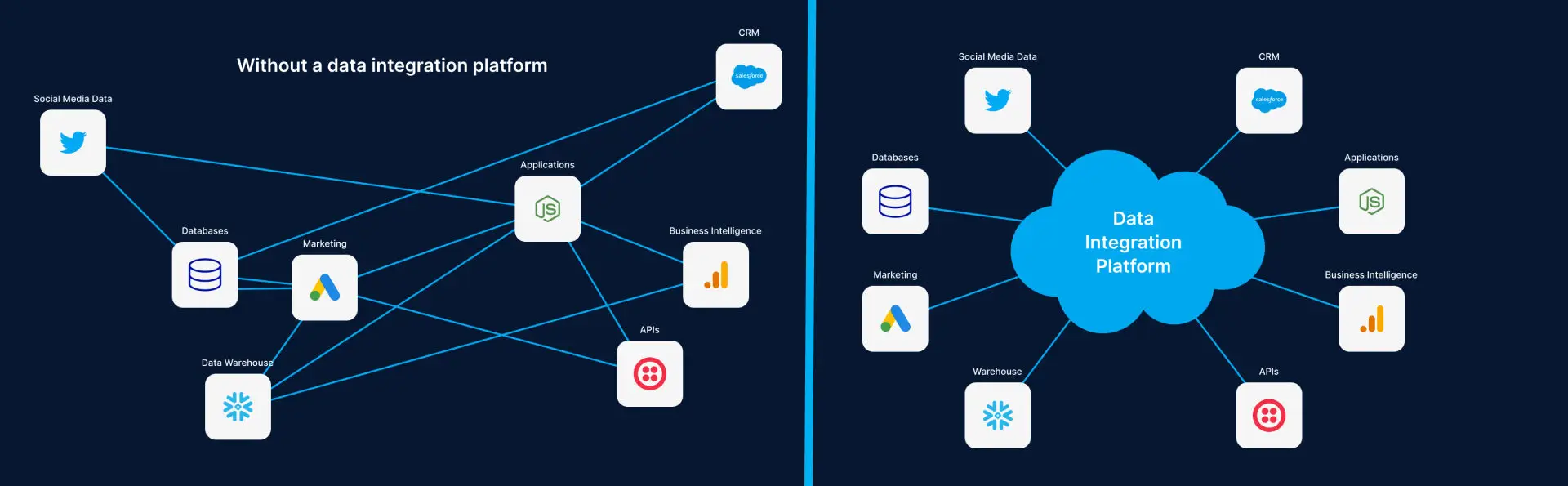
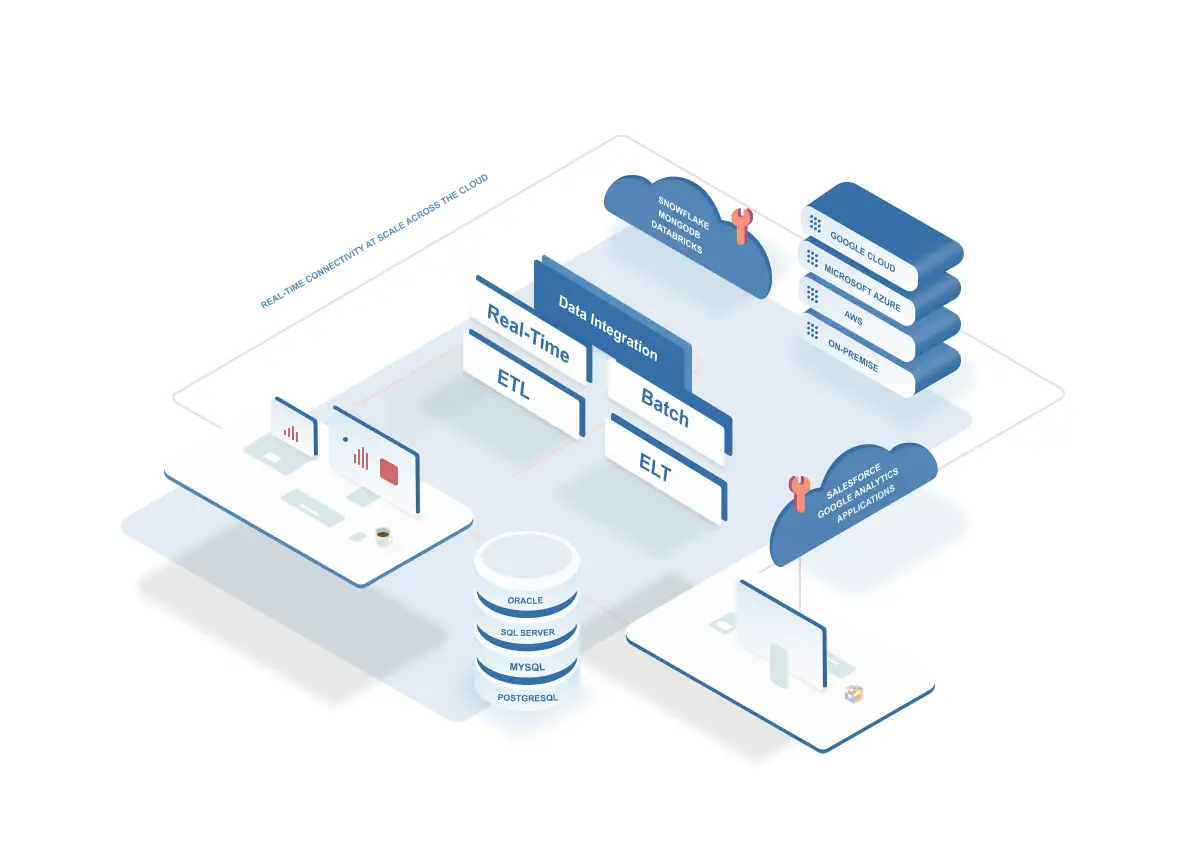
Enter data integration (DI) platforms. DI platforms create a unified view of data that BI software can then access to produce business insights. And companies can choose from a variety of DI approaches and deployment options.

What is business intelligence?

Business Intelligence or ‘BI’ is the process of collecting, cleaning, analyzing, and turning business data into actionable insights. BI relies on descriptive analytics to answer the questions “what”, “how”, and “when” so you can better understand why a business-related event happened or is happening. These insights are typically provided through reports and dashboards.

BI shouldn’t be confused with data science that uses data mining, machine learning, and other techniques to answer “why” an event happened and make computational predictions. Imagine, for instance, that you’re running an online clothing store. BI can inform you that sales in a specific region have doubled in the past 30 days, while data science can can identify spending habits or sentiment of certain customer segments.

Popular tools for building business intelligence dashboards include Looker and Tableau.

Why BI needs data integration

BI tools require access to various data sources to be effective. Today’s organizations collect data from websites, IoT devices, machines, customers, and many other external sources. Data then gets stored in customer relationship management (CRM), enterprise resource planning (ERP), and a range of other cloud-based and on-premises systems.

BI tools that analyze data from only some of these sources aren’t helpful. And waiting days, weeks, or even months to make sense of information is unacceptable as well. Market opportunities quickly pass by. What BI tools need are effective data integration solutions that continuously deliver data in a consumable format. With reliable and timely access to information, BI tools can then provide much-needed insights.

It’s also worth noting that most business intelligence tools leverage data warehouses to store and retrieve data used for analysis. Data warehouses such as Snowflake maximize business intelligence operations by offering a scale, cloud platform to analyze data.

On the other end, Google BigQuery’s close integration with Looker also accelerate BI team operations.

With all the above options available to business intelligence teams, they must leverage data integration to bridge the gap between operations, data warehouses, and business intelligence.

How to deploy data integration in a business intelligence architecture

There are two high-level approaches to set up data integration in a cloud business intelligence infrastructure.

The first is a manual approach, in which you access various sources and accounts to collect necessary data, clean it up, and insert it into a warehouse.

The other is an automated approach to data integration. Cutting-edge integration platforms can access data from various sources and load into business intelligence systems in real-time . These platforms can also clean and transform data, purging it of errors that would prevent it from being easy analyzed by a BI tool.

Automating data integration has various benefits. For one, this process is more reliable and consolidated than manual integration. Automation also reduces data silos by connecting otherwise incompatible systems. And with data available in a single location, you can discover opportunities and threats faster and stay one step ahead of the competition.

How data integration scales business intelligence 

Robust BI tools are an essential asset to any data-driven organization. Fed with a continuous stream of data integrated from various sources, these tools help companies in many different ways.

For one, BI provides actionable insights that help users make better business decisions. BI makes it easier to discover inefficiencies and increase productivity. And if empowered with near real-time data integration tech, BI solutions can deliver real-time reporting and help companies continuously refine their marketing, sales, and production strategies. As a result, customers are provided with ever better services and products.

Real-time data integration can also help companies speed their business intelligence operations by continuously replicating all their data to their respective cloud BI tool. While traditional data integration tools can slow down business intelligence operations, real-time data integration platforms allow companies to accelerate their insights.

“Our legacy analytics platform used to take an hour per customer data load and weeks for each new deployment. With Striim [Real-Time Data Integration Platform] we are able to transfer operational data to Snowflake [A Cloud Data Platform] in near real-time for all customers,” says Prashant Soral, CTO of Inspryus.

Another example is a global retail company that wants to analyze their sales. Its products are sold through thousands of stores around the world. The company wants to continuously track and analyze sales figures, register transactions, and inventory levels. One way to go about that is to use data integration tools to create data flows to the system that is then accessed by BI tools. These tools help the company make sense of sales, transactions, and inventory data.

Or consider a coffee chain that wants to analyze and drill into receipt or sales data from thousands of its stores. An IT team can use data integration platforms to transmit data from each restaurant to a centralized location. Analysts can then apply BI tools to this dataset and cross-reference data with other relevant metrics, such as monthly recurring revenue or marketing campaigns, to gain further insights.

Data integration methods in business intelligence

On a more granular level, automated data integration in BI architecture can be performed using a number of integration methods. Companies can choose methods that best fit their unique business requirements, including:

Data consolidation: Data is combined from different sources to create a centralized data store that’s then used for reporting and analysis purposes. The goal is to reduce the number of data-storage systems. Platforms like Striim can provide data consolidation in real-time regardless of workload scale.

Data warehousing: Data is loaded into a data-warehouse architecture that scales fast reporting, BI, and other types of queries. Data warehousing allows you to discover data patterns quickly.

Data virtualization: An abstract layer of data is created, combining data from various source systems. Although users can view data in a single place, it is not stored at that site and remains a virtual structure without any physical movement.

Data propagation: Data from a data warehouse is transformed and then transferred to various data marts. Data updates happening in the warehouse are pushed into data marts synchronously or asynchronously.

Scale Business Intelligence by scaling data integration first

Today’s companies produce huge volumes of data. From sales to customer service to marketing, every department contributes to an ever-growing pool of data. But conducting effective business intelligence requires using DI platforms that bring disparate types of data into a unified environment. Only then can companies get actionable insights. And as the volume and variety of data keep rising, combining data integration and BI technologies will become ever more important.

Oracle to Snowflake – Migrate data to Snowflake with Change Data Capture

Overview

In this article we will go over implementing a data pipeline that migrates data with Oracle change data capture to Snowflake.

With Striim now on Snowflake Partner Connect, customers can start loading their data in minutes with one-click access to a proven and intuitive cloud-based data integration service – Harsha Kapre, Director of Product Management at Snowflake

Migrate data from Oracle to Snowflake with Striim’s Free Trial on Partner Connect

At Striim, we value building real-time data integration solutions for cloud data warehouses. Snowflake has become a leading Cloud Data Platform by making it easy to address some of the key challenges in modern data management such as

  • Building a 360 view of the customer
  • Combining historical and real-time data
  • Handling large scale IoT device data
  • Aggregating data for machine learning purposes

It only took you minutes to get up and running with Snowflake. So, it should be just as easy to move your data into Snowflake with an intuitive cloud-based data integration service.

A Quick Tutorial

We’ll dive into a tutorial on how you can use Striim on Partner Connect to create schemas and move data into Snowflake in minutes. We’ll cover the following in the tutorial:

  • Launch Striim’s cloud service directly from the Snowflake UI
  • Migrate data and schemas from Oracle to Snowflake
  • Perform initial load: move millions of rows in minutes all during a free trial
  • Kick off a real-time replication pipeline using change data capture from Oracle to Snowflake
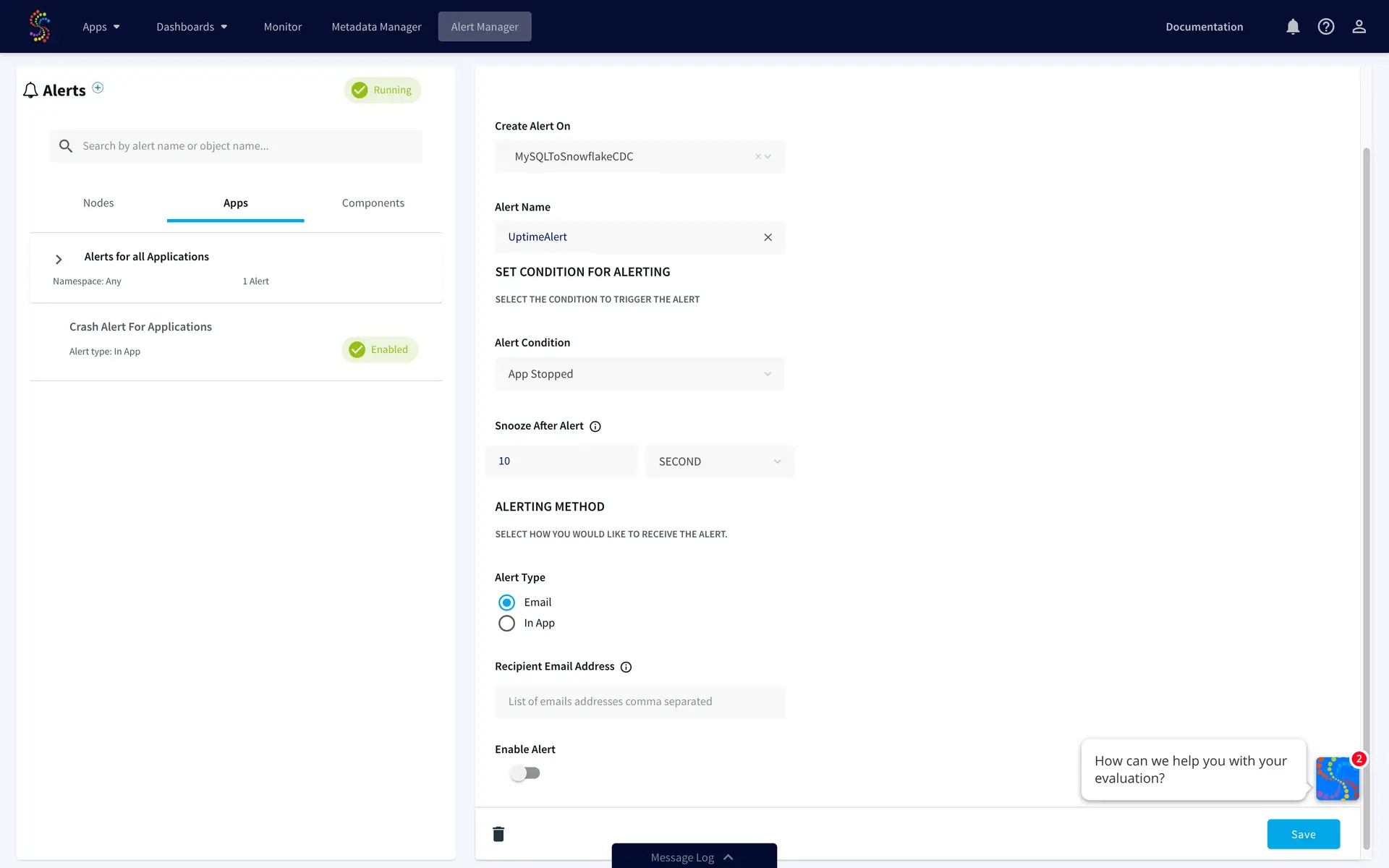
  • Monitoring your data integration pipelines with real-time dashboards and rule-based alerts

But first a little background!

What is Striim?

At a high level, Striim is a next generation Cloud Data Integration product that offers change data capture (CDC) enabling real-time data integration from popular databases such as Oracle, SQLServer, PostgreSQL and many others.

In addition to CDC connectors, Striim has hundreds of automated adapters for file-based data (logs, xml, csv), IoT data (OPCUA, MQTT), and applications such as Salesforce and SAP. Our SQL-based stream processing engine makes it easy to enrich and normalize data before it’s written to Snowflake.

Our focus on usability and scalability has driven adoption from customers like Attentia, Belgium-based HR and well-being company, and Inspyrus, a Silicon Valley-based invoice processing company, that chose Striim for data integration to Snowflake.

What is Change Data Capture?

While many products focus on batch data integration, Striim specializes in helping you build continuous, real-time database replication pipelines using change data capture (CDC).This keeps the target system in sync with the source database to address real-time requirements.

Before we dive into an example pipeline, we’ll briefly go over the concept of Change Data Capture (CDC). CDC is the process of tailing the database’s change logs, turning database events such as inserts, updates, deletes, and relevant DDL statements into a stream of immutable events, and applying those changes to a target database or data warehouse.

Change data capture is also a useful software abstraction for other software applications such as version control and event sourcing.

Striim brings decades of experience delivering change data capture products that work in mission-critical environments. The founding team at Striim was the executive (and technical) team at GoldenGate Software (now Oracle GoldenGate). Now Striim is offering CDC as an easy-to-use, cloud-based product for data integration.

Migrating data to Snowflake in minutes with Striim’s cloud service

Let’s dive into how you can start moving data into Snowflake in minutes using our platform. In a few simple steps, this example shows how you can move transactional data from Oracle to Snowflake.

Here are the simple high level steps to move data from Oracle to Snowflake:

  1. Connect to Oracle database
  2. Connect to your Snowflake environment – this step is done automatically in Striim for Snowflake Partner Connect
  3. Map data types from Oracle to Snowflake – this step is also done automatically in Striim’s wizards
  4. Start data migration with Oracle change data capture to Snowflake
  5. Monitor and validate your data pipeline from Oracle to Snowflake

Let’s get started:

1. Launch Striim in Snowflake Partner Connect

In your Snowflake UI, navigate to “Partner Connect” by clicking the link in the top right corner of the navigation bar. There you can find and launch Striim.

2. Sign Up For a Striim Free Trial

Striim’s free trial gives you seven calendar days of the full product offering to get started. But we’ll get you up and running with schema migration and database replication in a matter of minutes.

3. Create your first Striim Service.

A Striim Service is an encapsulated SaaS application that dedicates the software and fully managed compute resources you need to accomplish a specific workload; in this case we’re creating a service to help you move data to Snowflake! We’re also available to assist with you via chat in the bottom right corner of your screen.


4. Start migrating data with Striim’s step-by-step wizards.

To backfill and/or migrate your historical data set from your database to Snowflake, choose one of the ‘Database’ wizards. For instance, select the wizard with ‘Oracle Database’ as a source to perform an initial migration of schemas and data. For pure replication with no schema or historical data mgration, choose the ‘CDC’ wizards. In this case, we will use the Oracle Database to Snowflake wizard.


5. Select your schemas and tables from your source database

6. Start migrating your schemas and data

After select your tables, simply click ‘Next’ and your data migration pipeline will begin!

snowflake pc

7. Monitor your data pipelines in the Flow Designer

As your data starts moving, you’ll have a full view into the amount of data being ingested and written into Snowflake including the distribution of inserts, updates, deletes, primary key changes and more.


For a deeper drill down, our application monitor gives even more insights into low-level compute metrics that impact your integration latency.

Real-Time Database Replication with Oracle Change Data Capture to Snowflake

Striim makes it easy to sync your schema migration and CDC applications.

While Striim makes it just as easy to build these pipelines, there are some prerequisites to configuring CDC from most databases that are outside the scope of Striim.

To perform change data capture an administrator with the necessary privileges must create a user for use by the adapter and assign it the necessary privileges:

If using Oracle 11g ,or 12c, 18c, or 19c without CDB, enter the following commands

create role striim_privs;
grant create session,
  execute_catalog_role,
  select any transaction,
  select any dictionary
  to striim_privs;
grant select on SYSTEM.LOGMNR_COL$ to striim_privs;
grant select on SYSTEM.LOGMNR_OBJ$ to striim_privs;
grant select on SYSTEM.LOGMNR_USER$ to striim_privs;
grant select on SYSTEM.LOGMNR_UID$ to striim_privs;
create user striim identified by ******** default tablespace users;
grant striim_privs to striim;
alter user striim quota unlimited on users;

If using Database Vault, omit execute_catalog_role, and also enter the following commands:

grant execute on SYS.DBMS_LOGMNR to striim_privs;
grant execute on SYS.DBMS_LOGMNR_D to striim_privs;
grant execute on SYS.DBMS_LOGMNR_LOGREP_DICT to striim_privs;
grant execute on SYS.DBMS_LOGMNR_SESSION to striim_privs;

For Oracle 12c only, also enter the following command.

grant LOGMINING to striim_privs;

If using Oracle 12c, 18c, or 19c with PDB, enter the following commands. Replace <PDB name> with the name of your PDB.

create role c##striim_privs;
grant create session,
execute_catalog_role,
select any transaction,
select any dictionary,
logmining
to c##striim_privs;
grant select on SYSTEM.LOGMNR_COL$ to c##striim_privs;
grant select on SYSTEM.LOGMNR_OBJ$ to c##striim_privs;
grant select on SYSTEM.LOGMNR_USER$ to c##striim_privs;
grant select on SYSTEM.LOGMNR_UID$ to c##striim_privs;
create user c##striim identified by ******* container=all;
grant c##striim_privs to c##striim container=all;
alter user c##striim set container_data = (cdb$root, <PDB name>) container=current;

If using Database Vault, omit execute_catalog_role, and also enter the following commands:

grant execute on SYS.DBMS_LOGMNR to c##striim_privs;
grant execute on SYS.DBMS_LOGMNR_D to c##striim_privs;
grant execute on SYS.DBMS_LOGMNR_LOGREP_DICT to c##striim_privs;
grant execute on SYS.DBMS_LOGMNR_SESSION to c##striim_privs;

Maximum Uptime with Guaranteed Delivery, Monitoring and Alerts

Striim gives your team full visibility into your data pipelines with the following monitoring capabilities:

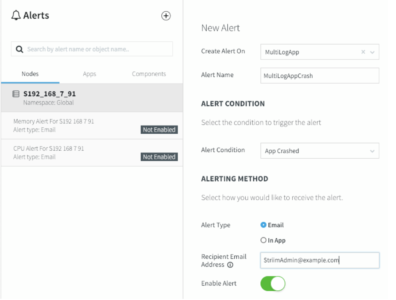
  • Rule-based, real-time alerts where you can define your custom alert criteria
  • Real-time monitoring tailored to your metrics
  • Exactly-once processing (E1P) guarantees

or

alerts

Striim uses a built-in stream processing engine that allows high volume data ingest and processing for Snowflake ETL purposes.

Conclusion

To summarize, Striim on Snowflake Partner Connect provides an easy-to-use cloud data integration service for Snowflake. The service comes with a 7-day free trial, giving you ample time to begin your journey to bridge your operational data with your Snowflake Data Warehouse.

Visit our Striim for Snowflake webpage for a deeper dive into solutions such as

  • How to migrate data from Oracle to Snowflake using Change Data Capture
  • How to migrate data from SQL Server to Snowflake using Change Data Capture
  • Teradata to Snowflake migrations
  • AWS Redshift to Snowflake migrations
  • Moving IoT data to Snowflake (OPCUA, MQTT)
  • Moving data from AWS S3 to Snowflake

As always, feel free to reach out to our integration experts to schedule a demo.

hbspt.forms.create({
portalId: “4691734”,
formId: “d62e8c47-580a-468d-81a9-9570eaabffd0”
});

Top Data Integration Use Cases For The Year Ahead

Over 80% of companies are set to use multiple cloud vendors for their data and analytics needs by 2025. Real-time data integration platforms are vital for making these plans a reality. They connect different cloud and on-premise sources and help move data around in real-time.

But the potential of this technology extends beyond cloud integration. Near instantaneous data transfer helps companies detect anomalies, make predictions, drive sales, apply machine learning (ML) models, and more. It provides a much-needed competitive edge.

As we wrap up what was an eventful year (to say the least), let’s take a look at some of the most popular data integration use cases in 2020 while looking ahead to new trends in cloud data platforms.

Moving on-premise data to the cloud

Moving data from legacy databases to the cloud in real-time reduces downtime, prevents business interruptions, and keeps databases synced.

A software process called Change Data Capture (CDC) is vital for reducing downtime. CDC allows real-time data integration (DI) to track and capture changes in the legacy system and then apply them to the cloud once the migration ends. CDC works later on as well, continuously syncing two databases. This technology allows companies to move data to the cloud without locking the legacy database.

Data can also be moved bidirectionally. Some users can be kept in the cloud and some in the legacy database. Data can then be gradually migrated to reduce risk, in case you’re dealing with mission-critical systems and can’t afford any business interruptions.

Transferring data to the cloud in real-time enables companies to offer innovative services. Courier businesses, for instance, may use real-time DI to move data from on-premise Oracle databases to Google BigQuery and run real-time analytics and reporting. They’re then able to provide customers with live shipment tracking.

Enabling real-time data warehousing in the cloud

Many companies are also turning to cloud data warehouses. This storage option is growing in popularity as it allows users to reduce the cost of ownership, improve speed, secure data, improve integration, and leverage the cloud.

But real-time analysis of data in cloud warehouses requires real-time integration platforms. They collect data from various on-prem and cloud-based sources – such as transactional databases, logs, IoT sensors – and move it to cloud warehouses.

These real-time integration platforms rely on CDC to ingest data from multiple sources without causing any modification or disruption to data production systems.

Data is then delivered to cloud warehouses with sub-second latency and in a consumable form. It’s processed in-flight using techniques such as denormalization, filtering, enrichment, and masking. In-flight data processing has multiple benefits including minimized ETL workload, reduced architecture complexity, and improved compliance with privacy regulations.

DI platforms also respect the ordering and transactionality of changes applied to cloud warehouses. And streaming integration also makes it possible to synchronize cloud data warehouses with on-premises relational databases. As a result, data can be moved to the cloud in a phased migration without disrupting the legacy environment.

Other businesses may prefer data lakes. This storage option doesn’t necessarily require data to be formatted or transformed because it can be stored in its raw state.

Adopting a multi-cloud strategy with cloud integration

Furthermore, real-time data integration allow you to be agile. You get to connect data, infrastructure, and applications in multiple cloud environments.

You can then avoid vendor lock-in and combine the cloud solutions that fit your needs.

For instance, you can have your applications write data to a data warehouse like Amazon Redshift. Meanwhile, the same records can also be inserted into another cloud vendor’s low-cost storage solution, such as Google Cloud Storage (GCS). If you later want to migrate from Redshift to BigQuery, your data will be ready in GCS for a low-friction migration.

Powering real-time applications and operations

Data integration enables companies to run real-time applications (RTA), whether these apps use on-premise or cloud databases. Real-time integration solutions move data with sub-second latency, and users perceive the functioning of RTAs as immediate and current.

Data integration can also support RTAs by transforming and cleaning data or running analytics. And applications from a wide range of fields — videoconferencing, online games, VoIP, instant messaging, ecommerce — can benefit from real-time integration.

Macy’s, for instance, makes great use of data integration platforms to scale their operations in the cloud. The giant US retailer is running real-time data pipelines in hybrid cloud environments for both operational and analytics needs. Its cloud and business apps need real-time visibility into orders and inventory. Otherwise, the company might have to deal with out-of-stock or inventory surpluses. It’s vital to avoid this scenario, especially during peak shopping periods, such as Black Friday and Cyber Monday, when Macy’s processing as much as 7,500 transactions per second.

Furthermore, real-time data pipelines are important for cloud-first apps, too. Designed specifically for cloud environments, these real-time apps can outperform on-premise competitors but require continuous data processing.

Also, real-time DI products can enhance operational reporting. Companies would receive up-to-date data from different sources and could detect immediate operational needs. Whether it’s about monitoring financial transactions, production chains, or store inventories, operational reporting adds value only if it’s delivered fast.

Detecting anomalies and making predictions

A real-time data pipeline allows companies to collect data and run various types of analytics, including anomaly detection and prediction. These two types of analytics are critical for making timely decisions. And they can be of help in many different ways.

Real-time data integration platforms, for instance, help companies manipulate IoT data produced by a range of sensor sources. Once cleaned and collected in a unified environment, this IoT data can be analyzed. The system may detect anomalies, such as high temperatures or rising pressure, and instruct a manager to act and prevent damage. Or, the data may reveal failing industrial robots that need replacement. Integration technologies also allow you to combine IoT sensor data with other data sources for better insights. Legacy technologies are rarely up to this challenge.

Besides factories and robots, sensors also monitor planes, cars, and trucks. Analyzing vehicle data can reveal if an engine is likely to fail soon if certain parts aren’t replaced. But this benefit can only be realized if various types of data are collected and analyzed in real-time. Otherwise, companies wouldn’t be able to fix engines on time. Data integration is thus vital for predictive maintenance.

Anomaly detection capabilities are especially useful in the cybersecurity field. Real-time collection and analysis of logs, IP addresses, sessions, and other pieces of information enable teams to detect and prevent suspicious transactions or credit card fraud.

Real-time analytics can also make the difference between scoring a sale or losing a customer. Up-to-the-minute suggestions based on customer emotions can push online visitors to buy products instead of going away. Companies can bring together data from multiple sources to help the system make the most relevant prediction.

Supporting machine learning solutions

Real-time DI platforms can help teams run ML models more effectively.

DI programs can save you the time you’d spend on cleaning, enriching, and labeling data. They deliver prepared data that can be pushed into algorithms.

Also, real-time architecture ensures ML models are fed with up-to-date data from various sources instead of obsolete data, as was historically the case. These real-time data streams can be used to train ML models and prepare for their deployment. Companies can develop an algorithm to spot a specific type of malicious behavior by correlating data from multiple sources.

Or, you could pass the streams through already trained algorithms and get real-time results. ML programs would be processing cleansed data from real-time pipelines and raising an alarm or executing an action once a predefined event is detected. These insights can then guide further decision-making.

Syncing records to multiple systems

Near-instantaneous data integration enables companies to sync records across multiple systems and ensure all departments always have access to up-to-date information. There are many situations in which this ability can make a difference.

Take, for example, two beverage producers that recently merged. They’ll likely have many retail customers and chemical suppliers in common but keep information about them in different databases. Some details, such as phone numbers or product prices, may not even agree. But now that those two producers are a single company, they need to find a way to merge or sync data. Integration platforms can take data from multiple repositories and update records in both companies.

Or, different departments in the same company might use siloed systems. The finance team’s system may not be linked with the receiving team’s system, which means that data updates won’t be visible to everyone. Real-time DI can link these systems and ensure data is synced.

Creating a sales and marketing performance dashboard

Companies can also use integration technologies to improve sales and marketing performance. This is done by using real-time DI products to integrate data points from internal and external sources into a unified environment. As Kelsey Fecho, growth lead at Avo, says, “If you have data in multiple platforms – point and click behavioral analytics tools, marketing tools, raw databases – the data integration tools will help you unify your data structures and control what data goes where from a user-friendly UI.”

Companies can then track sales, open rates, conversion metrics, and various other KPIs in a single dashboard. Data is visualized using charts and graphs, making it easier to spot trends in real-time and have a better sense of ROI.

And the rise of online sales and advertising makes this capability ever more relevant. Businesses now have vast amounts of data on sales and marketing activities and look for ways to extract more value.

Creating a 360-degree view of a customer

Real-time data integration platforms enable businesses to build other types of dashboards, such as a 360-degree view of a customer.

In this case, customer data is pulled from multiple systems, such as CRM, ERP, or support, into a single environment. Details on past calls, emails, purchases, chat sessions, and various other activities are added as well. And integration tech can further enrich the dashboard with external data taken from social media or data brokers.

Companies can apply predictive analytics to this wealth of data. The system could then make a personalized product recommendation or provide tips to agents dealing with demanding customers. And agents will also get to save some time. They no longer have to put customers on hold to collect information from other departments when solving an inquiry. All details are readily available. Customers will be more satisfied, too, as their problems are solved promptly.

Data integration platforms help you scale faster

The world is becoming increasingly data-driven. Realizing value from this trend starts with bringing data from disparate sources together and making it work for you. In that regard, real-time DI platforms are a game-changer. From moving data to running analytics to optimizing sales, they enable you to step up your data game and take on the competition. And to achieve these benefits, it’s vital to choose cutting-edge integration solutions that can rise to this challenge.

Types of Data Integration: ETL vs ELT and Batch vs Real-Time

Introduction

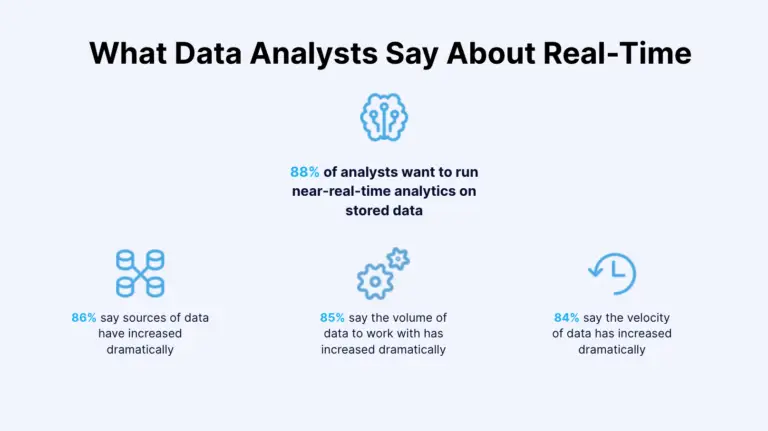
The world is drowning in data. More than 80% of respondents in an IBM study said that the sources, the volume, and the velocity of data they work with had increased. So it comes as no surprise that companies are eager to take advantage of these trends; the World Economic Forum’s report lists data analysts and scientists as the most in-demand job role across industries in 2020. And although companies are ramping up efforts in this field, there are major obstacles on the road ahead.

Not only are most analysts forced to work with unreliable and outdated data, but many also lack tools to quickly integrate data from different sources into a unified view. Traditional batch data integration is hardly up to this challenge.

That’s why a growing number of companies are looking for more effective and faster types of data integration. One solution is real-time data integration, a technology superior to batch methods because it enables rapid decision-making, breaks down data silos, future-proofs your business, and offers many other benefits.

Different types of data integration

data architecture

Depending on their business needs and IT infrastructures, companies opt for different types of data integration. Some choose to ingest, process, and deliver data in real time, while others might use batch integration. Let’s quickly dive into each one of those.

Batch data integration

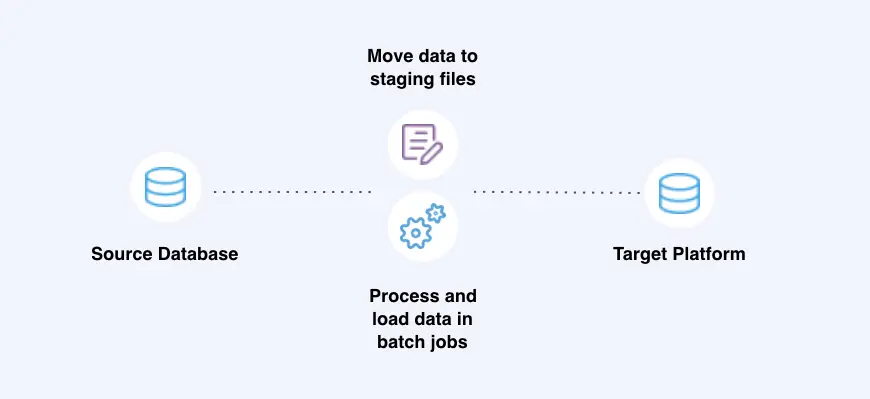
Batch data integration involves storing all the data in a single batch and moving it at scheduled periods of time or only once a certain amount is collected. This approach is useful if you can wait to receive and analyze data.

Batch data integration, for instance, can be used for maintaining an index of company files. You don’t necessarily need an index to be refreshed each time a document is added or modified; once or twice a day should be sufficient.

Electric bills are another relevant example. Your electric consumption is collected during a month and then processed and billed at the end of that period. Banks also use batch processing, which is why some card transactions might take time to be reflected in your online banking dashboard.

Real-time data integration with change data capture

Real-time data integration involves processing and transferring data as soon as it’s collected. The process isn’t literally instantaneous, though. It takes a fraction of a second to transfer, transform, and analyze data using change data capture (CDC), transform-in-flight, and other technologies.

Event as a Change to an Entry in a Database
Imagine Each Event as a Change to an Entry in a Database

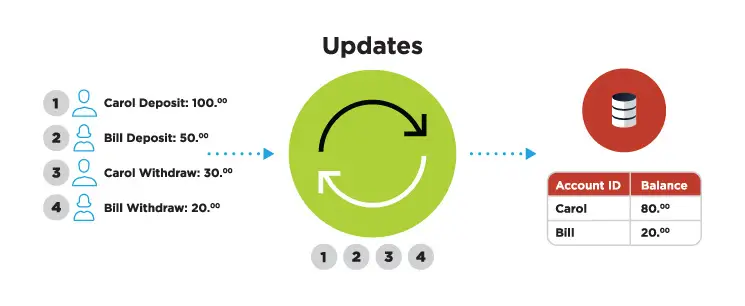
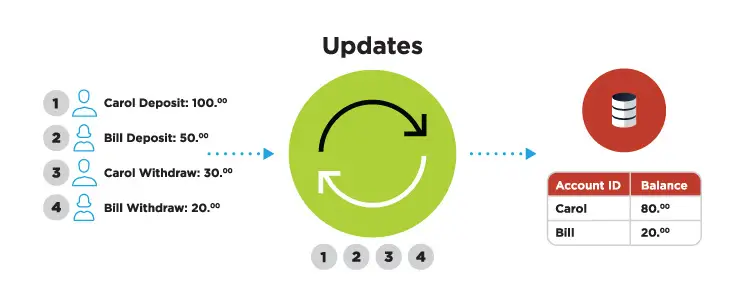
CDC involves tracking the database’s change logs and then turning inserts, updates, and other events into a stream of data applied to a target database. In many situations, however, data needs to be delivered in a specific format. That’s where the transform-in-flight feature comes into play as it turns data that’s in motion into a required format and enriches it with inputs from other sources. Data is delivered to the master file in a consumable form and is ready for processing.

Real-time data integration can be deployed in a range of time-sensitive use cases. Take, for example, reservation systems: When you book a vacation at your favorite hotel, its master database is automatically updated to prevent others from booking the same room. Point-of-sale terminals rely on the same data-processing tech. As you type your PIN and then take money from a terminal, your account is automatically updated to reflect this action.

ETL VS ELT

ETL (extract, transform, load) is another approach to data integration and has been standard for decades. It consists of three parts:

  • The first component of this method involves extracting data from the source systems using database queries (JDBC, SQL) or change data capture in the case of real-time data integration.
  • Transform, a second component of ETL, includes processing the data so it can be consumed properly in the target system. Examples of transformation include data type mapping, re-formatting data (e.g. removing special characters), or deriving aggregated values from raw data.
  • And load is the third component of ETL. It relates to the writing of the data to the target platform. This can be as simple as writing to a delimited file. Or, it can be as complex as creating schemas in a database or performing merge operations in a data warehouse.

ELT (Extract, load, transform) re-orders the equation by allowing the target data platform to handle transformation while the integration platform simply collects and delivers the data.

There are a few factors that have led to the recent popularity of ELT:

  • The cost of compute has been optimized over time with open source tools (Spark, Hadoop) and cloud infrastructure such as AWS, Microsoft Azure, and Google Cloud.
  • Modern cloud data platforms like Snowflake and Databricks provide analysts and cloud architects with a simple user experience to analyze disparate data sources in one platform. ELT tools load raw and unstructured data into these types if data platforms so analysts can join and correlate the data.
  • ETL has increasingly become synonymous with legacy, batch data integration workloads that poorly integrate with the modern data stack

Andreesen Horowitz’s recent paper on modern data infrastructure highlighted ELT as being a core component of next-generation data stacks while referring to ETL as ‘brittle’. It’s unclear why they are categorizing all ETL tools as brittle, but it’s clear there’s a perception that ETL has become synonymous with legacy, outdated data management practices.

However, real-time data integration modernizes ETL by using the latest paradigms to transform and correlate streaming data in-flight so it’s ready for analysis the moment it’s written to the target platform. This allows analysts to avoid data transformation headaches, reduce their cloud resource usage, and simply start analyzing their data in their platform of choice.

And real-time data processing is evolving and growing in popularity because it helps solve many difficult challenges and offers a range of benefits.

Real-time data flows allow rapid decision-making

By 2023, there will be over 5 billion internet users and 29.3 billion networked devices, each producing ever-larger amounts of different types of data. Real-time integration allows companies to act quickly on this information.

Data from on-premises and cloud-based sources can easily be fed, in real-time, into cloud-based analytics built on, for instance, Kafka (including cloud-hosted versions such as Google PubSub, AWS Kinesis, Azure EventHub), Snowflake, or BigQuery, providing timely insights and allowing fast decision making.

And speed is becoming a critical resource. Detecting and blocking fraudulent credit card usage requires matching payment details with a set of predefined parameters in real time. If, in this case, data processing took hours or even minutes, fraudsters could get away with stolen funds. But real-time data integration allows banks to collect and analyze information rapidly and cancel suspicious transactions.

Companies that ship their products also need to make decisions quickly. They require up-to-date information on inventory levels so that customers don’t order out-of-stock products. Real-time data integration prevents this problem because all departments have access to continuously updated information, and customers are notified about sold-out goods.

Real-time data integration breaks down data silos

When deciding which types of data integration to use, data silos are another obstacle companies have to account for. When data sets are scattered across ERP, CRM, and other systems, they’re isolated from each other. Engineers then find it hard to connect the dots, uncover insights, and make better decisions. Fortunately, real-time data integration helps businesses break down data silos.

From relational databases and data warehouses to IoT sensors and log files, real-time data integration delivers data with sub-second latency from various sources to a new environment. Organizations then have better visibility into their processes. Hospitals, for example, can integrate their radiology units with other departments and ensure that patient imaging data is shared with all stakeholders instead of being siloed.

Real-time data integration future-proofs your business

Speed is essential in a world that produces more and more data. Annual mobile traffic alone will reach almost a zettabyte by 2022, changing the existing technologies and giving rise to new ones. Thriving in this digital revolution requires handling an array of challenges and opportunities. It also requires navigating between different types of data integration options, with real-time tech capable of future-proofing your business in many different ways.

Avoid vendor lock-in with a multi-cloud strategy

According to IBM, 81% of all enterprises have a multi-cloud strategy already laid out or in the works.
Real-time data integration allows your team to get more value from the cloud by making it possible to experiment with or adopt different technologies. You’d be able to use a broader range of cloud services and, by extension, build better applications and improve machine-learning models. And these capabilities are critical to a resilient and flexible IT architecture that underpins innovation efforts across on-premises and cloud environments.

Improving customer service ops

Your support reps can better serve customers by having data from various sources readily available. Agents with real-time access to purchase history, inventory levels, or account balances will delight customers with an up-to-the-minute understanding of their problems. Rapid data flows also allow companies to be creative with customer engagement. They can program their order management system to inform a CRM system to immediately engage customers who purchased products or services.

Better customer experiences then translate into increased revenue, profits, and brand loyalty. Almost 75% of consumers say a good experience is critical for brand loyalties, while most businesses consider customer experience as a competitive differentiator vital for their survival and growth.

Optimizing business productivity

Spotting inefficiencies and taking corrective actions is another important goal for today’s companies. Manufacturers, for instance, achieve this goal by deploying various improvement methodologies, such as Lean production, Six Sigma, or Kaizen.

Whichever of those or other productivity tactics they choose, companies need access to real-time data and continuously updated dashboards. Relying on periodically refreshed data can slow down progress. Instead of tackling problems in real time, managers take a lot of time to spot problems, causing unnecessary costs and increased waste.

Therefore, the key to optimizing business productivity is collecting, transferring, and analyzing data in real time. And many companies agree with this argument. According to an IBM study, businesses expect that fast data will allow them to “make better informed decisions using insights from analytics (44%), improved data quality and consistency (39%), increased revenue (39%), and reduced operational costs (39%).”

Harnessing the power of digital transformation


Among different types of data integration, real-time tech is the one that allows companies to truly take their data game to the next level. No longer constrained by batch processing, businesses can innovate more, build better products, and drive profits. Harnessing the power of data will provide them with a much-needed competitive edge. And that can make all the difference between growth and stagnation as the digital revolution reshapes the world.

Definitions

Batch data integration involves storing all the data in a single batch and moving it only once a certain amount is collected or at scheduled periods of time.

Real-time data integration involves processing and transferring data as soon as it’s collected using change data capture (CDC), transform-in-flight, and other technologies.

Benefits of real-time data integration

  • Enables rapid decision-making
  • Accelerates ELT with faster loads
  • Modernizes ETL with high throughput transformations
  • Breaks down data silos
  • Prepares teams for a multi-cloud, anti-vendor lock-in strategy
  • Improves customer experiences

Real-Time Data Integration for Snowflake with Striim on Partner Connect

With Striim now on Snowflake Partner Connect, customers can start loading their data in minutes with one-click access to a proven and intuitive cloud-based data integration service – Harsha Kapre, Director of Product Management at Snowflake

Data Integration for Snowflake: Announcing Striim on Partner Connect

At Striim, we value building real-time data integration solutions for cloud data warehouses. Snowflake has become a leading Cloud Data Platform by making it easy to address some of the key challenges in modern data management such as

  • Building a 360 view of the customer
  • Combining historical and real-time data
  • Handling large scale IoT device data
  • Aggregating data for machine learning purposes

It only took you minutes to get up and running with Snowflake. So, it should be just as easy to move your data into Snowflake with an intuitive cloud-based data integration service.

To give you an equally seamless data integration experience, we’re happy to announce that Striim is now available as a cloud service directly on Snowflake Partner Connect.

“Striim simplifies and accelerates the movement of real-time enterprise data to Snowflake with an easy and scalable pay-as-you-go model,” Director of Product Management at Snowflake, Harsha Kapre said. “With Striim now on Snowflake Partner Connect, customers can start loading their data in minutes with one-click access to a proven and intuitive cloud-based data integration service.”

John Kutay, Director of Product Growth at Striim, highlights the simplicity of Striim’s cloud service on Partner Connect: “We focused on delivering an experience tailored towards Snowflake customers; making it easy to bridge the gap between operational databases and Snowflake via self-service schema migration, initial data sync, and change data capture.

A Quick Tutorial

We’ll dive into a tutorial on how you can use Striim on Partner Connect to create schemas and move data into Snowflake in minutes. We’ll cover the following in the tutorial:

  • Launch Striim’s cloud service directly from the Snowflake UI
  • Migrate schemas from your source database. We will be using MySQL for this example, but the steps are almost exactly the same other databases (Oracle, PostgreSQL, SQLServer, and more).
  • Perform initial load: move millions of rows in minutes all during your free trial of Striim
  • Kick off a real-time replication pipeline using change data capture.
  • Monitoring your data integration pipelines with real-time dashboards and rule-based alerts

But first a little background!

What is Striim?

At a high level, Striim is a next generation Cloud Data Integration product that offers change data capture (CDC) enabling real-time data integration from popular databases such as Oracle, SQLServer, PostgreSQL and many others.

In addition to CDC connectors, Striim has hundreds of automated adapters for file-based data (logs, xml, csv), IoT data (OPCUA, MQTT), and applications such as Salesforce and SAP. Our SQL-based stream processing engine makes it easy to enrich and normalize data before it’s written to Snowflake.

Our focus on usability and scalability has driven adoption from customers like Attentia, Belgium-based HR and well-being company, and Inspyrus, a Silicon Valley-based invoice processing company, that chose Striim for data integration to Snowflake.

What is Change Data Capture?

While many products focus on batch data integration, Striim specializes in helping you build continuous, real-time database replication pipelines using change data capture (CDC).This keeps the target system in sync with the source database to address real-time requirements.

Before we dive into an example pipeline, we’ll briefly go over the concept of Change Data Capture (CDC). CDC is the process of tailing the database’s change logs, turning database events such as inserts, updates, deletes, and relevant DDL statements into a stream of immutable events, and applying those changes to a target database or data warehouse.

Change data capture is also a useful software abstraction for other software applications such as version control and event sourcing.

Event as a Change to an Entry in a Database
Imagine Each Event as a Change to an Entry in a Database

Striim brings decades of experience delivering change data capture products that work in mission-critical environments. The founding team at Striim was the executive (and technical) team at GoldenGate Software (now Oracle GoldenGate). Now Striim is offering CDC as an easy-to-use, cloud-based product for data integration.

Migrating data to Snowflake in minutes with Striim’s cloud service

Let’s dive into how you can start moving data into Snowflake in minutes using our platform. In a few simple steps, this example shows how you can move transactional data from MySQL to Snowflake. Let’s get started:

1. Launch Striim in Snowflake Partner Connect

In your Snowflake UI, navigate to “Partner Connect” by clicking the link in the top right corner of the navigation bar. There you can find and launch Striim.

2. Sign Up For a Striim Free Trial

Striim’s free trial gives you seven calendar days of the full product offering to get started. But we’ll get you up and running with schema migration and database replication in a matter of minutes.

3. Create your first Striim Service.

A Striim Service is an encapsulated SaaS application that dedicates the software and fully managed compute resources you need to accomplish a specific workload; in this case we’re creating a service to help you move data to Snowflake! We’re also available to assist with you via chat in the bottom right corner of your screen.


4. Start moving data with Striim’s step-by-step wizards.

In this case, the MySQL to Snowflake is selected. As you can see, Striim supports data integration for a wide-range of database sources – all available in the free trial.


5. Select your schemas and tables from your source database


6. Start migrating your schemas and data

After select your tables, simply click ‘Next’ and your data migration pipeline will begin!


snowflake pc

7. Monitor your data pipelines in the Flow Designer

As your data starts moving, you’ll have a full view into the amount of data being ingested and written into Snowflake including the distribution of inserts, updates, deletes, primary key changes and more.


For a deeper drill down, our application monitor gives even more insights into low-level compute metrics that impact your integration latency.

Real-Time Database Replication to Snowflake with Change Data Capture

Striim makes it easy to sync your schema migration and CDC applications.

While Striim makes it just as easy to build these pipelines, there are some prerequisites to configuring CDC from most databases that are outside the scope of Striim.

To use MySQLReader, the adapter that performs CDC, an administrator with the necessary privileges must create a user for use by the adapter and assign it the necessary privileges:

CREATE USER 'striim' IDENTIFIED BY '******';
GRANT REPLICATION SLAVE ON *.* TO 'striim';
GRANT REPLICATION CLIENT ON *.* TO 'striim';
GRANT SELECT ON *.* TO 'striim';</code>

The MySQL 8 caching_sha2_password authentication plugin is not supported in this release. The mysql_native_password plugin is required. The minimum supported version is 5.5 and higher.

The REPLICATION privileges must be granted on *.*. This is a limitation of MySQL.

You may use any other valid name in place of striim. Note that by default MySQL does not allow remote logins by root.

Replace ****** with a secure password.

You may narrow the SELECT statement to allow access only to those tables needed by your application. In that case, if other tables are specified in the MySQLReader properties, Striim will return an error that they do not exist.

MYSQL BINARY LOG SETUP
MySQLReader reads from the MySQL binary log. If your MySQL server is using replication, the binary log is enabled, otherwise it may be disabled.

For MySQL, the property name for enabling the binary log, its default setting, and how and where you change that setting vary depending on the operating system and your MySQL configuration, so see the documentation for the version of MySQL you are running for instructions.

If the binary log is not enabled, Striim’s attempts to read it will fail with errors such as the following:

2016-04-25 19:05:40,377 @ -WARN hz._hzInstance_1_striim351_0423.cached.thread-2
com.webaction.runtime.Server.startSources (Server.java:2477) Failure in Starting
Sources.
java.lang.Exception: Problem with the configuration of MySQL
Row logging must be specified.
Binary logging is not enabled.
The server ID must be specified.
Add --binlog-format=ROW to the mysqld command line or add binlog-format=ROW to your
my.cnf file
Add --bin-log to the mysqld command line or add bin-log to your my.cnf file
Add --server-id=n where n is a positive number to the mysqld command line or add
server-id=n to your my.cnf file
at com.webaction.proc.MySQLReader_1_0.checkMySQLConfig(MySQLReader_1_0.java:605) ...</code>

Once those prerequisites are completed, you can run the MySQL CDC wizard and start replicating data from your database right where your schema migration and initial load left off.

Maximum Uptime with Guaranteed Delivery, Monitoring and Alerts

Striim gives your team full visibility into your data pipelines with the following monitoring capabilities:

  • Rule-based, real-time alerts where you can define your custom alert criteria
  • Real-time monitoring tailored to your metrics
  • Exactly-once processing (E1P) guarantees

Striim uses a built-in stream processing engine that allows high volume data ingest and processing for Snowflake ETL purposes.

Conclusion

To summarize, Striim on Snowflake Partner Connect provides an easy-to-use cloud data integration service for Snowflake. The service comes with a 7-day free trial, giving you ample time to begin your journey to bridge your operational data with your Snowflake Data Warehouse.

Visit our Striim for Snowflake webpage for a deeper dive into solutions such as

  • How to migrate data from Oracle to Snowflake using Change Data Capture
  • How to migrate data from SQL Server to Snowflake using Change Data Capture
  • Teradata to Snowflake migrations
  • AWS Redshift to Snowflake migrations
  • Moving IoT data to Snowflake (OPCUA, MQTT)
  • Moving data from AWS S3 to Snowflake

As always, feel free to reach out to our integration experts to schedule a demo.

Back to top