SQL Server to BigQuery: Real-Time Replication Guide

SQL Server has developed a reputation as the backbone of enterprise operational data. But when it comes to analytics, operational systems weren’t designed for complex queries or transformations. To build advanced analytics and AI applications, enterprises are increasingly turning to Google BigQuery.

Ripping and replacing your legacy operational databases isn’t just risky; it’s highly disruptive. Instead of migrating away from SQL Server entirely, data leaders increasingly want ongoing, continuous integration between their operational stores and their cloud analytics environments.

The future of analytics and machine learning hinges on fresh, low-latency data. If your BigQuery dashboards and AI models rely on data that was batched overnight, you aren’t making proactive decisions, you’re just documenting history. To power modern, event-driven applications, enterprises need real-time, cloud-native pipelines.

This guide covers the why, the how, and the essential best practices of replicating data from SQL Server to BigQuery without disrupting your production systems.

Key Takeaways

  • Integrate, don’t just migrate: Enterprises choose to integrate SQL Server with BigQuery to extend the life of their operational systems while unlocking cloud-scale analytics, AI, and machine learning.
  • Real-time is the modern standard: While there are multiple ways to move data into BigQuery—from manual exports to scheduled ETL—real-time replication using Change Data Capture (CDC) is the most effective approach for enterprises demanding low latency and high resilience.
  • Architecture matters: Following established best practices and leveraging enterprise-grade platforms ensures your SQL Server to BigQuery pipelines remain reliable, secure, and scalable as your data volumes grow.

Why Integrate SQL Server with BigQuery

Modernizing your enterprise data architecture doesn’t have to mean tearing down the foundation. For many organizations, SQL Server is deeply embedded in daily operations, powering ERPs, CRMs, and custom applications consistently for years.

Integrating SQL Server with BigQuery is an ideal way to extend the life and value of your database while simultaneously unlocking BigQuery’s massive scale for analytics, AI, and machine learning.
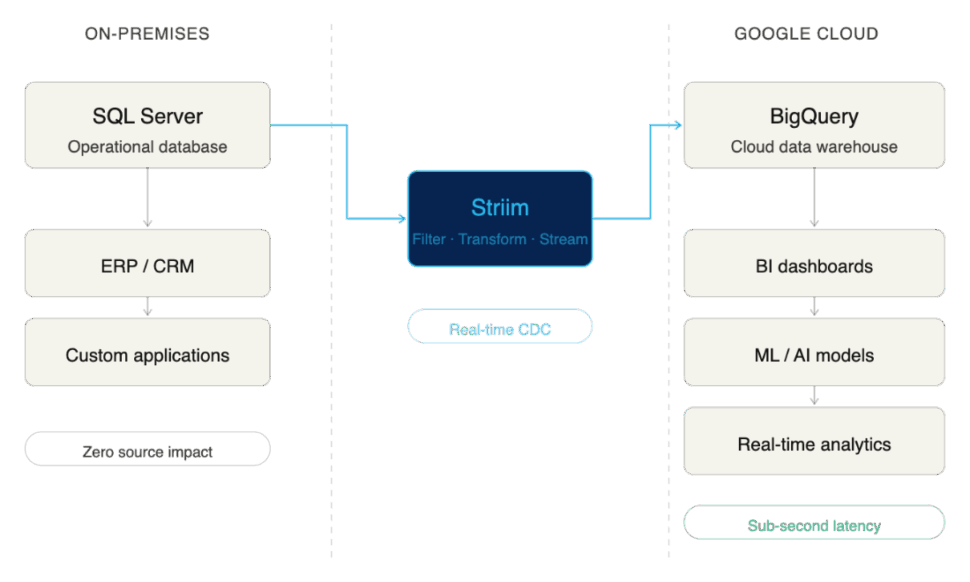
Here are the primary business drivers compelling enterprises to integrate SQL Server with BigQuery:

Unlock Real-Time Analytics Without Replacing SQL Server

Migrating away from a legacy operational database is often a multi-year, high-risk endeavor. By choosing integration over migration, enterprises get the “reward” of modern analytics in a fraction of the time, without disrupting the business. You land with the best of both worlds: the operational stability of SQL Server and the elastic, real-time analytical power of BigQuery.

Support Business Intelligence and Machine Learning in BigQuery

SQL Server is adept at handling high-volume transactional workloads (OLTP). However, it wasn’t built to train AI models or run complex, historical business intelligence queries (OLAP) without severe performance degradation. BigQuery is purpose-built for this exact scale. By replicating your SQL Server data to BigQuery, you give your data science and BI teams the context-rich, unified environment they need to do their best work without bogging down your production databases.

Reduce Reliance on Batch ETL Jobs

Historically, moving data from SQL Server to a data warehouse meant relying on scheduled, batch ETL (Extract, Transform, Load) jobs that ran overnight. But a fast-paced enterprise can’t rely on stale data. Integrating these systems modernizes your pipeline, allowing you to move away from rigid batch windows and toward continuous, real-time data flows.

Common Approaches to SQL Server-BigQuery Integration

Moving data from SQL Server to BigQuery is not a one-size-fits-all endeavor. The method you choose fundamentally impacts the freshness of your data, the strain on your source systems, and the ongoing operational overhead for your data engineering team.

While there are multiple ways to connect the two systems, they generally fall into three categories. Here is a quick comparison:

Integration Method Integration Method Integration Method Integration Method Integration Method Integration Method Integration Method
Batch / Manual Days / Hours Low High (Manual intervention) Very Low Low upfront, high hidden costs Poor. Best for one-off ad-hoc exports.
ETL / ELT Hours / Minutes Medium Medium (Managing schedules/scripts) Medium Moderate Fair. Good for legacy reporting, bad for real-time AI.
Real-Time CDC Sub-second Medium to High (Depending on tool) Low (Fully automated, continuous) Very High Highly efficient at scale Excellent. The gold standard for modern data architectures.

Let’s break down these approaches and explore their pros and cons.

Batch Exports and Manual Jobs

The most basic method of integration is the manual export. This usually involves running a query on SQL Server, dumping the results into a flat file (like a CSV or JSON), moving that file to Google Cloud Storage, and finally loading it into BigQuery using the bq command-line tool or console.

  • Pros: It’s incredibly simple to understand and requires virtually no specialized infrastructure.
  • Cons: Painfully slow, highly prone to human error, and completely unscalable for enterprise workloads. This method can’t handle schema changes, and by the time the data lands in BigQuery, it is already stale.

ETL and ELT Pipelines

Extract, Transform, Load (ETL) and Extract, Load, Transform (ELT) have been the industry standard for decades. Using custom scripts or platforms like Google Cloud Data Fusion or SQL Server Integration Services (SSIS), data engineers automate the extraction of data from SQL Server, apply necessary transformations, and load it into BigQuery.

  • Pros: Highly automated and capable of handling complex data transformations before or after the data hits BigQuery.
  • Cons: ETL and ELT pipelines traditionally run on schedules (e.g., nightly or hourly). These frequent, heavy queries can put significant performance strain on the source SQL Server database. More importantly, because they rely on batch windows, they cannot deliver the true real-time data required for modern, event-driven business operations.

Real-Time Replication with Change Data Capture (CDC)

For modern enterprises, real-time replication powered by Change Data Capture (CDC) has emerged as the clear gold standard.

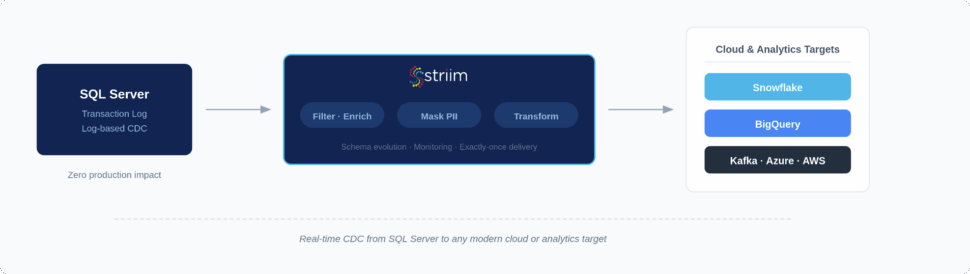
Instead of querying the database directly for changes, CDC works by reading SQL Server’s transaction logs. As inserts, updates, and deletes happen in the source system, CDC captures those discrete events and streams them continuously into BigQuery.

  • Pros: CDC delivers sub-second latency, ensuring BigQuery is an always-accurate reflection of your operational data. Because it reads logs rather than querying tables, it exerts almost zero impact on SQL Server’s production performance. It is continuous, resilient, and built to scale alongside your business.
  • Cons: Building a CDC pipeline from scratch is highly complex and requires deep engineering expertise to maintain transaction consistency and handle schema evolution. (This is why enterprises typically rely on purpose-built CDC integration platforms rather than DIY solutions).

Challenges of SQL Server to BigQuery Replication

While continuous CDC replication is the gold standard, executing it across enterprise environments comes with its own set of complexities.

Here are some of the primary challenges enterprises face when connecting SQL Server to BigQuery, and the risks associated with failing to address them.

Managing Schema and Data Type Differences

SQL Server and Google BigQuery use fundamentally different architectures and data types. For example, SQL Server’s DATETIME2 or UNIQUEIDENTIFIER types do not have exact 1:1 equivalents in BigQuery without transformation.

If your replication method doesn’t carefully map and convert these schema differences on the fly, you risk severe business consequences. Data can be truncated, rounding errors can occur in financial figures, or records might be rejected by BigQuery entirely. Furthermore, when upstream SQL Server schemas change (e.g., a developer adds a new column to a production table), fragile pipelines break, causing damaging downtime.

Handling High-Volume Transactions at Scale

Enterprise operational databases process millions of rows an hour, often experiencing massive spikes in volume during peak business hours.

Your replication pipeline must be able to handle this throughput using high parallelism without overwhelming the network or suffocating BigQuery’s ingestion APIs. If your architecture bottlenecks during a traffic spike, latency increases exponentially. What should have been real-time analytics suddenly becomes hours old, resulting in stale insights exactly when the business needs them most.

Ensuring Consistency and Accuracy Across Systems

Yes, replication is about moving new data (INSERT statements). But beyond that, to maintain an accurate analytical environment, your pipeline must capture and precisely replicate every UPDATE and DELETE exactly as they occurred in the source database.

Transaction boundaries must be respected so that partial transactions aren’t analyzed before they are complete. If your pipeline drops events, applies them out of order, or fails to properly hard-delete removed records, your target database will drift from your source. Enterprises require exact match confidence between SQL Server and BigQuery; without it, analytical models fail and compliance audits become a nightmare.

Balancing Latency, Performance, and Cost

Achieving true, sub-second latency is immensely powerful, but if managed poorly, it can cause your cloud costs to spiral. For example, streaming every single micro-transaction individually into BigQuery can trigger higher ingestion fees compared to micro-batching.

Enterprises need to balance speed with efficiency. They need the flexibility to stream critical operational events in real-time, while smartly batching less time-sensitive data to optimize Google Cloud costs.

Because of the deep complexity of schema evolution, transaction consistency, and cost-optimization at scale, relying on basic scripts or generic ETL tools often leads to failure. Not every tool is built to solve these specific challenges, which is why enterprises must carefully evaluate their replication architecture.

Best Practices for Enterprise-Grade Replication

Building a custom DIY pipeline might work for a single, low-volume table. But enterprise replication is a different beast entirely. Many organizations learn the hard way that missing key architectural elements leads to failed projects, spiraling cloud costs, or broken dashboards.

To ensure success, your replication strategy should be built on proven best practices. These also serve as excellent criteria when evaluating an enterprise-grade integration platform.

Start With Initial Load, Then Enable Continuous Replication

The standard architectural pattern for replication requires two phases: first, you must perform a bulk initial load of all historical data. Once the target table is seeded, the pipeline must seamlessly transition to CDC to keep the target synced with new transactions. Doing this manually is notoriously difficult and often results in downtime or lost data during the cutover.

  • How Striim helps: Striim supports this exact pattern out of the box. It handles the heavy lifting of the one-time historical load and seamlessly transitions into real-time CDC replication, ensuring zero downtime and zero data loss.

Design for High Availability and Failover

Enterprises cannot afford replication downtime. If a network connection blips or a server restarts, your pipeline shouldn’t crash and require a data engineer to manually intervene at 2:00 AM. Your architecture requires built-in fault tolerance, strict checkpoints, and automated retries to keep pipelines inherently resilient.

  • How Striim helps: Striim pipelines are architected for high availability. With features like exactly-once processing (E1P) and automatic state recovery, Striim ensures your pipelines meet rigorous business continuity needs without requiring custom engineering.

Secure Pipelines to Meet Compliance Standards

Moving operational data means you are inevitably moving sensitive information. Whether it’s PII, financial records, or healthcare data, regulatory expectations like HIPAA, GDPR, and SOC2 are non-negotiable. Your replication architecture must guarantee end-to-end encryption, granular access controls, and strict auditability.

  • How Striim helps: Striim provides enterprise-grade security features by default, so compliance isn’t an afterthought. Data is encrypted in flight, and built-in governance features ensure that sensitive customer data can be detected and masked before it ever enters BigQuery.

Monitor, Alert, and Tune for Performance

“Set and forget” is a dangerous mentality for enterprise data infrastructure. To guarantee service-level agreements (SLAs) and maintain operational efficiency, you need continuous observability. This means actively tracking metrics, retaining logs, and configuring alerts so your team is proactively notified of latency spikes or throughput drops.

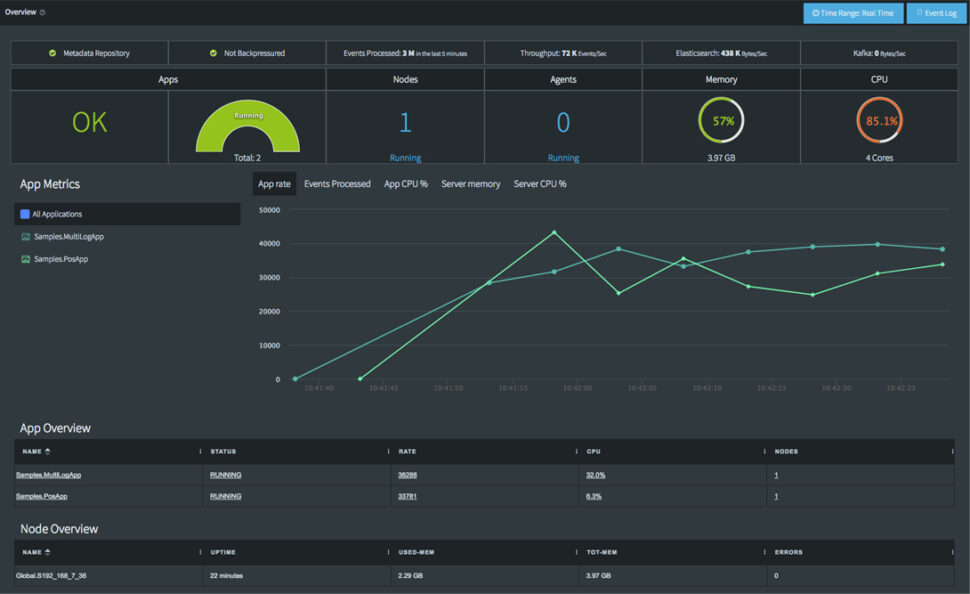
  • How Striim helps: Striim features a comprehensive, real-time monitoring dashboard. It makes it effortless for engineering teams to track pipeline health, monitor sub-second latency, and visualize throughput in one centralized place.

Optimize BigQuery Usage for Cost Efficiency

Real-time replication is valuable, but inefficient streaming can drive up BigQuery compute and ingestion costs unnecessarily. To maintain cost efficiency, data engineering teams should leverage BigQuery best practices like table partitioning and clustering, while intelligently tuning batch sizes based on the urgency of the data.

  • How Striim helps: Striim’s pre-built BigQuery writer includes highly configurable write strategies. Teams can easily toggle between continuous streaming and micro-batching, helping enterprises perfectly balance high-performance requirements with cloud cost efficiency.

Why Enterprises Choose Striim for SQL Server to BigQuery Integration

Striim is purpose-built to solve the complexities of enterprise data integration. By leveraging Striim, organizations can reliably replicate SQL Server data into Google BigQuery in real time, securely, and at scale. This allows data leaders to confidently modernize their analytics stack without disrupting the critical operational systems their business relies on.

Striim delivers on this promise through a robust, enterprise-grade feature set:

  • Log-Based CDC for SQL Server: Striim reads directly from SQL Server transaction logs, capturing inserts, updates, and deletes with sub-second latency while exerting virtually zero impact on your production database performance.
  • Configurable BigQuery Writer: Optimize for both speed and cost. Striim’s pre-built BigQuery target allows teams to configure precise batching or streaming modes, ensuring efficient resource utilization in Google Cloud.
  • Inherent High Availability: Designed for mission-critical workloads, Striim includes automated failover, exactly-once processing (E1P), and state recovery to ensure absolute business continuity during replication.
  • Enterprise-Grade Security: Compliance is built-in, not bolted on. Striim ensures data is protected with end-to-end encryption, granular role-based access controls, and features designed to meet strict HIPAA, GDPR, and SOC2 standards.
  • Comprehensive Real-Time Monitoring: Data engineering teams are empowered by unified dashboards that track replication health, monitor latency metrics, aggregate logs, and trigger alerts to ensure you consistently meet stringent internal SLAs.
  • Accessible Yet Advanced Configuration: Striim pairs a rapid, no-code, drag-and-drop user interface for quick pipeline creation with advanced, code-level configuration options to solve the most complex enterprise data transformation use cases.

Ready to break down your data silos? Try Striim for free or book a demo today to see real-time replication in action.

FAQs

What are the cost considerations when replicating SQL Server data into BigQuery?

The primary costs involve the compute resources required for extraction (usually minimal with log-based CDC) and the ingestion/storage fees on the BigQuery side. Streaming data record-by-record into BigQuery can trigger higher streaming insert fees. To optimize costs, enterprises should use a replication tool that allows for intelligent micro-batching and leverages BigQuery partitioning strategies.

How do enterprises keep replication secure and compliant?

To maintain compliance with frameworks like SOC2 or HIPAA, enterprises must ensure data is encrypted both in transit and at rest during the replication process. It is also critical to use platforms that offer role-based access control (RBAC) and data masking capabilities, ensuring sensitive PII is obscured before it ever lands in the cloud data warehouse.

How does replication impact day-to-day operations in SQL Server?

If you use traditional query-based ETL methods, replication can cause significant performance degradation on the SQL Server, slowing down the applications that rely on it. However, modern Change Data Capture (CDC) replication reads the database’s transaction logs rather than querying the tables directly. This approach exerts virtually zero impact on the source database, keeping day-to-day operations running smoothly.

What is the best way to scale SQL Server to BigQuery replication as data volumes grow?

The most effective way to scale is by utilizing a distributed, cloud-native integration platform designed for high parallelism. As transaction volumes from SQL Server spike, the replication architecture must be able to dynamically allocate compute resources to process the stream without bottlenecking. Ensuring your target writer is optimized for BigQuery’s bulk ingestion APIs is also crucial for handling massive growth.

How do I replicate SQL Server to BigQuery using Striim?

Replicating data with Striim is designed to be straightforward. You start by configuring SQL Server as your source using Striim’s CDC reader, which manages the initial historical load. Next, you select BigQuery as your target, mapping your schemas and applying any necessary in-flight transformations via the drag-and-drop UI. Finally, you deploy the pipeline, and Striim seamlessly transitions from the initial load into continuous, real-time replication.

What makes Striim different from other SQL Server to BigQuery replication tools?

Unlike basic data movement scripts or legacy batch ETL tools, Striim is a unified integration and intelligence platform built specifically for real-time, enterprise-grade workloads. It goes beyond simple replication by offering in-flight data processing, exactly-once processing (E1P) guarantees, and built-in AI governance capabilities. This ensures data isn’t just moved, but arrives in BigQuery validated, secure, and ready for immediate analytical use.

How can I test Striim for SQL Server to BigQuery replication before rolling it out company-wide?

The best approach is to start with a targeted pilot project. Identify a single, high-value SQL Server database and set up a Striim pipeline to replicate a subset of non-sensitive data into a sandbox BigQuery environment. You can leverage Striim’s free trial to validate the sub-second latency, test the monitoring dashboards, and confirm the platform meets your specific enterprise requirements before a full-scale rollout.
Data Modernization Tools: Top Platforms for Real‑Time Data

The enterprise AI landscape has moved into execution mode. Today, data leaders face urgent board-level pressure to deliver measurable AI outcomes, and to do it fast.

But there remains a fundamental disconnect. For all their ambition, enterprise leaders cannot power modern, agentic AI systems with batch-processed data that’s hours or even days old. Legacy pipelines and fragmented data silos aren’t just an IT inconvenience; they are actively bottlenecking advanced analytics and AI initiatives. Models trained on stale, unvalidated data provide unreliable insights at best, and financially damaging outcomes at worst.

Turning data from a static liability into a dynamic asset requires platform modernization: a shift in approach to how data is moved, validated, and stored. This requires systems capable of capturing data the instant it’s born, processing it mid-flight, and landing it safely in modern cloud environments.

In this guide, we break down the leading data modernization tools into two core categories: platforms that move and validate data (such as Striim, Oracle GoldenGate, and Confluent) and platforms that store and manage data (such as Databricks, Snowflake, and BigQuery). We will compare their features, pricing models, and ideal use cases to help you build a real-time data foundation you can trust.

Key Takeaways

  • Data modernization tools fall into two main categories: platforms that move and validate data (e.g., Striim, Confluent, Fivetran HVR) and platforms that store and manage data (e.g., Databricks, Snowflake, BigQuery).
  • The most effective modernization strategies pair a real-time data movement and validation layer with modern cloud storage so analytics, AI, and reporting are continuously fed with accurate, up-to-date data.
  • When evaluating tools, it’s critical to look beyond basic migration. Prioritize real-time capabilities (CDC), breadth of connectors, in-flight governance and validation, scalability, and total cost of ownership.
  • Striim stands out by combining high-performance CDC, streaming, and Validata-powered data validation to ensure that data arriving at your destination is both sub-second fast and completely trustworthy.
  • Choosing the right mix of data movement and storage tools helps organizations modernize faster, reduce risk from data drift, and unlock high-impact agentic AI use cases.

What are Data Modernization Tools?

Data modernization tools are the foundational infrastructure used to move an enterprise from legacy, batch-based data processing to unified, real-time data architectures. They act as the bridge between siloed operational databases and modern cloud platforms.

Instead of relying on nightly ETL (Extract, Transform, Load) batch jobs that leave your analytics and AI models running on yesterday’s information, modern tools continuously capture, process, and deliver data the instant it is born.

Broadly, these tools fall into two distinct but complementary categories:

  1. Data Movement and Validation (The Pipeline): Platforms like Striim, Confluent, and Oracle GoldenGate capture data at the source, transform it mid-flight, and validate its accuracy before it ever lands in a database.
  2. Data Storage and Management (The Destination): Platforms like Databricks, Snowflake, and Google BigQuery provide the highly scalable, cloud-native environments where data is stored, queried, and used to power machine learning models.

Benefits of Data Modernization Tools

Legacy batch pipelines create data latency measured in hours or days. This is no longer acceptable when modern fraud detection, dynamic pricing, and agentic AI models require sub-second freshness and guaranteed consistency.

Here’s what enterprise-grade data modernization platforms deliver:

1. Breaking Down Data Silos

When internal teams isolate data sources, critical business decisions get stalled. Data modernization tools democratize data management by unifying disparate systems. Using Change Data Capture (CDC) and streaming architecture, these platforms break down data silos and make real-time intelligence accessible across the entire enterprise.

2. Powering Agentic AI and Machine Learning

You can’t build autonomous, agentic AI systems based on stale data. To be effective, AI needs real-time context. Modernization platforms feed your LLMs, feature stores, and vector databases with continuous, fresh data. This is what allows enterprises to move their AI initiatives out of the pilot phase and into production-grade execution.

3. Unlocking Sub-Second, Operational Decisions

Eliminate the latency of batch processing. Event-driven architectures support sub-second data freshness for dynamic pricing engines, real-time recommendation systems, and operational ML models. This enables your business to capitalize on fleeting market opportunities and respond to customer behavior in the moment.

4. Ensuring In-Flight Governance and Compliance

Modern tools don’t just move data; they ensure it’s trustworthy and can be put to good use the moment it’s born. Enterprise-grade platforms implement data validation at scale, providing row-level reconciliation, drift detection, and automated quality checks mid-flight. This prevents costly downstream failures while ensuring your data pipelines comply with SOC 2, GDPR, and HIPAA frameworks.

Top 5 Data Modernization Tools for Data Integration and Streaming

If you’re modernizing your data architecture, your first priority is the pipeline: extracting data from legacy systems and delivering it to cloud destinations without introducing latency or corruption.

The following five platforms represent the leading solutions for real-time data movement, change data capture, and in-flight processing.

1. Striim

Striim is a unified integration and intelligence platform that connects clouds, data, and applications through real-time data streaming. Designed to process over 100 billion events daily with sub-second latency, Striim embeds intelligence directly into the data pipeline, allowing organizations to operationalize AI at enterprise scale.

Key Products and Features

  • Real-Time Change Data Capture (CDC): Captures database changes the instant they occur and streams them to target destinations, maintaining continuous synchronization with exactly-once processing (E1P) and zero impact on source systems.
  • Validata (Continuous Data Validation): Embeds trust into high-velocity data flows. Validata compares datasets at scale with minimal database load, identifying discrepancies and ensuring data accuracy for compliance-heavy operations (HIPAA, PCI) and model training.
  • In-Flight Stream Processing: Provides in-memory, SQL-based transformations, allowing users to filter, enrich, and format data while it is in motion.
  • AI-Native Functionality: Embeds intelligence directly into the stream. Striim enables AI agents to generate vector embeddings, detect anomalies in real time, and govern sensitive data before it reaches the destination.
  • 150+ Pre-Built Connectors: Seamlessly integrates legacy databases, modern cloud data warehouses, and messaging systems out of the box.

Key Use Cases

  • Agentic AI & ML Data Foundations: Provides continuous, cleansed replicas of data in safe, compliant zones so AI models and intelligent agents get fresh context without exposing production systems.
  • Real-Time Fraud Detection: Analyzes high-velocity transactional data from multiple sources to identify suspicious patterns and trigger instant alerts before financial loss occurs.
  • Zero-Downtime Cloud Migration: Striim’s CDC and Validata combination provides end-to-end visibility into data accuracy during system transitions, enabling seamless cutovers to modern cloud infrastructure.

Pricing Striim scales from free experimentation to mission-critical enterprise deployments:

  • Striim Developer (Free): For learning and prototypes. Includes up to 25M events/month and trial access to connectors.
  • Striim Community (Free, Serverless): A no-cost sandbox to validate early PoCs.
  • Serverless Striim Cloud: Fully managed SaaS with elastic scale. Usage-based pricing on metered credits.
  • Dedicated Cloud / Striim Platform: Custom pricing for private cloud or self-hosted deployments requiring maximum control.

Who It’s Ideal For Striim is built for enterprise organizations (Healthcare, Financial Services, Retail, Telecommunications) that require sub-second data delivery, robust compliance, and embedded data validation to power operational efficiency and real-time AI initiatives. Pros

  • Unmatched Speed: True sub-second, real-time data processing for time-critical applications.
  • Built-in Trust: The Validata feature ensures data integrity and audit readiness natively within the pipeline.
  • AI-Ready: Goes beyond basic ETL by generating vector embeddings and governing data mid-flight.
  • Ease of Use: Intuitive, SQL-based interface and automated schema evolution speed up deployment.

Cons

  • Learning Curve: While SQL-based, mastering advanced stream processing architectures can take time.
  • Enterprise Focus: Built for enterprise scale: Striim may not be an ideal fit with mid-sized or small companies.

2. Oracle GoldenGate

Oracle GoldenGate is a legacy giant in the data replication space. It’s a data comparison and verification tool that identifies discrepancies between source and target datasets, heavily optimized for the Oracle ecosystem.

Key Products and Features

  • GoldenGate Core Platform: Enables unidirectional and bidirectional replication with support for complex topologies.
  • Oracle Cloud Infrastructure (OCI) GoldenGate: A fully managed, cloud-based service for orchestrating replication tasks.
  • Oracle GoldenGate Veridata: Compares source and target datasets to identify discrepancies concurrently with data replication.

Key Use Cases

  • Disaster Recovery: Maintains synchronized copies of critical data across locations for business continuity.
  • Zero Downtime Migration: Facilitates slow, gradual cutovers between legacy systems and new databases without disrupting business operations.

Pricing

  • Pricing varies heavily by region and deployment. OCI lists GoldenGate at approximately $1.3441 per OCPU hour, but enterprise agreements are notoriously complex.

Who It’s Ideal For Large enterprises already deeply entrenched in the Oracle ecosystem that need high-fidelity replication across mission-critical, traditional databases. Pros

  • Reliability: Highly stable in large scale production environments.
  • Oracle Native: Strong performance when replicating from Oracle to Oracle.

Cons

  • Cost and Complexity: Expensive licensing models and massive resource consumption.
  • Steep Learning Curve: Requires highly specialized, hard-to-find technical expertise to configure, tune, and maintain.

3. Qlik (Talend / Qlik Replicate)

Following its acquisition of Talend, Qlik has positioned itself as a broad data integration and analytics platform. It offers a wide suite of tools for data movement, governance, and business intelligence dashboards.

Key Products and Features

  • Qlik Replicate: Provides real-time synchronization using log-based CDC for operational data movement.
  • Talend Data Fabric: Unifies, integrates, and governs disparate data environments.
  • Qlik Cloud Analytics: AI-powered dashboards and visualizations for business users.

Key Use Cases

  • Data Pipeline Automation: Automates the lifecycle of data mart creation.
  • Multi-Cloud Data Movement: Facilitates data transfer between SaaS applications, legacy systems, and modern lakehouses.

Pricing

  • Qlik operates on complex, tiered pricing. Cloud Analytics starts at $200/month for small teams, scaling to custom enterprise pricing. Data integration features (Qlik Replicate/Talend) require custom enterprise quoting.

Who It’s Ideal For Medium-to-large enterprises looking for an all-in-one suite that handles both the data engineering pipeline (Talend) and the front-end business intelligence visualizations (Qlik Analytics). Pros

  • Broad Ecosystem: Offers everything from pipeline creation to front-end dashboarding.
  • Connectivity: Strong library of supported endpoints for both legacy and cloud systems.

Cons

  • Fragmented Experience: Integrating the legacy Qlik and Talend products can be challenging.
  • Dated Interface: Users frequently report that the Java-based UI feels outdated and cumbersome for everyday workflows.

4. Fivetran HVR

While Fivetran is known for its simple, batch-based SaaS product, Fivetran HVR (High-Volume Replicator) is its self-hosted, enterprise-grade offering. HVR uses CDC technology to streamline high-volume replication for complex data architectures.

Key Products and Features

  • Log-Based CDC: Captures and replicates database changes for high-volume environments.
  • Distributed Architecture: Supports complex remote or local capture options.
  • Fivetran Dashboard Integration: Attempts to bring Fivetran’s classic ease-of-use to the HVR infrastructure.

Key Use Cases

  • Database Consolidation: Keeping geographically distributed databases synchronized.
  • Large-Scale Migrations: Moving massive on-premises workloads to cloud environments like AWS or Azure.

Pricing

  • Usage-Based (MAR): Fivetran relies on a Monthly Active Rows (MAR) pricing model. You are charged based on the number of unique rows inserted, updated, or deleted.

Who It’s Ideal For Large enterprises with strict compliance requirements that demand a self-hosted replication environment, and teams already comfortable with Fivetran’s broader ecosystem. Pros

  • High Throughput: Capable of handling large data loads.
  • Customizable: Granular control over data integration topologies.

Cons

  • Unpredictable Costs: The MAR pricing model can lead to massive, unexpected bills, especially during required historical re-syncs or when data volumes spike.
  • Complexity: Significantly more difficult to deploy and manage than standard Fivetran.

5. Confluent

Built by the original creators of Apache Kafka, Confluent is a cloud-native data streaming platform. It acts as a central nervous system for enterprise data, enabling teams to build highly scalable, event-driven architectures.

Key Products and Features

  • Confluent Cloud: A fully managed, cloud-native Apache Kafka service.
  • Confluent Platform: A self-managed distribution of Kafka for on-premises environments.
  • Apache Flink Integration: Enables real-time stream processing and data transformation.

Key Use Cases

  • Event-Driven Microservices: Building scalable, fault-tolerant messaging between application services.
  • Legacy System Decoupling: Acting as an intermediary data access layer between mainframes and modern apps.

Pricing

  • Confluent Cloud utilizes a highly granular usage-based model involving eCKU-hours (compute), data transfer fees, and storage costs. Basic tiers start nominally free but scale aggressively into custom Enterprise pricing based on throughput.

Who It’s Ideal For Engineering-heavy organizations building complex, custom microservices architectures that have the technical talent required to manage Kafka-based ecosystems. Pros

  • Kafka: A widely popular solution for managed Apache Kafka.
  • Scale: Capable of handling high throughput for global applications.

Cons

  • Heavy Engineering Lift: Kafka concepts (topics, partitions, offsets) are notoriously difficult to master. It requires specialized engineering talent to maintain.
  • Runaway Costs: The granular pricing model (charging for compute, storage, and networking separately) frequently leads to unpredictable and high infrastructure bills at scale.

Top 4 Data Modernization Tools for Storing Data

While pipeline tools extract and move your data, you need a highly scalable destination to query it, build reports, and train models. The following four tools represent the leading solutions for storing and managing data in the cloud. However, it is vital to remember: these platforms are only as powerful as the data feeding them. To unlock real-time analytics and AI, organizations must pair these storage destinations with a high-speed pipeline like Striim.

1. Databricks

Databricks pioneered the “lakehouse” architecture, bringing the reliability of a data warehouse to the massive scalability of a data lake. Built natively around Apache Spark, it is highly favored by data science and machine learning teams.

Key Products and Features

  • Data Intelligence Platform: Unifies data warehousing and AI workloads on a single platform.
  • Delta Lake: An open-source storage layer that brings ACID transactions and reliability to data lakes.
  • Unity Catalog: Centralized data governance and security across all data and AI assets.
  • MLflow: End-to-end machine learning lifecycle management, from experimentation to model deployment.

Key Use Cases

  • AI and Machine Learning: Building, training, and deploying production-quality ML models.
  • Data Engineering: Managing complex ETL/ELT pipelines at a massive scale.

Pricing

  • Databricks charges based on “Databricks Units” (DBUs)—a measure of processing capability per hour. Rates vary heavily by tier, cloud provider, and compute type (e.g., standard vs. photon-enabled), plus your underlying cloud infrastructure costs.

Pros

  • Unified Lakehouse: Eliminates the need to maintain separate data lakes and warehouses.
  • Native AI/ML: Unmatched tooling for data scientists building complex machine learning models.

Cons

  • Cost Management: Granular DBU pricing combined with underlying cloud costs can easily spiral out of control without strict governance.
  • Steep Learning Curve: Demands strong Spark and data engineering expertise to optimize properly.

2. Snowflake

Snowflake revolutionized the industry with its cloud-native architecture that separated compute from storage. This meant organizations could scale their processing power up or down instantly without worrying about storage limits.

Key Products and Features

  • The Data Cloud: A fully managed, serverless infrastructure requiring near-zero manual maintenance.
  • Snowpark: Allows developers to execute non-SQL code (Python, Java, Scala) natively within Snowflake.
  • Snowflake Cortex: Managed, AI-powered functions to bring LLMs directly to your enterprise data.
  • Zero-Copy Cloning: Share live data across teams and external partners without actually moving or duplicating it.

Key Use Cases

  • Analytics and BI: High-speed SQL querying for enterprise reporting dashboards.
  • Data Monetization: Sharing live data securely with partners via the Snowflake Marketplace.

Pricing

  • Snowflake uses a consumption-based model based on “Credits” for compute (ranging from ~$2.00 to $4.00+ per credit based on your edition) and a flat fee for storage (typically around $23 per TB/month).

Pros

  • Zero Operational Overhead: Fully managed; no indexes to build, no hardware to provision.
  • Concurrency: Automatically scales to handle thousands of concurrent queries without performance degradation.

Cons

  • Batch-Oriented Ingestion: While tools like Snowpipe exist, Snowflake is not inherently designed for native, sub-second streaming ingestion without external CDC tools.
  • Runaway Compute Costs: If virtual warehouses are left running or queries are poorly optimized, credit consumption can skyrocket.

3. Google BigQuery

Google BigQuery is a fully managed, serverless enterprise data warehouse. It allows organizations to run lightning-fast SQL queries across petabytes of data, seamlessly integrated with Google’s broader AI ecosystem.

Key Products and Features

  • Serverless Architecture: Decoupled storage and compute that scales automatically without infrastructure management.
  • BigQuery ML: Train and execute machine learning models using standard SQL commands directly where the data lives.
  • Gemini Integration: AI-powered agents to assist with pipeline building, natural language querying, and semantic search.

Key Use Cases

  • Petabyte-Scale Analytics: Rapid querying of massive datasets for enterprise BI.
  • Democratized Data Science: Allowing analysts who only know SQL to build and deploy ML models.

Pricing

  • On-Demand: You are charged for the bytes scanned by your queries (approx. $6.25 per TiB).
  • Capacity (Slot-Hour): Pre-purchased virtual CPUs for predictable workloads. Storage is billed separately (approx. $0.02 per GB/month for active storage).

Pros

  • Massive Scalability: Seamlessly handles petabytes of data without any cluster provisioning.
  • Ecosystem Synergy: Perfect integration with Google Cloud tools like Looker and Vertex AI.

Cons

  • Pricing Complexity: The “bytes scanned” model means a poorly written query on a massive table can cost hundreds of dollars instantly.
  • Schema Tuning Required: Requires careful partitioning and clustering to keep query costs low.

4. Microsoft Azure (Data Ecosystem)

For enterprises deeply invested in the Microsoft stack, modernizing often means moving legacy SQL Server integration workflows into the cloud via Azure Data Factory (ADF) and landing them in Azure Synapse Analytics or Microsoft Fabric.

Key Products and Features

  • Azure Data Factory: A fully managed, serverless data integration service with a visual drag-and-drop pipeline builder.
  • SSIS Migration: Native execution of existing SQL Server Integration Services (SSIS) packages in the cloud.
  • Azure Synapse Analytics: An enterprise analytics service that brings together data integration, enterprise data warehousing, and big data analytics.

Key Use Cases

  • Hybrid Cloud Integration: Connecting on-premises SQL databases with cloud SaaS applications.
  • Legacy Modernization: Moving off on-premises SSIS infrastructure to a managed cloud environment.

Pricing

  • Azure Data Factory utilizes a highly complex, consumption-based pricing model factoring in pipeline orchestration runs, data movement (DIU-hours), and transformation compute (vCore-hours).

Pros

  • Visual Interface: Excellent low-code/no-code pipeline builder for citizen integrators.
  • Microsoft Synergy: Unbeatable integration for teams migrating from on-premises SQL Server.

Cons

  • Limited Real-Time: ADF is primarily a batch orchestration tool. Achieving true real-time streaming requires stringing together additional services (like Azure Event Hubs and Stream Analytics).
  • Billing Complexity: Because costs are spread across pipeline runs, data movement, and compute, predicting the final monthly bill is notoriously difficult.

Choosing the Right Data Modernization Tool

Modernizing your data stack is not just about moving information into the cloud. It is about ensuring that data arrives accurately, in real time, and in a form your teams can trust to power agentic AI and mission-critical workloads.

The storage platforms outlined above—Databricks, Snowflake, BigQuery, and Azure—are incredible analytical engines. But they cannot function effectively on stale data.

If your priority is to feed these modern destinations reliably, quickly, and securely, Striim is the most complete pipeline option. Striim’s combination of high-performance CDC, sub-second stream processing, and Validata for continuous reconciliation gives you end-to-end control over both data movement and data quality. This means you can modernize faster while actively reducing the risk of broken pipelines, silent data drift, and compliance failures.

For organizations that want to modernize with confidence and bring their enterprise into the AI era, Striim provides the trusted, real-time foundation you need.

Book a Demo Today to See Striim in Action

FAQs About Data Modernization Tools

  1. What are data modernization tools, and why do they matter? Data modernization tools replace legacy, batch-based systems with cloud-native architectures. They handle real-time data movement, validation, governance, and storage, allowing you to power analytics and AI without undertaking a complete infrastructure rebuild.
  2. How do data streaming tools differ from data storage tools? Movement tools (like Striim) extract and validate data mid-flight the moment it is created. Storage tools (like Snowflake or Databricks) act as the highly scalable destination where that data is kept, queried, and analyzed. A modern stack requires both.
  3. What should I look for when evaluating data modernization tools? Look beyond basic cloud migration. Prioritize true real-time capabilities (log-based CDC), a wide breadth of pre-built connectors, in-flight data validation to guarantee trust, and an architecture that scales without hidden operational costs.
  4. How do data modernization tools support AI and advanced analytics? Agentic AI and ML models cannot survive on batch data from yesterday. Modernization tools automate the ingestion, transformation, and validation of data in real time, ensuring your AI systems are reasoning with accurate, current context.
  5. Where does Striim fit in a data modernization strategy? Striim is the intelligent bridge between your legacy systems and your modern cloud destinations. By delivering sub-second CDC, mid-flight transformations, and continuous Validata checks, Striim ensures your analytics and AI tools are always fed with fresh, fully compliant data.

MongoDB to Databricks: Methods, Use Cases & Best Practices

If your modern applications run on MongoDB, you’re sitting on a goldmine of operational data. As a leading NoSQL database, MongoDB is an unparalleled platform for handling the rich, semi-structured, high-velocity data generated by web apps, microservices, and IoT devices.

But operational data is only half the equation. To turn those raw application events into predictive models, executive dashboards, and agentic AI, that data needs to land in a modern data lakehouse. That is where Databricks comes in.

The challenge is getting data from MongoDB into Databricks without breaking your architecture, ballooning your compute costs, or serving your data science teams stale information.

For modern use cases—like dynamic pricing, in-the-moment fraud detection, or real-time customer personalization—a nightly batch export isn’t fast enough. To power effective AI and actionable analytics, you need to ingest MongoDB data into Databricks in real time.

If you’re a data leader or architect tasked with connecting these two powerful platforms, you likely have some immediate questions: Should we use native Spark connectors or a third-party CDC tool? How do we handle MongoDB’s schema drift when writing to structured Delta tables? How do we scale this without creating a maintenance nightmare?

This guide will answer those questions. We’ll break down exactly how to architect a reliable, low-latency pipeline between MongoDB and Databricks.

What you’ll learn in this article:

  • A comprehensive trade-offs matrix comparing batch, native connectors, and streaming methods.
  • A selection flowchart to help you choose the right integration path for your architecture.
  • A POC checklist for evaluating pipeline solutions.
  • A step-by-step rollout plan for taking your MongoDB-to-Databricks pipeline into production.

Why Move Data from MongoDB to Databricks?

MongoDB is the operational engine of the modern enterprise. It excels at capturing the high-volume, flexible document data your applications generate: from e-commerce transactions and user sessions to IoT telemetry and microservice logs.

Yet MongoDB is optimized for transactional (OLTP) workloads, not heavy analytical processing. If you want to run complex aggregations across years of historical data, train machine learning models, or build agentic AI systems, you need a unified lakehouse architecture. Databricks provides exactly that. By pairing MongoDB’s rich operational data with Databricks’ advanced analytics and AI capabilities, you bridge the gap between where data is created and where it becomes intelligent.

When you ingest MongoDB data into Databricks continuously, you unlock critical business outcomes:

  • Faster Decision-Making: Live operational data feeds real-time executive dashboards, allowing leaders to pivot strategies based on what is happening right now, not what happened yesterday.
  • Reduced Risk: Security and fraud models can analyze transactions and detect anomalies in the moment, flagging suspicious activity before the damage is done.
  • Improved Customer Satisfaction: Fresh data powers hyper-personalized experiences, in-the-moment recommendation engines, and dynamic pricing that responds to live user behavior.
  • More Efficient Operations: Supply chain and logistics teams can optimize routing, inventory, and resource allocation based on up-to-the-minute telemetry.

The Metrics That Matter To actually achieve these outcomes, “fast enough” isn’t a strategy. Your integration pipeline needs to hit specific, measurable targets. When evaluating your MongoDB to Databricks architecture, aim for the following SLAs:

  • Latency & Freshness SLA: Sub-second to low-single-digit seconds from a MongoDB commit to visibility in a Databricks Delta table.
  • Model Feature Lag: Under 5 seconds for real-time inference workloads (crucial for fraud detection and dynamic pricing).
  • Dashboard Staleness: Near-zero, ensuring operational reporting reflects the current, trusted state of the business.
  • Cost per GB Ingested: Optimized to minimize compute overhead on your source MongoDB cluster while avoiding unnecessary Databricks SQL warehouse costs for minor updates.

Common Use Cases for MongoDB to Databricks Integration

When you successfully stream MongoDB data into Databricks, you move beyond a static repository towards an active, decision-ready layer of your AI architecture.

Here is how data teams are leveraging this integration in production today:

Feeding Feature Stores for Machine Learning Models

Machine learning models are hungry for fresh, relevant context. For dynamic pricing models or recommendation engines, historical batch data isn’t enough; the model needs to know what the user is doing right now. By streaming MongoDB application events directly into Databricks Feature Store, data scientists can ensure their real-time inference models are always calculating probabilities based on the freshest possible behavioral context.

Real-Time Fraud Detection and Anomaly Detection

In the financial and e-commerce sectors, milliseconds matter. If a fraudulent transaction is committed to a MongoDB database, it needs to be analyzed immediately. By mirroring MongoDB changes into Databricks in real time, security models can evaluate transactions against historical baselines on the fly, triggering alerts or blocking actions before the user session ends.

Customer Personalization and Recommendation Engines

Modern consumers expect hyper-personalized experiences. If a user adds an item to their cart (recorded in MongoDB), the application should instantly recommend complementary products. By routing that cart update through Databricks, where complex recommendation algorithms reside, businesses can serve tailored content and offers while the customer is still active on the site, directly driving revenue.

Operational Reporting and Dashboards

Executive dashboards shouldn’t wait hours or days for updates. Supply chain managers, logistics coordinators, and financial officers need a single source of truth that reflects the current reality of the business. Streaming MongoDB operational data into Databricks SQL allows teams to query massive datasets with sub-second latency, ensuring that BI tools like Tableau or PowerBI always display up-to-the-minute metrics.

Methods for Moving MongoDB Data into Databricks

There is no single “right” way to connect MongoDB and Databricks; the best method depends entirely on your SLA requirements, budget, and engineering bandwidth.

Broadly speaking, teams choose from three architectural patterns. Here is a quick summary of how they stack up:

Integration Method

Speed / Data Freshness

Pipeline Complexity

Scalability

Infrastructure Cost

AI/ML Readiness

Batch / File-Based Low (Hours/Days) Low Medium High (Compute spikes) Poor
Native Spark Connectors Medium (Minutes) Medium Low (Impacts source DB) Medium Fair
Streaming CDC High (Sub-second) High (if DIY) / Low (with managed platform) High Low (Continuous, optimized) Excellent

Let’s break down how each of these methods works in practice.

Batch Exports and File-Based Ingestion

This is the traditional, manual approach to data integration. A scheduled job (often a cron job or an orchestration tool like Airflow) runs a script to export MongoDB collections into flat files—typically JSON or CSV formats. These files are then uploaded to cloud object storage (like AWS S3, Azure Data Lake, or Google Cloud Storage), where Databricks can ingest them.

  • The Pros: This approach is conceptually simple and requires very little initial engineering effort.
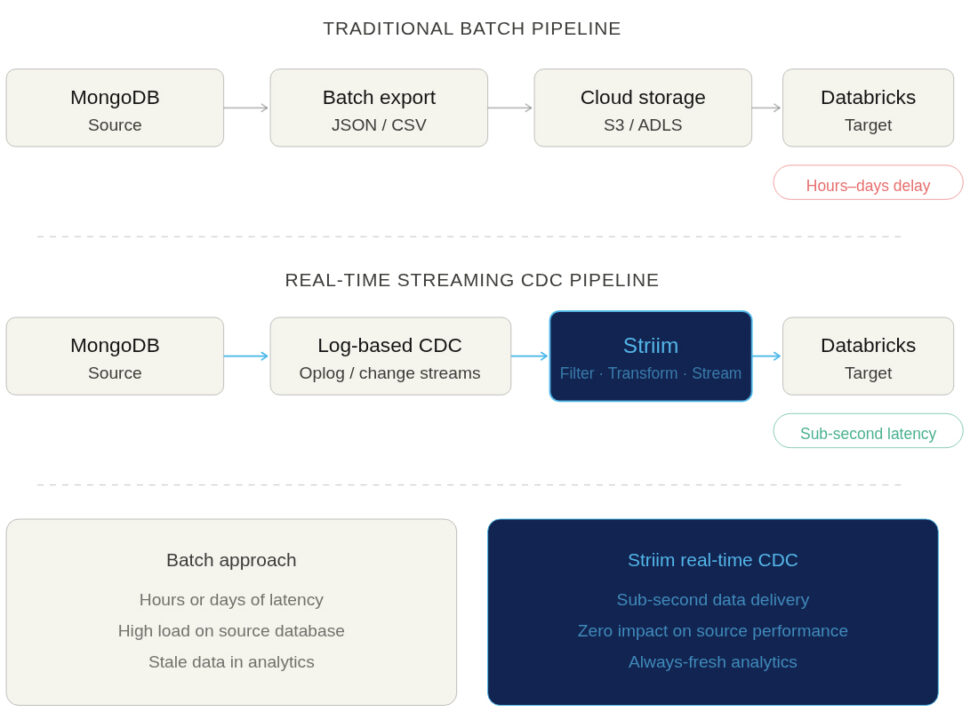
  • The Cons: Batched jobs are notoriously slow. By the time your data lands in Databricks, it is already stale. Furthermore, running massive query exports puts heavy, periodic strain on your MongoDB operational database.

It’s worth noting that Databricks Auto Loader can partially ease the pain of file-based ingestion by automatically detecting new files and handling schema evolution as the files arrive. However, Auto Loader can only process files after they are exported; your data freshness remains entirely bound by your batch schedule.

Native Spark/MongoDB Connectors

For teams already heavily invested in the Databricks ecosystem, a common approach is to use the official MongoDB Spark Connector. This allows a Databricks cluster to connect directly to your MongoDB instance and read collections straight into Spark DataFrames.

  • The Pros: It provides direct access to the source data and natively handles MongoDB’s semi-structured BSON/JSON formats.
  • The Cons: This method is not optimized for continuous, real-time updates. Polling a live database for changes requires running frequent, heavy Spark jobs. Worse, aggressive polling can directly degrade the performance of your production MongoDB cluster, leading to slow application response times for your end users.
  • The Verdict: It requires careful cluster tuning and significant maintenance overhead to manage incremental loads effectively at scale.

Streaming Approaches and Change Data Capture (CDC)

If your goal is to power real-time AI, ML, or operational analytics, Change Data Capture (CDC) is the gold standard. Instead of querying the database for data, CDC methods passively tap into MongoDB’s oplog (operations log) or change streams. They capture every insert, update, and delete exactly as it happens and stream those events continuously into Databricks.

  • Why it matters for AI/ML: Predictive models and real-time dashboards degrade rapidly if their underlying data isn’t fresh. Streaming CDC ensures that Databricks always reflects the exact, current state of your operational applications.
  • The Complexity Warning: While the architectural concept is elegant, building a CDC pipeline yourself is incredibly complex. Not all CDC tools or open-source frameworks gracefully handle MongoDB’s schema drift, maintain strict event ordering, or execute the necessary retries if a network failure occurs. Doing this reliably requires enterprise-grade stream processing.

Challenges of Integrating MongoDB with Databricks

Connecting an operational NoSQL database to an analytical Lakehouse represents a paradigm shift in how data is structured and processed. While pulling a small, one-off snapshot might seem trivial, the underlying challenges are severely magnified when you scale up to millions of daily events.

Before building your pipeline, your data engineering team must be prepared to tackle the following hurdles.

Latency and Stale Data in Batch Pipelines

The most immediate challenge is the inherent delay in traditional ETL. Delays between a MongoDB update and its visibility in Databricks actively undermine the effectiveness of your downstream analytics and ML workloads. If an e-commerce platform relies on a nightly batch load to update its recommendation engine, the model will suggest products based on yesterday’s browsing session—completely missing the user’s current intent. For high-stakes use cases like fraud detection, a multi-hour delay renders the data practically useless.

Handling Schema Drift and Complex JSON Structures

MongoDB’s greatest strength for developers—its flexible, schema-less document model—is often a data engineer’s biggest headache. Applications can add new fields, change data types, or deeply nest JSON arrays at will, without ever running a database migration. However, when landing this data into Databricks, you are moving it into structured Delta tables. If your integration pipeline cannot automatically adapt to evolving document structures (schema drift), your downstream pipelines will break, requiring manual intervention and causing significant downtime.

Ensuring Data Consistency and Integrity at Scale

Moving data from Point A to Point B is easy. Moving it exactly once, in the correct order, while processing thousands of transactions per second, is incredibly difficult. Network partitions, brief database outages, or cluster restarts are inevitable in distributed systems. If your pipeline cannot guarantee exactly-once processing (E1P), you risk creating duplicate events or missing critical updates entirely. In financial reporting or inventory management, a single dropped or duplicated event can break the integrity of the entire dataset.

Managing Infrastructure and Operational Overhead

Many teams attempt to solve the streaming challenge by stitching together open-source tools, for example, deploying Debezium for CDC, Apache Kafka for the message broker, and Spark Structured Streaming to land the data. The operational overhead of this DIY approach is massive. Data engineers end up spending their cycles maintaining connectors, scaling clusters, and troubleshooting complex failures rather than building valuable data products.

Challenge Area

The Operational Reality

Connector Maintenance Open-source connectors frequently break when MongoDB or Databricks release version updates.
Cluster Scaling Managing Kafka and Spark clusters requires dedicated DevOps resources to monitor memory, CPU, and partition rebalancing.
Observability Tracking exactly where an event failed (was it in the CDC layer, the broker, or the writer?) requires building custom monitoring dashboards.
Error Recovery Restarting a failed streaming job without duplicating data requires complex checkpointing mechanisms that are notoriously hard to configure.

Best Practices for Powering Databricks with Live MongoDB Data

Building a resilient, real-time pipeline between MongoDB and Databricks is entirely achievable. However, the most successful enterprise teams don’t reinvent the wheel; they rely on architectural lessons from the trenches.

While you can technically build these best practices into a custom pipeline, doing so requires significant engineering effort. That is why leading organizations turn to enterprise-grade platforms like Striim to bake these capabilities directly into their infrastructure.

Here are some best practices to ensure a production-ready integration.

Start With An Initial Snapshot, Then Stream Changes

To build an accurate analytical model in Databricks, you cannot just start streaming today’s changes; you need the historical baseline. The best practice is to perform an initial full load (a snapshot) of your MongoDB collections, and then seamlessly transition into capturing continuous changes (CDC).

Coordinating this manually is difficult. If you start CDC too early, you create duplicates; if you start it too late, you miss events. Platforms like Striim automate this end-to-end. Striim handles the initial snapshot and automatically switches to CDC exactly where the snapshot left off, ensuring your Databricks environment has a complete, gap-free, and duplicate-free history.

Transform And Enrich Data In Motion For Databricks Readiness

MongoDB stores data in flexible BSON/JSON documents, but Databricks performs best when querying highly structured, columnar formats like Parquet via Delta tables. Pre-formatting this data before it lands in Databricks reduces your cloud compute costs and drastically simplifies the work for your downstream analytics engineers.

While you can achieve this with custom Spark code running in Databricks, performing transformations mid-flight is much more efficient. Striim offers built-in stream processing (using Streaming SQL), allowing you to filter out PII, flatten nested JSON arrays, and enrich records in real time, so the data lands in Databricks perfectly structured and ready for immediate querying.

Monitor Pipelines For Latency, Lag, And Data Quality

Observability is non-negotiable. When you are feeding live data to an AI agent or a fraud detection model, you must know immediately if the pipeline lags or if data quality drops. Data teams need comprehensive dashboards and alerting to ensure their pipelines are keeping up with business SLAs.

Building this level of monitoring from scratch across multiple open-source tools is a heavy lift. Striim provides end-to-end visibility out of the box. Data teams can monitor throughput, quickly detect lag, identify schema drift, and catch pipeline failures before they impact downstream analytics.

Optimize Delta Table Writes To Avoid Small-File Issues

One of the biggest pitfalls of streaming data into a lakehouse is the “small file problem.” If you write every single MongoDB change to Databricks as an individual file, it will severely degrade query performance and bloat your storage metadata.

To ensure optimal performance, take a strategic approach to batching and partitioning your writes into Databricks. These optimizations are incredibly complex to tune manually in DIY pipelines. Striim handles write optimization automatically, smartly batching micro-transactions into efficiently sized Parquet files for Delta Lake, helping your team avoid costly performance bottlenecks without lifting a finger.

Simplify MongoDB to Databricks Integration with Striim

Striim is the critical bridge between MongoDB’s rich operational data and the Databricks Lakehouse. It ensures that your analytics and AI/ML workloads run on live, trusted, and production-ready data, rather than stale batch exports.

While DIY methods and native connectors exist, they often force you to choose between data freshness, cluster performance, and engineering overhead. Striim uniquely combines real-time Change Data Capture (CDC), in-flight transformation, and enterprise reliability into a single, unified platform. Built to handle massive scale—processing over 100 billion events daily for leading enterprises—Striim turns complex streaming architecture into a seamless, managed experience.

With Striim, data teams can leverage:

  • Real-time Change Data Capture (CDC): Passively read from MongoDB oplogs or change streams with zero impact on source database performance.
  • Built-in Stream Processing: Use SQL to filter, enrich, and format data (e.g., flattening complex JSON to Parquet) before it ever lands in Databricks.
  • Exactly-Once Processing (E1P): Guarantee data consistency in Databricks without duplicates or dropped records.
  • Automated Snapshot + CDC: Execute a seamless full historical load that instantly transitions into continuous replication.
  • End-to-End Observability: Out-of-the-box dashboards to monitor throughput, latency, and pipeline health.
  • Fault Tolerance: Automated checkpointing allows your pipelines to recover seamlessly from network failures.
  • Secure Connectivity: Safely integrate both MongoDB Atlas and self-hosted/on-prem deployments.
  • Optimized Delta Lake Writes: Automatically batch and partition writes to Databricks to ensure maximum query performance and scalable storage.

Ready to stop managing pipelines and start building AI? Try Striim for free or book a demo with our engineering team today.

FAQs

What is the best way to keep MongoDB data in sync with Databricks in real time?

The most effective method is log-based Change Data Capture (CDC). Instead of running heavy batch queries that degrade database performance, CDC passively reads MongoDB’s oplog or change streams. This allows platforms like Striim to capture inserts, updates, and deletes continuously, syncing them to Databricks with sub-second latency.

How do you handle schema drift when moving data from MongoDB to Databricks?

MongoDB’s flexible document model means fields can change without warning, which often breaks structured Databricks Delta tables. To handle this, your pipeline must detect changes in motion. Enterprise streaming platforms automatically identify schema drift mid-flight and elegantly evolve the target Delta table schema without requiring pipeline downtime or manual engineering intervention.

Why is streaming integration better than batch exports for AI and machine learning use cases?

AI and ML models rely on fresh context to make accurate predictions. If an e-commerce dynamic pricing model is fed via a nightly batch export, it will price items based on yesterday’s demand, losing revenue. Streaming integration ensures that Databricks Feature Stores are updated in milliseconds, allowing models to infer intent and execute decisions based on what a user is doing right now.

How do I choose between native connectors and third-party platforms for MongoDB to Databricks integration?

Native Spark connectors are useful for occasional, developer-led ad-hoc queries or small batch loads. However, if you poll them frequently for real-time updates, you risk severely straining your MongoDB cluster. Third-party CDC platforms like Striim are purpose-built for continuous, low-impact streaming at enterprise scale, offering built-in observability and automated recovery that native connectors lack.

Can Striim integrate both MongoDB Atlas and on-prem MongoDB with Databricks?

Yes. Striim provides secure, native connectivity for both fully managed MongoDB Atlas environments and self-hosted or on-premises MongoDB deployments. This ensures that no matter where your operational data lives, it can be securely unified into your Databricks Lakehouse without creating infrastructure silos.

What are the costs and ROI benefits of using a platform like Striim for MongoDB to Databricks pipelines?

Striim dramatically reduces compute overhead by eliminating heavy batch polling on MongoDB and optimizing writes to avoid Databricks SQL warehouse spikes. The true ROI, however, comes from engineering velocity. By eliminating the need to build, maintain, and troubleshoot complex Kafka/Spark streaming architectures, data engineers can refocus their time on building revenue-generating AI products.

How do you ensure data quality when streaming from MongoDB to Databricks?

Data quality must be enforced before the data lands in your lakehouse. Using in-flight transformations, you can validate data types, filter out malformed events, and mask PII in real time. Furthermore, utilizing a platform that guarantees exactly-once processing (E1P) ensures that network hiccups don’t result in duplicated or dropped records in Databricks.

Can MongoDB to Databricks pipelines support both historical and real-time data?

Yes, a production-grade pipeline should handle both seamlessly. The best practice is to execute an automated snapshot (a full load of historical MongoDB data) and then immediately transition into continuous CDC. Striim automates this hand-off, ensuring Databricks starts with a complete baseline and stays perfectly synchronized moving forward.

What security considerations are important when integrating MongoDB and Databricks?

When moving operational data, protecting Personally Identifiable Information (PII) is paramount. Data should never be exposed in transit. Using stream processing, teams can detect and redact sensitive customer fields (like credit card numbers or SSNs) mid-flight, ensuring that your Databricks environment remains compliant with HIPAA, PCI, and GDPR regulations.

How does Striim compare to DIY pipelines built with Spark or Kafka for MongoDB to Databricks integration?

Building a DIY pipeline requires stitching together and maintaining multiple distributed systems (e.g., Debezium, Kafka, ZooKeeper, and Spark). This creates a fragile architecture that is difficult to monitor and scale. Striim replaces this complexity with a single, fully managed platform that offers sub-second latency, drag-and-drop transformations, and out-of-the-box observability—drastically lowering total cost of ownership.

Change Data Capture MongoDB: How It Works, Challenges & Tools

Developers love MongoDB for its speed and flexibility. But getting that fast-moving data out of MongoDB and into your data warehouse or analytics platform in real time is no mean feat.

Teams used to rely on batch ETL pipelines or constant database polling to sync their NoSQL data with downstream systems. But batch-based data ingestion can no longer keep pace with modern business demands. And each time you poll a database for changes, you burn valuable compute resources and degrade the performance of the very applications your customers rely on.

The solution is Change Data Capture (CDC). By capturing data changes the instant they occur, CDC eliminates the need for batch windows. But CDC in a NoSQL environment comes with its own unique set of rules.

In this guide, we’ll break down exactly how CDC works in MongoDB. We’ll explore the underlying mechanics—from the oplog to native Change Streams—and weigh the pros and cons of common implementation methods. We’ll also unpack the hidden challenges of schema evolution and system performance at scale, showing why the most effective approach treats CDC not just as a simple log reader, but as the foundation of modern, real-time data architecture.

What is Change Data Capture (CDC) in MongoDB?

Change Data Capture (CDC) is the process of identifying and capturing changes made to a database—specifically inserts, updates, and deletes—and instantly streaming those changes to downstream systems like data warehouses, data lakes, or event buses.

MongoDB is a NoSQL, document-oriented database designed for flexibility and horizontal scalability. Because it stores data in JSON-like documents rather than rigid tables, developers frequently use it to power fast-changing, high-velocity applications. However, this same unstructured flexibility makes syncing that raw data to structured downstream targets a complex task.

To facilitate real-time syncing, MongoDB relies on its Change Streams API. Change Streams provide a seamless, secure way to tap directly into the database’s internal operations log (the oplog). Instead of writing heavy, resource-intensive queries to periodically ask the database what changed, Change Streams allow your data pipelines to subscribe to the database’s activity. As soon as a document is inserted, updated, or deleted, the change is pushed out as a real-time event, providing the exact incremental data you need to power downstream analytics and event-driven architectures.

Why Do Teams Use CDC with MongoDB?

Batch ETL forces your analytics to constantly play catch-up, while continuous database polling degrades your primary database by stealing compute from customer-facing applications.

CDC solves both of these problems simultaneously. By capturing only the incremental changes (the exact inserts, updates, and deletes) directly from the database’s log, CDC avoids the performance overhead of polling and the massive data payloads of batch extraction.

When implemented correctly, streaming MongoDB CDC unlocks several key advantages:

  • Real-time data synchronization: Keep downstream systems—like Snowflake, BigQuery, or ADLS Gen2—perfectly mirrored with your operational MongoDB database, ensuring dashboards and reports always reflect the current state of the business.
  • Zero-impact performance: Because CDC reads from the oplog or Change Streams rather than querying the tables directly, it doesn’t compete with your application for database resources.
  • Support for event-driven architectures: CDC turns static database commits into actionable, real-time events. You can stream these changes to message brokers like Apache Kafka to trigger microservices, alerts, or automated workflows the second a customer updates their profile or places an order.
  • Improved pipeline efficiency and scalability: Moving kilobytes of changed data as it happens is vastly more efficient and cost-effective than moving gigabytes of data in nightly batch dumps.
  • AI and advanced analytics readiness: Fresh, accurate context is the prerequisite for reliable predictive models and Retrieval-Augmented Generation (RAG) applications. CDC ensures your AI systems are grounded in up-to-the-second reality.

While the benefits are clear, building robust CDC pipelines for MongoDB isn’t as simple as flipping a switch. Because MongoDB uses a flexible, dynamic schema, a single collection can contain documents with wildly different structures. Capturing those changes is only step one; transforming and flattening that nested, unstructured JSON into a format that a rigid, relational data warehouse can actually use introduces a level of complexity that traditional CDC tools often fail to handle.

We will explore these specific challenges—and how to overcome them—later in this guide. First, let’s look at the mechanics of how MongoDB actually captures these changes under the hood.

How MongoDB Implements Change Data Capture

To build resilient CDC infrastructure, you need to understand how MongoDB actually tracks and publishes data changes. Understanding the underlying architecture will help you make informed decisions about whether to build a custom solution, use open-source connectors, or adopt an enterprise platform like Striim.

MongoDB oplog vs. Change Streams

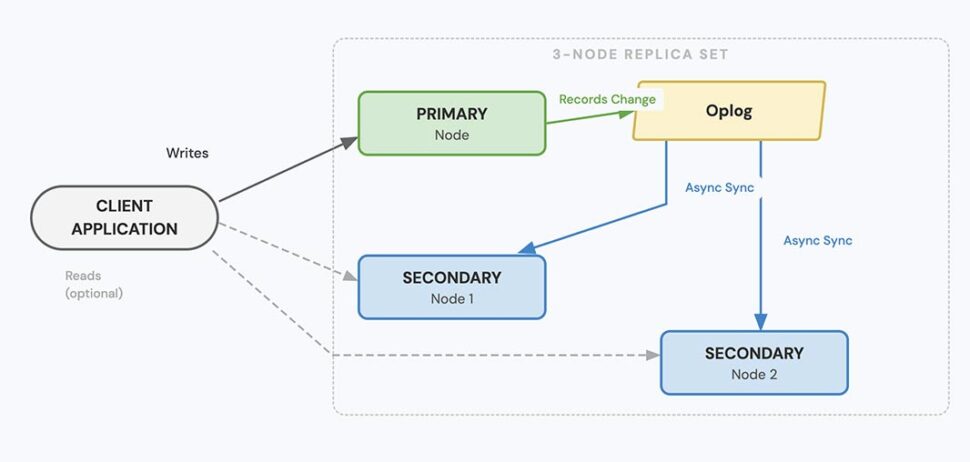
In MongoDB, CDC revolves around the oplog (operations log). The oplog is a special capped collection that keeps a rolling record of all operations that modify the data stored in your databases.

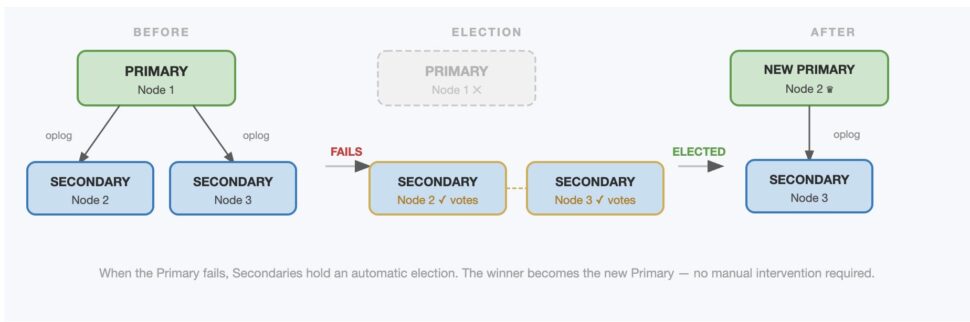
Historically, developers achieved CDC by directly “tailing” the oplog: writing scripts to constantly read this raw log. However, oplog tailing is notoriously brittle. It requires high-level administrative database privileges, exposes raw and sometimes cryptic internal formats, and breaks easily if there are elections or topology changes in the database cluster.

To solve this, MongoDB introduced Change Streams in version 3.6. Change Streams sit on top of the oplog. They act as a secure, user-friendly API that abstracts away the complexity of raw oplog tailing.

  • Oplog Tailing (Deprecated for most use cases): Requires full admin access, difficult to parse, doesn’t handle database elections well, and applies globally to the whole cluster.
  • Change Streams (Recommended): Uses standard Role-Based Access Control (RBAC), outputs clean and formatted JSON documents, gracefully handles cluster node elections, and can be scoped to a specific collection, database, or the entire deployment.

Key Components of Change Streams

When you subscribe to a Change Stream, MongoDB pushes out event documents. To manage this flow reliably, there are a few key concepts you must account for:

  • Event Types: Every change is categorized. The most common operations are insert, update, delete, and replace. The event document contains the payload (the data itself) as well as metadata about the operation.
  • Resume Tokens: This is the most critical component for fault tolerance. Every Change Stream event includes a unique _id known as a resume token. If your downstream consumer crashes or disconnects, it can present the last known resume token to MongoDB upon reconnection. MongoDB will automatically resume the stream from that exact point, ensuring exactly-once processing and zero data loss.
  • Filtering and Aggregation: Change Streams aren’t just firehoses. You can pass a MongoDB aggregation pipeline into the stream configuration to filter events before they ever leave the database. For example, you can configure the stream to only capture update events where a specific field (like order_status) is changed.

Requirements and Limitations

While Change Streams are powerful, they are not universally available or infinitely scalable. There are strict architectural requirements you must be aware of:

  • Topology Requirements: Change Streams only work on MongoDB Replica Sets or Sharded Clusters. Because they rely on the oplog (which is used for replication), they are completely unavailable on standalone MongoDB instances.
  • Oplog Sizing and Data Retention: The oplog is a “capped collection,” meaning it has a fixed maximum size. Once it fills up, it overwrites the oldest entries. If your CDC consumer goes offline for longer than your oplog’s retention window, the resume token will become invalid. You will lose the stream history and be forced to perform a massive, resource-intensive initial snapshot of the entire database to catch up.
  • Performance Impact: Change Streams execute on the database nodes themselves. Opening too many concurrent streams, or applying overly complex aggregation filters to those streams, will consume memory and CPU, potentially impacting the performance of your primary transactional workloads.

Understanding these mechanics makes one thing clear: capturing the data is only the beginning. Next, we’ll look at the different methods for actually moving that captured data into your target destinations.

Methods for Implementing CDC with MongoDB

When it comes to actually building pipelines to move CDC data out of MongoDB, you have several options. Each approach carries different trade-offs regarding architectural complexity, scalability, and how well it handles data transformation.

Native MongoDB Change Streams (Custom Code)

The most direct method is to write custom applications (using Node.js, Python, Java, etc.) that connect directly to the MongoDB Change Streams API.

  • The Pros: It’s highly customizable and requires no additional middleware. This is often the best choice for lightweight microservices—for example, a small app that listens for a new user registration and sends a welcome email.
  • The Limitations: You are entirely responsible for the infrastructure. Your developers must write the logic to store resume tokens safely, handle failure states, manage retries, and parse dynamic schema changes. If the application crashes and loses its resume token, you risk permanent data loss.

Kafka Connect MongoDB Source/Sink Connectors

For teams already invested in Apache Kafka, using the official MongoDB Kafka Connectors is a common approach. This method acts as a bridge, publishing Change Stream events directly into Kafka topics.

  • The Pros: Kafka provides excellent decoupling, fault tolerance, and buffering. If your downstream data warehouse goes offline, Kafka will hold the MongoDB events until the target system is ready to consume them again.
  • The Limitations: Kafka Connect introduces significant operational complexity. You have to manage Connect clusters, handle brittle JSON-to-Avro mappings, and deal with schema registries. Furthermore, Kafka Connect is primarily for routing. If you need to flatten nested MongoDB documents or mask sensitive PII before it lands in a data warehouse, you will have to stand up and maintain an entirely separate stream processing layer (like ksqlDB or Flink) or write custom Single Message Transforms (SMTs).

Third-Party Enterprise Platforms (Striim)

For high-volume, enterprise-grade pipelines, relying on custom code or piecing together open-source middleware often becomes an operational bottleneck. This is where platforms like Striim come in.

  • The Pros: Striim is a unified data integration and intelligence platform that connects directly to MongoDB (and MongoDB Atlas) out of the box. Unlike basic connectors, Striim allows you to perform in-flight transformations using a low-code UI or Streaming SQL. You can flatten nested JSON, filter records, enrich data, and mask PII before the data ever lands in your cloud data warehouse.
  • The Limitations: It introduces a new platform into your stack. However, because Striim is fully managed and multi-cloud native, it generally replaces multiple disparate tools (extractors, message buses, and transformation engines), ultimately reducing overall architectural complexity.

How to Choose the Right Approach

Choosing the right tool comes down to your primary use case. Use this simple framework to evaluate your needs:

  1. Complexity and Latency: Are you building a simple, single-purpose application trigger? Custom code via the native API might suffice.
  2. Existing Infrastructure: Do you have a dedicated engineering team already managing a massive, enterprise-wide Kafka deployment? Kafka Connect is a logical extension.
  3. Transformation, Scale, and Analytics: Do you need fault-tolerant, scalable pipelines that can seamlessly transform unstructured NoSQL data and deliver it securely to Snowflake, BigQuery, or ADLS Gen2 in sub-second latency? An enterprise platform like Striim is the clear choice.

Streaming MongoDB CDC Data: Key Destinations and Architecture Patterns

Capturing changes from MongoDB is only half the battle. Streaming CDC data isn’t useful unless it reliably reaches the systems where it actually drives business value. Depending on your goals—whether that’s powering BI dashboards, archiving raw events, or triggering automated workflows—the architectural pattern you choose matters.

Here is a look at the most common destinations for MongoDB CDC data and how modern teams are architecting those pipelines.

Data Warehouses (Snowflake, BigQuery, Redshift)

The most common use case for MongoDB CDC is feeding structured analytics platforms. Operational data from your application needs to be joined with marketing, sales, or financial data to generate comprehensive KPIs and executive dashboards.

The core challenge here is a structural mismatch. MongoDB outputs nested, schema-less JSON documents. Cloud data warehouses require rigid, tabular rows and columns.

The Striim Advantage: Instead of dumping raw JSON into a warehouse staging table and running heavy post-processing batch jobs (ELT), Striim allows you to perform in-flight transformation. You can seamlessly parse, flatten, and type-cast complex MongoDB arrays into SQL-friendly formats while the data is still in motion, delivering query-ready data directly to your warehouse with zero delay.

Data Lakes and Cloud Storage (ADLS Gen2, Amazon S3, GCS)

For organizations building a lakehouse architecture, or those that simply need a cost-effective way to archive raw historical data for machine learning model training, cloud object storage is the ideal target.

When streaming CDC to a data lake, the format you write the data in drastically impacts both your cloud storage costs and downstream query performance.

The Striim Advantage: Striim integrates natively with cloud object storage like Azure Data Lake Storage (ADLS) Gen2. More importantly, Striim can automatically convert your incoming MongoDB JSON streams into highly optimized, columnar formats like

Apache Parquet before writing them to the lake. This ensures your data is immediately partitioned, compressed, and ready for efficient querying by tools like Databricks or Azure Synapse.

Event-Driven Architectures (Apache Kafka, Event Hubs)

Many engineering teams don’t just want to analyze MongoDB data—they want to react to it. By streaming CDC events to a message broker or event bus, you can trigger downstream microservices. For example, a new document inserted into an orders collection in MongoDB can instantly trigger an inventory update service and a shipping notification service.

The Striim Advantage: Striim provides native integration with Kafka, Confluent, and Azure Event Hubs, allowing you to stream MongoDB changes to event buses without writing brittle glue code. Furthermore, Striim allows you to enrich the event data (e.g., joining the MongoDB order event with customer data from a separate SQL Server database) before publishing it to the topic, ensuring downstream consumers have the full context they need to act.

Real-Time Analytics Platforms and Dashboards

In use cases like fraud detection, dynamic pricing, or live operational dashboards, every millisecond counts. Data cannot wait in a queue or sit in a staging layer. It needs to flow from the application directly into an in-memory analytics engine or operational datastore. The Striim Advantage: Striim is engineered for high-velocity, sub-second latency. By processing, validating, and moving data entirely in-memory, Striim ensures that critical operational dashboards reflect the exact state of your MongoDB database in real time. There is no manual stitching required—just continuous, reliable intelligence delivered exactly when it is needed.

Common Challenges with MongoDB CDC (and How to Overcome Them)

While MongoDB CDC is powerful, rolling it out in a production environment is rarely straightforward. At enterprise scale, capturing the data is only a fraction of the battle. Transforming it, ensuring zero data loss, and keeping pipelines stable as the business changes are where most initiatives stall out. Here are the most common challenges teams face when implementing MongoDB CDC, along with practical strategies for overcoming them.

Schema Evolution in NoSQL Environments

MongoDB’s dynamic schema is a double-edged sword. It grants developers incredible agility, they can add new fields or change data types on the fly without running heavy database migrations. However, this creates chaos downstream. When a fast-moving engineering team pushes a new nested JSON array to production, downstream data warehouses expecting a flat, rigid table will instantly break, causing pipelines to fail and dashboards to go dark.

How to Overcome It: Build “defensive” CDC pipelines. First, define optional schemas for your target systems to accommodate structural shifts. Second, implement strict data validation steps within your CDC stream to catch and log schema drift before it corrupts your warehouse. While doing this manually requires constant maintenance, modern platforms like Striim offer automated schema tracking and in-flight transformation capabilities. Striim can detect a schema change in MongoDB, automatically adapt the payload, and even alter the downstream target table dynamically, keeping your data flowing without engineering intervention.

Handling Reordering, Retries, and Idempotency

In any distributed system, network hiccups happen every so often. A CDC consumer might crash, a target warehouse might temporarily refuse connections, or packets might arrive out of order. If your CDC pipeline simply retries a failed batch of insert events without context, you risk duplicating data and ruining the accuracy of your analytics.

How to Overcome It: Whether you are building a custom solution, using open-source tools, or leveraging an enterprise platform, design your downstream consumers to be idempotent. An idempotent system ensures that applying the same CDC event multiple times yields the same result as applying it once. Rely heavily on MongoDB’s resume tokens to maintain exact checkpoints, and test your replay logic early and often to guarantee exactly-once processing (E1P) during system failures.

Performance Impact and Scaling Considerations

Change Streams are highly efficient, but they still execute on your database nodes. If you configure poorly optimized filters, open dozens of concurrent streams, or subject the database to massive volumes of small, rapid-fire writes, you can severely impact your MongoDB replica performance. Consequently, your CDC consumer’s throughput will tank, introducing unacceptable latency into your “real-time” pipelines.

How to Overcome It: Monitor your replication lag closely. Set highly specific aggregation filters on your Change Streams so the database only publishes the exact events you need, dropping irrelevant noise before it hits the network. Furthermore, always load-test your pipelines with production-like data volumes. To avoid overloading MongoDB, many organizations use an enterprise CDC platform optimized for high-throughput routing. These platforms can ingest a single, consolidated stream from MongoDB, buffer it in-memory, and securely fan it out to multiple destinations in parallel without adding additional load to the source database.

Managing Snapshots and Initial Sync

By definition, CDC only captures changes from the moment you turn it on. If you spin up a new Change Stream today, it has no memory of the millions of documents inserted yesterday. To ensure your downstream systems have a complete, accurate dataset, you first have to perform a massive historical load (a snapshot), and then flawlessly cut over to the real-time stream without missing a single event or creating duplicates in the gap.

How to Overcome It: If you are building this manually, you must plan a staged migration. You will need to sync the historical data, record the exact oplog position or resume token at the start of that sync, and then initiate your CDC stream from that precise marker once the snapshot completes. Doing this with custom scripts is highly error-prone. The best practice is to use a tool that supports snapshotting and CDC within a single, unified pipeline. Platforms like Striim handle the initial historical extract and seamlessly transition into real-time CDC automatically, guaranteeing data consistency without requiring a manual, middle-of-the-night cutover.

Simplify MongoDB CDC with Striim

MongoDB Change Streams provide an excellent, raw mechanism for accessing real-time data changes. But as we’ve seen, raw access isn’t enough to power a modern enterprise architecture. Native APIs and open-source connectors don’t solve the hard problems: parsing nested JSON, handling dynamic schema evolution, delivering exactly-once processing, or providing multi-cloud enterprise observability.

That is where Striim excels.

Striim is not just a connector; it is a unified data integration and intelligence platform purpose-built to turn raw data streams into decision-ready assets. When you use Striim for MongoDB CDC, you eliminate the operational burden of DIY pipelines and gain:

  • Native support for MongoDB and MongoDB Atlas: Connect securely and reliably with out-of-the-box integrations.
  • Real-time, in-flight transformations: Flatten complex JSON arrays, enrich events, and mask sensitive data before it lands in your warehouse, reducing latency from hours to milliseconds.
  • Schema evolution and replay support: Automatically handle upstream schema drift and rely on enterprise-grade exactly-once processing (E1P) to guarantee zero data loss.
  • Low-code UI and enterprise observability: Build, monitor, and scale your streaming pipelines visually, without managing complex distributed infrastructure.
  • Destination flexibility: Seamlessly route your MongoDB data to Snowflake, Google BigQuery, ADLS Gen2, Apache Kafka, and more (or even write back to another MongoDB cluster)—simultaneously and with sub-second latency.

Stop wrestling with brittle batch pipelines and complex open-source middleware. Bring your data architecture into the real-time era. Get started with Striim for free or book a demo today. to see how Striim makes MongoDB CDC simple, scalable, and secure.

Data Replication for SQL Server: Native Tools vs. Real-Time CDC

SQL Server has long been the reliable workhorse of enterprise IT. It stores the mission-critical data that keeps your business running. But in an era where data must be instantly available across cloud platforms, analytics engines, and AI models, it’s no longer strategically optimal to keep that data locked in a single database.

That’s where data replication comes in.

When you need to migrate workloads to the cloud, offload heavy reporting queries, or ensure high availability during an outage, replication is the engine that makes it happen. As data volumes scale and the architecture grows more complex, how you replicate matters just as much as why.

If you’re navigating the complexities of data replication for SQL Server, you’re likely facing a practical set of challenges: which native replication method should you use? How do you avoid crippling performance bottlenecks? And how do you reliably move SQL Server data to modern cloud platforms without taking your systems offline? In this guide, we’ll break down exactly how SQL Server replication works, explore the limitations of its native tools, and show you why modern, log-based Change Data Capture (CDC) is the fastest, safest path to modern database replication.

Key Takeaways

  • Replication is an enterprise enabler: SQL Server data replication underpins business continuity, advanced analytics, and cloud modernization strategies.
  • Native tools have trade-offs: SQL Server offers four built-in replication types (Snapshot, Transactional, Merge, and Peer-to-Peer), each with unique strengths and inherent limitations.
  • Scale breaks native approaches: Native replication introduces challenges—like latency, schema changes, limited cloud support, and complex monitoring—that compound at enterprise scale.
  • CDC is the modern standard for data replication: Log-based Change Data Capture (CDC) enables real-time, cloud-ready replication with far less overhead than traditional native methods.
  • Best practices mitigate risk: Success requires aligning your replication strategy with business outcomes, proactively monitoring pipeline health, securing endpoints, and planning migrations to minimize downtime.
  • Striim bridges the gap: Modern platforms like Striim extend replication beyond SQL Server’s native limits. With real-time CDC, diverse cloud-native targets, built-in monitoring, and enterprise-grade security, Striim reduces total cost of ownership (TCO) and accelerates modernization.

What Is Data Replication in SQL Server?

Data replication in SQL Server is the process of copying and distributing data and database objects from one database to another, and then synchronizing them to maintain consistency.

But when data leaders talk about “data replication for SQL Server,” they aren’t just talking about Microsoft’s built-in features. Today, the term encompasses both native SQL Server Replication and modern, third-party approaches like log-based Change Data Capture (CDC) streaming.

Whether you’re relying on the native tools out of the box or upgrading to a modern streaming platform, the underlying goal is the same. To move data securely and accurately where it needs to go to support high availability, operational performance, and advanced analytics.

How Data Replication Works for SQL Server

To appreciate why many enterprises are eventually forced to move toward modern CDC platforms, you first need a baseline understanding of how native SQL Server replication operates under the hood.

Native replication is built around a publishing industry metaphor: Publishers, Distributors, and Subscribers.

Here’s how the native workflow looks, broken down step-by-step:

Step 1: Define the Publisher and Articles to Replicate

The Publisher is your source database. You don’t have to replicate the entire database; instead, you start by defining “Articles”, i.e. the specific tables, views, or stored procedures you want to share. Grouping these articles together creates a “Publication.”

Step 2: Configure the Distributor to Manage Replication

The Distributor is the middleman. It stores the distribution database, which holds metadata, history data, and (in transactional replication) the actual transactions waiting to be moved. It acts as the routing engine, taking the load off the Publisher.

Step 3: Set up Subscribers to Receive Data

Subscribers are your destination databases. A Subscriber requests or receives the Publication from the Distributor. You can have multiple Subscribers receiving the same data, and they can be located on the same server or across the globe.

Step 4: Run Replication Agents to Move and Apply Changes

SQL Server relies on dedicated background programs called Replication Agents to do the heavy lifting. The Snapshot Agent creates the initial baseline of your data, the Log Reader Agent scans the transaction log for new changes, and the Distribution Agent moves those changes to the Subscribers.

Step 5: Monitor Replication Status and Performance

Once running, Database Administrators (DBAs) must continuously monitor the health of these agents. This involves tracking latency, checking for failed transactions, and ensuring the Distributor doesn’t become a bottleneck as transaction volumes spike.

Types of SQL Server Replication

SQL Server offers four primary native replication models, and choosing the right one is critical to the health of your infrastructure. Pick the wrong method, and you’ll quickly introduce crippling latency, data conflicts, or massive operational overhead.

Here is a breakdown of the four native types:

Type

How it works

Pros

Cons

Ideal scenarios

Notes/limits

Snapshot Copies the entire dataset at a specific moment in time. Simple to configure; no continuous overhead. Resource-intensive; data is instantly stale; high network cost. Small databases; read-only reporting; baseline syncing. Rarely used for continuous enterprise replication.
Transactional Reads the transaction log and streams inserts, updates, and deletes. Lower latency; highly consistent; supports high volumes. Schema changes can break pipelines; large transactions cause bottlenecks. Offloading read-heavy queries; populating data warehouses. The workhorse of native SQL Server replication.
 Merge Allows changes at both Publisher and Subscriber, merging them later. Supports offline work; allows multi-directional updates. High CPU usage; complex conflict resolution rules. Point-of-sale (POS) systems; mobile applications. Relies heavily on database triggers, increasing overhead.
Peer-to-Peer Multi-node transactional replication where all nodes read and write. Excellent high availability; scales read/write workloads globally. Extremely complex to manage; strict identical schema requirements. Distributed web applications requiring global read/write access. Requires SQL Server Enterprise Edition.

Snapshot Replication You can think of snapshot replication like taking a photograph of your database. It copies the entire dataset—schema and data—and drops it onto the Subscriber. It is straightforward, but it is heavy. Because it moves the whole dataset every time, it’s typically only used for very small databases, or as the initial step to seed a database before turning on another, more dynamic replication method.

Transactional Replication

This is the most common native approach. Instead of copying everything over and over, the Log Reader Agent scans the SQL Server transaction log and continuously moves individual inserts, updates, and deletes to the Subscriber. It’s designed for low-latency environments. However, it requires a pristine network connection, and any structural changes to your tables (DDL changes) can easily break the pipeline and force a painful restart.

Merge Replication

Merge replication allows both the Publisher and the Subscriber to make changes to the data independently. When the systems finally connect, they merge their updates. If two users change the same row, SQL Server uses predefined rules to resolve the conflict. It is highly flexible for offline scenarios—like remote retail stores or mobile apps—but it demands significant CPU resources and constant operational oversight to untangle inevitable data conflicts.

Peer-to-Peer Replication

Built on the foundation of transactional replication, peer-to-peer allows multiple SQL Server nodes to act as both Publishers and Subscribers simultaneously. It is designed to scale out read and write operations globally, offering excellent high availability. But it comes with a steep cost in complexity. Managing conflicts across a multi-node, active-active architecture requires intense DBA attention.

Common Use Cases for Data Replication in SQL Server

Why go through the effort of replicating data in the first place? In an enterprise environment, replication is the engine behind several mission-critical initiatives.

While native SQL Server tools can handle basic SQL-to-SQL setups, many of these use cases eventually push organizations toward modern, log-based CDC streaming platforms—especially when the destination is a cloud environment or a modern analytics engine.

Disaster Recovery and High Availability

When your primary system goes down, your business stops. Every minute of downtime costs revenue and erodes customer trust. Replication ensures that a standby database is always ready to take over. By keeping a secondary replica continuously synchronized, you can failover instantly during an outage, minimizing data loss and keeping mission-critical applications online.

Offload Reporting and Analytics Workloads

Running heavy analytical queries on your production SQL Server is a recipe for disaster. It drains compute resources, slows down operational performance, and frustrates your end-users. Replication solves this by moving operational data to a secondary system or a dedicated data warehouse. While native transactional replication can do this for SQL-to-SQL environments, modern CDC platforms excel here by streaming that data directly into platforms like Snowflake or BigQuery for real-time analytics.

Support Cloud Migration and Hybrid Architectures

Enterprises are rapidly migrating workloads to Azure, AWS, and Google Cloud. However, taking a massive production database offline for an extended migration window is rarely feasible. Replication bridges the gap. By continuously syncing your on-premises SQL Server to your new cloud environment, you can migrate seamlessly and perform a zero-downtime cutover. When you’re dealing with heterogeneous cloud targets, modern streaming platforms are the only viable path forward.

Enable Geo-Replication and Distributed Applications

If your users are in London, but your database is in New York, latency is somewhat inevitable. Replication allows you to distribute data geographically, placing read-replicas closer to the end-users. This drastically improves application response times and ensures a smooth, localized experience for a global user base.

Challenges with Native SQL Server Replication

Native SQL Server replication can work well for basic, homogenous environments. But as enterprise data architectures scale, these built-in tools often lead to significant risks. Here’s where native approaches typically fall short.

Latency and Performance Trade-Offs

In high-transaction environments, the Log Reader and Distribution Agents can quickly become bottlenecks. Wide Area Network (WAN) constraints or high-churn tables often lead to severe lag. DBAs are left constantly measuring “undistributed commands” and troubleshooting end-to-end latency. Furthermore, the cost of over-replication—replicating too many tables or unnecessary columns—severely taxes the source system’s CPU and memory.

Schema Changes and Conflict Resolution

Data structures are rarely static. With native transactional replication, executing Data Definition Language (DDL) changes—like adding a column or modifying a data type—can easily break the replication pipeline. Handling identity columns and strict Primary Key (PK) requirements also introduces friction. In the worst-case scenarios, a schema mismatch forces a complete reinitialization of the database, leading to hours of downtime. For Merge or Peer-to-Peer replication, designing and managing conflict resolution policies demands immense operational overhead.

Limited Hybrid and Cloud Support

Native replication was designed for SQL-to-SQL ecosystems. When you need to move data to heterogeneous targets—like Snowflake, BigQuery, Kafka, or a distinct cloud provider—native tools fall flat. Creating workarounds involves overcoming significant network hurdles, security complexities, and tooling gaps. Modern cloud architectures require platforms built specifically for cross-platform, multi-cloud topologies.

Complexity of Monitoring and Maintenance

Managing native replication requires a heavy administrative lift. Daily and weekly tasks include monitoring agent jobs, triaging cryptic error logs, and making tough calls on whether to reinitialize failing subscriptions. Because there is no unified observability layer, it is difficult to establish and adhere to clear Service Level Objectives (SLOs) around maximum lag or Mean Time to Recovery (MTTR).

Best Practices for SQL Server Data Replication

Whether you are trying to optimize your current native setup or transitioning to a modern streaming architecture, adhering to best practices is essential. These field-tested lessons reduce risk, improve reliability, and support broader modernization strategies.

Define Replication Strategy Based on Business Needs

Technology should always follow business drivers. Start by defining your required outcomes—whether that is high availability, offloading analytics, or executing a cloud migration—before selecting a data replication strategy. To reduce overhead and limit the blast radius of failures, strictly scope your replication down to the necessary tables, columns, and filters.

How Striim helps: Striim simplifies strategic planning by supporting log-based CDC for heterogeneous targets right out of the box. This makes it significantly easier to align your replication setup directly with your modernization and analytics goals, without being constrained by native SQL Server limits.

Monitor and Validate Replication Health

Replication blind spots are dangerous. It’s best to be proactive from the offset: tracking latency, backlog sizes, agent status, and errors. Set up proactive alerting thresholds and regularly validate data parity using row counts or checksums. Crucially, establish a clear incident response plan to reduce MTTR when replication inevitably hits a snag.

How Striim helps: Striim provides built-in dashboards and real-time monitoring capabilities. It gives you a unified view of pipeline health, making it far easier to detect issues early, troubleshoot efficiently, and ensure continuous data flow across SQL Server and your cloud systems.

Secure Replication Endpoints and Credentials

Data in motion is highly vulnerable. Secure your pipelines by enforcing least-privilege access, encrypting data in transit, and securing snapshot folders. Avoid common security pitfalls, like embedding plaintext credentials in agent jobs or deployment scripts. Always rotate secrets regularly and audit access to maintain compliance with mandates like SOX, HIPAA, and GDPR.

How Striim helps: Striim natively integrates with enterprise-grade security controls. With support for TLS encryption, Role-Based Access Control (RBAC), and comprehensive audit logs, Striim drastically reduces your manual security burden and compliance risk compared to piecing together native replication security.

Minimize Downtime During Migrations

When migrating databases, downtime is the enemy. A safe migration strategy involves seeding the target database via a backup and restore process, and then using replication to synchronize the ongoing deltas. Always run dry-run cutovers to test your process, and define strict rollback criteria before touching production. For large, high-churn tables, carefully plan for phased or parallel migrations to minimize impact. How Striim helps: Striim is built for zero-downtime migrations. By leveraging log-based CDC to capture and stream changes in real-time, Striim allows you to move SQL Server workloads to modern cloud targets continuously, ensuring you can modernize your infrastructure without ever disrupting live applications.

What Makes Striim the Data Replication Solution of Choice for SQL Server

Native SQL Server replication often creates pain around latency, schema changes, and cross-platform targets. To truly modernize, you need a platform built for the speed and scale of the cloud.

Striim is the enterprise-ready, log-based CDC platform designed to overcome the limitations of native replication. By unifying real-time data movement, in-flight transformation, and governance, Striim ensures your data gets where it needs to be—accurately, securely, and in sub-second latency.

Here is how Striim specifically solves SQL Server replication challenges (for deeper technical details, refer to our SQL Server documentation):

  • Log-based Change Data Capture (CDC) with minimal latency: Using our Microsoft SQL Server connector, Striim reads directly from the SQL Server transaction log, keeping your production databases unburdened while ensuring real-time data freshness for analytics, reporting, and operational decision-making.
  • Continuous replication to modern cloud platforms: Moving to Azure, AWS, GCP, Snowflake, Kafka, or BigQuery? Striim supports continuous replication to heterogeneous targets, accelerating cloud adoption and enabling multi-cloud strategies without friction.
  • Low-code interface with drag-and-drop pipeline design: Avoid complex scripting. Striim’s intuitive interface shortens project timelines and reduces engineering effort, helping your data teams deliver results in weeks instead of months.
  • Built-in monitoring dashboards and alerts: Stop flying blind. Striim lowers DBA overhead and improves reliability by actively monitoring pipeline health, surfacing errors, and catching latency issues before they impact the business.
  • Enterprise-grade security: Striim reduces compliance risk and ensures your replication meets regulatory standards (like HIPAA, SOX, and GDPR) with native TLS encryption, role-based access control, and comprehensive audit trails.
  • Schema evolution handling: Don’t let a simple DDL change break your pipeline. Striim seamlessly handles schema evolution, simplifying ongoing operations by avoiding painful database re-initializations and minimizing disruption.
  • Zero-downtime cloud migration workflows: Moving massive SQL Server databases to the cloud doesn’t have to require planned outages. Striim supports phased modernization without ever interrupting your live applications or customer experiences.
  • Horizontal scalability: Built to process over 100 billion events daily, Striim ensures your replication infrastructure easily keeps pace as data volumes and business demands grow.

FAQs

What are the biggest challenges with data replication for SQL Server in large enterprises?

The biggest challenges revolve around scale, system performance, and architectural rigidity. Native tools can heavily tax source databases, creating crippling latency during high-transaction periods. Furthermore, native methods struggle with Data Definition Language (DDL) changes, which frequently break pipelines, and lack native support for streaming data to modern, non-Microsoft cloud environments.

How does log-based CDC improve SQL Server replication compared to native methods?

Log-based CDC is drastically more efficient because it reads the database transaction log asynchronously, rather than running resource-heavy queries against the active tables. This prevents performance degradation on your primary SQL Server instance. It also provides sub-second latency and handles structural schema changes far more gracefully than native transactional replication.

Can SQL Server data replication support cloud migration without downtime?

Yes, but doing it safely requires modern CDC tools. You begin by executing an initial data load (seeding) to the new cloud target while the primary SQL Server remains online. Simultaneously, log-based CDC captures any changes happening in real time and streams those deltas to the cloud, allowing you to synchronize the systems and cut over with zero downtime.

What’s the difference between SQL Server replication and third-party replication tools like Striim?

SQL Server’s built-in replication is primarily designed for homogenous, SQL-to-SQL environments and relies heavily on complex agent management. Striim, conversely, is an enterprise-grade platform built for heterogeneous architectures. It captures data from SQL Server and streams it in real-time to almost any target—including Snowflake, Kafka, and BigQuery—while offering in-flight transformations and unified observability.

How do I monitor and troubleshoot SQL Server replication at scale?

At an enterprise scale, you must move away from manually checking agent logs. Best practices dictate establishing Service Level Objectives (SLOs) around acceptable lag and implementing centralized monitoring dashboards. Platforms like Striim automate this by providing real-time visibility into pipeline health, proactive alerting for bottlenecks, and automated error handling to reduce mean time to recovery (MTTR).

Is data replication for SQL Server secure enough for compliance-driven industries (HIPAA, SOX, GDPR)?

Native SQL Server replication can be secured, but it requires meticulous manual configuration to ensure snapshot folders and credentials aren’t exposed. For compliance-driven industries, utilizing a platform like Striim is far safer. It embeds security directly into the pipeline with end-to-end TLS encryption, role-based access control (RBAC), and rigorous audit trails that easily satisfy regulatory audits.

How do I choose the best data replication strategy for SQL Server in a hybrid cloud environment?

Always start by mapping your business requirements: acceptable latency, source system impact, and target destinations. If you are moving data across a hybrid cloud topology (e.g., from an on-premises SQL Server to a cloud data warehouse), native tools will likely introduce too much friction. In these scenarios, a modern log-based CDC and streaming strategy is the undisputed best practice.

What’s the ROI of using Striim for SQL Server data replication versus managing native replication in-house?

The ROI of Striim is driven by massive reductions in engineering and administrative overhead, as DBAs no longer spend hours troubleshooting broken native pipelines. It accelerates time-to-market for AI and analytics initiatives by delivering real-time, context-rich data continuously. Most importantly, it protects revenue by enabling zero-downtime migrations and guaranteeing high availability for mission-critical applications.

Ready to modernize your SQL Server data architecture? Don’t let legacy replication tools hold back your digital transformation. Integration isn’t just about moving data. It’s about breaking down silos and building a unified, intelligent architecture.

Curious to learn more? Book a demo today to explore how Striim helps enterprises break free from native limitations, operationalize AI, and power real-time intelligence—already in production at the world’s most advanced companies.

Data Replication for MongoDB: Guide to Real-Time CDC

If your application goes down, your customers go elsewhere. That’s the harsh reality for enterprise companies operating at a global scale. In distributed architectures, relying on a single database node leads to a single point of failure. You need continuous, reliable copies of your data distributed across servers to ensure high availability, disaster recovery, and low-latency access for users around the world.

MongoDB is a leading NoSQL database because it makes data replication central to its architecture. It handles the basics of keeping multiple copies of your data for durability natively. But for modern enterprises, simply having a backup copy of your operational data is no longer sufficient.

As they scale, enterprises need continuous, decision-ready data streams. They need to feed cloud data warehouses, power real-time analytics, and supply AI agents with fresh context. While MongoDB’s native replication is a strong foundation for operational health, it wasn’t designed to deliver data in motion across your entire enterprise ecosystem.

In this guide, we will explore the core modes of MongoDB data replication, the limitations of relying solely on native tools at the enterprise level, and how Change Data Capture (CDC) turns your operational data into a continuous, real-time asset. (If you’re looking for a broader industry overview across multiple databases, check out our guide to modern database replication).

What is Data Replication in MongoDB?

Data replication is the process of keeping multiple, synchronized copies of your data across different servers or environments. In distributed systems, this is a foundational requirement. If your infrastructure relies on a single database server, a hardware failure or network outage will take your entire application offline. MongoDB, as a leading NoSQL database built for scale and flexibility, makes replication a central pillar of its architecture. Rather than treating replication as an afterthought or a bolt-on feature, MongoDB natively distributes copies of your data across multiple nodes. This ensures that if the primary node goes down, a secondary node is standing by, holding an identical copy of the data, ready to take over. It provides the durability and availability required to keep modern applications running smoothly.

Why Data Replication Matters for Enterprises

While basic replication is helpful for any MongoDB user, the stakes are exponentially higher in enterprise environments. A minute of downtime for a small startup might be an inconvenience; for a global enterprise, it means lost revenue, damaged brand reputation, and potential compliance violations.

For enterprises, replicating MongoDB data is a business-critical operation that drives continuity, intelligence, and customer satisfaction.

Business Continuity and Disaster Recovery

Data center outages, natural disasters, and unexpected server crashes are inevitable. When they happen, enterprises must ensure minimal disruption, making proactive infrastructure planning a top enterprise risk management trend. By replicating MongoDB data across different physical locations or cloud regions, you create a robust disaster recovery strategy. If a primary node fails, automated failover mechanisms promote a secondary node to take its place, ensuring your applications stay online and your data remains intact.

Real-Time Analytics and Faster Decision-Making

Operational data is most valuable the instant it’s created. However, running heavy analytics queries directly on your primary operational database can degrade performance and slow down your application. Replication solves this by moving a continuous copy of your operational data into dedicated analytics systems or cloud data warehouses. This reduces the latency between a transaction occurring and a business leader gaining insights from it, enabling faster, more accurate decision-making and powering true real-time analytics.

Supporting Global Scale and Customer Experience

Modern enterprises serve global user bases that demand instantaneous interactions. If a user in Tokyo has to query a database located in New York, anything other than low latency will degrade their experience. By replicating MongoDB data to regions closer to your users, you enable faster local read operations. This ensures that regardless of where your customers are located, they receive the high-speed, low-latency experience they expect from a top-tier brand.

The Two Primary Modes of MongoDB Replication

When architecting a MongoDB deployment, database administrators and data architects have two core architectural choices for managing scale and redundancy. (While we focus on MongoDB’s native tools here, there are several broader data replication strategies you can deploy across a sprawling enterprise stack).

Replica Sets

A replica set is the foundation of MongoDB’s replication strategy. It relies on a “leader-follower” model: a group of MongoDB instances that maintain the same data set.

In a standard configuration, one node is designated as the Primary (leader), which receives all write operations from the application. The other nodes act as Secondaries (followers). The secondaries continuously replicate the primary’s oplog (operations log) and apply the changes to their own data sets, ensuring they stay synchronized.

If the primary node crashes or becomes unavailable due to a network partition, the replica set automatically holds an election. The remaining secondary nodes vote to promote one of themselves to become the new primary, resulting in automatic failover without manual intervention.


Sharding

As your application grows, you may reach a point where a single server (or replica set) can no longer handle the sheer volume of read/write throughput or store the massive amount of data required. This is where sharding comes in.

While replica sets are primarily about durability and availability, sharding is about scaling writes and storage capacity. Sharding distributes your data horizontally across multiple independent machines.

However, sharding and replication are not mutually exclusive—in fact, they work together. In a production MongoDB sharded cluster, each individual shard is deployed as its own replica set. This guarantees that not only is your data distributed for high performance, but each distributed chunk of data is also highly available and protected against server failure.

Replica Sets vs. Sharding: Key Differences

To clarify when to rely on each architectural component, here is a quick breakdown of their core differences:

Feature

Replica Sets

Sharding

Primary Purpose High availability, data durability, and disaster recovery. Horizontal scaling for massive data volume and high write throughput.
Scaling Type Scales reads (by directing read operations to secondary nodes). Scales writes and storage (by distributing data across multiple servers).
Complexity Moderate. Easier to set up and manage. High. Requires config servers, query routers (mongos), and careful shard key selection.
Complexity Cannot scale write operations beyond the capacity of the single primary node. Complex to maintain, and choosing the wrong shard key can lead to uneven data distribution (hotspots).

Challenges with Native MongoDB Replication

While replica sets and sharding are powerful tools for keeping your database online, they were designed specifically for operational durability. But as your data strategy matures, keeping the database alive becomes the baseline, not the end destination.

Today’s businesses need more than just identical copies of a database sitting on a secondary server. When evaluating data replication software, enterprises must look for tools capable of pushing data into analytics platforms, personalized marketing engines, compliance systems, and AI models.

When organizations try to use native MongoDB replication to power these broader enterprise initiatives, they quickly run into roadblocks.

Replication Lag and Performance Bottlenecks

Under heavy write loads or network strain, secondary nodes can struggle to apply oplog changes as fast as the primary node generates them. This creates replication lag. If your global applications are directing read traffic to these secondary nodes, users may experience stale data. In an enterprise context—like a financial trading app or a live inventory system—even a few seconds of latency can quietly break enterprise AI at scale and lead to costly customer experience errors.

Cross-Region and Multi-Cloud Limitations

Modern enterprises rarely operate in a single, homogenous environment. You might have MongoDB running on-premises while your analytics team relies on Snowflake in AWS, or you might be migrating from MongoDB Atlas to Google Cloud. Native MongoDB replication is designed to work within the MongoDB ecosystem. It struggles to support the complex, hybrid, or multi-cloud replication pipelines that enterprises rely on to prevent vendor lock-in and optimize infrastructure costs.

Complexity in Scaling and Managing Clusters

Managing a globally distributed replica set or a massive sharded cluster introduces significant operational headaches. Database administrators (DBAs) must constantly monitor oplog sizing, balance shards to avoid data “hotspots,” and oversee election protocols during failovers. As your data footprint grows, the operational overhead of managing these native replication mechanics becomes a drain on engineering resources.

Gaps in Analytics, Transformation, and Observability

Perhaps the most significant limitation: native replication is not streaming analytics. Replicating data to a secondary MongoDB node simply gives you another MongoDB node.

Native replication does not allow you to filter out Personally Identifiable Information (PII) before the data lands in a new region for compliance. It doesn’t transform JSON documents into a relational format for your data warehouse. And it doesn’t offer the enterprise-grade observability required to track data lineage or monitor pipeline health. To truly activate your data, you need capabilities that go far beyond what native MongoDB replication provides.

Real-Time Change Data Capture (CDC) for MongoDB

To bridge the gap between operational durability and enterprise-wide data activation, modern organizations are turning to streaming solutions.

At a high level, log-based Change Data Capture (CDC) is a data integration methodology that identifies and captures changes made to a database in real time. For MongoDB, CDC tools listen directly to the operations log (oplog): the very same log MongoDB uses for its native replica sets. As soon as a document is inserted, updated, or deleted in your primary database, CDC captures that exact event.

This shift in methodology changes the entire paradigm of data replication. Instead of just maintaining a static backup on a secondary server, CDC turns your operational database into a live data producer. It empowers organizations to route streams of change events into analytical platforms, cloud data warehouses, or message brokers like Kafka the instant they happen.

By adopting CDC, stakeholders no longer view data replication as a mandatory IT checkbox for disaster recovery. Instead, it becomes a unified foundation for customer experience, product innovation, and measurable revenue impact.

Real-Time CDC vs. Batch-Based Replication

Historically, moving data out of an operational database for analytics or replication meant relying on batch processing (traditional ETL). A script would run periodically—perhaps every few hours or overnight—taking a snapshot of the database and moving it to a warehouse.

Batch replication is fundamentally flawed for modern enterprises. Periodic data dumps introduce hours of latency, meaning your analytics and AI models are always looking at the past.

Furthermore, running heavy batch queries against your operational database can severely degrade performance, sometimes requiring “maintenance windows” or risking application downtime.

CDC eliminates these risks. Because it reads directly from the oplog rather than querying the database engine itself, CDC has virtually zero impact on your primary database’s performance. It is continuous, low-latency, and highly efficient. Here is how the two approaches compare:

Feature

Batch-Based Replication (ETL)

Real-Time CDC

Data Freshness (Latency) High (Hours to days). Data reflects a historical snapshot. Low (Sub-second). Data reflects the current operational state immediately.
Performance Impact High. Large, resource-intensive queries can degrade primary database performance. Minimal. Reads seamlessly from the oplog, preventing strain on production systems.
Operation Type Periodic bulk dumps or scheduled snapshots. Continuous, event-driven streaming of document-level changes (inserts, updates, deletes).
Ideal Use Cases End-of-month reporting, historical trend analysis. Real-time analytics, continuous AI context, live personalization, and zero-downtime migrations.


Use Cases for MongoDB Data Replication with CDC

For today’s data-driven enterprises, robust data replication is far more than a “nice to have”. By pairing MongoDB with an enterprise-grade CDC streaming platform like Striim, organizations unlock powerful use cases that natively replicate systems simply cannot support.

Zero-Downtime Cloud Migration

Moving large MongoDB workloads from on-premises servers to the cloud—or migrating between different cloud providers—often requires taking applications offline. For a global enterprise, even planned downtime is costly.

Real-time CDC replication eliminates this hurdle. Striim continuously streams oplog changes during the migration process, seamlessly syncing the source and target databases. This means your applications stay live and operational while the migration happens in the background. Once the target is fully synchronized, you simply execute a cutover with zero downtime and zero data loss.

Real-Time Analytics and AI Pipelines

To make accurate decisions or feed context to generative AI applications, businesses need data that is milliseconds old, not days old.

With CDC, you can replicate MongoDB data and feed it into downstream systems like Snowflake, Google BigQuery, Databricks, or Kafka in real time. But the true value lies in what happens in transit. Striim doesn’t just move the data; it transforms and enriches it in-flight. You can flatten complex JSON documents, join data streams, or generate vector embeddings on the fly, ensuring your data is instantly analytics- and AI-ready the moment it lands. Enterprises gain actionable insights seconds after events occur.

Global Applications with Low-Latency Data Access

Customer experience is intrinsically linked to speed. When users interact with a global application, they expect instantaneous responses regardless of their geographic location.

Native MongoDB replication can struggle with cross-region lag, especially over unreliable network connections. Striim helps solve this by optimizing real-time replication pipelines across distributed regions and hybrid clouds. By actively streaming fresh data to localized read-replicas or regional data centers with sub-second latency, you ensure a frictionless, high-speed experience for your end users globally.

Regulatory Compliance and Disaster Recovery

Strict data sovereignty laws, such as GDPR in Europe or state-specific regulations in the US, mandate exactly where and how customer data is stored.

Striim enables intelligent replication into compliant environments. Utilizing features like in-stream masking and filtering, you can ensure Personally Identifiable Information (PII) is obfuscated or removed before it ever crosses regional borders. Additionally, if disaster strikes, Striim’s continuous CDC replication ensures your standby systems possess the exact, up-to-the-second state of your primary database. Failover happens with minimal disruption, high auditability, and zero lost data.

Extend MongoDB Replication with Striim

MongoDB’s native replication is incredibly powerful for foundational operational health. It ensures your database stays online and your transactions are safe. But as enterprise data architectures evolve, keeping the database alive is only half the battle.

To truly activate your data—powering real-time analytics, executing zero-downtime migrations, maintaining global compliance, and feeding next-generation AI agents—real-time CDC is the proven path forward.

Striim is the world’s leading Unified Integration & Intelligence Platform, designed to pick up where native replication leaves off. With Striim, enterprises gain:

  • Log-based CDC: Seamless, zero-impact capture of inserts, updates, and deletes directly from MongoDB’s oplog.
  • Diverse Targets: Replicate your MongoDB data anywhere via our dedicated MongoDB connector—including Snowflake, BigQuery, Databricks, Kafka, and a wide array of other databases.
  • In-Flight Transformation: Filter, join, mask, and convert complex JSON formats on the fly before they reach your target destination.
  • Cross-Cloud Architecture: Build resilient, multi-directional replication pipelines that span hybrid and multi-cloud environments.
  • Enterprise-Grade Observability: Maintain total control with exactly-once processing (E1P), latency metrics, automated recovery, and real-time monitoring dashboards.

Stop settling for static backups and start building a real-time data foundation. Book a demo today to see how Striim can modernize your MongoDB replication, or get started for free to test your first pipeline.

FAQs

What are the key challenges enterprises face with MongoDB replication at scale?

As data volumes grow, natively scaling MongoDB clusters becomes operationally complex. Enterprises often run into replication lag under heavy write loads, which causes stale data for downstream applications. Additionally, native tools struggle with cross-cloud replication and lack the built-in transformation capabilities needed to feed modern cloud data warehouses effectively.

How does Change Data Capture (CDC) improve MongoDB replication compared to native tools?

Native replication is primarily designed for high availability and disaster recovery strictly within the database ecosystem. Log-based CDC, on the other hand, reads directly from the MongoDB oplog to capture document-level changes in real time. This allows enterprises to stream data to diverse, external targets—like Snowflake or Kafka—without impacting the primary database’s performance.

What’s the best way to replicate MongoDB data into a cloud data warehouse or lakehouse?

The most efficient approach is using a real-time streaming platform equipped with log-based CDC. Instead of relying on periodic batch ETL jobs that introduce hours of latency, CDC continuously streams changes as they happen. Tools like Striim also allow you to flatten complex JSON documents in-flight, ensuring the data is relational and query-ready the moment it lands in platforms like BigQuery or Databricks.

How can organizations ensure low-latency replication across multiple regions or cloud providers?

While native MongoDB replica sets can span regions, they can suffer from network strain and lag in complex hybrid environments. By leveraging a unified integration platform, enterprises can optimize real-time replication pipelines across distributed architectures. This approach actively pushes fresh data to regional read-replicas or secondary clouds with sub-second latency, ensuring global users experience instantaneous performance.

What features should enterprises look for in a MongoDB data replication solution?

When evaluating replication software, prioritize log-based CDC to minimize source database impact and guarantee low latency. The solution must offer in-flight data transformation (like filtering, masking, and JSON flattening) to prepare data for analytics instantly. Finally, demand enterprise-grade observability—including exactly-once processing (E1P) guarantees and real-time latency monitoring—to ensure data integrity at scale.

How does Striim’s approach to MongoDB replication differ from other third-party tools?

Striim combines continuous CDC with a powerful, in-memory streaming SQL engine, meaning data isn’t just moved, it’s intelligently transformed in-flight. Recent industry studies show that 61% of leaders cite a lack of integration between systems as a major blocker to AI adoption. Striim solves this by enabling complex joins, PII masking, and vector embedding generation before the data reaches its target, providing an enterprise-ready architecture that scales horizontally to process billions of events daily.

Can Striim support compliance and security requirements when replicating MongoDB data?

Absolutely. Striim supports teams to meet compliance regulations like GDPR or HIPAA by applying in-stream data masking and filtering. This means sensitive Personally Identifiable Information (PII) can be obfuscated or entirely removed from the data pipeline before it is stored in a secondary region or cloud. Furthermore, Striim’s comprehensive auditability and secure connections ensure your data movement remains fully governed.

Change Data Capture Postgres: Real-Time Integration Guide

Modern systems don’t break because data is wrong. They break because data is late.

When a transaction commits in PostgreSQL, something downstream depends on it. A fraud detection model. A real-time dashboard. A supply chain optimizer. An AI agent making autonomous decisions. If that change takes hours to propagate, the business operates on stale context.

For most enterprise companies, the answer is still “too long.” Batch pipelines run overnight. Analysts reconcile yesterday’s numbers against this morning’s reports. By the time the data lands, the moment it mattered most has already passed. When your fraud model runs on data that’s six hours old, you aren’t preventing fraud. You’re just documenting it.

Change Data Capture (CDC) changes the paradigm. Rather than waiting for a nightly batch job to catch up, CDC reads a database’s transaction log—the record of every insert, update, and delete—and streams those changes to downstream systems the instant they occur.

For PostgreSQL, one of the most widely adopted relational databases for mission-critical workloads, CDC is essential infrastructure.

This guide covers how CDC works in PostgreSQL, the implementation methods available, real-world enterprise use cases, and the technical challenges you should plan for.

Whether you’re evaluating logical decoding, trigger-based approaches, or a fully managed integration platform, you’ll find actionable guidance to help you move from batch to real-time.

Change Data Capture in PostgreSQL 101

Change Data Capture identifies row-level changes—insert, update, and delete operations—and delivers those changes to downstream systems in real time.

In PostgreSQL, CDC typically works by reading the Write-Ahead Log (WAL). The WAL is PostgreSQL’s transaction log. Every committed change is recorded there before being applied to the database tables. By reading the WAL, CDC tools can stream changes efficiently without re-querying entire tables or impacting application workloads. This approach:

  • Minimizes load on production systems
  • Eliminates full-table batch scans
  • Delivers near real-time propagation
  • Enables continuous synchronization across systems

For modern enterprises, especially those running PostgreSQL in hybrid or multi-cloud environments—or migrating to AlloyDB—this is essential.

In PostgreSQL environments, this matters for a specific reason: Postgres is increasingly the database of choice for mission-critical applications. Companies like Apple, Instagram, Spotify, and Twitch rely on PostgreSQL to power massive production workloads. When data in those systems changes, the rest of the enterprise needs to know immediately.

CDC in PostgreSQL breaks down data silos by enabling real-time integration across hybrid and multi-cloud environments. It keeps analytical systems, cloud data warehouses, and AI pipelines in perfect sync with live application data.

Without it, you’re making decisions on stale information, and in domains like dynamic pricing, supply chain logistics, or personalized marketing, stale data is costly.

Key Features and How CDC Is Used in PostgreSQL

PostgreSQL CDC captures row-level changes and propagates them with sub-second latency. Here’s what that enables in practice:

  • Real-time data propagation. Changes are delivered as they occur, closing the gap between when data is written and when it becomes actionable for downstream consumers.
  • Low-impact processing. By reading the database’s Write-Ahead Log (WAL) rather than querying production tables directly, CDC minimizes the performance impact on the source database.
  • Broad integration support. A single PostgreSQL source can simultaneously feed cloud warehouses (Snowflake, BigQuery), lakehouses (Databricks), and streaming platforms (Apache Kafka).

When enterprises move from batch processing to PostgreSQL CDC, they typically apply it to three core areas:

  1. Modernizing ETL/ELT pipelines. CDC replaces the heavy “extract” phase of traditional ETL with a continuous, low-impact feed of changes, enabling real-time transformation and loading. Instead of waiting on nightly jobs, data moves as it’s created, reducing latency and infrastructure strain.
  2. Real-time analytics and warehousing. CDC keeps dashboards and reporting systems in sync without running resource-heavy full table scans or waiting for batch windows. Analytics environments stay current, which improves decision-making and operational visibility.
  3. Event-driven architectures. CDC turns database commits into actionable events. You can trigger downstream workflows like order fulfillment, inventory alerts, fraud checks, or customer notifications without building custom polling logic into your applications.
  4. AI adoption. With real-time data flowing through CDC, organizations can operationalize AI more effectively. Machine learning models, anomaly detection systems, fraud scoring engines, and predictive forecasting tools can operate on continuously updated data rather than stale snapshots. This enables faster decisions, higher model accuracy, and intelligent automation embedded directly into business processes.

Real-World Examples of CDC in PostgreSQL

CDC is not a conceptual architecture pattern reserved for whiteboard discussions. It is production infrastructure used by enterprises in high-risk, high-volume environments where data latency directly impacts revenue, compliance, and customer trust.

How Financial Services Use CDC for Fraud Detection

In financial services, latency is risk. The time between when a transaction is committed and when it is analyzed determines the potential financial and reputational impact. Batch processes that execute hourly or nightly create exposure windows that fraudsters can exploit.

With PostgreSQL-based CDC, transaction data is streamed immediately after commit into fraud detection systems. Instead of waiting for scheduled extracts, scoring models receive events in near real time, enabling institutions to detect anomalies as they occur and intervene before funds are transferred or losses escalate.

CDC also plays a critical role beyond fraud detection. Financial institutions operate under strict regulatory requirements that demand accurate, timely reporting and clear audit trails. Because CDC captures ordered, transaction-level changes directly from the database log, it provides a reliable record of data movement and system state over time. This strengthens internal controls and supports compliance with regulatory frameworks such as SOX and PCI DSS.

In environments where milliseconds matter and oversight is non-negotiable, PostgreSQL CDC becomes foundational, not optional.

Improving Manufacturing and Supply Chains with CDC

Manufacturing and logistics environments depend on precise coordination across systems, facilities, and partners. When inventory counts, production metrics, or shipment statuses fall out of sync—even briefly—the impact cascades quickly: missed deliveries, excess working capital tied up in stock, delayed production runs, and strained supplier relationships.

PostgreSQL CDC enables real-time operational visibility by streaming changes from production databases as soon as they are committed. Inventory updates propagate immediately to planning and ERP systems. Equipment readings and production metrics surface in monitoring dashboards without delay. Shipment status changes synchronize across distribution and customer-facing platforms in near real time.

This continuous flow of operational data reduces reconciliation cycles and shortens response times when disruptions occur. Instead of reacting at the end of a shift or after a nightly batch run, teams can intervene the moment anomalies appear.

As a result, teams can achieve fewer bottlenecks, more accurate inventory positioning, improved service levels, and stronger resilience across the supply chain. According to Deloitte’s 2025 Manufacturing Outlook, real-time data visibility is no longer a competitive differentiator—it is a baseline requirement for operational resilience in modern manufacturing environments.

Using CDC to Supercharge AI and ML

CDC and AI are tightly coupled at the systems level because machine learning pipelines are only as good as the freshness and integrity of the data they consume. A model can be well-architected and properly trained, but if inference runs against stale features, performance degrades. Feature drift accelerates, predictions lose calibration, recommendation relevance drops, and anomaly detection shifts from proactive to post-incident analysis.

When PostgreSQL is the system of record for transactional workloads, Change Data Capture provides a log-based, commit-ordered stream of row-level mutations directly from the WAL. Instead of relying on periodic snapshots or bulk extracts, every insert, update, and delete is propagated downstream in near real time. This allows feature stores, streaming processors, and model inference services to consume a continuously synchronized representation of operational state.

From an architectural perspective, CDC enables:

  • Low-latency feature pipelines. Transactional updates are transformed into feature vectors as they occur, keeping online and offline feature stores aligned and reducing training-serving skew.
  • Continuous inference. Models score events or entities immediately after state transitions, rather than waiting for batch windows.
  • Incremental retraining workflows. Data drift detection and model retraining pipelines can trigger automatically based on streaming deltas instead of scheduled jobs.

This foundation unlocks several high-impact use cases:

  • Predictive maintenance. Operational metrics, maintenance logs, and device telemetry updates flow into forecasting models as state changes occur. Risk scoring and failure probability calculations are recomputed continuously, enabling condition-based interventions instead of fixed maintenance intervals.
  • Dynamic pricing. Pricing engines respond to live transaction streams, inventory adjustments, and demand fluctuations. Instead of recalculating prices from prior-day aggregates, models adapt in near real time, improving margin optimization and market responsiveness.
  • Anomaly detection at scale. Fraud signals, transaction irregularities, healthcare metrics, or infrastructure deviations are evaluated against streaming baselines. Detection models operate on current behavioral patterns, reducing false positives and shrinking mean time to detection.

Beyond traditional ML, CDC is increasingly foundational for agent-driven architectures. Autonomous AI agents depend on accurate, synchronized context to execute decisions safely.

Whether the agent is approving a transaction, escalating a fraud alert, adjusting supply chain workflows, or personalizing a customer interaction, it must reason over the current state of the system. Streaming PostgreSQL changes into vector pipelines, retrieval layers, and orchestration frameworks ensures that agents act on authoritative data rather than lagging replicas.

By propagating committed database changes directly into feature engineering layers, inference services, and agent runtimes, CDC aligns operational systems with AI systems at the data plane. The result is tighter feedback loops, reduced model drift, and intelligent systems that operate on real-time truth rather than delayed approximations.

CDC Implementation Methods for PostgreSQL

PostgreSQL provides multiple ways to implement Change Data Capture (CDC). The right approach depends on performance requirements, operational tolerance, architectural complexity, and how much engineering ownership teams are prepared to assume.

Broadly, CDC in PostgreSQL is implemented using:

  • Logical decoding (native WAL-based capture)
  • Trigger-based CDC
  • Third-party platforms that leverage logical decoding

Each option comes with trade-offs in scalability, maintainability, and operational overhead.

Logical Decoding: The Native Approach

Logical decoding is PostgreSQL’s built-in mechanism for streaming row-level changes. It works by reading from the Write-Ahead Log (WAL) — the transaction log that records every committed INSERT, UPDATE, and DELETE before those changes are written to the actual data files.

Instead of polling tables or adding write-time triggers, logical decoding converts WAL entries into structured change events that downstream systems can consume.

To enable logical decoding, PostgreSQL requires:

  • wal_level = logical
  • Configured replication slots
  • A logical replication output plugin

How It Works Under the Hood

Replication slots

Replication slots track how far a consumer has progressed through the WAL stream. PostgreSQL retains WAL segments needed by each slot until the consumer confirms they’ve been processed. This ensures changes are not lost — even if the downstream system disconnects temporarily.

However, replication slots must be monitored. If a consumer becomes unavailable or falls too far behind, WAL files continue accumulating. Without safeguards, this can consume disk space and eventually affect database availability. PostgreSQL 13 introduced max_slot_wal_keep_size to help limit retained WAL per slot, but monitoring replication lag remains essential.

Output plugins

Output plugins define how decoded changes are formatted. Common options include:

  • pgoutput — PostgreSQL’s native logical replication plugin
  • wal2json — a widely used plugin that formats changes as JSON

Logical decoding captures row-level DML operations (INSERT, UPDATE, DELETE). It does not automatically provide a standardized stream of DDL events (such as ALTER TABLE), so schema changes must be managed carefully.

Why Logical Decoding Scales

Because logical decoding reads directly from the WAL instead of executing SELECT queries:

  • It avoids full-table scans
  • It does not introduce table locks
  • It minimizes interference with transactional workloads

For high-volume production systems, this makes it significantly more efficient than polling or trigger-based alternatives.

That said, logical decoding introduces operational responsibility. Replication slot monitoring, WAL retention management, failover planning, and schema evolution handling all become part of your production posture.

Trigger-Based CDC: Custom but Costly

Trigger-based CDC uses PostgreSQL triggers to capture changes at write time. When a row is inserted, updated, or deleted, a trigger fires and typically writes the change into a separate audit or changelog table. Downstream systems then read from that table.

This approach offers flexibility but comes with trade-offs.

Benefits

  • Fine-grained control over what gets captured
  • Works on older PostgreSQL versions that predate logical replication
  • Allows embedded transformation logic during the write operation

Drawbacks

  • Performance overhead. Triggers execute synchronously inside transactions, adding latency to every write.
  • Scalability limits. High-throughput systems can experience measurable degradation.
  • Maintenance burden. Changelog tables must be pruned, indexed, and monitored to prevent growth and bloat.
  • Operational complexity. Managing triggers across large schemas becomes difficult and error-prone.

Trigger-based CDC is typically reserved for low-volume systems or legacy environments where logical decoding is not an option.

Third-Party Platforms: Moving from Build to Buy

Logical decoding provides the raw change stream. Running it reliably at scale is a separate challenge. Production-grade CDC requires:

  • Monitoring replication slot lag
  • Managing WAL retention
  • Handling schema changes
  • Coordinating consumer failover
  • Delivering to multiple downstream systems
  • Centralized visibility and alerting

Open-source tools such as Debezium build on logical decoding and publish changes into Kafka. They are powerful and widely used, but they require Kafka infrastructure, configuration management, and operational ownership.

Striim for PostgreSQL CDC: Enterprise-Grade Change Data Capture with Schema Evolution

Capturing changes from PostgreSQL is only half the battle. Running CDC reliably at scale — across cloud-managed services, hybrid deployments, and evolving schemas — requires more than basic replication. Striim’s PostgreSQL change capture capabilities are built to handle these challenges for production environments.

Striim reads change data from PostgreSQL using logical decoding, providing real-time, WAL-based capture without polling or heavy load on production systems. In Striim’s architecture, CDC pipelines typically consist of an initial load (snapshot) followed by continuous change capture using CDC readers.

Broad Support for PostgreSQL and PostgreSQL-Compatible Services

Striim supports real-time CDC from an extensive set of PostgreSQL environments, including:

  • Self-managed PostgreSQL (9.4 and later)
  • Amazon Aurora with PostgreSQL compatibility
  • Amazon RDS for PostgreSQL
  • Azure Database for PostgreSQL
  • Azure Database for PostgreSQL – Flexible Server
  • Google Cloud SQL for PostgreSQL
  • Google AlloyDB for PostgreSQL

This means you can standardize CDC across on-premises and cloud platforms without changing tools, processes, or integration logic.

For detailed setup and prerequisites for reading from PostgreSQL, see the official Striim PostgreSQL Reader documentation.

WAL-Based Logical Decoding for Real-Time Capture

Striim leverages PostgreSQL’s native logical replication framework. Change events are extracted directly from the Write-Ahead Log (WAL) — the same transaction log PostgreSQL uses for replication — and streamed into Striim CDC pipelines. This ensures:

  • Capture of row-level DML operations (INSERT, UPDATE, DELETE)
  • Ordered, commit-consistent change events
  • Minimal impact on production workloads (no table scans or polling)
  • Near real-time delivery for downstream systems

Because Striim uses replication slots, change data is retained until it has been successfully consumed, protecting against temporary downstream outages and ensuring no data is lost.

Initial Load + Continuous CDC

Many CDC use cases require building an initial consistent snapshot before streaming new changes. Striim supports this pattern by combining:

  1. Database Reader for an initial point-in-time load
  2. PostgreSQL CDC Reader for continuous WAL-based change capture

This dual-phase approach avoids downtime and ensures a consistent starting state before real-time replication begins.

Built-In Schema Evolution (DDL) Support

One of the most common causes of pipeline failures in CDC is schema change. Native PostgreSQL logical decoding captures DML, but schema changes like adding or dropping columns don’t appear in the WAL stream in a simple “event” format.

Striim addresses this with automated schema evolution. When source schemas change, Striim detects those changes and adapts the CDC pipeline accordingly. This reduces the need for manual updates and prevents silent errors or pipeline breakage due to schema drift. Automatic schema evolution is especially valuable in agile environments with frequent development cycles or ongoing database enhancements.

In-Motion Processing with Streaming SQL

Striim’s CDC capabilities are more than just change capture. Its Streaming SQL engine lets you apply logic in real time while data flows through the pipeline, including:

This in-flight processing ensures downstream systems receive data that is not only fresh, but also clean, compliant, and ready for analytics or operational use.

Production Observability and Control

Running CDC at scale requires visibility and control. Striim provides:

  • Visualization dashboards for pipeline health and status
  • Replication lag and throughput monitoring
  • Alerts for failures or lag spikes
  • Centralized management across all CDC streams

This turns PostgreSQL CDC from a low-level technical task into a manageable, observable data service suitable for enterprise environments.

Powering Agentic AI with Striim and Postgres

Agentic AI systems don’t just analyze data, they act on it. But autonomous agents are only as effective as the data they act on. If they operate on stale or inconsistent inputs, decisions degrade quickly. Striim connects real-time PostgreSQL CDC directly to AI-driven pipelines, ensuring agents operate on live, commit-consistent data streamed from the WAL. Every insert, update, and delete becomes part of a continuously synchronized context layer for inference and decision-making. Striim also embeds AI capabilities directly into streaming pipelines through built-in agents:

  • Sherlock AI for sensitive data discovery
  • Sentinel AI for real-time protection and masking
  • Euclid for vector embeddings and semantic enrichment
  • Foreseer for anomaly detection and forecasting

This allows enterprises to classify, enrich, secure, and score data in motion — before it reaches downstream systems or AI services. By combining real-time CDC, in-flight processing, schema evolution handling, and AI agents within a single platform, Striim enables organizations to move from passive analytics to production-ready, agentic AI systems that operate on trusted, real-time data.

Frequently Asked Questions

What is Change Data Capture (CDC) in PostgreSQL?

Change Data Capture (CDC) in PostgreSQL is the process of capturing row-level changes — INSERT, UPDATE, and DELETE operations — and streaming those changes to downstream systems in near real time.

In modern PostgreSQL environments, CDC is typically implemented using logical decoding, which reads changes directly from the Write-Ahead Log (WAL). This allows systems to process incremental updates without scanning entire tables or relying on batch jobs.

How does PostgreSQL logical decoding work?

Logical decoding reads committed changes from the WAL and converts them into structured change events. It uses:

  • Replication slots to track consumer progress and prevent data loss
  • Output plugins (such as pgoutput or wal2json) to format change events

This approach avoids table polling and minimizes impact on transactional workloads, making it suitable for high-throughput production systems when properly monitored.

What are the main ways to implement CDC in PostgreSQL?

There are three common approaches:

  1. Logical decoding (native WAL-based capture)
  2. Trigger-based CDC, where database triggers write changes to audit tables
  3. CDC platforms that build on logical decoding and provide additional monitoring, transformation, and management capabilities

Logical decoding is the modern standard for scalable CDC implementations.

Does CDC affect PostgreSQL performance?

Yes, CDC introduces overhead — but the impact depends on how it’s implemented.

Logical decoding consumes CPU and I/O resources to read and decode WAL entries, but it does not add locks to tables or require full-table scans. Trigger-based approaches, by contrast, add overhead directly to write transactions.

Proper configuration, infrastructure sizing, and replication lag monitoring are essential to maintaining performance stability.

Can CDC handle schema changes in PostgreSQL?

Schema changes — such as adding columns or modifying data types — are a common operational challenge.

PostgreSQL logical decoding captures row-level DML events but does not automatically standardize DDL changes for downstream systems. As a result, native CDC implementations often require manual updates when schemas evolve.

Enterprise platforms such as Striim provide automated schema evolution handling, allowing pipelines to adapt to source changes without breaking or requiring downtime.

How does Striim capture CDC from PostgreSQL?

Striim captures PostgreSQL changes using native logical decoding. It reads directly from the WAL via replication slots and streams ordered, commit-consistent change events in real time.

Striim supports CDC from:

  • Self-managed PostgreSQL
  • Amazon RDS and Aurora PostgreSQL
  • Azure Database for PostgreSQL
  • Google Cloud SQL for PostgreSQL
  • Google AlloyDB for PostgreSQL

This enables consistent CDC across hybrid and multi-cloud environments.

Can Striim write to PostgreSQL and AlloyDB?

Yes. Striim can write to both PostgreSQL and PostgreSQL-compatible systems, including Google AlloyDB.

This supports use cases such as:

  • PostgreSQL-to-PostgreSQL replication
  • Migration from PostgreSQL to AlloyDB
  • Continuous synchronization across environments
  • Hybrid and multi-cloud architectures

Striim supports DML replication and handles schema evolution during streaming, making it suitable for production-grade database modernization.

Can Striim perform an initial load and continuous CDC?

Yes. Striim supports a two-phase approach:

  1. An initial bulk snapshot of source tables
  2. Seamless transition into continuous WAL-based change streaming

This allows organizations to migrate or synchronize databases without downtime while maintaining transactional consistency.

Why would a company choose Striim instead of managing logical decoding directly?

Native logical decoding is powerful, but running it reliably at scale requires:

  • Monitoring replication slot lag
  • Managing WAL retention
  • Handling schema drift
  • Building monitoring and alerting systems
  • Coordinating failover and recovery

Striim builds on PostgreSQL’s native capabilities while abstracting operational complexity. It provides centralized monitoring, in-stream transformations, automated schema handling, and enterprise-grade reliability — reducing operational risk and accelerating time to production.

Unlock the Full Potential of CDC in PostgreSQL with Striim

PostgreSQL CDC is the foundational infrastructure for any enterprise that needs its analytical, operational, and AI systems to reflect reality—not yesterday’s static snapshot. From native logical decoding to fully managed platforms, the implementation path you choose determines how much value you extract and how much engineering effort you waste.

The core takeaway: CDC isn’t just about data replication. It’s about making PostgreSQL data instantly useful across every system that depends on it.

Striim makes this straightforward. With real-time CDC from PostgreSQL, in-stream transformations via Streaming SQL, automated schema evolution, and built-in continuous data validation, Striim delivers enterprise-grade intelligence without the burden of a DIY approach. Our Active-Active architecture ensures zero downtime, guaranteeing that your data flows reliably at scale.

Whether you’re streaming PostgreSQL changes to Snowflake, feeding real-time context into Databricks, or powering autonomous AI agents with Model Context Protocol (MCP), Striim provides the processing engine and operational reliability to do it flawlessly.

Ready to see it in action? Book a demo to explore how Striim handles PostgreSQL CDC in production, or start a free trial and build your first real-time pipeline today.

Data Infrastructure: Definition, Importance & Key Components

Data used to be like a library. You collected it, shelved it in a warehouse, and occasionally sent someone to check the stacks when you needed an answer. This was the era of “data at rest.”

But today, that model is breaking.

Between the surge of multi-cloud environments, the demand for instant AI insights, and the complexity of hybrid architectures, your data can no longer afford to sit still. The stakes have changed. Whether you’re aiming for real-time customer personalization or trying to get a production-grade AI agent off the ground, the bottleneck is almost always the same: stale, siloed data trapped in infrastructure that wasn’t built for speed.

Data infrastructure is the hidden foundation behind every modern business success story. It’s the plumbing that ensures information doesn’t just exist, but moves to where it is needed most, exactly when it is needed.

If you’re trying to make sense of your current stack or planning a modernization effort, you’re not just looking for a list of tools: you’re looking for a blueprint. This guide will walk you through what modern data infrastructure actually looks like, why the shift to “data in motion” is non-negotiable, and how to bridge the gap between your legacy systems and the real-time future.

Key Takeaways

  • The Foundation of Innovation: Data infrastructure is the unseen framework that powers analytics, AI, and decision-making. If this foundation is siloed or slow, your high-level initiatives will stall.
  • From Batch to Stream: Modern infrastructure solves legacy latency issues by connecting systems through real-time streaming and integration. This moves the needle from “what happened yesterday” to “what is happening now.”
  • Modernization Without Rip-and-Replace: You don’t have to start from scratch. Platforms like Striim allow you to bridge legacy on-prem databases with modern cloud environments, enabling continuous data flow and a hybrid-ready foundation for innovation.

What is Data Infrastructure?

Data infrastructure refers to the set of systems, tools, and processes that enable an organization to collect, store, move, and manage data effectively.

However, thinking of it as a “set of tools” is often where enterprises go wrong. A better way to visualize it is as the circulatory system of your business. In this metaphor:

  • Data Sources (like your CRM, ERP, or production databases) are the organs.
  • Storage (warehouses and lakes) are the reservoirs.
  • The Integration Layer is the network of veins and arteries that keeps everything oxygenated and moving.

When this system works, your business is agile. Decisions are made using fresh data, AI models have the context they need to be accurate, and customer experiences feel seamless. When it fails—when data gets “stuck” in a silo or delayed by a 24-hour batch window—the business loses its ability to react to the market in real time.

The Shift to Continuous Infrastructure

As businesses move toward multi-cloud, hybrid, and edge environments, the definition of infrastructure is evolving. It is no longer just about having a big enough “bucket” to hold your data. Modern data infrastructure must be:

  1. Dynamic: Able to scale up and down as workloads change.
  2. Distributed: Spanning across on-premises servers, public clouds, and edge devices.
  3. Integrated: Ensuring that a change in a local SQL database is reflected in your cloud analytics platform in sub-second latency.

Today, data infrastructure has become a primary competitive differentiator. Organizations with modern, real-time systems can pivot instantly to meet customer needs, while those tethered to legacy, static systems are left waiting for yesterday’s reports to run.

Why Data Infrastructure Matters More Than Ever

Building a modern data stack has evolved from a technical challenge into a strategic imperative. Your infrastructure directly influences your innovation velocity, your customer experience, and your ability to meet regulatory standards for compliance.

Here’s why data infrastructure has moved from the back office to the boardroom:

Faster, Smarter Decision-Making

Traditional business intelligence often relies on “stale” data, i.e. reports based on what happened 24 hours ago. In a modern infrastructure, real-time streaming eliminates these latency bottlenecks. When your teams have instant access to reliable, current data, they can act on insights as they happen, rather than reacting to outdated information.

Real-Time Customer Experiences

Today’s consumers want immediacy. Whether it’s a hyper-personalized recommendation while they shop or an instant fraud alert for a suspicious transaction, these experiences depend on real-time data infrastructure that moves information continuously. If your data is stuck in a batch job, your customer is already gone.

Reducing Operational Costs and Inefficiencies

Fragmented systems often lead to technical debt. Modernizing your infrastructure with unified, automated pipelines reduces the need for manual data transfers and custom “brittle” scripts. By moving to cloud-native, scalable architectures, enterprises can also optimize storage costs and reduce the redundancy that plagues siloed environments.

Supporting Innovation and AI Adoption

You can’t build a “smart” business on “dumb” data infrastructure. Generative AI and Machine Learning models are only as good as the data they are fed. To move AI from pilot to production, you need a real-time data foundation that provides the fresh, trustworthy, and well-governed context these systems require to function.

Compliance and Risk Management

As data privacy regulations like GDPR and CCPA evolve, “bolting on” security isn’t enough. Modern data infrastructure builds governance and lineage directly into the flow of data. This provides total visibility into where data came from and who accessed it, significantly reducing your risk profile.

The Anatomy of Modern Data Infrastructure

One way to conceptualize data infrastructure is to picture a mix of interdependent components. For the system to be effective, every piece has to work in harmony. While storage and compute usually get the most headlines, it’s the integration and movement layer that actually brings the system to life.

Here’s a look at the core components you’ll find in a mature environment:

Data Storage and Compute

This is where your data lives and where the heavy lifting happens. Modern stacks use a mix of cloud data warehouses (like Snowflake or BigQuery), data lakes, and “lakehouses.” The key here is scalability: you need to be able to spin up compute power when you need it and dial it back when you don’t.

Data Integration and Movement

If storage is the “reservoir”, this is like the connective tissue. This layer determines how fast data flows from your legacy on-prem databases to your cloud analytics platforms. Striim specializes here, using Change Data Capture (CDC) and real-time streaming to ensure your data is always fresh and synchronized across every environment.

Networking and Connectivity

You can have the best tools in the world, but they’ll fail without a solid foundation for data transfer. In distributed, hybrid-cloud environments, reliable and low-latency connections are table stakes. You need to ensure your pipelines can handle high-volume traffic through robust connectors without dropping packets or creating bottlenecks.

Data Security and Governance

Security shouldn’t be an afterthought you “bolt on” later. In modern infrastructure, protection and privacy are built directly into the pipeline. This includes everything from encryption and access controls to data lineage: tracking where data came from, how it was transformed, and where it’s going.

Monitoring and Observability

You can’t manage what you can’t see. Monitoring tools provide a window into your pipelines, tracking performance and identifying issues before they break your downstream apps. Observability goes a step further, helping you understand the “why” behind system behavior so you can maintain a high level of trust in your data.

Legacy vs. Modern Data Infrastructure

If you’re still relying on nightly batch updates and point-to-point integrations, you’re operating on a legacy foundation. While these systems were once the gold standard, they weren’t designed for the velocity, volume, or sheer complexity of today’s data landscape.

Here’s how the two approaches stack up:

Trait

Legacy Infrastructure

Modern Infrastructure

Performance Batch-based (high latency) Event-driven (sub-second latency)
Integration Rigid, siloed, point-to-point Unified, continuous, hybrid-ready
Governance Manual, “bolted-on” Automated, “built-in”
Scalability Tied to physical hardware Elastic, cloud-native
Cost High maintenance, predictable Optimized, consumption-based


Legacy Data Infrastructure: Siloed, Batch-Based, and Rigid

Legacy infrastructure is typically built around on-premises systems and “store-then-process” architectures. Data moves in large chunks—usually at night when traffic is low—meaning your analytics are always reflecting the past. Common symptoms include:

  • Disconnected systems that don’t talk to each other.
  • Massive manual effort to maintain custom ETL scripts.
  • Scalability limits tied to how much hardware you can physically buy and rack.

Real-world examples:

  • Retail: A department store relies on nightly syncs to update inventory. By noon the next day, the “in-stock” status on their website is wrong, leading to frustrated customers.
  • Banking: A bank runs end-of-day reconciliations. They can’t detect a fraudulent transaction pattern until the damage is already done.
  • Manufacturing: A factory stores data in three different ERPs. Getting a single view of the supply chain requires a week of manual data pulling and cleanup.

Modern Data Infrastructure: Real-Time, Hybrid, and AI-Ready

Modern infrastructure turns the old model on its head. It’s cloud-native (or hybrid) and designed for continuous flow. Instead of waiting for a batch window, data is treated as a stream of events that are processed, enriched, and delivered the moment they’re created. How it changes the game:

  • Automation-First: Governance and security are enforced as data moves, not after it lands.
  • API-Centric: Connecting new sources or destinations doesn’t require a six-month project.
  • Hybrid by Design: It bridges the gap between your legacy “systems of record” and your modern cloud-based “systems of insight.”

Real-world examples:

  • Retail: A global brand streams point-of-sale data through Striim into Snowflake. They have live inventory updates across all stores, enabling “buy online, pick up in-store” with 100% accuracy.
  • Finance: An institution uses real-time streaming to flag suspicious behavior the second a card is swiped, stopping fraud before the transaction even completes.
  • Healthcare: A provider integrates IoT device data with patient records in real time, allowing doctors to monitor critical vitals across multiple facilities from a single dashboard.

How to Build Modern Data Infrastructure

Modernizing isn’t about throwing away everything you’ve built and starting from scratch. It’s about creating a path that allows your data to flow more freely while maintaining the reliability your business depends on.

Here is a high-level roadmap to help you navigate the shift:

Step 1: Assess Your Current Gaps

You can’t fix what you can’t see. Start with a thorough audit of where your data lives and how it currently moves. Look for the “latency pain points” i.e. the places where data sits waiting for a batch job or a manual transfer. Mapping out your data lineage end-to-end will often reveal silos you didn’t even know existed.

Step 2: Align on Business Objectives

Infrastructure is a means to an end. Are you modernizing to support a new AI initiative? To reduce cloud spend? To provide faster reporting to your executive team? Defining these outcomes early ensures that your technical choices remain aligned with business value.

Step 3: Choose a Flexible Architecture

Most enterprises don’t live in a 100% cloud-native world; they operate in a hybrid reality. When choosing your architecture, prioritize flexibility and interoperability. Avoid vendor lock-in by looking for tools that play well with both your legacy on-prem databases and your future-state cloud warehouses.

Step 4: Implement Real-Time Integration

This is often the “aha” moment for most modernization efforts. To move from batch to real-time, you need a streaming-first integration layer. By implementing Change Data Capture (CDC), you can continuously stream updates from your production systems into your analytics layer without putting a heavy load on your source databases. This is where you’ll see the biggest jump in agility.

Step 5: Embed Governance and Observability

Don’t wait until the end to think about security. Embed governance directly into your pipelines from day one. Automated data quality checks, encryption, and real-time observability ensure that the data flowing through your system is not just fast, but trustworthy and compliant.

Step 6: Optimize and Evolve

Modern data infrastructure isn’t a “set it and forget it” project. It’s a living system. Regularly review your pipeline performance, storage costs, and data usage. A platform like Striim is designed to scale with you, allowing you to add new sources or targets as your business needs evolve without having to rebuild the foundation.

Power the Future of Data Infrastructure with Striim

We’re rapidly moving from a world of static “data at rest” to a world of dynamic “data in motion.” To thrive in this environment, your business needs an integration backbone that can handle the volume, variety, and velocity of modern enterprise data.

Striim is the world’s leading unified integration and intelligence platform, designed to sit at the heart of your modern data infrastructure. We help you bridge the gap between your legacy systems and your cloud-native future without the risks of downtime or data loss. With Striim, you get:

  • Change Data Capture (CDC): Continuously capture and replicate database changes in real time, keeping your warehouses and lakes perfectly synchronized.
  • Streaming Integration: Move data instantly across on-prem, cloud, and edge environments, eliminating the latency of batch processing.
  • Schema Evolution: Don’t let source changes break your pipelines. Striim automatically detects and adapts to schema updates in real time.
  • Exactly-Once Processing (E1P): Ensure your data is delivered reliably and accurately, with no duplicates and no missing records.
  • End-to-End Observability: Get full visibility into your data flows, so you can monitor health, troubleshoot issues, and maintain governance with ease.

Ready to see how Striim can modernize your infrastructure? Get started for free or book a demo to see the platform in action.

FAQs

How do I know if my current data infrastructure is holding my business back?

If you’re hearing complaints about “stale data” in reports, or if it takes weeks to connect a new data source to your cloud warehouse, your infrastructure is likely a bottleneck. Other signs include high maintenance costs for custom ETL scripts and an inability to support real-time initiatives like live fraud detection or personalization.

What’s the ROI of investing in modern data infrastructure?

The ROI often shows up in three areas: increased innovation velocity (shipping data-driven products faster), reduced operational costs (less manual maintenance and optimized cloud spend), and improved risk management (better governance and fewer compliance gaps). For many enterprises, the ability to act on real-time data also opens up entirely new revenue streams.

How does data infrastructure support AI and machine learning initiatives?

AI models require fresh, high-quality data to be effective. Modern infrastructure provides the “connective tissue” that feeds these models with real-time context. Without a streaming foundation, your AI is essentially making decisions based on old news, leading to hallucinations or inaccurate outputs in production.

How can organizations ensure security and compliance in modern data infrastructure?

The key is to embed security directly into the data pipelines. By using tools that offer real-time masking, encryption, and data lineage tracking, you can enforce compliance policies as data moves across your hybrid environment, rather than trying to audit it after it has already landed in a warehouse.

What are the most common challenges in hybrid or multi-cloud data environments?

The biggest challenges are usually latency and fragmentation. When data is spread across multiple clouds and on-prem servers, keeping everything in sync without creating a “data mess” is difficult. Modern platforms solve this by providing a unified integration layer that treats the entire distributed environment as a single, continuous stream.

What’s the difference between a data infrastructure platform and a data integration tool?

A data integration tool is a specific component (like a screwdriver), whereas a data infrastructure platform is the whole framework (the toolbox and the blueprint). While integration is the most critical part of that framework, the “infrastructure” also encompasses your storage, security, and monitoring strategies.

How does Striim enable real-time data movement across hybrid and cloud systems?

Striim uses non-intrusive Change Data Capture (CDC) to “listen” to your source databases and stream updates the millisecond they occur. It then transforms and enriches that data in flight before delivering it to your target systems, ensuring your hybrid architecture stays synchronized with sub-second latency.

Why do enterprises choose Striim over traditional ETL or replication tools?

Traditional ETL is built for a batch-based world. Enterprises choose Striim because they need a platform that can handle real-time velocity, support complex hybrid environments, and provide built-in intelligence and observability—all while maintaining the “exactly-once” reliability required for mission-critical operations.

7 Best Fivetran HVR Alternatives for Real-Time Data Replication

It usually starts as a safe bet. You need to replicate data from Oracle or SQL Server, so you reach for Fivetran HVR. It’s a well-known name, and for good reason, it has historically handled high-volume Change Data Capture (CDC) and hybrid deployments well.

But as your data volumes grow, the cracks often start to show. Whether it’s the pricing model based on Monthly Active Rows (MAR) that makes forecasting your budget a nightmare. Or the “micro-batch” architecture isn’t fast enough for your new real-time AI use cases. Or perhaps you simply need more control over your deployment than a managed black box allows.

When you hit that ceiling, it’s time to evaluate the landscape.

In this guide, we’ll walk through seven leading alternatives to Fivetran HVR. We’ll compare their strengths in log-based CDC, true real-time streaming, deployment flexibility, and pricing: so you can choose the right platform for your stack.

The alternatives we’ll examine include:

Fivetran HVR: The Baseline

Before we look at the alternatives, it is worth establishing what Fivetran HVR is—and isn’t.

Fivetran HVR is a log-based CDC engine designed for high-volume replication. It captures changes from transaction logs and replays them to targets. Since Fivetran acquired HVR, the tool has been positioned as the “high-volume” engine within the broader Fivetran ecosystem.

However, the integration has shifted the focus toward a fully managed, “set-it-and-forget-it” model. While this is convenient for small teams, it often introduces friction for enterprises. The reliance on Monthly Active Rows (MAR) pricing means costs can spike unpredictably during high-volume events or full resyncs.

Furthermore, the move toward a vertically integrated stack (especially with the recent dbt Labs merger news) means adopting HVR increasingly ties you into the Fivetran ecosystem.

If flexibility, real-time performance, or avoiding vendor lock-in are your priorities, you’ll want to weigh the following options carefully.

1. Striim

If Fivetran is about moving data in efficient batches, Striim is about moving data the instant it’s born.

Striim is a unified data integration and streaming intelligence platform. While many tools focus solely on getting data from point A to point B, Striim processes, analyzes, and transforms that data in-flight. This means you aren’t just replicating raw data; you are delivering analysis-ready data to your warehouse, lakehouse, or AI models with sub-second latency.

For teams outgrowing Fivetran HVR (or evaluating Striim vs. Fivetran), Striim solves the two biggest pain points: latency and flexibility. Because Striim uses an in-memory streaming engine rather than micro-batches, it delivers true real-time performance critical for fraud detection, customer personalization, and AI. And unlike the black-box SaaS model, Striim offers full deployment flexibility: run it fully managed in the cloud, self-hosted on-prem, or in a hybrid architecture that suits your security needs.

Key Products and Features

  • Real-time Data Integration with CDC: Captures and replicates data changes from enterprise databases (Oracle, SQL Server, PostgreSQL, etc.) in real-time using log-based Change Data Capture.
  • Streaming SQL: A unique feature that lets you use standard SQL to filter, mask, transform, and enrich data while it is moving, reducing the load on your destination warehouse.
  • Enterprise-Grade Connectors: Over 150 pre-built connectors for databases, messaging systems (Kafka), and clouds (Snowflake, Databricks, BigQuery).
  • Built-in Intelligence: Unlike simple pipes, Striim can run correlation and pattern detection on the stream, making it ideal for anomaly detection and real-time alerts.

Key Use Cases

  • Real-Time Generative AI: Feed vector databases and LLMs with live data to prevent hallucinations and ensure context is always current.
  • Hybrid Cloud Integration: Move data seamlessly between legacy on-prem mainframes/databases and modern cloud environments without downtime.
  • Financial Services & Fraud: Detect fraudulent transactions in milliseconds by analyzing patterns in the data stream before it even lands in a database.
  • Customer 360: Instantly sync customer interactions across CRM, billing, and support systems to give agents a live view of the customer.

Pricing

Striim’s pricing is designed for predictability, avoiding the “sticker shock” of row-based metering.

  • Striim Developer (Free): For learning and prototyping with up to 25M events/month.
  • Striim Cloud: A fully managed SaaS model with transparent, consumption-based pricing (pay for what you move, but with predictable metering).
  • Striim Platform (Self-Hosted/Enterprise): Custom pricing based on throughput and connectors, ideal for mission-critical deployments where cost predictability is paramount.

Who It’s Ideal For

Enterprises that have graduated beyond simple “daily syncs” and need mission-critical reliability. It is the top choice for industries like finance, retail, and healthcare where sub-second latency and data integrity are non-negotiable, and for technical teams who want the power to transform data in-flight using SQL.

Pros & Cons

Pros

  • True Real-Time: Sub-second latency (milliseconds) vs. minutes.
  • In-Flight Transformation: Filter and enrich data before it hits the target, saving storage and compute costs downstream.
  • Deployment Choice: Full control to run on-prem, in the cloud, or as a managed service.
  • Zero Downtime Migration: Proven capabilities for complex, high-stakes database migrations.

Cons

  • Learning Curve: It’s a powerful platform, not just a connector. While the UI is drag-and-drop, streaming at enterprise scale takes time to master.
  • Overkill for Simple Batch Jobs: If you only need to update a spreadsheet once a day, Striim is more power than you need.

2. Qlik Replicate

Qlik Replicate (formerly Attunity) is a “universal” data replication platform that specializes in moving data across heterogeneous environments. It is often the go-to choice for organizations that have a heavy footprint in legacy systems—think mainframes and SAP—and need to move that data into modern cloud platforms like Snowflake or Databricks.

Unlike Fivetran HVR, which feels like a modern SaaS tool, Qlik Replicate feels more like traditional enterprise middleware. It excels at the “heavy lifting” of massive, complex datasets.

Key Products and Features

  • Universal Data Connectivity: One of the broadest sets of connectors on the market, covering everything from DB2 on Mainframe to modern NoSQL stores.
  • Log-Based CDC: Like Striim and HVR, Qlik uses log-based capture to minimize impact on source systems.
  • No-Code GUI: A visual interface that allows administrators to set up replication tasks without writing code, appealing to teams with fewer developer resources.
  • SAP Integration: Deep, specialized capabilities for decoding complex SAP application data structures.

Key Use Cases

  • Mainframe Offloading: Moving DB2 or IMS data to the cloud to reduce MIPS costs.
  • SAP Analytics: Unlocking data from SAP ERP systems for analysis in modern data lakes.
  • Cloud Migration: Lifting and shifting large on-prem databases to the cloud with minimal downtime.

Pricing

Qlik typically operates on a traditional enterprise licensing model. Pricing is not public and is usually based on cores or source/target combinations. This can make it expensive for smaller deployments, though it offers predictable annual contracts for large enterprises.

Who It’s Ideal For

Large legacy enterprises. If your data stack includes Mainframes, SAP, or legacy IBM systems, Qlik Replicate is a strong contender because of its specialized connectors for those older technologies.

Pros & Cons

Pros

  • Legacy Support: Unmatched connectivity for Mainframe and SAP environments.
  • Ease of Use: The “click-to-replicate” interface is intuitive for administrators.
  • Broad Platform Support: Works with many sources and targets.

Cons

  • Cost: High licensing fees can be a barrier for mid-market companies.
  • “Black Box” Troubleshooting: The no-code nature can make it difficult to debug when replication breaks or performance lags.
  • Separate Automation: Full data warehouse automation requires buying a separate product (Qlik Compose).

3. Oracle GoldenGate

For decades, Oracle GoldenGate was the gold standard for high-availability replication in Oracle environments. It is the tool of choice for mission-critical banking systems and global enterprises where “down” is not an option.

Compared to Fivetran HVR, GoldenGate is less of a “connector” and more of a deeply integrated infrastructure component. It provides the lowest possible latency for Oracle databases because it reads directly from the Redo Logs at a native level that few other tools can match.

Key Products and Features

  • Deep Oracle Integration: As an Oracle product, it offers native, highly optimized access to Oracle Redo Logs, often outperforming third-party CDC tools in pure Oracle-to-Oracle scenarios.
  • Active-Active Replication: Supports complex bi-directional and multi-master replication topologies, ensuring data consistency across geographically distributed systems.
  • Zero Downtime Migration (ZDM): Allows massive databases to be migrated to the cloud without interrupting business operations.
  • Veridata: A specialized tool for verifying data consistency between source and target, ensuring 100% accuracy.

Key Use Cases

  • Disaster Recovery: Creating exact, real-time replicas of production databases for failover.
  • High-Frequency Trading: Environments where microseconds matter and data loss is unacceptable.
  • Oracle-to-Cloud Migration: Moving mission-critical Oracle workloads to OCI (Oracle Cloud Infrastructure) or other clouds with near-zero downtime.

Pricing

GoldenGate is known for its premium price tag.

  • Core-Based Licensing: Traditionally priced per core (CPU), which can become extremely expensive for large multi-core servers.
  • OCI GoldenGate: A fully managed cloud service on Oracle Cloud Infrastructure that offers a more flexible, pay-as-you-go model (priced per OCPU/hour).

Who It’s Ideal For

“Oracle shops.” If your organization runs its core business on Oracle databases and has a dedicated team of DBAs, GoldenGate is the default choice. It is overkill for simple replication needs but indispensable for complex, high-stakes Oracle environments.

Pros & Cons

Pros

  • Reliability: Battle-tested in the world’s most demanding environments.
  • Complex Topologies: Handles active-active and bi-directional replication well.

Cons

  • Cost: Licensing can be prohibitively expensive, especially for non-Oracle targets.
  • Complexity: Requires specialized skills to configure and maintain; definitely not a “low-code” tool.
  • Oracle-Centric: While it supports other databases, its primary strength and tooling are heavily skewed toward the Oracle ecosystem.

4. AWS Database Migration Service (DMS)

If you are already deep in the AWS ecosystem, AWS Database Migration Service (DMS) is the utility player you likely already have access to. It is a fully managed service designed primarily to help you migrate databases to AWS quickly and securely.

Unlike Fivetran HVR or Striim, which act as independent data platforms, AWS DMS is a purpose-built tool for moving data into the AWS cloud. It’s effective for one-time migrations (lift-and-shift) but can struggle with the low latency and complex transformations required for long-running, continuous replication.

Key Products and Features

  • DMS Schema Conversion (SCT): An automated tool that assesses and converts your source database schema (e.g., Oracle) to be compatible with your target (e.g., Aurora PostgreSQL). This is a massive time-saver for modernization projects.
  • Serverless Option: Automatically provisions and scales resources based on demand, meaning you don’t have to manually guess how many instances you need.
  • Heterogeneous Migration: Supports moving data between different database engines, such as from Microsoft SQL Server to Amazon Aurora.
  • Continuous Replication (CDC): Offers ongoing replication to keep source and target databases in sync, though often with higher latency than log-based tools like GoldenGate or Striim.

Key Use Cases

  • Lift and Shift: Moving on-premise databases to RDS or EC2 with minimal downtime.
  • Database Modernization: Converting expensive commercial databases (Oracle, SQL Server) to open-source engines (PostgreSQL, MySQL) on AWS.
  • Archiving: Replicating old data from production transactional databases to S3 for long-term storage and analysis.

Pricing

AWS DMS is budget-friendly, especially compared to enterprise alternatives.

  • On-Demand Instances: You pay hourly for the replication instances you use.
  • Free Tier: AWS often offers a free tier for DMS, covering a certain amount of usage for specific instance types.
  • DMS Schema Conversion: Free to use (you only pay for the S3 storage used).

Who It’s Ideal For

Teams fully committed to AWS who need a cost-effective way to migrate databases. It is perfect for “one-and-done” migrations where you move the data and then shut off the service.

Pros & Cons

Pros

  • AWS Integration: Seamlessly works with RDS, Redshift, S3, and Kinesis.
  • Schema Conversion: The SCT tool is excellent for heterogeneous migrations (e.g., Oracle to Postgres).

Cons

  • Latency: “Real-time” in DMS can often mean seconds or minutes of lag, which may not be fast enough for modern operational use cases.
  • Limited Transformations: Basic mapping and filtering are supported, but you cannot perform complex in-flight enrichment or stream processing.
  • Operational Overhead: Troubleshooting errors often involves digging through obscure CloudWatch logs, and “resyncs” can be frequent and painful.

5. Debezium

Debezium is the open-source standard for Change Data Capture. If you have a strong engineering team and are building an event-driven architecture on top of Apache Kafka, Debezium is likely already on your radar.

Unlike Fivetran HVR, which is a complete, managed platform, Debezium is a set of distributed services. It sits on top of Kafka Connect, monitoring your databases and streaming row-level changes as events. It’s powerful and free to license, but it shifts the cost from “software” to “engineering hours.”

Key Products and Features

  • Kafka Native: Built explicitly for the Kafka ecosystem, making it the natural choice if you are already using Kafka Connect.
  • Debezium Server: A configurable, ready-to-use application that streams change events to messaging infrastructure (like Google Pub/Sub or Kinesis) without needing a full Kafka cluster.
  • Embedded Engine: A library that allows you to embed CDC directly into your Java applications, removing the need for external clusters entirely.
  • Snapshotting: Capable of taking an initial snapshot of a database and then seamlessly switching to streaming changes, ensuring no data is lost.

Key Use Cases

  • Microservices Data Exchange: Streaming data changes from a monolith database to decouple microservices.
  • Cache Invalidation: Automatically updating a Redis or Elasticsearch cache whenever the primary database changes.
  • Audit Logging: creating a permanent, queryable log of every change made to your data for compliance.

Pricing

Debezium is open-source (Apache 2.0) and free to use. However, the Total Cost of Ownership (TCO) can be high. You are responsible for the infrastructure (Kafka brokers, Zookeeper, Connect workers) and the engineering time required to configure, monitor, and scale it.

Who It’s Ideal For

Engineering-led organizations. If you have a team of Kafka experts who prefer “do-it-yourself” flexibility over managed ease-of-use, Debezium offers incredible power without vendor lock-in.

Pros & Cons

Pros

  • Open Source: No licensing fees and a vibrant community.
  • Log-Based Precision: Captures every single insert, update, and delete in the exact order they happened.
  • Flexibility: Deploy it as a connector, a server, or an embedded library.

Cons

  • Operational Complexity: Running Debezium at scale requires managing a full Kafka stack, which is no small feat.
  • No Built-in Transformations: It captures raw data. If you need to filter, mask, or join that data, you have to build that logic yourself (often in Kafka Streams or Flink).
  • Scaling Pain: High-velocity workloads can create backlogs that require manual tuning of partitions and resources to resolve.

6. Airbyte

If Fivetran represents the “Managed ELT” standard, Airbyte is the open-source challenger that disrupted the market.

Unlike Fivetran HVR’s proprietary black box, Airbyte is built on the premise that data integration should be a commodity. If you need to move data from a niche SaaS API to Snowflake and then transform it with dbt, Airbyte is a sought-after tool for engineers.

Key Products and Features

  • Long-Tail Connectivity: With 600+ connectors (and counting), if a data source exists, Airbyte likely connects to it.
  • ELT Focus: Designed to extract data and load it into a warehouse (Snowflake, BigQuery, Redshift) where it can be transformed later using tools like dbt.
  • Connector Development Kit (CDK): Allows teams to build custom connectors in Python or Java quickly, solving the “missing connector” problem that plagues closed platforms.
  • PyAirbyte: An open-source Python library that lets you run Airbyte pipelines directly within your code, offering immense flexibility for developers.

Key Use Cases

  • Marketing Analytics: Consolidating data from dozens of ad platforms (Facebook, Google, TikTok) into a single warehouse for reporting.
  • Modern Data Stack (MDS): Serving as the default ingestion layer for teams using the “dbt + Snowflake” architecture.
  • Custom API Integration: Quickly building pipelines for internal or niche tools that big vendors don’t support.

Pricing

Airbyte offers a flexible model that appeals to startups and scale-ups.

  • Open Source: Free to use if you self-host (you pay for your own infrastructure).
  • Airbyte Cloud: A consumption-based model using “credits.” You pay for the compute time and volume processed.

Who It’s Ideal For

Data Engineering teams and startups. If you are comfortable managing some infrastructure and love the flexibility of open source—or if you need to connect to a very specific long-tail data source—Airbyte is unmatched.

Pros & Cons

Pros

  • Massive Library: The largest catalog of connectors in the industry.
  • No Vendor Lock-in: The open-source core means you can always take your data and code with you.
  • Customizability: If a connector breaks or is missing features, you can fix it yourself.

Cons

  • Batch Latency: Airbyte is fundamentally an ELT tool. While it has CDC, it is typically scheduled (e.g., every 5 or 15 minutes), not true sub-second streaming like Striim.
  • Reliability at Scale: Users often report that connectors for high-volume sources can be “flaky” or require frequent maintenance compared to enterprise-grade tools like HVR or GoldenGate.
  • Limited Transformations: It moves data; it doesn’t really transform it in-flight. You need a separate tool (like dbt) to clean and model the data after it lands.

7. Hevo Data

Hevo Data is one of the most user-friendly alternatives on this list. It is a no-code platform designed to make data pipelines accessible to everyone, not just data engineers.

If Fivetran HVR feels too “heavy” or complex for your needs, Hevo is the opposite. It’s designed to get you from zero to a populated warehouse in minutes, making it a favorite for marketing agencies and smaller analytics teams.

Key Products and Features

  • No-Code UI: An exceptionally simple interface that allows non-technical users to set up data pipelines in clicks.
  • Automated Schema Mapping: Automatically detects schema changes in the source (e.g., a new column in Salesforce) and updates the destination warehouse without breaking the pipeline.
  • Real-Time Replication: Uses log-based CDC for databases, offering near real-time latency (though not typically sub-second like Striim).
  • dbt Integration: Like Airbyte and Fivetran, it integrates with dbt for post-load transformations.

Key Use Cases

  • Marketing 360: Quickly pulling data from Facebook Ads, Google Ads, and HubSpot into BigQuery for analysis.
  • Startup Analytics: Small teams that need to centralize data but don’t have a dedicated data engineer.
  • SaaS Reporting: Aggregating data from various SaaS tools for operational reporting.

Pricing

Hevo offers a straightforward, volume-based pricing model.

  • Free Plan: A generous free tier for small volumes (up to 1M events).
  • Starter/Professional: Monthly subscription based on the number of events (rows) you sync.

Who It’s Ideal For

Marketing teams, agencies, and lean startups. If you don’t have a data engineer and need to get data flowing now, Hevo is an excellent choice.

Pros & Cons

Pros

  • Usability: Simple setup for basic use cases.
  • Maintenance-Free: Fully managed SaaS; no infrastructure to worry about.
  • Cost: Often cheaper than Fivetran for small-to-medium volumes.

Cons

  • Limited Control: It’s a “black box” by design. If you need complex filtering or custom network configurations, you might hit a wall.
  • Scale Limitations: While great for mid-market, it may struggle with the massive throughput and complex topologies that tools like HVR, GoldenGate, or Striim handle easily.

The Verdict: Which Alternative is Right for You?

Choosing an alternative to Fivetran HVR isn’t just about picking a tool; it’s about choosing your architecture.

  • Choose Striim, Airbyte or Hevo if your priority is Simplicity & ELT. These are intuitive solutions for teams that need to centralize marketing or SaaS data into a warehouse for daily reporting and don’t mind the latency of batch processing.
  • Choose Striim, Oracle GoldenGate or Qlik Replicate if your priority is Legacy Connectivity. If your world revolves around Mainframes, SAP, or mission-critical Oracle-to-Oracle replication, these options offer the stability you need.
  • Choose Debezium if you are building an open source, event-driven architecture. For engineering teams that want to build microservices on Kafka and have the resources to manage the infrastructure, Debezium is the go-to solution for open-source CDC.

Why Striim Stands Out

Integration isn’t just about moving data; it’s about making it useful the instant it’s born.

Striim is the only alternative that unifies real-time log-based CDC with in-flight streaming SQL and AI integration. It is built for enterprises that have outgrown the limitations of batch processing and need to power the next generation of real-time applications.

Striim supports this shift with:

  • Zero-Lag CDC for sub-second data delivery across hybrid clouds.
  • Streaming SQL to enrich, filter, and mask data in motion, reducing compliance risk and storage costs.
  • Unified Intelligence that turns raw data streams into actionable insights for AI and analytics.

Curious to learn more? Book a demo to explore how Striim helps enterprises break free from batch processing and power real-time AI.

Azure and MongoDB: Integration and Deployment Guide

Azure and MongoDB: Integration and Deployment Guide

Azure and MongoDB make for a powerful pairing: MongoDB handles the high-velocity operational workloads that power your applications, while Microsoft Azure provides the heavy lifting for analytics, long-term storage, and AI.

However, synchronizing these environments for real-time performance is where organizations often encounter significant architectural hurdles.

While native Atlas integrations and standard connectors exist, they often hit a wall when faced with the messy reality of enterprise data. When you need sub-second latency for a fraud detection model, in-flight governance for GDPR compliance, or resilience across a hybrid environment, standard “batch-and-load” approaches introduce unacceptable risks. Stale data kills AI accuracy, and ungoverned pipelines invite compliance nightmares.

To actually unlock the value of your data, specifically for AI and advanced analytics, you need a real-time, trusted pipeline. In this post, we’ll look at why bridging the gap between MongoDB and Azure is critical for future-proofing your data architecture, the pros and cons of common deployment options, and how to build a pipeline that is fast enough for AI and safe enough for the enterprise.

Why Integrate MongoDB with Microsoft Azure?

For many enterprises, MongoDB is the engine for operational apps—handling user profiles, product catalogs, and high-speed transactions—while Azure is the destination for deep analytics, data warehousing, and AI model training.

When operational data flows seamlessly into Azure services like Synapse, Cosmos DB, or Azure AI, you transform static records into actionable insights.

$$Diagram: Visualizing how MongoDB powers operational workloads while Azure supports analytics, AI, and data warehousing. Show the before-and-after of disconnected vs. integrated systems.$$ Here is why top-tier organizations are prioritizing integrating MongoDB with their cloud stack:

  • Accelerate Time-to-Insight: Shift from overnight batch processing to real-time streaming. Your dashboards, alerts, and executive reports reflect what’s happening right now — enabling faster decisions, quicker response to customer behavior, and more agile operations.
  • Optimize Infrastructure Costs: Offload heavy analytical workloads from your MongoDB operational clusters to Azure analytics services. This protects application performance, reduces strain on production systems, and eliminates costly over-provisioning.
  • Eliminate Data Silos Across Teams: Unify operational and analytical data. Product teams working in MongoDB and data teams operating in Azure Synapse or Fabric can finally leverage a synchronized, trusted dataset — improving collaboration and accelerating innovation.
  • Power AI, Personalization & Automation: Modern AI systems require fresh, contextual data. Real-time pipelines feed Azure OpenAI and machine learning models with continuously updated information — enabling smarter recommendations, dynamic personalization, and automated decisioning.
  • Strengthen Governance & Compliance: A modern integration strategy enforces data controls in motion. Sensitive fields can be masked, filtered, or tokenized before landing in shared Azure environments — supporting GDPR, CCPA, and internal governance standards without slowing innovation.

Popular Deployment Options for MongoDB on Azure

Your approach for integrating Azure and MongoDB depends heavily on how your MongoDB instance is deployed. There is no “one size fits all” here; the right choice depends on your team’s appetite for infrastructure management versus their need for native cloud agility.

Here are the three primary deployment models we see in the enterprise, along with the strategic implications of each.

1. Self-Managed MongoDB on Azure VMs (IaaS)

Some organizations, particularly those with deep roots in traditional infrastructure or specific compliance requirements, choose to host MongoDB Community or Enterprise Advanced directly on Azure Virtual Machines.

The Appeal:

  • Full control over OS, storage, binaries, and configuration
  • Custom security hardening and network topology
  • Often the simplest lift-and-shift option for legacy migrations

The Trade-off:

  • You own everything: patching, upgrades, backups, monitoring
  • Replica set and sharding design is your responsibility
  • Scaling requires planning and operational effort
  • High availability and DR must be architected and tested manually

This model delivers maximum flexibility but also maximum operational burden.

The Integration Angle: Extracting real-time data from self-managed clusters can be resource-intensive. Striim simplifies this by using log-based Change Data Capture (CDC) to read directly from the Oplog, ensuring you get real-time streams without impacting the performance of the production database.

This minimizes impact on application performance while enabling streaming analytics.

2. MongoDB Atlas on Azure (PaaS)

Increasingly the default choice for modern applications, MongoDB Atlas is a fully managed service operated by MongoDB, Inc., running on Azure infrastructure.

The Appeal:

  • Automated backups and patching
  • Built-in high availability
  • Global cluster deployment
  • Auto-scaling (with configurable limits)
  • Reduced operational overhead

Atlas removes most of the undifferentiated database maintenance work.

The Trade-off: Although Atlas runs on Azure, it operates within MongoDB’s managed control plane. Secure connectivity to other Azure resources typically requires:

  • Private Endpoint / Private Link configuration
  • VNet peering
  • Careful IAM and network policy design

It’s not “native Azure” in the same way Cosmos DB is.

The Integration Angle: Striim enables secure, real-time data movement from MongoDB Atlas using private connectivity options such as Private Endpoints and VPC/VNet peering.

It continuously streams changes with low impact on the source system, delivering reliable, production-grade pipelines into Azure analytics services. This ensures downstream platforms like Synapse, Fabric, or Databricks remain consistently populated and ready for analytics, AI, and reporting — without introducing latency or operational overhead.

3. Azure Cosmos DB for MongoDB (PaaS)

Azure Cosmos DB offers an API for MongoDB, enabling applications to use MongoDB drivers while running on Microsoft’s globally distributed database engine.

The Appeal:

  • Native Azure service with deep IAM integration
  • Multi-region distribution with configurable consistency levels
  • Serverless and provisioned throughput options
  • Tight integration with the Azure ecosystem

For Microsoft-centric organizations, this simplifies governance and identity management.

The Trade-off: Cosmos DB is wire-protocol compatible, but it is not the MongoDB engine.

Key considerations:

  • Feature support varies by API version
  • Some MongoDB operators, aggregation features, or behaviors may differ
  • Application refactoring may be required
  • Performance characteristics are tied to RU (Request Unit) consumption

Compatibility is strong, but not identical.

The Integration Angle: Striim plays a strategic role in Cosmos DB (API for MongoDB) architectures by enabling near zero-downtime migrations from on-premises MongoDB environments into Cosmos DB, while also establishing continuous, real-time streaming pipelines into Azure analytics services.

By leveraging log-based CDC, Striim keeps operational and analytical environments synchronized without interrupting application availability — supporting phased modernization, coexistence strategies, and real-time data availability across the Azure ecosystem.For detailed technical guidance on how Striim integrates with Azure Cosmos DB, see the official documentation here: https://www.striim.com/docs/en/cosmos-db.html

Challenges with Traditional MongoDB-to-Azure Data Pipelines

While the MongoDB and Azure ecosystem is powerful, the data integration layer often lets it down. Many legacy ETL tools and homegrown pipelines were built for batch processing — not for real-time analytics, hybrid cloud architectures, or AI-driven workloads. As scale, governance, and performance expectations increase, limitations become more visible.

Here is where the cracks typically form:

Latency and Stale Data Undermine Analytics and AI

If your data takes hours to move from MongoDB to Azure, your “real-time” dashboard is effectively a historical snapshot. Batch pipelines introduce delays that reduce the relevance of analytics and slow operational decision-making.

  • The Problem: Rapidly changing operational data in MongoDB can be difficult to synchronize efficiently using query-based extraction. Frequent polling or full-table reads increase load on the source system and still fail to provide low-latency updates.
  • The Solution: Striim’s MongoDB connectors use log-based Change Data Capture (CDC), leveraging the replication Oplog (or Change Streams built on it) to capture changes as they occur. This approach minimizes impact on the production database while delivering low-latency streaming into Azure analytics, AI, and reporting platforms.

Governance and Compliance Risks During Data Movement

Moving sensitive customer or regulated data from a secured MongoDB cluster into broader Azure environments increases compliance exposure if not handled properly.

  • The Problem: Traditional ETL tools often extract and load raw data without applying controls during transit. Masking and filtering are frequently deferred to downstream systems, reducing visibility into how sensitive data is handled along the way.
  • The Solution: Striim enables in-flight transformations such as field-level masking, filtering, and enrichment before data lands in Azure. This allows organizations to enforce governance policies during data movement and support compliance initiatives (e.g., GDPR, HIPAA, internal security standards) without introducing batch latency.

Operational Complexity in Hybrid and Multi-Cloud Setups

Most enterprises do not operate a single MongoDB deployment. It is common to see MongoDB running on-premises, Atlas across one or more clouds, and downstream analytics services in Azure.

  • The Problem: Integrating these environments often leads to tool sprawl — separate solutions for different environments, custom scripts for edge cases, and fragmented monitoring. Over time, this increases operational overhead and complicates troubleshooting and recovery.
  • The Solution: Striim provides a unified streaming platform that connects heterogeneous sources and targets across environments. With centralized monitoring, checkpointing, and recovery mechanisms, teams gain consistent visibility and operational control regardless of where the data originates or lands.

Scaling Challenges with Manual or Batch-Based Tools

Custom scripts and traditional batch-based integration approaches may work at small scale but frequently struggle under sustained enterprise workloads.

  • The Problem: As throughput increases, teams encounter pipeline backlogs, manual recovery steps, and limited fault tolerance. Schema evolution in flexible MongoDB documents can also require frequent downstream adjustments, increasing maintenance burden.
  • The Solution: Striim’s distributed architecture supports horizontal scalability, high-throughput streaming, and built-in checkpointing for recovery. This enables resilient, production-grade pipelines capable of adapting to evolving workloads without constant re-engineering.

Strategic Benefits of Real-Time MongoDB-to-Azure Integration

It’s tempting to view data integration merely as plumbing: a technical task to be checked off. But done right, real-time integration becomes a driver of digital transformation. It directly shapes your ability to deliver AI, comply with regulations, and modernize without disruption.

Support AI/ML and Advanced Analytics with Live Operational Data

Timeliness materially impacts the effectiveness of many AI and analytics workloads. Fraud detection, personalization engines, operational forecasting, and real-time recommendations all benefit from continuously updated data rather than periodic batch snapshots.

By streaming MongoDB data into Azure services such as Azure OpenAI, Synapse, and Databricks, organizations can enable use cases like Retrieval-Augmented Generation (RAG), feature store enrichment, and dynamic personalization.

In production environments, log-based streaming architectures have reduced data movement latency from batch-level intervals (hours) to near real-time (seconds or minutes), enabling more responsive and trustworthy analytics.

Improve Agility with Always-Current Data Across Cloud Services

Product teams, analytics teams, and executives often rely on different data refresh cycles. Batch-based integration can create misalignment between operational systems and analytical platforms.

Real-time synchronization ensures Azure services reflect the current state of MongoDB operational data. This reduces reconciliation cycles, minimizes sync-related discrepancies, and accelerates experimentation and reporting. Teams make decisions based on up-to-date operational signals rather than delayed aggregates.

Reduce Infrastructure Costs and Risk with Governed Streaming

Analytical workloads running directly against operational MongoDB clusters can increase resource consumption and impact application performance.

Streaming data into Azure analytics platforms creates governed downstream data stores optimized for reporting, machine learning, and large-scale processing. This offloads heavy analytical queries from operational clusters and shifts them to services purpose-built for scale and elasticity.

With in-flight transformations such as masking and filtering, organizations can enforce governance controls during data movement — reducing compliance risk while maintaining performance.

Enable Continuous Modernization Without Disruption

Modernization rarely happens as a single cutover event. Most enterprises adopt phased migration and coexistence strategies.

Real-time replication enables gradual workload transitions — whether migrating MongoDB deployments, re-platforming to managed services, or introducing new analytical architectures. Continuous synchronization reduces downtime risk and allows cutovers to occur when the business is ready.

Case in Point:  Large enterprises in transportation, financial services, retail, and other industries have implemented real-time data hubs combining MongoDB, Azure services, and streaming integration platforms to maintain synchronized operational data at scale.

American Airlines built a real-time hub with MongoDB, Striim, and Azure to manage operational data across 5,800+ flights daily. This architecture allowed them to ensure business continuity and keep massive volumes of flight and passenger data synchronized in real time, even during peak travel disruptions.

Best Practices for Building MongoDB-to-Azure Data Pipelines

We have covered the why, but it’s equally worth considering the how. These architectural principles separate fragile, high-maintenance pipelines from robust, enterprise-grade data meshes.

Choose the Right Deployment Model

As outlined earlier, your choice between Self-Managed MongoDB, MongoDB Atlas, or Azure Cosmos DB (API for MongoDB) influences your operational model and integration architecture.

  • Align with Goals:If your priority is reduced operational overhead and managed scalability, Atlas or Cosmos DB may be appropriate. If you require granular infrastructure control, custom configurations, or specific compliance postures, a self-managed deployment may be the better fit.
  • Stay Flexible: Avoid tightly coupling your data integration strategy to a single deployment model. Deployment-agnostic streaming platforms allow you to transition between self-managed, Atlas, or Cosmos DB environments without redesigning your entire data movement architecture.

Plan for Compliance and Security From the Start

Security and governance should be designed into the architecture, not layered on after implementation — especially when moving data between operational and analytical environments.

It’s not enough to encrypt data in transit. You must also consider how sensitive data is handled during movement and at rest.

  • In-Flight Governance: Apply masking, filtering, or tokenization to sensitive fields (e.g., PII, financial data) before data lands in shared analytics environments.
  • Auditability: Ensure data movement is logged, traceable, and recoverable. Checkpointing and lineage visibility are critical for regulated industries.
  • The UPS Capital Example: Public case studies describe how  UPS Capital used real-time streaming into Google BigQuery to support fraud detection workflows. By validating and governing data before it reached analytical systems, they maintained compliance while enabling near real-time fraud analysis.The same architectural principles apply when streaming into Azure services such as Synapse or Fabric: governance controls should be enforced during movement, not retroactively.

Prioritize Real-Time Readiness Over Batch ETL

Customer expectations and operational demands increasingly require timely data availability.

  • Reevaluate Batch Dependencies:
  • : Batch windows are shrinking as businesses demand fresher insights. Hourly or nightly ETL cycles can introduce blind spots where decisions are made on incomplete or outdated data.
  • Adopt Log-Based CDC: Log-based Change Data Capture (CDC) is widely regarded as a low-impact method for capturing database changes. By reading from MongoDB’s replication Oplog (or Change Streams), CDC captures changes as they occur without requiring repeated collection scans — preserving performance for operational workloads.

Align Architecture with Future AI and Analytics Goals

Design your integration strategy with future use cases in mind — not just current reporting needs.

  • Future-Proofing: Today’s requirement may be dashboards and reporting. Tomorrow’s may include semantic search, RAG (Retrieval-Augmented Generation), predictive modeling, or agent-driven automation.
  • Enrichment and Extensibility:Look for platforms, such as Striim, that support real-time data transformation and enrichment within the streaming pipeline. Architectures that can integrate with vector databases and AI services — including the ability to generate embeddings during processing and write them to downstream vector stores or back into MongoDB when required — position your organization for emerging Generative AI and semantic search use cases without redesigning your data flows.

Treat your data pipeline as a strategic capability, not a tactical implementation detail. The architectural decisions made today will directly influence how quickly and confidently you can adopt new technologies tomorrow.

Deliver Smarter, Safer, and Faster MongoDB-to-Azure Integration with Striim

To maximize your investment in both MongoDB and Azure, you need an integration platform built for real-time workloads, enterprise governance, and hybrid architectures. Striim is not just a connector — it is a unified streaming data platform designed to support mission-critical data movement at scale.

Here is how Striim helps you build a future-ready pipeline:

Low-Latency Streaming Pipelines

Striim enables low-latency streaming from MongoDB into Azure destinations such as Synapse, ADLS, Cosmos DB, Event Hubs, and more.

Streaming CDC architectures commonly reduce traditional batch delays (hours) to near real-time data movement — supporting operational analytics and AI use cases.

Log-Based Change Data Capture (CDC)

Striim leverages MongoDB’s replication Oplog (or Change Streams) to capture inserts, updates, and deletes as they occur.

This log-based approach avoids repetitive collection scans and minimizes performance impact on production systems while ensuring downstream platforms receive complete and ordered change events.

Built-In Data Transformation and Masking

Striim supports in-flight transformations, filtering, and field-level masking within the streaming pipeline. This enables organizations to enforce governance controls — such as protecting PII — before data lands in Azure analytics environments, helping align with regulatory and internal security standards.

AI-Powered Streaming Intelligence with AI Agents

Striim extends traditional data integration with AI Agents that embed intelligence directly into streaming workflows, enabling enterprises to do more than move data — they can intelligently act on it.

Key AI capabilities available in Striim’s Flow Designer include:

  • Euclid (Vector Embeddings): Generates vector representations to support semantic search, content categorization, and AI-ready feature enrichment directly in the data pipeline.
  • Foreseer (Anomaly Detection & Forecasting): Applies predictive modeling to detect unusual patterns and forecast trends in real time.
  • Sentinel (Sensitive Data Detection): Detects and protects sensitive data as it flows through the pipeline, enabling governance at the source rather than after the fact.
  • Sherlock AI: Examines source data to classify and tag sensitive fields using large language models.
  • Striim CoPilot: A generative AI assistant that helps reduce design time and resolve operational issues within the Striim UI (complements AI Agents).

These AI features bring real-time analytics and intelligence directly into data movement — helping you not only stream fresh data but also make it actionable and safer for AI workflows across Azure.

MCP AgentLink for Simplified Hybrid Connectivity

Striim’s AgentLink technology simplifies secure connectivity across distributed environments by reducing network configuration complexity and improving centralized observability.

This is particularly valuable in hybrid or multi-cloud architectures where firewall and routing configurations can otherwise delay deployments.

Enterprise-Ready Security

Striim supports features such as Role-Based Access Control (RBAC), encryption in transit, and audit logging. These capabilities allow the platform to integrate into enterprise security frameworks commonly required in regulated industries such as financial services and healthcare.

Hybrid and Deployment Flexibility

Striim can be deployed self-managed or consumed as a fully managed cloud service. Whether operating on-premises, in Azure, or across multiple clouds, organizations can align deployment with their architectural, compliance, and operational requirements.

Trusted at Enterprise Scale

Striim is used by global enterprises across industries including financial services, retail, transportation, and logistics to support real-time operational analytics, modernization initiatives, and AI-driven workloads.

Frequently Asked Questions

What is the best way to move real-time MongoDB data to Azure services like Synapse or Fabric?

The most efficient method for low-latency replication is log-based Change Data Capture (CDC) — and Striim implements this natively.

Striim reads from MongoDB’s replication Oplog (or Change Streams) to capture inserts, updates, and deletes as they occur. Unlike batch extraction, which repeatedly queries collections and increases database load, Striim streams only incremental changes.

When architected properly, this enables near real-time delivery into Azure services such as Synapse, Fabric, ADLS, and Event Hubs — while minimizing performance impact on production systems.

Can I replicate MongoDB Atlas data to Azure without exposing sensitive information?

Yes — and Striim addresses both the network and data security layers. At the network level, Striim supports secure connectivity patterns including:

At the data layer, Striim enables in-flight masking, filtering, and transformation, allowing sensitive fields (such as PII) to be redacted, tokenized, or excluded before data leaves MongoDB.

This combination helps organizations move data securely while aligning with regulatory and internal governance requirements.

What is the difference between using Cosmos DB’s MongoDB API vs. native MongoDB on Azure — and how does Striim fit in?

Native MongoDB (self-managed or Atlas) runs the actual MongoDB engine. Azure Cosmos DB (API for MongoDB):

  • Implements the MongoDB wire protocol
  • Runs on Microsoft’s Cosmos DB engine
  • Uses a Request Unit (RU) throughput model
  • Integrates tightly with Azure IAM

While compatibility is strong, feature support can vary by API version. Striim supports streaming from and writing to both MongoDB and Cosmos DB environments, enabling:

  • Migration with minimal downtime
  • Hybrid coexistence strategies
  • Continuous synchronization between systems

This allows organizations to transition between engines without rebuilding integration pipelines.

Is Change Data Capture (CDC) required for low-latency MongoDB replication to Azure?

For near real-time replication, Striim’s log-based CDC is the most efficient and scalable approach. Polling-based alternatives:

  • Introduce latency (changes detected only at poll intervals)
  • Increase database load
  • Do not scale efficiently under high write throughput

Striim’s CDC captures changes as they are committed, enabling continuous synchronization into Azure without repeatedly querying collections.

Does Striim support writing data back into MongoDB?

Yes. Striim includes a MongoDB Writer. This allows organizations to:

  • Replicate data into MongoDB collections
  • Write enriched or AI-processed data back into MongoDB
  • Enable phased migrations or coexistence architectures

This flexibility is valuable when building hybrid systems or AI-driven applications that require enriched data to return to operational systems.

How do Striim AI Agents enhance MongoDB-to-Azure pipelines?

Striim embeds intelligence directly into streaming workflows through built-in AI Agents. These include:

  • Sentinel – Detects and classifies sensitive data within streaming flows
  • Sherlock – Uses large language models to analyze and tag fields
  • Euclid – Generates vector embeddings to support semantic search and RAG use cases
  • Foreseer – Enables real-time anomaly detection and forecasting
  • CoPilot – Assists with pipeline design and troubleshooting inside the platform

Rather than simply transporting data, Striim enables enrichment, classification, and AI-readiness during movement.

When should I use Striim AI Agents in a MongoDB-Azure architecture?

You should consider Striim AI Agents when:

Q: Do I need to detect or protect sensitive data before it lands in Azure?

A: Use Sentinel or Sherlock within Striim to classify and govern data in-flight.


Q: Am I building RAG, semantic search, or personalization use cases?

A: Use Euclid within Striim to generate vector embeddings during streaming and send them to Azure vector-enabled systems.


Q: Do I need anomaly detection on operational data?

A: Use Foreseer to analyze patterns directly in the stream.


Q: Do I want to accelerate pipeline development?

A: Striim CoPilot assists in building and managing flows.


AI Agents transform Striim from a data movement layer into a real-time intelligence layer.

What challenges should I expect when building a hybrid MongoDB-Azure architecture — and how does Striim help?

Common challenges include:

  • Network latency and firewall traversal
  • Secure connectivity configuration
  • Monitoring across distributed systems
  • Tool sprawl across environments

Striim simplifies this by providing:

  • Unified connectivity across on-prem and cloud
  • Centralized monitoring and checkpointing
  • Secure agent-based deployment models
  • Built-in recovery and fault tolerance

This reduces operational complexity compared to stitching together multiple tools.

How can I future-proof my MongoDB data pipelines for AI and advanced analytics on Azure?

Striim helps future-proof architectures by combining:

  • Real-time CDC
  • In-flight transformation and governance
  • AI-driven enrichment
  • MongoDB source and writer capabilities
  • Hybrid deployment flexibility

By embedding streaming, enrichment, and intelligence into a single platform, Striim positions your MongoDB-Azure ecosystem to support evolving AI, analytics, and modernization initiatives without re-architecting pipelines.

What makes Striim different from traditional ETL or open-source CDC tools?

Traditional ETL tools are typically batch-based and not optimized for low-latency workloads. Open-source CDC tools (e.g., Debezium) are powerful but often require:

  • Infrastructure management
  • Custom monitoring and scaling
  • Security hardening
  • Ongoing engineering investment

Striim delivers an enterprise-grade streaming platform that integrates:

  • Log-based CDC for MongoDB
  • Native Azure integrations
  • In-flight transformation and masking
  • AI Agents
  • MongoDB Writer support
  • Managed and self-hosted deployment options

This reduces operational overhead while accelerating time to production.

Back to top