What Is Streaming Data Integration?


Streaming data integration is a fundamental component of any modern data architecture. Increasingly, companies need to make data-driven decisions – regardless of where data resides, when it matters most – immediately. Streaming data integration is one of the first steps in being able to leverage the next-generation infrastructures such as Cloud, Big Data, real-time applications, and IoT that underlie these decisions.

In this post, we’re going to take a look at how the Striim platform was built from the ground up for streaming data integration, and how organizations are benefitting from it. Striim enables businesses to move to Cloud, easily build real-time applications, and get more value from Hadoop solutions.

Striim is patented, enterprise-grade software for streaming data integration, which offers continuous data collection, stream processing, pipeline monitoring, and real-time delivery with verification across heterogeneous systems. Striim provides up-to-date data in a consumable form in Kafka, Hadoop, and databases — on-prem or in the Cloud — to support operational intelligence and other high-value workloads.

Core Platform Capabilities

  • Continuous, Structured, and Unstructured Data Collection: Striim captures real-time data from a wide variety of sources including databases (using low-impact chance data capture), cloud applications, log files, IoT devices, and message queues.
  • SQL-based Stream Processing: Striim applies filtering, transformations, aggregations, masking, and enrichment using static or streaming reference data.
  • Pipeline Monitoring and Alerting: Striim allows users to visualize the data flow and the content of data in real time, and offers delivery validation.
  • Real-Time Delivery: Striim distributes real-time data in a consumable form to all major targets including Cloud environments, Kafka and other messaging systems, Hadoop, relational and NoSQL databases, and flat files.

Key Platform Differentiators

  • Streaming data integration with intelligence via an in-memory platform
  • Real-time data movement across on-prem and cloud environments
  • Low-impact CDC for Oracle, SQL Server, HPE NonStop, and MYSQL
  • In-flight filtering, aggregation, transformation, and enrichment using SQL
  • Quick-to-deploy and easy-to-integrate via drag-and-drop UI
  • Continuous data pipeline monitoring and built-in delivery validation
  • Integration with existing technologies and open source solutions

Common Use Cases

Here are just a few of the most common ways Striim customers leverage its patented software to solve critical enterprise challenges:

Hybrid Cloud Integration

Striim eases cloud adoption by continuously moving real-time data from on-premises and cloud sources to Microsoft Azure, Amazon Web Services (AWS), and Google Cloud Platform environments. Many Striim customers use pre-built data pipelines to feed their cloud solutions from their on-premises databases, files, messaging systems, and sensors to enable operational workloads in the cloud. By filtering, aggregating, transforming, and enriching the data-in-motion before delivering to the cloud, Striim delivers real-time data in consumable form and helps to optimize cloud storage. Available on-premises or in the cloud, Striim enables businesses to get up and running in a matter of minutes.

Data Integration for Real-Time Applications

Striim enables real-time applications on event-based messaging systems such as Kafka, fast analytics storage solutions such as Kudu, and NoSQL databases such as Cassandra by continuously feeding pre-processed data in real time. Striim offers a wizard-based UI and SQL-based language for easy and fast development. Also, when needed Striim performs SQL-based streaming analytics and visualizes the streaming data, before delivering the data to the target to provide real-time operational intelligence.

Real-Time Integration and Pre-Processing for Hadoop

Striim enables a modern, smart data architecture for data lakes by non-intrusively and continuously collecting real-time data from databases, logs, messaging systems, and sensors, and pre-processing the data-in-motion for operational reporting and analytics. To accelerate insights and optimize storage, Striim filters, masks, aggregates, transforms, and enriches the data before delivering with sub-second latency to HDFS, HBase, and Hive. Striim can also pre-process and extract features suitable for machine learning before continually delivering training files to Hadoop. Models built using Hadoop technologies can be brought into Striim, so real-time insights can guide operational decision making and truly transform the business. Striim can also monitor model fitness and trigger retraining of models for full automation.

To learn more about our streaming data integration capabilities, please visit our Real-time Data Integration solution page, schedule a demo with a Striim expert, or download the Striim platform to get started!

Real-Time Data Warehousing with Azure SQL Data Warehouse and Striim

[This post was originally published by Ellis Butterfield, Program Manager for Azure SQL Data Warehouse, on the Microsoft Azure blog. For more information about Azure SQL Data Warehouse, please visit https://azure.microsoft.com/en-us/services/sql-data-warehouse/.]

Gaining insights rapidly from data is critical to competitiveness in today’s business world. Azure SQL Data Warehouse (SQL DW), Microsoft’s fully managed analytics platform, leverages Massively Parallel Processing (MPP) to run complex interactive SQL queries at every level of scale.

Users today expect data within minutes, a departure from traditional analytics systems which used to operate on data latency of a single day or more. With the requirement for faster data, users need ways of moving data from source systems into their analytical stores in a simple, quick, and transparent fashion. In order to deliver on modern analytics strategies, it is necessary that users are acting on current information. This means that users must enable the continuous movement from enterprise data, from on-premises to cloud and everything in-between.

SQL Data Warehouse is happy to announce that Striim now fully supports SQL Data Warehouse as a target for Striim for Azure. Striim enables continuous non-intrusive performant ingestion of all your enterprise data from a variety of sources in real time. This means that users can use intelligent pipelines for change data capture from sources such as Oracle Exadata straight into SQL Data Warehouse. Striim can also be used to move fast-moving data landing in your data lake into SQL Data Warehouse with advanced functionality such as on-the-fly transformation and model-based scoring with Azure Databricks.

“Enterprises adopting cloud-based analytics need to ensure reliable, real-time and continuous data delivery from on-prem and cloud-based data sources to reduce decision latencies inherent in batch based analytics. Striim’s solution for SQL Data Warehouse is offered in the Azure marketplace, and can help our customers quickly ingest, transform, and mask real time data from transactional systems or Kafka into SQL Data Warehouse to support both operational and analytics workloads”.

– Alok Pareek, Founder and EVP of Products for Striim


Via in-line transformations, including denormalization, before delivering to Azure SQL Data Warehouse, Striim reduces on-premises ETL workload as well as data latency. Striim enables fast data loading to Azure SQL DW through optimized interfaces such as streaming (JDBC) or batching (PolyBase). Azure customers can store the data in the right format, and provide full context for any downstream operations, such as reporting and analytical applications.

Next steps

To learn more about how you can build a modern data warehouse using Azure SQL Data Warehouse and Striim, watch this video, schedule a demo with a Striim technologist, or get started now on the Azure Marketplace.

Learn more about SQL DW and stay up-to-date with the latest news by following @AzureSQLDW on Twitter.

Striim TQL vs. KSQL: An Analysis of Streaming SQL Engines


The following blog outlines some benchmarks on streaming SQL engines that we cited in our recent paper, Real-time ETL in Striim, at VLDB Rio de Janeiro in August 2018.

BIRTE ’18
Proceedings of the International Workshop on Real-Time Business Intelligence and Analytics
Article No. 3

In the past couple of years, Apache Kafka has proven itself as a fast, scalable, fault-tolerant messaging system, and has been chosen by many leading organizations as the standard for moving data around in a reliable way. Once data has landed into Kafka, enterprises want to derive value out of that data. This fueled the need to support a declarative way to access, manage and manipulate the data residing in Kafka. Striim introduced its streaming SQL engine, TQL (Tungsten Query Language), in 2014 for data engineers and business analysts to write SQL-style declarative queries over streaming data including data in Kafka topics. Recently, KSQL was announced as an open source, streaming SQL engine that enables real-time data processing against Apache Kafka.

In this blog post, we will attempt to do a competitive analysis of these streaming SQL engines – Striim’s TQL Engine vs. KSQL – based on two dimensions (a) Usability and (b) Performance. We will compare and contrast approaches taken by both the platforms and we will use two workloads to test the performance of both the engines:

  • Workload A: We use the ever popular data engineering benchmark TPCH and use a representative query (with modifications for streaming).
  • Workload B: We use a workload clickstream-analysis that is part of KSQL’s github page and use a query file that is also part of KSQL’s sample query set.

Usability

In this section, we will spend some time discussing how the two platforms differ in terms of basic constructs and capabilities. In every streaming compute/analytics platform, the following constructs are core to developing applications:

  • Streams: A stream is an unbounded sequence or series of data
  • Windows: A window is used to bound a stream by time or count
  • Continuous Queries: Continuously running SQL-like queries to filter, enrich, aggregate, join and transform the data.
  • Caches: A cache is set of historical or reference data to enrich streaming data
  • Tables: A table is a view of the events(rows) in a stream. Rows in a Table are mutable, which means that existing rows can be updated or deleted.

In addition to the above core constructs, because of the high volume and velocity of today’s streaming applications, all streaming platforms must be horizontally and vertically scalable. Also, because of the business nature of the data, all platforms must support Exactly Once Processing (E1P) semantics even for non-replayable sources.

In the following table, we will highlight some differences between Striim TQL and KSQL in terms of how core streaming compute constructs are defined and managed.

Construct KSQL TQL
Streams No in-memory version.

Always required a disk-based Kafka topic.

Both in-memory and persisted versions.
Windows No attribute (column)-based time windows.

Same window cannot be used in multiple queries.

Supports all types of windows.

Same window can be used in multiple queries, amortizing memory cost.

Queries No support for grouping on derived columns, limited aggregate support and no inner join Supports all types of join, and aggregate queries.
Caches Maintain external cache In-house built cache with refresh
Tables Has external dependency on RocksDB In-house built EventTable


Performance Using Workload A

In this section, we will attempt to do a performance evaluation of the two platforms using a well-known benchmark in the data engineering space. We selected the TPCH benchmark, which is a very popular analytics benchmark amongst the data processing vendors, and modified the core nature of the queries from batching to streaming. The experiments were conducted in an EC machine of type i3xlarge.

As KSQL does not support inner joins, we were very limited by what we could potentially run in KSQL since most of the queries in TPCH require inner join support. So, we limited ourselves to just one query that had some kind of filtering and aggregation. We generated data for Scale Factor 10 which led to a rowcount of 60M for the lineitem table. In order to make the workload streaming, we introduced timestamps (borrowed from Lorderdate from Orders table) in the rows so that we could apply windowing and aggregation on the data. Here is the schema for the lineitem table (prior to adding timestamps).

We then performed a set of experiments.

  • The first experiment is when the data comes in as raw files and being constantly fed to Striim TQL Engine. This experiment could not be repeated for KSQL since KSQL can only get data from Kafka topics.
  • The second experiment is when the data comes in as events in a Kafka topic. Striim TQL can directly read from Kafka topics (by using a construct called persisted streams that directly map to a Kafka topic).

We selected TPCH Q6 that has a filter and an aggregation.

SELECT
    sum(l_extendedprice * l_discount) as revenue
FROM
    lineitem
WHERE
    l_shipdate >= date '1994-01-01'
    AND l_shipdate < date '1994-01-01' + interval '1' year
    AND l_discount between 0.05 AND 0.07
    AND l_quantity < 24;


Since we had to convert the query to something that made sense in a streaming environment, we removed the predicates on l_shipdate and instead applied a 5 minute jumping (also commonly known as tumbling) window on the streaming data as it comes in while still retaining the predicates on l_discount, l_quantity and aggregate on l_extendedprice and l_discount. The original query gets converted to the following pseudo-queries

  • First create a stream S1 based on the stream of rows in the fact table lineitem
  • Filter out rows in S1 based on the predicates on l_discount and l_quantity
  • The filtered rows would keep forming 5 minute windows
    • For each window, compute the aggregate and output to a result Kafka topic

KSQL

We inserted all the data in a Kafka topic line_10 and executed the following queries. Since KSQL did not support the original form of the query, we had to insert an arbitrary column ‘group_key’ (that had a single unique value) and use it for the grouping. The output of the final query also goes to a Kafka table named line_query6.

CREATE STREAM lineitem_raw_10 (shipDate varchar, orderKey bigint, discount Double , extendedPrice Double,  suppKey bigint, quantity bigint, returnflag varchar, partKey bigint, linestatus varchar, tax double , commitdate varchar, recieptdate varchar,shipmode varchar, linenumber bigint,shipinstruct varchar,orderdate varchar, group_key smallint) WITH (kafka_topic='line10', value_format='DELIMITED'); 

CREATE STREAM lineitem_10 AS 
Select STRINGTOTIMESTAMP(orderdate, 'yyyy-MM-dd HH:mm:ss') , orderkey, discount, suppKey, extendedPrice , quantity, group_key from lineitem_raw_10 where quantity<24 and   discount <0.07 and discount >0.05;

CREATE TABLE line_query6 AS Select  group_key, ,sum(extendedprice * (1-discount)) as revenue from lineitem_10  WINDOW TUMBLING (SIZE 5 MINUTES) GROUP BY group_key;


TQL

In Striim, there are several ways to enabling the same workload. Striim allows data to be directly read from files and also from Kafka topics thereby preventing a complete IO cycle.

In order to be compatible (testing wise) with KSQL, we loaded the data into a Kafka topic ‘LineItemDataStreamAll’ and modeled it as a persisted stream ‘LineItemDataStreamAll’. We wrote the following TQL queries, where the final query writes the results to a Kafka topic named LineDiscountStreamGrouped. Alternatively the first query LineItemFilter could also be done via an in-built adapter of Striim named KafkaReader.

CREATE CQ LineItemFilter
INSERT INTO LineItemDataStreamFiltered
select * from LineItemDataStreamAll l
WHERE l.discount >0.05 and l.discount <0.07 and l.quantity < 24
;

CREATE JUMPING  WINDOW LineWindow OVER LineItemDataFilterStream6 KEEP WITHIN 5 MINUTE ON LOrderDate;
;

CREATE TYPE ResultType (
   Group_key Integer,
  revenue Double
);
create stream LineDiscountStreamGrouped of ResultType
persist using KafkaProps;


CREATE OR REPLACE CQ LineItemDiscount
INSERT INTO LineDiscountStreamGrouped
Select
group_key, SUM(l.extendedPrice*(1- l.discount)) as revenue
 from LineWindow2Mins l
Group by group_key


Performance Numbers

We measured the execution time and average event throughput for both the platforms. We also tried a variant where we only performed the filter (more like an ETL case) and not the windowing and subsequent aggregation. The following are the total execution times and average event throughput for both the platforms. We used Striim 3.7.4 and KSQL 0.4 for the experiments.

As we can see from both the charts, Striim’s TQL beat KSQL in both the scenarios. We believe that the main reason why Striim outperforms KSQL is because in Striim, the entire computation pipeline can be run in-memory whereas for KSQL, the output of every KSQL query is either a stream or a table which are backed by (disk-based) Kafka topics. Another interesting element is partitioning; in this experiment we could not partition the data because the aggregate query did not have any inherent grouping. Having said that, if there is partitioning in the storage and querying, Striim would also benefit from running computation tasks in parallel.

Another point to note is that KSQL is severely constrained on how many analytical query forms it can run since it still doesn’t support inner joins and aggregation like avg or count distinct without a grouping key. Till KSQL adds these core capabilities to the product, we really cannot compare performance of analytical queries across the two platforms.

Performance Using Workload B

As mentioned in the last section, KSQL is severely constrained on the types and forms of analytical query forms it can support and run, it was very hard to do an apples to apples comparison with Striim, since Striim TQL is very feature rich and can run many complex forms of streaming analytics queries. Therefore, in order to make a realistic comparison, we decided to pick a dataset and query from the KSQL github page and used to run the next set of experiments. The experiments were conducted in an EC machine of type i3xlarge.

The dataset that we picked up in the clickstream dataset that is available in the KSQL github page and we picked up the following sample query from one of their files clickstream-schema.sql. We ran the following queries that fall into the category of streaming data enrichment where the incoming streaming data is enriched with data that belongs to a another table or cache (one use case mentioned in this KSQL article).

KSQL Queries

CREATE STREAM clickstream (_time bigint,time varchar, ip varchar, request varchar, status int, userid int, bytes bigint, agent varchar) with (kafka_topic = 'clickstream', value_format = 'json');

CREATE TABLE WEB_USERS (user_id int, registered_At long, username varchar, first_name varchar, last_name varchar, city varchar, level varchar) with (key='user_id', kafka_topic = 'clickstream_users', value_format = 'json');

CREATE STREAM customer_clickstream WITH (PARTITIONS=2) as SELECT userid, u.first_name, u.last_name, u.level, time, ip, request, status, agent FROM clickstream c LEFT JOIN web_users u ON c.userid = u.user_id;

CREATE TABLE custClickStream as select * from customer_clickstream ;


We then used Striim to run a similar query where you read and write from Kafka. We used KafkaReader with JSON Parser to read into a typed stream. For “users” data set we loaded Striim’s refreshable cache component before performing the join. And the resulting stream is written back to Kafka as a new topic via the KafkaWriter. Striim TQL for the same is as follows:

CREATE STREAM clickStrm1 of clickStrmType;
CREATE SOURCE clickStreamSource USING KafkaReader (
 brokerAddress:'localhost:9092',
 Topic:'clickstream',
 startOffset:'0'
)
PARSE USING JSONParser (
 eventType:'admin.clickStrmType'
)
OUTPUT TO clickStrm1;

CREATE CQ customer_clickstreamCQ
INSERT INTO customer_clickstream1
select c.userid,u.first_name,u.last_name,u.level,c.time,c.ip,c.request,c.status,c.agent
From clickStrm1 c LEFT JOIN users_cache u
on c.userid = u.user_id ;

create Target writer using KafkaWriter VERSION '0.10.0' (
        brokerAddress:'localhost:9092',
        Topic:'StriimclkStrm'
)
format using JSONFormatter (
        EventsAsArrayOfJsonObjects:false,
        members:'userid,first_name,last_name,level,time,ip,request,status,agent'
)
INPUT FROM customer_clickstream1;


It is worthwhile to note here that even though we read and write to Kafka in this experiment, Striim is not limited to reading data from Kafka alone. Striim supports a much wider variety of input sources and output targets.


Performance Numbers

We measured the execution time and average event throughput for both the platforms for the following datasets

(a) DataSet1: 2 million rows in clickstream topic and 4 thousand rows in users topic.

(b) DataSet2: 4 million rows in clickstream topic and 8 thousand rows in users topic.

(c) DataSet3: 16 million rows in clickstream topic and 32 thousand rows in users topic.

The data was generated using scripts provided by KSQL github page; both KSQL and Striim consumed data from the same Kafka topic named clickstream.

The following are the total execution times and average event throughput for both the platforms. We used Striim 3.7.4 and KSQL 0.4 (released December 2017) for the experiments.
A
s we can see from both the charts, Striim’s TQL beat KSQL in both the scenarios by a multiple of 3. Again, we believe that the main reason why Striim outperforms KSQL is because in Striim, the entire computation pipeline can be run in-memory whereas for KSQL, the output of every KSQL query is either a stream or a table which are backed by (disk-based) Kafka topics. Also, since the input Kafka topic is partitioned, Striim was able to employ auto-parallelism and use multiple cores to read from Kafka, perform the query and write to the output Kafka topic.

Hardware

The experiments were all done using an EC2 machine of type i3xlarge. The hardware configuration is as follows

  1. 4 vCPUs each vCPU (Virtual CPU) is a hardware hyperthread on an Intel E5-2686 v4 (Broadwell) processor running at 2.3 GHz.
  2. 30.5 GB RAM
  3. We used EBS-disk for storage.

Code

All the code that was used to run the experiments on streaming SQL engines is available in Striim’s github page in https://github.com/striim/KSQL-Striim.

Striim Talks Cloud Integration at Strata Data Conference NYC, September 11-13

We at Striim are looking forward to seeing everyone next week at Strata Data Conference in NY! Stop by booth #1107 for ongoing presentations by Striim CTO, Steve Wilkes on the topics of Microsoft Azure, AWS and Google Cloud integration, as well as delivering real-time analytics in Apache Kudu.  

This year at the Strata Data Conference, Striim will be showcasing how enterprise companies can utilize the Striim platform to adopt a hybrid cloud solution. Over the last few months, we have delivered two new platform releases (3.8.4 and 3.8.5) that focus on cloud integration and the extensibility of the platform, providing users with easier access to major cloud environments from Microsoft, AWS, and Google, along with further integration with Cloudera, Kafka, and Kudu.

To learn more about these capabilities, read our recent blog post, “Striim’s Latest Releases Boost Cloud Integration Capabilities, Ease of Use, and Extensibility.”

Booth Presentations/Demos

To learn more about how Striim can help support your hybrid cloud initiatives, Steve Wilkes, co-founder and CTO of Striim, will be giving booth presentations on our integration capabilities with Microsoft, AWS, and Google. Presentations at Strata Data NY will run throughout all three days of the conference.

Expo Hall Hours

Tuesday, September 11: 5:00-6:30pm ET

Wednesday, September 12: 10:30am-7:05pm ET

Thursday, September 13: 10:30am-3:30pm ET

Discounted Passes to Strata Data NY

If you haven’t picked up your pass yet, feel free to use our code “Striim20” to save 20% off all Strata conference passes.

On top of all of this, we’ll also be featuring our Geek Gadget Giveaway, so stop by booth #1107 to try your luck at winning cool prizes such as mini drones, smart watches, bobblehead collectables, tech gear, and Star Wars gadgets.

For more information, download our Striim Overview datasheet, visit our blog, or request a demo. We look forward to speaking with you more at Strata!

Using Change Data Capture to Solve the Cache Consistency Problem

In this post, we take a look at change data capture (CDC) as a solution for the cache consistency problem. As a visual aid, included below is a brief video demo that will run you through how to push changes from a database to the cache in real time.

Imagine that you have an application that works by retrieving and storing information in a database. To get faster response times, you may utilize an in-memory cache for rapid access to data. However, other applications also make database updates, which leads to a cache consistency problem, and the application now shows out of date or invalid information.

Hazelcast Striim Hot Cache

Hazelcast Striim Hot Cache easily solves issues with cache consistency by using streaming change data capture to synchronize the cache with the database in real time, ensuring the cache and associated application always have the correct data. In the demo video, we have a MySQL database, Hazelcast Cache, and Striim server. We’re using test programs to work with the MySQL database to create, modify, and dump data, and for the Hazelcast cache which can also dump data.

We start by creating a table using the test code and loading it with data. We then use Striim to load the data from the database into the Hazelcast cache. Next, we create a CDC flow from the database and use this to deliver live changes into the cache. We run continuous modifications against a database which are replicated to the cache.

After some time, we dump the database and the cache to files and run a diff to prove that they are the same. In the demo, you’ll see the use of wizards to simplify the CDC setup and delivery to Hazelcast, real-time CDC from the database, real time delivery of change to synchronize the cache, and a real-time custom monitoring of the whole solution.


The first thing we need to do is set up the demo by using our test program to create a table in the MySQL database. Next, we use the test code to insert 200,000 rows of data. To perform the initial load from database to cache, we need a data flow. We use a database reader to extract data from MySQL, which we configure for MySQL instance and test table.

The target is a Hazelcast writer, which is configured to map the table data into our cache. To load the cache, we need to deploy it and start the application, which streams the table data from the database into the cache. The cache now has 200,000 entries. For Hot Cache, we need to set up change data capture to stream live database data to the cache.

First, we can figure properties to connect to the MySQL database, and Striim checks to make sure CDC will work properly. We will tell you if the configuration needs changing and what to do. You can then browse and select tables of interest.

Next, you enter the Hazelcast cluster information and mapping information in the form of a file linking database tables to cache objects. The last step finalizes the configuration of the Hazelcast target. The wizard results in a data flow from the MySQL CDC source to the Hazelcast target.

When deployed and started, the cache is synced with modifications from database change. We run some modifications in the form of inserts, updates, and deletes against the table. We see the table size, which we compare with the number of entries in the cache. Both the table and cache have 180,551 records.

If we dump the MySQL data from the database into a file and do the same with the cache data into a different file, we can do a diff between the two files with no results, proving that they are the same. In both cases, the Striim can also monitor the data flow using a separate data flow for analytics and fully customizable dashboards to meet your business requirements.

Cache Consistency

Are you having issues with cache consistency? Download Striim for Hazelcast to try it out yourself, or chat with a Striim technologist by scheduling a demo to learn more.

Streaming Integration: What Is It and Why Do I Need It?


In this blog post, we’re going to tackle the basics behind what streaming integration is, and why it’s critical for enterprises looking to adopt a modern data architecture. Let’s begin with a working definition of streaming integration.

What is Streaming Integration?

You’ve heard about streaming data and streaming data integration and you’re wondering, why is it an essential part of any enterprise infrastructure?

Well, streaming integration is all about continuously moving any enterprise data with real high throughput in a scalable fashion, while processing that data, correlating it, and analyzing it in-memory so that you can get real value out of that data, and visibility into it in a verifiable fashion.

And streaming data integration is the foundation for so many different use cases in this modern world, especially if you have legacy systems and you need to modernize, you need to use new technologies to get the right answers from your data, and you need to do that continuously, in real time.

Why Streaming Integration?

Now that we’ve outlined a high-level understanding of what streaming integration is, let’s discuss why it’s important. You now know streaming integration is an essential part of enterprise modernization. But why? Why streaming integration and why now?

Well, streaming data integration is all about treating your data the way it should be treated. Batch data is an artifact of technology and technology history – that storage was cheap, and memory and CPU were expensive. And so, people would store lots of data and then process it later.

But data is not created in batches. Data is created row-by-row, line-by-line, event-by-event as things in the real world happen. So, if you’re treating your data in batches, you’re not respecting it; you’re not treating it the way that it’s created. In order to do that, you need to collect that data and process it as it’s being produced, and do all of this in a streaming fashion. And that’s what streaming integration is all about.


If you’re interested in learning more about streaming data integration and why it’s needed, please visit our Real-Time Data Integration Solution page, or view the wide variety of sources and targets that Striim supports.

Operationalizing Machine Learning Through Streaming Integration – Part 1

I recently gave a presentation on operationalizing machine learning entitled, “Fast-Track Machine Learning Operationalization Through Streaming Integration,” at Intel AI Devcon 2018 in San Francisco. This event brought together leading data scientists, developers, and AI engineers to share the latest perspectives, research, and demonstrations on breaking barriers between AI theory and real-world functionality. This post provides an overview of my presentation.  

Background

The ultimate goal of many machine learning (ML) projects is to continuously serve a proper model in operational systems to make real-time predictions. There are several technical challenges practicing such kind of Machine Learning operationalization. First, efficient model serving relies on real-time handling of high data volume, high data velocity, and high data variety. Second, intensive real-time data pre-processing is required before feeding raw data into models. Third, static models cannot achieve high performance on dynamic data in operational systems even though they are fine-tuned offline. Last but not the least, operational systems demand continuous insights from model serving and minimal human intervention. To tackle these challenges, we need a streaming integration solution, which:

  • Filters, enriches and otherwise prepares streaming data
  • Lands data continuously, in an appropriate format for training a machine learning model
  • Integrates a trained model into the real-time data stream to make continuous predictions
  • Monitors data evolution and model performance, and triggers retraining if the model no longer fits the data
  • Visualizes the real-time data and associated predictions, and alerts on issues or changes

Striim: Streaming Integration with Intelligence

Figure 1. Overview of Striim

Striim offers a distributed, in-memory processing platform for streaming integration with intelligence. The value proposition of the Striim platform includes the following aspects:

  • It provides enterprise-grade streaming data integration with high availability, scalability, recovery, validation, failover, security, and exactly-once processing guarantees
  • It is designed for easy extensibility with a broad range of sources and targets
  • It contains rich and sophisticated built-in stream processors and also supports customization
  • Striim platform includes capabilities for multi-source correlation, advanced pattern matching, predictive analytics, statistical analysis, and time-window-based outlier detection via continuous queries on the streaming data
  • It enables flexible integration with incumbent solutions to mine value from streaming data

In addition, it is an end-to-end, easy-to-use, SQL-based platform with wizards-driven UI. Figure 1 describes the overall Striim architecture of streaming integration with intelligence. The architecture enables Striim users to flexibly investigate and analyze their data and efficiently take actions, while the data is moving.

Striim’s Solution of Fast-Track ML Operationalization

The advanced architecture of Striim enables us to leverage it to build a fast-track solution for operationalizing machine learning. Let me walk you through the solution in this blog post using a case of network traffic anomaly detection. In this use case, we deal with three practical tasks. First, we detect abnormal network flows using an offline-trained ML model. Second, we automatically adapt model serving to data evolution to keep a low false positive rate. Third, we continuously monitor the network system and alert on issues in real time. Each of these tasks correspond with a Striim application. For a better understanding with a hands-on experience, I recommend you download the sandbox where Striim is installed and these three applications are added. You can also download full instructions to install and work with the sandbox.

Abnormal network flow detection

Figure 2. Striim Flow of Network Anomaly Detection

We utilize one-class Support Vector Machine (SVM) to detect abnormal network flows. One-class SVM is a widely used anomaly detection algorithm. It is trained on data that has only one class, which is the normal class. It learns the properties of normal cases and accordingly predict which instances are unlike the normal instances. It is appropriate for anomaly detection because typically there are very few examples of the anomalous behavior in the training data set. We assume that there is an initial one-class SVM model offline trained on historical network flows with specific features. This model is then served online to identify abnormal flows in real time. This task requires us to perform the following steps.

  1. Ingest raw data from the source (Fig. 2 a);

For ease of demonstration, we use a csv file as the source. Each row of the csv file indicates a network flow with some robust features generated from a tcpdump analyzer. Striim users simply need to designate the file name, and the directory where the file locates, and then select DSVParser to parse the csv file. These configurations can be written in a SQL-based language TQL. Alternatively, Striim web UI can navigate users to make the configurations easily. Note that you can work with virtually any other source in practice, such as NetFlow, database, Kafka, security logs, etc. The configuration is also very straightforward.

  1. Filter the valuable data fields from data streams (Fig. 2 b);

Data may contain multiple fields, and while not all of them are useful for the specific task, Striim enables users to filter the valuable data fields for their tasks using standard SQL within continuous query (CQ). The SQL code of this CQ is as below, where 44 features plus a timestamp field are selected and converted to the specific types, and an additional field “NIDS” is added to identify the purpose of data usage. Besides, we pause for 15 milliseconds at each row to simulate continuous data streams.

SELECT  “NIDS”,TO_DATE(TO_LONG(data[0])*1000), TO_STRING(data[1]), TO_STRING(data[2]), TO_Double(data[3]),TO_STRING(data[4]),TO_STRING(data[5]),TO_STRING(data[6]),TO_Double(data[7]),TO_Double(data[8]), TO_Double(data[9]),TO_Double(data[10]),TO_Double(data[11]),TO_Double(data[12]),TO_Double(data[13]),TO_Double(data[14]),TO_Double(data[15]),TO_Double(data[16]),TO_Double(data[17]),TO_Double(data[18]),TO_Double(data[19]),TO_Double(data[20]),TO_Double(data[21]),TO_Double(data[22]),TO_Double(data[23]),TO_Double(data[24]),TO_Double(data[25]),TO_Double(data[26]),TO_Double(data[27]),TO_Double(data[28]),TO_Double(data[29]),TO_Double(data[30]),TO_Double(data[31]),TO_Double(data[32]),TO_Double(data[33]),TO_Double(data[34]),TO_Double(data[35]),TO_Double(data[36]),TO_Double(data[37]),TO_Double(data[38]),TO_Double(data[39]),TO_Double(data[40]),TO_Double(data[41]),TO_Double(data[42]),TO_Double(data[43]),TO_Double(data[44]) FROM dataStream c WHERE PAUSE(15000L, c)

  1. Preprocess data streams (Fig. 2 c, d);

To guarantee SVM to perform efficiently, the numerical features need to be standardized. The mean and standard deviation values of these features are stored in cache (c) and used to enrich the data streams output from b. Standardization is then performed in d.

  1. Aggregate events within a given time interval (Fig. 2 e);

Suppose that the network administration does not want to be overwhelmed with alerts. Instead, he or she cares about a summary for a given time interval, e.g., every 10 seconds. We can use a time bounded (10-second) jumping window to aggregate the pre-processed events. The window size can be flexibly adjusted according to the specific system requirements.

  1. Extract features and prepare for model input (Fig. 2 f);

Event aggregation not only prevents information overwhelming but also facilitates efficient in-memory computing. Such an operation enables us to extract a list of inputs, where each input contains a specific number of features, and to feed all inputs into the analytics model to get all of the results once. If analytics is done by calling remote APIs (e.g., cloud ML API) instead of in-memory computing, aggregation can additionally decrease the communication cost.

  1. Detect anomalies using an offline-trained model (Fig. 2 g);

We utilize one-class SVM algorithm from Weka library to perform anomaly detection. A SVM model is first trained and fine-tuned offline using historical network flow data. Then the model is stored as a local file. Striim allows users to call the model in the platform by writing a java function specifying model usage and then wrapping it into a jar file. When there are new network flows streaming into the platform, the model can be applied on the data streams to detect anomalies in real time.

  1. Persist anomaly detection results into the target (Fig. 2 h).

The anomaly detection results can be persisted into a wide range of targets, such as database, files, Kafka, Hadoop, cloud environments etc. Here we choose to persist the results in local files. By deploying and running this first application, you will see the intermediary results by clicking each stream in the flow and see the final results continuously being added in the target files, as shown in Fig. 3.

In part 2 of this two-part post, I’ll discuss how you can use the Striim platform to update your ML models. In the meantime, please feel free to visit our product page to learn more about the features of streaming integration that can support operationalizing machine learning.


Continuous Data Movement to Azure: Getting Started with Striim


Striim in the Microsoft Azure Cloud enables companies to simplify real-time data movement to Azure by enabling heterogeneous data ingestion, enrichment, and transformation in a single solution before it delivers the data with sub-second latency. Brought to you by the core team behind GoldenGate Software, Striim offers a non-intrusive, quick-to-deploy, and easy-to-iterate solution for streaming data movement to Azure.

It’s easy to get started with Striim in the Azure Cloud. We offer Azure Marketplace solutions for Azure SQL Data Warehouse, Azure Cosmos DB, SQL Database, Azure Database for PostgreSQL, Azure Storage, and HDInsight. However, if you want continuous data movement to Azure Database for MySQL or other Azure services, you can quickly set up your own instance of Striim on a VM.

This quick-start guide assumes you already have an Azure account set up, and should take about 20 minutes to complete.


Helpful Links
Striim Azure Documentation

Download Free Trial hbspt.cta.load(4691734, ‘e285e62c-9abc-45bb-857d-e8a52f2d9776’, {});

Create Ubuntu VM on Microsoft Azure

  1. Open up your favorite browser and navigate to Azure’s dashboard at portal.azure.com
  2. Click on the + Create a resource button on the top of the left hand menu

3. Search for Ubuntu and select Ubuntu Server 16.04 LTS. This version is certified to work with Striim out of the box.

4. Select Create

5. Enter the information for your VM. For this demo, I’m using a password as authentication type. For a more secure connection for production workloads, select SSH public key and generate it through terminal if you’re on a Mac. Click OK when you’re done entering the connection information.

6. Choose a size for your VM. I’m using D2s_v3 for this demo. However, choose a larger size if need be for production workloads. Note that you can always scale the VM after creating it if you find your initial choice is not sufficient. Press Select to continue.

7. Configure the additional Settings of the VM. If you need high availability for your configuration, select it here and specify your Availability set. As I’m only using this VM for demo purposes and don’t need high availability, I’ll skip it.

8. The important piece here is to open up the specific ports that you need to access on the VM. Make sure to open HTTP and SSH, as we’ll need them for connecting to the VM and Striim. Select OK when you’re done.

9. Azure will validate your Ubuntu VM, and make sure everything is correct. Make sure everything looks good on your end as well, and select Create.

10. It may take awhile to deploy the VM, so just be patient until it is deployed. When the VM is properly deployed, it will show up under All resources in your Azure Dashboard


Download and Configure Striim on your Ubuntu VM

Download Free Trial hbspt.cta.load(4691734, ‘e285e62c-9abc-45bb-857d-e8a52f2d9776’, {});

  1. Navigate to your Azure Dashboard and select the Ubuntu VM you just created.

2. First, ensure the correct ports are open in the Networking pane on the Azure portal (Striim needs to have the following ports open: 1527, 5701, 9080, 9300, 49152-65535, and 54237). You can find more information about the required ports in Installation and Configuration Guide of Striim’s documentation.

3. Select Connect in the top middle of the screen and copy the Login using VM local account address.

4. Note: these instructions are for a Mac. Open up a new Terminal window and paste the SSH command you copied earlier from the Azure portal. There is a slightly different process on Windows to SSH into a VM, and a quick Google search should get you started with PuTTY or other tools.

5. Type yes to continue, and enter the password you created through the Azure portal

6. Congratulations! Now you’re logged in to the VM you created on Azure. From here, first we’ll install Java, and then download and install Striim.

7. Following the instructions here: https://medium.com/coderscorner/installing-oracle-java-8-in-ubuntu-16-10-845507b13343, install Oracle’s JDK 8. First, add Oracle’s PPA to your list of sources, pressing ENTER when necessary:

– sudo add-apt-repository ppa:webupd8team/java

8. Update your package repository, typing Y or yes when necessary

– sudo apt-get update

9. Install Java. There will be two screens that pop up during the installation process that require you to accept Oracle’s license terms

– sudo apt-get install oracle-java8-installer

10. To make sure Java installed correctly, type java -version to ensure that Oracle JDK 1.8.0 is installed.

11. Now that Java is installed, we can install Striim on your Azure VM. First, download Derby using wget.

– sudo su
– wget https://s3-us-west-1.amazonaws.com/striim-downloads/Releases/3.8.3A/striim-dbms-3.8.3A-Linux.deb

12. Download Striim

– wget https://s3-us-west-1.amazonaws.com/striim-downloads/Releases/3.8.3A/striim-node-3.8.3A-Linux.deb

13. Now, install both the Striim and Derby packages

dpkg -i striim-node-3.8.3A-Linux.deb
dpkg -i striim-dbms-3.8.3A-Linux.deb

14. Edit the /opt/striim/conf/striim.conffile using your favorite text editor, and enter the following fields at the top of the file:
– WA_CLUSTER_NAME: choose a unique name for the new cluster (unique in the sense that it is not already used by any existing Striim cluster on the same network)
– WA_CLUSTER_PASSWORD: will be used by other servers to connect to the cluster and for other cluster-level operations
– WA_ADMIN_PASSWORD: will be assigned to Striim’s default admin user account
– WA_IP_ADDRESS: the IP address of this server to be used by Striim
– WA_PRODUCT_KEY and WA_LICENSE_KEY: If you have keys, specify them, otherwise leave blank to run Striim on a 30-day trial license.
– NOTE: You cannot create a multi-server cluster using a trial license.
– WA_COMPANY_NAME: If you specified keys, this must exactly match the associated company name. Otherwise, enter your company name.

15. If using Vi, execute the following commands:

– vi /opt/striim/conf/striim.conf
– This edits the existing file
– I
– Type/copy and paste your properties
– Press esc key
– Type : x to save file

16. Now, we can go ahead and start up Striim as a process. Execute the following commands:
– systemctl enable striim-dbms
– systemctl start striim-dbms
– Wait ten seconds, then
– systemctl enable striim-node
– systemctl start striim-node

17. Enter the following command and wait for a message similar to: Please go to … to administer, or use console.
– tail -F /opt/striim/logs/striim-node.log

18. Finally, navigate to Striim’s Web UI located at <VM Public IP Address>:9080 and login with the information you provided during the setup process. If you’re new to Striim, we recommend you go through the quickstart located under the ? Help > Documentation button in the upper right hand corner of the UI.

You are now ready to enable continuous data movement to Azure. For technical assistance, please feel free to contact support@striim.com. For a demo of Striim’s full capabilities around moving data to Azure, please schedule a demo with one of our lead technologists.

Logical Replication vs. Streaming Data Integration – Which is Better for Building a Streaming Architecture?


Out with the old and in with the new: Streaming data integration offers so much more than traditional logical replication – from cloud integration, to advanced analytics, to support for machine learning.

There was once a time, not too long ago, when only data in databases were collected and analyzed. This sounds like a crazy concept today based on the fact that now there are a myriad of digital frameworks for data to reside in – log files in machines, connected devices, Hadoop, Kafka, cloud-based data stores and applications etc. This is due, in part, to the wide variety of sources where data originates, not to mention the insane amount of data now being created. In its day, logical replication was the best option for organizations to share data across systems with low-latency so that companies were working with the most up-to-date data possible, regardless of location.

However, over the last few years, thanks to digital transformation, we’ve seen a fundamental shift in data management, demand for faster and better analytics, and advancements in computing technologies. We’ve seen CPU and RAM get cheaper and faster, enabling organizations to ingest, process, and analyze broader types of data, in real time, regardless of what environment enterprise data is in.

While logical replication (also known as transactional replication) vendors have done their best to support integration with modern data sources and targets, they weren’t designed to reliably and securely stream high-velocity data across new IoT, advanced analytics, and cloud systems. As a result, companies who try to use logical replication systems for next-generation analytics solutions, whether on-premises or in the cloud, often feel like they’re fitting round pegs in square holes.

The Striim platform was built from the ground up with a streaming architecture in mind, offering capabilities that far exceed where transactional replication falls short to bring enterprise companies to the evolutionary next stage of a modern data architecture.

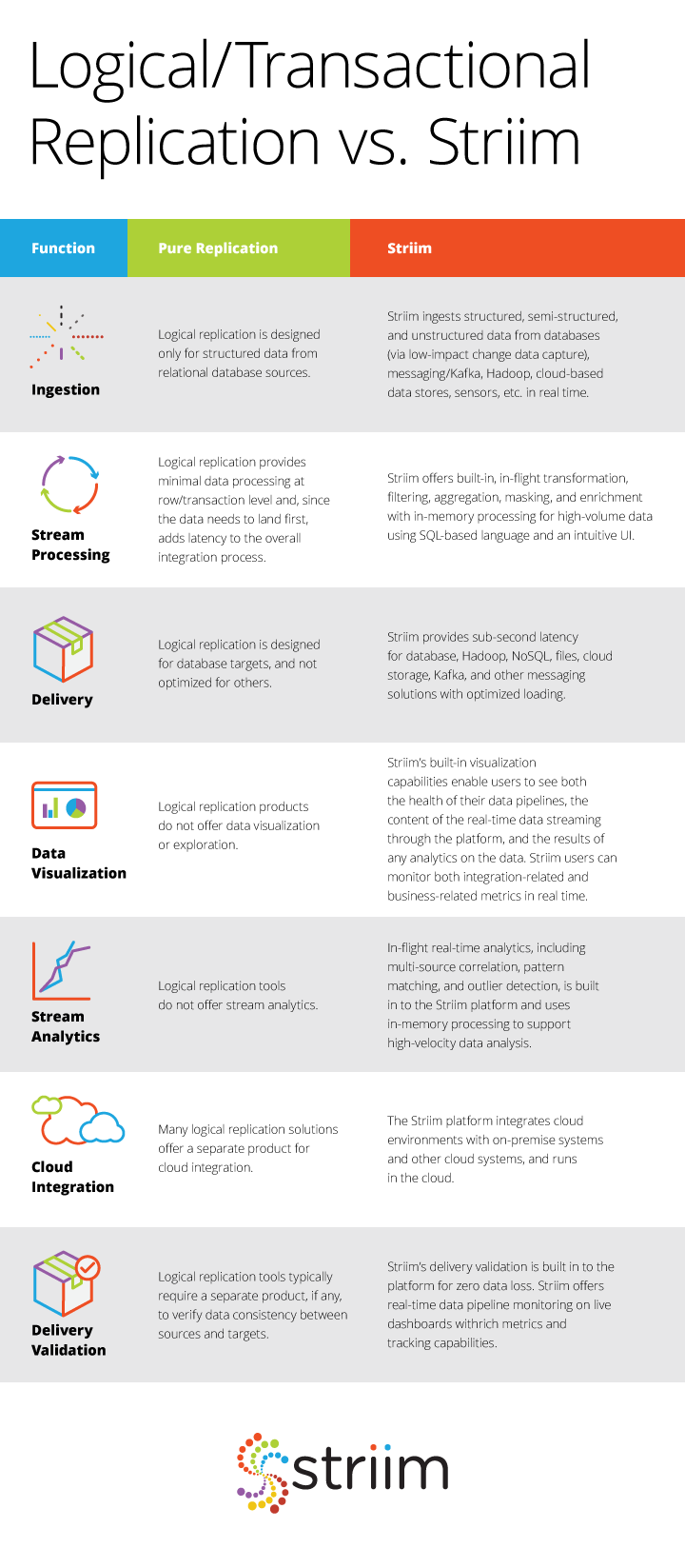
The image below succinctly details the differences between logical replication and streaming data integration, and why Striim is the better option for implementing a streaming architecture to gain maximum value from real-time data.

Companies need to work with all of their data, while it’s still relevant, in order to gain data-driven insights. A streaming architecture helps digital businesses make the most of their data assets for operational excellence, and for that, it needs solutions that go beyond just real-time data movement between databases. Companies can start building a streaming architecture with platforms like Striim that make it easy to collect, prepare, analyze, and visualize high-volume, high-velocity data (structured, semi-structured, or unstructured) from diverse set of sourcesin real time, and share with any system regardless of its location.

Learn more about how your organization can take the first step in adopting a streaming architecture by visiting the Striim website, where you can find further information about our platform’s capabilities, use cases, case studies, and other materials to guide you in the right direction. Additionally, you can download the Striim platform or schedule a demo to learn more.

How to Utilize Multiple DNS Services to Increase Security

Use Streaming Analytics to Monitor and Secure DNS Services

Once upon a time in a hotel bar in Las Vegas, two security professionals sat down over tall drinks of fine Irish whiskey and one asked the other an age old question:

“If you could do any one thing to improve the security of the internet as a whole, what would it be?”

There was a pause while decades of experience and knowledge silently were reviewed and thought over and then, with a smile, they both replied at the same time:

“Harden DNS.”

At that very moment the piano player at the bar started to play, “Sound out the galleon” and the two security professionals raised their glasses to each other and set off scribbling on bar napkins various ways to harden and better monitor their DNS servers.

This is the story of one such way.

How can you utilize streaming analytics to analyze and alert on DNS traffic within your network? In this blog entry we will cover how to utilize streaming analytics to analyze DNS A record requests and validate them against blacklists and external services for security, and against public DNS services for accuracy. While we acknowledge that each network is unique, this example is fairly generic and should work with most networks where DNS is handled internally. Should your network be substantially different, have heart, because flexibility and the ability to adapt is one of the cornerstones of stream processing. For now, let’s assume we have a medium-sized network in which we will provide DNS service internally, and for our streaming analytics platform we will use Striim.

Step One: Define goals

The goal here is to both improve your security stance and to explore diverse uses of Striim as a security platform. We will do this by analyzing the DNS query logs and comparing DNS A record requests against an internal blacklist, an external blacklist, external domain validation systems, and alternative DNS services. Our goal is to analyze DNS A record requests and to alert the SOC if we discover traffic on the network that indicates communication with known bad domains, questionable domains, non existing domains, or questionable requests.

Step Two : Gather Resources

The resources required for this app are easily found, and you most likely already have this information readily available.

  • Internal Blacklist

Utilizing your various security systems, you have previously identified domains that are known bad actors. These could be domains that belong to VPN services, sources of previous attacks, or just a list of domains from which you don’t care to see traffic from. It can be argued that these can be addressed by blackholing traffic at the border, however, in the spirit of defense in depth, while that can stop traffic from connecting, this app will assist in the effort by providing a secondary check that clearly indicates who is requesting a connection to the undesired domain, and a backup should the primary checking process fail due to hardware/software failure or compromise.

  • External Blacklist

This is a secondary blacklist similar to the internal one, however, this blacklist is curated by an external source. We all have our favorite blogs, projects, and resources. This allows you a place to utilize their results and information while keeping it separate from internal, potentially confidential data on past bad actors against your network. For this example we will be using a externally curated list of domain names associated with ransomware attacks.

  • DNS server logs

For this example we are using SYSLOG-NG to gather logs from our internal DNS servers, breaking them down into individual logs based on content, and storing them in a central logging location. In this case, we are only interested in the DNS Query logs, however, you can use your imagination and the flexibility of Striim to make good use of the other DNS logs provided by your DNS server. Here is an example of a sanitized DNS query log entry:

Aug 22 18:11:04 ns1 queries-log: 22-Aug-2017 18:10:58.461 queries: info: client 123.45.6.78#53 (press-any-key.foo): query: press-any-key.foo IN A -ED (200.100.90.80)

  • Java JAR for querying external DNS servers

This will allow us to query external DNS servers for any information that they can bring to our analysis. The requests are made by inserting the following in your TQL:

NSLookup(query,server,record_type)

In this example, we will extract the query from the DNS server query logs into the field _QUERY , and the record request type into _TYPE.

If we were to check the record against the Quad9 database of bad actors, the TQL would look like this:

SELECT _QUERY,_TYPE,

NSLookup(_QUERY,”9.9.9.9”,_TYPE) AS _QUAD9_QUERY

FROM DNS_QUERY_STREAM WHERE _TYPE=”A”;

In this case we are using the query extracted from the DNS query log, querying against the Quad9 database, for only DNS A records.

  • DNS services to compare against:

For this example we will use the following DNS services to compare the results from our internal DNS server against:

We will use these four services to validate the DNS queries that our network generates.

Step Three: Set process and parameters

How we apply the resources we have is as important as the resources themselves. This is where a good flowcharting system comes into play. We also have to create a scoring system in order to determine what, if any, action is to take place based on our results.

For this demo we will keep things simple. We will report either an ‘all clear‘ or no alert, a yellow or caution alert, and a red alert if we have high confidence that bad traffic is happening. There are a number of ways to score this, from this simple 3 color method, to methods involving assigning score values to all possible outcomes. The depth is up to you thanks to Striim being flexible as to how you score and display threats.

As far as process goes, let’s take it one at a time.

EXTERNAL DNS SERVERS

The external DNS servers will react differently from each other, so we have to be careful and let our TQL reflect this. Here is a grid showing what you can expect from the servers we are using in this demo:

* Google says that they only block domains under special circumstances. (https://developers.google.com/speed/public-dns/faq)

** Cloudflare offers extremely heightened DNS privacy and DDoS mitigation but not blocking of domains like Norton & Quad9 advertise. For details see (https://blog.cloudflare.com/announcing-1111/)

INTERNAL BLACKLISTS

One of the most important things that we can do with our data is to create a list of bad actors, bad traffic, and unwanted traffic based on our own internal experiences and requirements. From the review and analysis of our traffic, we can create a list of known items to serve as future warnings. Policy and procedure will dictate how often these internal blacklists are reviewed, how they are applied, and to ensure that they perform in an effective way or are corrected so that they accomplish the goal of better security.

EXTERNAL BLACKLISTS

There are many groups and organizations out there who are dedicated to identifying and sharing information on bad actors. Many of them provide open source blacklists that can be either directly queried (in the case of Quad9 and other similar) or downloaded, imported, and integrated into a security system.

STRIIM AND BLACKLISTS

To effectively use these blacklists, we will load them into Striim by way of a cache, which will be used to compare against real-time traffic in a stream as Striim processes the data. Let’s start by defining the cache and loading our internal blacklist into it:


CREATE TYPE DNS_BLACKLIST_Type(

   _DOMAIN String,

   _IP String,

   _REASON String

);


CREATE CACHE DNS_BLACKLIST USING FileReader (

   directory:’/var/log/striim/blacklist’,

   wildcard:’dns_query.blacklist’,

   charset: ‘UTF-8’,

   blocksize: ’64’,

   positionbyeof: ‘false’

)

PARSE USING DSVPARSER (

   columndelimiter: ‘,’,

   header: ‘true’

)

QUERY (keytomap:’_DOMAIN’) OF DNS_BLACKLIST_Type;

Next, let’s repeat this process with our external blacklists, utilizing a blacklist for known botnet command and control servers and ransomware servers:

CREATE TYPE DNS_RANSOMWARE_Type(

   _DOMAIN String

);


CREATE CACHE DNS_RANSOMWARE USING FileReader (

   directory:’/var/log/striim/blacklist’,

   wildcard:’dns_query_ransomwaretracker.blacklist’,

   charset: ‘UTF-8’,

   blocksize: ’64’,

   positionbyeof: ‘false’

)

PARSE USING DSVPARSER (

   columndelimiter: ‘,’,

   header: ‘true’

)

QUERY (keytomap:’_DOMAIN’) OF DNS_RANSOMWARE_Type;


CREATE TYPE DNS_C2_Type(

   _DOMAIN String,

   _REASON String,

   _REFATE String,

   _REF String

);


CREATE CACHE DNS_C2 USING FileReader (

   directory:’/var/log/striim/blacklist’,

   wildcard:’c2.blacklist’,

   charset: ‘UTF-8’,

   blocksize: ’64’,

   positionbyeof: ‘false’

)

PARSE USING DSVPARSER (

   columndelimiter: ‘,’,

   header: ‘true’

)

QUERY (keytomap:’_DOMAIN’) OF DNS_C2_Type;


THE DASHBOARD

Finally, we can create a dashboard that takes all of this gathered information and places it in a series of comprehensive dashboards so that an analyst can observe the data and make security decisions with clarity and speed.

As you can see, by applying the strengths of stream processing to your log files, you can create tools that not only improve your security stance, but also give your SOC quick access to vital information when during security incidents.

That’s all for now!

Do you have questions about how to use streaming analytics to improve your security posture? Do you have security related data but are unsure how to use or analyze it? Contact me at frankc@striim.com and I will address your questions in future blog entries! Make sure that any information you share is cleared through your security process and procedures before sharing with us.


Back to top